
Reimplementation of HDemucs for 4-stem music source separation, trained on MUSDB and compared to the original paper, with experiments on HNR/HPR-style heuristics for reference-free quality scoring.
Makefile
1
8 commits
updated Nov 20, 2025
README
Recreating HDemucs: Deep Extractor for Music Sources
In this project, we set out to reproduce the results of the original HDemucs work [1,2], which tackles music source separation: splitting a mixed track into vocals, drums, bass, and “other”. The original paper uses a semi-supervised approach: alongside the main source separation model, it introduces an auxiliary model that labels unlabelled mixtures. These pseudo-labels are then used to further train the main separation model.
However, the paper does not provide full details or code for the auxiliary model, and the official repository only includes the main HDemucs model. For this reason, we chose to:
- Reimplement and train the main HDemucs model on the original dataset.
- Evaluate our model on the MUSDB dataset, where we achieve an SDR (Signal-to-Distortion Ratio) that is approximately 1.2 dB lower than the reported HDemucs baseline.
- Explore an alternative to the auxiliary model: instead of learning a separate labeling network, we attempted to design a heuristic that scores the quality of a separated source without access to ground truth. Our goal was to use this heuristic to distill new training examples from the pre-trained model supplied by the authors. Despite several attempts, we did not find a heuristic that was both stable and predictive enough to be useful in practice.
Overall, this project focuses on understanding and reproducing the core HDemucs architecture and training pipeline, while also investigating how far we can go in a semi-supervised direction without the original auxiliary model.
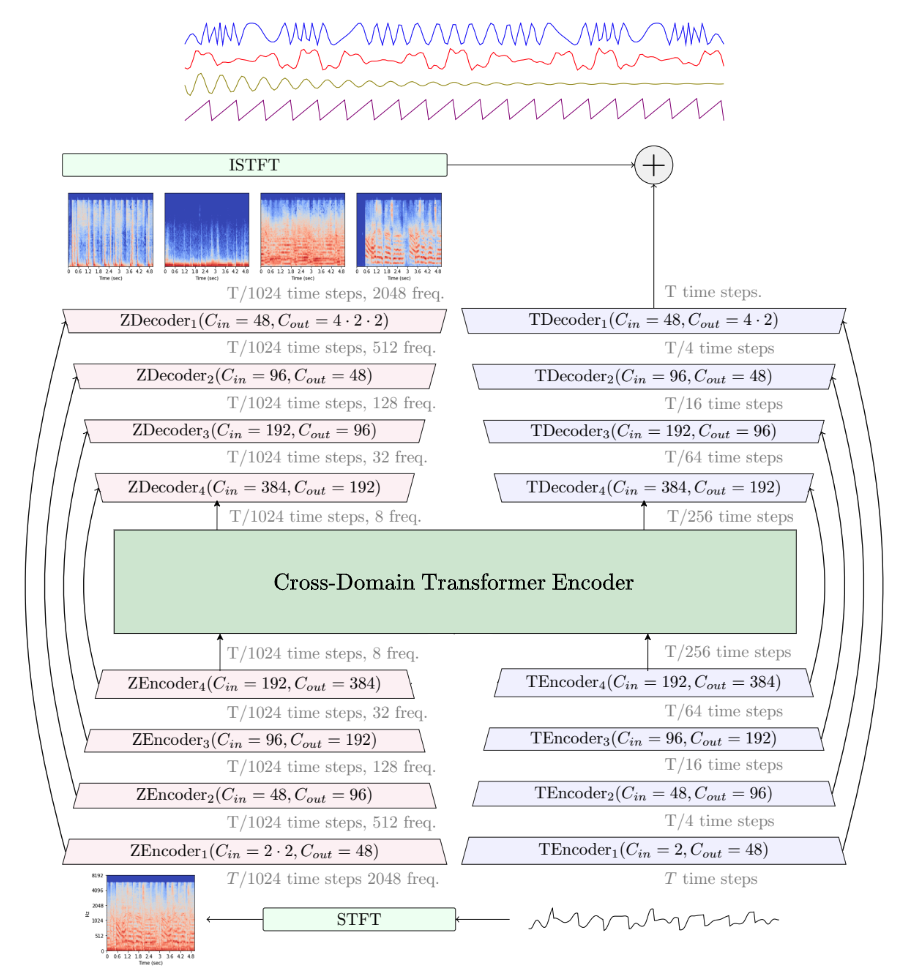
Demucs Training and Inference Workflow
1. Create the Demucs Environment
Open a terminal in the project/demucs folder and run:
conda env update -f environment-cuda.yml
conda activate demucs
pip install -e .
2. Update the Conda Path in SLURM Scripts
Before running training, you must update the train_slurm/continue_train_slurm script with the correct path to your current working directory. These are the only scripts that require this, assuming you are running all scripts from the work directory.
3. Workflow Commands
Once your environment and SLURM scripts are set up, you can run the following steps:
3.1 Training an HDemucs Model
Submit the training SLURM job (which runs a distributed training using Dora):
sbatch train_slurm.sh [num_epochs]
--- example usage: sbatch train_slurm.sh 180
This command will launch an 8-task distributed training job (each task with one GPU). The training command is embedded within the SLURM script (using dora run -d with your model hyperparameters). Check the output logs (in slurm_out/demucs_train.out) for progress and error messages.
This script takes an optional parameter for the number of epochs to train, with a default of 390, however the other hyperparameters are also changable within the script itself.
3.2 Export a Trained Model
After training, export the model so that it is available for inference. Provide the model signature (e.g., 53288a8c or your custom ID). Submit the export job:
sbatch slurm_release.sh <model_name>
--- example usage: sbatch slurm_release.sh 53288a8c
Once the script has finished, you will find your model under the "release_models" directory.
If no model name is provided, it defaults to 53288a8c.
3.3 Testing/Evaluating the Model
Evaluate the exported model using the test script by running:
sbatch evaluate_slurm.sh <model_name>
--- example usage: sbatch evaluate_slurm.sh 53288a8c
This script will use the command supplied by the original repo, python3 -m tools.test_pretrained --repo ./release_models -n <model_name> and log results (SDR and other metrics) in the output files.
3.4 Separating a Specific Audio File
To separate a particular song or audio file using your exported model, run:
sbatch slurm_separate.sh <file_path> <model_name>
--- example usage: sbatch slurm_separate.sh more_tests/test_2.mp3 53288a8c
This command uses the Demucs command (demucs --repo ./release_models -n <model_name> <file_path>) to process the file and output separated stems into the default folder.
model_name should be the name of the file in the "release_models" directory which you would like to run inference on.
3.5 Continuing Training from a Checkpoint
If you need to resume training (or fine-tune further) from an existing checkpoint, run:
sbatch continue_run_slurm.sh <model_name>
Replace <model_name> with the signature of the model you wish to continue training. This SLURM script calls dora run -d -f <model_name> to resume training from the last saved state.
4. Additional Information
Original Demucs Information and Training Docs
For further technical details on the Demucs models, training hyperparameters, and dataset details, please refer to the original README.md and training.md provided in the repository. They explain model architectures (e.g., HDemucs, HTDemucs), evaluation metrics (SDR, MOS), and other advanced usage. If you encounter issues or need to experiment with different configurations, consult the Hydra-based configuration system explained in the training documentation.
Building the Soundstretch Binary
We think you should be able to skip this step since our zip should already contain the relevant files, however we leave it here in case you run into any trouble with it.
Demucs uses soundstretch from the SoundTouch library for pitch/tempo augmentation. Although many systems provide a pre-built version, if you need to compile your own you can follow the instructions provided on the SoundTouch website. Ensure that the resulting executable is placed (or linked) in the appropriate directory so that your SLURM scripts can find it via the PATH. In our SLURM scripts, we add the soundstretch directory with:
export PATH="$(pwd)/soundtouch/build:$PATH"
This assumes that your soundtouch build directory is relative to the current repository root (with the SLURM scripts located in project/demucs/scripts and you cd .. to move to project/demucs).
Project Structure
The project is built of 4 directories:
- demucs: this directory holds the original project repo published by facebook research. All training, inference, release, etc. scripts are supplied by them.
- demucs_results: this directory holds the results (intermediate and final) we obtained while training and running the model. More specifically, it contains logs, graphs and separation examples from running our model.
- Graphing scripts: this directory holds the scripts we used to create the graphs presented in the project PDF as well as any other operation we needed to do that. Some of the scripts assume we are running them from the root directory, and may need slight changes in order to run.
- slurm_scripts: this directory holds the scripts we ran on the slurm cluster. They each contain relevant calls to functions from the original repo with the correct parameters set.
Final Notes
-
Make sure to adjust any SLURM-specific parameters (e.g., partition, account, memory, GPU requirements) to match your cluster configuration.
-
Always run these commands from the appropriate directory (i.e., from within
project/demucs/, since our SLURM scripts assume that the repository root is one directory up).
Contributors

8 commits
Similar repos


Languages
Makefile
33.4%
C++
28.9%
Python
23.5%
CMake
4.1%
C#
3.9%
Pascal
1.7%
M4
1.1%
C
1.0%
Reimplementation of HDemucs for 4-stem music source separation, trained on MUSDB and compared to the original paper, with experiments on HNR/HPR-style heuristics for reference-free quality scoring.
Makefile
1
8 commits
updated Nov 20, 2025
README
Recreating HDemucs: Deep Extractor for Music Sources
In this project, we set out to reproduce the results of the original HDemucs work [1,2], which tackles music source separation: splitting a mixed track into vocals, drums, bass, and “other”. The original paper uses a semi-supervised approach: alongside the main source separation model, it introduces an auxiliary model that labels unlabelled mixtures. These pseudo-labels are then used to further train the main separation model.
However, the paper does not provide full details or code for the auxiliary model, and the official repository only includes the main HDemucs model. For this reason, we chose to:
- Reimplement and train the main HDemucs model on the original dataset.
- Evaluate our model on the MUSDB dataset, where we achieve an SDR (Signal-to-Distortion Ratio) that is approximately 1.2 dB lower than the reported HDemucs baseline.
- Explore an alternative to the auxiliary model: instead of learning a separate labeling network, we attempted to design a heuristic that scores the quality of a separated source without access to ground truth. Our goal was to use this heuristic to distill new training examples from the pre-trained model supplied by the authors. Despite several attempts, we did not find a heuristic that was both stable and predictive enough to be useful in practice.
Overall, this project focuses on understanding and reproducing the core HDemucs architecture and training pipeline, while also investigating how far we can go in a semi-supervised direction without the original auxiliary model.
Demucs Training and Inference Workflow
1. Create the Demucs Environment
Open a terminal in the project/demucs folder and run:
conda env update -f environment-cuda.yml
conda activate demucs
pip install -e .
2. Update the Conda Path in SLURM Scripts
Before running training, you must update the train_slurm/continue_train_slurm script with the correct path to your current working directory. These are the only scripts that require this, assuming you are running all scripts from the work directory.
3. Workflow Commands
Once your environment and SLURM scripts are set up, you can run the following steps:
3.1 Training an HDemucs Model
Submit the training SLURM job (which runs a distributed training using Dora):
sbatch train_slurm.sh [num_epochs]
--- example usage: sbatch train_slurm.sh 180
This command will launch an 8-task distributed training job (each task with one GPU). The training command is embedded within the SLURM script (using dora run -d with your model hyperparameters). Check the output logs (in slurm_out/demucs_train.out) for progress and error messages.
This script takes an optional parameter for the number of epochs to train, with a default of 390, however the other hyperparameters are also changable within the script itself.
3.2 Export a Trained Model
After training, export the model so that it is available for inference. Provide the model signature (e.g., 53288a8c or your custom ID). Submit the export job:
sbatch slurm_release.sh <model_name>
--- example usage: sbatch slurm_release.sh 53288a8c
Once the script has finished, you will find your model under the "release_models" directory.
If no model name is provided, it defaults to 53288a8c.
3.3 Testing/Evaluating the Model
Evaluate the exported model using the test script by running:
sbatch evaluate_slurm.sh <model_name>
--- example usage: sbatch evaluate_slurm.sh 53288a8c
This script will use the command supplied by the original repo, python3 -m tools.test_pretrained --repo ./release_models -n <model_name> and log results (SDR and other metrics) in the output files.
3.4 Separating a Specific Audio File
To separate a particular song or audio file using your exported model, run:
sbatch slurm_separate.sh <file_path> <model_name>
--- example usage: sbatch slurm_separate.sh more_tests/test_2.mp3 53288a8c
This command uses the Demucs command (demucs --repo ./release_models -n <model_name> <file_path>) to process the file and output separated stems into the default folder.
model_name should be the name of the file in the "release_models" directory which you would like to run inference on.
3.5 Continuing Training from a Checkpoint
If you need to resume training (or fine-tune further) from an existing checkpoint, run:
sbatch continue_run_slurm.sh <model_name>
Replace <model_name> with the signature of the model you wish to continue training. This SLURM script calls dora run -d -f <model_name> to resume training from the last saved state.
4. Additional Information
Original Demucs Information and Training Docs
For further technical details on the Demucs models, training hyperparameters, and dataset details, please refer to the original README.md and training.md provided in the repository. They explain model architectures (e.g., HDemucs, HTDemucs), evaluation metrics (SDR, MOS), and other advanced usage. If you encounter issues or need to experiment with different configurations, consult the Hydra-based configuration system explained in the training documentation.
Building the Soundstretch Binary
We think you should be able to skip this step since our zip should already contain the relevant files, however we leave it here in case you run into any trouble with it.
Demucs uses soundstretch from the SoundTouch library for pitch/tempo augmentation. Although many systems provide a pre-built version, if you need to compile your own you can follow the instructions provided on the SoundTouch website. Ensure that the resulting executable is placed (or linked) in the appropriate directory so that your SLURM scripts can find it via the PATH. In our SLURM scripts, we add the soundstretch directory with:
export PATH="$(pwd)/soundtouch/build:$PATH"
This assumes that your soundtouch build directory is relative to the current repository root (with the SLURM scripts located in project/demucs/scripts and you cd .. to move to project/demucs).
Project Structure
The project is built of 4 directories:
- demucs: this directory holds the original project repo published by facebook research. All training, inference, release, etc. scripts are supplied by them.
- demucs_results: this directory holds the results (intermediate and final) we obtained while training and running the model. More specifically, it contains logs, graphs and separation examples from running our model.
- Graphing scripts: this directory holds the scripts we used to create the graphs presented in the project PDF as well as any other operation we needed to do that. Some of the scripts assume we are running them from the root directory, and may need slight changes in order to run.
- slurm_scripts: this directory holds the scripts we ran on the slurm cluster. They each contain relevant calls to functions from the original repo with the correct parameters set.
Final Notes
-
Make sure to adjust any SLURM-specific parameters (e.g., partition, account, memory, GPU requirements) to match your cluster configuration.
-
Always run these commands from the appropriate directory (i.e., from within
project/demucs/, since our SLURM scripts assume that the repository root is one directory up).
Similar repos
Contributors
8 commits
Languages
Makefile
33.4%
C++
28.9%
Python
23.5%
CMake
4.1%
C#
3.9%
Pascal
1.7%
M4
1.1%
C
1.0%