Lightweight, pragmatic fine‑tuning and evaluation pipeline around Salesforce BLIP for image captioning. Uses Hugging Face Transformers and Datasets, with a clean modular layout and a single‑file inference helper.




If you’re looking for a “batteries included” library, see LAVIS. If you want a focused, no‑frills training script that you can own and reason about, you’re in the right place.
blip_caption/ package structureImage-Captioning-BLIP/
├─blip_caption/
│ ├── __init__.py
│ ├── collator.py # batch collation with BLIP processor
│ ├── config.py # defaults: model, data, training, generation, metrics
│ ├── data.py # dataset loading (e.g., Flickr8k / COCO-Karpathy)
│ ├── inference.py # single-image caption helper
│ ├── metrics.py # BLEU during training; COCO-style post-train metrics
│ ├── modeling.py # model/processor builders (BLIP base by default)
│ ├── training.py # HF TrainingArguments + Trainer wiring
│ └── main_train.py # end-to-end train→evaluate→export entrypoint
├─ sagemaker/
│ ├─ train_blip.py # Training entrypoint (HF Trainer on BLIP)
│ ├─ inference.py # SageMaker PyTorch model server handlers
│ ├─ launch_training.py # Create & run a SageMaker training job
│ ├─ deploy_endpoint.py # Create a real-time endpoint (or batch)
│ ├─ requirements.txt # Pinned libs for training/inference in DLC
│ └─ README_SAGEMAKER.md # One-page runbook for teammates
├─ tests/
│ └─ test_inference_handler.py # Smoke test for inference handlers
└─ .github/workflows/ci.yaml # Lint + unit test


# 1) Create and activate an environment
python -m venv .venv && source .venv/bin/activate  # On Windows: .venv\Scripts\activate

# 2) Install dependencies
pip install --upgrade pip
pip install torch torchvision --index-url https://download.pytorch.org/whl/cu121  # adjust for your CUDA/OS
pip install transformers datasets evaluate tensorboard sacrebleu pillow numpy
# For COCO metrics (optional; needed for CIDEr, METEOR, SPICE):
pip install pycocotools pycocoevalcap

# 3) Train (defaults: Flickr8k, BLIP base)
python -m blip_caption.main_train
Note: COCO metrics run after training on the validation split and are written to
blip-open-out/coco_metrics.json. If SPICE throws a Java error, see Troubleshooting below.
blip_caption/config.py is a set of @dataclass blocks you can treat like a single config object:
Model & outputs
paths.model_id: "Salesforce/blip-image-captioning-base"paths.output_dir: "blip-open-out"Data
data.use_dataset: "flickr8k" or "coco_karpathy"ariG23498/flickr8kyerevann/coco-karpathy42Training
4, LR: 5e-5, per‑device batch size: 8 (train & eval), gradient accumulation: 2TrueFalse (set True for lighter fine‑tuning)50 steps, keep 2 checkpoints"sacrebleu" best metricGeneration (inference/eval)
max_txt_len: 40, gen_max_new_tokens: 30, num_beams: 5, length_penalty: 1.0, early_stopping: TrueCOCO metrics
do_spice: True (requires Java), spice_subsample: 1500 (speeds things up), JSON output enabledPro tip: No CLI yet—tweak anything in
config.py(or copy the dataclasses into your own script and pass a custom config into the builders).
main_train.py does the heavy lifting:
data.use_dataset.Trainer with a custom collator and a BLEU compute function.Run:
python -m blip_caption.main_train
After training, main_train.py decodes validation captions and computes:
blip-open-out/coco_metrics.jsonSPICE can be slow and needs Java; set
coco.do_spice=Falseif you don’t need it for a quick pass.
Use the tiny helper to caption a single local image with any BLIP checkpoint (pretrained or your fine‑tuned export):
from transformers import BlipProcessor, BlipForConditionalGeneration
from blip_caption.inference import caption_image

# Load either your trained artifacts or a pretrained BLIP:
processor = BlipProcessor.from_pretrained("blip-open-out")  # or "Salesforce/blip-image-captioning-base"
model = BlipForConditionalGeneration.from_pretrained("blip-open-out")

print(caption_image("path/to/image.jpg", processor, model, max_new_tokens=30, num_beams=5))
You can also point both from_pretrained calls to "Salesforce/blip-image-captioning-base" for quick zero‑shot captions.
Data (data.py)
image to a deferred Image feature to inject a stable image_id from filenames, then decode on demand.image, caption, image_id) and normalize the records (when captions are lists, we sample one per example for supervision).Collation (collator.py)
BlipProcessor to tokenize text and process images in one shot, returns pixel_values, input_ids, attention_mask, and labels where pad tokens are masked to -100.Modeling (modeling.py)
BlipForConditionalGeneration. Optional “freeze vision” switch for parameter‑efficient fine‑tuning.Training (training.py)
TrainingArguments + Trainer with BLEU compute function (via evaluate/sacrebleu). Logging to TensorBoard out of the box. Checkpoint churn is capped.Metrics (metrics.py)
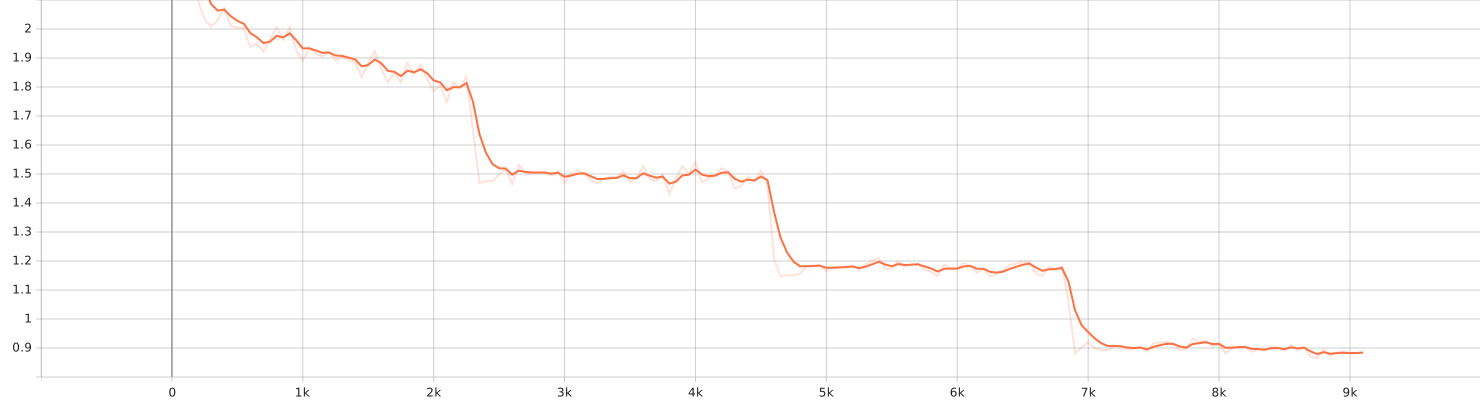
seed_utils.set_seed seeds Python, NumPy, and PyTorch RNGs.CUBLAS_WORKSPACE_CONFIG=:16:8 or :4096:8 and disable certain CuDNN autotune knobs (not wired here by default).The following plot shows the training loss progression:
The following plot shows the validation loss progression:
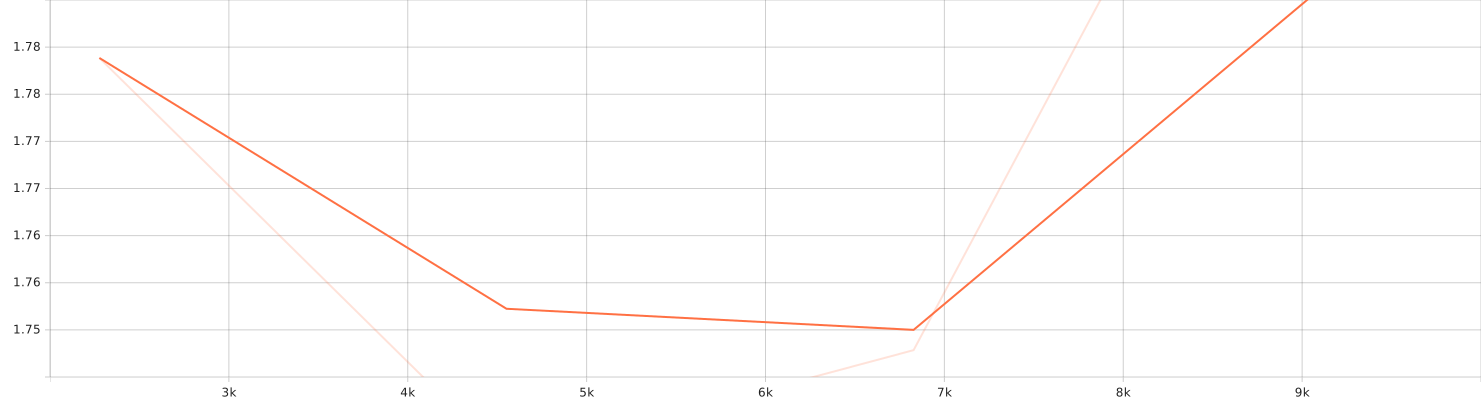
(SVG file generated during training(by tensorboard logs) and stored under assets/)
86,423,848,150,821,240,0007,141.1743 secondsblip_caption/.../logsYou can monitor training live with:
tensorboard --logdir blip_caption/.../logs




| Metric | Score |
|---|---|
| BLEU‑4 | 0.9708 |
| METEOR | 0.7888 |
| CIDEr | 9.3330 |
| SPICE | — |
{
  "Bleu_4": 0.9707865195383757,
  "METEOR": 0.7887653835397767,
  "CIDEr": 9.332990983959254,
  "SPICE": null
}
# Train & evaluate with repo defaults
python -m blip_caption.main_train

# COCO metrics (including CIDEr, METEOR, and optionally SPICE) are saved to:
cat blip-open-out/coco_metrics.json
A complete SageMaker recipe is provided in sagemaker/README_SAGEMAKER.md. It explains how to:
freeze_vision=True.per_device_train_bs and/or increase grad_accum_steps.bitsandbytes) or LoRA if you need more headroom (not included here).COCO/SPICE errors (Java required)
sudo apt-get update && sudo apt-get install -y default-jre
java -version  # should print something like "1.8.x" or "11.x"
coco.do_spice=False in config.py.PyTorch + CUDA
HF Datasets timeouts
~/.cache/huggingface/datasets. Use HF_DATASETS_CACHE=/custom/path if you need to relocate it.If you use this codebase in academic work, please cite BLIP:
@misc{li2022blip,
  title  = {BLIP: Bootstrapping Language-Image Pre-training for Unified Vision-Language Understanding and Generation},
  author = {Li, Junnan and Li, Dongxu and Xiong, Caiming and Hoi, Steven},
  year   = {2022},
  eprint = {2201.12086},
  archivePrefix = {arXiv}
}
Lightweight, pragmatic fine‑tuning and evaluation pipeline around Salesforce BLIP for image captioning. Uses Hugging Face Transformers and Datasets, with a clean modular layout and a single‑file inference helper.
If you’re looking for a “batteries included” library, see LAVIS. If you want a focused, no‑frills training script that you can own and reason about, you’re in the right place.
blip_caption/ package structureImage-Captioning-BLIP/
├─blip_caption/
│ ├── __init__.py
│ ├── collator.py # batch collation with BLIP processor
│ ├── config.py # defaults: model, data, training, generation, metrics
│ ├── data.py # dataset loading (e.g., Flickr8k / COCO-Karpathy)
│ ├── inference.py # single-image caption helper
│ ├── metrics.py # BLEU during training; COCO-style post-train metrics
│ ├── modeling.py # model/processor builders (BLIP base by default)
│ ├── training.py # HF TrainingArguments + Trainer wiring
│ └── main_train.py # end-to-end train→evaluate→export entrypoint
├─ sagemaker/
│ ├─ train_blip.py # Training entrypoint (HF Trainer on BLIP)
│ ├─ inference.py # SageMaker PyTorch model server handlers
│ ├─ launch_training.py # Create & run a SageMaker training job
│ ├─ deploy_endpoint.py # Create a real-time endpoint (or batch)
│ ├─ requirements.txt # Pinned libs for training/inference in DLC
│ └─ README_SAGEMAKER.md # One-page runbook for teammates
├─ tests/
│ └─ test_inference_handler.py # Smoke test for inference handlers
└─ .github/workflows/ci.yaml # Lint + unit test
# 1) Create and activate an environment
python -m venv .venv && source .venv/bin/activate  # On Windows: .venv\Scripts\activate

# 2) Install dependencies
pip install --upgrade pip
pip install torch torchvision --index-url https://download.pytorch.org/whl/cu121  # adjust for your CUDA/OS
pip install transformers datasets evaluate tensorboard sacrebleu pillow numpy
# For COCO metrics (optional; needed for CIDEr, METEOR, SPICE):
pip install pycocotools pycocoevalcap

# 3) Train (defaults: Flickr8k, BLIP base)
python -m blip_caption.main_train
Note: COCO metrics run after training on the validation split and are written to
blip-open-out/coco_metrics.json. If SPICE throws a Java error, see Troubleshooting below.
blip_caption/config.py is a set of @dataclass blocks you can treat like a single config object:
Model & outputs
paths.model_id: "Salesforce/blip-image-captioning-base"paths.output_dir: "blip-open-out"Data
data.use_dataset: "flickr8k" or "coco_karpathy"ariG23498/flickr8kyerevann/coco-karpathy42Training
4, LR: 5e-5, per‑device batch size: 8 (train & eval), gradient accumulation: 2TrueFalse (set True for lighter fine‑tuning)50 steps, keep 2 checkpoints"sacrebleu" best metricGeneration (inference/eval)
max_txt_len: 40, gen_max_new_tokens: 30, num_beams: 5, length_penalty: 1.0, early_stopping: TrueCOCO metrics
do_spice: True (requires Java), spice_subsample: 1500 (speeds things up), JSON output enabledPro tip: No CLI yet—tweak anything in
config.py(or copy the dataclasses into your own script and pass a custom config into the builders).
main_train.py does the heavy lifting:
data.use_dataset.Trainer with a custom collator and a BLEU compute function.Run:
python -m blip_caption.main_train
After training, main_train.py decodes validation captions and computes:
blip-open-out/coco_metrics.jsonSPICE can be slow and needs Java; set
coco.do_spice=Falseif you don’t need it for a quick pass.
Use the tiny helper to caption a single local image with any BLIP checkpoint (pretrained or your fine‑tuned export):
from transformers import BlipProcessor, BlipForConditionalGeneration
from blip_caption.inference import caption_image

# Load either your trained artifacts or a pretrained BLIP:
processor = BlipProcessor.from_pretrained("blip-open-out")  # or "Salesforce/blip-image-captioning-base"
model = BlipForConditionalGeneration.from_pretrained("blip-open-out")

print(caption_image("path/to/image.jpg", processor, model, max_new_tokens=30, num_beams=5))
You can also point both from_pretrained calls to "Salesforce/blip-image-captioning-base" for quick zero‑shot captions.
Data (data.py)
image to a deferred Image feature to inject a stable image_id from filenames, then decode on demand.image, caption, image_id) and normalize the records (when captions are lists, we sample one per example for supervision).Collation (collator.py)
BlipProcessor to tokenize text and process images in one shot, returns pixel_values, input_ids, attention_mask, and labels where pad tokens are masked to -100.Modeling (modeling.py)
BlipForConditionalGeneration. Optional “freeze vision” switch for parameter‑efficient fine‑tuning.Training (training.py)
TrainingArguments + Trainer with BLEU compute function (via evaluate/sacrebleu). Logging to TensorBoard out of the box. Checkpoint churn is capped.Metrics (metrics.py)
seed_utils.set_seed seeds Python, NumPy, and PyTorch RNGs.CUBLAS_WORKSPACE_CONFIG=:16:8 or :4096:8 and disable certain CuDNN autotune knobs (not wired here by default).The following plot shows the training loss progression:
The following plot shows the validation loss progression:
(SVG file generated during training(by tensorboard logs) and stored under assets/)
86,423,848,150,821,240,0007,141.1743 secondsblip_caption/.../logsYou can monitor training live with:
tensorboard --logdir blip_caption/.../logs
| Metric | Score |
|---|---|
| BLEU‑4 | 0.9708 |
| METEOR | 0.7888 |
| CIDEr | 9.3330 |
| SPICE | — |
{
  "Bleu_4": 0.9707865195383757,
  "METEOR": 0.7887653835397767,
  "CIDEr": 9.332990983959254,
  "SPICE": null
}
# Train & evaluate with repo defaults
python -m blip_caption.main_train

# COCO metrics (including CIDEr, METEOR, and optionally SPICE) are saved to:
cat blip-open-out/coco_metrics.json
A complete SageMaker recipe is provided in sagemaker/README_SAGEMAKER.md. It explains how to:
freeze_vision=True.per_device_train_bs and/or increase grad_accum_steps.bitsandbytes) or LoRA if you need more headroom (not included here).COCO/SPICE errors (Java required)
sudo apt-get update && sudo apt-get install -y default-jre
java -version  # should print something like "1.8.x" or "11.x"
coco.do_spice=False in config.py.PyTorch + CUDA
HF Datasets timeouts
~/.cache/huggingface/datasets. Use HF_DATASETS_CACHE=/custom/path if you need to relocate it.If you use this codebase in academic work, please cite BLIP:
@misc{li2022blip,
  title  = {BLIP: Bootstrapping Language-Image Pre-training for Unified Vision-Language Understanding and Generation},
  author = {Li, Junnan and Li, Dongxu and Xiong, Caiming and Hoi, Steven},
  year   = {2022},
  eprint = {2201.12086},
  archivePrefix = {arXiv}
}