
Simple secure chat room web application with end-to-end client-side encryption
5
stars
162
commits
JavaScript
primary language
Sep 14, 2026
updated
README
SymmetricCryptoChatRoom

Simple secure chat room web (+ file transfer) application using SignalR (dotnet core) and Blazor for front-end and most importantly:
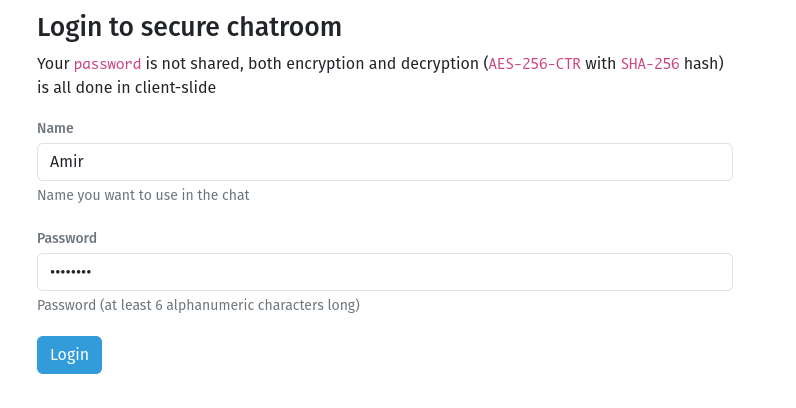
SHA-256to hash the given passwordAES-256-CTRto encrypt/decrypt the messages
Note
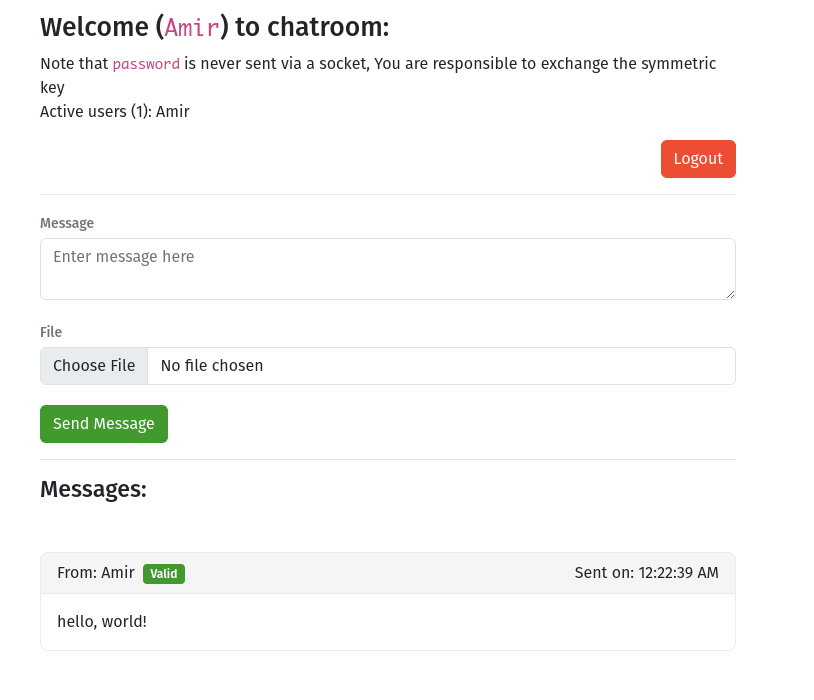
passwordis never sent via a socket, You are responsible to exchange the symmetric key- Both encryption and decryption is all done in client-slide, only ciphertexts are transmitted via Sockets
- File name is transmitted as plaintext but file blob is transmitted as ciphertext
- Combined attachment size per message is limited to
25 MB - Attachments use managed gzip compression before encryption when it reduces their size
- The active session password is stored as plaintext in browser
sessionStorage. Successful logins are also retained inlocalStoragefor optional quick login until individually removed or the site's storage is cleared. - Used LiteDB to playback messages from 10 minutes ago to just joined users
- Fody.PropertyChanged to detect if any of state's properties changes which triggers re-renders of UI
Self-hosted voice and video channel
The chat application and coturn are deployed as separate Dockerfile-based services. The coturn image is maintained in the sibling stun-turn-setup repository. No public STUN/TURN service is configured. Encoded audio and video frames are encrypted with AES-256-CTR using a PBKDF2 key derived from the channel name and shared chat password. Each encrypted frame carries its header length and an eight-byte counter so decryption remains consistent across browsers. WebRTC DTLS-SRTP authenticates and encrypts the media transport as a second protection layer.
Password-encrypted calls require a browser with RTCRtpScriptTransform support. Offers and answers include an HMAC confirmation of the derived media key, allowing both participants to reject the bridge with a clear error when their passwords differ without transmitting the password or key. The connection fails closed when encoded transforms are unavailable; it never sends audio or video protected only by WebRTC transport encryption. Joining the bridge alone does not open the microphone; audio capture starts when another voice participant connects and stops again when the last peer leaves. Multiple sessions using the same display name in one channel are treated as one voice identity and cannot connect to each other, preventing a user's own tabs or devices from creating an echo loop. Calls start as audio-only. Use Start video during a call to grant camera access and share video, and Stop video to stop the camera and remove its WebRTC sender. Share screen uses the browser's screen picker and replaces the encrypted camera track without creating another participant tile. Stopping the share restores the camera when it was active beforehand, or returns the call to audio-only otherwise.
Live transcription is opt-in. Until Start transcription is selected, the application does not create a transcription worker or audio-processing graph and does not import Transformers.js or request model files. The default Auto option chooses quantized multilingual Whisper Tiny, Base, or Small from browser-reported memory, logical processor count, and mobile input characteristics. Manual multilingual and English-only Tiny, Base, and Small options are also available; larger models improve accuracy but increase download size, memory use, and processing latency. Enabling transcription lazily downloads only the selected model, mixes local and remote call audio in the browser, and transcribes short windows on-device. Call audio is not uploaded for inference. The browser can cache downloaded model files for later sessions; stopping transcription terminates the worker and audio graph, and leaving the bridge clears the displayed transcript.
Voice quality defaults to Auto at the 32 kbps Medium profile. It promotes to the 64 kbps High profile after sustained good packet loss, round-trip time, and outgoing-bandwidth measurements, then falls back to Medium when conditions degrade. Manual Low, Medium, and High modes remain available.
Camera quality also defaults to Auto. It starts at Medium (480p, 24 fps, up to 700 kbps), promotes to High (720p, 30 fps, up to 1.5 Mbps) when network measurements remain strong, and steps down to Low (240p, 15 fps, up to 250 kbps) as conditions degrade. The same Low, Medium, and High profiles can be selected manually before or during a call.
Microphone audio uses real-time echo cancellation, noise suppression, and automatic gain control. Browsers that expose native voice isolation use it automatically; other browsers retain the standard WebRTC noise suppression fallback. The ICE debug view reports which processing features are supported and active.
While voice is active, supported mobile browsers keep the screen awake and use their communication audio-session mode. Manually locking the device can still suspend a browser call when the mobile operating system does not allow background microphone or WebRTC activity.
Supported iOS browsers show an in-call Audio output selector with Auto, Earpiece, and Speaker modes. Auto delegates routing to the phone's call audio session so the operating system can apply its proximity behavior; browsers do not expose the raw proximity sensor to the application. Earpiece and Speaker request a fixed handset route. Browsers implementing the Audio Output Devices API instead show Choose output for selecting a speaker, wired headset, or Bluetooth device through the system picker. Browsers without either API continue using the operating system's default route.
TURN_RELAY_ONLY defaults to true. In this mode WebRTC uses iceTransportPolicy: "relay", so voice fails instead of connecting directly when the configured coturn service is unavailable. Set it to false only when direct peer-to-peer paths through the configured STUN server are acceptable.
Set TURN_EXTERNAL_IP on the coturn service to its Docker host's public IPv4 address. Also publish and allow TCP/UDP 3478 and UDP 49160-49200 through the host firewall and network security rules. Set TURN_HOST on the chat service to the public DNS name clients should use.
Set TURN_SECRET explicitly. The API uses it to issue short-lived credentials, and the coturn service uses the same value to validate them.
Microphone and camera access require a secure browser context. Use a trusted HTTPS certificate in production, either at a reverse proxy on the same host or by configuring ASP.NET Core HTTPS and mounting the certificate into the container. Plain HTTP works only on localhost for browser media capture.
Coolify
Create a Dockerfile resource for this repository and route chat.coolify.hesamian.com to container port 3000. Configure persistent storage at /app/data for LiteDB playback data.
The chat image checks http://127.0.0.1:3000/health every 30 seconds. Coolify should report the container as healthy after its startup grace period.
Create a second Dockerfile resource from the stun-turn-setup repository. Do not add turn.coolify.hesamian.com to Coolify's Domains panel because STUN/TURN is not HTTP. Publish TCP/UDP 3478 and UDP 49160-49200 directly from the coturn container to the host.
Set these environment variables on the chat service:
TURN_HOST=turn.coolify.hesamian.com
TURN_SECRET=replace-with-a-long-random-secret
TURN_RELAY_ONLY=true
Set these environment variables on the coturn service:
TURN_EXTERNAL_IP=203.0.113.10
TURN_REALM=chat.coolify.hesamian.com
TURN_SECRET=replace-with-the-same-long-random-secret
Create a DNS-only A record at your DNS provider for turn.coolify.hesamian.com, pointing to the value of TURN_EXTERNAL_IP. When using Cloudflare, set it to DNS only. Allow TCP/UDP 3478 and UDP 49160-49200 in the server provider's firewall.
To verify relay routing in Chromium or Edge, open chrome://webrtc-internals or edge://webrtc-internals during a call and inspect the selected ICE candidate pair. The local candidate type must be relay, and its relay protocol/address must correspond to the configured TURN_HOST. With TURN_RELAY_ONLY=true, a non-relay candidate cannot be selected.
Screenshots
Contributors


See what people are saying
Similar repos


Languages
JavaScript
37.0%
HTML
31.4%
C#
27.6%
CSS
4.0%
Simple secure chat room web application with end-to-end client-side encryption
5
stars
162
commits
JavaScript
primary language
Sep 14, 2026
updated
README
SymmetricCryptoChatRoom
Simple secure chat room web (+ file transfer) application using SignalR (dotnet core) and Blazor for front-end and most importantly:
SHA-256to hash the given passwordAES-256-CTRto encrypt/decrypt the messages
Note
passwordis never sent via a socket, You are responsible to exchange the symmetric key- Both encryption and decryption is all done in client-slide, only ciphertexts are transmitted via Sockets
- File name is transmitted as plaintext but file blob is transmitted as ciphertext
- Combined attachment size per message is limited to
25 MB - Attachments use managed gzip compression before encryption when it reduces their size
- The active session password is stored as plaintext in browser
sessionStorage. Successful logins are also retained inlocalStoragefor optional quick login until individually removed or the site's storage is cleared. - Used LiteDB to playback messages from 10 minutes ago to just joined users
- Fody.PropertyChanged to detect if any of state's properties changes which triggers re-renders of UI
Self-hosted voice and video channel
The chat application and coturn are deployed as separate Dockerfile-based services. The coturn image is maintained in the sibling stun-turn-setup repository. No public STUN/TURN service is configured. Encoded audio and video frames are encrypted with AES-256-CTR using a PBKDF2 key derived from the channel name and shared chat password. Each encrypted frame carries its header length and an eight-byte counter so decryption remains consistent across browsers. WebRTC DTLS-SRTP authenticates and encrypts the media transport as a second protection layer.
Password-encrypted calls require a browser with RTCRtpScriptTransform support. Offers and answers include an HMAC confirmation of the derived media key, allowing both participants to reject the bridge with a clear error when their passwords differ without transmitting the password or key. The connection fails closed when encoded transforms are unavailable; it never sends audio or video protected only by WebRTC transport encryption. Joining the bridge alone does not open the microphone; audio capture starts when another voice participant connects and stops again when the last peer leaves. Multiple sessions using the same display name in one channel are treated as one voice identity and cannot connect to each other, preventing a user's own tabs or devices from creating an echo loop. Calls start as audio-only. Use Start video during a call to grant camera access and share video, and Stop video to stop the camera and remove its WebRTC sender. Share screen uses the browser's screen picker and replaces the encrypted camera track without creating another participant tile. Stopping the share restores the camera when it was active beforehand, or returns the call to audio-only otherwise.
Live transcription is opt-in. Until Start transcription is selected, the application does not create a transcription worker or audio-processing graph and does not import Transformers.js or request model files. The default Auto option chooses quantized multilingual Whisper Tiny, Base, or Small from browser-reported memory, logical processor count, and mobile input characteristics. Manual multilingual and English-only Tiny, Base, and Small options are also available; larger models improve accuracy but increase download size, memory use, and processing latency. Enabling transcription lazily downloads only the selected model, mixes local and remote call audio in the browser, and transcribes short windows on-device. Call audio is not uploaded for inference. The browser can cache downloaded model files for later sessions; stopping transcription terminates the worker and audio graph, and leaving the bridge clears the displayed transcript.
Voice quality defaults to Auto at the 32 kbps Medium profile. It promotes to the 64 kbps High profile after sustained good packet loss, round-trip time, and outgoing-bandwidth measurements, then falls back to Medium when conditions degrade. Manual Low, Medium, and High modes remain available.
Camera quality also defaults to Auto. It starts at Medium (480p, 24 fps, up to 700 kbps), promotes to High (720p, 30 fps, up to 1.5 Mbps) when network measurements remain strong, and steps down to Low (240p, 15 fps, up to 250 kbps) as conditions degrade. The same Low, Medium, and High profiles can be selected manually before or during a call.
Microphone audio uses real-time echo cancellation, noise suppression, and automatic gain control. Browsers that expose native voice isolation use it automatically; other browsers retain the standard WebRTC noise suppression fallback. The ICE debug view reports which processing features are supported and active.
While voice is active, supported mobile browsers keep the screen awake and use their communication audio-session mode. Manually locking the device can still suspend a browser call when the mobile operating system does not allow background microphone or WebRTC activity.
Supported iOS browsers show an in-call Audio output selector with Auto, Earpiece, and Speaker modes. Auto delegates routing to the phone's call audio session so the operating system can apply its proximity behavior; browsers do not expose the raw proximity sensor to the application. Earpiece and Speaker request a fixed handset route. Browsers implementing the Audio Output Devices API instead show Choose output for selecting a speaker, wired headset, or Bluetooth device through the system picker. Browsers without either API continue using the operating system's default route.
TURN_RELAY_ONLY defaults to true. In this mode WebRTC uses iceTransportPolicy: "relay", so voice fails instead of connecting directly when the configured coturn service is unavailable. Set it to false only when direct peer-to-peer paths through the configured STUN server are acceptable.
Set TURN_EXTERNAL_IP on the coturn service to its Docker host's public IPv4 address. Also publish and allow TCP/UDP 3478 and UDP 49160-49200 through the host firewall and network security rules. Set TURN_HOST on the chat service to the public DNS name clients should use.
Set TURN_SECRET explicitly. The API uses it to issue short-lived credentials, and the coturn service uses the same value to validate them.
Microphone and camera access require a secure browser context. Use a trusted HTTPS certificate in production, either at a reverse proxy on the same host or by configuring ASP.NET Core HTTPS and mounting the certificate into the container. Plain HTTP works only on localhost for browser media capture.
Coolify
Create a Dockerfile resource for this repository and route chat.coolify.hesamian.com to container port 3000. Configure persistent storage at /app/data for LiteDB playback data.
The chat image checks http://127.0.0.1:3000/health every 30 seconds. Coolify should report the container as healthy after its startup grace period.
Create a second Dockerfile resource from the stun-turn-setup repository. Do not add turn.coolify.hesamian.com to Coolify's Domains panel because STUN/TURN is not HTTP. Publish TCP/UDP 3478 and UDP 49160-49200 directly from the coturn container to the host.
Set these environment variables on the chat service:
TURN_HOST=turn.coolify.hesamian.com
TURN_SECRET=replace-with-a-long-random-secret
TURN_RELAY_ONLY=true
Set these environment variables on the coturn service:
TURN_EXTERNAL_IP=203.0.113.10
TURN_REALM=chat.coolify.hesamian.com
TURN_SECRET=replace-with-the-same-long-random-secret
Create a DNS-only A record at your DNS provider for turn.coolify.hesamian.com, pointing to the value of TURN_EXTERNAL_IP. When using Cloudflare, set it to DNS only. Allow TCP/UDP 3478 and UDP 49160-49200 in the server provider's firewall.
To verify relay routing in Chromium or Edge, open chrome://webrtc-internals or edge://webrtc-internals during a call and inspect the selected ICE candidate pair. The local candidate type must be relay, and its relay protocol/address must correspond to the configured TURN_HOST. With TURN_RELAY_ONLY=true, a non-relay candidate cannot be selected.
Screenshots
See what people are saying
Similar repos
Contributors
Languages
JavaScript
37.0%
HTML
31.4%
C#
27.6%
CSS
4.0%