
README
aiotone
Audio synthesis and MIDI processing tools in AsyncIO.
Installation
$ git clone https://github.com/ambv/aiotone
$ python3.8 -m venv /tmp/aiotone
$ source /tmp/aiotone/bin/activate
(aiotone)$ pip install Cython cymem
(aiotone)$ pip install -e .[dev]
(aiotone)$ python build.py
DISCLAIMER: tested on macOS only.
Usage
Realtime FM synthesis in pure Python
- this is work-in-progress polyphonic 4-operator FM synthesizer following the general Yamaha design;
- this is pushing Python real hard, your CPU might not be able to do realtime audio with this, if that's the case: decrease polyphony;
- as usual, MIDI IN and AUDIO OUT configuration is done through a config file;
- tested under macOS and Linux (both PulseAudio and ALSA) where we were able to achieve 8+ voices of polyphony without buffer underruns;
- use something like BlackHole to route audio to your DAW of choice.
For more information see:
(aiotone)$ python -m aiotone.fmsynth --help
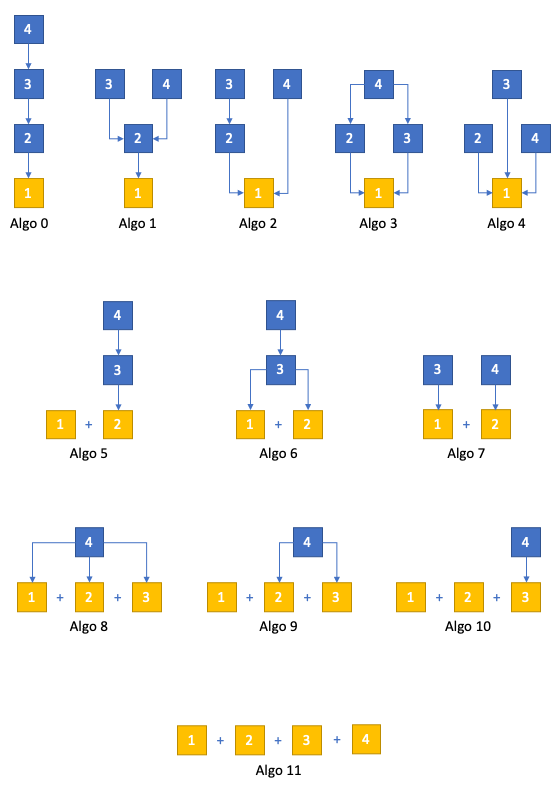
Available algorithms:
Performing on two Moog Mother 32 synthesizers as one instrument
- regular unison mode for rich chorus;
- power chord mode;
- duophonic mode: real 2-voice polyphony;
- legato-controlled glide (or sustain pedal-controlled glide);
- velocity-controlled accent notes;
- one Mother receives mod wheel on ASSIGN CV;
- the other Mother receives expression pedal on ASSIGN CV.
For more information:
(aiotone)$ python -m aiotone.redblue --help
Sequencing the Novation Circuit + Novation Circuit Mono Station
(aiotone)$ python -m aiotone.circuits --help
See this talk for a full tutorial: https://www.youtube.com/watch?v=02CLD-42VdI
Self-generating sequences for two Moog Mother 32 synthesizers and one Moog Subharmonicon
- the idea is to have a generative sequence that can still be modulated with incoming MIDI signal from the musician;
- so far very simple but will be extended;
- the musician controls pitch bend, expression, and damper pedal (I personally have them patched to control resonance, cutoff, and glide of the synthesizers);
- the musician can transpose the generated sequences on the fly.
For more information see:
(aiotone)$ python -m aiotone.mothergen --help
Automatic multisampling into 32-bit float WAVs
(aiotone)$ python -m aiotone.samplesnake --help
Long story short: this enables you to automatically record many samples of different note pitches and velocities for use with a sample player, especially handy to export nice VST sounds for use with hardware samplers.
Caveats:
- only really tested on an M1 Mac;
- this is realtime, in case of buffer underruns the resulting sample will be empty;
- not well suited for recording analog stuff with a high noise floor;
- only records 32-bit float stereo samples, convert after if needed;
- silence detection is very primitive and there's no smart sample
trimming (you can try
aiotone.sampletrimafter).
How to use:
- open up your DAW like Ableton Live, create a MIDI track with your VST of choice;
- select MIDI input on the track to be a virtual MIDI port like "IAC aiotone" (see "Help, how do I use this?" if you're not sure what I'm talking about);
- select the audio output on the track to be BlackHole channels 1-2;
- (optional) if you want to hear audio processed by the script, create an audio track in the DAW taking input from BlackHole channels 3-4;
- create a
samplesnakeINI file and configure the[sampling]section where you specify the output directory, file name prefixes, and what notes, octaves, and velocities should be played. "hold" is how long a note is held, "cooldown" is how much time to give for the file to be saved before the next note, "silence-threshold" is when to automatically consider signal start and signal end for each sample.
Help, how do I use this?
You will need to figure out the names of your MIDI ports (and, in the case of the FM synth, the name of your audio port).
You can run python -m aiotone.lsdev to list all the audio
and MIDI ports detected on your system, so that you know what
to enter in your .ini configuration file.
Many scripts here use virtual MIDI ports built into macOS. To configure
one, open "Audio MIDI Setup", open the "MIDI Studio" screen, find the
red IAC object there, double-click it, and add a port using "+". A port
with one input and one output is enough. Scripts here use a port called
"aiotone", which is visible in lsdev as "IAC aiotone".
Some scripts here rely on virtual audio I/O called BlackHole, which is open-source and available for the Mac.


Similar repos


Languages
Python
96.1%
Cython
3.9%
README
aiotone
Audio synthesis and MIDI processing tools in AsyncIO.
Installation
$ git clone https://github.com/ambv/aiotone
$ python3.8 -m venv /tmp/aiotone
$ source /tmp/aiotone/bin/activate
(aiotone)$ pip install Cython cymem
(aiotone)$ pip install -e .[dev]
(aiotone)$ python build.py
DISCLAIMER: tested on macOS only.
Usage
Realtime FM synthesis in pure Python
- this is work-in-progress polyphonic 4-operator FM synthesizer following the general Yamaha design;
- this is pushing Python real hard, your CPU might not be able to do realtime audio with this, if that's the case: decrease polyphony;
- as usual, MIDI IN and AUDIO OUT configuration is done through a config file;
- tested under macOS and Linux (both PulseAudio and ALSA) where we were able to achieve 8+ voices of polyphony without buffer underruns;
- use something like BlackHole to route audio to your DAW of choice.
For more information see:
(aiotone)$ python -m aiotone.fmsynth --help
Available algorithms:
Performing on two Moog Mother 32 synthesizers as one instrument
- regular unison mode for rich chorus;
- power chord mode;
- duophonic mode: real 2-voice polyphony;
- legato-controlled glide (or sustain pedal-controlled glide);
- velocity-controlled accent notes;
- one Mother receives mod wheel on ASSIGN CV;
- the other Mother receives expression pedal on ASSIGN CV.
For more information:
(aiotone)$ python -m aiotone.redblue --help
Sequencing the Novation Circuit + Novation Circuit Mono Station
(aiotone)$ python -m aiotone.circuits --help
See this talk for a full tutorial: https://www.youtube.com/watch?v=02CLD-42VdI
Self-generating sequences for two Moog Mother 32 synthesizers and one Moog Subharmonicon
- the idea is to have a generative sequence that can still be modulated with incoming MIDI signal from the musician;
- so far very simple but will be extended;
- the musician controls pitch bend, expression, and damper pedal (I personally have them patched to control resonance, cutoff, and glide of the synthesizers);
- the musician can transpose the generated sequences on the fly.
For more information see:
(aiotone)$ python -m aiotone.mothergen --help
Automatic multisampling into 32-bit float WAVs
(aiotone)$ python -m aiotone.samplesnake --help
Long story short: this enables you to automatically record many samples of different note pitches and velocities for use with a sample player, especially handy to export nice VST sounds for use with hardware samplers.
Caveats:
- only really tested on an M1 Mac;
- this is realtime, in case of buffer underruns the resulting sample will be empty;
- not well suited for recording analog stuff with a high noise floor;
- only records 32-bit float stereo samples, convert after if needed;
- silence detection is very primitive and there's no smart sample
trimming (you can try
aiotone.sampletrimafter).
How to use:
- open up your DAW like Ableton Live, create a MIDI track with your VST of choice;
- select MIDI input on the track to be a virtual MIDI port like "IAC aiotone" (see "Help, how do I use this?" if you're not sure what I'm talking about);
- select the audio output on the track to be BlackHole channels 1-2;
- (optional) if you want to hear audio processed by the script, create an audio track in the DAW taking input from BlackHole channels 3-4;
- create a
samplesnakeINI file and configure the[sampling]section where you specify the output directory, file name prefixes, and what notes, octaves, and velocities should be played. "hold" is how long a note is held, "cooldown" is how much time to give for the file to be saved before the next note, "silence-threshold" is when to automatically consider signal start and signal end for each sample.
Help, how do I use this?
You will need to figure out the names of your MIDI ports (and, in the case of the FM synth, the name of your audio port).
You can run python -m aiotone.lsdev to list all the audio
and MIDI ports detected on your system, so that you know what
to enter in your .ini configuration file.
Many scripts here use virtual MIDI ports built into macOS. To configure
one, open "Audio MIDI Setup", open the "MIDI Studio" screen, find the
red IAC object there, double-click it, and add a port using "+". A port
with one input and one output is enough. Scripts here use a port called
"aiotone", which is visible in lsdev as "IAC aiotone".
Some scripts here rely on virtual audio I/O called BlackHole, which is open-source and available for the Mac.
Similar repos
Languages
Python
96.1%
Cython
3.9%