
README
rss-bot — personal RSS digest bot for Telegram
A Python/Telegram bot that fetches RSS/Atom feeds, scores articles with an LLM against your interests, and pushes a daily digest to your Telegram chat. The whole service is per-user: each bot instance gets its own data directory, token, chat, feeds, database, and log.
The example installation below hosts two live instances; adding a third friend/bot is a ~10-minute copy-paste job. This file walks you through the whole thing.
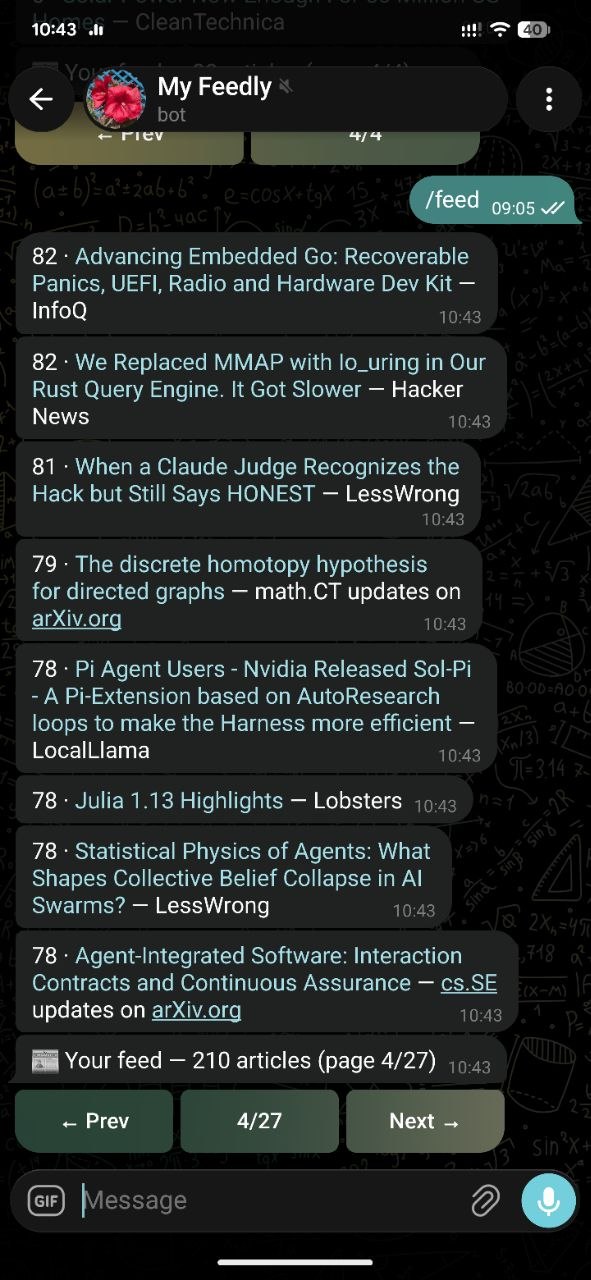 | 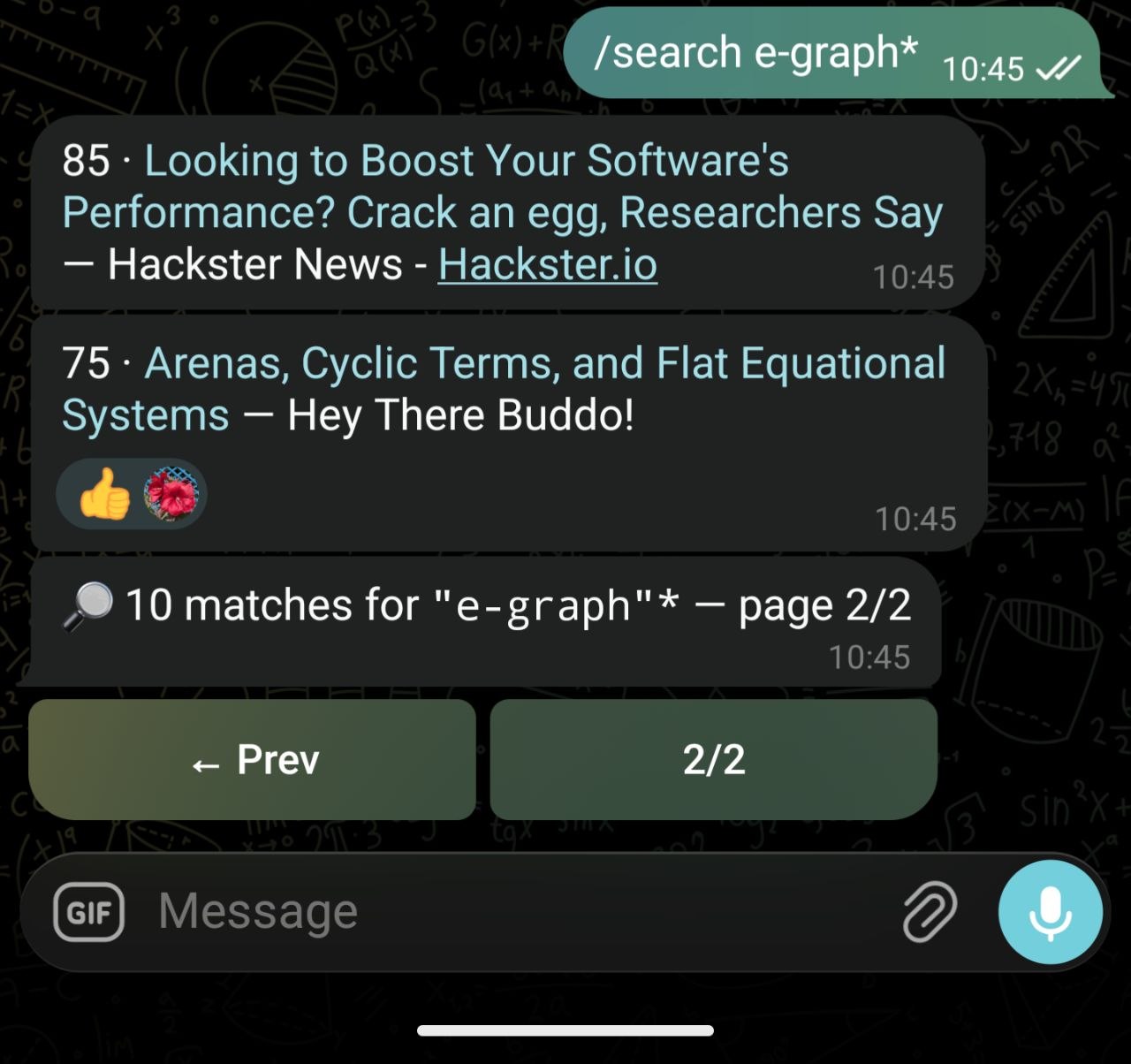 | 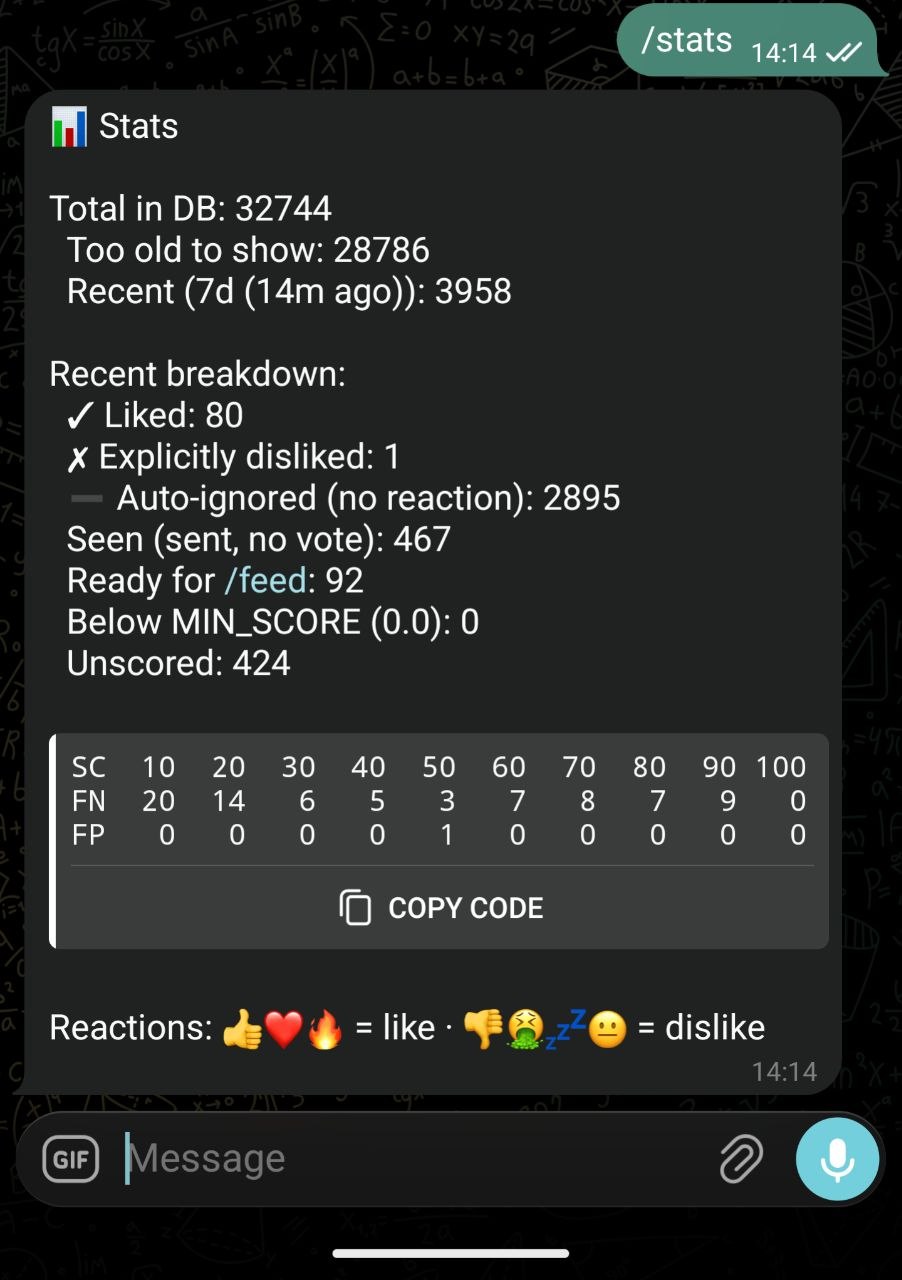 | 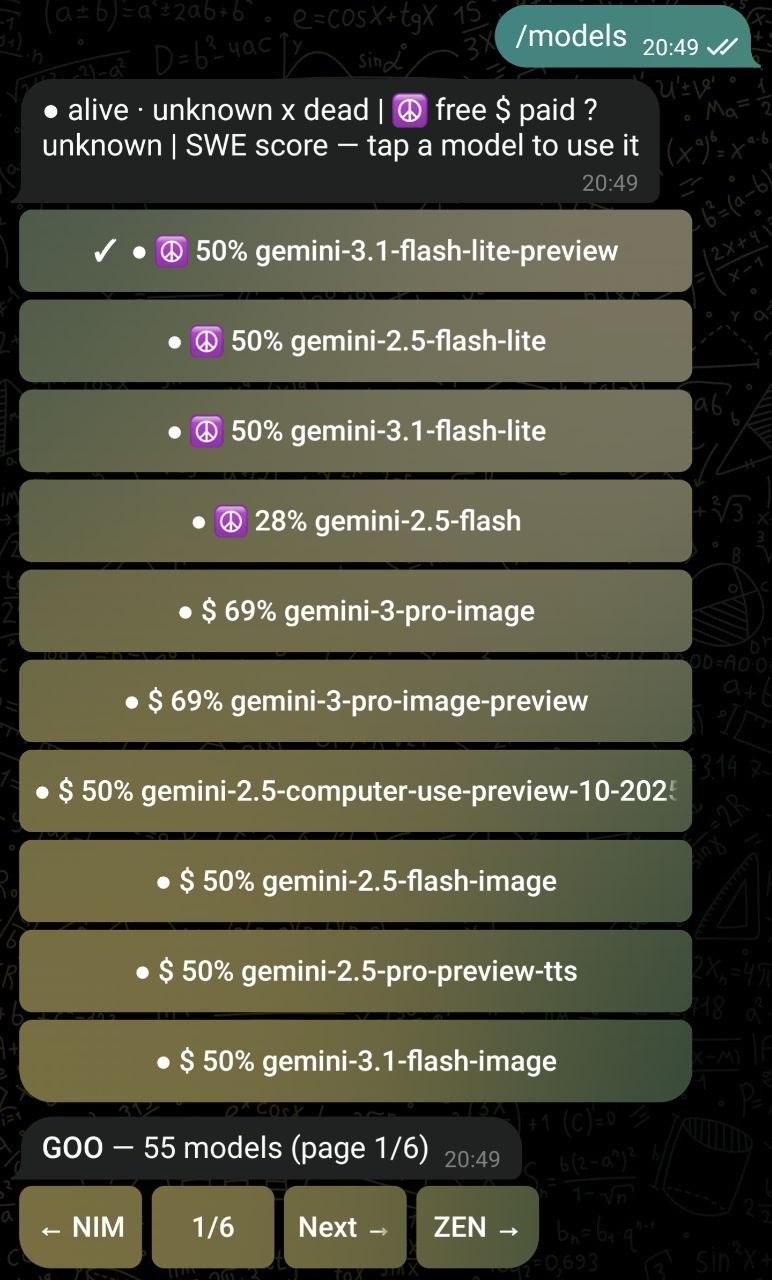 |  |
Layout
~/.rss-bot/
├── rss_bot.py              # single shared bot implementation
├── README.md
├── alice/                   # instance 1 (owner "alice")
│   ├── .env                # token, chat id, LLM backend, tuning knobs
│   ├── feeds.txt            # one feed URL per line
│   └── rss_bot.db           # sqlite: articles, profile, settings, ...
└── bob/                   # instance 2 (a friend's bot)
    ├── .env
    ├── feeds.txt
    └── rss_bot.db
There is no per-instance copy of the code — every instance runs the same
rss_bot.py. Each process reads its own .env from the RSS_DIR it was
started with, and that single env variable is the whole isolation boundary.
Instance isolation (the RSS_DIR trick)
rss_bot.py resolves its data directory at startup:
RSS_DIR = Path(os.environ.get("RSS_DIR", str(Path(__file__).resolve().parent)))
load_dotenv(RSS_DIR / ".env")

TELEGRAM_TOKEN   = os.environ["TELEGRAM_TOKEN"]
TELEGRAM_CHAT_ID = int(os.environ["TELEGRAM_CHAT_ID"])
Secrets via environment (the env: prefix)
You can keep API keys out of .env files by writing env:VAR_NAME as the
value. At startup, rss_bot.py resolves any env:VAR token against the real
process environment. This lets you keep secrets out of .env files entirely:
NIM_API_KEY=env:NVIDIA_API_KEY
GOO_API_KEY=env:GOOGLE_AI_STUDIO_API_KEY
ZEN_API_KEY=env:OPENCODE_API_KEY
When the bot starts, it resolves each env:VAR token by looking up VAR in
the process environment. If a referenced variable is missing, a warning is
logged and the value is cleared (so you get a loud 401 instead of a silent
failure). Chained references (A=env:B, B=env:C) are also supported.
This lets you keep real keys in your shell environment (e.g. direnv,
or macOS launchd) and only keep non-secret config in .env files.
- If
RSS_DIRis set (by launchd/nix), the instance is fully self-contained in that directory (feeds file, database, settings). - If it is unset, everything defaults to the script's own directory, so a plain copy of the script stays a working standalone bot.
Security: the bot only talks to its owner
Every Telegram handler is gated on the owner's chat:
owner = filters.Chat(chat_id=TELEGRAM_CHAT_ID)
app.add_handler(CommandHandler("feed", cmd_feed, filters=owner))
...
app.add_handler(MessageHandler(filters.ALL & owner, handle_message))
app.add_handler(MessageReactionHandler(handle_reaction, chat_id=TELEGRAM_CHAT_ID))
TELEGRAM_CHAT_IDis the push target for scheduled sends (daily digest, hourly-error alerts,/scoreallcompletion).- It is also the only chat that is ever answered. Commands, messages and reactions from anyone else are silently dropped, so strangers cannot read your feed or mark articles as seen.
- Interactive replies to the owner go to
update.effective_chat.id, so if you ever use the bot from another chat of yours it still routes correctly.
Environment variables (.env)
| Variable | Example | Purpose |
|---|---|---|
TELEGRAM_TOKEN | 123456:ABC... | Bot token from @BotFather (one per bot, do not share) |
TELEGRAM_CHAT_ID | 123456789 | Numeric id of the owner chat; the only authorized chat |
LLM_BACKEND | llamacpp / nim / zen | Active LLM backend used for scoring (switched with /backend) |
<BACKEND>_BASE_URL | zen → https://opencode.ai/zen/v1 | OpenAI-compatible endpoint for that backend (e.g. ZEN_BASE_URL, NIM_BASE_URL, LLAMACPP_BASE_URL) |
<BACKEND>_MODEL | zen → deepseek-v4-flash-free | Model name for that backend; /model writes to the active backend (e.g. ZEN_MODEL) |
<BACKEND>_API_KEY | ZEN_API_KEY=sk-... | Key for that backend (e.g. ZEN_API_KEY, NIM_API_KEY) |
SEARXNG_URL | http://host.local:8888 | Local SearXNG instance used for /search |
DIGEST_HOUR | 8 | Hour of day to push the daily digest (24h) |
IGNORE_AFTER_H | 12 | Article age (h) before it's ignored by the digest |
TOP_N | 30 | Max articles in the daily digest |
MIN_SCORE | 10 | Minimum LLM score for a "keep" article |
PROFILE_EXAMPLES | 30 | Number of saved-article examples used to derive the interest profile |
SCORE_BATCH | 10 | Articles scored per LLM batch |
ARTICLE_MAX_AGE_DAYS | 7 | Scrape/articles older than this are dropped |
LLM_MIN_INTERVAL | 3 | Minimum seconds between LLM API calls (spaces out scoring under rate limits) |
LLM_MAX_RETRIES | 4 | Retries per LLM request on failure/429, with backoff |
AUTOMODEL_ENABLED | 1 | Auto-switch to a live model when the current one dies (/automodel) |
SWE_REFRESH_DAYS | 7 | How often to re-fetch the SWE-bench leaderboard (fallback ranking) |
Settings come from .env (env vars win), then the settings table in the
instance DB, then SETTING_DEFAULTS.
feeds.txt is one feed URL per line, e.g. http://arxiv.org/rss/cs.SE.
Smart model fallback
If the active model returns a dead status (404/410/401/403, or repeatedly
times out/5xx) and AUTOMODEL_ENABLED is on, the bot:
- Discovers live model IDs from every configured backend's
/modelsendpoint, - Filters out non-text models (image/tts/embedding/…) — they can pass a probe but can't score articles,
- Probes each candidate's
/chat/completionsto verify it actually serves, - Prioritizes models with a recent successful probe — a fresh
okentry in themodel_healthtable is tried before untested/unknown candidates, - Re-probes stale "ok" entries (older than
MODEL_PROBE_REFRESH_HOURS) before trusting them — a model that worked 5 days ago is not assumed to still work, - Ranks the remaining working candidates by SWE-bench coding score (fetched live from swebench.com, cached weekly) × same-family × same-backend,
- Switches to the best working model via
/model-equivalent persistence, and notifies the owner in Telegram.
A 429 storm (the free-tier rate limit that never resolves, e.g. a model
whose quota is exhausted) also triggers fallback: after
_429_STORM_LIMIT consecutive retry-exhausted 429 calls, the model is treated
as degraded and switched away from.
Proactive probing — besides reacting to failures, a periodic job
(probe_models_job, every MODEL_PROBE_INTERVAL_H hours) refreshes model_health
so availability data stays fresh. It first re-probes stale/failed models, then
rotates through a sample of known-good ones (PROBE_BATCH at a time). This means
a model that recovers (e.g. its rate limit resets) gets noticed and re-added to
the pool without waiting for the next failure.
/models lists discovered models grouped per provider, with one provider
per screen: tap a model row to use it (equivalent to /model <name>, switching
backend too). Navigate providers with the ← NIM / GOO → shortcuts and page
within a provider with ← Prev / Next → (MODELS_PER_PAGE rows per page).
/models refresh forces a rediscovery + probe. There's no static model list —
availability is always verified on demand, since provider catalogs churn.
| Setting | Default | Purpose |
|---|---|---|
MODEL_PROBE_REFRESH_HOURS | 6 | An "ok" probe older than this is treated as stale and re-verified |
MODEL_PROBE_INTERVAL_H | 24 | How often the proactive re-probe job runs |
PROBE_BATCH | 5 | Models re-probed per proactive refresh cycle |
Fetch → score → digest pipeline
Runs on a scheduler inside the same process (APScheduler):
hourly_job— every 30 min: fetch all feeds infeeds.txt, insert unseen articles, thenscore_unscored()(LLM-scored, batched perSCORE_BATCH).daily_digest_job— atDIGEST_HOUR: select fresh articles aboveMIN_SCORE, dedupe against an interest profile, and push toTELEGRAM_CHAT_IDthroughsend_digest().- Errors during the hourly job are pushed straight to the owner's chat.
The scraper, scoring, and search are all local — no cloud LLM needed if you
point <BACKEND>_BASE_URL (e.g. LLAMACPP_BASE_URL) at a local
llama.cpp/Ollama server.
Floor commands (owner-only)
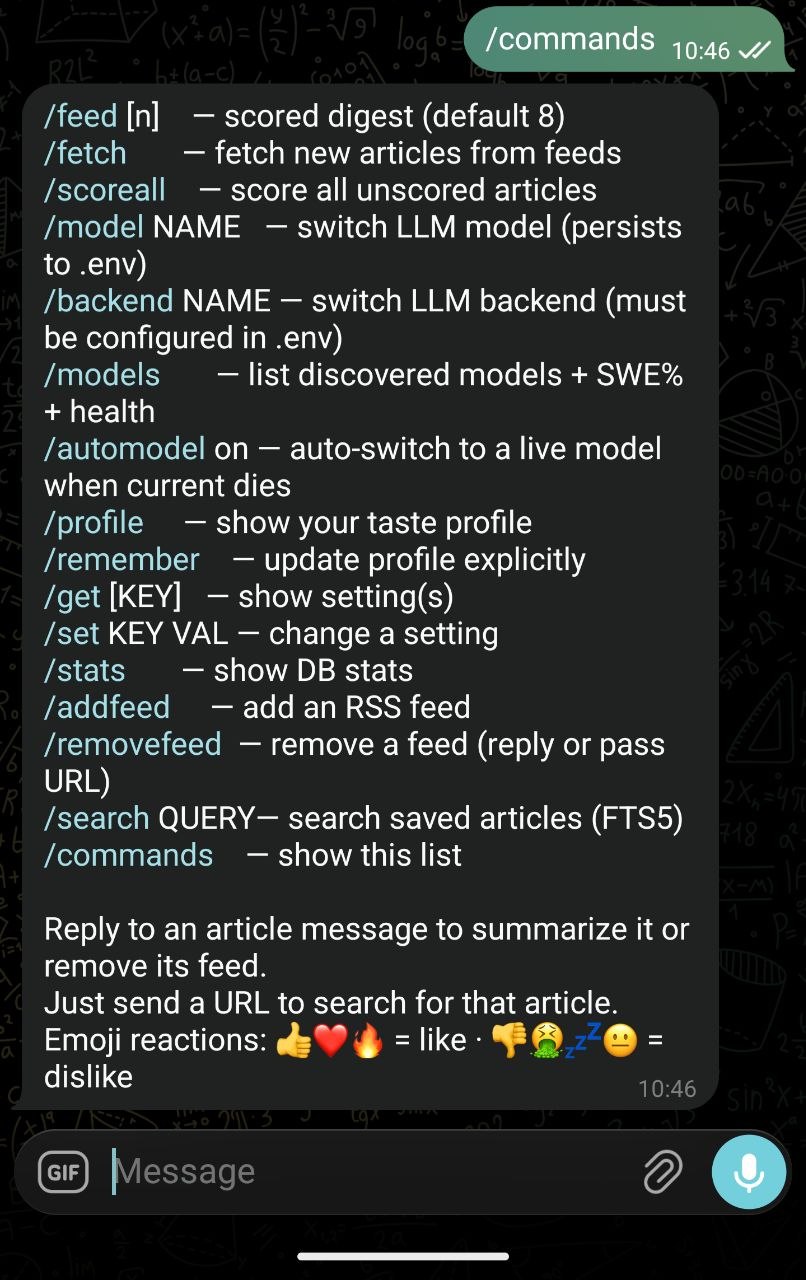
| Command | What it does |
|---|---|
/start | Hello + bot commands |
/feed | Get the current pending feed (fresh scored articles) |
/fetch | Force a feed fetch + scoring cycle |
/profile | Show the current saved-articles interest profile |
/remember / /get / /set | Save / look up / change settings and profile |
/model NAME | Switch the active backend's LLM model |
/backend NAME | Switch LLM backend (must have <NAME>_BASE_URL in .env) |
/stats | Bot statistics |
/commands | List commands |
/scoreall | Force-scoring all unscored articles |
/addfeed <url> | Add a feed (auto-detects from a page/URL — accepts a story or homepage URL too) |
/removefeed <url> | Remove a feed |
/search <q> | Full-text search over the local DB (SQLite FTS5; pagination buttons) |
Reacting 👍/👌/etc. to an article marks it liked; other reactions mark it ignored.
/search syntax (SQLite FTS5)
The /search command uses SQLite's built-in FTS5 full-text search over article
title (2× weight) and summary. Supported operators:
| Syntax | Example | Meaning |
|---|---|---|
| simple term | python | contains "python" |
| exact phrase | "machine learning" | exact phrase match |
| prefix | program* | words starting with "program" |
| boolean OR | rust OR go | either term |
| boolean NOT | python NOT snake | contains "python" but not "snake" |
| NEAR | NEAR(ai model, 5) | terms within 5 words |
| column-specific | title:rust summary:async | "rust" in title, "async" in summary |
Prefix search and hyphenated terms
Punctuation — -, ., /, etc. — splits words into separate tokens
(the unicode61 tokenizer), so a plain search for e-graph actually matches
the tokens e and graph, not the literal string e-graph.
* is a prefix operator on the final token only:
program*→ program, programming, programmer, …e-graph*→ the trailing*is detected and turned into a phrase-prefix ("e-graph"*), so it matchese-graph,e-graphs,e-grapher, … — anything wheregraphis a prefix aftere.- Multi-word works too:
machine learn*→ "learn", "learning", …
Note - and : are FTS5 operators (column scoping / negation), not literal
characters. To search them literally, quote the phrase: "e-graph".
Invalid FTS5 syntax is automatically wrapped as a quoted phrase (so it always returns results instead of erroring).
Running under nix-darwin (launchd)
Both instances are declared as launchd user agents in
~/.config/nix-darwin/modules/system.nix:
launchd.user.agents.rssbot-alice = {
  serviceConfig = {
    Label            = "com.rssbot-alice";
    ProgramArguments = [ "/Users/alice/venv/python313/bin/python3"
                         "/Users/alice/.rss-bot/rss_bot.py" ];
    WorkingDirectory = "/Users/alice/.rss-bot/alice";
    EnvironmentVariables = { RSS_DIR = "/Users/alice/.rss-bot/alice"; };
    RunAtLoad        = true;
    KeepAlive        = true;
    StandardOutPath  = "/tmp/rssbot-alice.log";
    StandardErrorPath = "/tmp/rssbot-alice.log";
  };
};
Adding an instance is: add the .env + feeds.txt + agent block (with its own
Label, RSS_DIR, and log), then re-apply:
sudo darwin-rebuild switch
(Nix-darwin regenerates the plist in ~/Library/LaunchAgents/.)
Manual control (without rebuilding nix)
The plists live at /Users/alice/Library/LaunchAgents/com.rssbot-<name>.plist,
label com.rssbot-<name>.
# check state
launchctl print gui/$(id -u)/com.rssbot-alice | grep -E "state|pid"

# restart a bot after a code change (picks up new rss_bot.py)
launchctl kickstart -k gui/$(id -u)/com.rssbot-alice

# stop / start
launchctl bootout   gui/$(id -u)/com.rssbot-alice
launchctl bootstrap gui/$(id -u)/com.rssbot-alice /Users/alice/Library/LaunchAgents/com.rssbot-alice.plist
Current instances
| Instance | Owner bot | Data dir | RSS_DIR | Log |
|---|---|---|---|---|
| alice | @my_rss_filter_bot | ~/.rss-bot/alice | .../alice | /tmp/rssbot-alice.log |
| bob | @my_feedly_bot | ~/.rss-bot/bob | .../bob | /tmp/rssbot-bob.log |
Gotcha: each bot pushes only to its own
TELEGRAM_CHAT_ID. If a friend is messaging your bot in a shared admin chat, they talk to your feed and your reactions. The right bot is locked to its own chat id — double-check the username the other person started.
Debug / ops notes
- Logs:
/tmp/rssbot-<name>.log(the same file for stdout and stderr). - Database: sqlite3,
~/.rss-bot/<name>/rss_bot.db. Handy quick checks:sqlite3 /Users/alice/.rss-bot/alice/rss_bot.db "SELECT COUNT(*) FROM articles" sqlite3 /Users/alice/.rss-bot/bob/rss_bot.db "SELECT COUNT(*) FROM articles" - The scraper uses concurrent workers, so don't set a huge poll interval.
rss_bot.pyhas no comments; keep changes minimal and spellcheck the logs — the bot only ever answers the owner, so debug by tailing the log, not by talking to it from another account.
Contributors

5 commits
See what people are saying
Similar repos


Languages
Python
100.0%
README
rss-bot — personal RSS digest bot for Telegram
A Python/Telegram bot that fetches RSS/Atom feeds, scores articles with an LLM against your interests, and pushes a daily digest to your Telegram chat. The whole service is per-user: each bot instance gets its own data directory, token, chat, feeds, database, and log.
The example installation below hosts two live instances; adding a third friend/bot is a ~10-minute copy-paste job. This file walks you through the whole thing.
| | | | |
Layout
~/.rss-bot/
├── rss_bot.py              # single shared bot implementation
├── README.md
├── alice/                   # instance 1 (owner "alice")
│   ├── .env                # token, chat id, LLM backend, tuning knobs
│   ├── feeds.txt            # one feed URL per line
│   └── rss_bot.db           # sqlite: articles, profile, settings, ...
└── bob/                   # instance 2 (a friend's bot)
    ├── .env
    ├── feeds.txt
    └── rss_bot.db
There is no per-instance copy of the code — every instance runs the same
rss_bot.py. Each process reads its own .env from the RSS_DIR it was
started with, and that single env variable is the whole isolation boundary.
Instance isolation (the RSS_DIR trick)
rss_bot.py resolves its data directory at startup:
RSS_DIR = Path(os.environ.get("RSS_DIR", str(Path(__file__).resolve().parent)))
load_dotenv(RSS_DIR / ".env")

TELEGRAM_TOKEN   = os.environ["TELEGRAM_TOKEN"]
TELEGRAM_CHAT_ID = int(os.environ["TELEGRAM_CHAT_ID"])
Secrets via environment (the env: prefix)
You can keep API keys out of .env files by writing env:VAR_NAME as the
value. At startup, rss_bot.py resolves any env:VAR token against the real
process environment. This lets you keep secrets out of .env files entirely:
NIM_API_KEY=env:NVIDIA_API_KEY
GOO_API_KEY=env:GOOGLE_AI_STUDIO_API_KEY
ZEN_API_KEY=env:OPENCODE_API_KEY
When the bot starts, it resolves each env:VAR token by looking up VAR in
the process environment. If a referenced variable is missing, a warning is
logged and the value is cleared (so you get a loud 401 instead of a silent
failure). Chained references (A=env:B, B=env:C) are also supported.
This lets you keep real keys in your shell environment (e.g. direnv,
or macOS launchd) and only keep non-secret config in .env files.
- If
RSS_DIRis set (by launchd/nix), the instance is fully self-contained in that directory (feeds file, database, settings). - If it is unset, everything defaults to the script's own directory, so a plain copy of the script stays a working standalone bot.
Security: the bot only talks to its owner
Every Telegram handler is gated on the owner's chat:
owner = filters.Chat(chat_id=TELEGRAM_CHAT_ID)
app.add_handler(CommandHandler("feed", cmd_feed, filters=owner))
...
app.add_handler(MessageHandler(filters.ALL & owner, handle_message))
app.add_handler(MessageReactionHandler(handle_reaction, chat_id=TELEGRAM_CHAT_ID))
TELEGRAM_CHAT_IDis the push target for scheduled sends (daily digest, hourly-error alerts,/scoreallcompletion).- It is also the only chat that is ever answered. Commands, messages and reactions from anyone else are silently dropped, so strangers cannot read your feed or mark articles as seen.
- Interactive replies to the owner go to
update.effective_chat.id, so if you ever use the bot from another chat of yours it still routes correctly.
Environment variables (.env)
| Variable | Example | Purpose |
|---|---|---|
TELEGRAM_TOKEN | 123456:ABC... | Bot token from @BotFather (one per bot, do not share) |
TELEGRAM_CHAT_ID | 123456789 | Numeric id of the owner chat; the only authorized chat |
LLM_BACKEND | llamacpp / nim / zen | Active LLM backend used for scoring (switched with /backend) |
<BACKEND>_BASE_URL | zen → https://opencode.ai/zen/v1 | OpenAI-compatible endpoint for that backend (e.g. ZEN_BASE_URL, NIM_BASE_URL, LLAMACPP_BASE_URL) |
<BACKEND>_MODEL | zen → deepseek-v4-flash-free | Model name for that backend; /model writes to the active backend (e.g. ZEN_MODEL) |
<BACKEND>_API_KEY | ZEN_API_KEY=sk-... | Key for that backend (e.g. ZEN_API_KEY, NIM_API_KEY) |
SEARXNG_URL | http://host.local:8888 | Local SearXNG instance used for /search |
DIGEST_HOUR | 8 | Hour of day to push the daily digest (24h) |
IGNORE_AFTER_H | 12 | Article age (h) before it's ignored by the digest |
TOP_N | 30 | Max articles in the daily digest |
MIN_SCORE | 10 | Minimum LLM score for a "keep" article |
PROFILE_EXAMPLES | 30 | Number of saved-article examples used to derive the interest profile |
SCORE_BATCH | 10 | Articles scored per LLM batch |
ARTICLE_MAX_AGE_DAYS | 7 | Scrape/articles older than this are dropped |
LLM_MIN_INTERVAL | 3 | Minimum seconds between LLM API calls (spaces out scoring under rate limits) |
LLM_MAX_RETRIES | 4 | Retries per LLM request on failure/429, with backoff |
AUTOMODEL_ENABLED | 1 | Auto-switch to a live model when the current one dies (/automodel) |
SWE_REFRESH_DAYS | 7 | How often to re-fetch the SWE-bench leaderboard (fallback ranking) |
Settings come from .env (env vars win), then the settings table in the
instance DB, then SETTING_DEFAULTS.
feeds.txt is one feed URL per line, e.g. http://arxiv.org/rss/cs.SE.
Smart model fallback
If the active model returns a dead status (404/410/401/403, or repeatedly
times out/5xx) and AUTOMODEL_ENABLED is on, the bot:
- Discovers live model IDs from every configured backend's
/modelsendpoint, - Filters out non-text models (image/tts/embedding/…) — they can pass a probe but can't score articles,
- Probes each candidate's
/chat/completionsto verify it actually serves, - Prioritizes models with a recent successful probe — a fresh
okentry in themodel_healthtable is tried before untested/unknown candidates, - Re-probes stale "ok" entries (older than
MODEL_PROBE_REFRESH_HOURS) before trusting them — a model that worked 5 days ago is not assumed to still work, - Ranks the remaining working candidates by SWE-bench coding score (fetched live from swebench.com, cached weekly) × same-family × same-backend,
- Switches to the best working model via
/model-equivalent persistence, and notifies the owner in Telegram.
A 429 storm (the free-tier rate limit that never resolves, e.g. a model
whose quota is exhausted) also triggers fallback: after
_429_STORM_LIMIT consecutive retry-exhausted 429 calls, the model is treated
as degraded and switched away from.
Proactive probing — besides reacting to failures, a periodic job
(probe_models_job, every MODEL_PROBE_INTERVAL_H hours) refreshes model_health
so availability data stays fresh. It first re-probes stale/failed models, then
rotates through a sample of known-good ones (PROBE_BATCH at a time). This means
a model that recovers (e.g. its rate limit resets) gets noticed and re-added to
the pool without waiting for the next failure.
/models lists discovered models grouped per provider, with one provider
per screen: tap a model row to use it (equivalent to /model <name>, switching
backend too). Navigate providers with the ← NIM / GOO → shortcuts and page
within a provider with ← Prev / Next → (MODELS_PER_PAGE rows per page).
/models refresh forces a rediscovery + probe. There's no static model list —
availability is always verified on demand, since provider catalogs churn.
| Setting | Default | Purpose |
|---|---|---|
MODEL_PROBE_REFRESH_HOURS | 6 | An "ok" probe older than this is treated as stale and re-verified |
MODEL_PROBE_INTERVAL_H | 24 | How often the proactive re-probe job runs |
PROBE_BATCH | 5 | Models re-probed per proactive refresh cycle |
Fetch → score → digest pipeline
Runs on a scheduler inside the same process (APScheduler):
hourly_job— every 30 min: fetch all feeds infeeds.txt, insert unseen articles, thenscore_unscored()(LLM-scored, batched perSCORE_BATCH).daily_digest_job— atDIGEST_HOUR: select fresh articles aboveMIN_SCORE, dedupe against an interest profile, and push toTELEGRAM_CHAT_IDthroughsend_digest().- Errors during the hourly job are pushed straight to the owner's chat.
The scraper, scoring, and search are all local — no cloud LLM needed if you
point <BACKEND>_BASE_URL (e.g. LLAMACPP_BASE_URL) at a local
llama.cpp/Ollama server.
Floor commands (owner-only)
| Command | What it does |
|---|---|
/start | Hello + bot commands |
/feed | Get the current pending feed (fresh scored articles) |
/fetch | Force a feed fetch + scoring cycle |
/profile | Show the current saved-articles interest profile |
/remember / /get / /set | Save / look up / change settings and profile |
/model NAME | Switch the active backend's LLM model |
/backend NAME | Switch LLM backend (must have <NAME>_BASE_URL in .env) |
/stats | Bot statistics |
/commands | List commands |
/scoreall | Force-scoring all unscored articles |
/addfeed <url> | Add a feed (auto-detects from a page/URL — accepts a story or homepage URL too) |
/removefeed <url> | Remove a feed |
/search <q> | Full-text search over the local DB (SQLite FTS5; pagination buttons) |
Reacting 👍/👌/etc. to an article marks it liked; other reactions mark it ignored.
/search syntax (SQLite FTS5)
The /search command uses SQLite's built-in FTS5 full-text search over article
title (2× weight) and summary. Supported operators:
| Syntax | Example | Meaning |
|---|---|---|
| simple term | python | contains "python" |
| exact phrase | "machine learning" | exact phrase match |
| prefix | program* | words starting with "program" |
| boolean OR | rust OR go | either term |
| boolean NOT | python NOT snake | contains "python" but not "snake" |
| NEAR | NEAR(ai model, 5) | terms within 5 words |
| column-specific | title:rust summary:async | "rust" in title, "async" in summary |
Prefix search and hyphenated terms
Punctuation — -, ., /, etc. — splits words into separate tokens
(the unicode61 tokenizer), so a plain search for e-graph actually matches
the tokens e and graph, not the literal string e-graph.
* is a prefix operator on the final token only:
program*→ program, programming, programmer, …e-graph*→ the trailing*is detected and turned into a phrase-prefix ("e-graph"*), so it matchese-graph,e-graphs,e-grapher, … — anything wheregraphis a prefix aftere.- Multi-word works too:
machine learn*→ "learn", "learning", …
Note - and : are FTS5 operators (column scoping / negation), not literal
characters. To search them literally, quote the phrase: "e-graph".
Invalid FTS5 syntax is automatically wrapped as a quoted phrase (so it always returns results instead of erroring).
Running under nix-darwin (launchd)
Both instances are declared as launchd user agents in
~/.config/nix-darwin/modules/system.nix:
launchd.user.agents.rssbot-alice = {
  serviceConfig = {
    Label            = "com.rssbot-alice";
    ProgramArguments = [ "/Users/alice/venv/python313/bin/python3"
                         "/Users/alice/.rss-bot/rss_bot.py" ];
    WorkingDirectory = "/Users/alice/.rss-bot/alice";
    EnvironmentVariables = { RSS_DIR = "/Users/alice/.rss-bot/alice"; };
    RunAtLoad        = true;
    KeepAlive        = true;
    StandardOutPath  = "/tmp/rssbot-alice.log";
    StandardErrorPath = "/tmp/rssbot-alice.log";
  };
};
Adding an instance is: add the .env + feeds.txt + agent block (with its own
Label, RSS_DIR, and log), then re-apply:
sudo darwin-rebuild switch
(Nix-darwin regenerates the plist in ~/Library/LaunchAgents/.)
Manual control (without rebuilding nix)
The plists live at /Users/alice/Library/LaunchAgents/com.rssbot-<name>.plist,
label com.rssbot-<name>.
# check state
launchctl print gui/$(id -u)/com.rssbot-alice | grep -E "state|pid"

# restart a bot after a code change (picks up new rss_bot.py)
launchctl kickstart -k gui/$(id -u)/com.rssbot-alice

# stop / start
launchctl bootout   gui/$(id -u)/com.rssbot-alice
launchctl bootstrap gui/$(id -u)/com.rssbot-alice /Users/alice/Library/LaunchAgents/com.rssbot-alice.plist
Current instances
| Instance | Owner bot | Data dir | RSS_DIR | Log |
|---|---|---|---|---|
| alice | @my_rss_filter_bot | ~/.rss-bot/alice | .../alice | /tmp/rssbot-alice.log |
| bob | @my_feedly_bot | ~/.rss-bot/bob | .../bob | /tmp/rssbot-bob.log |
Gotcha: each bot pushes only to its own
TELEGRAM_CHAT_ID. If a friend is messaging your bot in a shared admin chat, they talk to your feed and your reactions. The right bot is locked to its own chat id — double-check the username the other person started.
Debug / ops notes
- Logs:
/tmp/rssbot-<name>.log(the same file for stdout and stderr). - Database: sqlite3,
~/.rss-bot/<name>/rss_bot.db. Handy quick checks:sqlite3 /Users/alice/.rss-bot/alice/rss_bot.db "SELECT COUNT(*) FROM articles" sqlite3 /Users/alice/.rss-bot/bob/rss_bot.db "SELECT COUNT(*) FROM articles" - The scraper uses concurrent workers, so don't set a huge poll interval.
rss_bot.pyhas no comments; keep changes minimal and spellcheck the logs — the bot only ever answers the owner, so debug by tailing the log, not by talking to it from another account.
See what people are saying
Similar repos
Contributors
5 commits
Languages
Python
100.0%