
fault-tolerant Python3 package for searching, navigating, and modifying LaTeX documents
See the codeREADME

TexSoup



TexSoup is a fault-tolerant, Python3 package for searching, navigating, and modifying LaTeX documents. You can skip installation and try TexSoup directly, using the pytwiddle demo →
Created by Alvin Wan + contributors.
Getting Started
To parse a $LaTeX$ document, pass an open filehandle or a string into the
TexSoup constructor.
from TexSoup import TexSoup
soup = TexSoup("""
\begin{document}

\section{Hello \textit{world}.}

\subsection{Watermelon}

(n.) A sacred fruit. Also known as:

\begin{itemize}
\item red lemon
\item life
\end{itemize}

Here is the prevalence of each synonym.

\begin{tabular}{c c}
red lemon & uncommon \\
life & common
\end{tabular}

\end{document}
""")
With the soupified $\LaTeX$, you can now search and traverse the document tree. The code below demonstrates the basic functions that TexSoup provides.
>>> soup.section  # grabs the first `section`
\section{Hello \textit{world}.}
>>> soup.section.name
'section'
>>> soup.section.string
'Hello \\textit{world}.'
>>> soup.section.parent.name
'document'
>>> soup.tabular
\begin{tabular}{c c}
red lemon & uncommon \\
life & common
\end{tabular}
>>> soup.tabular.args[0]
'c c'
>>> soup.item
\item red lemon
>>> list(soup.find_all('item'))
[\item red lemon, \item life]
For more use cases, see the Quickstart Guide. Or, try TexSoup online, via pytwiddle →
Links:
- Quickstart Guide: how and when to use TexSoup
- Example Use Cases: counting references, resolving imports, and more
- arXiv Benchmarks: reproducible parser and converter comparisons
Benchmarks
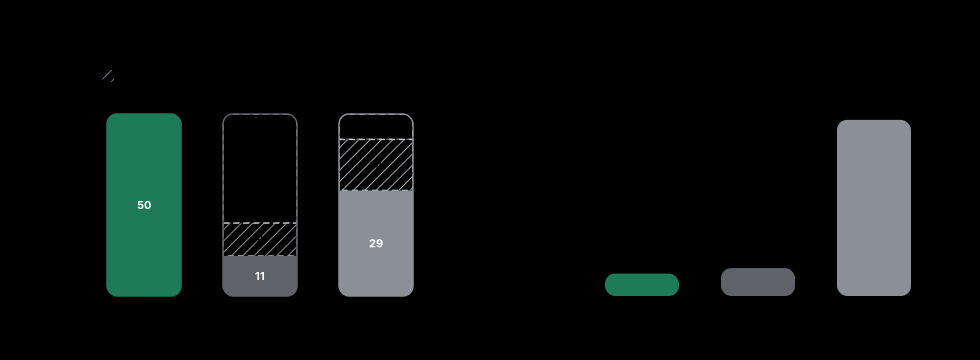
TexSoup parsed all 50/50 papers in our current AI/ML arXiv benchmark set,
while plasTeX parsed 11/50 and LaTeXML parsed 29/50 under the same
10-second timeout. See the full benchmark breakdown
for raw per-paper results and reproduction details.
Installation
Pip
TexSoup is published via PyPi, so you can install it via pip. The package
name is TexSoup:
$ pip install texsoup
From source
Alternatively, you can install the package from source:
$ git clone https://github.com/alvinwan/TexSoup.git
$ cd TexSoup
$ pip install .
Significant stargazers

122 followers · starred Jun 2018

43 followers · starred Jun 2024

83 followers · starred Oct 2025

10 followers · starred Dec 2018
Similar repos


Languages
Python
99.1%
fault-tolerant Python3 package for searching, navigating, and modifying LaTeX documents
See the codeREADME
TexSoup
TexSoup is a fault-tolerant, Python3 package for searching, navigating, and modifying LaTeX documents. You can skip installation and try TexSoup directly, using the pytwiddle demo →
Created by Alvin Wan + contributors.
Getting Started
To parse a $LaTeX$ document, pass an open filehandle or a string into the
TexSoup constructor.
from TexSoup import TexSoup
soup = TexSoup("""
\begin{document}

\section{Hello \textit{world}.}

\subsection{Watermelon}

(n.) A sacred fruit. Also known as:

\begin{itemize}
\item red lemon
\item life
\end{itemize}

Here is the prevalence of each synonym.

\begin{tabular}{c c}
red lemon & uncommon \\
life & common
\end{tabular}

\end{document}
""")
With the soupified $\LaTeX$, you can now search and traverse the document tree. The code below demonstrates the basic functions that TexSoup provides.
>>> soup.section  # grabs the first `section`
\section{Hello \textit{world}.}
>>> soup.section.name
'section'
>>> soup.section.string
'Hello \\textit{world}.'
>>> soup.section.parent.name
'document'
>>> soup.tabular
\begin{tabular}{c c}
red lemon & uncommon \\
life & common
\end{tabular}
>>> soup.tabular.args[0]
'c c'
>>> soup.item
\item red lemon
>>> list(soup.find_all('item'))
[\item red lemon, \item life]
For more use cases, see the Quickstart Guide. Or, try TexSoup online, via pytwiddle →
Links:
- Quickstart Guide: how and when to use TexSoup
- Example Use Cases: counting references, resolving imports, and more
- arXiv Benchmarks: reproducible parser and converter comparisons
Benchmarks
TexSoup parsed all 50/50 papers in our current AI/ML arXiv benchmark set,
while plasTeX parsed 11/50 and LaTeXML parsed 29/50 under the same
10-second timeout. See the full benchmark breakdown
for raw per-paper results and reproduction details.
Installation
Pip
TexSoup is published via PyPi, so you can install it via pip. The package
name is TexSoup:
$ pip install texsoup
From source
Alternatively, you can install the package from source:
$ git clone https://github.com/alvinwan/TexSoup.git
$ cd TexSoup
$ pip install .
Similar repos
Significant stargazers
122 followers · starred Jun 2018
43 followers · starred Jun 2024
83 followers · starred Oct 2025
10 followers · starred Dec 2018
Languages
Python
99.1%