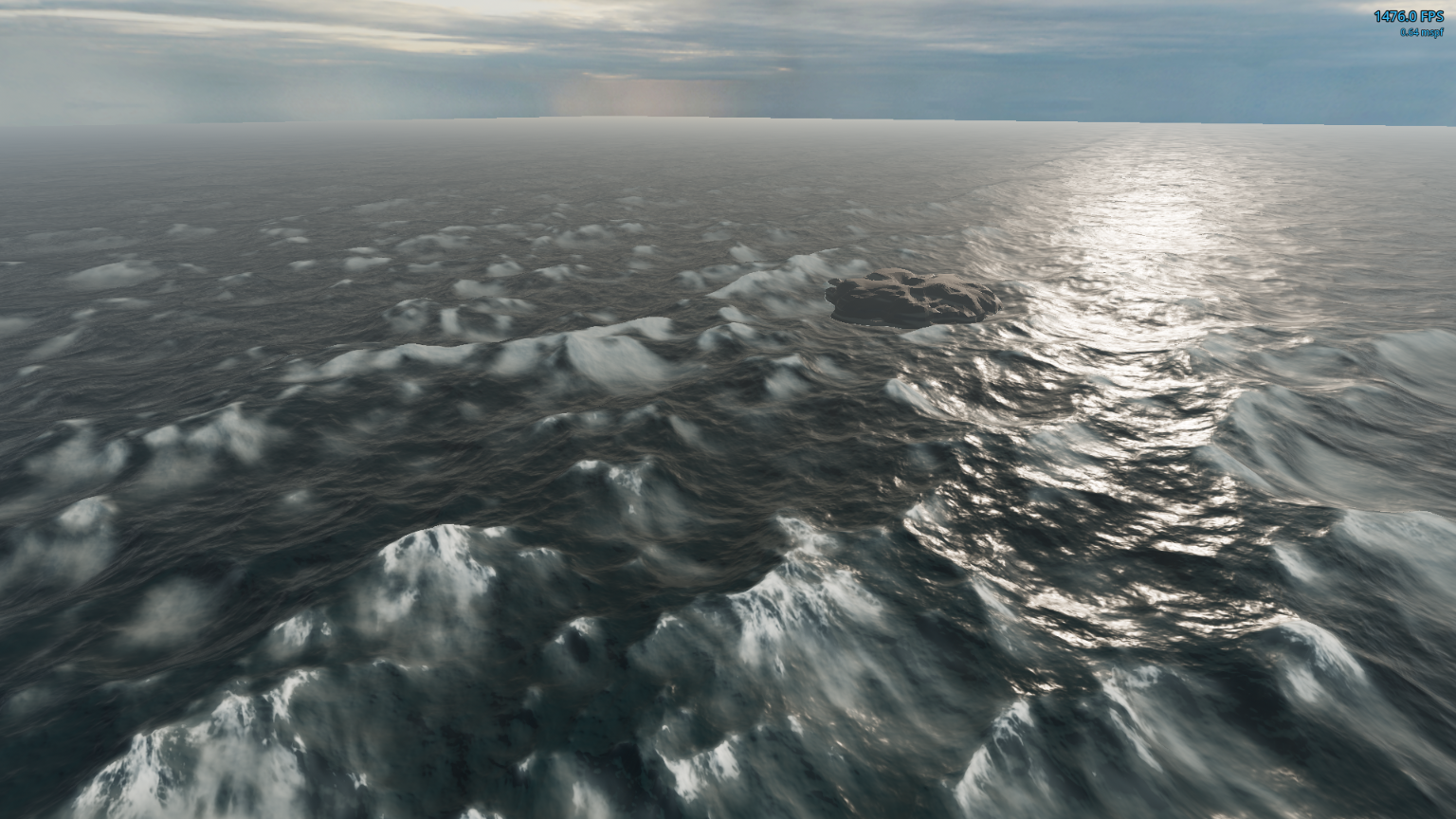
▶ Watch the showcase video (the screenshot links to it too)
A drop-in, GPU-simulated ocean for Godot 4.7 .NET (Forward+). Three FFT cascades run in GLSL compute on the main
RenderingDevice, a camera-local foam field turns breaking crests into whitecaps that age into soft trails, and a
single spatial shader does the sky-driven, painterly shading. It runs at well over 1000 fps at 1080p on a current
desktop GPU.
OCEAN_GUIDE.md)This project was built by an AI coding agent from a single written brief, OCEAN_GUIDE.md, and then
refined with feedback. The guide is the brief, kept up to date: every technical choice and value in this repository,
why it was chosen, what was tried and rejected, the engine facts that trip people up (Godot 4.7, D3D12), the
verification steps, and the bugs that were already paid for. Read it if you want to understand why the ocean looks and
performs the way it does, change it without re-learning those lessons, or rebuild it in another engine. Handing it to
an agent in an empty Godot 4.7 C# project is meant to reproduce this repository; the "Findings" section at the top lists
the hard-won lessons with pointers to where each is specified.
The repository has three layers:
| Folder | What it is |
|---|---|
ocean/ | The renderer. One Ocean node, its shaders, the config and parameter models. No UI, lights, sky, camera or command line. Copy this folder and you are done. |
demo/ | The showcase scene: sky presets, sun, fog, a rock, a fly camera, the parameter panels, JSON presets. |
dev/ | Tooling for development (captures, bursts, benchmark, GPU self-test). Not needed to run anything; see dev/README.md. |
tests/ | TUnit tests for the pure maths in ocean/core/. |
ocean/ into your Godot 4.7 C# project (keep it at res://ocean/).ocean/ocean.tscn in a scene that has a camera, a DirectionalLight3D and a WorldEnvironment.That is all: with no config the ocean uses the calm defaults. The ocean follows the active viewport camera and is lit by the scene's light and environment; it never searches the tree for anything else.
Optional, from code:
var ocean = GetNode<Ocean.Ocean>("Ocean");
ocean.LoadConfig("res://my_ocean.json");      // or set the ConfigPath export in the inspector
var c = ocean.Snapshot();                      // a copy of the live config
c.Cascades[0].WindSpeed = 16;
ocean.Apply(c);                                // regenerates only what changed
ocean.SaveConfig("user://ocean.json");
foreach (var set in ocean.Parameters)          // live knobs for your own UI or tools
    foreach (var p in set.Parameters) GD.Print(p.Id, " = ", p.Value);
| API | |
|---|---|
ConfigPath (export) | JSON config loaded in _Ready (optional) |
Config | the live OceanConfig |
Snapshot() | a copy of the live config |
Apply(config) | replaces the config; regenerates a cascade's spectrum only when its spectrum fields change, rebuilds GPU resources only when the resolution changes |
LoadConfig(path) / SaveConfig(path) | res://, user:// or absolute paths |
Parameters | ParameterSets: Ocean, Cascade 0–2, Foam field, Surface (built from the shader's uniform groups) |
ConfigChanged | raised after every Apply |
Plain JSON (camelCase, unknown fields ignored, missing fields keep their defaults). surface holds only overrides of
ocean.gdshader uniform defaults, by uniform name: numbers, or colours as "#rrggbb" or [r, g, b].
{
  "resolution": 512,
  "simulationRate": 60,
  "cascades": [
    { "patchSize": 400, "windSpeed": 16, "windDirection": 20, "fetch": 300000, "suppression": 0.5, "heightScale": 1.3, "choppiness": 0.9 },
    { "patchSize": 73, "windSpeed": 11, "windDirection": 35, "fetch": 60000, "suppression": 0.1, "heightScale": 0.85 },
    {}
  ],
  "foam": { "bias": 0.64 },
  "foamTexture": "crest",
  "surface": { "foam_veil": 0.3, "sss_color": "#14383d" }
}
resolution is 256, 512 or 1024 per cascade. foamTexture is crest, ambientcg_001 or procedural. The demo ships
demo/presets/ocean_calm.json (the built-in defaults) and ocean_breeze.json (the demo starts on it).
Rendering a frame does not need a simulation step. The cascades and the foam fields tick at a fixed rate
(simulationRate, 60 Hz) on staggered phases: with three cascades and the foam slot, each client's first tick is a
quarter interval after the previous one. At 1000+ fps most frames record no compute at all, and a frame records at
most one cascade or the foam fields. Everything due in a frame goes into one compute list, opened only when something
is due. When frames are slower than the tick rate, everything due ticks every frame. Cascade time advances by the real
elapsed time × timeScale, so the result is frame-rate independent. A cascade tick is: evolve the spectrum while
loading each row, row FFTs, column FFTs with the outputs assembled in registers (displacement + Jacobian, slope,
Jacobian partials), then mip chains for displacement, slope and partials.
The surface is one camera-centred mesh of square rings: 0.25 m spacing for the first 8 m, then growing geometrically to 4 km. Each vertex samples the displacement at the mip that matches its own spacing, so the coarse outer rings show only the waves they can resolve instead of aliasing and swimming as the camera moves.
Two camera-centred RG16F fields (near: 1024² over 256 m, far: 1024² over 2048 m), snapped to whole texels, sum the three
cascades' Jacobian partials at their own resolution and inject foam where the combined Jacobian drops below bias.
Red is density (slow decay, blurred every tick, mostly along the swell direction: the trails), green is freshness (fast
decay: the whitecaps). Because the field lives in world space while the crest that injects it moves on, foam stays with
the water and trails form behind breaking crests. The surface shader looks the field up at the undisplaced grid
position and erodes a hex-tiled, streak-stretched detail texture with it (Crest-style lace: thin foam keeps only the
brightest parts). Following Sea of Thieves ("The Technical Art of Sea of Thieves", SIGGRAPH 2018), the foam's age
(how much of it is no longer fresh) blends the sharp crest texture into a blurred, softer, fainter version of the same
texture at the same place, so a crest dissolves into its own tail instead of into unrelated blobs. Milky water around
foam, a lace relief on the normal, and wrapped Lambert lighting so foam darkens away from the sun and warms under a
sunset.
| Key | |
|---|---|
| F1 | ocean panel (presets, cascades, foam, surface) |
| F2 | environment panel (sky, yaw, sun elevation, energies, glow) |
| F3 | Debug Menu (FPS, frame times) |
| W A S D, Q / E | fly, down / up |
| hold right mouse | look |
| Shift | ×5 speed |
| mouse wheel | speed ×1.2 / ÷1.2 |
Both panels are open when the demo starts; F1 / F2 hide them. They exist only in debug builds (running from the editor
or a debug export). Presets save to user://ocean_custom.json and load back as "custom".
dotnet run --project tests/Ocean.Tests
<godot> --path . res://dev/dev_main.tscn -- --selftest
<godot> is the Godot 4.7 mono console executable. The TUnit project links ocean/core/** directly (that folder is pure
C#: if a core file touched Godot, the test build would fail). --selftest runs the GPU checks (spectrum vs the CPU
port, an analytic single wave, mip chains) and the foam field targets.
1920×1080, 3D scale 100 %, vsync off, glow on, calm preset at the hero pose (--bench), AMD Radeon RX 9070 XT, D3D12:
| Cascades | Average | 1 % low |
|---|---|---|
| 3 × 512² | ~1310 fps (0.76 ms) | 330–500 fps |
| 3 × 1024² | ~1130 fps (0.89 ms) | 250–300 fps |
Glow costs about 0.1–0.2 ms of that; the breeze preset at the demo's default view measured 0.57 ms with glow off.
The 1 % lows are the frames that record a tick plus normal OS jitter. See "Performance notes" in OCEAN_GUIDE.md
for where the remaining time goes.
mix(Lambert, wrapped Lambert, foam) for the whole surface (the engine multiplies it
by ALBEDO, which already blends water and foam), and a bubble-scatter term lights milky water and foam alike. Small
deviations from that recipe produced dark "shadows" in the foam veil and blue streaks along lace edges.--selftest reports it as WARN, not FAIL. The streaky look comes from the stretched detail texture.demo/presets/skies.json are the verified ones.dotnet build -p:Ship=true excludes dev/ from compilation; delete dev/ (and tests/) from an export. The demo runs
without them.
Godot exports only resources by default: add *.json to the export preset's "Filters to export non-resource files" so
the presets (demo/presets/*.json, including skies.json) and any ocean ConfigPath ship with the build.
This ocean stands on other people's work. Ideas, formulas and a little code came from:
lighting.gdshaderinc and ocean.gdshader.RenderingDevice; a reference for how to structure that in Godot.Assets, see THIRD_PARTY_NOTICES.md: Crest foam texture (MIT, Wave Harmonic), ambientCG Foam001 (CC0, Lennart Demes), Evening
Road 01 (CC0, Poly Haven: Sergej Majboroda, Jarod Guest), Cloudy Skyboxes (CC0, Screaming Brain Studios), Debug Menu
(MIT, Hugo Locurcio and contributors). Each asset folder has a README with source, licence and processing.
MIT, see LICENSE.
▶ Watch the showcase video (the screenshot links to it too)
A drop-in, GPU-simulated ocean for Godot 4.7 .NET (Forward+). Three FFT cascades run in GLSL compute on the main
RenderingDevice, a camera-local foam field turns breaking crests into whitecaps that age into soft trails, and a
single spatial shader does the sky-driven, painterly shading. It runs at well over 1000 fps at 1080p on a current
desktop GPU.
OCEAN_GUIDE.md)This project was built by an AI coding agent from a single written brief, OCEAN_GUIDE.md, and then
refined with feedback. The guide is the brief, kept up to date: every technical choice and value in this repository,
why it was chosen, what was tried and rejected, the engine facts that trip people up (Godot 4.7, D3D12), the
verification steps, and the bugs that were already paid for. Read it if you want to understand why the ocean looks and
performs the way it does, change it without re-learning those lessons, or rebuild it in another engine. Handing it to
an agent in an empty Godot 4.7 C# project is meant to reproduce this repository; the "Findings" section at the top lists
the hard-won lessons with pointers to where each is specified.
The repository has three layers:
| Folder | What it is |
|---|---|
ocean/ | The renderer. One Ocean node, its shaders, the config and parameter models. No UI, lights, sky, camera or command line. Copy this folder and you are done. |
demo/ | The showcase scene: sky presets, sun, fog, a rock, a fly camera, the parameter panels, JSON presets. |
dev/ | Tooling for development (captures, bursts, benchmark, GPU self-test). Not needed to run anything; see dev/README.md. |
tests/ | TUnit tests for the pure maths in ocean/core/. |
ocean/ into your Godot 4.7 C# project (keep it at res://ocean/).ocean/ocean.tscn in a scene that has a camera, a DirectionalLight3D and a WorldEnvironment.That is all: with no config the ocean uses the calm defaults. The ocean follows the active viewport camera and is lit by the scene's light and environment; it never searches the tree for anything else.
Optional, from code:
var ocean = GetNode<Ocean.Ocean>("Ocean");
ocean.LoadConfig("res://my_ocean.json");      // or set the ConfigPath export in the inspector
var c = ocean.Snapshot();                      // a copy of the live config
c.Cascades[0].WindSpeed = 16;
ocean.Apply(c);                                // regenerates only what changed
ocean.SaveConfig("user://ocean.json");
foreach (var set in ocean.Parameters)          // live knobs for your own UI or tools
    foreach (var p in set.Parameters) GD.Print(p.Id, " = ", p.Value);
| API | |
|---|---|
ConfigPath (export) | JSON config loaded in _Ready (optional) |
Config | the live OceanConfig |
Snapshot() | a copy of the live config |
Apply(config) | replaces the config; regenerates a cascade's spectrum only when its spectrum fields change, rebuilds GPU resources only when the resolution changes |
LoadConfig(path) / SaveConfig(path) | res://, user:// or absolute paths |
Parameters | ParameterSets: Ocean, Cascade 0–2, Foam field, Surface (built from the shader's uniform groups) |
ConfigChanged | raised after every Apply |
Plain JSON (camelCase, unknown fields ignored, missing fields keep their defaults). surface holds only overrides of
ocean.gdshader uniform defaults, by uniform name: numbers, or colours as "#rrggbb" or [r, g, b].
{
  "resolution": 512,
  "simulationRate": 60,
  "cascades": [
    { "patchSize": 400, "windSpeed": 16, "windDirection": 20, "fetch": 300000, "suppression": 0.5, "heightScale": 1.3, "choppiness": 0.9 },
    { "patchSize": 73, "windSpeed": 11, "windDirection": 35, "fetch": 60000, "suppression": 0.1, "heightScale": 0.85 },
    {}
  ],
  "foam": { "bias": 0.64 },
  "foamTexture": "crest",
  "surface": { "foam_veil": 0.3, "sss_color": "#14383d" }
}
resolution is 256, 512 or 1024 per cascade. foamTexture is crest, ambientcg_001 or procedural. The demo ships
demo/presets/ocean_calm.json (the built-in defaults) and ocean_breeze.json (the demo starts on it).
Rendering a frame does not need a simulation step. The cascades and the foam fields tick at a fixed rate
(simulationRate, 60 Hz) on staggered phases: with three cascades and the foam slot, each client's first tick is a
quarter interval after the previous one. At 1000+ fps most frames record no compute at all, and a frame records at
most one cascade or the foam fields. Everything due in a frame goes into one compute list, opened only when something
is due. When frames are slower than the tick rate, everything due ticks every frame. Cascade time advances by the real
elapsed time × timeScale, so the result is frame-rate independent. A cascade tick is: evolve the spectrum while
loading each row, row FFTs, column FFTs with the outputs assembled in registers (displacement + Jacobian, slope,
Jacobian partials), then mip chains for displacement, slope and partials.
The surface is one camera-centred mesh of square rings: 0.25 m spacing for the first 8 m, then growing geometrically to 4 km. Each vertex samples the displacement at the mip that matches its own spacing, so the coarse outer rings show only the waves they can resolve instead of aliasing and swimming as the camera moves.
Two camera-centred RG16F fields (near: 1024² over 256 m, far: 1024² over 2048 m), snapped to whole texels, sum the three
cascades' Jacobian partials at their own resolution and inject foam where the combined Jacobian drops below bias.
Red is density (slow decay, blurred every tick, mostly along the swell direction: the trails), green is freshness (fast
decay: the whitecaps). Because the field lives in world space while the crest that injects it moves on, foam stays with
the water and trails form behind breaking crests. The surface shader looks the field up at the undisplaced grid
position and erodes a hex-tiled, streak-stretched detail texture with it (Crest-style lace: thin foam keeps only the
brightest parts). Following Sea of Thieves ("The Technical Art of Sea of Thieves", SIGGRAPH 2018), the foam's age
(how much of it is no longer fresh) blends the sharp crest texture into a blurred, softer, fainter version of the same
texture at the same place, so a crest dissolves into its own tail instead of into unrelated blobs. Milky water around
foam, a lace relief on the normal, and wrapped Lambert lighting so foam darkens away from the sun and warms under a
sunset.
| Key | |
|---|---|
| F1 | ocean panel (presets, cascades, foam, surface) |
| F2 | environment panel (sky, yaw, sun elevation, energies, glow) |
| F3 | Debug Menu (FPS, frame times) |
| W A S D, Q / E | fly, down / up |
| hold right mouse | look |
| Shift | ×5 speed |
| mouse wheel | speed ×1.2 / ÷1.2 |
Both panels are open when the demo starts; F1 / F2 hide them. They exist only in debug builds (running from the editor
or a debug export). Presets save to user://ocean_custom.json and load back as "custom".
dotnet run --project tests/Ocean.Tests
<godot> --path . res://dev/dev_main.tscn -- --selftest
<godot> is the Godot 4.7 mono console executable. The TUnit project links ocean/core/** directly (that folder is pure
C#: if a core file touched Godot, the test build would fail). --selftest runs the GPU checks (spectrum vs the CPU
port, an analytic single wave, mip chains) and the foam field targets.
1920×1080, 3D scale 100 %, vsync off, glow on, calm preset at the hero pose (--bench), AMD Radeon RX 9070 XT, D3D12:
| Cascades | Average | 1 % low |
|---|---|---|
| 3 × 512² | ~1310 fps (0.76 ms) | 330–500 fps |
| 3 × 1024² | ~1130 fps (0.89 ms) | 250–300 fps |
Glow costs about 0.1–0.2 ms of that; the breeze preset at the demo's default view measured 0.57 ms with glow off.
The 1 % lows are the frames that record a tick plus normal OS jitter. See "Performance notes" in OCEAN_GUIDE.md
for where the remaining time goes.
mix(Lambert, wrapped Lambert, foam) for the whole surface (the engine multiplies it
by ALBEDO, which already blends water and foam), and a bubble-scatter term lights milky water and foam alike. Small
deviations from that recipe produced dark "shadows" in the foam veil and blue streaks along lace edges.--selftest reports it as WARN, not FAIL. The streaky look comes from the stretched detail texture.demo/presets/skies.json are the verified ones.dotnet build -p:Ship=true excludes dev/ from compilation; delete dev/ (and tests/) from an export. The demo runs
without them.
Godot exports only resources by default: add *.json to the export preset's "Filters to export non-resource files" so
the presets (demo/presets/*.json, including skies.json) and any ocean ConfigPath ship with the build.
This ocean stands on other people's work. Ideas, formulas and a little code came from:
lighting.gdshaderinc and ocean.gdshader.RenderingDevice; a reference for how to structure that in Godot.Assets, see THIRD_PARTY_NOTICES.md: Crest foam texture (MIT, Wave Harmonic), ambientCG Foam001 (CC0, Lennart Demes), Evening
Road 01 (CC0, Poly Haven: Sergej Majboroda, Jarod Guest), Cloudy Skyboxes (CC0, Screaming Brain Studios), Debug Menu
(MIT, Hugo Locurcio and contributors). Each asset folder has a README with source, licence and processing.
MIT, see LICENSE.



