
Bhyve management GUI written in Freepascal/Lazarus
Pascal
105
257 commits
updated Sep 21, 2026
README
Bhyvemgr
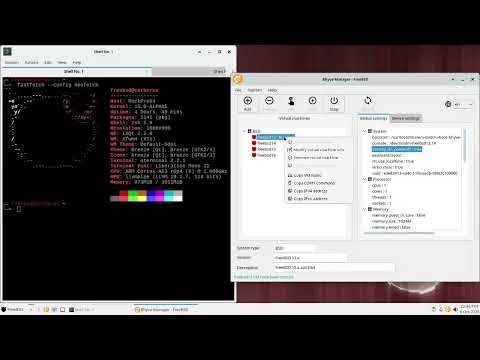
Bhyvemgr is a bhyve management GUI written in Freepascal/Lazarus on FreeBSD. It needs a bunch of tools mostly installed on base system and some installed from ports/packages. Currently it supports amd64 and aarch64. The main goal is to be a desktop user application to easily and quickly setup and run virtual machines on the FreeBSD host. Since v2.0.0 version, bhyvemgr was migrated to client/server architecture. For this reason a server component was developed. This new component is named bhyvemgrd.
Features
- virtual machines management
- create virtual machines from cloud/vm images
- cloud init and naugeinit initialization support
- devices management (support almost all bhyve pci devices with some exceptions)
- dnsmasq support
- vnc and xfreerdp client support
- zfs/ufs support
- raw/zfs volume support
- bridge/tap support
- bhyve_config configuration variables support
- basic sudo/doas support (only bhyvemgr <= 1.15.0)
- mac_do/mdo support (only bhyvemgr >= 2.0.0 and bhyvemgrd >= 1.0.0)
- mac_do/setcred/exec_paths support (only bhyvemgr >= 2.0.0, bhyvemgrd >= 1.1.0 and FreeBSD >= 1501501)
- uefi/uboot support only
- swtpm support
- ipv4/ipv6 support
- aarch64 and amd64 support
- i18n support
- PF/NAT support
- Storage ZFS snapshots support (only bhyvemgr >= 2.1.0 and bhyvemgrd >= 1.2.0)
- and more
Bhyvemgr dependencies
From base system
v2.0.0 and later
bhyve, bhyvectl, bhyveload, chown, chmod, fetch, file, ifconfig, install, kill, kldload, kldstat, makefs, mdo/mac_do, pciconf, pfctl, pgrep, rm, service, sysctl, truncate, xz, zfs and zpool
v1.15.0 and below
bhyve, bhyvectl, bhyveload, chown, chmod, fetch, file, ifconfig, install, kill, kldload, kldstat, makefs, pciconf, pfctl, pgrep, rm, service, sysctl, truncate, xz, zfs and zpool
From ports/packages
v2.0.0 and later
bhyvemgrd (sysutils/bhyvemgrd), bhyve-firmware (sysutils/bhyve-firmware), qemu-tools (emulators/qemu@tools), swtpm (sysutils/swtpm), vncviewer (net/tigervnc-viewer) and xfreerdp3 (net/freerdp3)
v1.15.0 and below
bhyve-firmware (sysutils/bhyve-firmware), doas (security/doas) or sudo (security/sudo), qemu-tools (emulators/qemu@tools), swtpm (sysutils/swtpm), vncviewer (net/tigervnc-viewer) and xfreerdp3 (net/freerdp3)
Network configuration
bhyvemgr can use two kind of network settings: Quick network configuration or Optimal network configuration. Choose one of them accord to your own needs. I recommend second one because it permits a complete network management of virtual machines. Take a look at network configuration guide for details about how use/configure them.
Privilege tasks
v1.15.0 and below
sudo / doas configuration
bhyve requires root privileges on FreeBSD. To handle these tasks, bhyvemgr uses sudo or doas to mitigate certain security risks. The easiest - but not recommended - way to configure sudo or doas is as follows:
For sudo, if the user is part of the wheel group. Alternatively, a specific user can be defined instead of the group - replace :wheel with a username, such as acm, for example.
%wheel ALL=(ALL:ALL) NOPASSWD: ALL
For doas, if the user is part of the wheel group. Alternatively, a specific user can be defined instead of the group - replace :wheel with a username, such as acm, for example.
permit nopass :wheel
Otherwise, if you panic, use the following:
For sudo, if the user is part of the wheel group
%wheel ALL=(ALL:ALL) ALL
%wheel ALL=(ALL:ALL) NOPASSWD: /usr/sbin/bhyve, /usr/sbin/bhyvectl, /bin/chmod, /usr/sbin/chown, /sbin/ifconfig, \
                        /usr/bin/install, /bin/kill, /sbin/kldload, /sbin/pfctl, /usr/bin/pgrep, /bin/rm, \
                        /usr/sbin/service, /sbin/zfs
For doas, if the user is part of the wheel group
permit keepenv :wheel
permit keepenv nopass :wheel as root cmd /usr/sbin/bhyve
permit keepenv nopass :wheel as root cmd /usr/sbin/bhyvectl
permit keepenv nopass :wheel as root cmd /bin/chmod
permit keepenv nopass :wheel as root cmd /usr/sbin/chown
permit keepenv nopass :wheel as root cmd /sbin/ifconfig
permit keepenv nopass :wheel as root cmd /usr/bin/install
permit keepenv nopass :wheel as root cmd /bin/kill
permit keepenv nopass :wheel as root cmd /sbin/kldload
permit keepenv nopass :wheel as root cmd /sbin/pfctl
permit keepenv nopass :wheel as root cmd /usr/bin/pgrep
permit keepenv nopass :wheel as root cmd /bin/rm
permit keepenv nopass :wheel as root cmd /usr/sbin/service
permit keepenv nopass :wheel as root cmd /sbin/zfs
v2.0.0 and later
The new version of bhyvemgr doesn't require root privileges via sudo or doas on FreeBSD. Privileged operations are handled by bhyvemgrd, mac_do/mdo or mac_do/setcred/exec_paths instead , helping to mitigate security risks. See the bhyvemgrd README for details about how to configure and run it.
Run bhyvemgr for the first time
v1.15.0 and below
When bhyvemgr starts in the first time, this will create a initial config file. It is mandatory to review, modify (if it is necessary) and press Save settings button from of Settings form the first time
v2.0.0 and later
In this case, bhyvemgr will create two configuration files: gui.conf and common.conf. The common.conf file is required for both bhyvemgr and bhyvemgrd. Take a look at migration guide if you are planning move from 1.15.0 to 2.0.0 or later.
Demo
On FreeBSD aarch64
On FreeBSD amd64
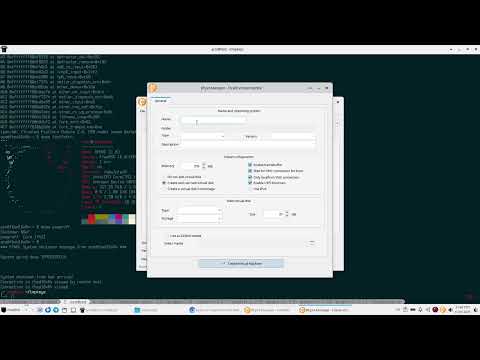
Bhyvemgr Wiki contains guides about how use bhyvemgr in some use cases. Enjoy creating and testing your virtual machines on FreeBSD
Contributors


Similar repos


Languages
Pascal
99.9%
Bhyve management GUI written in Freepascal/Lazarus
Pascal
105
257 commits
updated Sep 21, 2026
README
Bhyvemgr
Bhyvemgr is a bhyve management GUI written in Freepascal/Lazarus on FreeBSD. It needs a bunch of tools mostly installed on base system and some installed from ports/packages. Currently it supports amd64 and aarch64. The main goal is to be a desktop user application to easily and quickly setup and run virtual machines on the FreeBSD host. Since v2.0.0 version, bhyvemgr was migrated to client/server architecture. For this reason a server component was developed. This new component is named bhyvemgrd.
Features
- virtual machines management
- create virtual machines from cloud/vm images
- cloud init and naugeinit initialization support
- devices management (support almost all bhyve pci devices with some exceptions)
- dnsmasq support
- vnc and xfreerdp client support
- zfs/ufs support
- raw/zfs volume support
- bridge/tap support
- bhyve_config configuration variables support
- basic sudo/doas support (only bhyvemgr <= 1.15.0)
- mac_do/mdo support (only bhyvemgr >= 2.0.0 and bhyvemgrd >= 1.0.0)
- mac_do/setcred/exec_paths support (only bhyvemgr >= 2.0.0, bhyvemgrd >= 1.1.0 and FreeBSD >= 1501501)
- uefi/uboot support only
- swtpm support
- ipv4/ipv6 support
- aarch64 and amd64 support
- i18n support
- PF/NAT support
- Storage ZFS snapshots support (only bhyvemgr >= 2.1.0 and bhyvemgrd >= 1.2.0)
- and more
Bhyvemgr dependencies
From base system
v2.0.0 and later
bhyve, bhyvectl, bhyveload, chown, chmod, fetch, file, ifconfig, install, kill, kldload, kldstat, makefs, mdo/mac_do, pciconf, pfctl, pgrep, rm, service, sysctl, truncate, xz, zfs and zpool
v1.15.0 and below
bhyve, bhyvectl, bhyveload, chown, chmod, fetch, file, ifconfig, install, kill, kldload, kldstat, makefs, pciconf, pfctl, pgrep, rm, service, sysctl, truncate, xz, zfs and zpool
From ports/packages
v2.0.0 and later
bhyvemgrd (sysutils/bhyvemgrd), bhyve-firmware (sysutils/bhyve-firmware), qemu-tools (emulators/qemu@tools), swtpm (sysutils/swtpm), vncviewer (net/tigervnc-viewer) and xfreerdp3 (net/freerdp3)
v1.15.0 and below
bhyve-firmware (sysutils/bhyve-firmware), doas (security/doas) or sudo (security/sudo), qemu-tools (emulators/qemu@tools), swtpm (sysutils/swtpm), vncviewer (net/tigervnc-viewer) and xfreerdp3 (net/freerdp3)
Network configuration
bhyvemgr can use two kind of network settings: Quick network configuration or Optimal network configuration. Choose one of them accord to your own needs. I recommend second one because it permits a complete network management of virtual machines. Take a look at network configuration guide for details about how use/configure them.
Privilege tasks
v1.15.0 and below
sudo / doas configuration
bhyve requires root privileges on FreeBSD. To handle these tasks, bhyvemgr uses sudo or doas to mitigate certain security risks. The easiest - but not recommended - way to configure sudo or doas is as follows:
For sudo, if the user is part of the wheel group. Alternatively, a specific user can be defined instead of the group - replace :wheel with a username, such as acm, for example.
%wheel ALL=(ALL:ALL) NOPASSWD: ALL
For doas, if the user is part of the wheel group. Alternatively, a specific user can be defined instead of the group - replace :wheel with a username, such as acm, for example.
permit nopass :wheel
Otherwise, if you panic, use the following:
For sudo, if the user is part of the wheel group
%wheel ALL=(ALL:ALL) ALL
%wheel ALL=(ALL:ALL) NOPASSWD: /usr/sbin/bhyve, /usr/sbin/bhyvectl, /bin/chmod, /usr/sbin/chown, /sbin/ifconfig, \
                        /usr/bin/install, /bin/kill, /sbin/kldload, /sbin/pfctl, /usr/bin/pgrep, /bin/rm, \
                        /usr/sbin/service, /sbin/zfs
For doas, if the user is part of the wheel group
permit keepenv :wheel
permit keepenv nopass :wheel as root cmd /usr/sbin/bhyve
permit keepenv nopass :wheel as root cmd /usr/sbin/bhyvectl
permit keepenv nopass :wheel as root cmd /bin/chmod
permit keepenv nopass :wheel as root cmd /usr/sbin/chown
permit keepenv nopass :wheel as root cmd /sbin/ifconfig
permit keepenv nopass :wheel as root cmd /usr/bin/install
permit keepenv nopass :wheel as root cmd /bin/kill
permit keepenv nopass :wheel as root cmd /sbin/kldload
permit keepenv nopass :wheel as root cmd /sbin/pfctl
permit keepenv nopass :wheel as root cmd /usr/bin/pgrep
permit keepenv nopass :wheel as root cmd /bin/rm
permit keepenv nopass :wheel as root cmd /usr/sbin/service
permit keepenv nopass :wheel as root cmd /sbin/zfs
v2.0.0 and later
The new version of bhyvemgr doesn't require root privileges via sudo or doas on FreeBSD. Privileged operations are handled by bhyvemgrd, mac_do/mdo or mac_do/setcred/exec_paths instead , helping to mitigate security risks. See the bhyvemgrd README for details about how to configure and run it.
Run bhyvemgr for the first time
v1.15.0 and below
When bhyvemgr starts in the first time, this will create a initial config file. It is mandatory to review, modify (if it is necessary) and press Save settings button from of Settings form the first time
v2.0.0 and later
In this case, bhyvemgr will create two configuration files: gui.conf and common.conf. The common.conf file is required for both bhyvemgr and bhyvemgrd. Take a look at migration guide if you are planning move from 1.15.0 to 2.0.0 or later.
Demo
On FreeBSD aarch64
On FreeBSD amd64
Bhyvemgr Wiki contains guides about how use bhyvemgr in some use cases. Enjoy creating and testing your virtual machines on FreeBSD
Similar repos
Contributors
Languages
Pascal
99.9%