
Open Chat Playground (OCP) is a web UI that is able to connect virtually any LLM from any platform.
See the codeREADME
 Open Chat Playground
Open Chat Playground (OCP) is a web UI that is able to connect virtually any LLM from any platform.
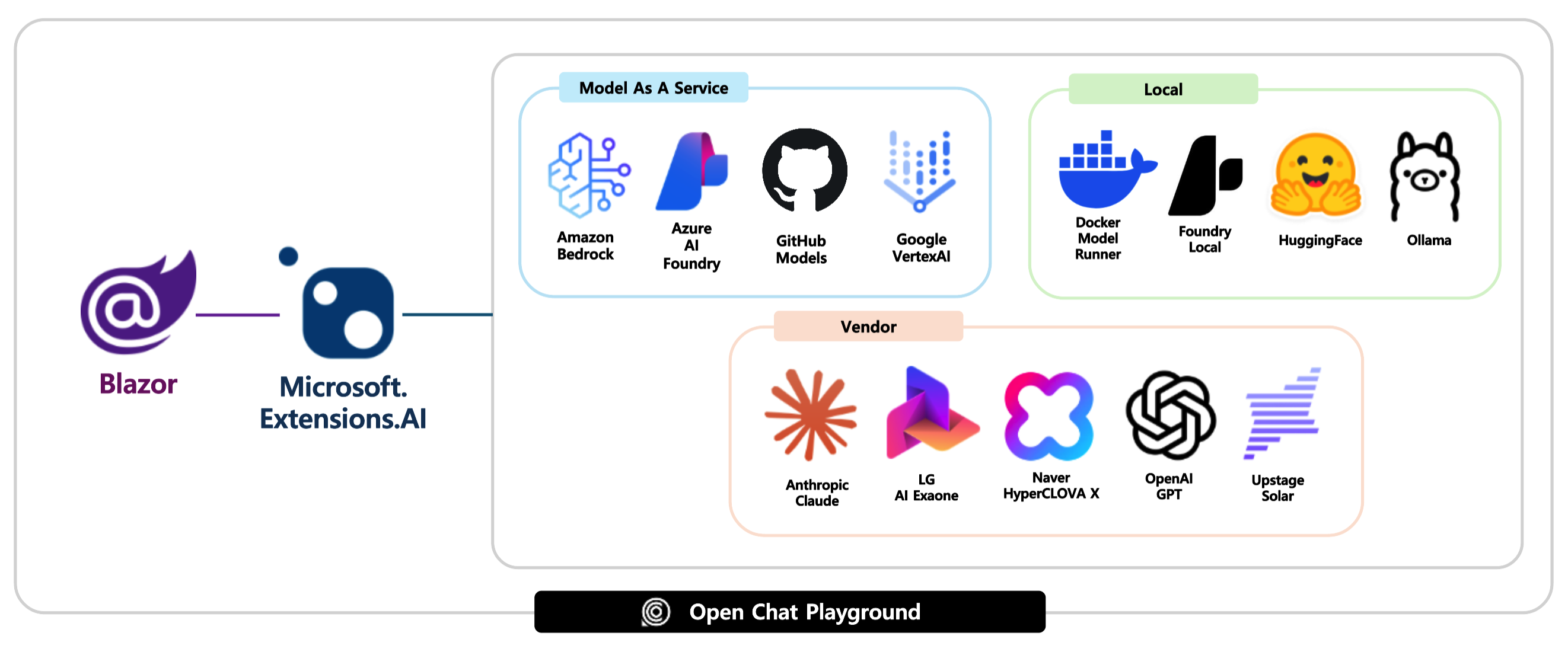
Supported platforms
- Amazon Bedrock
- Azure AI Foundry
- GitHub Models
- Google Vertex AI
- Docker Model Runner
- Foundry Local
- Hugging Face
- Ollama
- Anthropic
-
Naver - LG
- OpenAI
- Upstage
Prerequisites
- Azure Subscription
- .NET SDK 9
- Visual Studio Code + C# DevKit or Visual Studio 2022 v17.14+
- Docker Desktop
- Azure Developer CLI
- GitHub CLI
- PowerShell 7.5+ 👉 Windows only
Getting started
Get the repository ready
-
Login to GitHub.
gh auth login -
Check login status.
gh auth status -
Fork this repository to your account and clone the forked repository to your local machine.
gh repo fork aliencube/open-chat-playground --clone --default-branch-only -
Navigate to the cloned repository.
cd open-chat-playground
Run on local machine
- Use Amazon Bedrock
- Use Azure AI Foundry
- Use GitHub Models
- Use Google Vertex AI
- Use Docker Model Runner
- Use Foundry Local
- Use Hugging Face
- Use Ollama
- Use Anthropic
- Use LG
- Use OpenAI
- Use Upstage
Run in local container
- Use Amazon Bedrock
- Use Azure AI Foundry
- Use GitHub Models
- Use Google Vertex AI
- Use Docker Model Runner
Use Foundry Local👉 NOT SUPPORTED- Use Hugging Face
- Use Ollama
- Use Anthropic
- Use LG
Use Naver👉 NOT SUPPORTED- Use OpenAI
- Use Upstage
Run on Azure
- Use Amazon Bedrock
- Use Azure AI Foundry
- Use GitHub Models
- Use Google Vertex AI
Use Docker Model Runner👉 NOT SUPPORTEDUse Foundry Local👉 NOT SUPPORTED- Use Hugging Face
- Use Ollama
- Use Anthropic
- Use LG
Use Naver👉 NOT SUPPORTED- Use OpenAI
- Use Upstage
Run as API
-
Run the app - either locally or remotely.
-
Navigate to
{{APP_URL}}/openapi.jsonto see the OpenAPI doc. NOTE: the OpenAPI doc is only able to see on a local machine, not on a remote instance. -
Send a
POSTrequest to{{APP_URL}}/api/chat/responseswith a request payload like:[ { "role": "system", "message": "You're a friendly assistant" }, { "role": "user", "message": "Why is the sky blue?" } ] -
Confirm the response payload like:
[
  {
    "role": "assistant",
    "message": "Because "
  },
  {
    "role": "assistant",
    "message": "It's "
  },
  {
    "role": "assistant",
    "message": "... "
  },
  ...
  {
    "role": "assistant",
    "message": "... "
  }
]
Run tests
Build app
-
Make sure you are at the repository root.
cd $REPOSITORY_ROOT -
Build the app.
dotnet restore && dotnet build
Unit tests
-
Make sure you are at the repository root.
cd $REPOSITORY_ROOT -
Run tests.
dotnet test --filter "Category=UnitTest"
Integration tests
-
Make sure you have the Ollama server up and running on your local machine.
ollama serve ollama run hf.co/Qwen/Qwen3-0.6B-GGUF -
Make sure you are at the repository root.
cd $REPOSITORY_ROOT -
Install playwright.
pwsh $REPOSITORY_ROOT/test/OpenChat.PlaygroundApp.Tests/bin/Debug/net{YOUR_VERSION}/playwright.ps1 install -
Run the app.
dotnet run --project $REPOSITORY_ROOT/src/OpenChat.PlaygroundApp -- --connector-type HuggingFace -
Run tests.
# With LLM provider
dotnet test --filter "Category=IntegrationTest"
# Without LLM provider dotnet test --filter "Category=IntegrationTest & Category!=LLMRequired"
Configure GitHub Actions for CI/CD Pipeline
-
Make sure you are at the repository root.
cd $REPOSITORY_ROOT -
Make sure you've logged in to Azure.
azd auth login --check-status -
Run pipeline config.
azd pipeline config -
Answer the question below:
? Select how to authenticate the pipeline to Azure👉Federated Service Principal (SP + OIDC)? Would you like to commit and push your local changes to start the configured CI pipeline?👉No
-
Once the configuration is done, push a new commit to GitHub to run the GitHub Actions workflow.
Significant stargazers

263 followers · starred Oct 2025
Similar repos





Languages
C#
86.2%
JavaScript
8.2%
Bicep
2.6%
CSS
1.4%
HTML
1.3%
Open Chat Playground (OCP) is a web UI that is able to connect virtually any LLM from any platform.
See the codeREADME
Open Chat Playground
Open Chat Playground (OCP) is a web UI that is able to connect virtually any LLM from any platform.
Supported platforms
- Amazon Bedrock
- Azure AI Foundry
- GitHub Models
- Google Vertex AI
- Docker Model Runner
- Foundry Local
- Hugging Face
- Ollama
- Anthropic
-
Naver - LG
- OpenAI
- Upstage
Prerequisites
- Azure Subscription
- .NET SDK 9
- Visual Studio Code + C# DevKit or Visual Studio 2022 v17.14+
- Docker Desktop
- Azure Developer CLI
- GitHub CLI
- PowerShell 7.5+ 👉 Windows only
Getting started
Get the repository ready
-
Login to GitHub.
gh auth login -
Check login status.
gh auth status -
Fork this repository to your account and clone the forked repository to your local machine.
gh repo fork aliencube/open-chat-playground --clone --default-branch-only -
Navigate to the cloned repository.
cd open-chat-playground
Run on local machine
- Use Amazon Bedrock
- Use Azure AI Foundry
- Use GitHub Models
- Use Google Vertex AI
- Use Docker Model Runner
- Use Foundry Local
- Use Hugging Face
- Use Ollama
- Use Anthropic
- Use LG
- Use OpenAI
- Use Upstage
Run in local container
- Use Amazon Bedrock
- Use Azure AI Foundry
- Use GitHub Models
- Use Google Vertex AI
- Use Docker Model Runner
Use Foundry Local👉 NOT SUPPORTED- Use Hugging Face
- Use Ollama
- Use Anthropic
- Use LG
Use Naver👉 NOT SUPPORTED- Use OpenAI
- Use Upstage
Run on Azure
- Use Amazon Bedrock
- Use Azure AI Foundry
- Use GitHub Models
- Use Google Vertex AI
Use Docker Model Runner👉 NOT SUPPORTEDUse Foundry Local👉 NOT SUPPORTED- Use Hugging Face
- Use Ollama
- Use Anthropic
- Use LG
Use Naver👉 NOT SUPPORTED- Use OpenAI
- Use Upstage
Run as API
-
Run the app - either locally or remotely.
-
Navigate to
{{APP_URL}}/openapi.jsonto see the OpenAPI doc. NOTE: the OpenAPI doc is only able to see on a local machine, not on a remote instance. -
Send a
POSTrequest to{{APP_URL}}/api/chat/responseswith a request payload like:[ { "role": "system", "message": "You're a friendly assistant" }, { "role": "user", "message": "Why is the sky blue?" } ] -
Confirm the response payload like:
[
  {
    "role": "assistant",
    "message": "Because "
  },
  {
    "role": "assistant",
    "message": "It's "
  },
  {
    "role": "assistant",
    "message": "... "
  },
  ...
  {
    "role": "assistant",
    "message": "... "
  }
]
Run tests
Build app
-
Make sure you are at the repository root.
cd $REPOSITORY_ROOT -
Build the app.
dotnet restore && dotnet build
Unit tests
-
Make sure you are at the repository root.
cd $REPOSITORY_ROOT -
Run tests.
dotnet test --filter "Category=UnitTest"
Integration tests
-
Make sure you have the Ollama server up and running on your local machine.
ollama serve ollama run hf.co/Qwen/Qwen3-0.6B-GGUF -
Make sure you are at the repository root.
cd $REPOSITORY_ROOT -
Install playwright.
pwsh $REPOSITORY_ROOT/test/OpenChat.PlaygroundApp.Tests/bin/Debug/net{YOUR_VERSION}/playwright.ps1 install -
Run the app.
dotnet run --project $REPOSITORY_ROOT/src/OpenChat.PlaygroundApp -- --connector-type HuggingFace -
Run tests.
# With LLM provider
dotnet test --filter "Category=IntegrationTest"
# Without LLM provider dotnet test --filter "Category=IntegrationTest & Category!=LLMRequired"
Configure GitHub Actions for CI/CD Pipeline
-
Make sure you are at the repository root.
cd $REPOSITORY_ROOT -
Make sure you've logged in to Azure.
azd auth login --check-status -
Run pipeline config.
azd pipeline config -
Answer the question below:
? Select how to authenticate the pipeline to Azure👉Federated Service Principal (SP + OIDC)? Would you like to commit and push your local changes to start the configured CI pipeline?👉No
-
Once the configuration is done, push a new commit to GitHub to run the GitHub Actions workflow.
Similar repos
Significant stargazers
263 followers · starred Oct 2025
Languages
C#
86.2%
JavaScript
8.2%
Bicep
2.6%
CSS
1.4%
HTML
1.3%