SVG icon animation tool for Android, iOS, and the web
See the code
Shape Shifter is a web-app that simplifies the creation of icon animations for Android and the web.
This tool currently exports to standalone SVGs and SVG spritesheets for the web, as well as to
AnimatedVectorDrawable
format for Android. I am totally open to adding support for other export formats as well, so
if you have a format that you'd like to see added in the future,
file a feature request!
Support us with either a one time donation or a monthly donation and help us continue our activities. Funds will go towards hiring new developers to work on awesome features! We'll display your logo below with a link to your site.
🙏 Become a backer 🙏
Is your company using Shape Shifter? Ask your manager to support us! We'll display your logo below with a link to your site.
🙏 Become a sponsor 🙏
I gave a couple of live demos that illustrate how to use the tool at Droidcon SF (15:15 - 20:33):

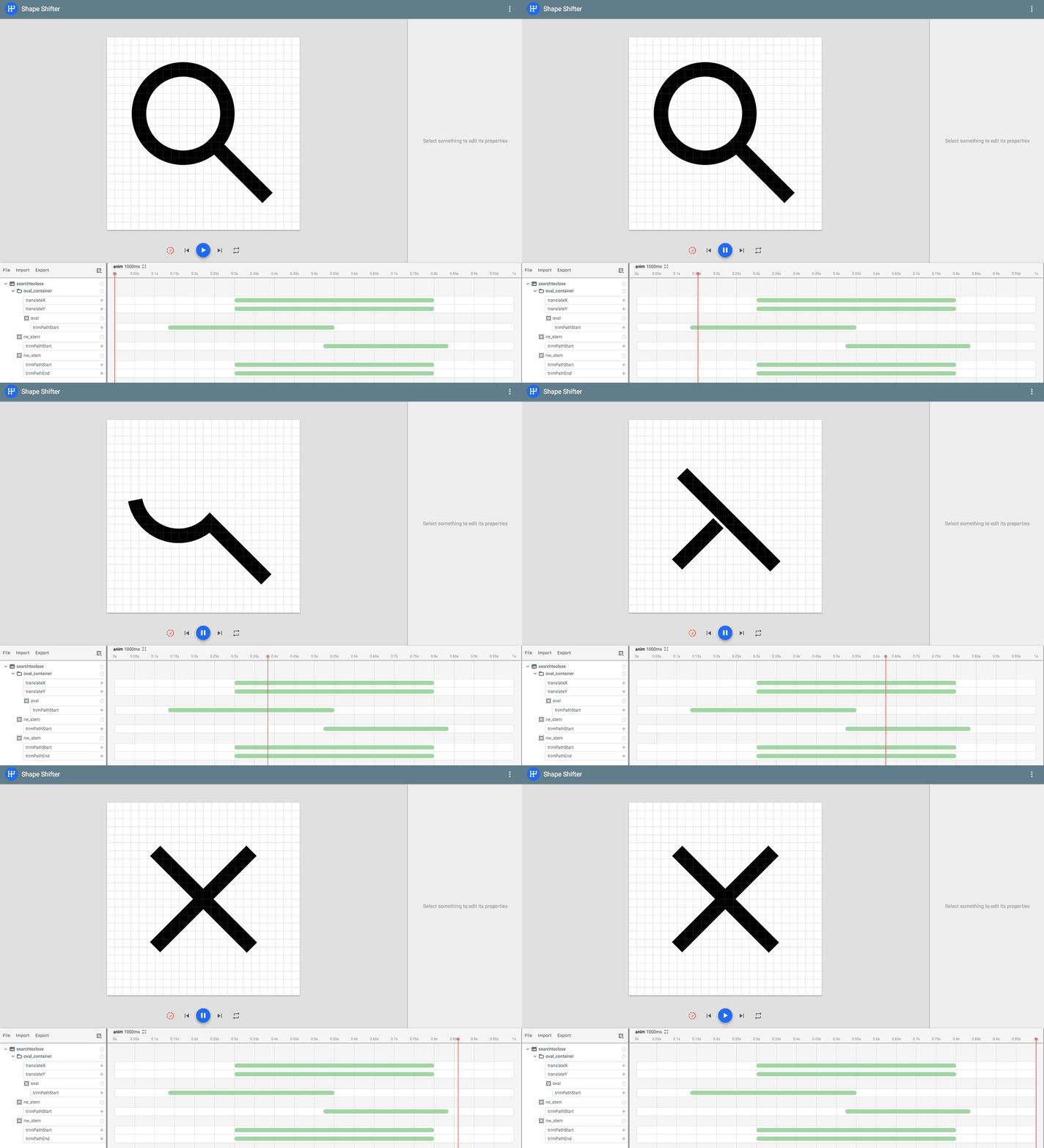
Here are some example icon animations created by Shape Shifter:



Writing high-quality path morphing animations is a tedious and time-consuming task. In order to morph one shape into another, the SVG paths describing the two must be compatible with each other—that is, they need to have the same number and type of drawing commands. This is problematic because:
To address these problems, Shape Shifter provides the following features:
Ls into Qs and As into Cs by hand in
order to make your paths compatible—Shape Shifter does this for you behind-the-scenes!AnimatedVectorDrawable format
for use on the web and in Android applications. I'm open to adding support for other export
formats as well, so feel free to file a feature request!Pretty much all of the graphics in this app are powered by bezier curve approximations under-the-hood.
I learned most of what I needed to know from this excellent primer on bezier curves
(especially sections 9 and 33, which explain how to split and project points onto bezier
curves without altering their original appearance). Most of the interesting SVG-related code
is located under src/app/modules/editor/model/paths.
Auto fix is powered by an adaptation of the Needleman-Wunsch algorithm,
which is used in bioinformatics to align protein or nucleotide sequences. Instead of
aligning DNA base-pairs, Shape Shifter aligns the individual SVG commands that make up
each path instead. You can view the current implementation of the algorithm in the
AutoAwesome.ts file.
Let me know if you encounter any issues with the app (attach SVG files and/or screenshots if you can). Before you do, take a look at the list of known issues here and leave a comment on the existing bugs you want to see fixed in a future release!
I am open to pretty much any feature request, so don't be afraid to ask! I'll likely work on the most popular feature requests first. I'm especially curious how I can make this web app more useful for iOS and web developers.
If you want to contribute, you can build and serve the web app locally as follows:
First install Node.js 24 or later (see .nvmrc), and
npm 11.10 or later. Older releases of Node 24 come with an older
npm, so run npm install -g npm if npm install fails with EBADENGINE.
Clone the repository and in the root directory, run:
npm install
To build and serve the web app locally, run:
npm start
To run the tests, run:
npx playwright install chromium firefox webkit  # Only needed once.
npm run format:check  # Or `npm run format` to fix it.
npm run typecheck
npm run lint
npm run test:run
npm run e2e
The end-to-end tests run in Chromium, Firefox, and WebKit. To run them in one browser, pass
its project name, e.g. npm run e2e -- --project=chromium (or chromium-preview for the
tests that need a production build).
The app is built with React, TypeScript, and Vite.
Huge thanks to Nick Butcher, Roman Nurik, and Steph Yim for all of their help during the early stages of this project!
(top 24 of 30)
1,989 followers · starred Apr 2020
9,435 followers · starred Aug 2022
57 followers · starred Jan 2026
466 followers · starred Jul 2025
SVG icon animation tool for Android, iOS, and the web
See the code
Shape Shifter is a web-app that simplifies the creation of icon animations for Android and the web.
This tool currently exports to standalone SVGs and SVG spritesheets for the web, as well as to
AnimatedVectorDrawable
format for Android. I am totally open to adding support for other export formats as well, so
if you have a format that you'd like to see added in the future,
file a feature request!
Support us with either a one time donation or a monthly donation and help us continue our activities. Funds will go towards hiring new developers to work on awesome features! We'll display your logo below with a link to your site.
🙏 Become a backer 🙏
Is your company using Shape Shifter? Ask your manager to support us! We'll display your logo below with a link to your site.
🙏 Become a sponsor 🙏
I gave a couple of live demos that illustrate how to use the tool at Droidcon SF (15:15 - 20:33):
Here are some example icon animations created by Shape Shifter:
Writing high-quality path morphing animations is a tedious and time-consuming task. In order to morph one shape into another, the SVG paths describing the two must be compatible with each other—that is, they need to have the same number and type of drawing commands. This is problematic because:
To address these problems, Shape Shifter provides the following features:
Ls into Qs and As into Cs by hand in
order to make your paths compatible—Shape Shifter does this for you behind-the-scenes!AnimatedVectorDrawable format
for use on the web and in Android applications. I'm open to adding support for other export
formats as well, so feel free to file a feature request!Pretty much all of the graphics in this app are powered by bezier curve approximations under-the-hood.
I learned most of what I needed to know from this excellent primer on bezier curves
(especially sections 9 and 33, which explain how to split and project points onto bezier
curves without altering their original appearance). Most of the interesting SVG-related code
is located under src/app/modules/editor/model/paths.
Auto fix is powered by an adaptation of the Needleman-Wunsch algorithm,
which is used in bioinformatics to align protein or nucleotide sequences. Instead of
aligning DNA base-pairs, Shape Shifter aligns the individual SVG commands that make up
each path instead. You can view the current implementation of the algorithm in the
AutoAwesome.ts file.
Let me know if you encounter any issues with the app (attach SVG files and/or screenshots if you can). Before you do, take a look at the list of known issues here and leave a comment on the existing bugs you want to see fixed in a future release!
I am open to pretty much any feature request, so don't be afraid to ask! I'll likely work on the most popular feature requests first. I'm especially curious how I can make this web app more useful for iOS and web developers.
If you want to contribute, you can build and serve the web app locally as follows:
First install Node.js 24 or later (see .nvmrc), and
npm 11.10 or later. Older releases of Node 24 come with an older
npm, so run npm install -g npm if npm install fails with EBADENGINE.
Clone the repository and in the root directory, run:
npm install
To build and serve the web app locally, run:
npm start
To run the tests, run:
npx playwright install chromium firefox webkit  # Only needed once.
npm run format:check  # Or `npm run format` to fix it.
npm run typecheck
npm run lint
npm run test:run
npm run e2e
The end-to-end tests run in Chromium, Firefox, and WebKit. To run them in one browser, pass
its project name, e.g. npm run e2e -- --project=chromium (or chromium-preview for the
tests that need a production build).
The app is built with React, TypeScript, and Vite.
Huge thanks to Nick Butcher, Roman Nurik, and Steph Yim for all of their help during the early stages of this project!
(top 24 of 30)
1,989 followers · starred Apr 2020
9,435 followers · starred Aug 2022
57 followers · starred Jan 2026
466 followers · starred Jul 2025



