
README
New Release 2026-08-17: 2.0.0
Packagers: libyaml dependency replaces yaml-cpp
way-displays: Auto Manage Your Wayland Displays
-
Set resolution/refresh: preferred, highest or custom
-
Enable VRR / adaptive sync
-
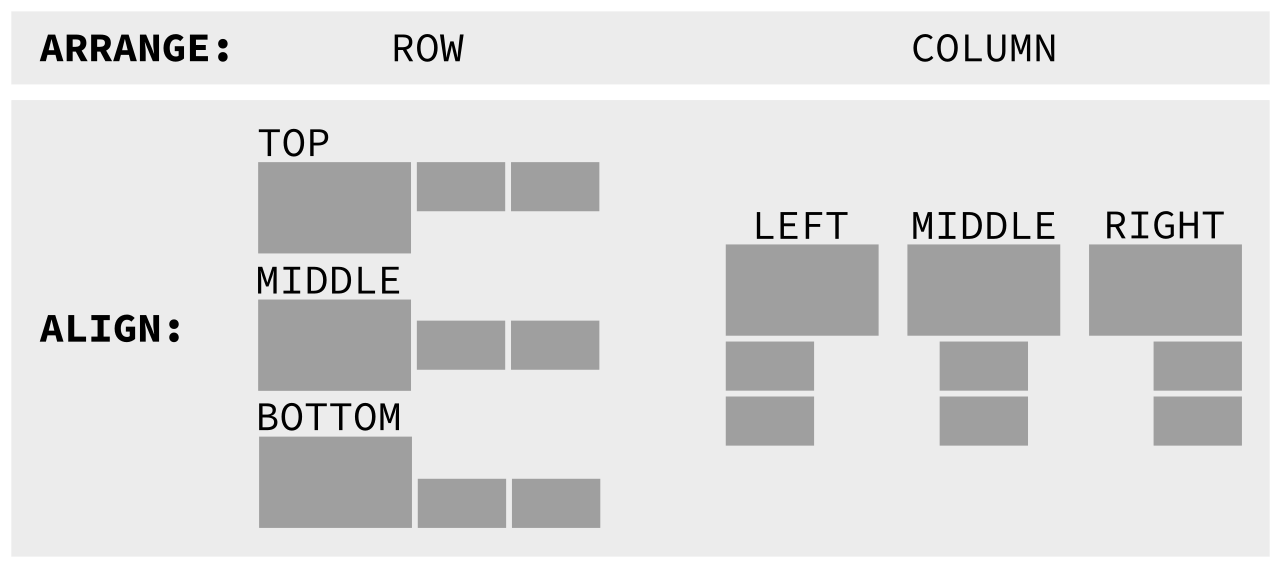
Arrange in a row or a column
-
Auto scale based on DPI: 96 is a scale of 1
-
Update when displays plugged/unplugged with optionally defined conditions
-
Update when laptop lid closed/opened
Works out of the box: no configuration required.
Communicates verbosely via logs/stdout and notifications.
Wayland successor to xlayoutdisplay, inspired by kanshi.
Requirements
A wlroots based compositor that supports the WLR Output Management protocol version 4+.
way-displays is blessed for the sway, river and river-classic compositors. It may work on others; please tell me of your experiences!
Hpyrland already provides all the features of way-displays. It may function, however it is explicitly not supported and you will likely experience problems. Please do not raise issues.
way-displays must be run as a daemon, a background server process. It will respond to your configuration changes as well as state changes such as plugging in a monitor or closing the lid.
User should be a member of the input UNIX group for querying laptop lid state.
Documentation
man way-displays for server and CLI details.
man 5 way-displays for cfg.yaml config file reference.
Quick Start
Start the way-displays server:
Sway
Remove any output commands from your sway config file and add the following:
exec way-displays > /tmp/way-displays.${XDG_VTNR}.${USER}.log 2>&1
River
Add the following to your River Window Manager’s init script or similar:
exec way-displays > /tmp/way-displays.${XDG_VTNR}.${USER}.log 2>&1
River Classic
Add the following to your ${XDG_CONFIG_HOME}/river/init:
way-displays > /tmp/way-displays.${XDG_VTNR}.${USER}.log 2>&1 &
Configure
Restart the compositor and run way-displays -g or look at /tmp/way-displays.${XDG_VTNR}.${USER}.log
way-displays will communicate verbosely via the logs - you might want to tail -f /tmp/way-displays.${XDG_VTNR}.${USER}.log whilst you are tweaking.
Tweak cfg.yaml to your liking and save it, see man 5 way-displays. Changes will be immediately applied.
Alternatively, use the CLI to make your changes then persist them with way-displays -w
Installation
Package Manager

From Source
master is unstable, a release tag is recommended for a stable experience.

See CONTRIBUTING for a list of the dependencies you'll need.
Install / Uninstall
sudo make install
sudo make uninstall
Issues
Please collect debug logs, create a github issue and attach your log.
Questions, Ideas And Contributions
Please raise a github issue
Contributions are most gratefully received, see Milestones for prioritised issues.
Contributors


Similar repos


Languages
C
98.0%
Makefile
1.1%
README
New Release 2026-08-17: 2.0.0
Packagers: libyaml dependency replaces yaml-cpp
way-displays: Auto Manage Your Wayland Displays
-
Set resolution/refresh: preferred, highest or custom
-
Enable VRR / adaptive sync
-
Arrange in a row or a column
-
Auto scale based on DPI: 96 is a scale of 1
-
Update when displays plugged/unplugged with optionally defined conditions
-
Update when laptop lid closed/opened
Works out of the box: no configuration required.
Communicates verbosely via logs/stdout and notifications.
Wayland successor to xlayoutdisplay, inspired by kanshi.
Requirements
A wlroots based compositor that supports the WLR Output Management protocol version 4+.
way-displays is blessed for the sway, river and river-classic compositors. It may work on others; please tell me of your experiences!
Hpyrland already provides all the features of way-displays. It may function, however it is explicitly not supported and you will likely experience problems. Please do not raise issues.
way-displays must be run as a daemon, a background server process. It will respond to your configuration changes as well as state changes such as plugging in a monitor or closing the lid.
User should be a member of the input UNIX group for querying laptop lid state.
Documentation
man way-displays for server and CLI details.
man 5 way-displays for cfg.yaml config file reference.
Quick Start
Start the way-displays server:
Sway
Remove any output commands from your sway config file and add the following:
exec way-displays > /tmp/way-displays.${XDG_VTNR}.${USER}.log 2>&1
River
Add the following to your River Window Manager’s init script or similar:
exec way-displays > /tmp/way-displays.${XDG_VTNR}.${USER}.log 2>&1
River Classic
Add the following to your ${XDG_CONFIG_HOME}/river/init:
way-displays > /tmp/way-displays.${XDG_VTNR}.${USER}.log 2>&1 &
Configure
Restart the compositor and run way-displays -g or look at /tmp/way-displays.${XDG_VTNR}.${USER}.log
way-displays will communicate verbosely via the logs - you might want to tail -f /tmp/way-displays.${XDG_VTNR}.${USER}.log whilst you are tweaking.
Tweak cfg.yaml to your liking and save it, see man 5 way-displays. Changes will be immediately applied.
Alternatively, use the CLI to make your changes then persist them with way-displays -w
Installation
Package Manager
From Source
master is unstable, a release tag is recommended for a stable experience.
See CONTRIBUTING for a list of the dependencies you'll need.
Install / Uninstall
sudo make install
sudo make uninstall
Issues
Please collect debug logs, create a github issue and attach your log.
Questions, Ideas And Contributions
Please raise a github issue
Contributions are most gratefully received, see Milestones for prioritised issues.
Similar repos
Contributors
Languages
C
98.0%
Makefile
1.1%