
README
GitLab CI Language Server (gitlab-ci-ls)

Disclaimer
This is an independent project and not an official GitLab product.
It is intended to be used alongside yaml-language-server (yamlls), providing specialized support for GitLab CI files without replacing yamlls.
Features
- Go To Definition: Navigate to definitions of
jobs,includes,variables,needs,extends,components,stagesandvariables. - Find References: Find all usages of
jobs,extendsandstages. - Autocompletion: Suggestions for
extends,stages,needs,variables,included projects filesandcomponents. - Hover Information: View documentation for job with merged definitions.
- Diagnostics: Identifies issues with
extendsreferences,stagedefinitions,job needsusage andcomponents. - Rename: Supports job renaming.
It also supports jump to included files. In case it is a remote file it tries to downloading using current workspace git setup and caches it locally.
Showcase
Note that this video doesn't include all functionalities.
Configuration
Initialization options:
-
cache: location for cached remote files
-
log_path: location for LS log
-
variables: map of CI variable names to values, used to expand
$VAR/${VAR}occurrences ininclude:project:andref:values. Variables not present in the map fall back to the process environment; unknown variables are left untouched. This is needed when includes are parameterized through instance- or group-level CI variables that only exist on the GitLab server. For example, every project on drupal.org's GitLab uses:include: - project: $_GITLAB_TEMPLATES_REPO ref: $_GITLAB_TEMPLATES_REF file: "/includes/include.drupalci.main.yml"which resolves with:
{ "variables": { "_GITLAB_TEMPLATES_REPO": "project/gitlab_templates", "_GITLAB_TEMPLATES_REF": "default-ref" } } -
options:
- dependencies_autocomplete_stage_filtering: Items in dependencies options has to be from previous or current stage. This opption enables dependencies autocomplete result filtering by job stages. It is currently set as opt-in because it takes a longer time (cca 800ms on test repo - medium size) when stages aren't defined in root job because language server needs to first build whole job definition (merging extends) before it can check if job is a valid one. Defaults to
false
- dependencies_autocomplete_stage_filtering: Items in dependencies options has to be from previous or current stage. This opption enables dependencies autocomplete result filtering by job stages. It is currently set as opt-in because it takes a longer time (cca 800ms on test repo - medium size) when stages aren't defined in root job because language server needs to first build whole job definition (merging extends) before it can check if job is a valid one. Defaults to
Project-level Configuration (.gitlab-ci-ls.yml)
For projects that do not have a standard .gitlab-ci.yml file at their root (e.g., GitLab CI template projects that define reusable components without a pipeline of their own), you can specify the root CI files using a .gitlab-ci-ls.yml file in your project's root directory. This allows the language server to correctly identify and process your GitLab CI configurations.
The .gitlab-ci-ls.yml file should contain a root_files key, which is a list of paths to your main GitLab CI files. These paths can be:
- Individual files: Direct paths to
.gitlab-ci.ymlor.gitlab-ci.yamlfiles. Example:["path/to/my-pipeline.gitlab-ci.yml"] - Directories: The language server will recursively search for
.gitlab-ci.ymlor.gitlab-ci.yamlfiles within the specified directories. Example:["pipelines/"] - Glob patterns: Patterns that match multiple GitLab CI files.
Example:
["templates/**/*.gitlab-ci.yml"]
You can combine these types in a single list to cover all your root CI files.
Example .gitlab-ci-ls.yml:
root_files:
  - pipeline1/.gitlab-ci.yml
  - pipeline2/.gitlab-ci.yml
  - shared-templates/**/*.gitlab-ci.yml
  - ci-configs/
Installation
Hint: On Linux you have to install the package libssl-dev and pkg-config (On Debian based distributions)
respectively openssl-devel and pkgconf (On RedHat based distributions) when you use Cargo or Mason installation.
- GitHub Releases: Download from the GitHub releases page.
- Homebrew (macOS/Linux):
brew install alesbrelih/gitlab-ci-ls/gitlab-ci-lsHint: Since Homebrew version 6 you have to trust 3rd party taps. - Cargo (Rust Package Manager):
cargo install gitlab-ci-lsHint: You may have to add$HOME/.cargo/binto your$PATHenv var. - Mason (neovim): Github
- Zed integration: Zed extension Hint: You still have to install a binary.
Build from source
cargo build --release
Executable can then be found at target/release/gitlab-ci-ls
Integration with Neovim
Easiest way to use this using neovim is to install it using mason with combination of mason-lspconfig.
Important: To use it now you will have to set correct file type. Before it was attached on
yaml file types, but I have decided that it brings too much confusion.
Example how to add it:
vim.filetype.add({
  pattern = {
    ['%.gitlab%-ci%.ya?ml'] = 'yaml.gitlab',
  },
})
Integration with VSCode
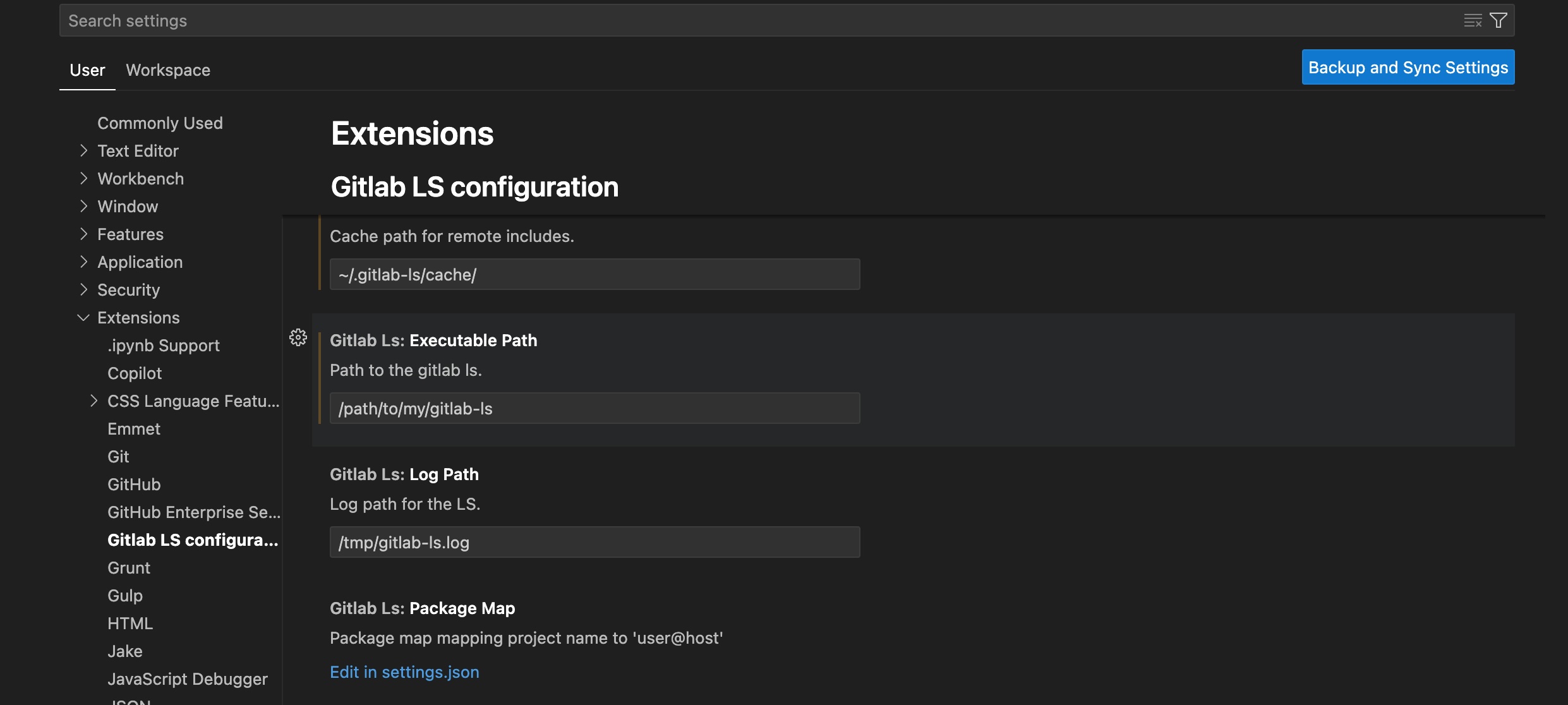
Extension can be found here.
This extension supports configuration which needs to be set up because gitlab-ci-ls itself isn't installed along with the extension but it needs to be downloaded from releases, brew or built from source.
Emacs lsp-mode configuration
To use gitlab-ci-ls with Emacs lsp-mode, reference the below sample
configuration.
(add-to-list 'lsp-language-id-configuration '("\\.gitlab-ci\\.yml$" . "gitlabci"))
(add-to-list 'lsp-language-id-configuration '("/ci-templates/.*\\.yml$" . "gitlabci"))

(lsp-register-custom-settings
  '(("gitlabci.cache" "/path/where/remote/folders/will/be/cached")
    ("gitlabci.log_path" "/tmp/gitlab-ci-ls.log")))

(lsp-register-client
  (make-lsp-client :new-connection (lsp-stdio-connection '("gitlab-ci-ls"))
                  :activation-fn (lsp-activate-on "gitlabci")
                  :server-id 'gitlabci
                  :priority 10
                  :initialization-options (lambda () (gethash "gitlabci" (lsp-configuration-section "gitlabci")))))
TODO
- Smarter way to initialize, it should support root_dir equal to nil and once file is opened it should receive/calculate new root.
- Fix VSCode completion. It seems it also needs a range to correctly update text.
- Rename to gitlab-ci-ls.
- References for stages
- Variables can be set in matrixes as well, this is relevant for go to definition on variable.
- Support !reference
- Handle default keyword
- Handle components
- Push diagnostics, instead of pull based
Contributors


Similar repos



Languages
Rust
98.8%
TypeScript
1.2%
README
GitLab CI Language Server (gitlab-ci-ls)
Disclaimer
This is an independent project and not an official GitLab product.
It is intended to be used alongside yaml-language-server (yamlls), providing specialized support for GitLab CI files without replacing yamlls.
Features
- Go To Definition: Navigate to definitions of
jobs,includes,variables,needs,extends,components,stagesandvariables. - Find References: Find all usages of
jobs,extendsandstages. - Autocompletion: Suggestions for
extends,stages,needs,variables,included projects filesandcomponents. - Hover Information: View documentation for job with merged definitions.
- Diagnostics: Identifies issues with
extendsreferences,stagedefinitions,job needsusage andcomponents. - Rename: Supports job renaming.
It also supports jump to included files. In case it is a remote file it tries to downloading using current workspace git setup and caches it locally.
Showcase
Note that this video doesn't include all functionalities.
Configuration
Initialization options:
-
cache: location for cached remote files
-
log_path: location for LS log
-
variables: map of CI variable names to values, used to expand
$VAR/${VAR}occurrences ininclude:project:andref:values. Variables not present in the map fall back to the process environment; unknown variables are left untouched. This is needed when includes are parameterized through instance- or group-level CI variables that only exist on the GitLab server. For example, every project on drupal.org's GitLab uses:include: - project: $_GITLAB_TEMPLATES_REPO ref: $_GITLAB_TEMPLATES_REF file: "/includes/include.drupalci.main.yml"which resolves with:
{ "variables": { "_GITLAB_TEMPLATES_REPO": "project/gitlab_templates", "_GITLAB_TEMPLATES_REF": "default-ref" } } -
options:
- dependencies_autocomplete_stage_filtering: Items in dependencies options has to be from previous or current stage. This opption enables dependencies autocomplete result filtering by job stages. It is currently set as opt-in because it takes a longer time (cca 800ms on test repo - medium size) when stages aren't defined in root job because language server needs to first build whole job definition (merging extends) before it can check if job is a valid one. Defaults to
false
- dependencies_autocomplete_stage_filtering: Items in dependencies options has to be from previous or current stage. This opption enables dependencies autocomplete result filtering by job stages. It is currently set as opt-in because it takes a longer time (cca 800ms on test repo - medium size) when stages aren't defined in root job because language server needs to first build whole job definition (merging extends) before it can check if job is a valid one. Defaults to
Project-level Configuration (.gitlab-ci-ls.yml)
For projects that do not have a standard .gitlab-ci.yml file at their root (e.g., GitLab CI template projects that define reusable components without a pipeline of their own), you can specify the root CI files using a .gitlab-ci-ls.yml file in your project's root directory. This allows the language server to correctly identify and process your GitLab CI configurations.
The .gitlab-ci-ls.yml file should contain a root_files key, which is a list of paths to your main GitLab CI files. These paths can be:
- Individual files: Direct paths to
.gitlab-ci.ymlor.gitlab-ci.yamlfiles. Example:["path/to/my-pipeline.gitlab-ci.yml"] - Directories: The language server will recursively search for
.gitlab-ci.ymlor.gitlab-ci.yamlfiles within the specified directories. Example:["pipelines/"] - Glob patterns: Patterns that match multiple GitLab CI files.
Example:
["templates/**/*.gitlab-ci.yml"]
You can combine these types in a single list to cover all your root CI files.
Example .gitlab-ci-ls.yml:
root_files:
  - pipeline1/.gitlab-ci.yml
  - pipeline2/.gitlab-ci.yml
  - shared-templates/**/*.gitlab-ci.yml
  - ci-configs/
Installation
Hint: On Linux you have to install the package libssl-dev and pkg-config (On Debian based distributions)
respectively openssl-devel and pkgconf (On RedHat based distributions) when you use Cargo or Mason installation.
- GitHub Releases: Download from the GitHub releases page.
- Homebrew (macOS/Linux):
brew install alesbrelih/gitlab-ci-ls/gitlab-ci-lsHint: Since Homebrew version 6 you have to trust 3rd party taps. - Cargo (Rust Package Manager):
cargo install gitlab-ci-lsHint: You may have to add$HOME/.cargo/binto your$PATHenv var. - Mason (neovim): Github
- Zed integration: Zed extension Hint: You still have to install a binary.
Build from source
cargo build --release
Executable can then be found at target/release/gitlab-ci-ls
Integration with Neovim
Easiest way to use this using neovim is to install it using mason with combination of mason-lspconfig.
Important: To use it now you will have to set correct file type. Before it was attached on
yaml file types, but I have decided that it brings too much confusion.
Example how to add it:
vim.filetype.add({
  pattern = {
    ['%.gitlab%-ci%.ya?ml'] = 'yaml.gitlab',
  },
})
Integration with VSCode
Extension can be found here.
This extension supports configuration which needs to be set up because gitlab-ci-ls itself isn't installed along with the extension but it needs to be downloaded from releases, brew or built from source.
Emacs lsp-mode configuration
To use gitlab-ci-ls with Emacs lsp-mode, reference the below sample
configuration.
(add-to-list 'lsp-language-id-configuration '("\\.gitlab-ci\\.yml$" . "gitlabci"))
(add-to-list 'lsp-language-id-configuration '("/ci-templates/.*\\.yml$" . "gitlabci"))

(lsp-register-custom-settings
  '(("gitlabci.cache" "/path/where/remote/folders/will/be/cached")
    ("gitlabci.log_path" "/tmp/gitlab-ci-ls.log")))

(lsp-register-client
  (make-lsp-client :new-connection (lsp-stdio-connection '("gitlab-ci-ls"))
                  :activation-fn (lsp-activate-on "gitlabci")
                  :server-id 'gitlabci
                  :priority 10
                  :initialization-options (lambda () (gethash "gitlabci" (lsp-configuration-section "gitlabci")))))
TODO
- Smarter way to initialize, it should support root_dir equal to nil and once file is opened it should receive/calculate new root.
- Fix VSCode completion. It seems it also needs a range to correctly update text.
- Rename to gitlab-ci-ls.
- References for stages
- Variables can be set in matrixes as well, this is relevant for go to definition on variable.
- Support !reference
- Handle default keyword
- Handle components
- Push diagnostics, instead of pull based
Similar repos
Contributors
Languages
Rust
98.8%
TypeScript
1.2%