
Open-source RSVP speed reader component for focused, distraction-free reading (built with React & TypeScript).
See the codeSee what people are saying (1)
README
ADHD Reader
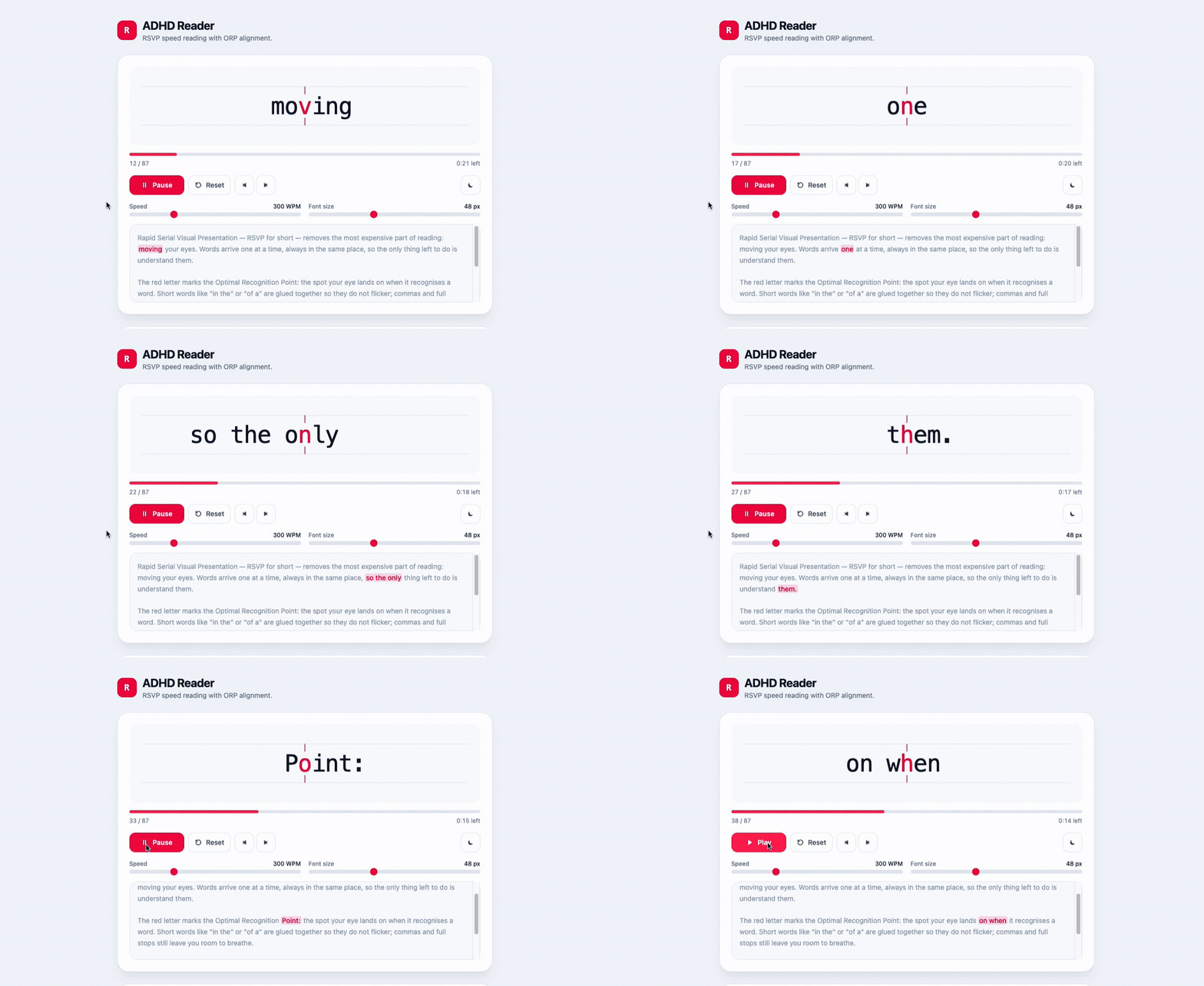
A dependency-free React + TypeScript component for RSVP (Rapid Serial Visual Presentation) reading: words appear one at a time in a fixed spot, so the eyes never travel and there is no line to lose. Built for readers with ADHD or focus difficulties.
Live demo: adhd-reader-iota.vercel.app
Highlights
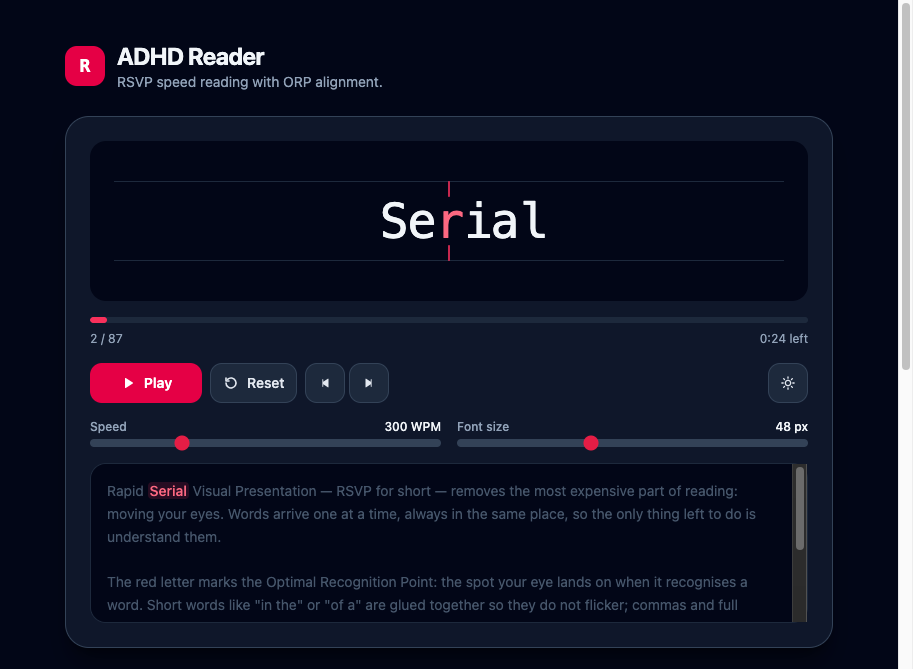
- ORP alignment. Every word gets an Optimal Recognition Point; that character is painted red and stays glued to the center of the box between two focus ticks, no matter how long the word is.
- Rhythm, not a metronome. Commas, dashes, sentence ends and paragraph breaks each get their own pause; long words get a little extra time.
- Smart short-word merging.
in the houseis shown as one frame instead of three, which removes most of the flicker. - Automatic language detection for short-word lists.
- Full control surface. Play / Pause / Reset, step by word, WPM slider (100–900), font-size slider, light/dark theme, keyboard shortcuts.
- No runtime dependencies beyond React. Styling is Tailwind CSS v4 utility classes.
Quick start
npm install
npm run dev      # http://localhost:5173
npm run build    # typecheck + production build
Using the component
The simplest, fully uncontrolled form — the component keeps speed, font size and theme in its own state:
import { AdhdReader } from './components/AdhdReader';

export function Article() {
  return <AdhdReader text="Words arrive one at a time, always in the same place." defaultWpm={350} />;
}
Controlled form, when the surrounding page owns the settings (this is what the demo in src/App.tsx does):
const [wpm, setWpm] = useState(300);
const [theme, setTheme] = useState<ReaderTheme>('light');

<AdhdReader
  text={text}
  language="auto"
  wpm={wpm}
  onWpmChange={setWpm}
  theme={theme}
  onThemeChange={setTheme}
  onFinish={() => console.log('done')}
/>;
Driving it from outside, through the imperative handle:
const reader = useRef<AdhdReaderHandle>(null);

<AdhdReader ref={reader} text={text} showControls={false} />
<button onClick={() => reader.current?.toggle()}>Play / Pause</button>;
Or skip the UI entirely and use the engine with your own markup:
const { token, isPlaying, progress, play, pause } = useRsvpReader({ text, wpm: 400 });
Props
| Prop | Type | Default | Description |
|---|---|---|---|
text | string | — | Text to read. Changing it rewinds to the first word. |
language | 'auto' | 'en' | 'auto' | Which short-word list to use. 'auto' detects from the text. |
wpm / defaultWpm | number | 300 | Reading speed. Changing it never interrupts playback. |
fontSize / defaultFontSize | number | 48 | Word size in pixels. |
theme / defaultTheme | 'light' | 'dark' | 'light' | Adds the dark class to the component root. |
mergeShortWords | boolean | true | Glue short prepositions/conjunctions to the next word. |
punctuationPauses | boolean | true | Slow down on punctuation and paragraph breaks. |
autoPlay | boolean | false | Start as soon as the text is loaded. |
showControls | boolean | true | Render the built-in control panel. |
showContext | boolean | true | Render the source text with the current word highlighted. |
enableKeyboardShortcuts | boolean | true | Space play/pause, ←/→ step, R reset. |
labels | Partial<AdhdReaderLabels> | English | Every UI string, for localization. |
onWpmChange, onFontSizeChange, onThemeChange | (value) => void | — | Change handlers for the controlled props. |
onIndexChange | (index, total) => void | — | Fires whenever the displayed frame changes. |
onFinish | () => void | — | Fires once after the last frame. |
className | string | — | Extra classes on the root element. |
Shortcuts are ignored while the focus is in an input, textarea or contenteditable element.
Localization
The UI ships with English strings; pass labels to translate it:
<AdhdReader
  text={text}
  labels={{
    play: 'Start',
    pause: 'Pause',
    reset: 'Reset',
    speed: 'Speed',
    fontSize: 'Font size',
    remaining: (time) => `${time} left`,
  }}
/>
How it works
ORP — Optimal Recognition Point
The eye does not fixate on the middle of a word but slightly left of it, so the anchor grows in steps
rather than linearly (utils.ts → computeOrpIndex):
| Letters in the word | 1 | 2–5 | 6–9 | 10–13 | 14+ |
|---|---|---|---|---|---|
| ORP index | 0 | 1 | 2 | 3 | 4 |
Leading punctuation is skipped, so "Hello still anchors on the second letter of Hello.
The word is laid out in a 1fr auto 1fr grid, which keeps that one character dead center while the
rest of the word grows to the left and right.
Pauses
Each frame carries a delayMultiplier; the actual delay is 60000 / wpm × delayMultiplier.
The factors (see constants.ts) are multiplied together:
| Cause | Factor |
|---|---|
. ! ? … | ×2.4 |
: ; — – | ×1.8 |
, | ×1.5 |
closing ” ) | ×1.2 |
| paragraph break / line break | ×1.6 / ×1.15 |
| every character above 8 | +0.04 (capped at ×1.6) |
| every extra word merged into the frame | +0.15 |
Short-word merging
A word is merged forward when it is at most 4 characters long, carries no trailing punctuation, and
appears in the language's function-word list. Merging chains (in → in the → in the house) and
stops at 3 words or 14 characters. The ORP is then computed inside the longest word of the group,
so the eye lands on house, not on the glued in.
Inspect the result for any text with the bundled dev script:
npm run tokens -- "The fox jumps over the lazy dog, and then it sleeps."
11 words -> 6 frames

The fox
     ^  x1.15
over the lazy
          ^  x1.3
Project structure
src/
├── components/AdhdReader/
│   ├── index.tsx              # Component: display, focus ticks, controls, context preview
│   ├── useRsvpReader.ts       # Headless engine: tokens, playback clock, timing math
│   ├── useControllableState.ts# Controlled / uncontrolled prop helper
│   ├── utils.ts               # Tokenizer, ORP, pauses, language detection
│   ├── constants.ts           # Short-word lists, pause factors, slider bounds
│   └── types.ts               # Public types
├── samples.ts                 # Demo text
├── App.tsx                    # Interactive demo page
└── index.css                  # Tailwind entry + class-based dark variant
To reuse the reader in another project, copy src/components/AdhdReader/ — it has no imports outside
of React. If that project does not use Tailwind, replace the class names in index.tsx; all the logic
lives in the other files and is style-agnostic.
License
MIT — see LICENSE.
Contributors

6 commits
Similar repos


Languages
TypeScript
96.3%
JavaScript
2.2%
Open-source RSVP speed reader component for focused, distraction-free reading (built with React & TypeScript).
See the codeSee what people are saying (1)
README
ADHD Reader
A dependency-free React + TypeScript component for RSVP (Rapid Serial Visual Presentation) reading: words appear one at a time in a fixed spot, so the eyes never travel and there is no line to lose. Built for readers with ADHD or focus difficulties.
Live demo: adhd-reader-iota.vercel.app
Highlights
- ORP alignment. Every word gets an Optimal Recognition Point; that character is painted red and stays glued to the center of the box between two focus ticks, no matter how long the word is.
- Rhythm, not a metronome. Commas, dashes, sentence ends and paragraph breaks each get their own pause; long words get a little extra time.
- Smart short-word merging.
in the houseis shown as one frame instead of three, which removes most of the flicker. - Automatic language detection for short-word lists.
- Full control surface. Play / Pause / Reset, step by word, WPM slider (100–900), font-size slider, light/dark theme, keyboard shortcuts.
- No runtime dependencies beyond React. Styling is Tailwind CSS v4 utility classes.
Quick start
npm install
npm run dev      # http://localhost:5173
npm run build    # typecheck + production build
Using the component
The simplest, fully uncontrolled form — the component keeps speed, font size and theme in its own state:
import { AdhdReader } from './components/AdhdReader';

export function Article() {
  return <AdhdReader text="Words arrive one at a time, always in the same place." defaultWpm={350} />;
}
Controlled form, when the surrounding page owns the settings (this is what the demo in src/App.tsx does):
const [wpm, setWpm] = useState(300);
const [theme, setTheme] = useState<ReaderTheme>('light');

<AdhdReader
  text={text}
  language="auto"
  wpm={wpm}
  onWpmChange={setWpm}
  theme={theme}
  onThemeChange={setTheme}
  onFinish={() => console.log('done')}
/>;
Driving it from outside, through the imperative handle:
const reader = useRef<AdhdReaderHandle>(null);

<AdhdReader ref={reader} text={text} showControls={false} />
<button onClick={() => reader.current?.toggle()}>Play / Pause</button>;
Or skip the UI entirely and use the engine with your own markup:
const { token, isPlaying, progress, play, pause } = useRsvpReader({ text, wpm: 400 });
Props
| Prop | Type | Default | Description |
|---|---|---|---|
text | string | — | Text to read. Changing it rewinds to the first word. |
language | 'auto' | 'en' | 'auto' | Which short-word list to use. 'auto' detects from the text. |
wpm / defaultWpm | number | 300 | Reading speed. Changing it never interrupts playback. |
fontSize / defaultFontSize | number | 48 | Word size in pixels. |
theme / defaultTheme | 'light' | 'dark' | 'light' | Adds the dark class to the component root. |
mergeShortWords | boolean | true | Glue short prepositions/conjunctions to the next word. |
punctuationPauses | boolean | true | Slow down on punctuation and paragraph breaks. |
autoPlay | boolean | false | Start as soon as the text is loaded. |
showControls | boolean | true | Render the built-in control panel. |
showContext | boolean | true | Render the source text with the current word highlighted. |
enableKeyboardShortcuts | boolean | true | Space play/pause, ←/→ step, R reset. |
labels | Partial<AdhdReaderLabels> | English | Every UI string, for localization. |
onWpmChange, onFontSizeChange, onThemeChange | (value) => void | — | Change handlers for the controlled props. |
onIndexChange | (index, total) => void | — | Fires whenever the displayed frame changes. |
onFinish | () => void | — | Fires once after the last frame. |
className | string | — | Extra classes on the root element. |
Shortcuts are ignored while the focus is in an input, textarea or contenteditable element.
Localization
The UI ships with English strings; pass labels to translate it:
<AdhdReader
  text={text}
  labels={{
    play: 'Start',
    pause: 'Pause',
    reset: 'Reset',
    speed: 'Speed',
    fontSize: 'Font size',
    remaining: (time) => `${time} left`,
  }}
/>
How it works
ORP — Optimal Recognition Point
The eye does not fixate on the middle of a word but slightly left of it, so the anchor grows in steps
rather than linearly (utils.ts → computeOrpIndex):
| Letters in the word | 1 | 2–5 | 6–9 | 10–13 | 14+ |
|---|---|---|---|---|---|
| ORP index | 0 | 1 | 2 | 3 | 4 |
Leading punctuation is skipped, so "Hello still anchors on the second letter of Hello.
The word is laid out in a 1fr auto 1fr grid, which keeps that one character dead center while the
rest of the word grows to the left and right.
Pauses
Each frame carries a delayMultiplier; the actual delay is 60000 / wpm × delayMultiplier.
The factors (see constants.ts) are multiplied together:
| Cause | Factor |
|---|---|
. ! ? … | ×2.4 |
: ; — – | ×1.8 |
, | ×1.5 |
closing ” ) | ×1.2 |
| paragraph break / line break | ×1.6 / ×1.15 |
| every character above 8 | +0.04 (capped at ×1.6) |
| every extra word merged into the frame | +0.15 |
Short-word merging
A word is merged forward when it is at most 4 characters long, carries no trailing punctuation, and
appears in the language's function-word list. Merging chains (in → in the → in the house) and
stops at 3 words or 14 characters. The ORP is then computed inside the longest word of the group,
so the eye lands on house, not on the glued in.
Inspect the result for any text with the bundled dev script:
npm run tokens -- "The fox jumps over the lazy dog, and then it sleeps."
11 words -> 6 frames

The fox
     ^  x1.15
over the lazy
          ^  x1.3
Project structure
src/
├── components/AdhdReader/
│   ├── index.tsx              # Component: display, focus ticks, controls, context preview
│   ├── useRsvpReader.ts       # Headless engine: tokens, playback clock, timing math
│   ├── useControllableState.ts# Controlled / uncontrolled prop helper
│   ├── utils.ts               # Tokenizer, ORP, pauses, language detection
│   ├── constants.ts           # Short-word lists, pause factors, slider bounds
│   └── types.ts               # Public types
├── samples.ts                 # Demo text
├── App.tsx                    # Interactive demo page
└── index.css                  # Tailwind entry + class-based dark variant
To reuse the reader in another project, copy src/components/AdhdReader/ — it has no imports outside
of React. If that project does not use Tailwind, replace the class names in index.tsx; all the logic
lives in the other files and is style-agnostic.
License
MIT — see LICENSE.
Similar repos
Contributors
6 commits
Languages
TypeScript
96.3%
JavaScript
2.2%