
README


Easily debug and pretty print your Ecto SQL queries




Contents
Installation
Available in Hex, the package can be installed by adding ecto_dbg to your list of
dependencies in mix.exs:
def deps do
  [
    {:ecto_dbg, "~> 0.5.0"}
  ]
end
Documentation can be found at https://hexdocs.pm/ecto_dbg.
Example Output
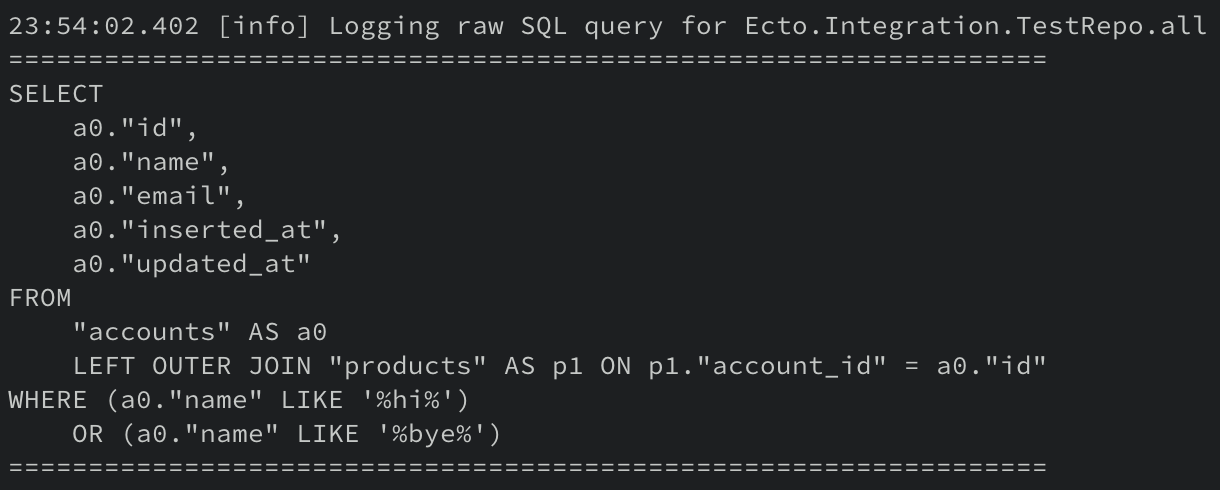
After setting up EctoDbg in your application you can expect the following output from your Ecto queries when using the EctoDbg helpers:
Supporting EctoDbg
If you rely on this library help you debug your Ecto queries, it would much appreciated if you can give back to the project in order to help ensure its continued development.
Checkout my GitHub Sponsorship page if you want to help out!
Gold Sponsors

Silver Sponsors
Bronze Sponsors
Setting Up EctoDbg
After adding {:ecto_dbg, "~> 0.1.0"} in your mix.exs file and running mix deps.get, open your repo.ex file and
add the following contents:
defmodule MyApp.Repo do
  use Ecto.Repo,
    otp_app: :my_app,
    adapter: Ecto.Adapters.Postgres

  use EctoDbg
end
You can also pass configuration options to EctoDbg if you so chose like so (see the EctoDbg module docs
for more information):
defmodule MyApp.Repo do
  use Ecto.Repo,
    otp_app: :my_app,
    adapter: Ecto.Adapters.Postgres

  use EctoDbg, level: :info
end
With that in place, any time that you want to inspect a query that is executed by Ecto, all you need to do is the following
query = from user in User

Repo.all_and_log(query)
By default the use EctoDbg macro will inject the debug functions into your repo module for only the :test and :dev
Mix.env() environments. If you would like to override this default behaviour, you can do that by providing the :only
option (this value should be a subset of the environments that you passed in your mix.exs file):
defmodule MyApp.Repo do
  use Ecto.Repo,
    otp_app: :my_app,
    adapter: Ecto.Adapters.Postgres

  use EctoDbg, only: :dev
end
If your queries are especially large, make sure you update your Logger configuration to support large log
messages. Specifically the :truncate option.
Attribution
- EctoDbg builds upon the EctoDevLogger package and has reused some of the code in that project to achieve a slightly different goal.
- The logo for the project is an edited version of an SVG image from the unDraw project.
- The EctoDbg library leans on the Rust library sqlformat-rs for SQL statement formatting. This is done through a Ruslter NIF I maintain called sql_fmt.


Similar repos


Languages
Elixir
100.0%
README
Easily debug and pretty print your Ecto SQL queries
Contents
Installation
Available in Hex, the package can be installed by adding ecto_dbg to your list of
dependencies in mix.exs:
def deps do
  [
    {:ecto_dbg, "~> 0.5.0"}
  ]
end
Documentation can be found at https://hexdocs.pm/ecto_dbg.
Example Output
After setting up EctoDbg in your application you can expect the following output from your Ecto queries when using the EctoDbg helpers:
Supporting EctoDbg
If you rely on this library help you debug your Ecto queries, it would much appreciated if you can give back to the project in order to help ensure its continued development.
Checkout my GitHub Sponsorship page if you want to help out!
Gold Sponsors
Silver Sponsors
Bronze Sponsors
Setting Up EctoDbg
After adding {:ecto_dbg, "~> 0.1.0"} in your mix.exs file and running mix deps.get, open your repo.ex file and
add the following contents:
defmodule MyApp.Repo do
  use Ecto.Repo,
    otp_app: :my_app,
    adapter: Ecto.Adapters.Postgres

  use EctoDbg
end
You can also pass configuration options to EctoDbg if you so chose like so (see the EctoDbg module docs
for more information):
defmodule MyApp.Repo do
  use Ecto.Repo,
    otp_app: :my_app,
    adapter: Ecto.Adapters.Postgres

  use EctoDbg, level: :info
end
With that in place, any time that you want to inspect a query that is executed by Ecto, all you need to do is the following
query = from user in User

Repo.all_and_log(query)
By default the use EctoDbg macro will inject the debug functions into your repo module for only the :test and :dev
Mix.env() environments. If you would like to override this default behaviour, you can do that by providing the :only
option (this value should be a subset of the environments that you passed in your mix.exs file):
defmodule MyApp.Repo do
  use Ecto.Repo,
    otp_app: :my_app,
    adapter: Ecto.Adapters.Postgres

  use EctoDbg, only: :dev
end
If your queries are especially large, make sure you update your Logger configuration to support large log
messages. Specifically the :truncate option.
Attribution
- EctoDbg builds upon the EctoDevLogger package and has reused some of the code in that project to achieve a slightly different goal.
- The logo for the project is an edited version of an SVG image from the unDraw project.
- The EctoDbg library leans on the Rust library sqlformat-rs for SQL statement formatting. This is done through a Ruslter NIF I maintain called sql_fmt.
Similar repos
Languages
Elixir
100.0%