Multiplatform command line interface parsing for Kotlin
See the code
Clikt (pronounced "clicked") is a multiplatform Kotlin library that makes writing command line interfaces simple and intuitive. It's the "Command Line Interface for Kotlin".
It is designed to make the process of writing command line tools effortless while supporting a wide variety of use cases and allowing advanced customization when needed.
Clikt has:
What does it look like? Here's a complete example of a simple Clikt program:
class Hello : CliktCommand() {
    val count: Int by option().int().default(1).help("Number of greetings")
    val name: String by option().prompt("Your name").help("The person to greet")

    override fun run() {
        repeat(count) {
            echo("Hello $name!")
        }
    }
}

fun main(args: Array<String>) = Hello().main(args)
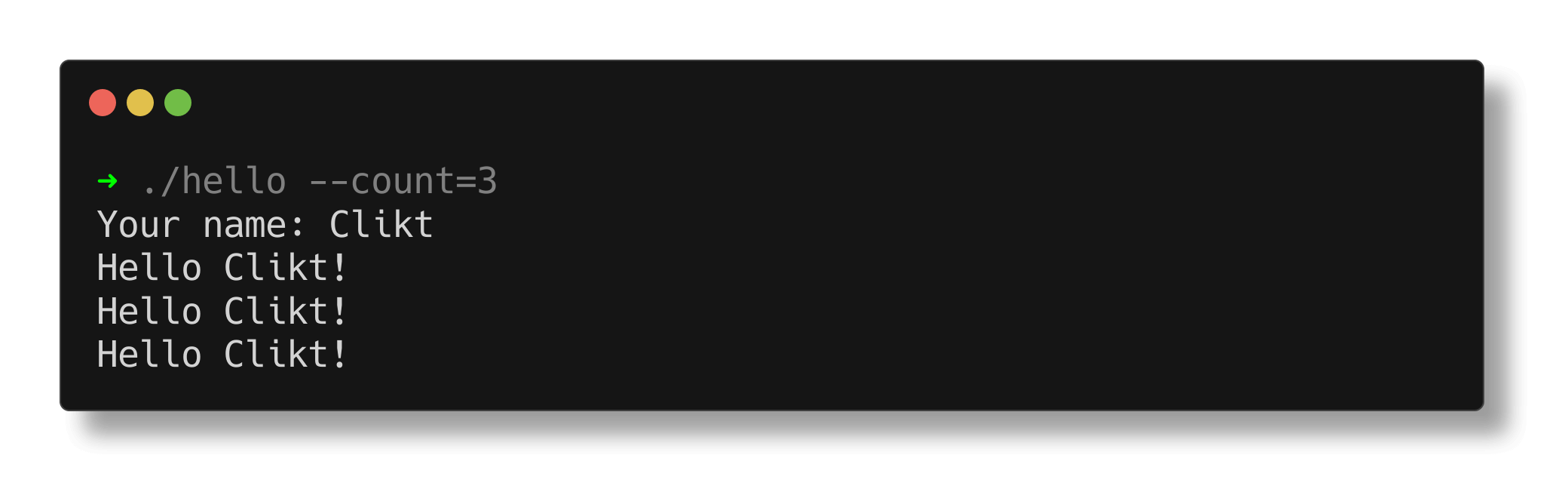
And here's what it looks like when run:
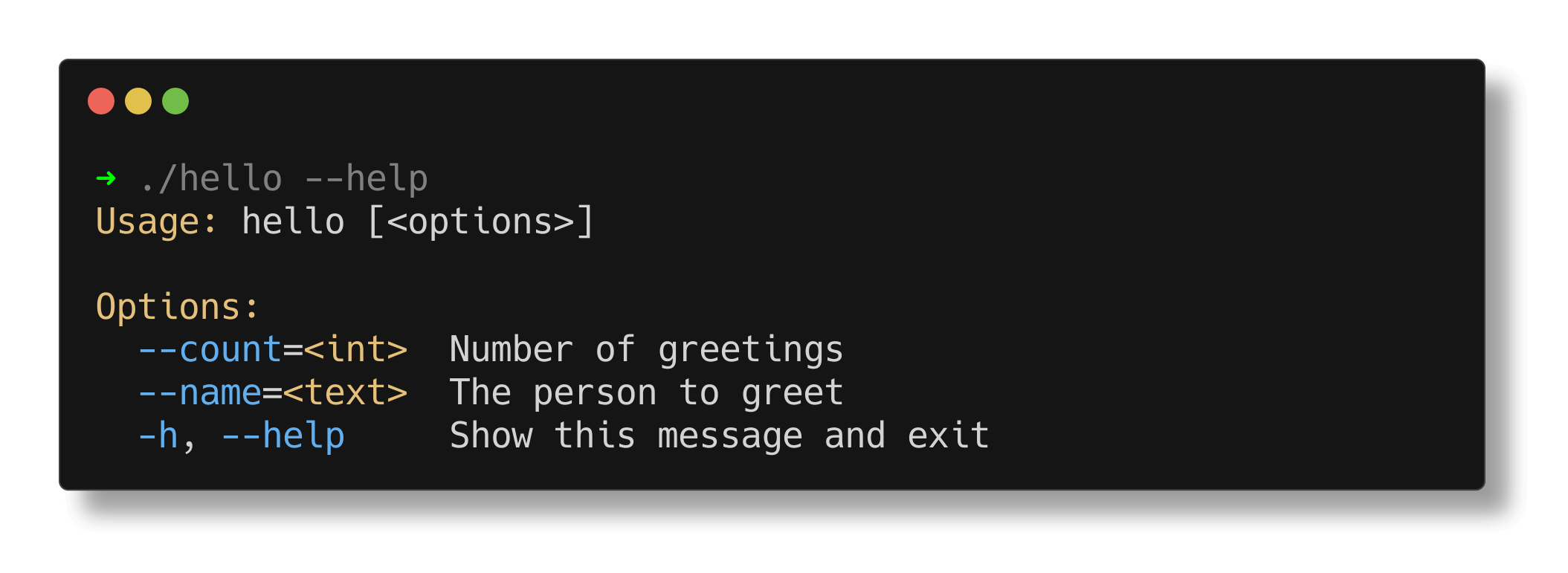
The help page is generated for you:
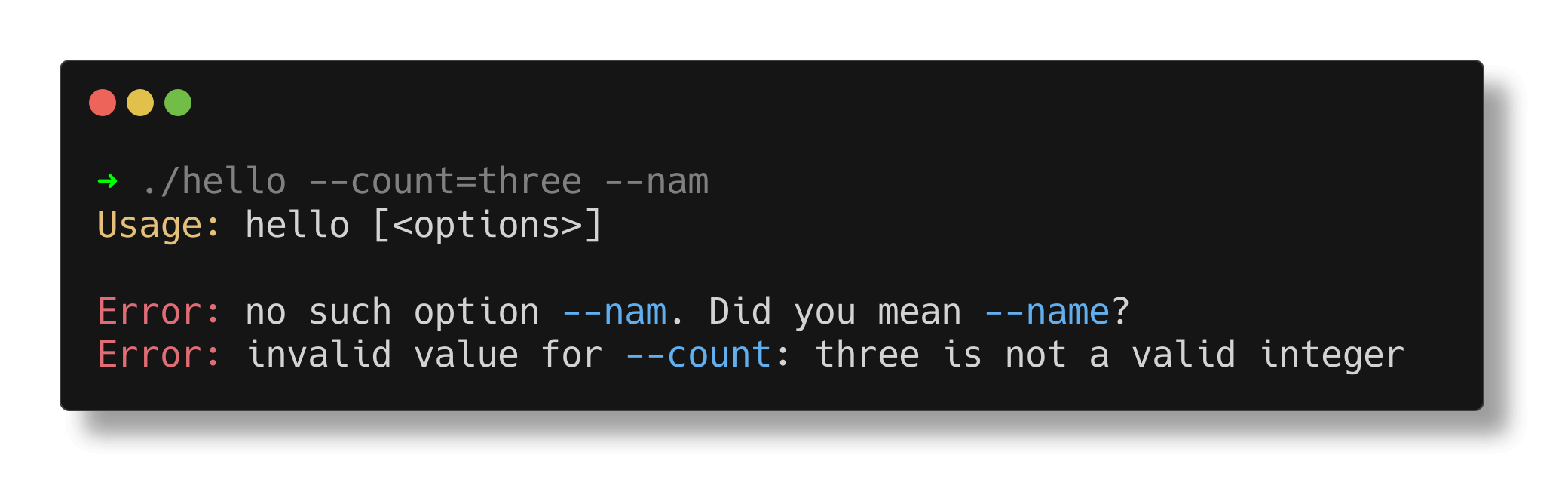
Errors are also taken care of:
The full documentation can be found on the website.
There are also a number of sample applications. You can run
them with the included runsample script.
Clikt is distributed through Maven Central.
dependencies {
   implementation("com.github.ajalt.clikt:clikt:5.1.0")

   // optional support for rendering markdown in help messages
   implementation("com.github.ajalt.clikt:clikt-markdown:5.1.0")
}
There is also a smaller core module available. See the docs for details.
<artifactId>clikt-jvm</artifactId>Clikt supports most multiplatform targets. See the docs for more information about functionality supported on each target. You'll need to use Gradle 6 or newer.
Sonatype has instructions for consuming snapshots
You'll need to add the Central Portal snapshots repository:
repositories {
    maven {
        url = uri("https://central.sonatype.com/repository/maven-snapshots/")
    }
}
Copyright 2018 AJ Alt

Licensed under the Apache License, Version 2.0 (the "License");
you may not use this file except in compliance with the License.
You may obtain a copy of the License at

    http://www.apache.org/licenses/LICENSE-2.0

Unless required by applicable law or agreed to in writing, software
distributed under the License is distributed on an "AS IS" BASIS,
WITHOUT WARRANTIES OR CONDITIONS OF ANY KIND, either express or implied.
See the License for the specific language governing permissions and
limitations under the License.
Overall
Maintained
Code review
Latest release
Releases this year
(top 24 of 56)
893 followers · starred Jul 2018
6,523 followers · starred Jun 2019
408 followers · starred Jan 2020
190 followers · starred Jun 2024
Multiplatform command line interface parsing for Kotlin
See the code
Clikt (pronounced "clicked") is a multiplatform Kotlin library that makes writing command line interfaces simple and intuitive. It's the "Command Line Interface for Kotlin".
It is designed to make the process of writing command line tools effortless while supporting a wide variety of use cases and allowing advanced customization when needed.
Clikt has:
What does it look like? Here's a complete example of a simple Clikt program:
class Hello : CliktCommand() {
    val count: Int by option().int().default(1).help("Number of greetings")
    val name: String by option().prompt("Your name").help("The person to greet")

    override fun run() {
        repeat(count) {
            echo("Hello $name!")
        }
    }
}

fun main(args: Array<String>) = Hello().main(args)
And here's what it looks like when run:
The help page is generated for you:
Errors are also taken care of:
The full documentation can be found on the website.
There are also a number of sample applications. You can run
them with the included runsample script.
Clikt is distributed through Maven Central.
dependencies {
   implementation("com.github.ajalt.clikt:clikt:5.1.0")

   // optional support for rendering markdown in help messages
   implementation("com.github.ajalt.clikt:clikt-markdown:5.1.0")
}
There is also a smaller core module available. See the docs for details.
<artifactId>clikt-jvm</artifactId>Clikt supports most multiplatform targets. See the docs for more information about functionality supported on each target. You'll need to use Gradle 6 or newer.
Sonatype has instructions for consuming snapshots
You'll need to add the Central Portal snapshots repository:
repositories {
    maven {
        url = uri("https://central.sonatype.com/repository/maven-snapshots/")
    }
}
Copyright 2018 AJ Alt

Licensed under the Apache License, Version 2.0 (the "License");
you may not use this file except in compliance with the License.
You may obtain a copy of the License at

    http://www.apache.org/licenses/LICENSE-2.0

Unless required by applicable law or agreed to in writing, software
distributed under the License is distributed on an "AS IS" BASIS,
WITHOUT WARRANTIES OR CONDITIONS OF ANY KIND, either express or implied.
See the License for the specific language governing permissions and
limitations under the License.
Overall
Maintained
Code review
Latest release
Releases this year
(top 24 of 56)
893 followers · starred Jul 2018
6,523 followers · starred Jun 2019
408 followers · starred Jan 2020
190 followers · starred Jun 2024