
Show your coding agent the bug. Local-first bug reports for web apps, iOS simulators and Android emulators.
JavaScript
9
9 commits
updated Sep 13, 2026
See what people are saying (1)
README
BugDrop
Stop explaining bugs to AI. Show the evidence.
BugDrop captures debugging evidence from web apps, iOS simulators, and Android emulators. A Chrome extension and a local desktop controller turn a short reproduction into a report for your coding agent or teammate. Record the steps, review what was captured, describe what should have happened, and export Markdown or JSON.
No account. No cloud service. No AI API key. MIT licensed.
Embedded iOS SDK prototype
sdk/ios contains an initial Swift Package for embedding BugDrop directly in an iOS app. It records explicitly added breadcrumbs and failed requests made through its URLSession, persists a bounded local timeline across unexpected termination, and provides a SwiftUI review form. It never uploads by itself and excludes request/response bodies, headers, cookies, URL queries, and input values. See sdk/ios/README.md for setup and the crash-reporting boundary.
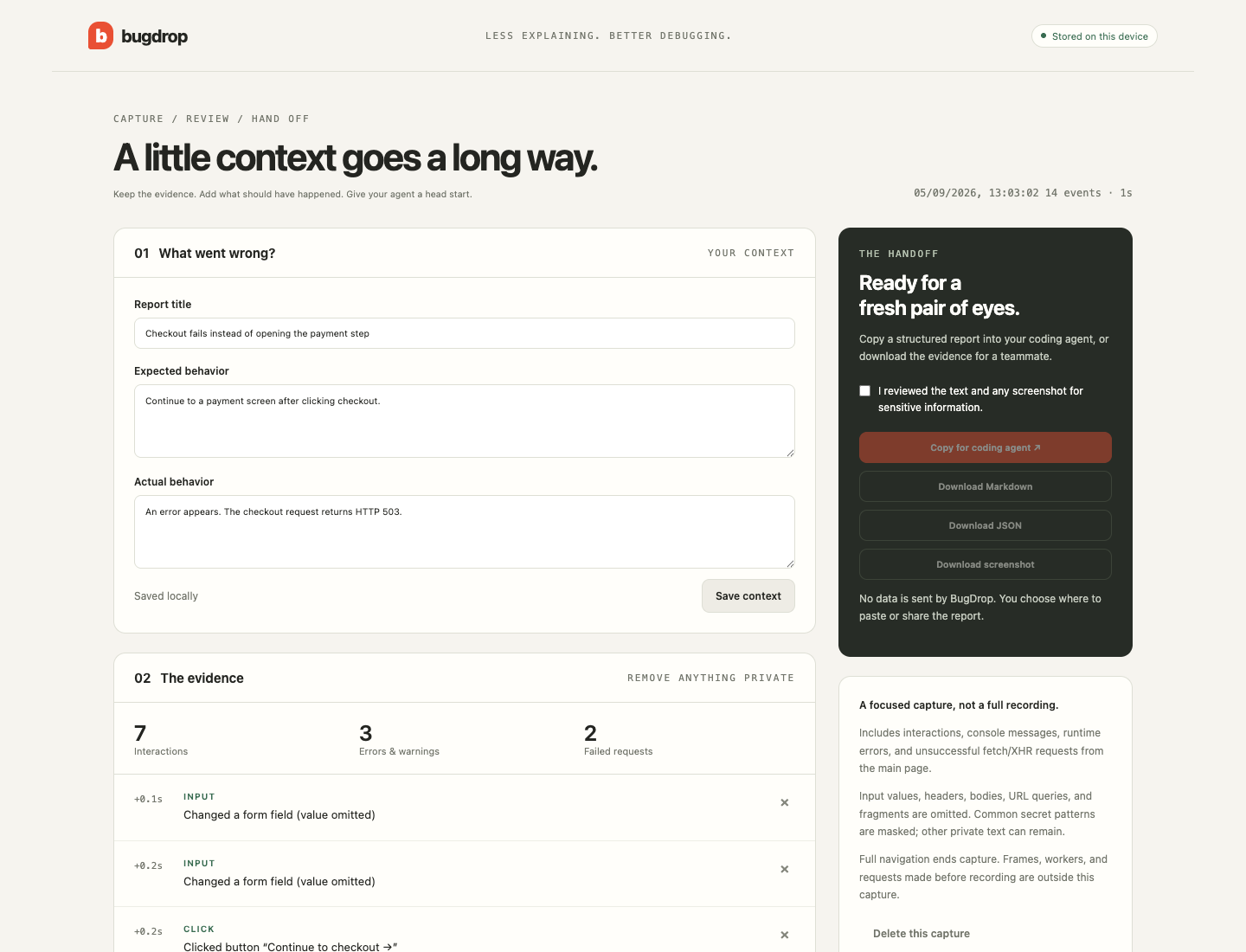
Early prototype · v0.2.3. Load it unpacked in Chrome. There is no Chrome Web Store listing yet. BugDrop captures debugging evidence; it does not automatically fix bugs or generate regression tests.
Desktop app — start here for mobile apps
BugDrop is available as a regular desktop app for macOS, Windows, and Linux. Open it from your Applications folder or Start menu; no terminal is needed. It can record a running desktop app on the local computer as well as iOS simulators and Android emulators. The app still runs entirely on your computer and saves captures under ~/BugDrop Captures/.
Build an installer on the target operating system:
npm install
npm run desktop:build
The installers are written to dist/desktop/. Tagged releases and manually started GitHub Actions runs build a universal macOS app plus x64 and ARM64 downloads for Windows and Linux. Builds without configured platform signing may trigger an operating-system confirmation the first time they are opened. See docs/DISTRIBUTION.md for supported systems, release assets, and signing setup.
For development, use npm run desktop to open the app window. The old browser-based controller remains available as npm run desktop:web.
Browser-based development mode
With Node.js 22 or newer:
git clone https://github.com/aim0xyz/bugdrop.git
cd bugdrop
npm run desktop:web
No npm install is needed for the runtime.
Open http://127.0.0.1:4318. Choose the local computer and a running desktop app, or choose a running simulator/emulator and an installed app. Then click Start recording, use Take screenshot, add steps, and choose Stop & review. No process names or command-line recording flags are needed.
Captures are saved under ~/BugDrop Captures/. The controller listens only on loopback and checks the Host, Origin, and a per-session token for API requests. Keep it running while using the review link. Closing the browser tab does not stop an active capture; use Stop, quit the controller, or wait for the three-minute limit.
The packaged app and browser-based development mode share the same controller. In the packaged app, desktop screenshots and optional video capture only a visible window belonging to the selected program, even when BugDrop is in front. If that window is unavailable, capture stops with an error rather than recording the full screen. The browser-based development mode and CLI do not support desktop video; desktop screenshots there use the operating system's screen capture. Desktop logs come from the selected process: Unified Logging on macOS, journal entries on Linux, and process status on Windows. An already-running process's stdout/stderr cannot be attached retroactively. iOS recording needs macOS and Xcode; Android recording needs adb. Physical devices are excluded in this version. Android's app list includes user-installed packages, not system apps.
iOS Simulator and Android Emulator — CLI
BugDrop also includes a local CLI recorder for native apps. Node.js 22+ is required; iOS requires macOS and Xcode, Android requires platform-tools (adb). Start the simulator/emulator and your app first.
node bin/bugdrop.cjs devices
node bin/bugdrop.cjs record --platform desktop --pid 1234 --process MyApp
node bin/bugdrop.cjs record --platform ios --process Runner --video
node bin/bugdrop.cjs record --platform android --package com.example.app --video
Replace Runner with the iOS app executable name and com.example.app with the Android application ID. With multiple devices, add --device EXACT_ID from the device listing. During capture, enter s for a screenshot, n Your reproduction step for a note, and q to stop. --video is optional. Use --seconds 10 for a bounded non-interactive capture.
Open the resulting review.html, describe the bug, deselect private evidence, review any media, and export Markdown or JSON. Media are referenced by filename and must be attached separately. Review edits are not saved back to the original files; do not share the raw capture directory without checking it.
Native capture collects process-scoped logs and optional media, not automatic touch events or network interception. Android follows the initial PID; restart capture after the app restarts. iOS unified logging may omit stdout-only messages. Captures are limited to three minutes and 1,000 log events. Video and screenshot pixels are not automatically redacted.
Verification: See test results and remaining limitations. The full desktop flow was tested using synthetic native demo apps on an iOS 26.5 simulator and an Android API 36 emulator: device/app selection, app logs, secret masking, screenshots, video playback, stopping, and reviewed JSON export.
Try the Chrome extension in two minutes
- Download this repository and open
chrome://extensionsin Chrome 120 or newer. - Enable Developer mode, choose Load unpacked, and select the
extensiondirectory. - Pin BugDrop in Chrome's extensions menu.
- Open your web app, click BugDrop, and choose Start recording this tab.
- Optionally enable automatic screenshots for runtime errors or failed requests, then reproduce the bug.
- Add more screenshots when useful. Use Mask private areas before capturing pixels that should stay hidden.
- Click Stop & review. Add expected and actual behavior, remove any private evidence, and confirm review.
- Copy for coding agent, Download Markdown, or Download JSON.
No build or dependency installation is needed to load the extension. Only one capture is retained at a time. After finishing one, use Delete report & start over in the popup (or delete it from the review page) before starting another.
A deliberately broken playground
With Node.js 22+:
npm run demo
Open http://127.0.0.1:4173, start BugDrop, and click Continue to checkout. The demo deliberately returns HTTP 503. Other buttons produce an XHR 401, runtime error, SPA route change, and a synthetic secret for testing the masking. No orders, emails, or payments are sent.
What you get
- Clicks on interactive elements with framework-independent roles and stable
data-testid,data-test, ordata-cyselectors when available, plus structural fallbacks and form-change markers without input values. - Console log/info/warn/error strings. Error objects include bounded, redacted stack traces; other objects are omitted instead of serialized.
- Uncaught errors and unhandled promise rejections with stack traces when the browser provides them.
- Unsuccessful
fetchand XHR requests: URL without query/fragment, method, status. - SPA route changes, same-origin reloads and navigation, millisecond-relative event timing, viewport, and browser information.
- Up to eight screenshots of the visible page. Screenshots can be manual or opt-in after runtime errors and failed requests.
- An interactive privacy mask for hiding selected page areas before manual or automatic screenshots.
- Editable context, removable events, and a portable JSON report.
Markdown includes agent guidance to treat the captured content as untrusted evidence, verify causes, and avoid claiming tests were run when they were not. Screenshots are included in JSON; when sharing Markdown, download and attach them separately.
Privacy and boundaries
BugDrop sends no recordings anywhere. A single report lives in chrome.storage.local in your browser profile until you delete it, replace it through an explicit flow, or uninstall the extension. Exported files and pasted text are outside BugDrop's control.
Input values, request/response bodies, headers, cookies, and storage contents are not intentionally collected. URL credentials, queries, and fragments are discarded. Common email and token patterns are masked before persistence. Masking is heuristic, not a guarantee: log strings, button labels, page titles, URL paths, and screenshots can still contain private information. The screenshot mask hides only areas explicitly selected by the reporter and must be applied before an error occurs to affect an automatic screenshot. Review everything before sharing.
The page-side event bridge can be spoofed or interfered with by the page. Reports are debugging aids, not authenticated audit records. Chrome messages are scoped to the captured tab and document; page events cannot request screenshots, delete reports, or run UI commands.
Permissions
| Permission | Purpose |
|---|---|
activeTab | Temporary access to the page you explicitly invoke BugDrop on, including optional visible-page capture. |
scripting | Install temporary event hooks in that page. |
storage | Keep the current report locally. |
No <all_urls>, persistent host permissions, debugger permission, analytics, or remote code.
Browser capture limits
- Chrome/Chromium desktop only; Chrome settings, store pages, extension pages, and
file:URLs cannot be recorded. - SPA routes and same-origin reloads/navigation stay in the current capture. Cross-origin navigation ends it because BugDrop deliberately avoids persistent host access.
- Main frame only. Iframes, workers, WebSockets, browser-level resource errors, earlier requests, and functions cached before recording are not comprehensively captured.
- Temporary wrappers around page APIs can affect unusual applications. Stop recording or reload the page to remove them.
- The capture stops at 300 events. Long sessions should be split into focused reproductions.
- Automatic screenshots require the recorded tab to be visible. They are throttled and may be skipped when the tab is in the background or the eight-image limit is reached.
- This is an event timeline, not a screen video or deterministic browser replay.
- Names and branding are provisional; availability has not been cleared for a public store listing.
Development
npm test
npm run check
npm run package
Runtime and unit tests have no third-party dependencies. Packaging uses zip (macOS/Linux) and writes dist/bugdrop-0.2.3.zip. See CONTRIBUTING.md for the real-browser test and architecture.
Next, driven by actual bug reports
- Optional persistence across explicitly approved cross-origin navigation.
- More flexible screenshot mask editing and automatic sensitive-field detection.
- A smaller shareable reproduction format and optional test scaffolding.
- Firefox support.
Contributions should solve observed problems. A reproducible bug report is more useful than an artificial metric. See CONTRIBUTING.md.
Integrations
BugDrop Core remains local-first. The integration contract and Jira ADF formatter are documented in docs/INTEGRATIONS.md; authentication, uploads, and paid entitlements belong to a separately operated service and are never implicit in a capture.
Contributors

9 commits
Similar repos


Languages
JavaScript
74.4%
Swift
14.2%
HTML
6.5%
Shell
4.0%
Show your coding agent the bug. Local-first bug reports for web apps, iOS simulators and Android emulators.
JavaScript
9
9 commits
updated Sep 13, 2026
See what people are saying (1)
README
BugDrop
Stop explaining bugs to AI. Show the evidence.
BugDrop captures debugging evidence from web apps, iOS simulators, and Android emulators. A Chrome extension and a local desktop controller turn a short reproduction into a report for your coding agent or teammate. Record the steps, review what was captured, describe what should have happened, and export Markdown or JSON.
No account. No cloud service. No AI API key. MIT licensed.
Embedded iOS SDK prototype
sdk/ios contains an initial Swift Package for embedding BugDrop directly in an iOS app. It records explicitly added breadcrumbs and failed requests made through its URLSession, persists a bounded local timeline across unexpected termination, and provides a SwiftUI review form. It never uploads by itself and excludes request/response bodies, headers, cookies, URL queries, and input values. See sdk/ios/README.md for setup and the crash-reporting boundary.
Early prototype · v0.2.3. Load it unpacked in Chrome. There is no Chrome Web Store listing yet. BugDrop captures debugging evidence; it does not automatically fix bugs or generate regression tests.
Desktop app — start here for mobile apps
BugDrop is available as a regular desktop app for macOS, Windows, and Linux. Open it from your Applications folder or Start menu; no terminal is needed. It can record a running desktop app on the local computer as well as iOS simulators and Android emulators. The app still runs entirely on your computer and saves captures under ~/BugDrop Captures/.
Build an installer on the target operating system:
npm install
npm run desktop:build
The installers are written to dist/desktop/. Tagged releases and manually started GitHub Actions runs build a universal macOS app plus x64 and ARM64 downloads for Windows and Linux. Builds without configured platform signing may trigger an operating-system confirmation the first time they are opened. See docs/DISTRIBUTION.md for supported systems, release assets, and signing setup.
For development, use npm run desktop to open the app window. The old browser-based controller remains available as npm run desktop:web.
Browser-based development mode
With Node.js 22 or newer:
git clone https://github.com/aim0xyz/bugdrop.git
cd bugdrop
npm run desktop:web
No npm install is needed for the runtime.
Open http://127.0.0.1:4318. Choose the local computer and a running desktop app, or choose a running simulator/emulator and an installed app. Then click Start recording, use Take screenshot, add steps, and choose Stop & review. No process names or command-line recording flags are needed.
Captures are saved under ~/BugDrop Captures/. The controller listens only on loopback and checks the Host, Origin, and a per-session token for API requests. Keep it running while using the review link. Closing the browser tab does not stop an active capture; use Stop, quit the controller, or wait for the three-minute limit.
The packaged app and browser-based development mode share the same controller. In the packaged app, desktop screenshots and optional video capture only a visible window belonging to the selected program, even when BugDrop is in front. If that window is unavailable, capture stops with an error rather than recording the full screen. The browser-based development mode and CLI do not support desktop video; desktop screenshots there use the operating system's screen capture. Desktop logs come from the selected process: Unified Logging on macOS, journal entries on Linux, and process status on Windows. An already-running process's stdout/stderr cannot be attached retroactively. iOS recording needs macOS and Xcode; Android recording needs adb. Physical devices are excluded in this version. Android's app list includes user-installed packages, not system apps.
iOS Simulator and Android Emulator — CLI
BugDrop also includes a local CLI recorder for native apps. Node.js 22+ is required; iOS requires macOS and Xcode, Android requires platform-tools (adb). Start the simulator/emulator and your app first.
node bin/bugdrop.cjs devices
node bin/bugdrop.cjs record --platform desktop --pid 1234 --process MyApp
node bin/bugdrop.cjs record --platform ios --process Runner --video
node bin/bugdrop.cjs record --platform android --package com.example.app --video
Replace Runner with the iOS app executable name and com.example.app with the Android application ID. With multiple devices, add --device EXACT_ID from the device listing. During capture, enter s for a screenshot, n Your reproduction step for a note, and q to stop. --video is optional. Use --seconds 10 for a bounded non-interactive capture.
Open the resulting review.html, describe the bug, deselect private evidence, review any media, and export Markdown or JSON. Media are referenced by filename and must be attached separately. Review edits are not saved back to the original files; do not share the raw capture directory without checking it.
Native capture collects process-scoped logs and optional media, not automatic touch events or network interception. Android follows the initial PID; restart capture after the app restarts. iOS unified logging may omit stdout-only messages. Captures are limited to three minutes and 1,000 log events. Video and screenshot pixels are not automatically redacted.
Verification: See test results and remaining limitations. The full desktop flow was tested using synthetic native demo apps on an iOS 26.5 simulator and an Android API 36 emulator: device/app selection, app logs, secret masking, screenshots, video playback, stopping, and reviewed JSON export.
Try the Chrome extension in two minutes
- Download this repository and open
chrome://extensionsin Chrome 120 or newer. - Enable Developer mode, choose Load unpacked, and select the
extensiondirectory. - Pin BugDrop in Chrome's extensions menu.
- Open your web app, click BugDrop, and choose Start recording this tab.
- Optionally enable automatic screenshots for runtime errors or failed requests, then reproduce the bug.
- Add more screenshots when useful. Use Mask private areas before capturing pixels that should stay hidden.
- Click Stop & review. Add expected and actual behavior, remove any private evidence, and confirm review.
- Copy for coding agent, Download Markdown, or Download JSON.
No build or dependency installation is needed to load the extension. Only one capture is retained at a time. After finishing one, use Delete report & start over in the popup (or delete it from the review page) before starting another.
A deliberately broken playground
With Node.js 22+:
npm run demo
Open http://127.0.0.1:4173, start BugDrop, and click Continue to checkout. The demo deliberately returns HTTP 503. Other buttons produce an XHR 401, runtime error, SPA route change, and a synthetic secret for testing the masking. No orders, emails, or payments are sent.
What you get
- Clicks on interactive elements with framework-independent roles and stable
data-testid,data-test, ordata-cyselectors when available, plus structural fallbacks and form-change markers without input values. - Console log/info/warn/error strings. Error objects include bounded, redacted stack traces; other objects are omitted instead of serialized.
- Uncaught errors and unhandled promise rejections with stack traces when the browser provides them.
- Unsuccessful
fetchand XHR requests: URL without query/fragment, method, status. - SPA route changes, same-origin reloads and navigation, millisecond-relative event timing, viewport, and browser information.
- Up to eight screenshots of the visible page. Screenshots can be manual or opt-in after runtime errors and failed requests.
- An interactive privacy mask for hiding selected page areas before manual or automatic screenshots.
- Editable context, removable events, and a portable JSON report.
Markdown includes agent guidance to treat the captured content as untrusted evidence, verify causes, and avoid claiming tests were run when they were not. Screenshots are included in JSON; when sharing Markdown, download and attach them separately.
Privacy and boundaries
BugDrop sends no recordings anywhere. A single report lives in chrome.storage.local in your browser profile until you delete it, replace it through an explicit flow, or uninstall the extension. Exported files and pasted text are outside BugDrop's control.
Input values, request/response bodies, headers, cookies, and storage contents are not intentionally collected. URL credentials, queries, and fragments are discarded. Common email and token patterns are masked before persistence. Masking is heuristic, not a guarantee: log strings, button labels, page titles, URL paths, and screenshots can still contain private information. The screenshot mask hides only areas explicitly selected by the reporter and must be applied before an error occurs to affect an automatic screenshot. Review everything before sharing.
The page-side event bridge can be spoofed or interfered with by the page. Reports are debugging aids, not authenticated audit records. Chrome messages are scoped to the captured tab and document; page events cannot request screenshots, delete reports, or run UI commands.
Permissions
| Permission | Purpose |
|---|---|
activeTab | Temporary access to the page you explicitly invoke BugDrop on, including optional visible-page capture. |
scripting | Install temporary event hooks in that page. |
storage | Keep the current report locally. |
No <all_urls>, persistent host permissions, debugger permission, analytics, or remote code.
Browser capture limits
- Chrome/Chromium desktop only; Chrome settings, store pages, extension pages, and
file:URLs cannot be recorded. - SPA routes and same-origin reloads/navigation stay in the current capture. Cross-origin navigation ends it because BugDrop deliberately avoids persistent host access.
- Main frame only. Iframes, workers, WebSockets, browser-level resource errors, earlier requests, and functions cached before recording are not comprehensively captured.
- Temporary wrappers around page APIs can affect unusual applications. Stop recording or reload the page to remove them.
- The capture stops at 300 events. Long sessions should be split into focused reproductions.
- Automatic screenshots require the recorded tab to be visible. They are throttled and may be skipped when the tab is in the background or the eight-image limit is reached.
- This is an event timeline, not a screen video or deterministic browser replay.
- Names and branding are provisional; availability has not been cleared for a public store listing.
Development
npm test
npm run check
npm run package
Runtime and unit tests have no third-party dependencies. Packaging uses zip (macOS/Linux) and writes dist/bugdrop-0.2.3.zip. See CONTRIBUTING.md for the real-browser test and architecture.
Next, driven by actual bug reports
- Optional persistence across explicitly approved cross-origin navigation.
- More flexible screenshot mask editing and automatic sensitive-field detection.
- A smaller shareable reproduction format and optional test scaffolding.
- Firefox support.
Contributions should solve observed problems. A reproducible bug report is more useful than an artificial metric. See CONTRIBUTING.md.
Integrations
BugDrop Core remains local-first. The integration contract and Jira ADF formatter are documented in docs/INTEGRATIONS.md; authentication, uploads, and paid entitlements belong to a separately operated service and are never implicit in a capture.
Similar repos
Contributors
9 commits
Languages
JavaScript
74.4%
Swift
14.2%
HTML
6.5%
Shell
4.0%