
See what people are saying
README





Topics:
ai-cad·text-to-cad·cadquery·generative-design·multi-agent·design-for-manufacturing
Quickstart | Runs Gallery | Case Study | FAQ | Docs | Dev Setup | Discussions Issues
AI-CAD : An OSS multi-agent harness for Mech. Eng. CAD
AI-CAD is an autonomous engineering department you commission,
AI-CAD is not a CAD modeling tool you operate.
Give it a plain-English brief or a hand-drawn sketch, and a team of LLM agents delivers real, manufacturable parts and assemblies:
- Plans : the machine and decomposes it into parts
- Writes : parametric CadQuery Python code
- Renders : every part to engineering views, and looks at them
- Critiques : the geometry against design-for-manufacturing and design-for-assembly rules
- Repairs : and re-judges until the design survives review and delivers your intent
Agents looking at what they built, and argue about it until it survives review and delivers your intent
All of this interactively inside your coding agent of choice, and with visibility in a live dashboard.
Every run writes a simple directory of files that you can read, diff, and version like any other engineering record.
There is no server and no database. AI-CAD is built on top of your coding-agent.
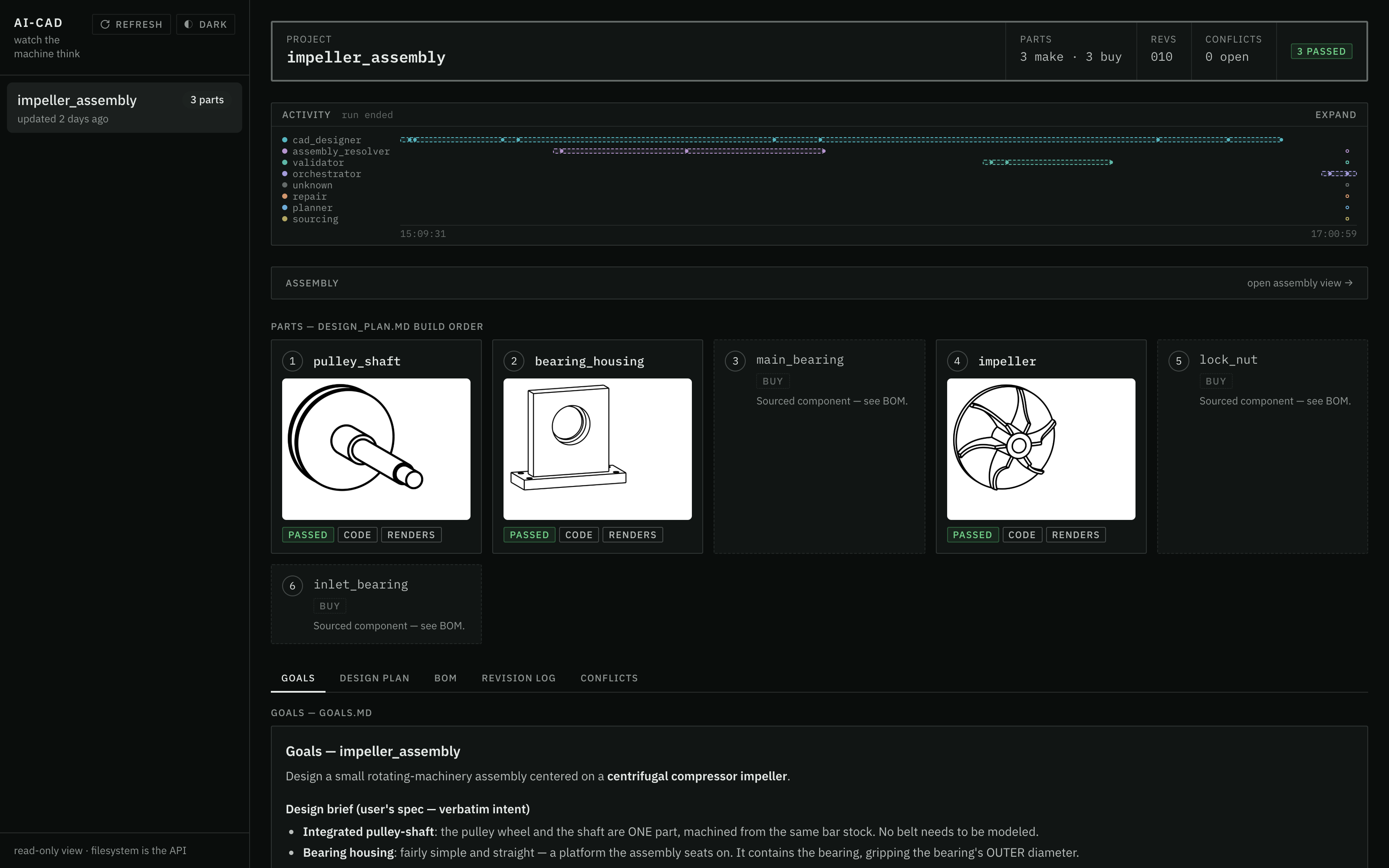
Your engineering department at work: parts land as agents deliver, verdicts post, and the activity waterfall traces every agent in real time.
Guiding Design Principles
Defends design intent
The system refuses generic manufacturing advice
that contradicts the intent and machine goals.
(See the run that argued back.)
Design machine components as stateful Python code (not immutable mesh props)
Unlike most text-to-3D tools that generate meshes
(excellent for game assets and concept art),

AI-CAD writes parametric CAD code:
every part is a Python program with named dimensions,

exporting STEP and STL that a machine shop or downstream CAD system accepts.
Manufacturability is a hard gate, not an afterthought
A DFM/DFA rulebook scores each design;
repair proposals that worsen the score are automatically rejected
by a regression gate with full traceability.
Agents that see
Every part and assembly is rendered to 8 engineering views
(front / top / right / iso, in wireframe and clean styles).

A vision-capable evaluator agent sees those renders:
geometry is judged from engineering lenses, not just executed.
Harness-agnostic
Canonical agent, skill, and tool content lives once in `.shared/`;
each harness (`.claude/`, `.opencode/`) is a thin symlinked shell over it.
The filesystem is the API
Every run writes a self-describing project directory:
goals, design log, per-part geometry, negotiation records, reflections.
Exports STEP and STL for every part.
No opaque database for facts to hide behind:
the frontend, replay, and analysis all read the same files.
Deterministic tool layer
Geometry execution, rendering, DFMA evaluation, spec validation, dimension checks, and export
are deterministic bash-callable Python tools.

Validation happens independently of any LLM.
Mortality-proof orchestrator
If the orchestrator agent is killed, or runs out of context window,
a fresh one reconstructs all state from the project directory alone.

That is also how a crashed run resumes: no checkpoint database needed.
Runs debrief themselves
A run reaches terminal state by writing a structured `run_reflection.md`:
what failed, what the run improvised to protect the result,
and what would make the next run smarter.
Agentic telemetry ships judgment, not just logs.
The full set of architecture decision records, with the alternatives each one rejected, lives in
docs/architecture-decision-records/
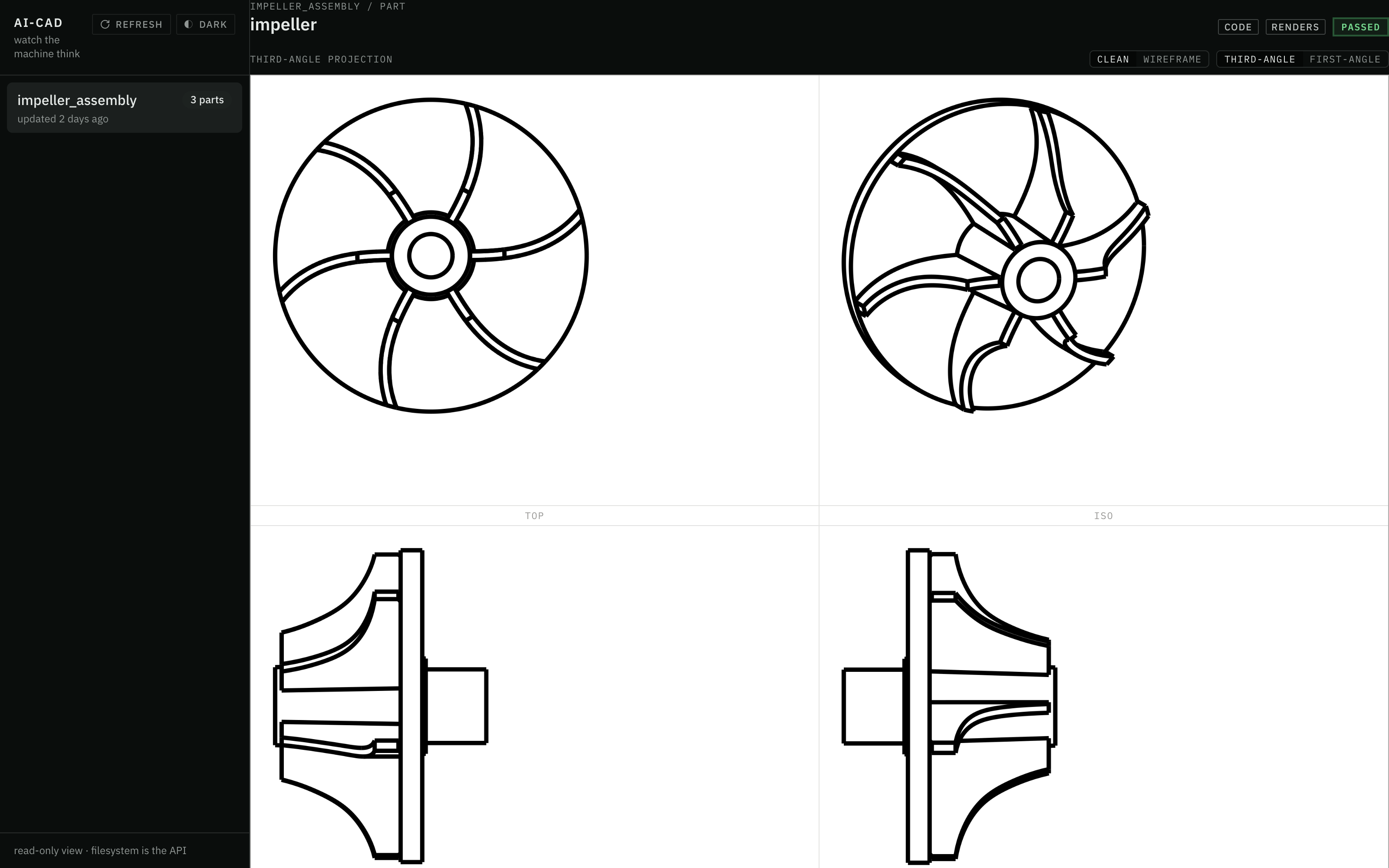
Eight views per part, judged like a drawing sheet: this is what the vision evaluator sees before any geometry ships.
What a Design run produces
One brief in, one self-describing artifact tree out.
This is the real tree of the run in the public gallery, an IC-engine core designed at top-dead-center:
projects/piston_crank/
├── goals.md              # the brief, expanded into measurable success criteria
├── design_plan.md        # parts, interfaces, the locked dimension chain, build order
├── design_log.md         # the agents' step-by-step build log
├── external/             # BOM + sourcing notes for catalog parts
├── assembly/
│   ├── piston/
│   │   ├── part.py       # the CadQuery source the agents wrote
│   │   ├── renders/      # the 8 engineering views the evaluator looked at
│   │   └── exports/      # piston.step + piston.stl
│   ├── crankshaft/           # ... same layout per part
│   ├── connecting_rod/
│   ├── gudgeon_pin/
│   ├── piston_ring/
│   └── renders/          # multi-view renders of the assembled mechanism
├── checkpoint.md         # optional handover note; resume rebuilds from files alone
└── run_reflection.md     # the run's own debrief
Live Dashboard : Watch the machine think
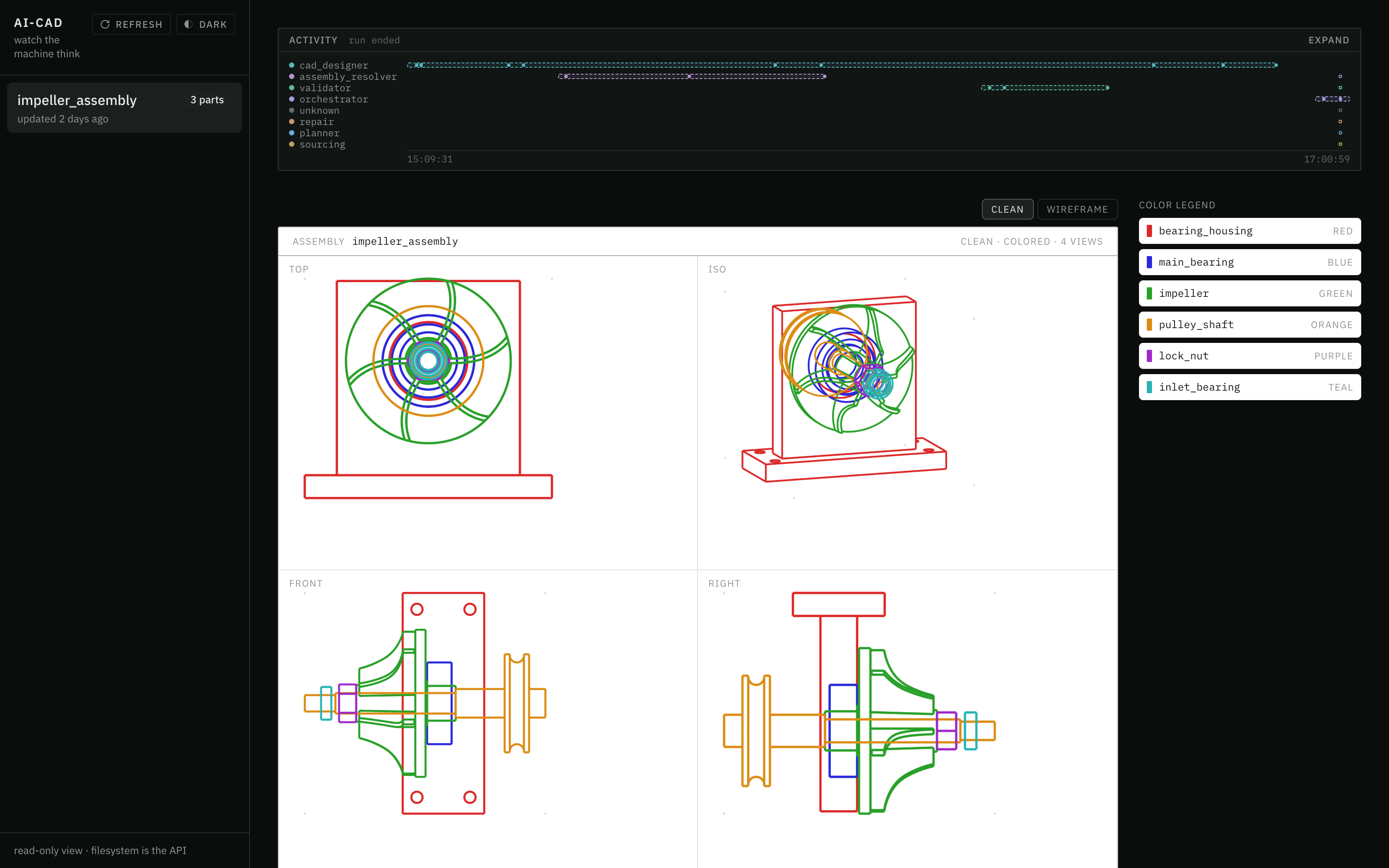
2 hours of autonomous design, traced live:
the agent waterfall above,
the assembly taking shape in four engineering views.
2 hours of autonomous design, traced live: the agent waterfall above, the assembly taking shape in four engineering views.
A read-only local dashboard renders live runs: drawing sheets, assembly negotiations, and a live agent activity waterfall.
cd frontend
npm install
npm run dev
# open http://localhost:5199
The dev server is pinned to port 5199 (strictPort) on purpose:
it never imports harness code and never writes;
it only reads projects/.
See frontend/README.md.
Agent Roles
The department roster.
Each role is defined by one instructions file
orchestrator- Runs the department. Mortality-proof by design: it can end mid-run and a successor rebuilds everything from files alone.planner- Decomposes a goal into parts, interfaces, and build order, and marks which parts areparallel_safeto build concurrently.cad_designer- Writes the CadQuery, adapting proven cookbook patterns instead of improvising raw API calls.validator- Settles disputes numerically: structural checks and geometry measurements that outrank anyone's opinion, including the vision evaluator's.dfma_inspector- Reads the renders and scores the design against the DFM/DFA rulebook.repair- Fixes geometry, but only viapart.proposal.py; the regression gate decides whether the fix ships.assembly_resolver- Fits the parts together and records the negotiations between them.sourcing- Selects catalog components and catches catalog traps (a bearing 1 mm thinner than assumed, a nut standard that would overhang its seat).reviewer- The final ship or no-ship verdict.
Agent skills
The knowledge layer the agents draw on.
Skills are versioned documents ,you can read exactly what the system believes.
cadquery-cookbook- 11 reusable CadQuery patterns, 8 design principles, and 6 anti-patterns; designers adapt the closest pattern rather than composing from raw API calls.cadquery-anti-hallucination- A catalog of CadQuery methods that do not exist but LLMs keep inventing, each with the correct alternative, plus the runtime error-to-hint table the executor applies.dfm-rules- The agent-readable digest of the DFM/DFA rulebooks: every rule's id, severity, and fix hint, plus the scoring arithmetic and the rule-proposal schema.run-reflection- The schema and quality bar for the structured self-debrief every run writes at terminal state.engineering-handbooksandsourcing-tables- Reserved stubs for machine-design playbooks and component tables, labeled provisional so no agent mistakes an empty slot for authority.
Agent tools
The deterministic half of the system:
bash-callable Python modules (uv run python -m tools.<name>)
that measure, render, score, and export.
Agents decide; tools verify.
uv run python -m tools.<name>)
that measure, render, score, and export.cadquery_executor- Runs generated CadQuery code; a--subprocessflag isolates native OCCT crashes so one bad kernel call cannot take the run down.renderer- Produces the 8 engineering views per part and assembly (4 views by 2 styles) as individual PNGs.dfma_evaluator- Scores designs against the rulebook and judges repair proposals with severity-weighted scoring (critical=10, major=5, minor=1); proposals that raise the score are auto-rejected with full traceability.dimension_checker- Deterministic bounding-box-versus-constraints verification: dimensions are measured, never asserted.spec_validator- Project state scanner and structural artifact checks; also how a resumed run reconstructs where it was.exporter- Exports finished parts to manufacturable formats (STEP, STL).placeholder_detector- Answers "is thispart.pya real design or a scaffold stub?" before anyone spends a render and a vision cycle on it.
DFMA Rulebook Mechanism
DFMA as a unit-test suite for generate part code
DFM/DFA rules live as JSON in rules/,
with .proposed siblings and a lifecycle log.
Rules are not frozen doctrine:
they can be proposed, promoted, or retired over time,
and every repair proposal is judged against them
by the regression gate in dfma_evaluator.
Think of DFMA as a unit-test suite for parts.
How the lifecycle got this shape, and what was rejected: decision record 0007, the central rules lifecycle.
Design Runs Gallery
Real, unedited design runs live in the public gallery:
ai-cad-labs/ai-cad-example-projects.
Every run ships its spec, plan, step-by-step design log, per-part geometry,
multi-view renders, STEP/STL exports, and its own debrief.
No geometry there was human-authored.
| Run | What it built | The numbers | Wall clock |
|---|---|---|---|
impeller_assembly | A belt-driven centrifugal compressor core, from a hand-drawn sketch (the case study) | 6 components (3 designed, 3 catalog) · 0.8000 mm clearance measured five ways · 6 backswept blades at 10.5° · reviewer verdict: ship | ~2h12m |
piston_crank | The 5-part IC-engine core at top-dead-center | 7-instance assembly · a locked dimension chain that held end-to-end · mid-run self-checkpoint and cold resume | 71.3 min |
spur_gear | A meshing involute gear pair | Deterministic mesh proof: 0.00 mm³ interference at the correct half-tooth phase · 0 repair cycles | ~49.8 min |
treasure_chest | The control baseline: a 4-part chest | 13 agents, 0 failures, 0 repairs · 3 findings deferred with written reasoning | 32.8 min |
Case Study : Impeller Assembly : the run that argued back
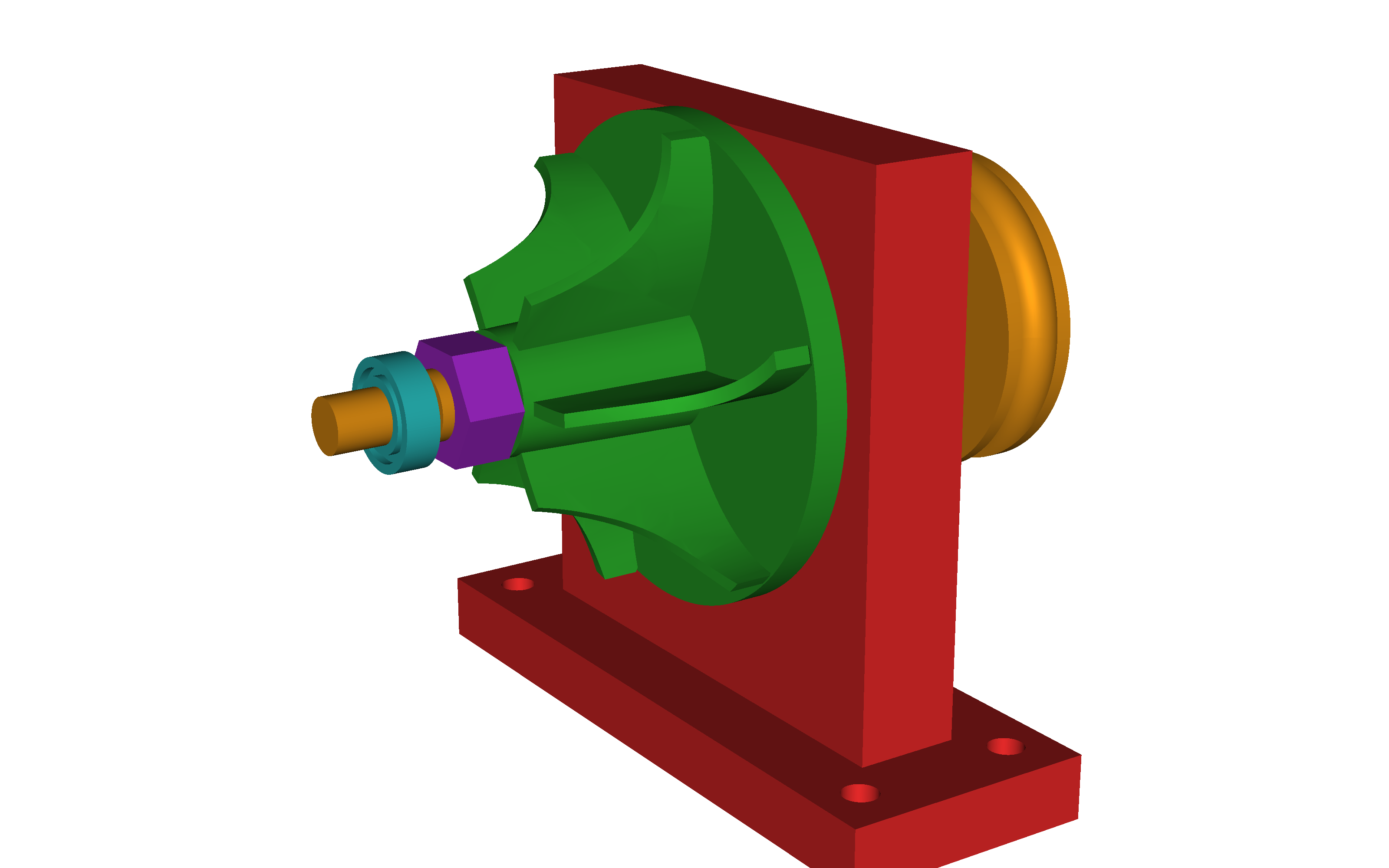
Designed end-to-end from a single hand-drawn sketch:
a six-component impeller rig assembly,
rendered from the design run's assembly geometry.
Details: the impeller_assembly run in the public gallery.
Designed end-to-end from a single hand-drawn sketch: a six-component impeller rig assembly, rendered from the design run's assembly geometry.
Details: the impeller_assembly run in the public gallery.
The best argument for the architecture is a run where the system disagreed with its own tooling and was right. Every claim below is on file in the public exhibit:
The input was a hand-drawn cross-section sketch and a five-bullet brief: a belt-driven centrifugal compressor core with backswept blades.
Moments from that run show what a manufacturing gate with judgment looks like:
- The system defended the user's design intent against its own evaluator.
Mid-run, the DFM evaluator (judging the wheel under a mis-selected
3-axis milling ruleset) recommended cutting the impeller to 4 blades
and straightening them into flat radial walls.
That advice would have quietly destroyed exactly what the brief asked for.
Both orchestrator generations refused it,
recorded the refusal in
open_issues.md, and passed an explicit do-not-comply guard downstream so no later agent could obey it by accident. - The headline requirement shipped as a machined dimension. The brief asked for 0.5 to 1.0 mm of running clearance; the run delivered 0.8000 mm, confirmed by five independent measurements and realized structurally in a part, not left to an assembly stack-up that can drift.
User intent held as a first-class constraint, not one voice in a negotiation the tooling usually wins. The full record, refusals included, is public and unedited:
6 STEP/STL exports, fourteen agent spawns across 2 sessions, roughly 2h12m of autonomous work, one repair cycle, reviewer verdict: ship.
The complete provenance chain,
from sketch to brief to per-part geometry to the run's own debrief,
is public:
impeller_assembly
run_reflection.md.
Get Exploring : Quickstart
Harness and platform support
| Platform | Linux | macOS | Windows |
|---|---|---|---|
| AI-CAD | ✅ | ✅ | ✅ * |
- Windows :
The repo depends on in-repo symlinks.
Clone with
git clone -c core.symlinks=true(Developer Mode or admin rights)Or work inside WSL
| Harness | Status | Notes |
|---|---|---|
| Claude Code | ✅ Supported (default) | The claude CLI carries its own authentication |
| OpenCode | 🚧 In progress | The .opencode/ symlinked shell ships; the parallel build is open work |
| Other harnesses | 🗺️ Planned | .shared/ holds all canonical content, so a new harness is a thin adapter |
Prerequisites
- Python 3.13+ and
uv(dependency + venv manager). - Claude Code, the default harness.
No API keys and no
.env: theclaudeCLI carries its own authentication. - cairo: the renderer converts SVG to PNG via
cairosvg, which needs the system cairo library. macOS:brew install cairo(the renderer auto-setsDYLD_FALLBACK_LIBRARY_PATHfor Homebrew). Debian/Ubuntu:apt-get install libcairo2. - Windows: clone with
git clone -c core.symlinks=true(requires Developer Mode or admin rights), or work inside WSL. The repo relies on in-repo symlinks (tools,.claude/agents,.claude/skillspoint into.shared/); a default Windows clone materializes them as plain text files, which breaks Python imports and agent discovery.
Install
git clone https://github.com/ai-cad-labs/ai-cad.git
cd ai-cad
uv sync            # creates .venv and installs the tool layer
uv run pytest -q   # ~163 tests should pass: confirms the CAD/DFMA engine works
Launch a design run
Open the repo in Claude Code and prompt as such:
create a project with a `goals.md` for <YOUR IDEA>
and dispatch the orchestrator to design it to completion.
Follow the run
Watch projects/<name>/ fill in as the agents work,
or open the live dashboard.
The filesystem is the source of truth:
goals, design plan, per-part CadQuery source, renders, measurements, exports.
Resume a previous run
Relaunch with an entry prompt that says RESUMING and names the project directory; the fresh orchestrator reconstructs state from the files alone.
Stack Acknowledgements
AI-CAD writes CadQuery,
the parametric Python CAD system that makes code-as-geometry possible.
Rendering goes through cairosvg and the system cairo library.
The default harness is Claude Code,
and the dashboard stands on Vite, React, and Tailwind.
Getting help
- Questions and problems: open an issue on github.com/ai-cad-labs/ai-cad.
- "What should healthy output look like?": study a complete run in the run gallery before changing pipeline behavior.
- Conventions and internals:
AGENTS.mdis the canonical map for anyone (human or agent) working in the repo. - Why the system is built this way:
docs/README.mdindexes the documentation layer: the glossary of domain language and the architecture decision records that carry each design decision and the alternatives it rejected. - CadQuery itself: the
reference/directory ships five distilled CadQuery reference documents, which are all the system needs at runtime. For deeper work,docs/dev/local-setup.mdlists the nine upstream CadQuery ecosystem repos worth cloning locally.
Contribution Invitation
Contributions are welcome, and we want you to feel welcome making them.
You do not need to be a CAD veteran or a machine-learning engineer to have a big impact: documentation, DFM/DFA rule improvements, gallery runs, and issue reports all move the project forward.
| Channel | Best for |
|---|---|
| Issues | Bugs and defects |
| Discussions | Show your runs, ask questions, propose machines |
Reporting a bug:
open an issue answering three questions.
Your environment (OS, Python, harness version),
what you asked for (the prompt or the run's goals.md),
and what happened
(attach the tail of design_log.md, open_issues.md,
and run_reflection.md if the run wrote one).
The project directory is the reproduction case:
it usually contains everything a maintainer needs.
Suggesting a feature or a rule:
open an issue describing the change and why it matters.
DFM/DFA rule proposals are a first-class contribution surface:
the rulebooks in rules/ have a documented proposal schema
(see the dfm-rules skill),
and rules can be proposed, promoted, or retired over time
(the DFMA Rulebook Mechanism above).
FAQ
Do I need API keys or a .env?
No.
The claude CLI carries its own authentication,
and the repo ships no .env by design.
(Decision record: 0008, one model engine, no keys.)
What CAD outputs does it produce?
Per part: parametric CadQuery source (part.py),
STEP and STL exports,
and 8 engineering-view PNG renders.
Assemblies additionally get multi-view assembly renders
and assembly-level exports where present.
Can it run unattended?
Yes.
Runs launch headless via claude -p,
and the mortality-proof orchestrator design means a crashed run
resumes from the project directory alone:
no checkpoint file is needed.
(Decision record: 0012, the mortal orchestrator.)
How do the agents coordinate?
Through the filesystem. Nine roles read and write one self-describing project directory: goals, plan, design log, per-part geometry, negotiation records, reflections. Nothing hides in a database, and the frontend, replay, and analysis all read the same files.
(Decision record: 0004, the filesystem is the message bus.)
Is the legacy PydanticAI repo maintained?
It is frozen and kept for its research value. Feature work happens in this repo.
Why the project moved from that implementation to a coding-agent harness is the founding decision record: 0001, Claude Code as the agent runtime.
Does it work on Windows?
Yes: clone with git clone -c core.symlinks=true
(requires Developer Mode or admin rights),
or work inside WSL.
A default Windows clone materializes the repo's symlinks as plain text files,
which breaks Python imports and agent discovery.
Can I run it on a harness other than Claude Code?
That is the design intent.
Canonical agent, skill, and tool content lives once in .shared/,
and each harness directory (.claude/, .opencode/)
is a thin symlinked shell over it.
Claude Code is the tested default today;
the OpenCode build is open work.
(Decision record: 0002, the shared canonical layer.)
License
Licensed under the Apache License 2.0.
See NOTICE for attribution;
the NOTICE attribution travels with every redistribution.
Citing AI-CAD
@software{ai_cad,
  title   = {AI-CAD: a multi-agent mechanical CAD harness},
  author  = {{Saif Raja on behalf of the ai-cad-labs project}},
  year    = {2026},
  url     = {https://github.com/ai-cad-labs/ai-cad},
  license = {Apache-2.0}
}
If you read this far,
open an issue with the machine you want designed,
and it will get run.
⭐ If AI-CAD is useful to you, please consider giving it a star! It helps⭐
Part of the ai-cad-labs project.
Maintained by @saif-raja on behalf of AI-CAD Labs.
Copyright (C) 2026, per LICENSE.
Contributors

1 commits
Similar repos


Languages
Python
62.1%
TypeScript
34.6%
CSS
3.2%
See what people are saying
README
Topics:
ai-cad·text-to-cad·cadquery·generative-design·multi-agent·design-for-manufacturing
Quickstart | Runs Gallery | Case Study | FAQ | Docs | Dev Setup | Discussions Issues
AI-CAD : An OSS multi-agent harness for Mech. Eng. CAD
AI-CAD is an autonomous engineering department you commission,
AI-CAD is not a CAD modeling tool you operate.
Give it a plain-English brief or a hand-drawn sketch, and a team of LLM agents delivers real, manufacturable parts and assemblies:
- Plans : the machine and decomposes it into parts
- Writes : parametric CadQuery Python code
- Renders : every part to engineering views, and looks at them
- Critiques : the geometry against design-for-manufacturing and design-for-assembly rules
- Repairs : and re-judges until the design survives review and delivers your intent
Agents looking at what they built, and argue about it until it survives review and delivers your intent
All of this interactively inside your coding agent of choice, and with visibility in a live dashboard.
Every run writes a simple directory of files that you can read, diff, and version like any other engineering record.
There is no server and no database. AI-CAD is built on top of your coding-agent.
Your engineering department at work: parts land as agents deliver, verdicts post, and the activity waterfall traces every agent in real time.
Guiding Design Principles
Defends design intent
The system refuses generic manufacturing advice
that contradicts the intent and machine goals.
(See the run that argued back.)
Design machine components as stateful Python code (not immutable mesh props)
Unlike most text-to-3D tools that generate meshes
(excellent for game assets and concept art),

AI-CAD writes parametric CAD code:
every part is a Python program with named dimensions,

exporting STEP and STL that a machine shop or downstream CAD system accepts.
Manufacturability is a hard gate, not an afterthought
A DFM/DFA rulebook scores each design;
repair proposals that worsen the score are automatically rejected
by a regression gate with full traceability.
Agents that see
Every part and assembly is rendered to 8 engineering views
(front / top / right / iso, in wireframe and clean styles).

A vision-capable evaluator agent sees those renders:
geometry is judged from engineering lenses, not just executed.
Harness-agnostic
Canonical agent, skill, and tool content lives once in `.shared/`;
each harness (`.claude/`, `.opencode/`) is a thin symlinked shell over it.
The filesystem is the API
Every run writes a self-describing project directory:
goals, design log, per-part geometry, negotiation records, reflections.
Exports STEP and STL for every part.
No opaque database for facts to hide behind:
the frontend, replay, and analysis all read the same files.
Deterministic tool layer
Geometry execution, rendering, DFMA evaluation, spec validation, dimension checks, and export
are deterministic bash-callable Python tools.

Validation happens independently of any LLM.
Mortality-proof orchestrator
If the orchestrator agent is killed, or runs out of context window,
a fresh one reconstructs all state from the project directory alone.

That is also how a crashed run resumes: no checkpoint database needed.
Runs debrief themselves
A run reaches terminal state by writing a structured `run_reflection.md`:
what failed, what the run improvised to protect the result,
and what would make the next run smarter.
Agentic telemetry ships judgment, not just logs.
The full set of architecture decision records, with the alternatives each one rejected, lives in
docs/architecture-decision-records/
Eight views per part, judged like a drawing sheet: this is what the vision evaluator sees before any geometry ships.
What a Design run produces
One brief in, one self-describing artifact tree out.
This is the real tree of the run in the public gallery, an IC-engine core designed at top-dead-center:
projects/piston_crank/
├── goals.md              # the brief, expanded into measurable success criteria
├── design_plan.md        # parts, interfaces, the locked dimension chain, build order
├── design_log.md         # the agents' step-by-step build log
├── external/             # BOM + sourcing notes for catalog parts
├── assembly/
│   ├── piston/
│   │   ├── part.py       # the CadQuery source the agents wrote
│   │   ├── renders/      # the 8 engineering views the evaluator looked at
│   │   └── exports/      # piston.step + piston.stl
│   ├── crankshaft/           # ... same layout per part
│   ├── connecting_rod/
│   ├── gudgeon_pin/
│   ├── piston_ring/
│   └── renders/          # multi-view renders of the assembled mechanism
├── checkpoint.md         # optional handover note; resume rebuilds from files alone
└── run_reflection.md     # the run's own debrief
Live Dashboard : Watch the machine think
2 hours of autonomous design, traced live:
the agent waterfall above,
the assembly taking shape in four engineering views.
2 hours of autonomous design, traced live: the agent waterfall above, the assembly taking shape in four engineering views.
A read-only local dashboard renders live runs: drawing sheets, assembly negotiations, and a live agent activity waterfall.
cd frontend
npm install
npm run dev
# open http://localhost:5199
The dev server is pinned to port 5199 (strictPort) on purpose:
it never imports harness code and never writes;
it only reads projects/.
See frontend/README.md.
Agent Roles
The department roster.
Each role is defined by one instructions file
orchestrator- Runs the department. Mortality-proof by design: it can end mid-run and a successor rebuilds everything from files alone.planner- Decomposes a goal into parts, interfaces, and build order, and marks which parts areparallel_safeto build concurrently.cad_designer- Writes the CadQuery, adapting proven cookbook patterns instead of improvising raw API calls.validator- Settles disputes numerically: structural checks and geometry measurements that outrank anyone's opinion, including the vision evaluator's.dfma_inspector- Reads the renders and scores the design against the DFM/DFA rulebook.repair- Fixes geometry, but only viapart.proposal.py; the regression gate decides whether the fix ships.assembly_resolver- Fits the parts together and records the negotiations between them.sourcing- Selects catalog components and catches catalog traps (a bearing 1 mm thinner than assumed, a nut standard that would overhang its seat).reviewer- The final ship or no-ship verdict.
Agent skills
The knowledge layer the agents draw on.
Skills are versioned documents ,you can read exactly what the system believes.
cadquery-cookbook- 11 reusable CadQuery patterns, 8 design principles, and 6 anti-patterns; designers adapt the closest pattern rather than composing from raw API calls.cadquery-anti-hallucination- A catalog of CadQuery methods that do not exist but LLMs keep inventing, each with the correct alternative, plus the runtime error-to-hint table the executor applies.dfm-rules- The agent-readable digest of the DFM/DFA rulebooks: every rule's id, severity, and fix hint, plus the scoring arithmetic and the rule-proposal schema.run-reflection- The schema and quality bar for the structured self-debrief every run writes at terminal state.engineering-handbooksandsourcing-tables- Reserved stubs for machine-design playbooks and component tables, labeled provisional so no agent mistakes an empty slot for authority.
Agent tools
The deterministic half of the system:
bash-callable Python modules (uv run python -m tools.<name>)
that measure, render, score, and export.
Agents decide; tools verify.
uv run python -m tools.<name>)
that measure, render, score, and export.cadquery_executor- Runs generated CadQuery code; a--subprocessflag isolates native OCCT crashes so one bad kernel call cannot take the run down.renderer- Produces the 8 engineering views per part and assembly (4 views by 2 styles) as individual PNGs.dfma_evaluator- Scores designs against the rulebook and judges repair proposals with severity-weighted scoring (critical=10, major=5, minor=1); proposals that raise the score are auto-rejected with full traceability.dimension_checker- Deterministic bounding-box-versus-constraints verification: dimensions are measured, never asserted.spec_validator- Project state scanner and structural artifact checks; also how a resumed run reconstructs where it was.exporter- Exports finished parts to manufacturable formats (STEP, STL).placeholder_detector- Answers "is thispart.pya real design or a scaffold stub?" before anyone spends a render and a vision cycle on it.
DFMA Rulebook Mechanism
DFMA as a unit-test suite for generate part code
DFM/DFA rules live as JSON in rules/,
with .proposed siblings and a lifecycle log.
Rules are not frozen doctrine:
they can be proposed, promoted, or retired over time,
and every repair proposal is judged against them
by the regression gate in dfma_evaluator.
Think of DFMA as a unit-test suite for parts.
How the lifecycle got this shape, and what was rejected: decision record 0007, the central rules lifecycle.
Design Runs Gallery
Real, unedited design runs live in the public gallery:
ai-cad-labs/ai-cad-example-projects.
Every run ships its spec, plan, step-by-step design log, per-part geometry,
multi-view renders, STEP/STL exports, and its own debrief.
No geometry there was human-authored.
| Run | What it built | The numbers | Wall clock |
|---|---|---|---|
impeller_assembly | A belt-driven centrifugal compressor core, from a hand-drawn sketch (the case study) | 6 components (3 designed, 3 catalog) · 0.8000 mm clearance measured five ways · 6 backswept blades at 10.5° · reviewer verdict: ship | ~2h12m |
piston_crank | The 5-part IC-engine core at top-dead-center | 7-instance assembly · a locked dimension chain that held end-to-end · mid-run self-checkpoint and cold resume | 71.3 min |
spur_gear | A meshing involute gear pair | Deterministic mesh proof: 0.00 mm³ interference at the correct half-tooth phase · 0 repair cycles | ~49.8 min |
treasure_chest | The control baseline: a 4-part chest | 13 agents, 0 failures, 0 repairs · 3 findings deferred with written reasoning | 32.8 min |
Case Study : Impeller Assembly : the run that argued back
Designed end-to-end from a single hand-drawn sketch:
a six-component impeller rig assembly,
rendered from the design run's assembly geometry.
Details: the impeller_assembly run in the public gallery.
Designed end-to-end from a single hand-drawn sketch: a six-component impeller rig assembly, rendered from the design run's assembly geometry.
Details: the impeller_assembly run in the public gallery.
The best argument for the architecture is a run where the system disagreed with its own tooling and was right. Every claim below is on file in the public exhibit:
The input was a hand-drawn cross-section sketch and a five-bullet brief: a belt-driven centrifugal compressor core with backswept blades.
Moments from that run show what a manufacturing gate with judgment looks like:
- The system defended the user's design intent against its own evaluator.
Mid-run, the DFM evaluator (judging the wheel under a mis-selected
3-axis milling ruleset) recommended cutting the impeller to 4 blades
and straightening them into flat radial walls.
That advice would have quietly destroyed exactly what the brief asked for.
Both orchestrator generations refused it,
recorded the refusal in
open_issues.md, and passed an explicit do-not-comply guard downstream so no later agent could obey it by accident. - The headline requirement shipped as a machined dimension. The brief asked for 0.5 to 1.0 mm of running clearance; the run delivered 0.8000 mm, confirmed by five independent measurements and realized structurally in a part, not left to an assembly stack-up that can drift.
User intent held as a first-class constraint, not one voice in a negotiation the tooling usually wins. The full record, refusals included, is public and unedited:
6 STEP/STL exports, fourteen agent spawns across 2 sessions, roughly 2h12m of autonomous work, one repair cycle, reviewer verdict: ship.
The complete provenance chain,
from sketch to brief to per-part geometry to the run's own debrief,
is public:
impeller_assembly
run_reflection.md.
Get Exploring : Quickstart
Harness and platform support
| Platform | Linux | macOS | Windows |
|---|---|---|---|
| AI-CAD | ✅ | ✅ | ✅ * |
- Windows :
The repo depends on in-repo symlinks.
Clone with
git clone -c core.symlinks=true(Developer Mode or admin rights)Or work inside WSL
| Harness | Status | Notes |
|---|---|---|
| Claude Code | ✅ Supported (default) | The claude CLI carries its own authentication |
| OpenCode | 🚧 In progress | The .opencode/ symlinked shell ships; the parallel build is open work |
| Other harnesses | 🗺️ Planned | .shared/ holds all canonical content, so a new harness is a thin adapter |
Prerequisites
- Python 3.13+ and
uv(dependency + venv manager). - Claude Code, the default harness.
No API keys and no
.env: theclaudeCLI carries its own authentication. - cairo: the renderer converts SVG to PNG via
cairosvg, which needs the system cairo library. macOS:brew install cairo(the renderer auto-setsDYLD_FALLBACK_LIBRARY_PATHfor Homebrew). Debian/Ubuntu:apt-get install libcairo2. - Windows: clone with
git clone -c core.symlinks=true(requires Developer Mode or admin rights), or work inside WSL. The repo relies on in-repo symlinks (tools,.claude/agents,.claude/skillspoint into.shared/); a default Windows clone materializes them as plain text files, which breaks Python imports and agent discovery.
Install
git clone https://github.com/ai-cad-labs/ai-cad.git
cd ai-cad
uv sync            # creates .venv and installs the tool layer
uv run pytest -q   # ~163 tests should pass: confirms the CAD/DFMA engine works
Launch a design run
Open the repo in Claude Code and prompt as such:
create a project with a `goals.md` for <YOUR IDEA>
and dispatch the orchestrator to design it to completion.
Follow the run
Watch projects/<name>/ fill in as the agents work,
or open the live dashboard.
The filesystem is the source of truth:
goals, design plan, per-part CadQuery source, renders, measurements, exports.
Resume a previous run
Relaunch with an entry prompt that says RESUMING and names the project directory; the fresh orchestrator reconstructs state from the files alone.
Stack Acknowledgements
AI-CAD writes CadQuery,
the parametric Python CAD system that makes code-as-geometry possible.
Rendering goes through cairosvg and the system cairo library.
The default harness is Claude Code,
and the dashboard stands on Vite, React, and Tailwind.
Getting help
- Questions and problems: open an issue on github.com/ai-cad-labs/ai-cad.
- "What should healthy output look like?": study a complete run in the run gallery before changing pipeline behavior.
- Conventions and internals:
AGENTS.mdis the canonical map for anyone (human or agent) working in the repo. - Why the system is built this way:
docs/README.mdindexes the documentation layer: the glossary of domain language and the architecture decision records that carry each design decision and the alternatives it rejected. - CadQuery itself: the
reference/directory ships five distilled CadQuery reference documents, which are all the system needs at runtime. For deeper work,docs/dev/local-setup.mdlists the nine upstream CadQuery ecosystem repos worth cloning locally.
Contribution Invitation
Contributions are welcome, and we want you to feel welcome making them.
You do not need to be a CAD veteran or a machine-learning engineer to have a big impact: documentation, DFM/DFA rule improvements, gallery runs, and issue reports all move the project forward.
| Channel | Best for |
|---|---|
| Issues | Bugs and defects |
| Discussions | Show your runs, ask questions, propose machines |
Reporting a bug:
open an issue answering three questions.
Your environment (OS, Python, harness version),
what you asked for (the prompt or the run's goals.md),
and what happened
(attach the tail of design_log.md, open_issues.md,
and run_reflection.md if the run wrote one).
The project directory is the reproduction case:
it usually contains everything a maintainer needs.
Suggesting a feature or a rule:
open an issue describing the change and why it matters.
DFM/DFA rule proposals are a first-class contribution surface:
the rulebooks in rules/ have a documented proposal schema
(see the dfm-rules skill),
and rules can be proposed, promoted, or retired over time
(the DFMA Rulebook Mechanism above).
FAQ
Do I need API keys or a .env?
No.
The claude CLI carries its own authentication,
and the repo ships no .env by design.
(Decision record: 0008, one model engine, no keys.)
What CAD outputs does it produce?
Per part: parametric CadQuery source (part.py),
STEP and STL exports,
and 8 engineering-view PNG renders.
Assemblies additionally get multi-view assembly renders
and assembly-level exports where present.
Can it run unattended?
Yes.
Runs launch headless via claude -p,
and the mortality-proof orchestrator design means a crashed run
resumes from the project directory alone:
no checkpoint file is needed.
(Decision record: 0012, the mortal orchestrator.)
How do the agents coordinate?
Through the filesystem. Nine roles read and write one self-describing project directory: goals, plan, design log, per-part geometry, negotiation records, reflections. Nothing hides in a database, and the frontend, replay, and analysis all read the same files.
(Decision record: 0004, the filesystem is the message bus.)
Is the legacy PydanticAI repo maintained?
It is frozen and kept for its research value. Feature work happens in this repo.
Why the project moved from that implementation to a coding-agent harness is the founding decision record: 0001, Claude Code as the agent runtime.
Does it work on Windows?
Yes: clone with git clone -c core.symlinks=true
(requires Developer Mode or admin rights),
or work inside WSL.
A default Windows clone materializes the repo's symlinks as plain text files,
which breaks Python imports and agent discovery.
Can I run it on a harness other than Claude Code?
That is the design intent.
Canonical agent, skill, and tool content lives once in .shared/,
and each harness directory (.claude/, .opencode/)
is a thin symlinked shell over it.
Claude Code is the tested default today;
the OpenCode build is open work.
(Decision record: 0002, the shared canonical layer.)
License
Licensed under the Apache License 2.0.
See NOTICE for attribution;
the NOTICE attribution travels with every redistribution.
Citing AI-CAD
@software{ai_cad,
  title   = {AI-CAD: a multi-agent mechanical CAD harness},
  author  = {{Saif Raja on behalf of the ai-cad-labs project}},
  year    = {2026},
  url     = {https://github.com/ai-cad-labs/ai-cad},
  license = {Apache-2.0}
}
If you read this far,
open an issue with the machine you want designed,
and it will get run.
⭐ If AI-CAD is useful to you, please consider giving it a star! It helps⭐
Part of the ai-cad-labs project.
Maintained by @saif-raja on behalf of AI-CAD Labs.
Copyright (C) 2026, per LICENSE.
Similar repos
Contributors
1 commits
Languages
Python
62.1%
TypeScript
34.6%
CSS
3.2%