
The floating Markdown notepad for Mac. An open source alternative to Raycast Notes.
See the codeSee what people are saying
README

Markraft
The floating Markdown notepad for Mac.
An open source alternative to Raycast Notes.



Press ⌥N in any app to write, and again to put it away. Notes are plain Markdown files in a folder you choose, so any other editor can open them too.
Download for macOS · Installation
Features
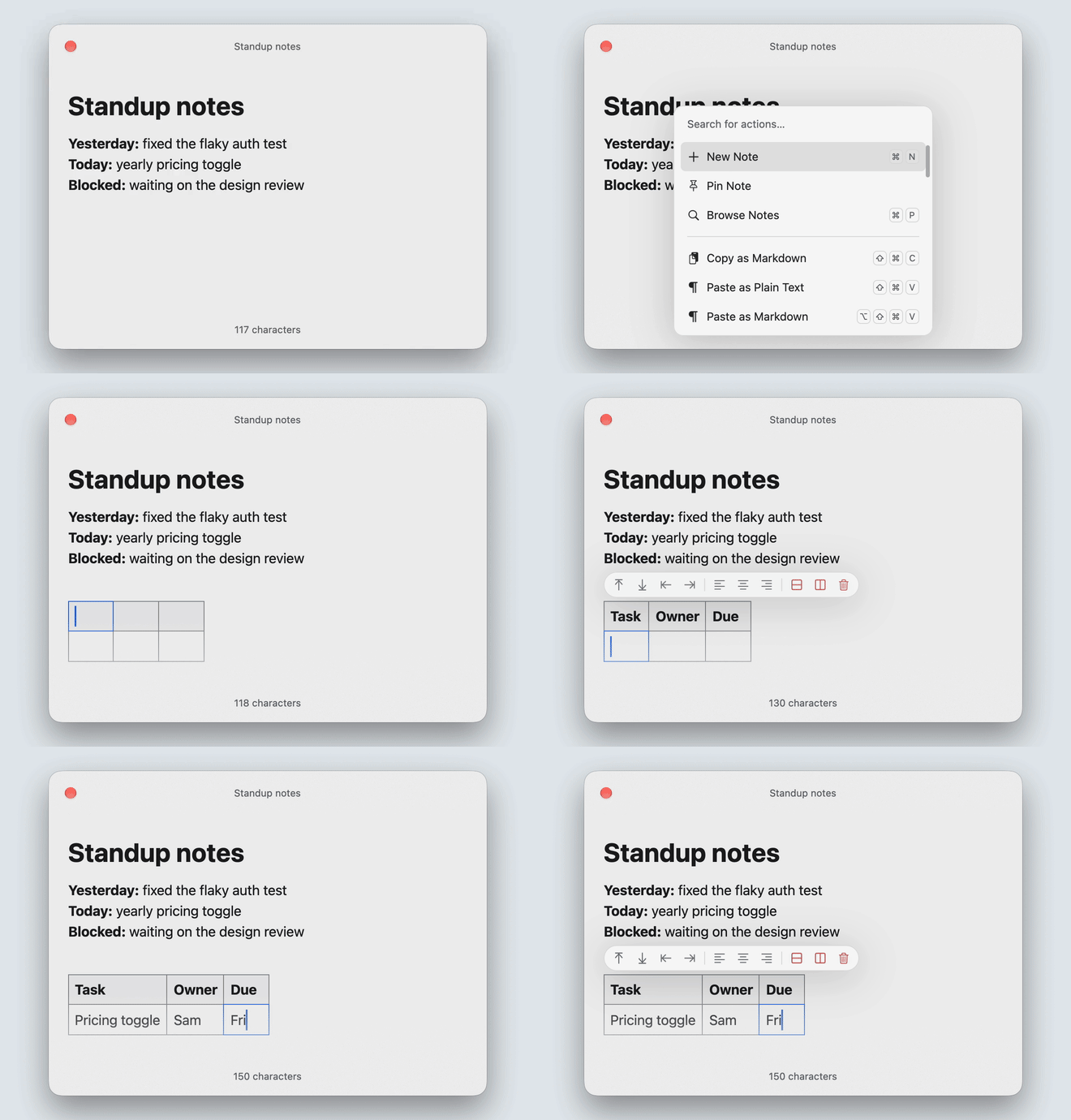
- Floating window. ⌥N shows or hides it over the current app. It stays on top, grows with the note, and can appear on every Space or on the screen with the pointer. A second hotkey for a new note can be set in Settings.
- Live Markdown. Formatting is shown as you type, in the style of Typora; inline marks such as
**appear around the caret only. - Tables, links and more. Tables edited cell by cell, task lists,
[[wiki links]]with completion, callouts, footnotes, images and highlighted code blocks. - Plain files. Each note is a
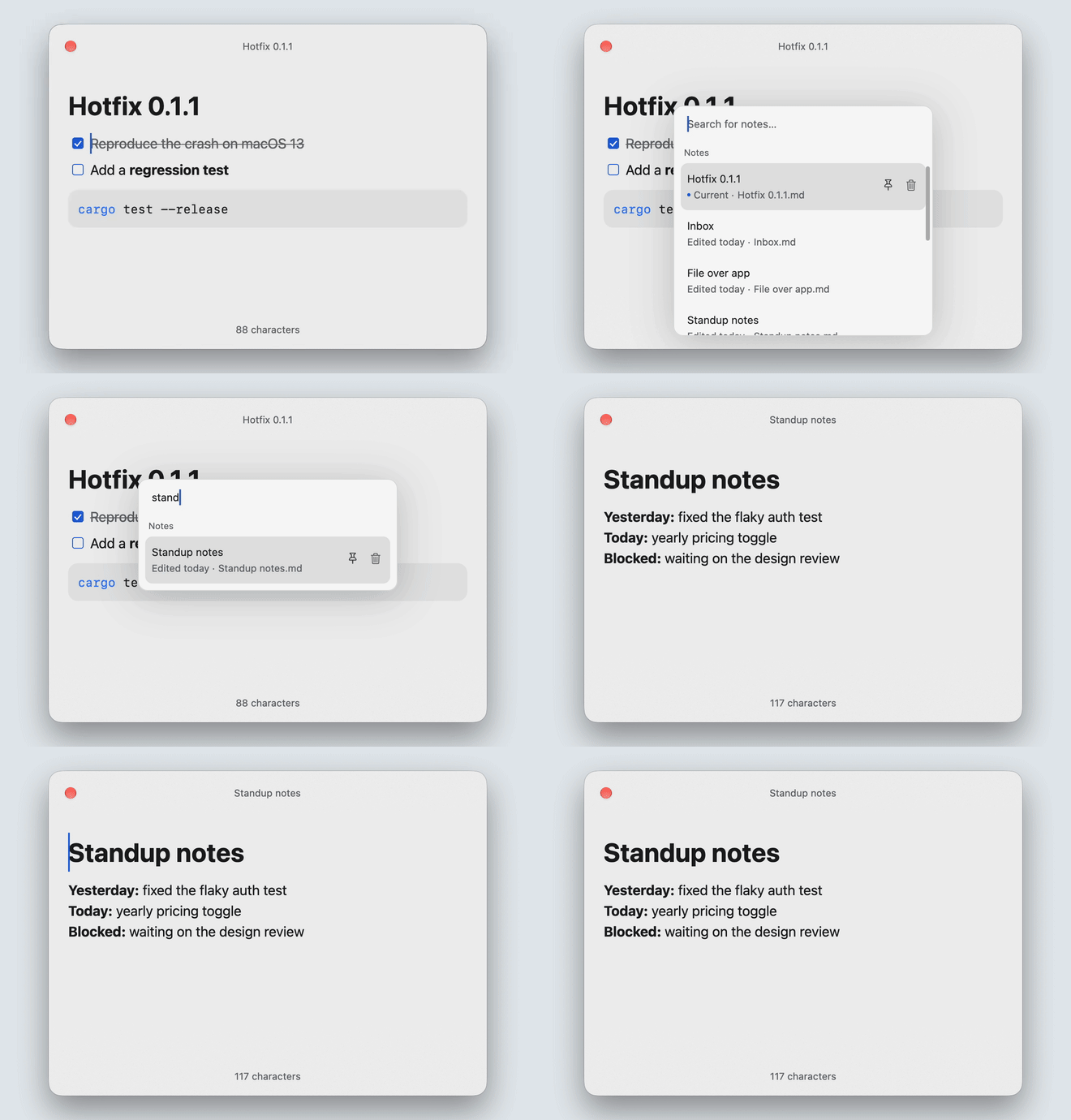
.mdfile. A save rewrites only the lines you edited and leaves the rest of the file unchanged. - Keyboard. ⌘K lists every action with its shortcut, / inserts a block, and vim mode can be turned on in Settings.
- Native. Written in Rust and drawn with GPUI, without a web view.
Installation
Download Markraft.dmg from the latest release, open it, and drag Markraft to Applications. Markraft is signed and notarized, and updates itself through Sparkle. It needs macOS 13 or later.
Markraft runs from the menu bar and has no Dock icon.
Shortcuts
| Shortcut | Action |
|---|---|
| ⌥N | Show or hide the window |
| Esc | Hide the window (:q in vim mode) |
| ⌘N | New note |
| ⌘P | Find a note |
| ⌘K | All actions |
| ⌘O | Open a Markdown file |
| ⌘, | Settings |
| / | Insert a heading, list, table, code block and more |
| [[ | Link to another note |
Vim mode
Turn on Vim mode in Settings → Editor. The editor starts in Normal mode and shows the current mode.
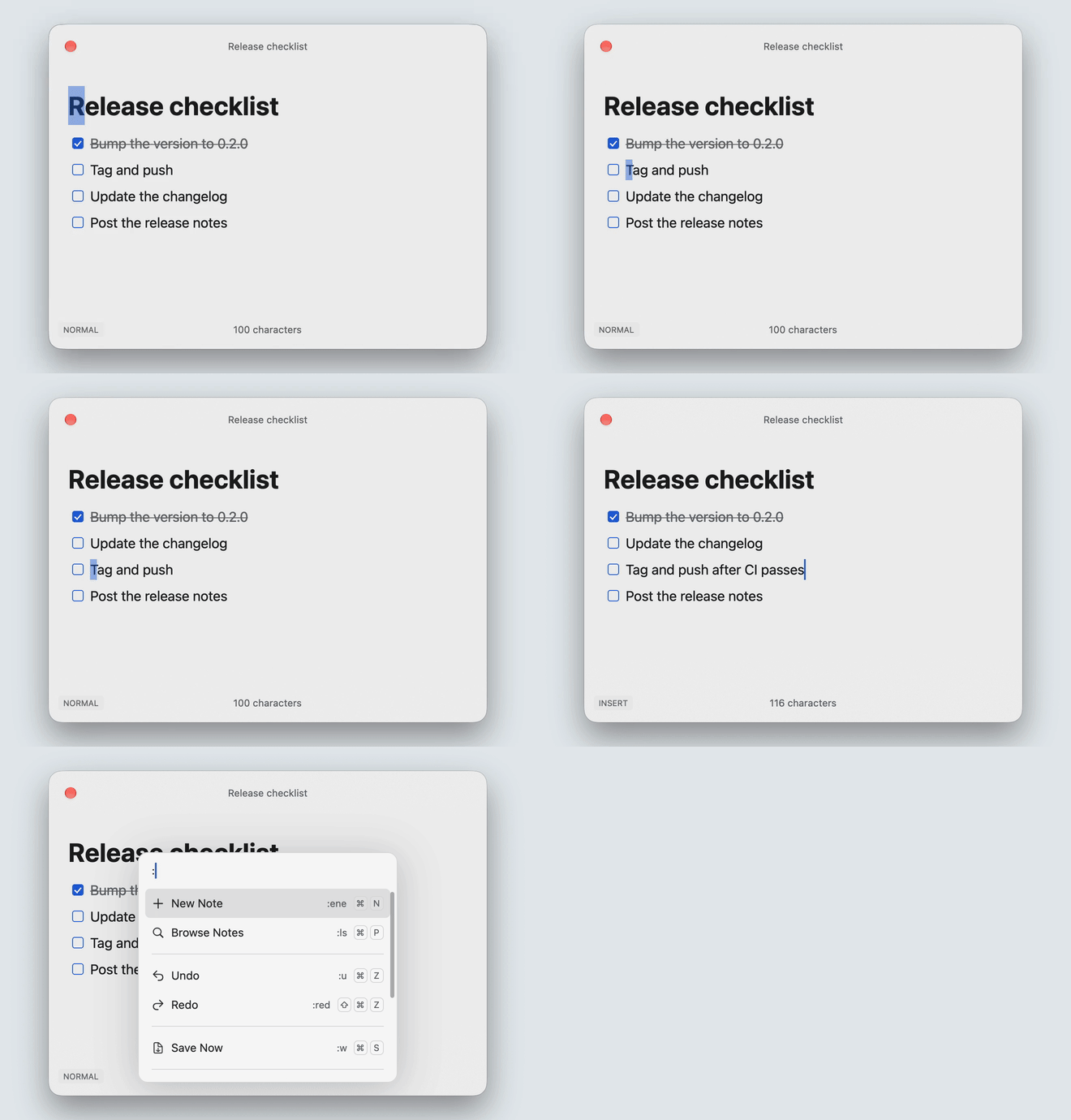
- Modes: Normal, Insert, Visual and Visual Line. Esc returns to Normal mode.
- Motions:
hjkl,wbe,0^$,ggG.jandkmove by visual row in wrapped lines. - Editing:
d,candywith a motion or doubled (dd,cc,yy),D,C,x,p,P,uand Ctrl+R. Counts work, as in3jor2d3w. - Entering Insert mode:
i,a,I,A,o,O. Everything typed in one Insert session is undone in one step. - Text objects:
iwaw,i"a"(and',`),i(a((orb),i[a[,i{a{(orB),i<a<,ipap, after an operator or in Visual mode. - Markdown blocks:
ddandyytake a whole block, so a list item keeps its nesting when pasted and a code block is taken whole. In a table, a line is a table row. - Commands:
:opens the action list as a command line.:wsaves,:qhides the window,:wqand:xsave and hide,:qaquits Markraft,:wqasaves and quits,:ereloads the note from disk,:enewstarts a new note,:lslists notes, and:uand:redundo and redo. In Normal mode Esc does not hide the window; use:q. - Search: in Normal mode,
/opens find with a live preview. Return confirms and returns to the note; Escape restores the original position and query.nfinds the next match from the cursor andNthe previous one, wrapping at either end. Search matches visible text literally, ignoring case, and shares its query with ⌘F.
Search counts, operator or Visual-mode search, ?, regular expressions, f and t, . repeat, registers and other : commands are not supported.
Your notes
Notes are Markdown files in ~/Documents/Markraft by default. You can choose another folder, including one you already keep notes in, and open any other .md file on your Mac.
- Changes made by other apps show up in the open note. If another app changes a file at the same moment you edit it, your version is kept as a separate conflicted copy.
- Deleting a note moves its file to the Trash.
- To sync notes between Macs, put the folder in iCloud Drive or another sync tool. Settings and window state stay on each Mac in
~/Library/Application Support/Markraft.
Settings
- General: launch at login, the hotkeys, light or dark appearance, and how the window floats, hides and which note it opens with.
- Editor: font, text size, line height and width, vim mode, and whether images linked from the web load.
- Markdown: the markers Markraft writes for lists, emphasis, code blocks and line breaks.
- Files: the notes folder, and where new notes and pasted images are saved and how they are named.
Privacy
Markraft has no account and sends no telemetry. It connects to the network only to check for updates and to load images that notes link to on the web; both can be turned off in Settings.
Crash reports
Logs and crash reports are written to ~/Library/Logs/Markraft and stay on your Mac. After a crash, Markraft mentions the report on its next launch. Report an Issue… in ⌘K opens a GitHub issue with your Mac and Markraft versions filled in; attach the report if there is one.
Contributing
Bug reports and pull requests are welcome. For a change in behavior, please open an issue to discuss it first.
bash scripts/download-sparkle.sh   # fetch the Sparkle framework into target/sparkle
cargo run -p markraft-app          # run the app
cargo test --workspace             # run the tests
cargo xtask bundle                 # build target/debug/bundle/osx/Markraft.app
The toolchain is pinned in rust-toolchain.toml. The workspace is split into markraft-core (document model and editing), markraft-commonmark (Markdown), markraft-gpui (the editor view), markraft-vim and markraft-app.
Acknowledgments
Markraft borrows ideas from apps we like:
- Raycast Notes: a note one hotkey away, floating over whatever you are doing.
- Typora: Markdown formatted as you type, with the syntax shown only where you edit.
- Obsidian: notes kept as plain files in your own folder, with
[[wiki links]]and callouts.
Built on GPUI, with comrak for parsing Markdown, syntect for highlighting code and Sparkle for updates.
License
Contributors

195 commits

1 commits
Similar repos


Languages
Rust
99.5%
The floating Markdown notepad for Mac. An open source alternative to Raycast Notes.
See the codeSee what people are saying
README
Markraft
The floating Markdown notepad for Mac.
An open source alternative to Raycast Notes.
Press ⌥N in any app to write, and again to put it away. Notes are plain Markdown files in a folder you choose, so any other editor can open them too.
Download for macOS · Installation
Features
- Floating window. ⌥N shows or hides it over the current app. It stays on top, grows with the note, and can appear on every Space or on the screen with the pointer. A second hotkey for a new note can be set in Settings.
- Live Markdown. Formatting is shown as you type, in the style of Typora; inline marks such as
**appear around the caret only. - Tables, links and more. Tables edited cell by cell, task lists,
[[wiki links]]with completion, callouts, footnotes, images and highlighted code blocks. - Plain files. Each note is a
.mdfile. A save rewrites only the lines you edited and leaves the rest of the file unchanged. - Keyboard. ⌘K lists every action with its shortcut, / inserts a block, and vim mode can be turned on in Settings.
- Native. Written in Rust and drawn with GPUI, without a web view.
Installation
Download Markraft.dmg from the latest release, open it, and drag Markraft to Applications. Markraft is signed and notarized, and updates itself through Sparkle. It needs macOS 13 or later.
Markraft runs from the menu bar and has no Dock icon.
Shortcuts
| Shortcut | Action |
|---|---|
| ⌥N | Show or hide the window |
| Esc | Hide the window (:q in vim mode) |
| ⌘N | New note |
| ⌘P | Find a note |
| ⌘K | All actions |
| ⌘O | Open a Markdown file |
| ⌘, | Settings |
| / | Insert a heading, list, table, code block and more |
| [[ | Link to another note |
Vim mode
Turn on Vim mode in Settings → Editor. The editor starts in Normal mode and shows the current mode.
- Modes: Normal, Insert, Visual and Visual Line. Esc returns to Normal mode.
- Motions:
hjkl,wbe,0^$,ggG.jandkmove by visual row in wrapped lines. - Editing:
d,candywith a motion or doubled (dd,cc,yy),D,C,x,p,P,uand Ctrl+R. Counts work, as in3jor2d3w. - Entering Insert mode:
i,a,I,A,o,O. Everything typed in one Insert session is undone in one step. - Text objects:
iwaw,i"a"(and',`),i(a((orb),i[a[,i{a{(orB),i<a<,ipap, after an operator or in Visual mode. - Markdown blocks:
ddandyytake a whole block, so a list item keeps its nesting when pasted and a code block is taken whole. In a table, a line is a table row. - Commands:
:opens the action list as a command line.:wsaves,:qhides the window,:wqand:xsave and hide,:qaquits Markraft,:wqasaves and quits,:ereloads the note from disk,:enewstarts a new note,:lslists notes, and:uand:redundo and redo. In Normal mode Esc does not hide the window; use:q. - Search: in Normal mode,
/opens find with a live preview. Return confirms and returns to the note; Escape restores the original position and query.nfinds the next match from the cursor andNthe previous one, wrapping at either end. Search matches visible text literally, ignoring case, and shares its query with ⌘F.
Search counts, operator or Visual-mode search, ?, regular expressions, f and t, . repeat, registers and other : commands are not supported.
Your notes
Notes are Markdown files in ~/Documents/Markraft by default. You can choose another folder, including one you already keep notes in, and open any other .md file on your Mac.
- Changes made by other apps show up in the open note. If another app changes a file at the same moment you edit it, your version is kept as a separate conflicted copy.
- Deleting a note moves its file to the Trash.
- To sync notes between Macs, put the folder in iCloud Drive or another sync tool. Settings and window state stay on each Mac in
~/Library/Application Support/Markraft.
Settings
- General: launch at login, the hotkeys, light or dark appearance, and how the window floats, hides and which note it opens with.
- Editor: font, text size, line height and width, vim mode, and whether images linked from the web load.
- Markdown: the markers Markraft writes for lists, emphasis, code blocks and line breaks.
- Files: the notes folder, and where new notes and pasted images are saved and how they are named.
Privacy
Markraft has no account and sends no telemetry. It connects to the network only to check for updates and to load images that notes link to on the web; both can be turned off in Settings.
Crash reports
Logs and crash reports are written to ~/Library/Logs/Markraft and stay on your Mac. After a crash, Markraft mentions the report on its next launch. Report an Issue… in ⌘K opens a GitHub issue with your Mac and Markraft versions filled in; attach the report if there is one.
Contributing
Bug reports and pull requests are welcome. For a change in behavior, please open an issue to discuss it first.
bash scripts/download-sparkle.sh   # fetch the Sparkle framework into target/sparkle
cargo run -p markraft-app          # run the app
cargo test --workspace             # run the tests
cargo xtask bundle                 # build target/debug/bundle/osx/Markraft.app
The toolchain is pinned in rust-toolchain.toml. The workspace is split into markraft-core (document model and editing), markraft-commonmark (Markdown), markraft-gpui (the editor view), markraft-vim and markraft-app.
Acknowledgments
Markraft borrows ideas from apps we like:
- Raycast Notes: a note one hotkey away, floating over whatever you are doing.
- Typora: Markdown formatted as you type, with the syntax shown only where you edit.
- Obsidian: notes kept as plain files in your own folder, with
[[wiki links]]and callouts.
Built on GPUI, with comrak for parsing Markdown, syntect for highlighting code and Sparkle for updates.
License
Similar repos
Contributors
195 commits
1 commits
Languages
Rust
99.5%