A step-through debugger for PyTorch training.
Run your unmodified training script under tvis run. It records the first few optimizer steps
end to end, then exits:
nn.Module and every function in your project, in call order, linked to the source lineThen open the recording in your browser, on your laptop, even when training ran on a cluster two SSH hops away.
python train.py --lr 3e-4                       # normal training: tvis is never imported
tvis run --steps 3 train.py --lr 3e-4           # debug run: same script, same arguments
tvis open mycluster:~/proj/tvis_runs            # on your laptop: opens the viewer
Early development (v1). PyTorch, single device, eager mode. See SCOPE.md.
pip install -e . # in the training environment (needs torch) and on your laptop (no torch needed)
tvis run [--steps N] [--out DIR] [--project DIR] train.py [script args...]
python train.py ... would (__main__, sys.argv,
imports). After N optimizer steps (default 3), tvis saves the recording and stops the script.<project>/tvis_runs/<timestamp>_<script>_<id>/. The project directory
defaults to the script's directory. Functions defined under it are traced; library code is not.tvis run so the data pipeline is
observable. The run reports this as a notice.torch.optim
treats each backward as a step.On SLURM, change one line in your job script:
srun tvis run --steps 3 train.py --lr 3e-4 # was: srun python train.py --lr 3e-4
When it finishes, tvis run prints the command for viewing the recording from your laptop.
tvis open starts the viewer on 127.0.0.1 on your laptop and opens your browser.
tvis open ./tvis_runs                           # runs on this machine
tvis open gpu-login:~/proj/tvis_runs            # any ssh host or ~/.ssh/config alias
tvis open --via bastion --via login c42:/scratch/me/tvis_runs    # explicit jump hosts
For remote runs, tvis runs ssh <host> tvis agent --stdio and reads the run over that SSH
session's stdin/stdout. No port is opened on the cluster, so it works where port forwarding is
disabled. Only the data you look at is transferred. Hops come from your ~/.ssh/config
(ProxyJump) or from --via. tvis reuses SSH connections, so on clusters with 2FA you're asked
to authenticate at most once.
If tvis isn't on the remote PATH for non-interactive shells (common with conda or venvs), tell
it how to start:
tvis open gpu:~/proj/tvis_runs --remote-tvis "~/miniconda3/envs/train/bin/tvis"
Save a target you use often:
tvis target add gpu --host c42 --via bastion,login --path ~/proj/tvis_runs --remote-tvis ~/venv/bin/tvis
tvis open gpu
| Page | What it shows |
|---|---|
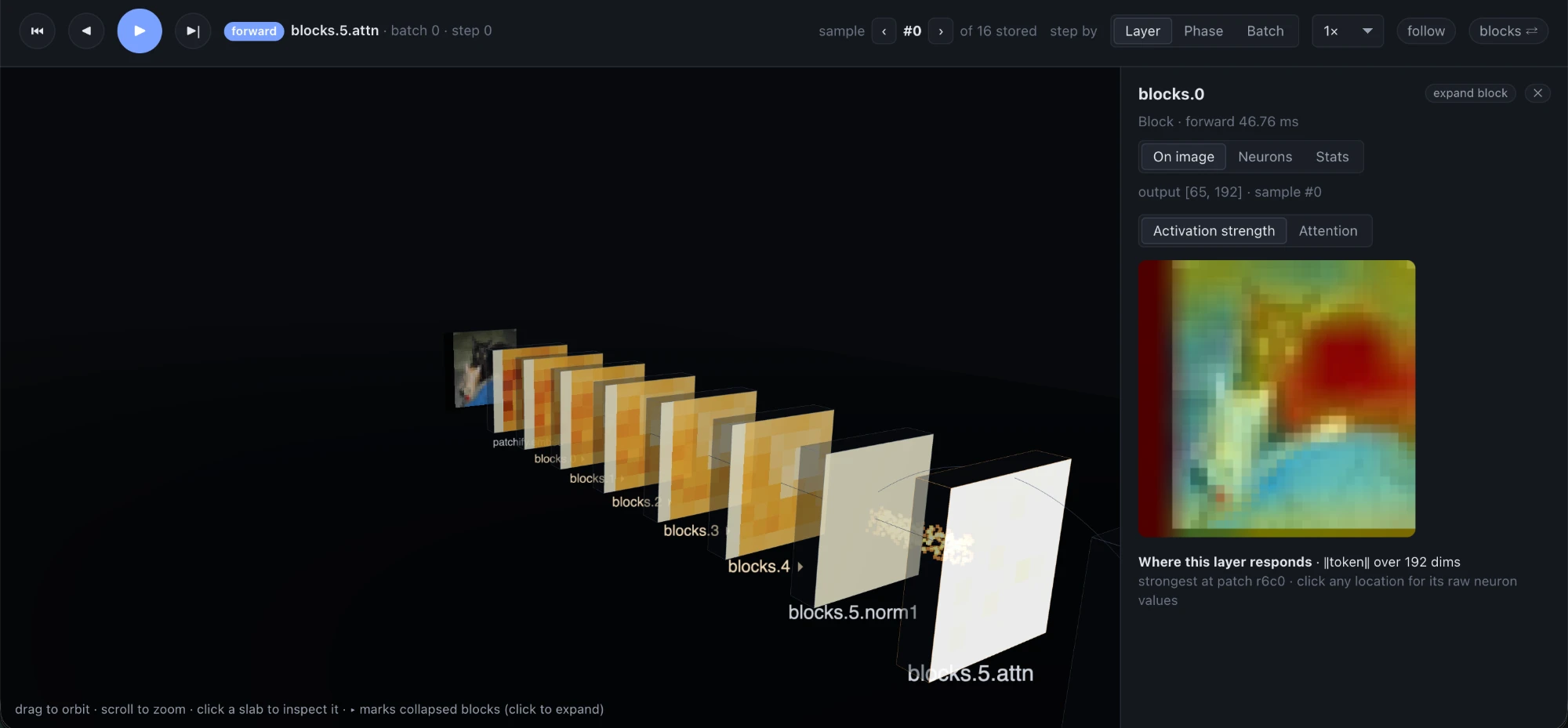
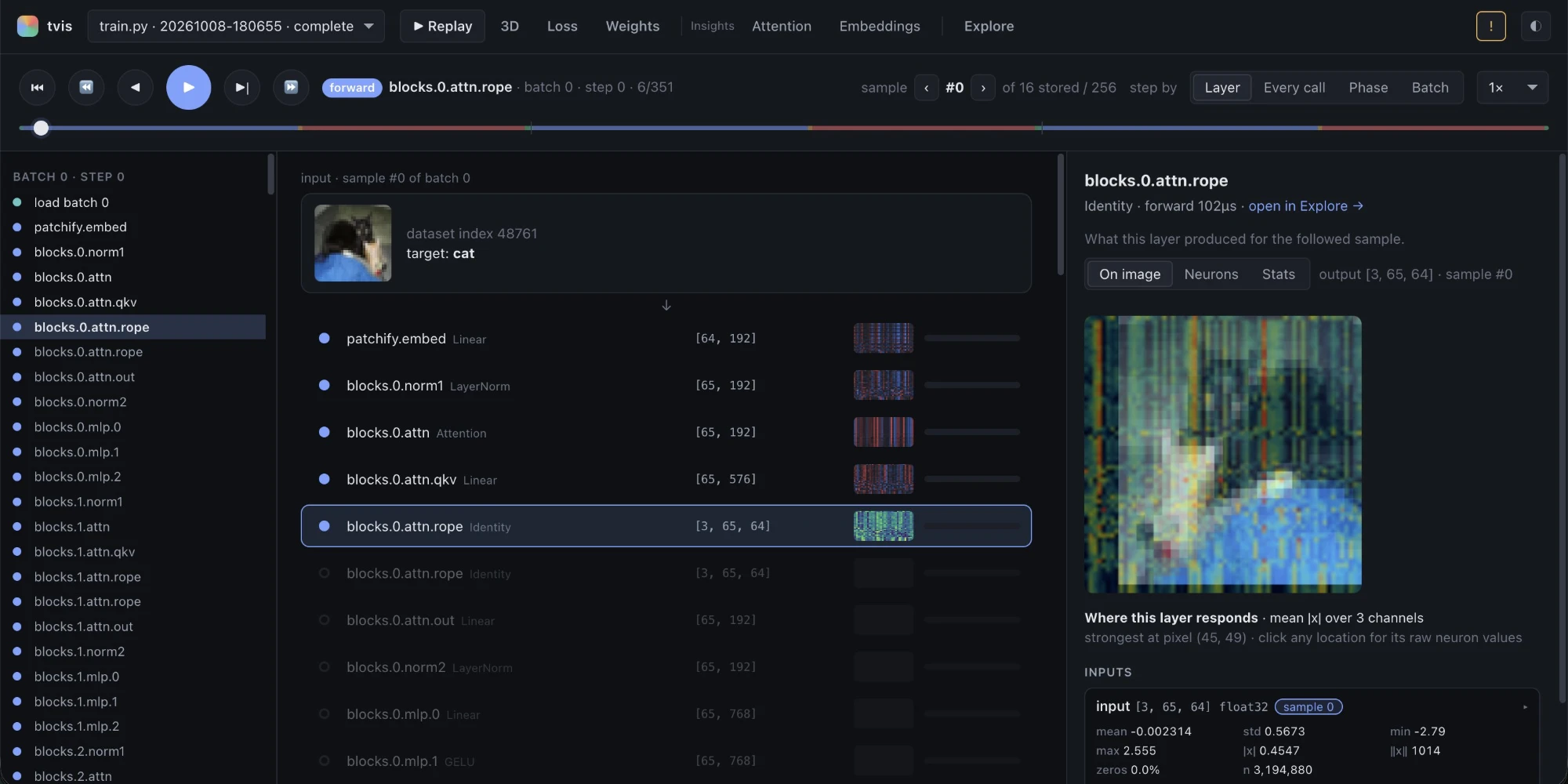
| ▶ Replay (default) | Plays the recorded steps back like training happening. The batch loads and your sample goes through the transforms; each layer lights up with its activation for that sample; the loss appears; gradients flow back up, each layer coloured by ‖dL/d(output)‖; the optimizer updates; the next batch starts. Play/pause, step (←/→), jump by phase, pick the step size (layer · every call · phase · batch) and the sample ([ / ]). |
| Every layer: On image · Neurons · Stats | In Replay and in Explore's inspector. On image: the layer's activation (or gradient) for the followed sample painted over the input picture: mean |x| per location for conv maps, per-patch token strength for ViTs, and for attention layers where [CLS] (or any patch you click) looks. Click a location for every neuron's raw value there. Neurons: every conv channel / ViT hidden dimension as its own map (most active first) or, for vectors such as logits, labelled bars; click one for its exact numbers. |
| Loss | Loss per batch across the run. The exact loss call and how it reduces. Each sample's p(target) → −log p → loss, worst first. A confusion matrix over all captured samples (classification), or each target token coloured by its loss with padding struck out (language models). |
| Weights | One layer at a time: conv kernels as a filter × channel grid, matrices as heatmaps, with stats and histograms. Switch weight / gradient / update Δw and slide across steps. "All layers" shows lazily loaded thumbnails of every parameter. |
| Insights → Attention | Token-to-token attention maps from softmax weights computed in your code, per layer and head with real tokens on the axes, plus attention rollout across layers. |
| Insights → Grad-CAM | True Grad-CAM (class-score gradients) over each input image, per conv layer, for the predicted or the true class. |
| Insights → Embeddings | PCA of every captured sample's representation at a chosen layer, coloured by class (slide through depth to see classes separate), and PCA of embedding tables labelled by token. |
| Explore | The full debugger: call tree, inspector, samples, timeline, annotated source, layers table, step view. |
Insight pages appear only when they apply: Grad-CAM needs conv layers, Attention needs attention softmaxes, and so on.
tvis run. The test suite checks this in-process and across processes.p_after - p_before exactly.autograd.grad pass that never writes
.grad, and tvis's gradient hooks are paused during it. Disable it with --no-gradcam.[B*T, V] is inferred.torchrun yet.torch.compiled modules may hide their internals from the hooks.GradScaler, recorded gradients are the scaled gradients.--max-elems (default 2M elements) keep stats and their leading rows only.F.scaled_dot_product_attention) and attention inside libraries never expose their weights.See AGENTS.md for commands, layout, invariants and test conventions.
python -m venv .venv && .venv/bin/pip install -e ".[dev]"
.venv/bin/pytest -q
A step-through debugger for PyTorch training.
Run your unmodified training script under tvis run. It records the first few optimizer steps
end to end, then exits:
nn.Module and every function in your project, in call order, linked to the source lineThen open the recording in your browser, on your laptop, even when training ran on a cluster two SSH hops away.
python train.py --lr 3e-4                       # normal training: tvis is never imported
tvis run --steps 3 train.py --lr 3e-4           # debug run: same script, same arguments
tvis open mycluster:~/proj/tvis_runs            # on your laptop: opens the viewer
Early development (v1). PyTorch, single device, eager mode. See SCOPE.md.
pip install -e . # in the training environment (needs torch) and on your laptop (no torch needed)
tvis run [--steps N] [--out DIR] [--project DIR] train.py [script args...]
python train.py ... would (__main__, sys.argv,
imports). After N optimizer steps (default 3), tvis saves the recording and stops the script.<project>/tvis_runs/<timestamp>_<script>_<id>/. The project directory
defaults to the script's directory. Functions defined under it are traced; library code is not.tvis run so the data pipeline is
observable. The run reports this as a notice.torch.optim
treats each backward as a step.On SLURM, change one line in your job script:
srun tvis run --steps 3 train.py --lr 3e-4 # was: srun python train.py --lr 3e-4
When it finishes, tvis run prints the command for viewing the recording from your laptop.
tvis open starts the viewer on 127.0.0.1 on your laptop and opens your browser.
tvis open ./tvis_runs                           # runs on this machine
tvis open gpu-login:~/proj/tvis_runs            # any ssh host or ~/.ssh/config alias
tvis open --via bastion --via login c42:/scratch/me/tvis_runs    # explicit jump hosts
For remote runs, tvis runs ssh <host> tvis agent --stdio and reads the run over that SSH
session's stdin/stdout. No port is opened on the cluster, so it works where port forwarding is
disabled. Only the data you look at is transferred. Hops come from your ~/.ssh/config
(ProxyJump) or from --via. tvis reuses SSH connections, so on clusters with 2FA you're asked
to authenticate at most once.
If tvis isn't on the remote PATH for non-interactive shells (common with conda or venvs), tell
it how to start:
tvis open gpu:~/proj/tvis_runs --remote-tvis "~/miniconda3/envs/train/bin/tvis"
Save a target you use often:
tvis target add gpu --host c42 --via bastion,login --path ~/proj/tvis_runs --remote-tvis ~/venv/bin/tvis
tvis open gpu
| Page | What it shows |
|---|---|
| ▶ Replay (default) | Plays the recorded steps back like training happening. The batch loads and your sample goes through the transforms; each layer lights up with its activation for that sample; the loss appears; gradients flow back up, each layer coloured by ‖dL/d(output)‖; the optimizer updates; the next batch starts. Play/pause, step (←/→), jump by phase, pick the step size (layer · every call · phase · batch) and the sample ([ / ]). |
| Every layer: On image · Neurons · Stats | In Replay and in Explore's inspector. On image: the layer's activation (or gradient) for the followed sample painted over the input picture: mean |x| per location for conv maps, per-patch token strength for ViTs, and for attention layers where [CLS] (or any patch you click) looks. Click a location for every neuron's raw value there. Neurons: every conv channel / ViT hidden dimension as its own map (most active first) or, for vectors such as logits, labelled bars; click one for its exact numbers. |
| Loss | Loss per batch across the run. The exact loss call and how it reduces. Each sample's p(target) → −log p → loss, worst first. A confusion matrix over all captured samples (classification), or each target token coloured by its loss with padding struck out (language models). |
| Weights | One layer at a time: conv kernels as a filter × channel grid, matrices as heatmaps, with stats and histograms. Switch weight / gradient / update Δw and slide across steps. "All layers" shows lazily loaded thumbnails of every parameter. |
| Insights → Attention | Token-to-token attention maps from softmax weights computed in your code, per layer and head with real tokens on the axes, plus attention rollout across layers. |
| Insights → Grad-CAM | True Grad-CAM (class-score gradients) over each input image, per conv layer, for the predicted or the true class. |
| Insights → Embeddings | PCA of every captured sample's representation at a chosen layer, coloured by class (slide through depth to see classes separate), and PCA of embedding tables labelled by token. |
| Explore | The full debugger: call tree, inspector, samples, timeline, annotated source, layers table, step view. |
Insight pages appear only when they apply: Grad-CAM needs conv layers, Attention needs attention softmaxes, and so on.
tvis run. The test suite checks this in-process and across processes.p_after - p_before exactly.autograd.grad pass that never writes
.grad, and tvis's gradient hooks are paused during it. Disable it with --no-gradcam.[B*T, V] is inferred.torchrun yet.torch.compiled modules may hide their internals from the hooks.GradScaler, recorded gradients are the scaled gradients.--max-elems (default 2M elements) keep stats and their leading rows only.F.scaled_dot_product_attention) and attention inside libraries never expose their weights.See AGENTS.md for commands, layout, invariants and test conventions.
python -m venv .venv && .venv/bin/pip install -e ".[dev]"
.venv/bin/pytest -q



