██████╗ ██████╗      ██╗ ██████╗ ██╗   ██╗
██╔══██╗██╔══██╗     ██║██╔═══██╗╚██╗ ██╔╝
██║  ██║██████╔╝     ██║██║   ██║ ╚████╔╝
██║  ██║██╔══██╗██   ██║██║   ██║  ╚██╔╝
██████╔╝██████╔╝╚█████╔╝╚██████╔╝   ██║
╚═════╝ ╚═════╝  ╚════╝  ╚═════╝    ╚═╝
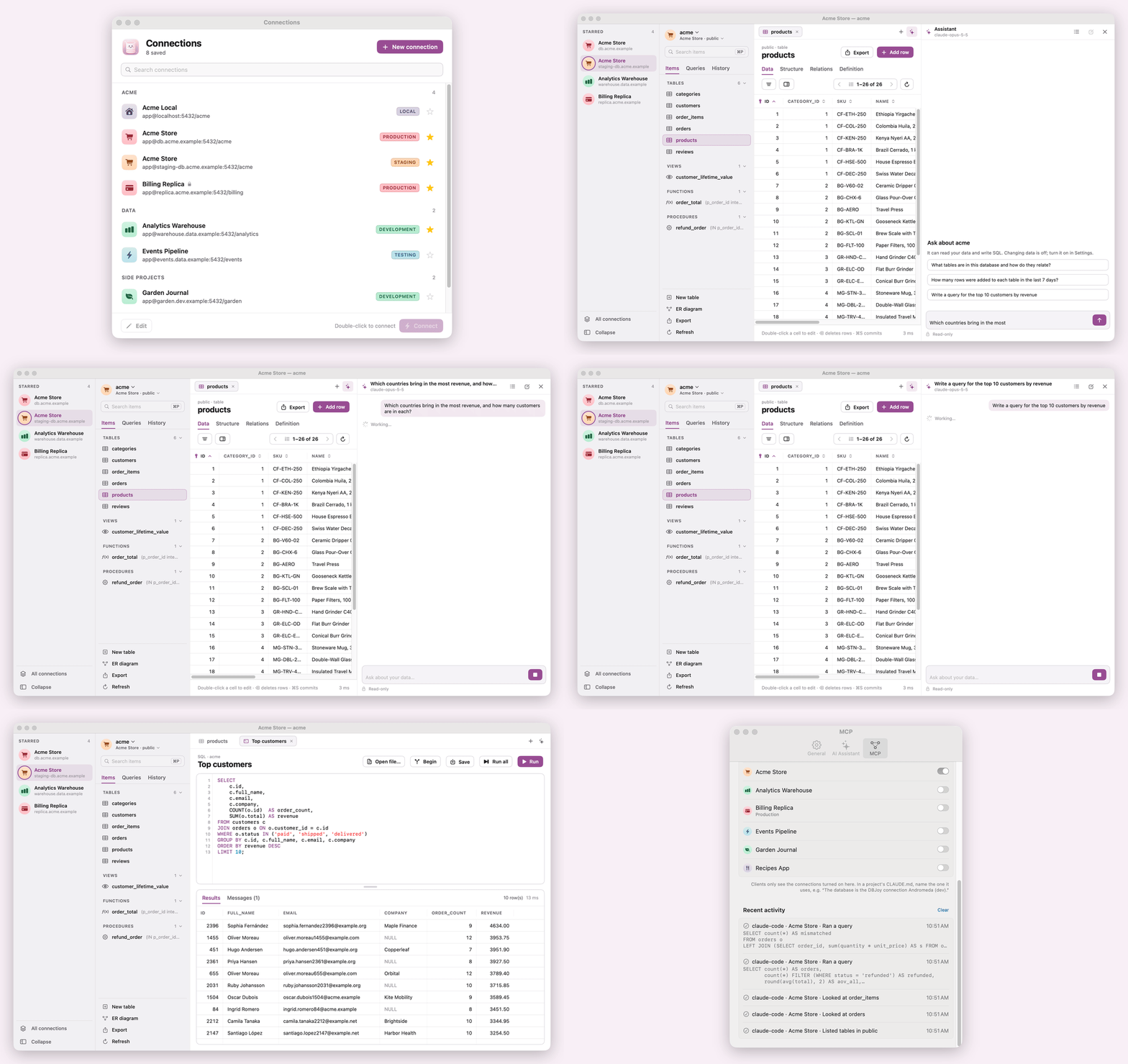
The AI-first PostgreSQL client for the Mac. Ask questions about your data in plain language and get answers backed by real queries, or have the SQL written for you, with your own Anthropic or OpenAI key. Then browse schemas, edit data safely, write SQL and export, all in a fast, keyboard-friendly SwiftUI app. More database engines can be added as drivers.
Download the latest DBJoy-<version>.dmg from Releases, open it, and
drag DBJoy to Applications. Builds are signed with a Developer ID and notarized by Apple.
postgres://user:pass@host:5432/db?sslmode=require or host=… dbname=…) to fill in a
new connection; DBJoy also offers one it finds on the clipboardCHECK (col IN (...)) lists; generated columns are read-onlyNOW(), CURRENT_DATE or gen_random_uuid() in date, number or UUID cells, or start
any cell with = for an expression (=now() + interval '1 day', =upper('x')); the server computes the value on
commit. Type \= to store text that starts with =ALTER statements in one transaction.sql files (⌘O, or drag them onto a query tab) and optionally run them right away; Run SQL File… (⇧⌘O)
opens and runs in one step. psql-only commands such as \connect or \copy are flagged before anything runs.sql file, open it in a query tab on the target, or run it there in one
transaction (nothing changes if a statement fails), with a confirmation that names the environmentINSERTs (one file, ordered by foreign keys, sequences reset)pg_dump (bundled with the app)When you work on a project with Claude Code, it can query that project's database through DBJoy. Ask "how many schools do we have?" from the terminal, and Claude Code finds the connection in DBJoy, checks the tables and runs the query itself. You don't copy credentials into the project: DBJoy connects with the password in your Keychain and any SSH tunnel you set up, and the shared connections are read-only.
claude mcp add --transport http --scope user dbjoy http://127.0.0.1:47821/mcp \
  --header "Authorization: Bearer <token>"
CLAUDE.md, say which connection it uses:
The database is the DBJoy connection "Andromeda (dev)".
Then ask away in that project: "how many schools signed up this month?", "which tables reference students?".
Run /mcp in Claude Code to check that DBJoy is connected.
| Tool | What it does |
|---|---|
list_connections | Lists the shared connections with their environment and database |
list_tables | Lists a schema's tables, views and routines, and the other schemas |
describe_table | Shows columns, keys, indexes, constraints and foreign keys |
run_query | Runs SELECT, WITH, EXPLAIN, SHOW or VALUES and returns the first 100 rows |
http://127.0.0.1:47821/mcp (Streamable HTTP)
with the header Authorization: Bearer <token>; Copy Token copies the token.| Action | Keys |
|---|---|
| New query tab | ⌘T |
| Close tab | ⌘W |
| Open anything | ⌘P |
| Run statement / selection | ⌘↩ |
| Run all | ⇧⌘↩ |
| Cancel query | ⌘. |
| Commit changes / save query | ⌘S |
| Refresh | ⌘R |
| Search rows / find in editor | ⌘F |
| ER diagram | ⇧⌘E |
| Compare schemas | ⇧⌘D |
| Export tables | ⌥⌘E |
| Open SQL file / run SQL file | ⌘O / ⇧⌘O |
| AI assistant | ⌘J |
| Next / previous tab | ⇧⌘] / ⇧⌘[ |
| Completion | typing, Esc or ⌃Space |
| Edit cell | double-click or Return; Tab moves to the next cell |
| Delete rows | ⌫ |
| Settings | ⌘, |
brew install libpq (keg-only; the package links /opt/homebrew/opt/libpq, override with LIBPQ_PREFIX)swift run DBJoy # run from the command line
scripts/build-app.sh # build build/DBJoy.app (release)
open build/DBJoy.app
Or open Package.swift in Xcode and run the DBJoy scheme.
build-app.sh signs with the first Developer ID / Apple Development identity in your keychain (override with
DBJOY_SIGN_IDENTITY). A stable signature keeps the Keychain from asking for your password after every rebuild.
DBJOY_SANDBOX=1 scripts/build-app.sh builds the sandboxed variant the Mac App Store needs.
Set DBJOY_DATA_DIR=<folder> to keep connections, saved queries and history in another folder (demos,
screenshots) instead of ~/Library/Application Support/DBJoy.
docker run -d --name dbjoy-pg -e POSTGRES_PASSWORD=secret -p 55432:5432 postgres:17
psql "postgres://postgres:secret@localhost:55432/postgres" -f scripts/sample-db.sql
Then add a connection to localhost:55432, user postgres, password secret, database dbjoy_sample.
The sample includes type_showcase, a table with one column per common Postgres type (enum, CHECK list, domain,
arrays, ranges, JSON, network types, a generated column…) for testing editors. Reload just that table with
scripts/type-showcase.sql.
swift test                       # unit tests (lexer, splitter, completion, SQL generation)
DBJOY_TEST_PG=1 swift test       # + integration and export tests against the sample database

scripts/ssh-test-server.sh       # throwaway sshd on 127.0.0.1:52222 next to the sample database
DBJOY_TEST_SSH=1 DBJOY_TEST_SSH_KEY=/tmp/dbjoy_test_key swift test --filter SSHTunnelTests
docker rm -f dbjoy-ssh
Sources/
  CLibPQ/          system module for libpq
  DBCore/          engine-agnostic: models, DatabaseDriver/DatabaseConnection protocols,
                   SQLDialect (edit + DDL generation), SQL lexer/splitter, completion, export encoders
  PostgresDriver/  libpq wrapper (serial queue per connection, single-row streaming,
                   cancellation, notices) + Postgres introspection and dialect
  DBJoy/           SwiftUI app; AppKit for the data grid (NSTableView) and SQL editor (NSTextView)
    MCP/           local MCP server (Streamable HTTP on 127.0.0.1) for Claude Code and other clients
    Compare/       schema compare window (the diff and migration SQL live in PostgresDriver)
To add an engine, implement DatabaseDriver, DatabaseConnection and SQLDialect in a new target, add a
DatabaseKind case, and register it in Sources/DBJoy/Services/Drivers.swift.
MIT. See LICENSE.
██████╗ ██████╗      ██╗ ██████╗ ██╗   ██╗
██╔══██╗██╔══██╗     ██║██╔═══██╗╚██╗ ██╔╝
██║  ██║██████╔╝     ██║██║   ██║ ╚████╔╝
██║  ██║██╔══██╗██   ██║██║   ██║  ╚██╔╝
██████╔╝██████╔╝╚█████╔╝╚██████╔╝   ██║
╚═════╝ ╚═════╝  ╚════╝  ╚═════╝    ╚═╝
The AI-first PostgreSQL client for the Mac. Ask questions about your data in plain language and get answers backed by real queries, or have the SQL written for you, with your own Anthropic or OpenAI key. Then browse schemas, edit data safely, write SQL and export, all in a fast, keyboard-friendly SwiftUI app. More database engines can be added as drivers.
Download the latest DBJoy-<version>.dmg from Releases, open it, and
drag DBJoy to Applications. Builds are signed with a Developer ID and notarized by Apple.
postgres://user:pass@host:5432/db?sslmode=require or host=… dbname=…) to fill in a
new connection; DBJoy also offers one it finds on the clipboardCHECK (col IN (...)) lists; generated columns are read-onlyNOW(), CURRENT_DATE or gen_random_uuid() in date, number or UUID cells, or start
any cell with = for an expression (=now() + interval '1 day', =upper('x')); the server computes the value on
commit. Type \= to store text that starts with =ALTER statements in one transaction.sql files (⌘O, or drag them onto a query tab) and optionally run them right away; Run SQL File… (⇧⌘O)
opens and runs in one step. psql-only commands such as \connect or \copy are flagged before anything runs.sql file, open it in a query tab on the target, or run it there in one
transaction (nothing changes if a statement fails), with a confirmation that names the environmentINSERTs (one file, ordered by foreign keys, sequences reset)pg_dump (bundled with the app)When you work on a project with Claude Code, it can query that project's database through DBJoy. Ask "how many schools do we have?" from the terminal, and Claude Code finds the connection in DBJoy, checks the tables and runs the query itself. You don't copy credentials into the project: DBJoy connects with the password in your Keychain and any SSH tunnel you set up, and the shared connections are read-only.
claude mcp add --transport http --scope user dbjoy http://127.0.0.1:47821/mcp \
  --header "Authorization: Bearer <token>"
CLAUDE.md, say which connection it uses:
The database is the DBJoy connection "Andromeda (dev)".
Then ask away in that project: "how many schools signed up this month?", "which tables reference students?".
Run /mcp in Claude Code to check that DBJoy is connected.
| Tool | What it does |
|---|---|
list_connections | Lists the shared connections with their environment and database |
list_tables | Lists a schema's tables, views and routines, and the other schemas |
describe_table | Shows columns, keys, indexes, constraints and foreign keys |
run_query | Runs SELECT, WITH, EXPLAIN, SHOW or VALUES and returns the first 100 rows |
http://127.0.0.1:47821/mcp (Streamable HTTP)
with the header Authorization: Bearer <token>; Copy Token copies the token.| Action | Keys |
|---|---|
| New query tab | ⌘T |
| Close tab | ⌘W |
| Open anything | ⌘P |
| Run statement / selection | ⌘↩ |
| Run all | ⇧⌘↩ |
| Cancel query | ⌘. |
| Commit changes / save query | ⌘S |
| Refresh | ⌘R |
| Search rows / find in editor | ⌘F |
| ER diagram | ⇧⌘E |
| Compare schemas | ⇧⌘D |
| Export tables | ⌥⌘E |
| Open SQL file / run SQL file | ⌘O / ⇧⌘O |
| AI assistant | ⌘J |
| Next / previous tab | ⇧⌘] / ⇧⌘[ |
| Completion | typing, Esc or ⌃Space |
| Edit cell | double-click or Return; Tab moves to the next cell |
| Delete rows | ⌫ |
| Settings | ⌘, |
brew install libpq (keg-only; the package links /opt/homebrew/opt/libpq, override with LIBPQ_PREFIX)swift run DBJoy # run from the command line
scripts/build-app.sh # build build/DBJoy.app (release)
open build/DBJoy.app
Or open Package.swift in Xcode and run the DBJoy scheme.
build-app.sh signs with the first Developer ID / Apple Development identity in your keychain (override with
DBJOY_SIGN_IDENTITY). A stable signature keeps the Keychain from asking for your password after every rebuild.
DBJOY_SANDBOX=1 scripts/build-app.sh builds the sandboxed variant the Mac App Store needs.
Set DBJOY_DATA_DIR=<folder> to keep connections, saved queries and history in another folder (demos,
screenshots) instead of ~/Library/Application Support/DBJoy.
docker run -d --name dbjoy-pg -e POSTGRES_PASSWORD=secret -p 55432:5432 postgres:17
psql "postgres://postgres:secret@localhost:55432/postgres" -f scripts/sample-db.sql
Then add a connection to localhost:55432, user postgres, password secret, database dbjoy_sample.
The sample includes type_showcase, a table with one column per common Postgres type (enum, CHECK list, domain,
arrays, ranges, JSON, network types, a generated column…) for testing editors. Reload just that table with
scripts/type-showcase.sql.
swift test                       # unit tests (lexer, splitter, completion, SQL generation)
DBJOY_TEST_PG=1 swift test       # + integration and export tests against the sample database

scripts/ssh-test-server.sh       # throwaway sshd on 127.0.0.1:52222 next to the sample database
DBJOY_TEST_SSH=1 DBJOY_TEST_SSH_KEY=/tmp/dbjoy_test_key swift test --filter SSHTunnelTests
docker rm -f dbjoy-ssh
Sources/
  CLibPQ/          system module for libpq
  DBCore/          engine-agnostic: models, DatabaseDriver/DatabaseConnection protocols,
                   SQLDialect (edit + DDL generation), SQL lexer/splitter, completion, export encoders
  PostgresDriver/  libpq wrapper (serial queue per connection, single-row streaming,
                   cancellation, notices) + Postgres introspection and dialect
  DBJoy/           SwiftUI app; AppKit for the data grid (NSTableView) and SQL editor (NSTextView)
    MCP/           local MCP server (Streamable HTTP on 127.0.0.1) for Claude Code and other clients
    Compare/       schema compare window (the diff and migration SQL live in PostgresDriver)
To add an engine, implement DatabaseDriver, DatabaseConnection and SQLDialect in a new target, add a
DatabaseKind case, and register it in Sources/DBJoy/Services/Drivers.swift.
MIT. See LICENSE.



