Jump quickly to directories that you have visited "frecently." A native Zsh port of z.sh with added features.
Shell
2,461
751 commits
updated Oct 2, 2026


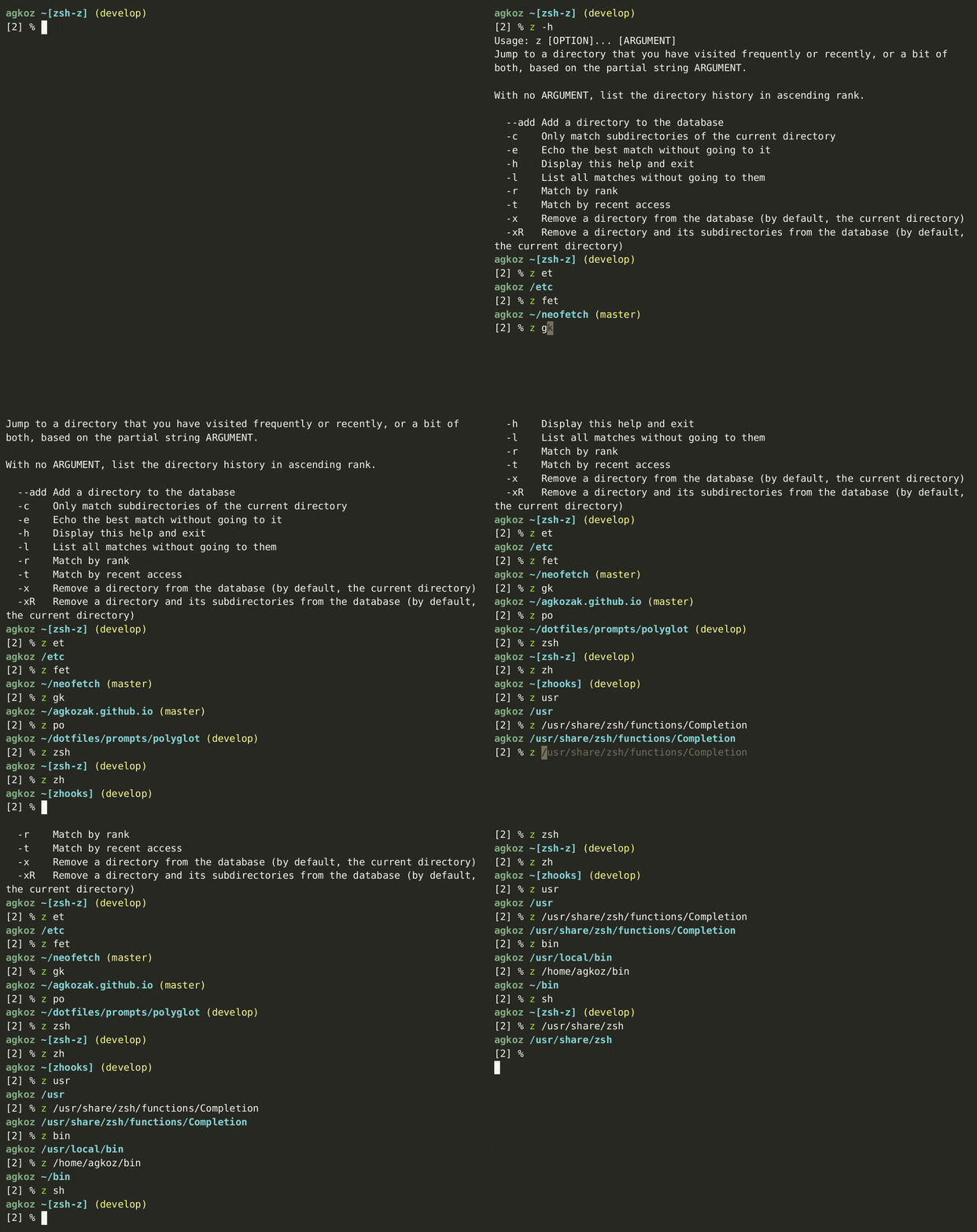
Zsh-z is a command-line tool that allows you to jump quickly to directories that you have visited frequently or recently -- but most often a combination of the two (a concept known as "frecency"). It works by keeping track of when you go to directories and how much time you spend in them. Based on this data, it predicts where you want to go when you type a partial string. For example, z src might take you to ~/src/zsh. z zsh might also get you there, and z c/z might prove to be even more specific -- it all depends on your habits and how long you have been using Zsh-z to build up a database. After using Zsh-z for a little while, you will get to where you want to be by typing considerably less than you would need to if you were using cd.
Zsh-z is a native Zsh port of rupa/z, a tool written for bash and Zsh that uses embedded awk scripts to do the heavy lifting. rupa/z was my most used command-line tool for a couple of years. I decided to translate it, awk parts and all, into pure Zsh script, to see if by eliminating calls to external tools (awk, sort, date, sed, mv, rm, and chown) and reducing forking through subshells I could make it faster. The performance increase is impressive, particularly on systems where forking is slow, such as Cygwin, MSYS2, and WSL.
There is also a significant stability improvement. Race conditions have always been a problem with rupa/z, and users of that utility occasionally lose their ~/.z databases. By having Zsh-z only use Zsh (rupa/z uses a hybrid shell code standard that works on bash as well), I have been able to implement a zsh/system-based file-locking mechanism. It is now nearly impossible to crash the database.
There are other, smaller improvements which I document below in Other Improvements to the Original Functionality of rupa/z. For instance, tab completions are now sorted by frecency by default rather than alphabetically (the latter behavior can be restored if you like it -- see below).
Zsh-z is a drop-in replacement for rupa/z and will, by default, use the same database (~/.z, or whatever database file you specify), so you can go on using rupa/z when you launch bash.
Zsh-z v2.0
v2.0 is the most significant release in the project's history. It is faster than ever at adding, searching, and listing on modern Zsh; it never makes your prompt wait on database writes -- on any platform; it hardens those writes against corruption and against prying eyes; and it makes tab completion "just work" even under
setopt COMPLETE_ALIASES. See v2.0 in the News below for the full rundown, and Performance for the benchmarks.
ZSHZ_UNCOMMONZSHZ_OWNER--add work for yourupa/zCOMPLETE_ALIASESsetopt NO_CLOBBER. Under NO_CLOBBER,
every database write could fail with can't clobber parameter tmpfd containing file descriptor 0, even when the database already existed. That error no longer
occurs (#81).setopt NO_CLOBBER. With
NO_CLOBBER set and APPEND_CREATE unset, Zsh-z could not create a missing
database or lockfile. It now creates them without changing your shell options or
losing existing directory history (#105).Version 2.0 is a major step forward, and these are the changes most worth knowing about:
--add has long run in the background on most systems, but Cygwin and MSYS2 did the write in the foreground, because backgrounding there cost a wrapper subshell plus a job. --add now runs as a single disowned job (&!) everywhere: one fork, no wrapper subshell, no job-control noise. On Cygwin and MSYS2 that turns a foreground write whose cost grows with your datafile (~30 ms at 300 entries, ~300 ms at 1,000) into a flat ~10-12 ms fork. Elsewhere it halves the forks per prompt.zsh/system file locking, with a bounded wait for lock acquisition (the new ZSHZ_LOCK_TIMEOUT, default 1 second). Write errors are handled gracefully, and locks are always released even if a write is interrupted. On Cygwin and MSYS2 a write is also retried briefly if Windows refuses it: a virus scanner or the search indexer that opens the database in the instant between its being written and its being moved into place makes the move fail, which used to lose that one directory silently. Zsh-z now retries the move briefly.600 permissions -- readable and writable only by you -- so that other users on a shared system cannot read your directory history (#92). On Zsh 5+ this uses the in-process zf_chmod builtin; on Zsh 4.3.11 it uses a umask-in-a-subshell technique that avoids the fork-and-exec of an external chmod.COMPLETE_ALIASES works automatically in normal setups. Tab completion no longer breaks when you have setopt COMPLETE_ALIASES enabled. Zsh-z registers the alias automatically on the first Tab press, so the manual compdef line that earlier versions required is no longer necessary. See below.can't clobber parameter tmpfd error on some Zsh builds. On certain Zsh builds, every database write could fail with can't clobber parameter tmpfd containing file descriptor 0, leaving an error at each new prompt (#81). Correction: the error occurs under setopt NO_CLOBBER, and the v2.0 change did not fix it there; v2.0.1 does.ZSHZ_DATA points at a directory, or names a file without a directory, Zsh-z now reports the problem and returns instead of calling exit. The per-prompt --add stays quiet about it, so you are told once, when you actually run z, rather than at every prompt (#103; props @ahjota).z -x can now remove the entry for a directory that no longer exists -- and can no longer crash Zsh 4.3.11. The removal target used to have to exist on disk, so a database entry whose directory had been deleted -- exactly the entry you most want gone -- could not be removed. z -x /deleted/dir (and z -xR) now canonicalizes the argument without requiring it to exist, resolving symlinks in as much of the path as is still present. The same change fixes a crash on Zsh 4.3.11, where an upstream bug makes ${x:A} segfault when the top-level component of the path is missing: z -x /gone/sub -- or a ZSHZ_DATA pointing into a missing top-level directory -- could kill the shell there.None of these should need any action from you, but they are the things a v1 user is most likely to spot:
-r and -t can no longer be combined. They name mutually exclusive sort orders -- rank versus recency -- so z -rt foo was always contradictory, and -t silently took precedence. It is now rejected with an error message instead of silently picking one.~/.z.lock (or $ZSHZ_DATA plus .lock). It is created 600, it stays empty, and it is deliberately never deleted -- removing a lockfile that another shell has already opened would reintroduce the very race it exists to prevent. Where zsh/system is missing and zsystem flock is therefore unavailable -- MobaXterm's cut-down Cygwin is the case in practice -- you will see a short-lived ~/.z.lock.d directory instead, which is created and removed for each write. See ZSHZ_LOCK_TIMEOUT for how that fallback behaves.600 on the next write. If your ~/.z predates this release and is 644, the first write will re-mode it. This is the #92 fix applied to databases you already have, not just newly created ones. Setting the mode is treated as part of the write rather than a courtesy afterwards: if it cannot be done, the write is abandoned and reports failure instead of publishing a database that anyone on the machine could read.The dated entries below remain the historical record of changes leading up to v2.0.
$) in them.sh/bash/ksh.z us lo bi), the command line is clear of detritus (i.e., it looks like z /usr/local/bin instead of z us lo /usr/local/bin).setopt NO_UNSET has been enabled (props @ntninja).zsh/files (props @z0rc).zsh/files module when possible but will fall back on the standard chown, mv, and rm commands in its absence.ZSHZ_CD environment variable (default: builtin cd; props @basnijholt).ZSHZ_DATA or _Z_DATA does not already exist, create it (props @mattmc3).HOME during completion when ZSHZ_TILDE=1 has been set.--add has been made to work with relative paths and has been documented for the user.z -xR will now remove a directory and its subdirectories from the database.z -x and z -xR can now take an argument; without one, PWD is assumed.$ZSHZ_CMD alias (default: z).print -v ... -f instead of print -v to work around longstanding bug in Zsh involving print -v and multibyte strings.zstyle.ZSHZ_EXCLUDE_DIRS as an array with unique elements so that you do not have to.print -v, which was mangling CJK multibyte strings.ZSHZ_TRAILING_SLASH=1 makes it so that a search pattern ending in / can match the end of a path; e.g. z foo/ can match /path/to/foo.ZSHZ_TILDE=1 displays the HOME directory as ~.ZSHZ_ECHO=1 will cause Zsh-z to display the new path when you change directories.\`()[].rupa/z now displays them, i.e. as large integers. This should help Zsh-z to integrate with other tools._zshz_precmd simply returns if PWD is HOME or in ZSHZ_EXCLUDE_DIRS, rather than waiting for zshz to do that.PUSHD_IGNORE_DUPS option is respected.z -h help text now breaks at spaces.z -l was not working for Zsh version < 5.z -lr and z -lt work as expected.EXTENDED_GLOB has been disabled within the plugin to accommodate old-fashioned Windows directories with names such as Progra~1.zshelldoc documentation.rupa/z's math, but for the present, Zsh-z will continue to display ranks as 1/10000th of what they are in rupa/z -- they had to multiply theirs by 10000 to work around bash's inadequacies at dealing with decimal fractions.z foo, and foo is not in the database but ${PWD}/foo is a valid directory, Zsh-z will cd to it.ZSHZ_CASE: when set to ignore, pattern matching is case-insensitive; when set to smart, patterns are matched case-insensitively when they are all lowercase and case-sensitively when they have uppercase characters in them (a behavior very much like Vim's smartcase setting).ZSHZ_KEEP_DIRS is an array of directory names that should not be removed from the database, even if they are not currently available (useful when a drive is not always mounted).This plugin can be installed simply by putting the various files in a directory together and by sourcing zsh-z.plugin.zsh in your .zshrc:
source /path/to/zsh-z.plugin.zsh
Tab completion requires compinit. _zshz must also be in the same directory as zsh-z.plugin.zsh. The frameworks handle both of these requirements, but if you are not using a framework, put
autoload -U compinit; compinit
in your .zshrc somewhere below where you source zsh-z.plugin.zsh -- the plugin adds its directory to fpath at source time, and compinit needs to see it there in order to find _zshz.
If you add
zstyle ':completion:*' menu select
to your .zshrc, your completion menus will look very nice. This zstyle invocation should work with any of the frameworks below as well.
Add the line
antigen bundle agkozak/zsh-z
to your .zshrc, somewhere above the line that says antigen apply.
Zsh-z is now included as part of Oh My Zsh! As long as you are using an up-to-date installation of Oh My Zsh, you can activate Zsh-z simply by adding z to your plugins array in your .zshrc, e.g.,
plugins=( git z )
It is as simple as that.
If, however, you prefer always to use the latest version of Zsh-z from the agkozak/zsh-z repo, you may install it thus:
git clone https://github.com/agkozak/zsh-z ${ZSH_CUSTOM:-~/.oh-my-zsh/custom}/plugins/zsh-z
and activate it by adding zsh-z to the line of your .zshrc that specifies plugins=(), e.g., plugins=( git zsh-z ).
Execute the following command:
git clone https://github.com/agkozak/zsh-z.git ~/.zprezto-contrib/zsh-z
Then edit your ~/.zpreztorc file. Make sure the line that says
zstyle ':prezto:load' pmodule-dirs $HOME/.zprezto-contrib
is uncommented. Then find the section that specifies which modules are to be loaded; it should look something like this:
zstyle ':prezto:load' pmodule \
    'environment' \
    'terminal' \
    'editor' \
    'history' \
    'directory' \
    'spectrum' \
    'utility' \
    'completion' \
    'prompt'
Add a backslash to the end of the last line and add 'zsh-z' to the list, e.g.,
zstyle ':prezto:load' pmodule \
    'environment' \
    'terminal' \
    'editor' \
    'history' \
    'directory' \
    'spectrum' \
    'utility' \
    'completion' \
    'prompt' \
    'zsh-z'
Then relaunch zsh.
Simply add
zcomet load agkozak/zsh-z
to your .zshrc (below where you source zcomet.zsh and above where you run zcomet compinit).
Add the line
zgen load agkozak/zsh-z
somewhere above the line that says zgen save. Then run
zgen reset
zsh
to refresh your init script.
Add the following line to your .zimrc:
zmodule https://github.com/agkozak/zsh-z
Then run
zimfw install
and restart your shell.
Add the line
zinit load agkozak/zsh-z
to your .zshrc.
Zsh-z supports zinit's unload feature; just run zinit unload agkozak/zsh-z to restore the shell to its state before Zsh-z was loaded. It gives back only what it took: the fpath entry is removed only if Zsh-z was the one that added it, so a directory your plugin manager put there is left alone, and the Tab-completion mapping is dropped only while it still points at Zsh-z's own completer.
Add the line
znap source agkozak/zsh-z
somewhere below the line where you source Znap itself.
Add the line
zplug "agkozak/zsh-z"
somewhere above the line that says zplug load. Then run
zplug install
zplug load
to install Zsh-z.
--add Add a directory to the database-c Only match subdirectories of the current directory-e Echo the best match without going to it-h Display help-l List all matches without going to them-r Match by rank (i.e. how much time you spend in directories)-t Time -- match by how recently you have been to directories-x Remove a directory (by default, the current directory) from the database-xR Remove a directory (by default, the current directory) and its subdirectories from the databaseZsh-z has environment variables (they all begin with ZSHZ_) that change its behavior if you set them. You can also keep your old ones if you have been using rupa/z (whose environment variables begin with _Z_).
ZSHZ_CASE can be ignore, for case-insensitive matching, or smart, for Vim-like smartcase matching; see below (default: empty, i.e., a case-sensitive match is tried first, then a case-insensitive one)ZSHZ_CMD changes the command name (default: z)ZSHZ_CD specifies the default directory-changing command (default: builtin cd)ZSHZ_COMPLETION can be 'frecent' (default) or 'legacy', depending on whether you want your completion results sorted according to frecency or simply sorted alphabeticallyZSHZ_DATA changes the database file (default: ~/.z)ZSHZ_ECHO displays the new path name when changing directories (default: 0)ZSHZ_EXCLUDE_DIRS is an array of directories to keep out of the database (default: empty)ZSHZ_KEEP_DIRS is an array of directories that should not be removed from the database, even if they are not currently available (useful when a drive is not always mounted) (default: empty)ZSHZ_LOCK_TIMEOUT is the number of seconds to wait for the database lock before giving up on a write (default: 1). Where zsh/system is unavailable and zsystem flock cannot be used -- MobaXterm's cut-down Cygwin, for instance -- Zsh-z serializes writes with an atomic mkdir on ~/.z.lock.d instead, and this setting bounds the wait the same way. That fallback has no equivalent of the kernel releasing a lock when its holder dies, so a lock directory older than 30 seconds is treated as abandoned and cleared; a write takes milliseconds, so nothing legitimate is ever that old. A write that times out is dropped silently -- the automatic precmd add is best-effort -- so if the database seems to stop updating, the lock is probably contended: run z --add . by hand and check $?. A 2 is a lock-acquisition timeout, which confirms contention -- look for a stale process holding ~/.z.lock (or a leftover ~/.z.lock.d directory on the fallback path), or raise this setting. A 1 is something else entirely, usually a permissions or ownership problem, such as a root-owned ~/.z or ~/.z.lock left behind by an earlier sudo -s session.ZSHZ_MAX_SCORE is the maximum combined score the database entries can have before they begin to age and potentially drop out of the database (default: 9000)ZSHZ_NO_RESOLVE_SYMLINKS prevents symlink resolution (default: 0)ZSHZ_OWNER is the username the database belongs to; set it to your own login name to keep z working in a root shell, such as under sudo -E -s; see below (default: empty)ZSHZ_TILDE displays the name of the HOME directory as a ~ (default: 0)ZSHZ_TRAILING_SLASH makes it so that a search pattern ending in / can match the final element in a path; e.g., z foo/ can match /path/to/foo (default: 0)ZSHZ_UNCOMMON changes the logic used to calculate the directory jumped to; see below (default: 0)The default behavior of Zsh-z is to try to find a case-sensitive match. If there is none, then Zsh-z tries to find a case-insensitive match.
Some users prefer simple case-insensitivity; this behavior can be enabled by setting
ZSHZ_CASE=ignore
If you like Vim's smartcase setting, where lowercase patterns are case-insensitive while patterns with any uppercase characters are treated case-sensitively, try setting
ZSHZ_CASE=smart
ZSHZ_UNCOMMONA common complaint about the default behavior of rupa/z and Zsh-z involves "common prefixes." If you type z code and the best matches, in increasing order, are
/home/me/code/foo
/home/me/code/bar
/home/me/code/bat
Zsh-z will see that all possible matches share a common prefix and will send you to that directory -- /home/me/code -- which is often a desirable result. But if the possible matches are
/home/me/.vscode/foo
/home/me/code/foo
/home/me/code/bar
/home/me/code/bat
then there is no common prefix. In this case, z code will simply send you to the highest-ranking match, /home/me/code/bat.
You may enable an alternate, experimental behavior by setting ZSHZ_UNCOMMON=1. If you do that, Zsh-z will not jump to a common prefix, even if one exists. Instead, it chooses the highest-ranking match -- but it drops any subdirectories that do not include the search term. So if you type z bat and /home/me/code/bat is the best match, that is exactly where you will end up. If, however, you had typed z code and the best match was also /home/me/code/bat, you would have ended up in /home/me/code (because code was what you had searched for). This feature is still in development, and feedback is welcome.
ZSHZ_OWNERIf you are using root privileges while keeping your personal home directory as HOME (as is the case with sudo -E -s), conflicts with file ownership arise. You can resolve them by using ZSHZ_OWNER. If you set this variable to your username, Zsh-z will be able to use your personal datafile, restoring its proper ownership with every write.
Setting ZSHZ_OWNER makes one thing stricter, because a privileged shell is then writing to a path that an unprivileged user controls: Zsh-z follows a symlink on the way to the datafile -- the file itself, or any parent directory -- only if root owns the link, and reports an error instead of writing otherwise. Symlinked system directories, such as /home → /usr/home on the BSDs or /var → /private/var on macOS, belong to root and still resolve. With ZSHZ_OWNER unset none of this applies: a symlinked ~/.z is followed exactly as before, so pointing it at synced storage keeps working.
--add Work for YouZsh-z internally uses the --add option to add paths to its database. @zachriggle pointed out to me that users might want to use --add themselves, so I have altered it a little to make it more user-friendly.
A good example might involve a directory tree that has Git repositories within it. The working directories could be added to the Zsh-z database as a batch with
for i in $(find $PWD -maxdepth 3 -name .git -type d); do
  z --add ${i:h}
done
(As a Zsh user, I tend to use ** instead of find, but it is good to see how deep your directory trees go before doing that.)
One of the goals of the rewrite that culminated in v2.0 was to make Zsh-z simultaneously more stable and faster. On modern Zsh, Zsh-z outpaces rupa/z's z.sh at adding, searching, and listing. Representative figures (N = 200 database entries, medians of seven interleaved runs on a Core i7-12700 desktop under WSL2):
Modern Zsh (5.9) -- Zsh-z vs. rupa/z:
| Operation | rupa/z (z.sh) | Zsh-z | Winner |
|---|---|---|---|
add | 6.25 ms/op | 1.99 ms/op | Zsh-z ~3.14x |
search | 6.51 ms/op | 3.62 ms/op | Zsh-z ~1.80x |
list | 8.93 ms/op | 4.36 ms/op | Zsh-z ~2.05x |
Zsh 4.3.11 (the oldest supported release) -- Zsh-z vs. rupa/z:
| Operation | rupa/z (z.sh) | Zsh-z | Winner |
|---|---|---|---|
add | 5.00 ms/op | 2.92 ms/op | Zsh-z ~1.71x |
search | 4.93 ms/op | 4.47 ms/op | Zsh-z ~1.10x |
list | 7.92 ms/op | 6.08 ms/op | Zsh-z ~1.30x |
Removal is absent from these tables: in rupa/z, the per-prompt hook re-adds the current directory right after z -x removes it, so the two implementations' -x are not doing comparable work.
Relative to the previous generation of Zsh-z, the v2.0 read path is dramatically faster -- on modern Zsh, listing the whole database is about 2.4x faster and searching about 1.6x faster.
rupa/zz -x works: a directory you remove stays removed.zshcompsys completion system instead of the old compctl one.[) in directory names are now supported.z -l returns only one match, a common root is not printed.-c, -r, and -t.~/foo and ~/foob are matches, ~/foo is no longer considered the common root. Only a common parent directory can be a common root.z -x and the new, recursive z -xR can now accept an argument so that you can remove directories other than PWD from the database.rupa/z's behavior of allowing spaces as wildcards (e.g., z us lo bi might take you to /usr/local/bin), but now completion of such command lines does not result in visual detritus.Zsh-z's database format is identical to that of rupa/z. You may switch freely between the two tools (I still use rupa/z for bash). fasd also uses that database format, but it stores it by default in ~/.fasd, so you will have to cp ~/.fasd ~/.z if you want to use your old directory history.
If you are coming to Zsh-z (or even to the original rupa/z, for that matter) from autojump, try using my jumpstart-z tool to convert your old database to the Zsh-z format, or simply run
awk -F "\t" '{printf("%s|%0.f|%s\n", $2, $1, '"$(date +%s)"')}' < /path/to/autojump.txt > ~/.z
COMPLETE_ALIASESz, or any alternative you set up using $ZSHZ_CMD or $_Z_CMD, is an alias. setopt COMPLETE_ALIASES divorces the tab completion for aliases from the underlying commands they invoke, which historically broke Zsh-z's tab completion. Zsh-z now handles this automatically: the first Tab press registers the alias name with _zshz so completion works under COMPLETE_ALIASES without any extra setup.
That registration happens inside Zsh-z's own Tab widget. If a plugin loaded after Zsh-z replaces the Tab binding without invoking the previous widget, Zsh-z's widget never runs and the registration does not happen. Under COMPLETE_ALIASES, you would then have no completion for z. Once compinit has run, adding
compdef _zshz ${ZSHZ_CMD:-${_Z_CMD:-z}}
below setopt COMPLETE_ALIASES in your .zshrc fixes that, and it is harmless if the automatic registration has already run.
(top 24 of 28)
4,827 followers · starred Sep 2022
219 followers · starred May 2024
60 followers · starred Feb 2021
867 followers · starred Dec 2021
Jump quickly to directories that you have visited "frecently." A native Zsh port of z.sh with added features.
Shell
2,461
751 commits
updated Oct 2, 2026
Zsh-z is a command-line tool that allows you to jump quickly to directories that you have visited frequently or recently -- but most often a combination of the two (a concept known as "frecency"). It works by keeping track of when you go to directories and how much time you spend in them. Based on this data, it predicts where you want to go when you type a partial string. For example, z src might take you to ~/src/zsh. z zsh might also get you there, and z c/z might prove to be even more specific -- it all depends on your habits and how long you have been using Zsh-z to build up a database. After using Zsh-z for a little while, you will get to where you want to be by typing considerably less than you would need to if you were using cd.
Zsh-z is a native Zsh port of rupa/z, a tool written for bash and Zsh that uses embedded awk scripts to do the heavy lifting. rupa/z was my most used command-line tool for a couple of years. I decided to translate it, awk parts and all, into pure Zsh script, to see if by eliminating calls to external tools (awk, sort, date, sed, mv, rm, and chown) and reducing forking through subshells I could make it faster. The performance increase is impressive, particularly on systems where forking is slow, such as Cygwin, MSYS2, and WSL.
There is also a significant stability improvement. Race conditions have always been a problem with rupa/z, and users of that utility occasionally lose their ~/.z databases. By having Zsh-z only use Zsh (rupa/z uses a hybrid shell code standard that works on bash as well), I have been able to implement a zsh/system-based file-locking mechanism. It is now nearly impossible to crash the database.
There are other, smaller improvements which I document below in Other Improvements to the Original Functionality of rupa/z. For instance, tab completions are now sorted by frecency by default rather than alphabetically (the latter behavior can be restored if you like it -- see below).
Zsh-z is a drop-in replacement for rupa/z and will, by default, use the same database (~/.z, or whatever database file you specify), so you can go on using rupa/z when you launch bash.
Zsh-z v2.0
v2.0 is the most significant release in the project's history. It is faster than ever at adding, searching, and listing on modern Zsh; it never makes your prompt wait on database writes -- on any platform; it hardens those writes against corruption and against prying eyes; and it makes tab completion "just work" even under
setopt COMPLETE_ALIASES. See v2.0 in the News below for the full rundown, and Performance for the benchmarks.
ZSHZ_UNCOMMONZSHZ_OWNER--add work for yourupa/zCOMPLETE_ALIASESsetopt NO_CLOBBER. Under NO_CLOBBER,
every database write could fail with can't clobber parameter tmpfd containing file descriptor 0, even when the database already existed. That error no longer
occurs (#81).setopt NO_CLOBBER. With
NO_CLOBBER set and APPEND_CREATE unset, Zsh-z could not create a missing
database or lockfile. It now creates them without changing your shell options or
losing existing directory history (#105).Version 2.0 is a major step forward, and these are the changes most worth knowing about:
--add has long run in the background on most systems, but Cygwin and MSYS2 did the write in the foreground, because backgrounding there cost a wrapper subshell plus a job. --add now runs as a single disowned job (&!) everywhere: one fork, no wrapper subshell, no job-control noise. On Cygwin and MSYS2 that turns a foreground write whose cost grows with your datafile (~30 ms at 300 entries, ~300 ms at 1,000) into a flat ~10-12 ms fork. Elsewhere it halves the forks per prompt.zsh/system file locking, with a bounded wait for lock acquisition (the new ZSHZ_LOCK_TIMEOUT, default 1 second). Write errors are handled gracefully, and locks are always released even if a write is interrupted. On Cygwin and MSYS2 a write is also retried briefly if Windows refuses it: a virus scanner or the search indexer that opens the database in the instant between its being written and its being moved into place makes the move fail, which used to lose that one directory silently. Zsh-z now retries the move briefly.600 permissions -- readable and writable only by you -- so that other users on a shared system cannot read your directory history (#92). On Zsh 5+ this uses the in-process zf_chmod builtin; on Zsh 4.3.11 it uses a umask-in-a-subshell technique that avoids the fork-and-exec of an external chmod.COMPLETE_ALIASES works automatically in normal setups. Tab completion no longer breaks when you have setopt COMPLETE_ALIASES enabled. Zsh-z registers the alias automatically on the first Tab press, so the manual compdef line that earlier versions required is no longer necessary. See below.can't clobber parameter tmpfd error on some Zsh builds. On certain Zsh builds, every database write could fail with can't clobber parameter tmpfd containing file descriptor 0, leaving an error at each new prompt (#81). Correction: the error occurs under setopt NO_CLOBBER, and the v2.0 change did not fix it there; v2.0.1 does.ZSHZ_DATA points at a directory, or names a file without a directory, Zsh-z now reports the problem and returns instead of calling exit. The per-prompt --add stays quiet about it, so you are told once, when you actually run z, rather than at every prompt (#103; props @ahjota).z -x can now remove the entry for a directory that no longer exists -- and can no longer crash Zsh 4.3.11. The removal target used to have to exist on disk, so a database entry whose directory had been deleted -- exactly the entry you most want gone -- could not be removed. z -x /deleted/dir (and z -xR) now canonicalizes the argument without requiring it to exist, resolving symlinks in as much of the path as is still present. The same change fixes a crash on Zsh 4.3.11, where an upstream bug makes ${x:A} segfault when the top-level component of the path is missing: z -x /gone/sub -- or a ZSHZ_DATA pointing into a missing top-level directory -- could kill the shell there.None of these should need any action from you, but they are the things a v1 user is most likely to spot:
-r and -t can no longer be combined. They name mutually exclusive sort orders -- rank versus recency -- so z -rt foo was always contradictory, and -t silently took precedence. It is now rejected with an error message instead of silently picking one.~/.z.lock (or $ZSHZ_DATA plus .lock). It is created 600, it stays empty, and it is deliberately never deleted -- removing a lockfile that another shell has already opened would reintroduce the very race it exists to prevent. Where zsh/system is missing and zsystem flock is therefore unavailable -- MobaXterm's cut-down Cygwin is the case in practice -- you will see a short-lived ~/.z.lock.d directory instead, which is created and removed for each write. See ZSHZ_LOCK_TIMEOUT for how that fallback behaves.600 on the next write. If your ~/.z predates this release and is 644, the first write will re-mode it. This is the #92 fix applied to databases you already have, not just newly created ones. Setting the mode is treated as part of the write rather than a courtesy afterwards: if it cannot be done, the write is abandoned and reports failure instead of publishing a database that anyone on the machine could read.The dated entries below remain the historical record of changes leading up to v2.0.
$) in them.sh/bash/ksh.z us lo bi), the command line is clear of detritus (i.e., it looks like z /usr/local/bin instead of z us lo /usr/local/bin).setopt NO_UNSET has been enabled (props @ntninja).zsh/files (props @z0rc).zsh/files module when possible but will fall back on the standard chown, mv, and rm commands in its absence.ZSHZ_CD environment variable (default: builtin cd; props @basnijholt).ZSHZ_DATA or _Z_DATA does not already exist, create it (props @mattmc3).HOME during completion when ZSHZ_TILDE=1 has been set.--add has been made to work with relative paths and has been documented for the user.z -xR will now remove a directory and its subdirectories from the database.z -x and z -xR can now take an argument; without one, PWD is assumed.$ZSHZ_CMD alias (default: z).print -v ... -f instead of print -v to work around longstanding bug in Zsh involving print -v and multibyte strings.zstyle.ZSHZ_EXCLUDE_DIRS as an array with unique elements so that you do not have to.print -v, which was mangling CJK multibyte strings.ZSHZ_TRAILING_SLASH=1 makes it so that a search pattern ending in / can match the end of a path; e.g. z foo/ can match /path/to/foo.ZSHZ_TILDE=1 displays the HOME directory as ~.ZSHZ_ECHO=1 will cause Zsh-z to display the new path when you change directories.\`()[].rupa/z now displays them, i.e. as large integers. This should help Zsh-z to integrate with other tools._zshz_precmd simply returns if PWD is HOME or in ZSHZ_EXCLUDE_DIRS, rather than waiting for zshz to do that.PUSHD_IGNORE_DUPS option is respected.z -h help text now breaks at spaces.z -l was not working for Zsh version < 5.z -lr and z -lt work as expected.EXTENDED_GLOB has been disabled within the plugin to accommodate old-fashioned Windows directories with names such as Progra~1.zshelldoc documentation.rupa/z's math, but for the present, Zsh-z will continue to display ranks as 1/10000th of what they are in rupa/z -- they had to multiply theirs by 10000 to work around bash's inadequacies at dealing with decimal fractions.z foo, and foo is not in the database but ${PWD}/foo is a valid directory, Zsh-z will cd to it.ZSHZ_CASE: when set to ignore, pattern matching is case-insensitive; when set to smart, patterns are matched case-insensitively when they are all lowercase and case-sensitively when they have uppercase characters in them (a behavior very much like Vim's smartcase setting).ZSHZ_KEEP_DIRS is an array of directory names that should not be removed from the database, even if they are not currently available (useful when a drive is not always mounted).This plugin can be installed simply by putting the various files in a directory together and by sourcing zsh-z.plugin.zsh in your .zshrc:
source /path/to/zsh-z.plugin.zsh
Tab completion requires compinit. _zshz must also be in the same directory as zsh-z.plugin.zsh. The frameworks handle both of these requirements, but if you are not using a framework, put
autoload -U compinit; compinit
in your .zshrc somewhere below where you source zsh-z.plugin.zsh -- the plugin adds its directory to fpath at source time, and compinit needs to see it there in order to find _zshz.
If you add
zstyle ':completion:*' menu select
to your .zshrc, your completion menus will look very nice. This zstyle invocation should work with any of the frameworks below as well.
Add the line
antigen bundle agkozak/zsh-z
to your .zshrc, somewhere above the line that says antigen apply.
Zsh-z is now included as part of Oh My Zsh! As long as you are using an up-to-date installation of Oh My Zsh, you can activate Zsh-z simply by adding z to your plugins array in your .zshrc, e.g.,
plugins=( git z )
It is as simple as that.
If, however, you prefer always to use the latest version of Zsh-z from the agkozak/zsh-z repo, you may install it thus:
git clone https://github.com/agkozak/zsh-z ${ZSH_CUSTOM:-~/.oh-my-zsh/custom}/plugins/zsh-z
and activate it by adding zsh-z to the line of your .zshrc that specifies plugins=(), e.g., plugins=( git zsh-z ).
Execute the following command:
git clone https://github.com/agkozak/zsh-z.git ~/.zprezto-contrib/zsh-z
Then edit your ~/.zpreztorc file. Make sure the line that says
zstyle ':prezto:load' pmodule-dirs $HOME/.zprezto-contrib
is uncommented. Then find the section that specifies which modules are to be loaded; it should look something like this:
zstyle ':prezto:load' pmodule \
    'environment' \
    'terminal' \
    'editor' \
    'history' \
    'directory' \
    'spectrum' \
    'utility' \
    'completion' \
    'prompt'
Add a backslash to the end of the last line and add 'zsh-z' to the list, e.g.,
zstyle ':prezto:load' pmodule \
    'environment' \
    'terminal' \
    'editor' \
    'history' \
    'directory' \
    'spectrum' \
    'utility' \
    'completion' \
    'prompt' \
    'zsh-z'
Then relaunch zsh.
Simply add
zcomet load agkozak/zsh-z
to your .zshrc (below where you source zcomet.zsh and above where you run zcomet compinit).
Add the line
zgen load agkozak/zsh-z
somewhere above the line that says zgen save. Then run
zgen reset
zsh
to refresh your init script.
Add the following line to your .zimrc:
zmodule https://github.com/agkozak/zsh-z
Then run
zimfw install
and restart your shell.
Add the line
zinit load agkozak/zsh-z
to your .zshrc.
Zsh-z supports zinit's unload feature; just run zinit unload agkozak/zsh-z to restore the shell to its state before Zsh-z was loaded. It gives back only what it took: the fpath entry is removed only if Zsh-z was the one that added it, so a directory your plugin manager put there is left alone, and the Tab-completion mapping is dropped only while it still points at Zsh-z's own completer.
Add the line
znap source agkozak/zsh-z
somewhere below the line where you source Znap itself.
Add the line
zplug "agkozak/zsh-z"
somewhere above the line that says zplug load. Then run
zplug install
zplug load
to install Zsh-z.
--add Add a directory to the database-c Only match subdirectories of the current directory-e Echo the best match without going to it-h Display help-l List all matches without going to them-r Match by rank (i.e. how much time you spend in directories)-t Time -- match by how recently you have been to directories-x Remove a directory (by default, the current directory) from the database-xR Remove a directory (by default, the current directory) and its subdirectories from the databaseZsh-z has environment variables (they all begin with ZSHZ_) that change its behavior if you set them. You can also keep your old ones if you have been using rupa/z (whose environment variables begin with _Z_).
ZSHZ_CASE can be ignore, for case-insensitive matching, or smart, for Vim-like smartcase matching; see below (default: empty, i.e., a case-sensitive match is tried first, then a case-insensitive one)ZSHZ_CMD changes the command name (default: z)ZSHZ_CD specifies the default directory-changing command (default: builtin cd)ZSHZ_COMPLETION can be 'frecent' (default) or 'legacy', depending on whether you want your completion results sorted according to frecency or simply sorted alphabeticallyZSHZ_DATA changes the database file (default: ~/.z)ZSHZ_ECHO displays the new path name when changing directories (default: 0)ZSHZ_EXCLUDE_DIRS is an array of directories to keep out of the database (default: empty)ZSHZ_KEEP_DIRS is an array of directories that should not be removed from the database, even if they are not currently available (useful when a drive is not always mounted) (default: empty)ZSHZ_LOCK_TIMEOUT is the number of seconds to wait for the database lock before giving up on a write (default: 1). Where zsh/system is unavailable and zsystem flock cannot be used -- MobaXterm's cut-down Cygwin, for instance -- Zsh-z serializes writes with an atomic mkdir on ~/.z.lock.d instead, and this setting bounds the wait the same way. That fallback has no equivalent of the kernel releasing a lock when its holder dies, so a lock directory older than 30 seconds is treated as abandoned and cleared; a write takes milliseconds, so nothing legitimate is ever that old. A write that times out is dropped silently -- the automatic precmd add is best-effort -- so if the database seems to stop updating, the lock is probably contended: run z --add . by hand and check $?. A 2 is a lock-acquisition timeout, which confirms contention -- look for a stale process holding ~/.z.lock (or a leftover ~/.z.lock.d directory on the fallback path), or raise this setting. A 1 is something else entirely, usually a permissions or ownership problem, such as a root-owned ~/.z or ~/.z.lock left behind by an earlier sudo -s session.ZSHZ_MAX_SCORE is the maximum combined score the database entries can have before they begin to age and potentially drop out of the database (default: 9000)ZSHZ_NO_RESOLVE_SYMLINKS prevents symlink resolution (default: 0)ZSHZ_OWNER is the username the database belongs to; set it to your own login name to keep z working in a root shell, such as under sudo -E -s; see below (default: empty)ZSHZ_TILDE displays the name of the HOME directory as a ~ (default: 0)ZSHZ_TRAILING_SLASH makes it so that a search pattern ending in / can match the final element in a path; e.g., z foo/ can match /path/to/foo (default: 0)ZSHZ_UNCOMMON changes the logic used to calculate the directory jumped to; see below (default: 0)The default behavior of Zsh-z is to try to find a case-sensitive match. If there is none, then Zsh-z tries to find a case-insensitive match.
Some users prefer simple case-insensitivity; this behavior can be enabled by setting
ZSHZ_CASE=ignore
If you like Vim's smartcase setting, where lowercase patterns are case-insensitive while patterns with any uppercase characters are treated case-sensitively, try setting
ZSHZ_CASE=smart
ZSHZ_UNCOMMONA common complaint about the default behavior of rupa/z and Zsh-z involves "common prefixes." If you type z code and the best matches, in increasing order, are
/home/me/code/foo
/home/me/code/bar
/home/me/code/bat
Zsh-z will see that all possible matches share a common prefix and will send you to that directory -- /home/me/code -- which is often a desirable result. But if the possible matches are
/home/me/.vscode/foo
/home/me/code/foo
/home/me/code/bar
/home/me/code/bat
then there is no common prefix. In this case, z code will simply send you to the highest-ranking match, /home/me/code/bat.
You may enable an alternate, experimental behavior by setting ZSHZ_UNCOMMON=1. If you do that, Zsh-z will not jump to a common prefix, even if one exists. Instead, it chooses the highest-ranking match -- but it drops any subdirectories that do not include the search term. So if you type z bat and /home/me/code/bat is the best match, that is exactly where you will end up. If, however, you had typed z code and the best match was also /home/me/code/bat, you would have ended up in /home/me/code (because code was what you had searched for). This feature is still in development, and feedback is welcome.
ZSHZ_OWNERIf you are using root privileges while keeping your personal home directory as HOME (as is the case with sudo -E -s), conflicts with file ownership arise. You can resolve them by using ZSHZ_OWNER. If you set this variable to your username, Zsh-z will be able to use your personal datafile, restoring its proper ownership with every write.
Setting ZSHZ_OWNER makes one thing stricter, because a privileged shell is then writing to a path that an unprivileged user controls: Zsh-z follows a symlink on the way to the datafile -- the file itself, or any parent directory -- only if root owns the link, and reports an error instead of writing otherwise. Symlinked system directories, such as /home → /usr/home on the BSDs or /var → /private/var on macOS, belong to root and still resolve. With ZSHZ_OWNER unset none of this applies: a symlinked ~/.z is followed exactly as before, so pointing it at synced storage keeps working.
--add Work for YouZsh-z internally uses the --add option to add paths to its database. @zachriggle pointed out to me that users might want to use --add themselves, so I have altered it a little to make it more user-friendly.
A good example might involve a directory tree that has Git repositories within it. The working directories could be added to the Zsh-z database as a batch with
for i in $(find $PWD -maxdepth 3 -name .git -type d); do
  z --add ${i:h}
done
(As a Zsh user, I tend to use ** instead of find, but it is good to see how deep your directory trees go before doing that.)
One of the goals of the rewrite that culminated in v2.0 was to make Zsh-z simultaneously more stable and faster. On modern Zsh, Zsh-z outpaces rupa/z's z.sh at adding, searching, and listing. Representative figures (N = 200 database entries, medians of seven interleaved runs on a Core i7-12700 desktop under WSL2):
Modern Zsh (5.9) -- Zsh-z vs. rupa/z:
| Operation | rupa/z (z.sh) | Zsh-z | Winner |
|---|---|---|---|
add | 6.25 ms/op | 1.99 ms/op | Zsh-z ~3.14x |
search | 6.51 ms/op | 3.62 ms/op | Zsh-z ~1.80x |
list | 8.93 ms/op | 4.36 ms/op | Zsh-z ~2.05x |
Zsh 4.3.11 (the oldest supported release) -- Zsh-z vs. rupa/z:
| Operation | rupa/z (z.sh) | Zsh-z | Winner |
|---|---|---|---|
add | 5.00 ms/op | 2.92 ms/op | Zsh-z ~1.71x |
search | 4.93 ms/op | 4.47 ms/op | Zsh-z ~1.10x |
list | 7.92 ms/op | 6.08 ms/op | Zsh-z ~1.30x |
Removal is absent from these tables: in rupa/z, the per-prompt hook re-adds the current directory right after z -x removes it, so the two implementations' -x are not doing comparable work.
Relative to the previous generation of Zsh-z, the v2.0 read path is dramatically faster -- on modern Zsh, listing the whole database is about 2.4x faster and searching about 1.6x faster.
rupa/zz -x works: a directory you remove stays removed.zshcompsys completion system instead of the old compctl one.[) in directory names are now supported.z -l returns only one match, a common root is not printed.-c, -r, and -t.~/foo and ~/foob are matches, ~/foo is no longer considered the common root. Only a common parent directory can be a common root.z -x and the new, recursive z -xR can now accept an argument so that you can remove directories other than PWD from the database.rupa/z's behavior of allowing spaces as wildcards (e.g., z us lo bi might take you to /usr/local/bin), but now completion of such command lines does not result in visual detritus.Zsh-z's database format is identical to that of rupa/z. You may switch freely between the two tools (I still use rupa/z for bash). fasd also uses that database format, but it stores it by default in ~/.fasd, so you will have to cp ~/.fasd ~/.z if you want to use your old directory history.
If you are coming to Zsh-z (or even to the original rupa/z, for that matter) from autojump, try using my jumpstart-z tool to convert your old database to the Zsh-z format, or simply run
awk -F "\t" '{printf("%s|%0.f|%s\n", $2, $1, '"$(date +%s)"')}' < /path/to/autojump.txt > ~/.z
COMPLETE_ALIASESz, or any alternative you set up using $ZSHZ_CMD or $_Z_CMD, is an alias. setopt COMPLETE_ALIASES divorces the tab completion for aliases from the underlying commands they invoke, which historically broke Zsh-z's tab completion. Zsh-z now handles this automatically: the first Tab press registers the alias name with _zshz so completion works under COMPLETE_ALIASES without any extra setup.
That registration happens inside Zsh-z's own Tab widget. If a plugin loaded after Zsh-z replaces the Tab binding without invoking the previous widget, Zsh-z's widget never runs and the registration does not happen. Under COMPLETE_ALIASES, you would then have no completion for z. Once compinit has run, adding
compdef _zshz ${ZSHZ_CMD:-${_Z_CMD:-z}}
below setopt COMPLETE_ALIASES in your .zshrc fixes that, and it is harmless if the automatic registration has already run.
(top 24 of 28)
4,827 followers · starred Sep 2022
219 followers · starred May 2024
60 followers · starred Feb 2021
867 followers · starred Dec 2021