LiveRAG Challenge: Team NoobRAG
Team Members:
- Ramy Boulos
- Himanshu Manoj Kaloni
- A F M Mohimenul Joaa
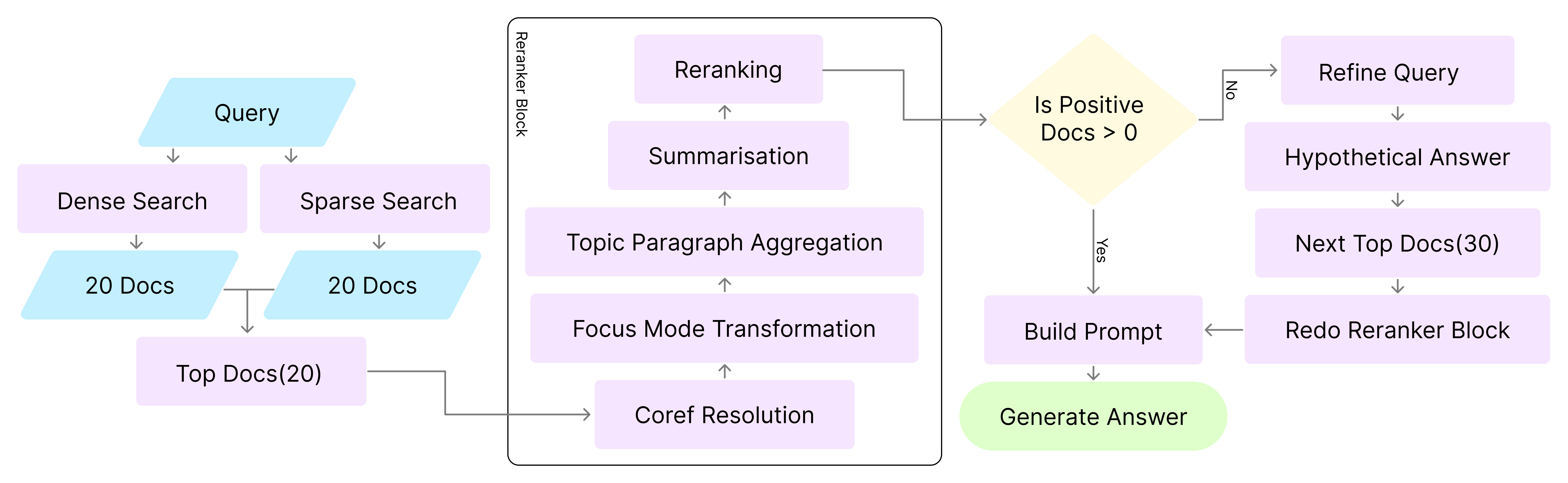
NoobRAG Implementation FlowChart
Resources:
Environment creation:
Command to replicate the conda environment
conda env create -f environment.yml
You can also use pip to install dependencies, after activating your conda environment
pip install -r requirements.txt
API KEYS
We are using three API
We are utilizing .env file to keep the keys in the root directory, Like:

Directory structure
- All part are structured in their own directory following clean architecture pattern.
- Question is read from
data\question\---.jsonl file
- Final answer is saved in
data\answer\---.jsonl file
- Items which need query refinement and more retrieval are saved in
data\refine\---.jsonl file
- In the
hpc\---.sh you can find the slurm scripts
How to run the code
🚀 Batch Processing with GPU Cluster
- Purpose: Designed for the LiveRAG challenge to generate answers for 500 or more questions.
- Requirements: Requires access to GPU clusters.
- Configuration: To change the path to the question file, edit line 275 in
batch_with_gpu_cluster.py.
- Execution: Run the following command in the terminal:
sbatch hpc/cluster.sh
Batch Processing with Single GPU
- Suitable for generating answers for up to 100 questions
- Requires a GPU with CUDA support
- Configuration: To update the question file path, modify line 257 in
batch_with_gpu.py.
- Execution: Run the following command in the terminal:
sbatch hpc/gpu.sh
Single Question Inference with CPU (No Query Refinement)
- Purpose: Used for testing; answers a single question.
- Requirements: Runs on CPU; slow performance expected.
- Execution: Open
single_with_cpu.py and run the main block manually.
Basic RAG System (No Query Refinement or Re-ranking)
- Purpose: Verifies that the basic RAG pipeline is functional.
- Execution: Open basic_rag.py and run the main block manually.



