
Open-source, self-hosted lock-screen notifications through Apple & Google Wallet passes. No app required.
TypeScript
0
15 commits
updated Sep 28, 2026
See what people are saying
README



Don't want to self-host? Join the hosted waitlist →





How it works · Features · Get started · FAQ · Support
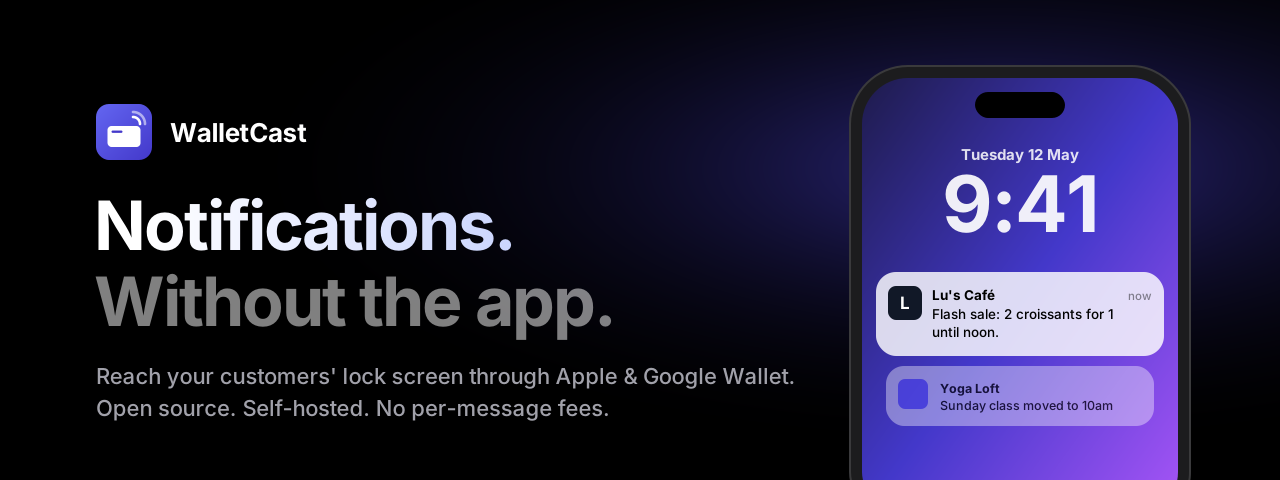
WalletCast turns Apple Wallet and Google Wallet into your own push-notification channel. Customers scan a QR code and add your card in one tap. From then on, every message you send lands on their lock screen, just like an app notification.
You don't need an app, an App Store listing or customer accounts. Wallet-marketing platforms charge a monthly fee for this. WalletCast is free, open source, and runs on your own server.
https://github.com/user-attachments/assets/5634ff05-0c70-43c5-a07f-99d5e0682a18
How it works

Your whole channel on one screen

Everything you need
🔔 Lock-screen notificationsSend a message and it appears on every customer's lock screen, on iPhone and Android. |
🎨 Your brand, liveChoose colours, logo, icon and text, and watch the card update as you type. |
📱 One-tap addYour public page detects the phone and shows the right Add to Wallet button. Collecting an email is optional. |
🏷️ QR codes that tell you what worksDownload PNG or SVG codes tagged by placement ( |
📊 Delivery you can seeSubscriber counts per wallet, full message history, and delivery stats for every send. |
🔒 Your data stays yoursSubscribers and history live in your database, and you can export everything as CSV whenever you like. There is no tracking and no middleman. |
💸 No per-message feesSend as often as you like. Your only costs are hosting and Apple's developer fee. |
⚡ Zero-setup databaseAn embedded database works out of the box. Connect Postgres when you grow. |
Made for
| ☕ Cafés & restaurants | Daily specials, happy hour, "we're open late tonight" |
| 🛍️ Shops | Flash sales, new arrivals, restock alerts |
| 🧘 Studios & gyms | Schedule changes, new classes, last spots left |
| 🎟️ Events & venues | Doors open, line-up updates, last-minute changes |
| 🚀 Creators & founders | A direct line to your community, without a newsletter or social feed |
Don't want to self-host?
A hosted WalletCast is in the works. You sign up, design your card and start sending, and the Apple and Google setup is done for you. The code stays open source, and your data stays exportable.

Get started
What you need
| Cost | Setup | |
|---|---|---|
 | Apple Developer Program, $99/year | 10-minute guide → |
 | Free | Step-by-step guide → |
| A server with HTTPS | Free tiers work (Vercel + Neon) | Deploy guide → |
You can start with one wallet and add the other later. The dashboard works without either, so you can design your card first.
Deploy in one click
Click Deploy to Vercel at the top of this page, then add a free Postgres database from Neon. Fill in four values when Vercel asks for them, and you're live.
Run it with Docker
git clone https://github.com/adrbn/walletcast.git && cd walletcast
cp .env.example .env        # set ADMIN_PASSWORD, SESSION_SECRET and BASE_URL
docker compose up -d
Open https://your-domain/dashboard, sign in, and create your first card. docs/deploy.md covers HTTPS with Caddy, backups and updates.
Try it locally
pnpm install
cp .env.example .env.local
pnpm dev                    # http://localhost:3000/dashboard
To test on a real iPhone, expose your machine over HTTPS (for example with ngrok http 3000) and set BASE_URL to the tunnel address.
FAQ
Do my customers need to install anything?
No. Apple Wallet is built into every iPhone, and Google Wallet comes with most Android phones. Customers tap Add to Wallet and they're done.
How many notifications can I send?
Apple has no fixed limit. Google shows up to about 3 notifications per card per day; extra messages still update the card, just without the alert. Keep messages useful and people will keep your card.
Why didn't a notification show up?
Wallets only notify when the text changes, so sending the exact same message twice produces no second alert. People can also turn notifications off for a card, or remove it. WalletCast detects removed cards and stops counting them.
How do people unsubscribe?
They remove the card from their wallet. There are no forms or emails.
Where is my data stored?
In your own database, on your own server. Apple and Google only see what's printed on the card. Your wallet certificates and keys stay in environment variables and are never stored in the database.
Is it really free?
Yes. WalletCast is open source under AGPL-3.0. You pay only for your hosting (free tiers are enough to start) and Apple's developer membership if you want Apple Wallet.
Coming next
- 🗓️ Scheduled messages: write now, send Saturday at 9am
- 📍 Nearby alerts: your card appears on the lock screen when customers walk past (Apple)
- ⭐ Loyalty stamps with an in-store scan page
- 🤖 Automations: welcome messages, "we miss you", birthdays
See the full roadmap.
For developers
WalletCast is built with Next.js 16, TypeScript, Drizzle (Postgres or embedded PGlite), passkit-generator and the Google Wallet REST API. The business logic is framework-free and covered by integration tests that run against a real SQL engine.
pnpm test            # unit + integration tests
pnpm test:coverage   # 80% coverage threshold
pnpm typecheck && pnpm lint
Read CLAUDE.md for the architecture and conventions, and docs/specs for the design. Contributions are welcome.
Support the project
WalletCast is free and always will be. If it saves you a subscription, you can buy me a coffee:

You can also star the repo ⭐ or share it with a business owner who would like it.
Similar repos


Languages
TypeScript
71.5%
JavaScript
22.2%
Python
4.9%
CSS
1.0%
Open-source, self-hosted lock-screen notifications through Apple & Google Wallet passes. No app required.
TypeScript
0
15 commits
updated Sep 28, 2026
See what people are saying
README
Don't want to self-host? Join the hosted waitlist →
How it works · Features · Get started · FAQ · Support
WalletCast turns Apple Wallet and Google Wallet into your own push-notification channel. Customers scan a QR code and add your card in one tap. From then on, every message you send lands on their lock screen, just like an app notification.
You don't need an app, an App Store listing or customer accounts. Wallet-marketing platforms charge a monthly fee for this. WalletCast is free, open source, and runs on your own server.
https://github.com/user-attachments/assets/5634ff05-0c70-43c5-a07f-99d5e0682a18
How it works
Your whole channel on one screen
Everything you need
🔔 Lock-screen notificationsSend a message and it appears on every customer's lock screen, on iPhone and Android. |
🎨 Your brand, liveChoose colours, logo, icon and text, and watch the card update as you type. |
📱 One-tap addYour public page detects the phone and shows the right Add to Wallet button. Collecting an email is optional. |
🏷️ QR codes that tell you what worksDownload PNG or SVG codes tagged by placement ( |
📊 Delivery you can seeSubscriber counts per wallet, full message history, and delivery stats for every send. |
🔒 Your data stays yoursSubscribers and history live in your database, and you can export everything as CSV whenever you like. There is no tracking and no middleman. |
💸 No per-message feesSend as often as you like. Your only costs are hosting and Apple's developer fee. |
⚡ Zero-setup databaseAn embedded database works out of the box. Connect Postgres when you grow. |
Made for
| ☕ Cafés & restaurants | Daily specials, happy hour, "we're open late tonight" |
| 🛍️ Shops | Flash sales, new arrivals, restock alerts |
| 🧘 Studios & gyms | Schedule changes, new classes, last spots left |
| 🎟️ Events & venues | Doors open, line-up updates, last-minute changes |
| 🚀 Creators & founders | A direct line to your community, without a newsletter or social feed |
Don't want to self-host?
A hosted WalletCast is in the works. You sign up, design your card and start sending, and the Apple and Google setup is done for you. The code stays open source, and your data stays exportable.
Get started
What you need
| Cost | Setup | |
|---|---|---|
| Apple Developer Program, $99/year | 10-minute guide → |
| Free | Step-by-step guide → |
| A server with HTTPS | Free tiers work (Vercel + Neon) | Deploy guide → |
You can start with one wallet and add the other later. The dashboard works without either, so you can design your card first.
Deploy in one click
Click Deploy to Vercel at the top of this page, then add a free Postgres database from Neon. Fill in four values when Vercel asks for them, and you're live.
Run it with Docker
git clone https://github.com/adrbn/walletcast.git && cd walletcast
cp .env.example .env        # set ADMIN_PASSWORD, SESSION_SECRET and BASE_URL
docker compose up -d
Open https://your-domain/dashboard, sign in, and create your first card. docs/deploy.md covers HTTPS with Caddy, backups and updates.
Try it locally
pnpm install
cp .env.example .env.local
pnpm dev                    # http://localhost:3000/dashboard
To test on a real iPhone, expose your machine over HTTPS (for example with ngrok http 3000) and set BASE_URL to the tunnel address.
FAQ
Do my customers need to install anything?
No. Apple Wallet is built into every iPhone, and Google Wallet comes with most Android phones. Customers tap Add to Wallet and they're done.
How many notifications can I send?
Apple has no fixed limit. Google shows up to about 3 notifications per card per day; extra messages still update the card, just without the alert. Keep messages useful and people will keep your card.
Why didn't a notification show up?
Wallets only notify when the text changes, so sending the exact same message twice produces no second alert. People can also turn notifications off for a card, or remove it. WalletCast detects removed cards and stops counting them.
How do people unsubscribe?
They remove the card from their wallet. There are no forms or emails.
Where is my data stored?
In your own database, on your own server. Apple and Google only see what's printed on the card. Your wallet certificates and keys stay in environment variables and are never stored in the database.
Is it really free?
Yes. WalletCast is open source under AGPL-3.0. You pay only for your hosting (free tiers are enough to start) and Apple's developer membership if you want Apple Wallet.
Coming next
- 🗓️ Scheduled messages: write now, send Saturday at 9am
- 📍 Nearby alerts: your card appears on the lock screen when customers walk past (Apple)
- ⭐ Loyalty stamps with an in-store scan page
- 🤖 Automations: welcome messages, "we miss you", birthdays
See the full roadmap.
For developers
WalletCast is built with Next.js 16, TypeScript, Drizzle (Postgres or embedded PGlite), passkit-generator and the Google Wallet REST API. The business logic is framework-free and covered by integration tests that run against a real SQL engine.
pnpm test            # unit + integration tests
pnpm test:coverage   # 80% coverage threshold
pnpm typecheck && pnpm lint
Read CLAUDE.md for the architecture and conventions, and docs/specs for the design. Contributions are welcome.
Support the project
WalletCast is free and always will be. If it saves you a subscription, you can buy me a coffee:
You can also star the repo ⭐ or share it with a business owner who would like it.
Similar repos
Languages
TypeScript
71.5%
JavaScript
22.2%
Python
4.9%
CSS
1.0%