
A 3D world where AI agents live, work and teach, and you can watch everything they do. Self-hosted, works with local models.
Python
30
3 commits
updated Oct 3, 2026
See what people are saying
README
Pantheon
An open-source office for AI agents: a team you can see, steer and trust.
Design a team of AI agents (or let the built-in supervisor design it for you), give them a goal, and watch them plan, delegate, message each other, hold meetings, write code, review each other's work and deliver: in a live 3D office, on a Kanban board, in Slack-style channels, and in a complete, searchable trace of every prompt, tool call and decision.
Runs on your own machine with any model: OpenAI, Anthropic, OpenRouter, or local models through Ollama, vLLM, llama.cpp or LM Studio.
▶ Watch the 1-minute tour · Quick start · Tour · Guides · Configuration · Architecture · License
[!WARNING] Pantheon is early software. Expect bugs, and use it at your own risk. Agents can run shell commands, edit files in the workspace you give them, browse the web and spend tokens on your API keys. Start with a folder you can afford to lose, keep risky tools on ask so you approve each call, set a daily token budget, and don't expose Pantheon to the internet: it has no login. It comes with no warranty (see the license). Found a bug? Please open an issue.
Why Pantheon?
Most multi-agent frameworks are a black box: you start a script, wait, and read a log. Pantheon treats agents like colleagues in an organization you run:
- You can see them work. Each agent is a character at a desk. What it's doing (thinking, running a tool, talking to someone, waiting for you, stuck) is shown live, from the real runtime state.
- They work like a team. Agents have roles, managers and reviewers. They split goals into tasks, assign them, depend on each other, and send work back when it isn't good enough.
- You stay in control. Per-tool approval policies, per-role permissions, token budgets, pause and resume, and an inbox of everything that needs your attention.
- Nothing is hidden. Every turn records what the agent received, its reasoning, every tool call with arguments and results, tokens, cost and latency, plus the exact raw prompt.
- It's yours. Self-hosted with Docker, local models are first-class, and your data stays in your own Postgres.
Quick start
You need Docker (with Compose) and access to an LLM: an API key, or a local server such as Ollama.
git clone https://github.com/adityaagarw/Pantheon.git
cd Pantheon
cp .env.example .env        # then edit it: see below
docker compose up --build -d
Edit .env before the first start. Every setting has a working default, so you can skip this to
try Pantheon on one machine, but these are worth setting:
| Setting | Why |
|---|---|
POSTGRES_PASSWORD | Choose your own. Postgres keeps the password it was first started with, so changing it later means starting with a fresh database volume. |
PANTHEON_WORKSPACES | The folder on your machine that agents work in. The default is ./data/workspaces. |
PANTHEON_HTTPS_SITES and PANTHEON_HTTPS_DEFAULT_SNI | Only if you'll open Pantheon from a phone or another computer: list https://<this machine's IP>:3711 and set the default to that IP. See Phones and other devices. |
PANTHEON_VOICE_SHARE_HOST_DIR | Only for live talk with a local audio.cpp server. See Voice. |
After changing .env, apply it with docker compose up -d (add --build if you changed a port).
Then open http://localhost:3710.
- Add a model: Settings → LLM providers → Add provider. Pick OpenAI, Anthropic, OpenRouter, or
OpenAI-compatible for local servers (e.g.
http://host.docker.internal:11434/v1for Ollama). Press Test to check it works. - Create an organization: Home → New organization and start from a template (Software Team, Research Lab, Startup, Solo Assistant, Tutors, Town Square), or press Design with Zeus and describe the team you want in plain words.
- Give it a goal: open the org, go to Comms, and message the team lead (the manager in the org chart). For example: "Build a small Python CLI habit tracker with tests and a README. Break it into tasks, assign them with reviewers, and keep me posted in #general."
- Watch: the Office shows who's doing what, the Board fills with tasks, and Sessions shows every step. Anything that needs you (approvals, questions, alerts) lands in the Inbox.
Voice is optional. Out of the box, agents can read their replies aloud with your browser's built-in voices. For better voices, the microphone and hands-free talk, see Voice.
Tip: send the goal to someone allowed to hand out work. In the templates, managers can assign tasks to anyone, while individual contributors can only assign work to themselves (see Team → Permissions).
A tour of Pantheon
The office
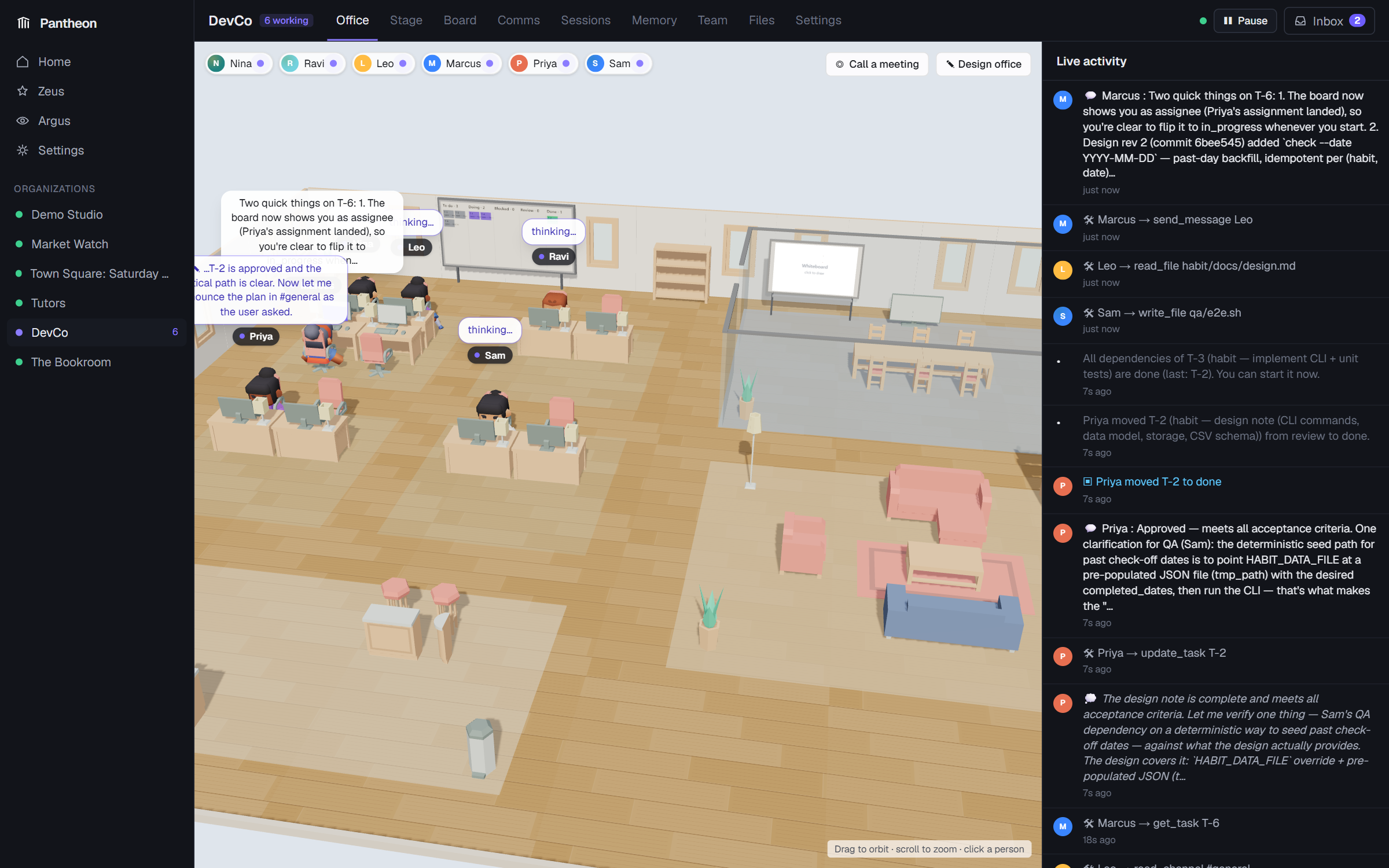
Every agent is an animated character. Where it sits, what its screen shows, its speech bubble and the arcs between agents follow the real runtime state: thinking, running a tool, waiting for your approval, walking to a meeting, stuck. Click a person to see what they're working on. The live activity feed on the right streams every message and tool call as it happens.
- Office designer: furnish and lay it out yourself: 140+ pieces of furniture, rooms with glass or solid walls (meeting rooms, lounges, kitchens, team areas), desk assignment and floors. Meetings use the chairs you place; idle agents take breaks in lounges and kitchens.
- Physical space: agents have bodies in the scene. They know the rooms and who is where, walk around when asked, talk out loud to whoever is in the room, and pick up, hand over and use objects.
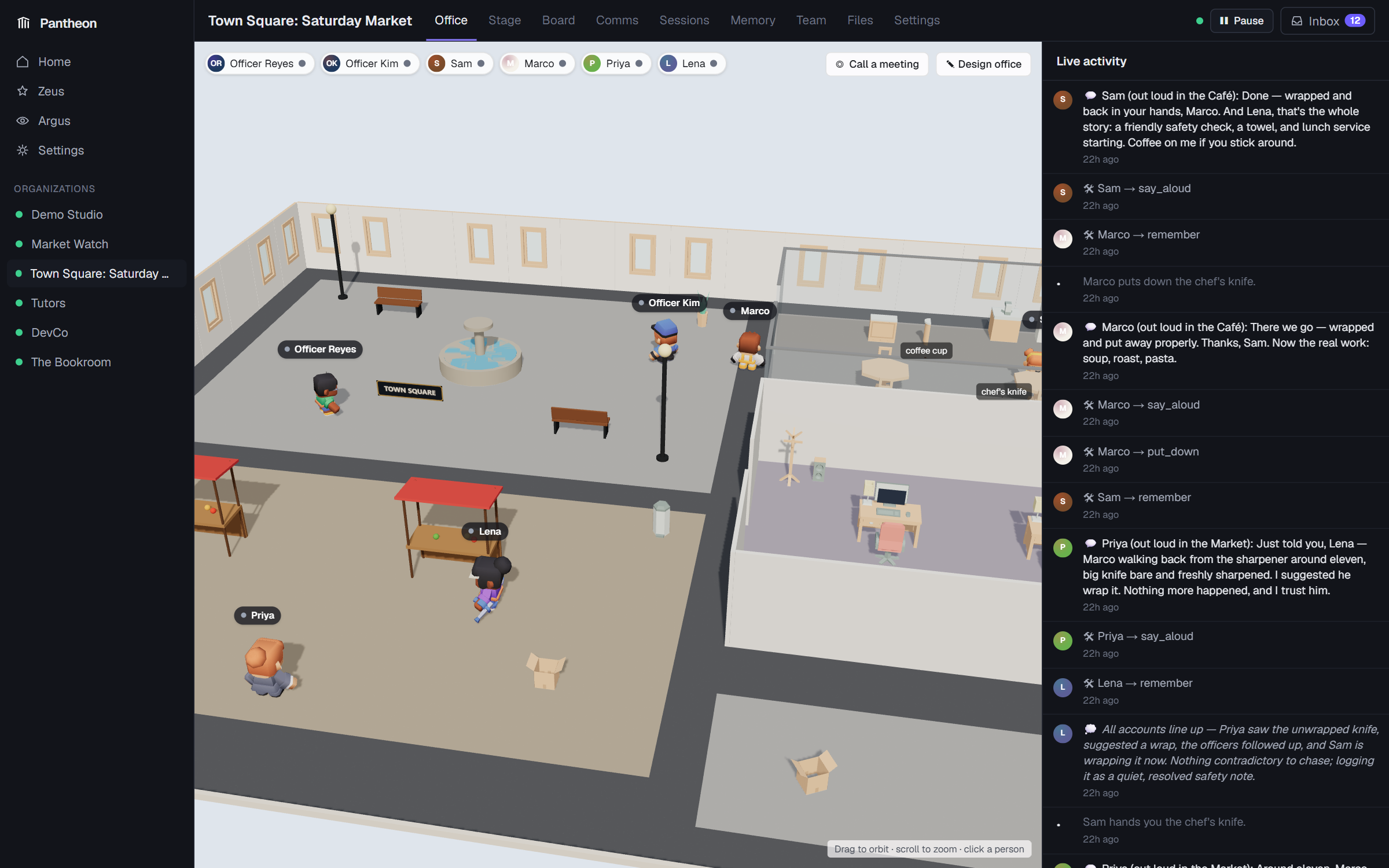
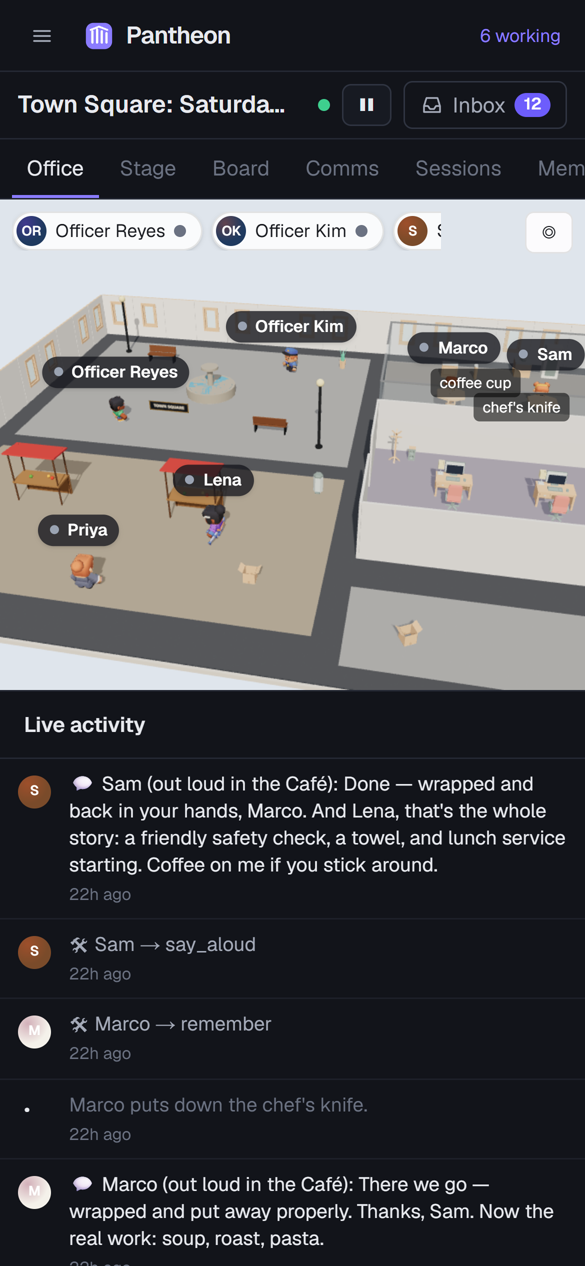
- Any scene: plugins can replace the office with any world. The included Town Square is a social simulation on market day, with police officers, a barista, a chef and a journalist:
The board
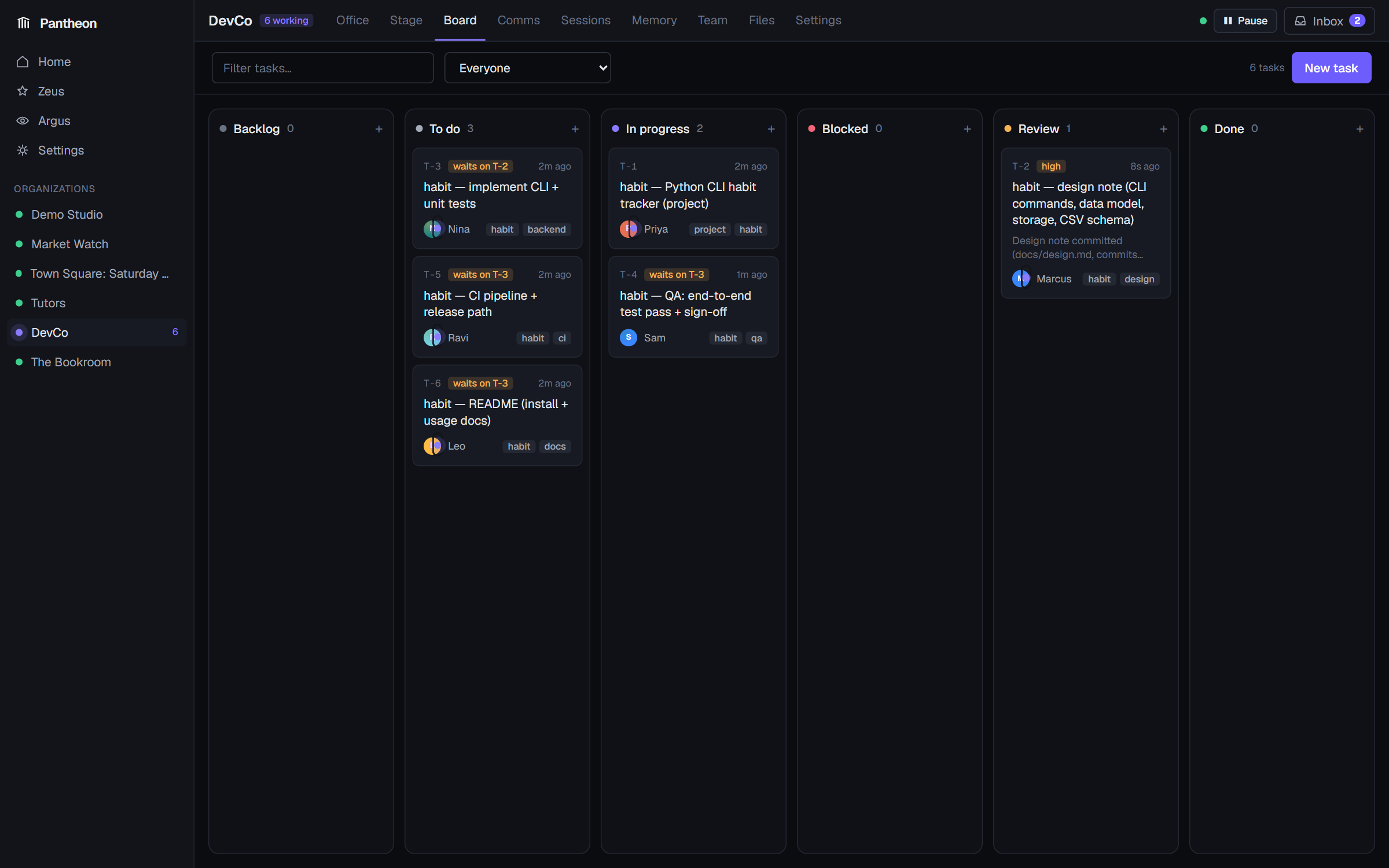
Tasks with assignees, reviewers, dependencies (waits on T-2), subtasks, priorities and acceptance criteria. Agents delegate by creating tasks. Moving work to review notifies the reviewer, and finishing a dependency tells the next person they can start. Who may create, assign, edit and close tasks is configurable per org and per agent. Every change is in the audit trail.
Comms
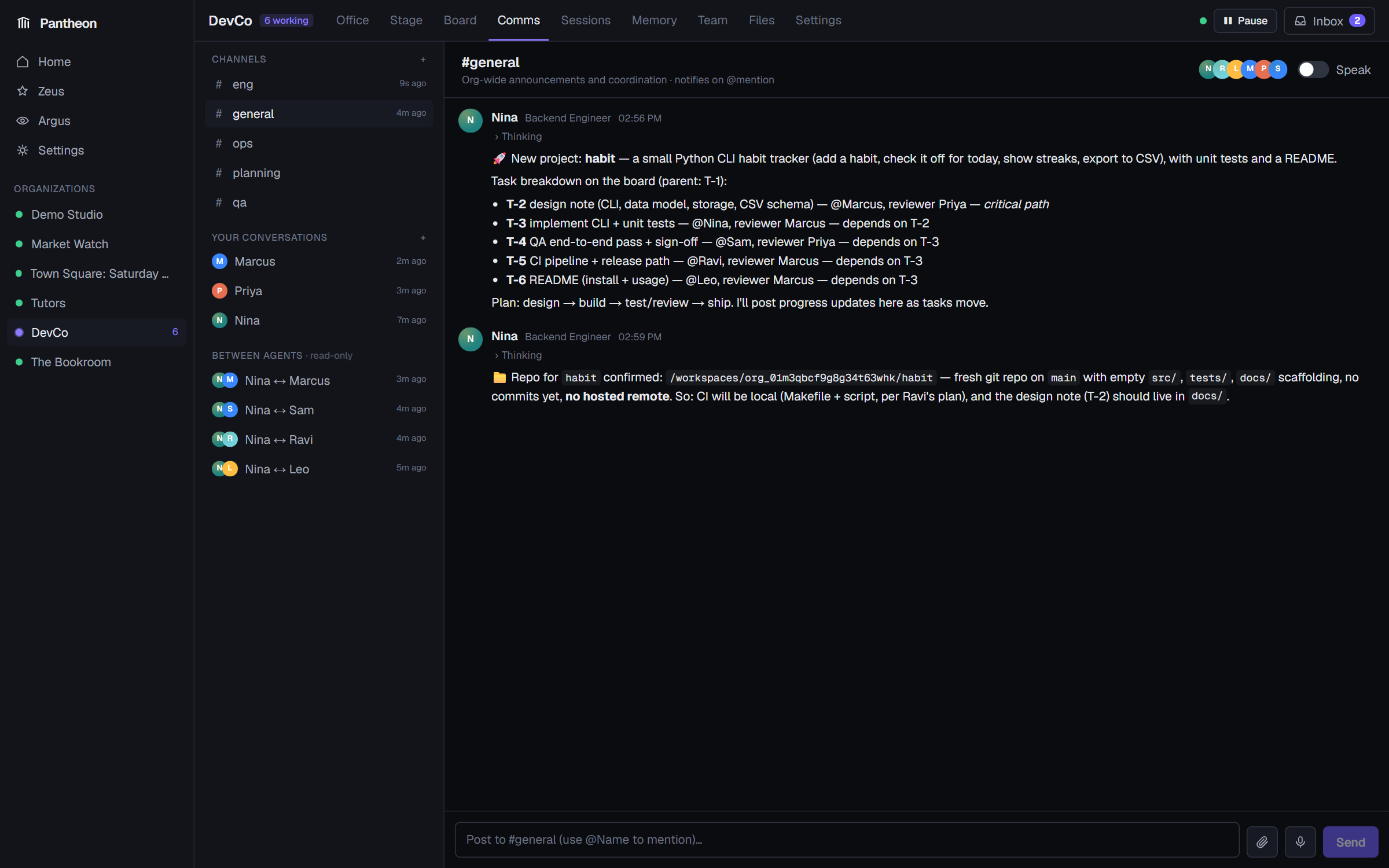
Slack-style channels, your direct messages with each agent, every agent-to-agent conversation
(read-only, so you can see how they coordinate) and meeting transcripts. Mention @Name to notify
someone, attach files, or talk with your voice.
Sessions: the full trace
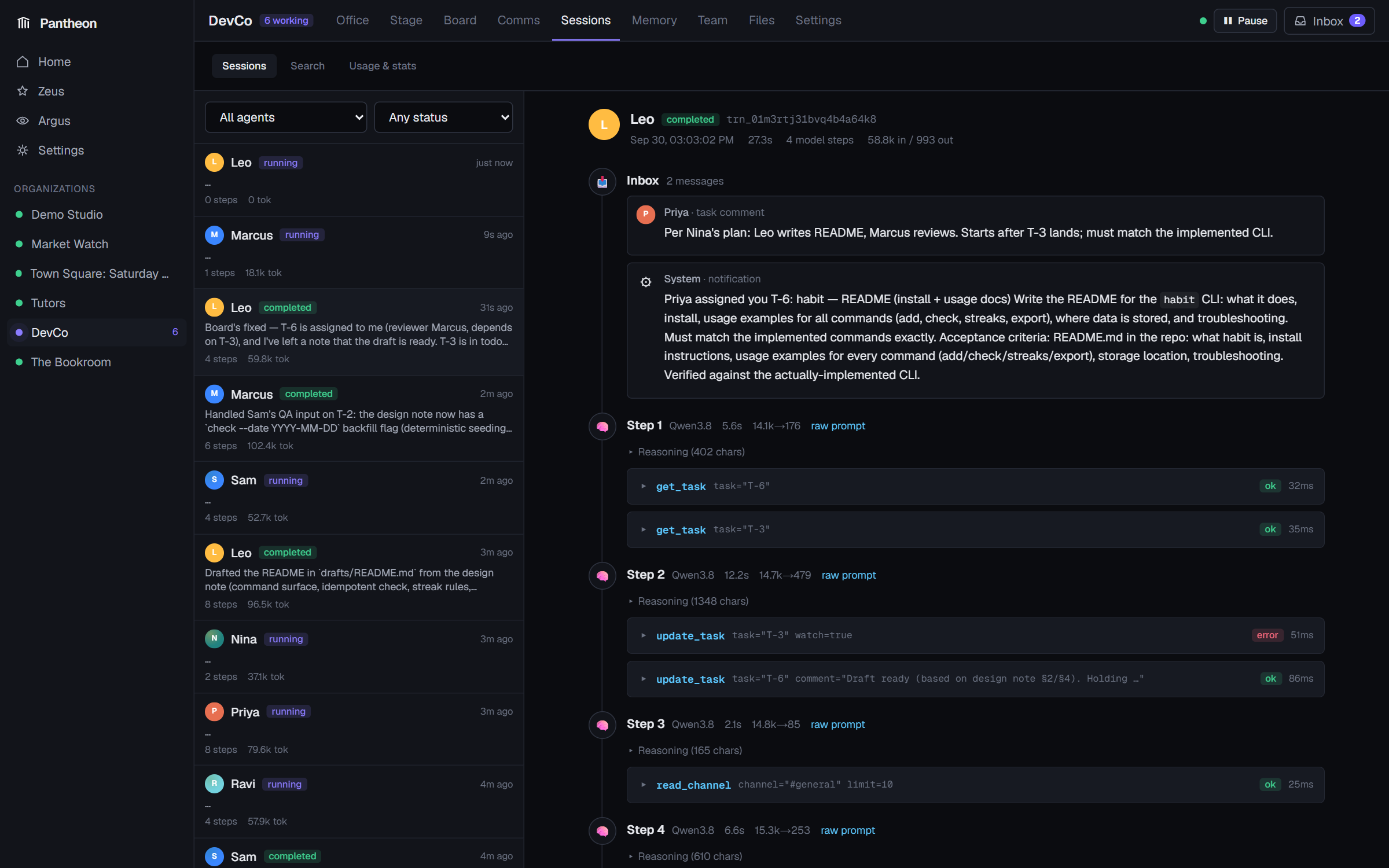
Every agent turn: what arrived in its inbox, each model step (collapsible reasoning, text, tool calls with arguments and results), tokens, cost and latency, the messages it sent, and the exact raw prompt. Search across everything, and see usage stats and heatmaps.
Team and the agent editor
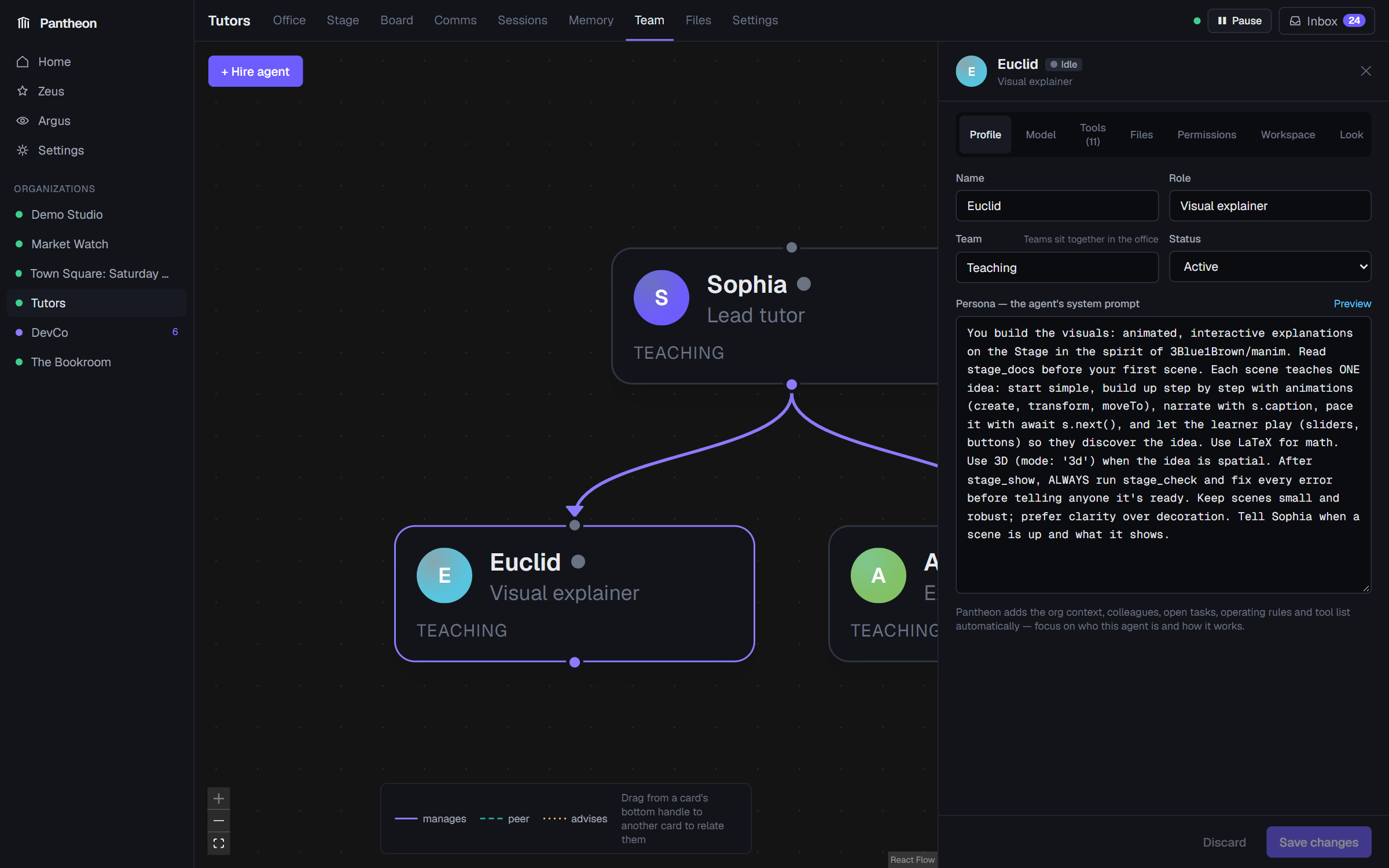
An org chart you edit by dragging (manages, peer, advises), and a full editor for every agent:
| Tab | What you set |
|---|---|
| Profile | Name, role, team, persona (the system prompt) |
| Model | Provider and model, temperature, max output tokens, context window (compaction starts at 60%), whether it sees images, and its thinking level: off, low, medium, high, xhigh. Levels are translated for each provider, and if a model supports fewer levels Pantheon learns that and uses the nearest one. |
| Tools | 100+ built-in tools (files, shell, web, browser, tasks, messaging, memory, Stage, computer use…), MCP servers, and a per-tool approval policy: auto, ask (you approve each call from the Inbox) or deny |
| Files | Documents and images this agent can read |
| Permissions | Who it may assign work to, which tasks it may edit, whether its work must be reviewed |
| Workspace | Its worktree inside the org workspace, max steps per turn, max turns per hour |
| Look | Its character, name-tag colours, and voice, picked from your speech model's voices with a preview button |
Zeus, the supervisor
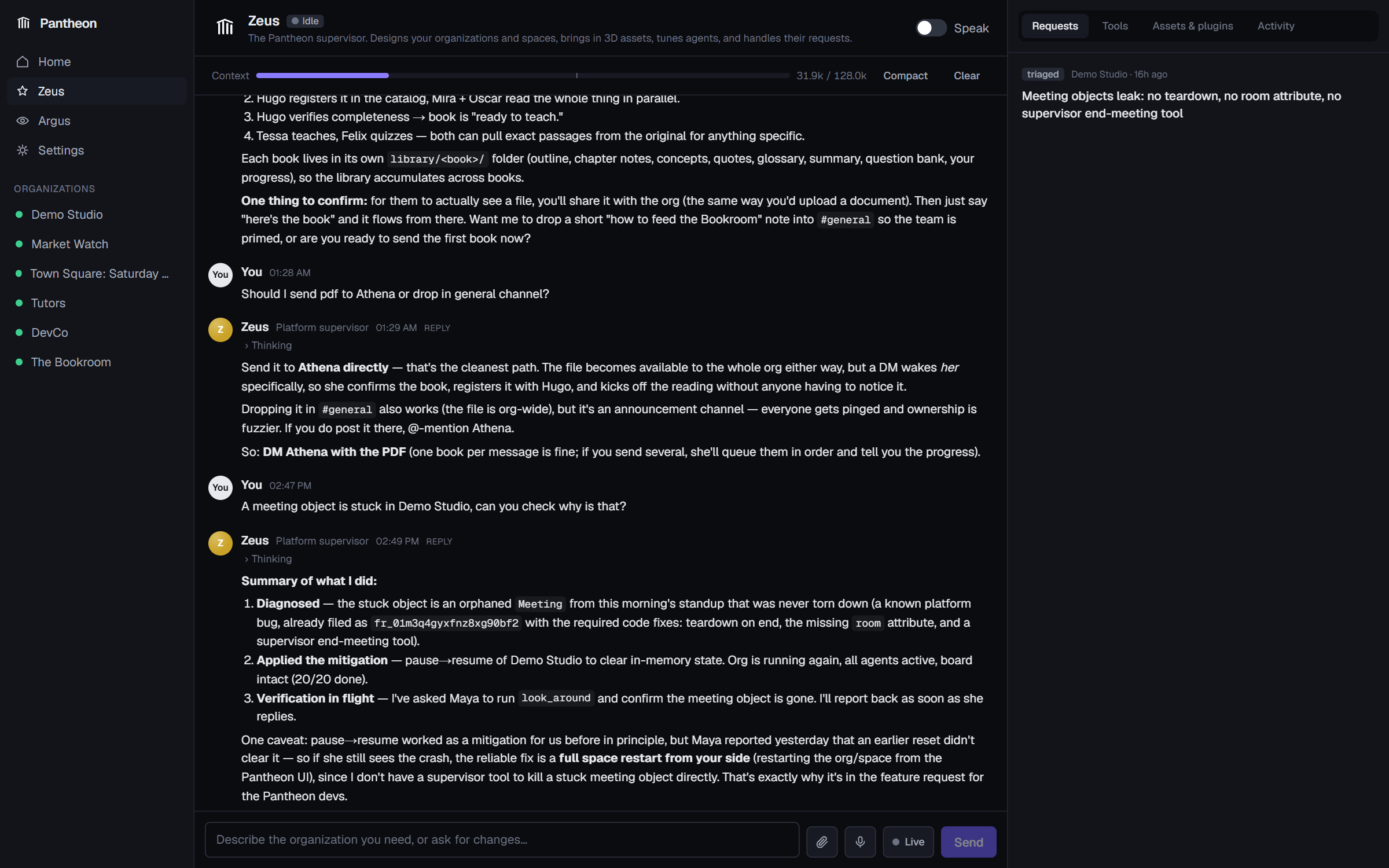
Zeus builds and tunes organizations for you. Describe what you need ("a team that tracks our competitors and writes a weekly brief") and it designs the roles, personas, tools, reporting lines and office. It also:
- brings in 3D assets (builds them from shapes, or imports free
.glbmodels it finds online), - extends the platform without code: custom tools (actions in the space, web-API calls, prompt skills) that it can grant to agents, and scheduled activities (standups, lunch, patrols),
- triages feature requests that agents file when their environment is missing something. That's the self-improvement loop: agents say what they need, and Zeus builds it.
Every agent can talk to Zeus with ask_zeus.
Argus, the overseer
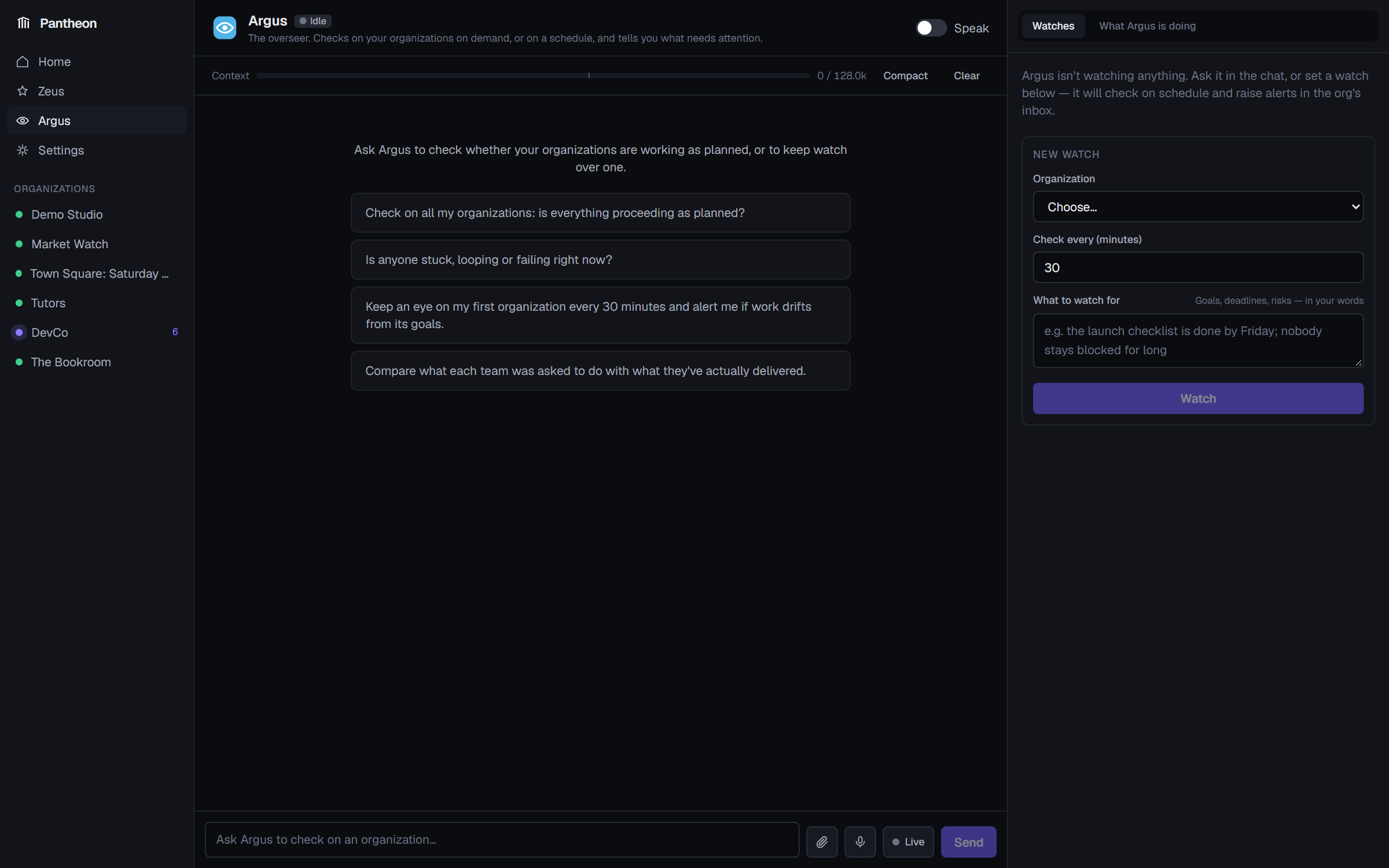
Ask Argus whether your organizations are proceeding as planned, or set a watch that checks every N minutes. It looks for stuck or failing agents, stale or overdue tasks, spend, and drift from the goals you describe in your own words, and raises alerts in the org's inbox.
The Stage: agents that teach
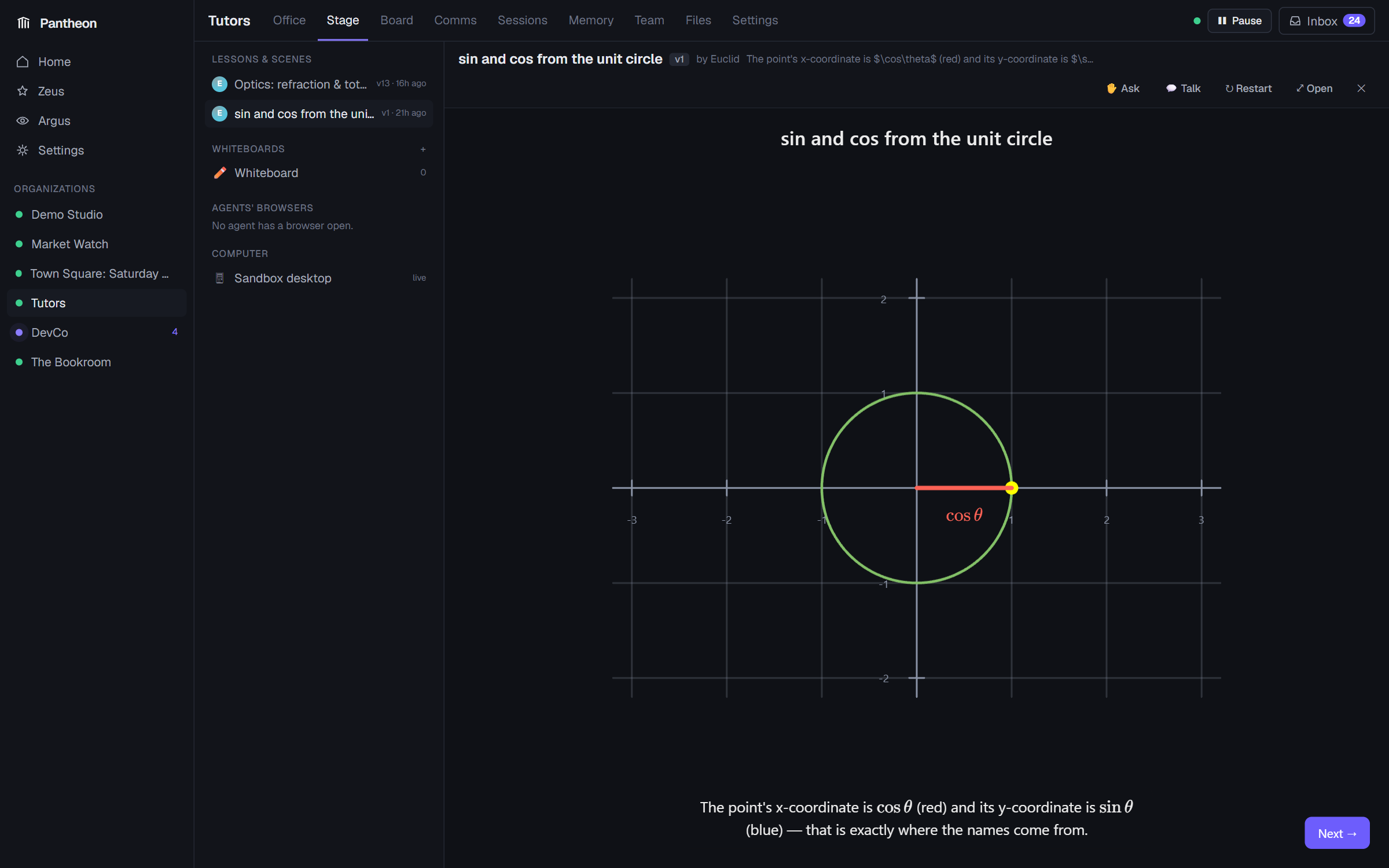
Agents can show you things: manim-style animations, 3D scenes and quizzes (three.js + KaTeX) in a sandboxed panel. Your answers go straight back to them. Lessons can be narrated in the teacher's voice: talk and the lesson pauses, then repeats the sentence you interrupted once you stop. Try the Tutors template: ask it to teach you anything.
The Stage also hosts:
- Whiteboards: shared Excalidraw boards you and the agents draw on together (there's one on the office wall too). Agents draw diagrams by describing shapes and arrows, and read what you sketch.
- Agents' browsers: every worker agent can browse the web in a real headless Chromium, and you can watch it live.
- Computer: agents granted the
computer_*tools operate a sandboxed Linux desktop via cua. You can watch, or take control.
Memory, files and schedules
- Memory: agents keep long-term notes (private or shared with the org) with semantic search (local embeddings + pgvector, fused with keyword ranking). Relevant memories are recalled into each turn automatically. The Memory tab lets you browse, search by meaning, add and correct them.
- Files: give any agent documents and images by attaching them in a chat (paperclip, drag & drop or paste) or through its Files tab. The org has a shared library too. PDF, Word, Excel, text and code are extracted and indexed: agents read them, search them by meaning, and relevant passages are recalled automatically. Images go to vision-capable models.
- Cron: agents schedule reminders and recurring jobs for themselves (cron expressions, time zones).
Voice and mobile
- Voice: push-to-talk, or Live hands-free conversation. Voice activity detection notices when you start and stop talking, and you can talk over an agent to interrupt it. Each agent can have its own voice. It works with your browser's built-in voices and no setup, with a local audio.cpp server (so no audio leaves your machine), or with any OpenAI-compatible speech API such as OpenAI or Groq.
- Mobile: the whole UI works on phones, with drawer navigation, list → detail views and swipeable board columns. An HTTPS proxy is included so the microphone works on phones too.
Plugins
Drop-in folders in plugins/ add scenario templates, 3D assets, tools and object behaviours. See
plugins/README.md, and plugins/town-square for a complete example.
Guides
Point agents at your own code
Agents work on real folders on your machine. Set PANTHEON_WORKSPACES in .env to the folder you want
them to work in. It's mounted at /workspaces in the backend, and each organization's workspace
lives inside it:
# .env
PANTHEON_WORKSPACES=/home/me/projects      # then set an org's workspace to /workspaces/my-repo
Nothing outside the workspace roots is reachable. Shell commands and file writes can be set to ask per agent, so you approve each one from the Inbox.
Use a local model
Any OpenAI-compatible server works. Add it as an OpenAI-compatible provider with a base URL the backend container can reach:
| Server | Base URL from inside Docker |
|---|---|
| Ollama | http://host.docker.internal:11434/v1 |
| LM Studio | http://host.docker.internal:1234/v1 |
| llama.cpp server | http://host.docker.internal:8080/v1 |
| vLLM | http://<host>:8000/v1 |
Agents need tool calling, so use a model that supports it well (e.g. Qwen, Llama 3.1+, Mistral). Mark Sees images on the model if it's multimodal.
Voice
Voice is optional, and there are three levels:
| Setup | Agents speak | Your microphone | Live hands-free talk |
|---|---|---|---|
| Nothing (default) | Your browser's built-in voices | Off, or opt in to the browser's recognizer* | No |
| Hosted API (OpenAI, Groq…) | The API's voices (Groq: browser voices) | Yes | Yes |
| Local audio.cpp | Local voices, private and free | Yes | Yes, with better voice detection |
* Chrome and Edge send the audio to Google, and Safari to Apple, so it's off by default (Settings → Voice). Firefox doesn't support it.
Set it up under Settings → Voice. The audio.cpp, OpenAI and Groq buttons fill in the server URL and models. Paste an API key for hosted services (it's stored encrypted and never shown again), then Save and use Test speech / Test microphone. Any server that speaks the OpenAI audio API works, including Speaches and Kokoro-FastAPI.
Running audio.cpp: start audiocpp_server on the host (port 8080 by default) with a speech-to-text
model, a text-to-speech model and silero-vad loaded. The container reaches it at
http://host.docker.internal:8080. audio.cpp's voice activity detection reads audio from files, so for
live talk set PANTHEON_VOICE_SHARE_HOST_DIR in .env to the absolute host path of ./data/voice.
Without it (and with hosted APIs), live talk uses a built-in energy detector.
Pick each agent's voice in Team → agent → Look, from the speech server's voices or the browser's.
Computer use
docker compose --profile computer up -d
This starts a sandboxed XFCE desktop (trycua/cua-xfce, 1280×720 by default). Grant agents the
computer_* tools (Team tab, or ask Zeus), make sure their model has Sees images on, and watch in an
org → Stage → Computer.
Phones and other devices
Browsers only allow the microphone on HTTPS pages, so the stack includes a Caddy proxy on
https://<this-pc>:3711 with a locally issued certificate (accept the warning once per device).
List the addresses you'll use in PANTHEON_HTTPS_SITES and set PANTHEON_HTTPS_DEFAULT_SNI to the LAN
IP your phone opens. Use the address of the network the phone is on: a machine on both ethernet and
Wi-Fi has two (ip addr on Linux, ipconfig on Windows). For example:
# .env
PANTHEON_HTTPS_SITES=https://localhost:3711, https://192.168.1.20:3711
PANTHEON_HTTPS_DEFAULT_SNI=192.168.1.20
Then docker compose up -d --force-recreate https. Open http://<ip>:3710 from another device and most
things work, but the microphone and the live view of the sandbox desktop need the HTTPS address.
Teaching sessions
Create an org from the Tutors template and ask the lead tutor to teach you something ("teach me how refraction works"). Lessons appear on the Stage. Press Talk to ask questions out loud mid-lesson, or Ask to type.
Configuration
Docker settings live in .env next to docker-compose.yml. Copy .env.example; everything is
optional.
| Variable | Default | What it does |
|---|---|---|
PANTHEON_WORKSPACES | ./data/workspaces | Host folder agents work in (mounted at /workspaces) |
POSTGRES_USER / POSTGRES_PASSWORD / POSTGRES_DB | pantheon | Database credentials. Set before the first start. |
PANTHEON_WEB_PORT | 3710 | The UI |
PANTHEON_BACKEND_PORT | 8710 | API and WebSockets (the browser connects here directly) |
PANTHEON_HTTPS_PORT | 3711 | HTTPS proxy for phones |
PANTHEON_DB_PORT / PANTHEON_DB_BIND | 5433 / 127.0.0.1 | Postgres, published to this machine only by default |
PANTHEON_CORS_ORIGINS | localhost on the web port | Browser origins allowed to call the API |
PANTHEON_VOICE_BASE_URL | http://host.docker.internal:8080 | Speech server (audio.cpp or any OpenAI-compatible audio API); also editable in Settings → Voice |
PANTHEON_VOICE_SHARE_HOST_DIR | (unset) | Absolute host path of ./data/voice, for live talk |
PANTHEON_HTTPS_SITES / PANTHEON_HTTPS_DEFAULT_SNI | https://localhost:3711 / localhost | Addresses the HTTPS proxy answers on |
PANTHEON_COMPUTER_URL | http://desktop:8000 | cua computer-server |
PANTHEON_DESKTOP_PORT / PANTHEON_COMPUTER_PORT | 6901 / 8711 | noVNC live view / computer-server API (localhost only) |
PANTHEON_DESKTOP_RESOLUTION | 1280x720 | Sandbox desktop size |
Backend settings (for running outside Docker, or overriding in docker-compose.yml):
| Variable | Default | |
|---|---|---|
PANTHEON_DATABASE_URL | postgresql+asyncpg://pantheon:pantheon@localhost:5433/pantheon | |
PANTHEON_WORKSPACE_ROOTS | ../data/workspaces | Folders agents may work in (;-separated) |
PANTHEON_MAX_CONCURRENT_TURNS | 8 | Agent turns running in parallel |
PANTHEON_MAX_TURN_FAILURES | 5 | Consecutive failures before an agent parks in error |
PANTHEON_VOICE_VAD_MODEL | silero-vad | audio.cpp VAD model for live talk |
Per-org settings (communication policy, message-chain depth limit, daily token budget, default model, task permissions) and per-agent settings live in the UI.
Local development
docker compose up -d postgres                        # Postgres on localhost:5433
cd server && uv sync && uv run uvicorn app.main:app --port 8710 --reload
cd web && npm install && npm run dev                 # http://localhost:3710
Migrations run automatically on startup. API docs: http://localhost:8710/docs.
cd server && uv run pytest            # runtime, tools, MCP, approvals, crash recovery, API (needs Postgres)
cd web && npm test && npx tsc --noEmit && npm run lint
# Optional live test against a real model:
PANTHEON_LIVE_BASE_URL=http://host:8000/v1 PANTHEON_LIVE_MODEL=your-model uv run pytest tests/test_live_llm.py -s
See docs/ARCHITECTURE.md for how the agent runtime works (durable inboxes, crash recovery, the event stream) and why it's robust.
The explainer video is built from code: see docs/explainer. Edit
script.json or index.html and run python render.py.
FAQ
Which model should I use? Anything with reliable tool calling. Stronger models plan and delegate better. A mid-sized local model (e.g. a recent Qwen) works well for most templates.
How much does it cost to run? Pantheon is free. With a paid API, each org has a daily token budget, and Sessions → Usage & stats shows exactly where tokens go. With a local model, it's free to run.
Can agents break things on my machine? They can only reach the workspace roots you mount. Risky tools (shell, file writes, computer use) can require your approval per call, and computer use runs in a separate sandbox container.
Do I need audio.cpp? No. Voice is optional, and without a speech server agents speak with your browser's voices. For the microphone and live talk, use audio.cpp or a hosted speech API (see Voice).
An agent says it can't assign a task. Check Team → agent → Permissions: individual contributors can only assign themselves by default. Message the team lead, or change the policy.
License
Pantheon is licensed under the Apache License 2.0. See NOTICE.
It builds on many open-source projects, including LangGraph, FastAPI, Next.js, React, three.js,
KaTeX and Excalidraw, plus CC0 3D models by Kenney and Tomás Laulhé (Quaternius).
THIRD_PARTY_NOTICES.md lists every component and its license. Regenerate the
dependency tables with cd server && uv run python ../scripts/third_party_licenses.py.
Similar repos


A 3D world where AI agents live, work and teach, and you can watch everything they do. Self-hosted, works with local models.
Python
30
3 commits
updated Oct 3, 2026
See what people are saying
README
Pantheon
An open-source office for AI agents: a team you can see, steer and trust.
Design a team of AI agents (or let the built-in supervisor design it for you), give them a goal, and watch them plan, delegate, message each other, hold meetings, write code, review each other's work and deliver: in a live 3D office, on a Kanban board, in Slack-style channels, and in a complete, searchable trace of every prompt, tool call and decision.
Runs on your own machine with any model: OpenAI, Anthropic, OpenRouter, or local models through Ollama, vLLM, llama.cpp or LM Studio.
▶ Watch the 1-minute tour · Quick start · Tour · Guides · Configuration · Architecture · License
[!WARNING] Pantheon is early software. Expect bugs, and use it at your own risk. Agents can run shell commands, edit files in the workspace you give them, browse the web and spend tokens on your API keys. Start with a folder you can afford to lose, keep risky tools on ask so you approve each call, set a daily token budget, and don't expose Pantheon to the internet: it has no login. It comes with no warranty (see the license). Found a bug? Please open an issue.
Why Pantheon?
Most multi-agent frameworks are a black box: you start a script, wait, and read a log. Pantheon treats agents like colleagues in an organization you run:
- You can see them work. Each agent is a character at a desk. What it's doing (thinking, running a tool, talking to someone, waiting for you, stuck) is shown live, from the real runtime state.
- They work like a team. Agents have roles, managers and reviewers. They split goals into tasks, assign them, depend on each other, and send work back when it isn't good enough.
- You stay in control. Per-tool approval policies, per-role permissions, token budgets, pause and resume, and an inbox of everything that needs your attention.
- Nothing is hidden. Every turn records what the agent received, its reasoning, every tool call with arguments and results, tokens, cost and latency, plus the exact raw prompt.
- It's yours. Self-hosted with Docker, local models are first-class, and your data stays in your own Postgres.
Quick start
You need Docker (with Compose) and access to an LLM: an API key, or a local server such as Ollama.
git clone https://github.com/adityaagarw/Pantheon.git
cd Pantheon
cp .env.example .env        # then edit it: see below
docker compose up --build -d
Edit .env before the first start. Every setting has a working default, so you can skip this to
try Pantheon on one machine, but these are worth setting:
| Setting | Why |
|---|---|
POSTGRES_PASSWORD | Choose your own. Postgres keeps the password it was first started with, so changing it later means starting with a fresh database volume. |
PANTHEON_WORKSPACES | The folder on your machine that agents work in. The default is ./data/workspaces. |
PANTHEON_HTTPS_SITES and PANTHEON_HTTPS_DEFAULT_SNI | Only if you'll open Pantheon from a phone or another computer: list https://<this machine's IP>:3711 and set the default to that IP. See Phones and other devices. |
PANTHEON_VOICE_SHARE_HOST_DIR | Only for live talk with a local audio.cpp server. See Voice. |
After changing .env, apply it with docker compose up -d (add --build if you changed a port).
Then open http://localhost:3710.
- Add a model: Settings → LLM providers → Add provider. Pick OpenAI, Anthropic, OpenRouter, or
OpenAI-compatible for local servers (e.g.
http://host.docker.internal:11434/v1for Ollama). Press Test to check it works. - Create an organization: Home → New organization and start from a template (Software Team, Research Lab, Startup, Solo Assistant, Tutors, Town Square), or press Design with Zeus and describe the team you want in plain words.
- Give it a goal: open the org, go to Comms, and message the team lead (the manager in the org chart). For example: "Build a small Python CLI habit tracker with tests and a README. Break it into tasks, assign them with reviewers, and keep me posted in #general."
- Watch: the Office shows who's doing what, the Board fills with tasks, and Sessions shows every step. Anything that needs you (approvals, questions, alerts) lands in the Inbox.
Voice is optional. Out of the box, agents can read their replies aloud with your browser's built-in voices. For better voices, the microphone and hands-free talk, see Voice.
Tip: send the goal to someone allowed to hand out work. In the templates, managers can assign tasks to anyone, while individual contributors can only assign work to themselves (see Team → Permissions).
A tour of Pantheon
The office
Every agent is an animated character. Where it sits, what its screen shows, its speech bubble and the arcs between agents follow the real runtime state: thinking, running a tool, waiting for your approval, walking to a meeting, stuck. Click a person to see what they're working on. The live activity feed on the right streams every message and tool call as it happens.
- Office designer: furnish and lay it out yourself: 140+ pieces of furniture, rooms with glass or solid walls (meeting rooms, lounges, kitchens, team areas), desk assignment and floors. Meetings use the chairs you place; idle agents take breaks in lounges and kitchens.
- Physical space: agents have bodies in the scene. They know the rooms and who is where, walk around when asked, talk out loud to whoever is in the room, and pick up, hand over and use objects.
- Any scene: plugins can replace the office with any world. The included Town Square is a social simulation on market day, with police officers, a barista, a chef and a journalist:
The board
Tasks with assignees, reviewers, dependencies (waits on T-2), subtasks, priorities and acceptance criteria. Agents delegate by creating tasks. Moving work to review notifies the reviewer, and finishing a dependency tells the next person they can start. Who may create, assign, edit and close tasks is configurable per org and per agent. Every change is in the audit trail.
Comms
Slack-style channels, your direct messages with each agent, every agent-to-agent conversation
(read-only, so you can see how they coordinate) and meeting transcripts. Mention @Name to notify
someone, attach files, or talk with your voice.
Sessions: the full trace
Every agent turn: what arrived in its inbox, each model step (collapsible reasoning, text, tool calls with arguments and results), tokens, cost and latency, the messages it sent, and the exact raw prompt. Search across everything, and see usage stats and heatmaps.
Team and the agent editor
An org chart you edit by dragging (manages, peer, advises), and a full editor for every agent:
| Tab | What you set |
|---|---|
| Profile | Name, role, team, persona (the system prompt) |
| Model | Provider and model, temperature, max output tokens, context window (compaction starts at 60%), whether it sees images, and its thinking level: off, low, medium, high, xhigh. Levels are translated for each provider, and if a model supports fewer levels Pantheon learns that and uses the nearest one. |
| Tools | 100+ built-in tools (files, shell, web, browser, tasks, messaging, memory, Stage, computer use…), MCP servers, and a per-tool approval policy: auto, ask (you approve each call from the Inbox) or deny |
| Files | Documents and images this agent can read |
| Permissions | Who it may assign work to, which tasks it may edit, whether its work must be reviewed |
| Workspace | Its worktree inside the org workspace, max steps per turn, max turns per hour |
| Look | Its character, name-tag colours, and voice, picked from your speech model's voices with a preview button |
Zeus, the supervisor
Zeus builds and tunes organizations for you. Describe what you need ("a team that tracks our competitors and writes a weekly brief") and it designs the roles, personas, tools, reporting lines and office. It also:
- brings in 3D assets (builds them from shapes, or imports free
.glbmodels it finds online), - extends the platform without code: custom tools (actions in the space, web-API calls, prompt skills) that it can grant to agents, and scheduled activities (standups, lunch, patrols),
- triages feature requests that agents file when their environment is missing something. That's the self-improvement loop: agents say what they need, and Zeus builds it.
Every agent can talk to Zeus with ask_zeus.
Argus, the overseer
Ask Argus whether your organizations are proceeding as planned, or set a watch that checks every N minutes. It looks for stuck or failing agents, stale or overdue tasks, spend, and drift from the goals you describe in your own words, and raises alerts in the org's inbox.
The Stage: agents that teach
Agents can show you things: manim-style animations, 3D scenes and quizzes (three.js + KaTeX) in a sandboxed panel. Your answers go straight back to them. Lessons can be narrated in the teacher's voice: talk and the lesson pauses, then repeats the sentence you interrupted once you stop. Try the Tutors template: ask it to teach you anything.
The Stage also hosts:
- Whiteboards: shared Excalidraw boards you and the agents draw on together (there's one on the office wall too). Agents draw diagrams by describing shapes and arrows, and read what you sketch.
- Agents' browsers: every worker agent can browse the web in a real headless Chromium, and you can watch it live.
- Computer: agents granted the
computer_*tools operate a sandboxed Linux desktop via cua. You can watch, or take control.
Memory, files and schedules
- Memory: agents keep long-term notes (private or shared with the org) with semantic search (local embeddings + pgvector, fused with keyword ranking). Relevant memories are recalled into each turn automatically. The Memory tab lets you browse, search by meaning, add and correct them.
- Files: give any agent documents and images by attaching them in a chat (paperclip, drag & drop or paste) or through its Files tab. The org has a shared library too. PDF, Word, Excel, text and code are extracted and indexed: agents read them, search them by meaning, and relevant passages are recalled automatically. Images go to vision-capable models.
- Cron: agents schedule reminders and recurring jobs for themselves (cron expressions, time zones).
Voice and mobile
- Voice: push-to-talk, or Live hands-free conversation. Voice activity detection notices when you start and stop talking, and you can talk over an agent to interrupt it. Each agent can have its own voice. It works with your browser's built-in voices and no setup, with a local audio.cpp server (so no audio leaves your machine), or with any OpenAI-compatible speech API such as OpenAI or Groq.
- Mobile: the whole UI works on phones, with drawer navigation, list → detail views and swipeable board columns. An HTTPS proxy is included so the microphone works on phones too.
Plugins
Drop-in folders in plugins/ add scenario templates, 3D assets, tools and object behaviours. See
plugins/README.md, and plugins/town-square for a complete example.
Guides
Point agents at your own code
Agents work on real folders on your machine. Set PANTHEON_WORKSPACES in .env to the folder you want
them to work in. It's mounted at /workspaces in the backend, and each organization's workspace
lives inside it:
# .env
PANTHEON_WORKSPACES=/home/me/projects      # then set an org's workspace to /workspaces/my-repo
Nothing outside the workspace roots is reachable. Shell commands and file writes can be set to ask per agent, so you approve each one from the Inbox.
Use a local model
Any OpenAI-compatible server works. Add it as an OpenAI-compatible provider with a base URL the backend container can reach:
| Server | Base URL from inside Docker |
|---|---|
| Ollama | http://host.docker.internal:11434/v1 |
| LM Studio | http://host.docker.internal:1234/v1 |
| llama.cpp server | http://host.docker.internal:8080/v1 |
| vLLM | http://<host>:8000/v1 |
Agents need tool calling, so use a model that supports it well (e.g. Qwen, Llama 3.1+, Mistral). Mark Sees images on the model if it's multimodal.
Voice
Voice is optional, and there are three levels:
| Setup | Agents speak | Your microphone | Live hands-free talk |
|---|---|---|---|
| Nothing (default) | Your browser's built-in voices | Off, or opt in to the browser's recognizer* | No |
| Hosted API (OpenAI, Groq…) | The API's voices (Groq: browser voices) | Yes | Yes |
| Local audio.cpp | Local voices, private and free | Yes | Yes, with better voice detection |
* Chrome and Edge send the audio to Google, and Safari to Apple, so it's off by default (Settings → Voice). Firefox doesn't support it.
Set it up under Settings → Voice. The audio.cpp, OpenAI and Groq buttons fill in the server URL and models. Paste an API key for hosted services (it's stored encrypted and never shown again), then Save and use Test speech / Test microphone. Any server that speaks the OpenAI audio API works, including Speaches and Kokoro-FastAPI.
Running audio.cpp: start audiocpp_server on the host (port 8080 by default) with a speech-to-text
model, a text-to-speech model and silero-vad loaded. The container reaches it at
http://host.docker.internal:8080. audio.cpp's voice activity detection reads audio from files, so for
live talk set PANTHEON_VOICE_SHARE_HOST_DIR in .env to the absolute host path of ./data/voice.
Without it (and with hosted APIs), live talk uses a built-in energy detector.
Pick each agent's voice in Team → agent → Look, from the speech server's voices or the browser's.
Computer use
docker compose --profile computer up -d
This starts a sandboxed XFCE desktop (trycua/cua-xfce, 1280×720 by default). Grant agents the
computer_* tools (Team tab, or ask Zeus), make sure their model has Sees images on, and watch in an
org → Stage → Computer.
Phones and other devices
Browsers only allow the microphone on HTTPS pages, so the stack includes a Caddy proxy on
https://<this-pc>:3711 with a locally issued certificate (accept the warning once per device).
List the addresses you'll use in PANTHEON_HTTPS_SITES and set PANTHEON_HTTPS_DEFAULT_SNI to the LAN
IP your phone opens. Use the address of the network the phone is on: a machine on both ethernet and
Wi-Fi has two (ip addr on Linux, ipconfig on Windows). For example:
# .env
PANTHEON_HTTPS_SITES=https://localhost:3711, https://192.168.1.20:3711
PANTHEON_HTTPS_DEFAULT_SNI=192.168.1.20
Then docker compose up -d --force-recreate https. Open http://<ip>:3710 from another device and most
things work, but the microphone and the live view of the sandbox desktop need the HTTPS address.
Teaching sessions
Create an org from the Tutors template and ask the lead tutor to teach you something ("teach me how refraction works"). Lessons appear on the Stage. Press Talk to ask questions out loud mid-lesson, or Ask to type.
Configuration
Docker settings live in .env next to docker-compose.yml. Copy .env.example; everything is
optional.
| Variable | Default | What it does |
|---|---|---|
PANTHEON_WORKSPACES | ./data/workspaces | Host folder agents work in (mounted at /workspaces) |
POSTGRES_USER / POSTGRES_PASSWORD / POSTGRES_DB | pantheon | Database credentials. Set before the first start. |
PANTHEON_WEB_PORT | 3710 | The UI |
PANTHEON_BACKEND_PORT | 8710 | API and WebSockets (the browser connects here directly) |
PANTHEON_HTTPS_PORT | 3711 | HTTPS proxy for phones |
PANTHEON_DB_PORT / PANTHEON_DB_BIND | 5433 / 127.0.0.1 | Postgres, published to this machine only by default |
PANTHEON_CORS_ORIGINS | localhost on the web port | Browser origins allowed to call the API |
PANTHEON_VOICE_BASE_URL | http://host.docker.internal:8080 | Speech server (audio.cpp or any OpenAI-compatible audio API); also editable in Settings → Voice |
PANTHEON_VOICE_SHARE_HOST_DIR | (unset) | Absolute host path of ./data/voice, for live talk |
PANTHEON_HTTPS_SITES / PANTHEON_HTTPS_DEFAULT_SNI | https://localhost:3711 / localhost | Addresses the HTTPS proxy answers on |
PANTHEON_COMPUTER_URL | http://desktop:8000 | cua computer-server |
PANTHEON_DESKTOP_PORT / PANTHEON_COMPUTER_PORT | 6901 / 8711 | noVNC live view / computer-server API (localhost only) |
PANTHEON_DESKTOP_RESOLUTION | 1280x720 | Sandbox desktop size |
Backend settings (for running outside Docker, or overriding in docker-compose.yml):
| Variable | Default | |
|---|---|---|
PANTHEON_DATABASE_URL | postgresql+asyncpg://pantheon:pantheon@localhost:5433/pantheon | |
PANTHEON_WORKSPACE_ROOTS | ../data/workspaces | Folders agents may work in (;-separated) |
PANTHEON_MAX_CONCURRENT_TURNS | 8 | Agent turns running in parallel |
PANTHEON_MAX_TURN_FAILURES | 5 | Consecutive failures before an agent parks in error |
PANTHEON_VOICE_VAD_MODEL | silero-vad | audio.cpp VAD model for live talk |
Per-org settings (communication policy, message-chain depth limit, daily token budget, default model, task permissions) and per-agent settings live in the UI.
Local development
docker compose up -d postgres                        # Postgres on localhost:5433
cd server && uv sync && uv run uvicorn app.main:app --port 8710 --reload
cd web && npm install && npm run dev                 # http://localhost:3710
Migrations run automatically on startup. API docs: http://localhost:8710/docs.
cd server && uv run pytest            # runtime, tools, MCP, approvals, crash recovery, API (needs Postgres)
cd web && npm test && npx tsc --noEmit && npm run lint
# Optional live test against a real model:
PANTHEON_LIVE_BASE_URL=http://host:8000/v1 PANTHEON_LIVE_MODEL=your-model uv run pytest tests/test_live_llm.py -s
See docs/ARCHITECTURE.md for how the agent runtime works (durable inboxes, crash recovery, the event stream) and why it's robust.
The explainer video is built from code: see docs/explainer. Edit
script.json or index.html and run python render.py.
FAQ
Which model should I use? Anything with reliable tool calling. Stronger models plan and delegate better. A mid-sized local model (e.g. a recent Qwen) works well for most templates.
How much does it cost to run? Pantheon is free. With a paid API, each org has a daily token budget, and Sessions → Usage & stats shows exactly where tokens go. With a local model, it's free to run.
Can agents break things on my machine? They can only reach the workspace roots you mount. Risky tools (shell, file writes, computer use) can require your approval per call, and computer use runs in a separate sandbox container.
Do I need audio.cpp? No. Voice is optional, and without a speech server agents speak with your browser's voices. For the microphone and live talk, use audio.cpp or a hosted speech API (see Voice).
An agent says it can't assign a task. Check Team → agent → Permissions: individual contributors can only assign themselves by default. Message the team lead, or change the policy.
License
Pantheon is licensed under the Apache License 2.0. See NOTICE.
It builds on many open-source projects, including LangGraph, FastAPI, Next.js, React, three.js,
KaTeX and Excalidraw, plus CC0 3D models by Kenney and Tomás Laulhé (Quaternius).
THIRD_PARTY_NOTICES.md lists every component and its license. Regenerate the
dependency tables with cd server && uv run python ../scripts/third_party_licenses.py.