
The PowerShell ISE reimagined with Avalonia and PowerShell 7.
C#
7
61 commits
updated Oct 5, 2026
See what people are saying
README
Iseberg
A cross-platform desktop workbench inspired by PowerShell ISE, built with Avalonia, AvaloniaEdit, and PowerShell 7.6.6.
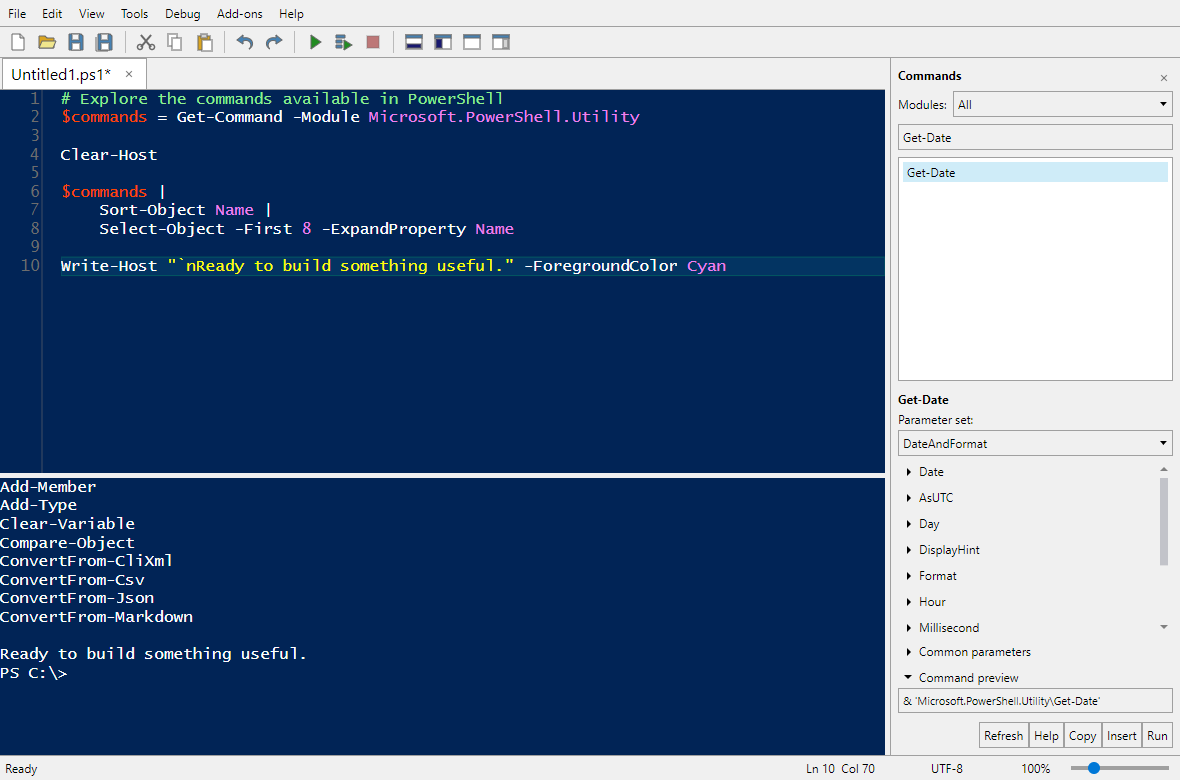
Get started | Keyboard shortcuts | User guide | Development guide
What you can do
- Edit scripts with syntax highlighting, folding, IntelliSense, find/replace, and built-in or custom snippets.
- Run PowerShell in independent tabs with persistent variables, functions, modules, and working directories.
- Explore commands through the Commands pane, command forms, and help.
- Debug scripts with breakpoints, stepping, variable inspection, watches, and a call stack.
- Work remotely through SSH or WSMan, including remote files and debugging.
- Extend the workbench with a supported
$psISEscripting subset, per-tab Add-ons menus, and ISE snippet-management commands. - Make it your own with themes, fonts, pane layouts, recovery copies, and keyboard navigation.
Getting started
Install a package
Download unsigned, self-contained packages from GitHub Releases, or from the Artifacts section of a successful Build and test Actions run.
| Platform | Packages | Installation |
|---|---|---|
| Windows x64 | MSI, ZIP | Run the MSI (administrator approval required), or extract the ZIP and launch Iseberg.exe. |
| macOS Intel / Apple silicon | DMG, ZIP | Open the DMG and drag Iseberg.app to Applications, or extract the ZIP and move the app there. |
| Linux x64 / ARM64 | ZIP | Extract with an archive tool that preserves executable permissions, then run ./Iseberg in a graphical desktop. |
Packages are not signed or notarized yet. Windows/macOS may warn or block launch according to local security policy. See installation and updates for file associations, manual updates, and verification limits.
Run from source
Install the .NET 10 SDK, then run from the repository root:
dotnet run --project src/Iseberg
To open a script at launch:
dotnet run --project src/Iseberg -- ./example.ps1
PowerShell is included through the SDK dependency; a separate pwsh installation is not required when running from source or using the full distribution.
Windows, Linux, and macOS are target platforms. Linux needs a graphical desktop and Avalonia's native dependencies. Native Linux/macOS desktop interaction has not yet been verified; see platform support for requirements and verification status.
The compact distribution is a smaller, single-executable alternative that requires a compatible PowerShell installation.
Your first script
- Open a script with Ctrl+O, or create one with Ctrl+N.
- Press F5 to run the script, or F8 to run a selection or the current line.
- Use the console below the editor for commands and output. Each PowerShell tab keeps its own session.
- Set a breakpoint with F9, then use F10 / F11 to step when execution pauses.
Scripts run with your account's permissions; Iseberg is not a sandbox. Windows execution policy is respected, and profiles are opt-in. See execution and profiles for blocked scripts and save-before-run behavior.
Keyboard shortcuts
| Action | Shortcut |
|---|---|
| New / open / save script | Ctrl+N / Ctrl+O / Ctrl+S |
| New / close PowerShell tab | Ctrl+T / Ctrl+Shift+W |
| Run script / continue debugging | F5 |
| Run selection, or current line | F8 |
| Stop execution | Ctrl+Break or Shift+F5 |
| Toggle breakpoint | F9 |
| Step over / into / out | F10 / F11 / Shift+F11 |
| Completion / snippets | Ctrl+Space / Ctrl+J |
| Find / replace / go to line | Ctrl+F / Ctrl+H / Ctrl+G |
| Focus script / console | Ctrl+I / Ctrl+D |
On macOS, Command is also accepted for workbench shortcuts. See the full shortcut reference for layout, printing, and additional debugger actions.
Documentation
| Looking for... | Start here |
|---|---|
| Packages, file associations, and update checks | Installation and updates |
| Console behavior, IntelliSense, and snippets | User guide |
$psISE, Add-ons menus, and snippet-management commands | ISE scripting compatibility |
| Profiles, execution policy, prompts, and native applications | Execution and profiles / Host and terminals |
| Remote connections and remote files | Remoting |
| Breakpoints, watches, and stepping | Debugging |
| File encodings, session restoration, recovery, and printing | Files and sessions / Autosave |
| Themes, preferences, and accessibility | Options and accessibility |
| Building, testing, publishing, and VS Code setup | Development guide |
| Module responsibilities and design decisions | Architecture overview |
Development
Build and run the tests from the repository root:
dotnet build Iseberg.slnx
dotnet test Iseberg.slnx
The development guide covers test prerequisites, full and compact distributions, runtime checks, and VS Code launch configurations.
Similar repos


The PowerShell ISE reimagined with Avalonia and PowerShell 7.
C#
7
61 commits
updated Oct 5, 2026
See what people are saying
README
Iseberg
A cross-platform desktop workbench inspired by PowerShell ISE, built with Avalonia, AvaloniaEdit, and PowerShell 7.6.6.
Get started | Keyboard shortcuts | User guide | Development guide
What you can do
- Edit scripts with syntax highlighting, folding, IntelliSense, find/replace, and built-in or custom snippets.
- Run PowerShell in independent tabs with persistent variables, functions, modules, and working directories.
- Explore commands through the Commands pane, command forms, and help.
- Debug scripts with breakpoints, stepping, variable inspection, watches, and a call stack.
- Work remotely through SSH or WSMan, including remote files and debugging.
- Extend the workbench with a supported
$psISEscripting subset, per-tab Add-ons menus, and ISE snippet-management commands. - Make it your own with themes, fonts, pane layouts, recovery copies, and keyboard navigation.
Getting started
Install a package
Download unsigned, self-contained packages from GitHub Releases, or from the Artifacts section of a successful Build and test Actions run.
| Platform | Packages | Installation |
|---|---|---|
| Windows x64 | MSI, ZIP | Run the MSI (administrator approval required), or extract the ZIP and launch Iseberg.exe. |
| macOS Intel / Apple silicon | DMG, ZIP | Open the DMG and drag Iseberg.app to Applications, or extract the ZIP and move the app there. |
| Linux x64 / ARM64 | ZIP | Extract with an archive tool that preserves executable permissions, then run ./Iseberg in a graphical desktop. |
Packages are not signed or notarized yet. Windows/macOS may warn or block launch according to local security policy. See installation and updates for file associations, manual updates, and verification limits.
Run from source
Install the .NET 10 SDK, then run from the repository root:
dotnet run --project src/Iseberg
To open a script at launch:
dotnet run --project src/Iseberg -- ./example.ps1
PowerShell is included through the SDK dependency; a separate pwsh installation is not required when running from source or using the full distribution.
Windows, Linux, and macOS are target platforms. Linux needs a graphical desktop and Avalonia's native dependencies. Native Linux/macOS desktop interaction has not yet been verified; see platform support for requirements and verification status.
The compact distribution is a smaller, single-executable alternative that requires a compatible PowerShell installation.
Your first script
- Open a script with Ctrl+O, or create one with Ctrl+N.
- Press F5 to run the script, or F8 to run a selection or the current line.
- Use the console below the editor for commands and output. Each PowerShell tab keeps its own session.
- Set a breakpoint with F9, then use F10 / F11 to step when execution pauses.
Scripts run with your account's permissions; Iseberg is not a sandbox. Windows execution policy is respected, and profiles are opt-in. See execution and profiles for blocked scripts and save-before-run behavior.
Keyboard shortcuts
| Action | Shortcut |
|---|---|
| New / open / save script | Ctrl+N / Ctrl+O / Ctrl+S |
| New / close PowerShell tab | Ctrl+T / Ctrl+Shift+W |
| Run script / continue debugging | F5 |
| Run selection, or current line | F8 |
| Stop execution | Ctrl+Break or Shift+F5 |
| Toggle breakpoint | F9 |
| Step over / into / out | F10 / F11 / Shift+F11 |
| Completion / snippets | Ctrl+Space / Ctrl+J |
| Find / replace / go to line | Ctrl+F / Ctrl+H / Ctrl+G |
| Focus script / console | Ctrl+I / Ctrl+D |
On macOS, Command is also accepted for workbench shortcuts. See the full shortcut reference for layout, printing, and additional debugger actions.
Documentation
| Looking for... | Start here |
|---|---|
| Packages, file associations, and update checks | Installation and updates |
| Console behavior, IntelliSense, and snippets | User guide |
$psISE, Add-ons menus, and snippet-management commands | ISE scripting compatibility |
| Profiles, execution policy, prompts, and native applications | Execution and profiles / Host and terminals |
| Remote connections and remote files | Remoting |
| Breakpoints, watches, and stepping | Debugging |
| File encodings, session restoration, recovery, and printing | Files and sessions / Autosave |
| Themes, preferences, and accessibility | Options and accessibility |
| Building, testing, publishing, and VS Code setup | Development guide |
| Module responsibilities and design decisions | Architecture overview |
Development
Build and run the tests from the repository root:
dotnet build Iseberg.slnx
dotnet test Iseberg.slnx
The development guide covers test prerequisites, full and compact distributions, runtime checks, and VS Code launch configurations.