
A cross-platform, interactive TUI tool to manage, compile, and flash microcontroller projects using arduino-cli, PlatformIO, and ESP-IDF.
Shell
108
114 commits
updated Sep 13, 2026
See what people are saying (1)
README
Anode MCU Manager
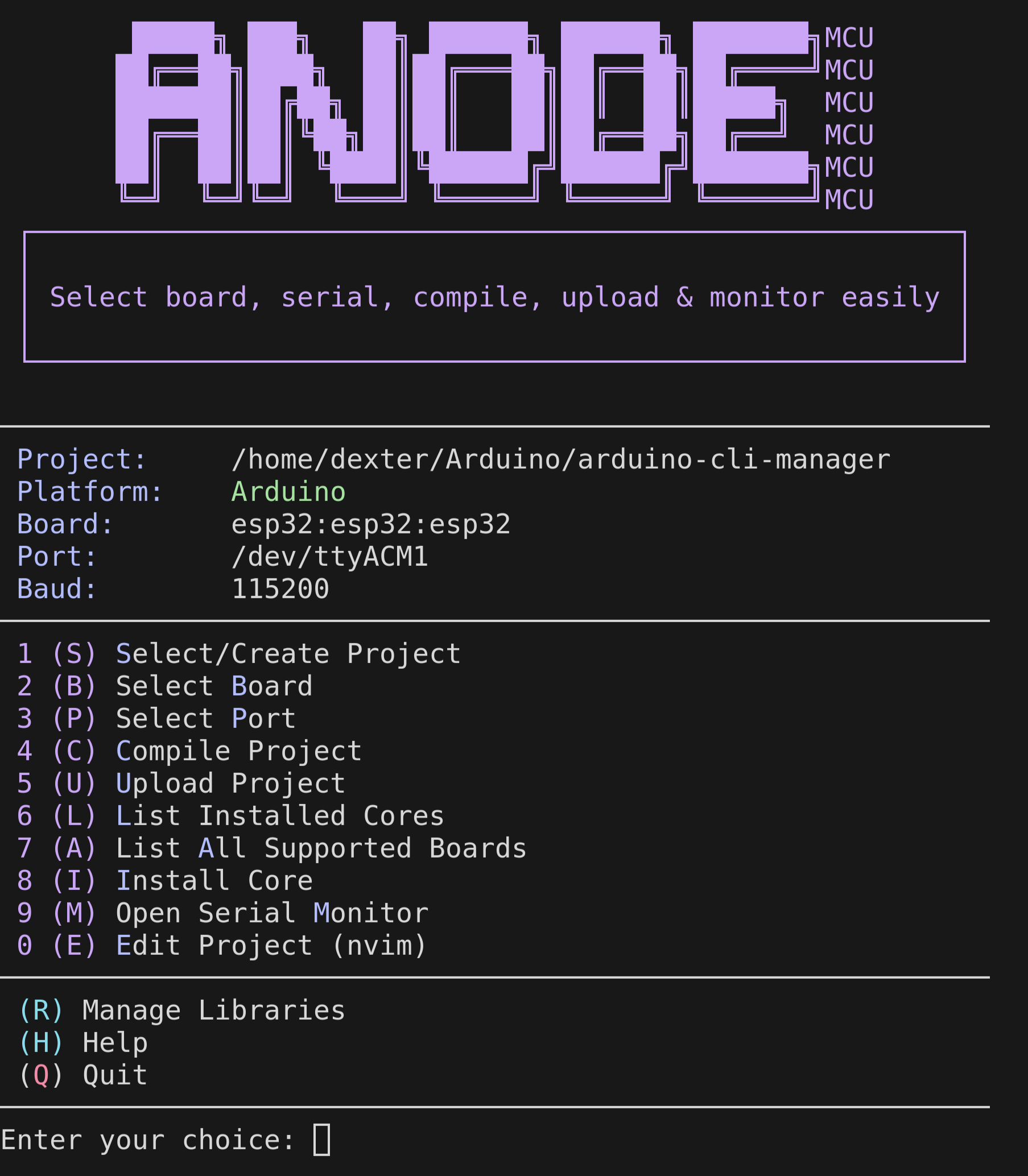








anodemcu is a premium, interactive TUI (Terminal User Interface) designed to simplify microcontroller development. It transforms the command-line tools into a vibrant, intuitive experience, allowing you to manage boards, ports, libraries, and projects across multiple ecosystems.
[!TIP] Perfect for developers who live in the terminal and want a high-speed, "no-nonsense" workflow for compiling and uploading code.
Features
- Multi-Platform Support: Seamlessly work with Arduino CLI, ESP-IDF, and PlatformIO projects.
- Auto-Detection & Ambiguity Resolution: Automatically detects the project type based on files. If multiple configurations exist (e.g. both
CMakeLists.txtandplatformio.ini), it prompts you to select your preferred platform and saves the choice. - ESP-IDF Auto-Sourcing: Automatically locates and sources the ESP-IDF
export.shscript if it's not active in the current shell environment. - Rich Terminal UI: Vibrant color-coded interface with a live dashboard header.
- Fuzzy Search Integration: Powered by
fzffor near-instant selection of boards, ports, and libraries. - Smart Project Management: Create, select, and edit projects (Neovim support) from a single menu, starting automatically in the current directory if it is a valid project.
- Safe Uploads: Automatic project backups before every upload (keeps the last 5 versions).
- Integrated Monitor: Quick access to the serial monitor for real-time debugging.
- Operation Logging: Complete history of your actions with automatic log rotation.
- Native Arch Linux Support: Available directly via the AUR.
Installation
Arch Linux (AUR)
If you are on Arch, this is the recommended way:
yay -S anodemcu
Global Installation (Any Linux/macOS)
Clone the repository and run the automated installer:
git clone https://github.com/abod8639/anodemcu.git
cd anodemcu
./install.sh
This will install the tool to ~/.local/bin/anodemcu and set up a convenient anode alias.
Manual Install
chmod +x anodemcu
# Run locally
./anodemcu
Prerequisites
| Dependency | Purpose | Status |
|---|---|---|
bash | Script execution | Required |
arduino-cli | Arduino compilation and upload | Required for Arduino projects |
idf.py (ESP-IDF) | ESP-IDF compilation and upload | Required for ESP-IDF projects |
pio (PlatformIO) | PlatformIO compilation and upload | Required for PlatformIO projects |
fzf | Interactive fuzzy searching | Recommended |
jq | Update notifications | Recommended |
nvim | Integrated code editing | Optional |
Arch Linux
yay -S arduino-cli fzf jq neovim
Debian/Ubuntu
sudo apt update
sudo apt install arduino-cli fzf jq neovim
Fedora
sudo dnf install arduino-cli fzf jq neovim
How to Use
Simply type anode (if installed globally) or ./anodemcu to open the main menu.
Keyboard Shortcuts & Platform-Specific Actions
Use these single-key triggers for a lightning-fast workflow:
| Key | Action | Platform / Ecosystem |
|---|---|---|
| S | Select/Create Project | All |
| B | Select Board (FQBN / Target) | All (IDF: set-target, PIO: updates platformio.ini) |
| P | Select Port | All |
| C | Compile Project | All (arduino-cli, idf.py build, or pio run) |
| U | Upload Project | All (arduino-cli, idf.py flash, or pio run -t upload) |
| M | Open Serial Monitor | All |
| E | Edit Code (Neovim) | All |
| R | Manage Libraries | Arduino |
| L | List Cores | Arduino |
| A | List All Supported Boards | Arduino |
| I | Install Core | Arduino |
| F | Open configuration menu (idf.py menuconfig) | ESP-IDF |
| N | Clean build files (idf.py clean or pio clean) | ESP-IDF / PlatformIO |
| Z | Show flash size statistics (idf.py size) | ESP-IDF |
| O | Install PlatformIO library (pio pkg install) | PlatformIO |
| H | Show Help | All |
Configuration
The tool maintains its state automatically, but you can customize defaults by editing your local configuration or the script header:
DEFAULT_FQBN="esp32:esp32:esp32"
DEFAULT_PORT="/dev/ttyACM1"
SKETCH_DIR="$HOME/Arduino"
Troubleshooting
- Upload Failed? Check your USB cable and ensure the port (
P) is correctly selected. - Library Missing? Use the Library Manager (
R) to search and install missing dependencies. - Permission Denied? Ensure your user is in the
uucpordialoutgroup (on Linux).
📜 License & Acknowledgments
Distributed under the MIT License. See LICENSE for more information.
Built with ❤️ by Dexter
Contributors

114 commits
Similar repos


Languages
Shell
97.6%
Makefile
2.0%
A cross-platform, interactive TUI tool to manage, compile, and flash microcontroller projects using arduino-cli, PlatformIO, and ESP-IDF.
Shell
108
114 commits
updated Sep 13, 2026
See what people are saying (1)
README
Anode MCU Manager
anodemcu is a premium, interactive TUI (Terminal User Interface) designed to simplify microcontroller development. It transforms the command-line tools into a vibrant, intuitive experience, allowing you to manage boards, ports, libraries, and projects across multiple ecosystems.
[!TIP] Perfect for developers who live in the terminal and want a high-speed, "no-nonsense" workflow for compiling and uploading code.
Features
- Multi-Platform Support: Seamlessly work with Arduino CLI, ESP-IDF, and PlatformIO projects.
- Auto-Detection & Ambiguity Resolution: Automatically detects the project type based on files. If multiple configurations exist (e.g. both
CMakeLists.txtandplatformio.ini), it prompts you to select your preferred platform and saves the choice. - ESP-IDF Auto-Sourcing: Automatically locates and sources the ESP-IDF
export.shscript if it's not active in the current shell environment. - Rich Terminal UI: Vibrant color-coded interface with a live dashboard header.
- Fuzzy Search Integration: Powered by
fzffor near-instant selection of boards, ports, and libraries. - Smart Project Management: Create, select, and edit projects (Neovim support) from a single menu, starting automatically in the current directory if it is a valid project.
- Safe Uploads: Automatic project backups before every upload (keeps the last 5 versions).
- Integrated Monitor: Quick access to the serial monitor for real-time debugging.
- Operation Logging: Complete history of your actions with automatic log rotation.
- Native Arch Linux Support: Available directly via the AUR.
Installation
Arch Linux (AUR)
If you are on Arch, this is the recommended way:
yay -S anodemcu
Global Installation (Any Linux/macOS)
Clone the repository and run the automated installer:
git clone https://github.com/abod8639/anodemcu.git
cd anodemcu
./install.sh
This will install the tool to ~/.local/bin/anodemcu and set up a convenient anode alias.
Manual Install
chmod +x anodemcu
# Run locally
./anodemcu
Prerequisites
| Dependency | Purpose | Status |
|---|---|---|
bash | Script execution | Required |
arduino-cli | Arduino compilation and upload | Required for Arduino projects |
idf.py (ESP-IDF) | ESP-IDF compilation and upload | Required for ESP-IDF projects |
pio (PlatformIO) | PlatformIO compilation and upload | Required for PlatformIO projects |
fzf | Interactive fuzzy searching | Recommended |
jq | Update notifications | Recommended |
nvim | Integrated code editing | Optional |
Arch Linux
yay -S arduino-cli fzf jq neovim
Debian/Ubuntu
sudo apt update
sudo apt install arduino-cli fzf jq neovim
Fedora
sudo dnf install arduino-cli fzf jq neovim
How to Use
Simply type anode (if installed globally) or ./anodemcu to open the main menu.
Keyboard Shortcuts & Platform-Specific Actions
Use these single-key triggers for a lightning-fast workflow:
| Key | Action | Platform / Ecosystem |
|---|---|---|
| S | Select/Create Project | All |
| B | Select Board (FQBN / Target) | All (IDF: set-target, PIO: updates platformio.ini) |
| P | Select Port | All |
| C | Compile Project | All (arduino-cli, idf.py build, or pio run) |
| U | Upload Project | All (arduino-cli, idf.py flash, or pio run -t upload) |
| M | Open Serial Monitor | All |
| E | Edit Code (Neovim) | All |
| R | Manage Libraries | Arduino |
| L | List Cores | Arduino |
| A | List All Supported Boards | Arduino |
| I | Install Core | Arduino |
| F | Open configuration menu (idf.py menuconfig) | ESP-IDF |
| N | Clean build files (idf.py clean or pio clean) | ESP-IDF / PlatformIO |
| Z | Show flash size statistics (idf.py size) | ESP-IDF |
| O | Install PlatformIO library (pio pkg install) | PlatformIO |
| H | Show Help | All |
Configuration
The tool maintains its state automatically, but you can customize defaults by editing your local configuration or the script header:
DEFAULT_FQBN="esp32:esp32:esp32"
DEFAULT_PORT="/dev/ttyACM1"
SKETCH_DIR="$HOME/Arduino"
Troubleshooting
- Upload Failed? Check your USB cable and ensure the port (
P) is correctly selected. - Library Missing? Use the Library Manager (
R) to search and install missing dependencies. - Permission Denied? Ensure your user is in the
uucpordialoutgroup (on Linux).
📜 License & Acknowledgments
Distributed under the MIT License. See LICENSE for more information.
Built with ❤️ by Dexter
Similar repos
Contributors
114 commits
Languages
Shell
97.6%
Makefile
2.0%