Unitree Go2, Unitree G1 support for Nvidia Isaac Lab (Isaac Gym / Isaac Sim)
Python
1,083
102 commits
updated Jul 1, 2026
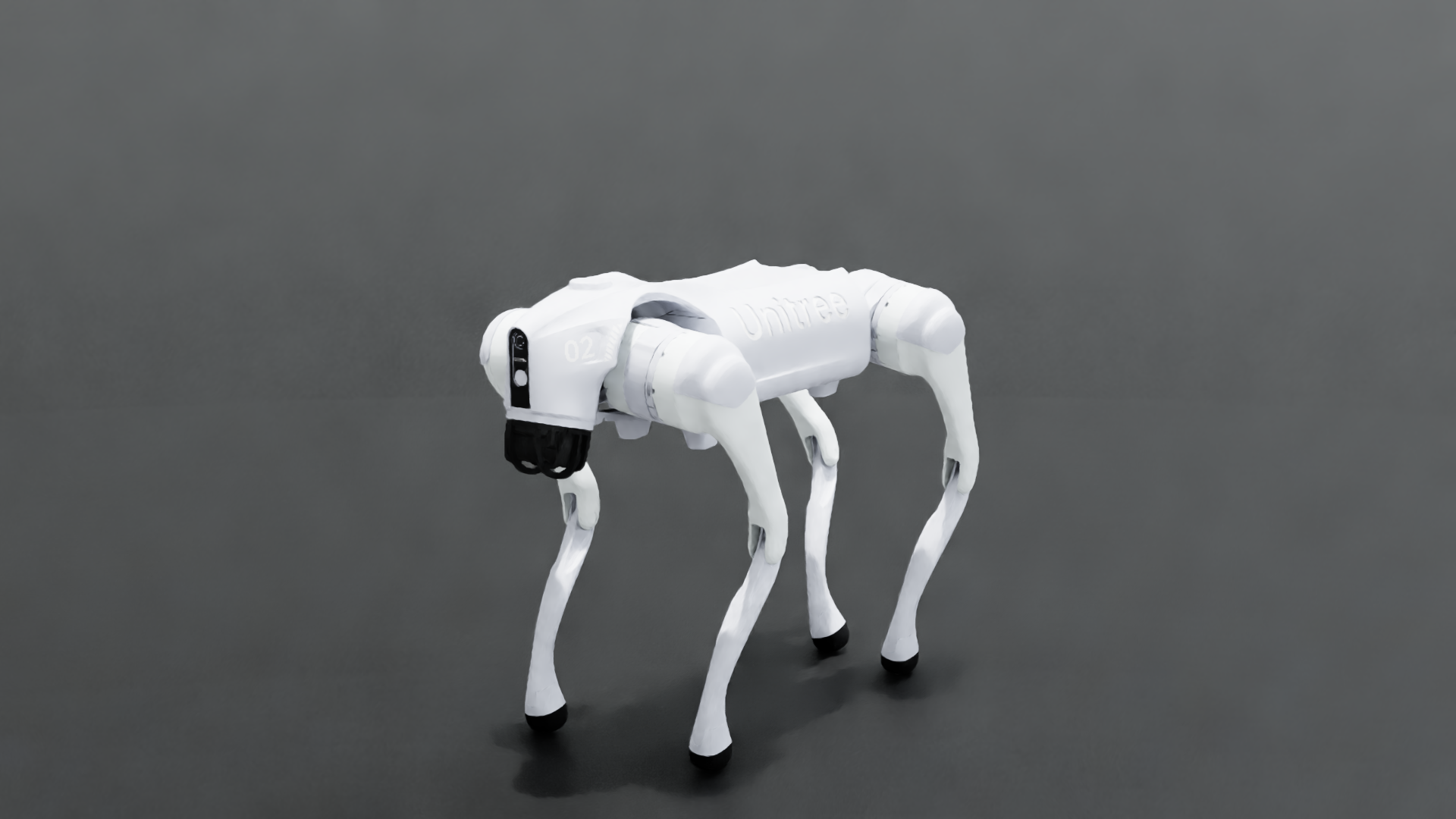
Unitree Go2 twin in Isaac Sim 5.x — studio HDRI lighting, RT2 quality render.




We are thrilled to announce that the Unitree Go2/G1 robot has now been integrated with the Nvidia Isaac Sim (Orbit), marking a major step forward in robotics research and development. The combination of these two cutting-edge technologies opens up a world of possibilities for creating and testing algorithms in a variety of simulated environments.
Get ready to take your research to the next level with this powerful new resource at your fingertips!
This fork of abizovnuralem/go2_omniverse
adds a real-robot digital twin mode and an Isaac Sim 5.x / ROS 2 Jazzy port,
plus higher-fidelity default rendering.
./run_twinbot.sh)twinbot mode drives the simulated Go2's joints directly from the physical
robot's /lowstate stream (forwarded off the Jetson by scripts/twinbot_bridge.py),
so the sim mirrors the real dog 1:1 via IMU-aligned kinematic playback. Details in
docs/TWINBOT_IMU_FIX.md.
Scope, stated honestly:
The default scene is lit with Isaac's bundled studio HDRI (image-based lighting), so the robot's shells catch real reflections instead of reading as a flat gray dome.
./run_twinbot.sh launches the quality RT2 render preset (--rendering_mode quality).
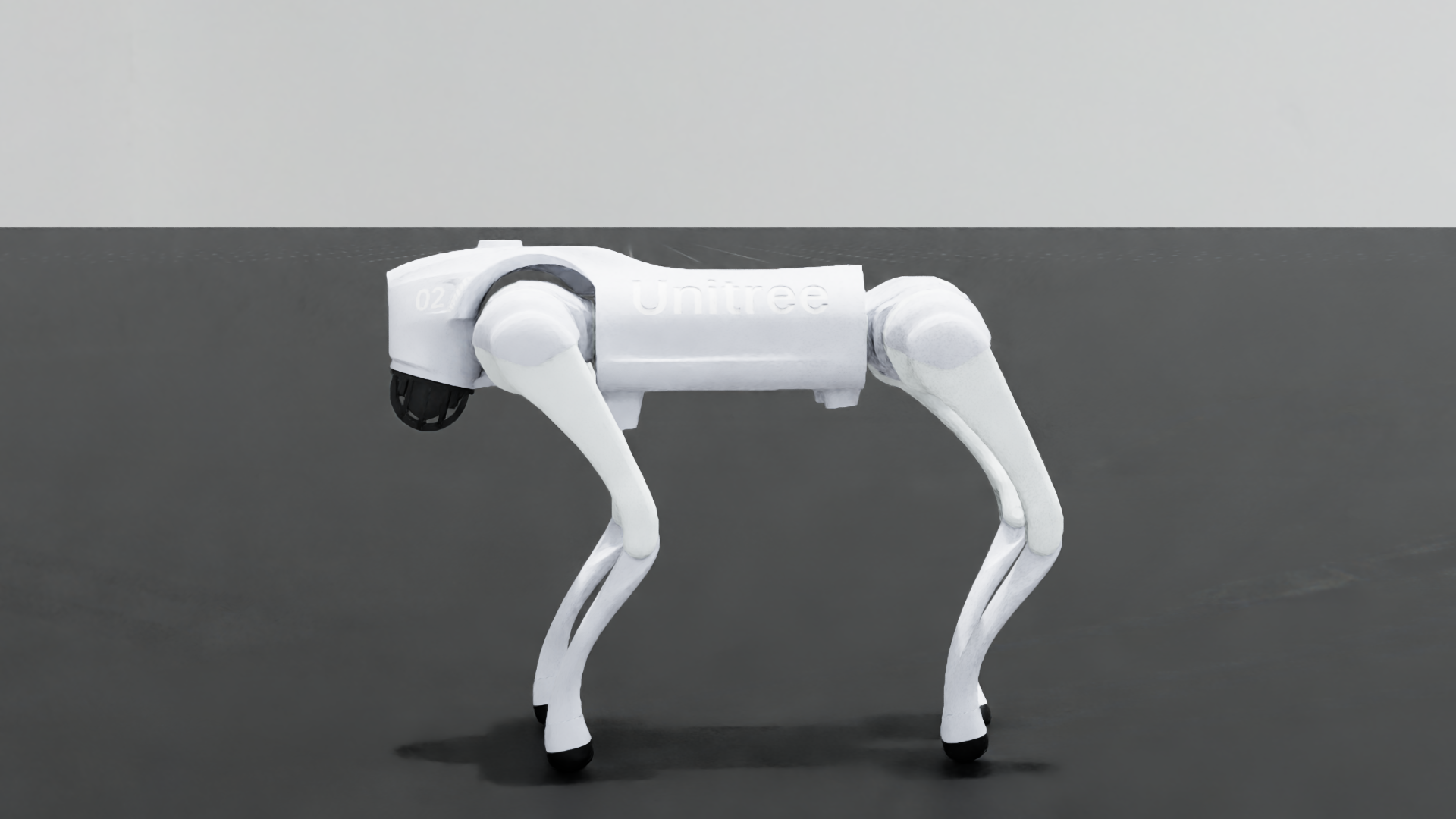
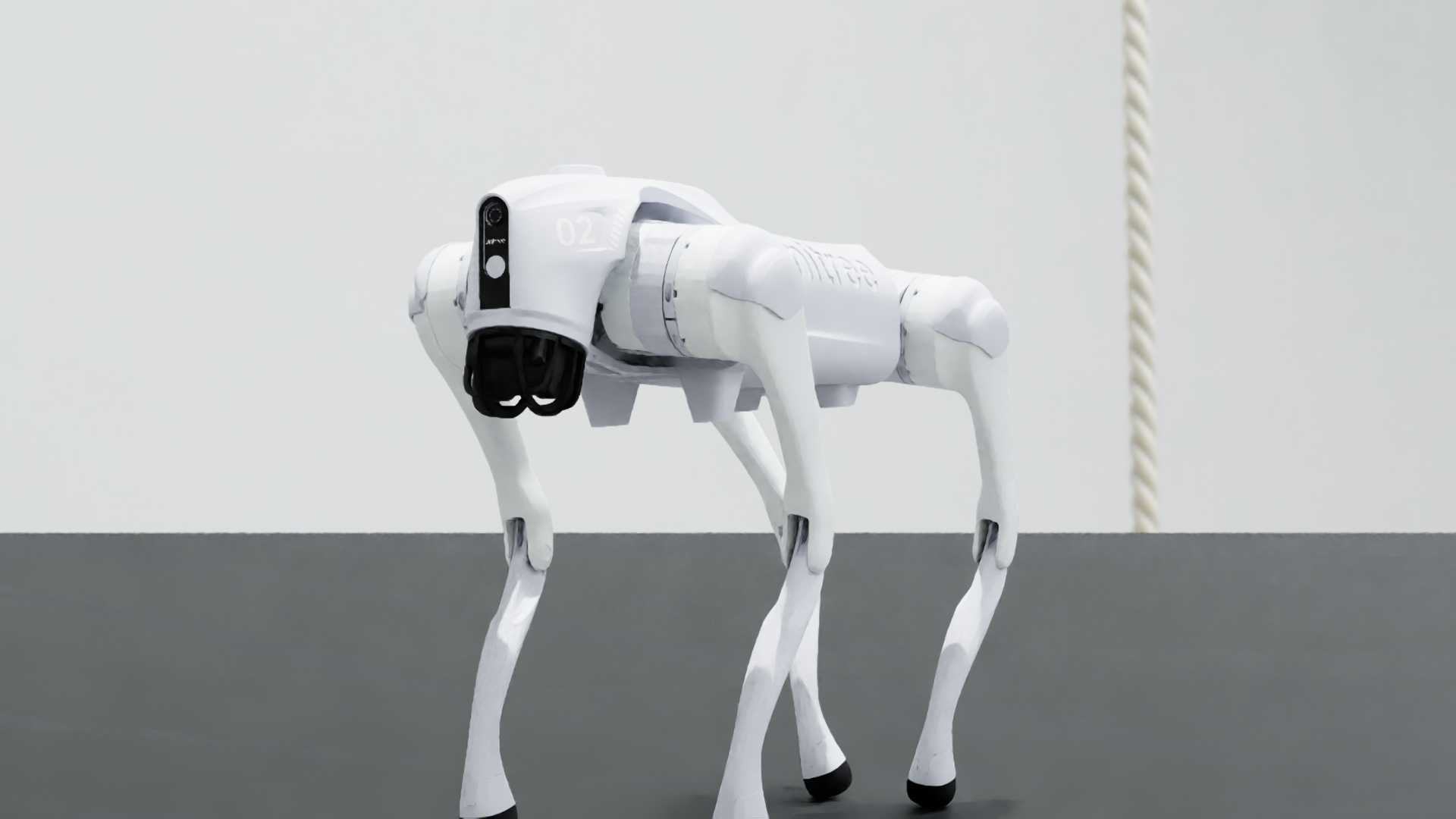
Hero stills are produced headlessly with --capture, which renders the Go2 from several
angles via an isaaclab Camera render product (no on-screen window needed):
./run_sim.sh --capture 80 --headless --enable_cameras --rendering_mode quality \
    --capture_dir ./media
For cinematic demo footage, record the joint trajectory live, then re-render it offline in RTX path-tracing mode (live closed-loop favours the real-time preset).
isaacsim.ros2.core (Isaac 5.x relocated them
out of isaacsim.ros2.bridge), with a fallback to the old path.JAZZY.md for the venv setup and what is / is not validated.
If you're as enthusiastic about this project as we are, please consider giving it a ⭐ star on our GitHub repository.
Your encouragement fuels our passion and helps us develop our RoadMap further. We welcome any help or suggestions you can offer!
Together, let's push the boundaries of what's possible with the Unitree Go2/G1 and ROS2!
If your system is not sufficient for Isaac Sim or Isaac Lab etc., this is where Robolaunch offers you a new service. You can do real-time work by simply connecting to the computer on the remote server via a web browser.


There are now two supported tracks:
Track A — original, Humble-based (Ubuntu 22.04, Isaac Sim 2023.1.1, Orbit 0.3.0)
This is the path the repo was originally designed for. Instructions below are unchanged.
Track B — experimental, Jazzy-based (Ubuntu 24.04, Isaac Sim 5.0, IsaacLab 0.54.3)
A pip-into-venv setup that uses the ROS 2 Jazzy runtime bundled inside
Isaac Sim (resolved from the isaacsim.ros2.core extension on Isaac 5.x, or
the older isaacsim.ros2.bridge as a fallback), rather than a system
/opt/ros/jazzy install. See JAZZY.md for the full
rationale (including why system Jazzy's Python 3.12 is not compatible with
Isaac Sim 5.0's Python 3.11), setup, and what is / is not validated.
./run_sim.sh and ./run_sim_g1.sh are the launchers for this track; they
no longer require conda activate orbit.
Full instruction:
After installation of Nvidia Isaac Sim 2023.1.1 and Ros2 Humble:

1. Clone this specific IsaacLab repo version: https://github.com/isaac-sim/IsaacLab/releases/tag/v0.3.1
2. Execute in ubuntu terminal:
export ISAACSIM_PATH="${HOME}/.local/share/ov/pkg/isaac-sim-2023.1.1"
export ISAACSIM_PYTHON_EXE="${ISAACSIM_PATH}/python.sh"
and also put it inside .bashrc file
3. Inside the root folder of Orbit repo (https://github.com/isaac-sim/IsaacLab/releases/tag/v0.3.1) execute ln -s ${ISAACSIM_PATH} _isaac_sim
4. Execute ./orbit.sh --conda
5. Execute conda activate orbit
6. Execute sudo apt install cmake build-essential
7. Execute ./orbit.sh --install
8. Execute ./orbit.sh --extra rsl_rl
9. Verify the installation using "python source/standalone/tutorials/00_sim/create_empty.py" You should be inside conda env.
10. You need to check that you have "Isaac Sim Python 2023.1.1 - New Stage*" on the top of the window.
11. Clone this repo with git clone https://github.com/abizovnuralem/go2_omniverse/ --recurse-submodules -j8 --depth=1
12. Copy the config file Unitree_L1.json (located in go2_omniverse/Isaac_sim/Unitree/Unitree_L1.json) for the Unitree L1 LiDAR to the folder IsaacLab-0.3.1/source/data/sensors/lidar/Unitree_L1.json (if the path doesnt exists, create it)
13. Copy all material files in the isaac-sim-2023.1.1/data/material_files folder to IsaacLab_v0.3.1/source/data/material_files (if the path doesnt exists, create it)
14. Execute ./run_sim.sh (without activated conda orbit env)
Some suggestions:
https://docs.omniverse.nvidia.com/isaacsim/latest/installation/install_ros.html#isaac-sim-app-install-ros
The current project was tested on Ubuntu 22.04, IsaacSim 2023.1.1 with Orbit 0.3.0 and Nvidia Driver Version: 545. To start the project with Unitree GO2, execute:
./run_sim.sh
To start the project with Unitree G1, execute:
./run_sim_g1.sh
You can control the dog using "WASD" keyboard commands
You can use https://github.com/abizovnuralem/go2_ros2_sdk as a basement for your ROS2 setup.
To use predifined custom envs, you need to download files from https://drive.google.com/drive/folders/1vVGuO1KIX1K6mD6mBHDZGm9nk2vaRyj3?usp=sharing and place them to /envs folder. Then you can execute it modifying run_sim.sh script with --custom_env=office and --terrain flat commands. If you are doing it first time, it will take 2-3 minutes to configure the env. Please, wait.
To contribute or modify the project, refer to these resources for implementing additional features or improving the existing codebase. PRs are welcome!
To enable VR support on linux will take some time, but it works! I have tested it on:
docker pull nvcr.io/nvidia/isaac-sim:2023.1.1
docker run --name isaac-sim --entrypoint bash -it --runtime=nvidia --gpus all -e "ACCEPT_EULA=Y" --rm --network=host \
    -e "PRIVACY_CONSENT=Y" \
    -v ~/docker/isaac-sim/cache/kit:/isaac-sim/kit/cache:rw \
    -v ~/docker/isaac-sim/cache/ov:/root/.cache/ov:rw \
    -v ~/docker/isaac-sim/cache/pip:/root/.cache/pip:rw \
    -v ~/docker/isaac-sim/cache/glcache:/root/.cache/nvidia/GLCache:rw \
    -v ~/docker/isaac-sim/cache/computecache:/root/.nv/ComputeCache:rw \
    -v ~/docker/isaac-sim/logs:/root/.nvidia-omniverse/logs:rw \
    -v ~/docker/isaac-sim/data:/root/.local/share/ov/data:rw \
    -v ~/docker/isaac-sim/documents:/root/Documents:rw \
    nvcr.io/nvidia/isaac-sim:2023.1.1
bash docker ps to find the container's ID.docker cp <id_container>:isaac-sim/. <your_local_machine_folder> # absolute path
.local/share/ov/pkg/
If running ./run_sim.sh results in the error "Could not import 'rosidl_typesupport_c' for package", refer to this thread.
Special thanks to
This project is licensed under the BSD 2-clause License - see the LICENSE file for details.
88 followers · starred Mar 2025
262 followers · starred Aug 2024
230 followers · starred Sep 2024
Unitree Go2, Unitree G1 support for Nvidia Isaac Lab (Isaac Gym / Isaac Sim)
Python
1,083
102 commits
updated Jul 1, 2026
Unitree Go2 twin in Isaac Sim 5.x — studio HDRI lighting, RT2 quality render.
We are thrilled to announce that the Unitree Go2/G1 robot has now been integrated with the Nvidia Isaac Sim (Orbit), marking a major step forward in robotics research and development. The combination of these two cutting-edge technologies opens up a world of possibilities for creating and testing algorithms in a variety of simulated environments.
Get ready to take your research to the next level with this powerful new resource at your fingertips!
This fork of abizovnuralem/go2_omniverse
adds a real-robot digital twin mode and an Isaac Sim 5.x / ROS 2 Jazzy port,
plus higher-fidelity default rendering.
./run_twinbot.sh)twinbot mode drives the simulated Go2's joints directly from the physical
robot's /lowstate stream (forwarded off the Jetson by scripts/twinbot_bridge.py),
so the sim mirrors the real dog 1:1 via IMU-aligned kinematic playback. Details in
docs/TWINBOT_IMU_FIX.md.
Scope, stated honestly:
The default scene is lit with Isaac's bundled studio HDRI (image-based lighting), so the robot's shells catch real reflections instead of reading as a flat gray dome.
./run_twinbot.sh launches the quality RT2 render preset (--rendering_mode quality).
Hero stills are produced headlessly with --capture, which renders the Go2 from several
angles via an isaaclab Camera render product (no on-screen window needed):
./run_sim.sh --capture 80 --headless --enable_cameras --rendering_mode quality \
    --capture_dir ./media
For cinematic demo footage, record the joint trajectory live, then re-render it offline in RTX path-tracing mode (live closed-loop favours the real-time preset).
isaacsim.ros2.core (Isaac 5.x relocated them
out of isaacsim.ros2.bridge), with a fallback to the old path.JAZZY.md for the venv setup and what is / is not validated.
If you're as enthusiastic about this project as we are, please consider giving it a ⭐ star on our GitHub repository.
Your encouragement fuels our passion and helps us develop our RoadMap further. We welcome any help or suggestions you can offer!
Together, let's push the boundaries of what's possible with the Unitree Go2/G1 and ROS2!
If your system is not sufficient for Isaac Sim or Isaac Lab etc., this is where Robolaunch offers you a new service. You can do real-time work by simply connecting to the computer on the remote server via a web browser.
There are now two supported tracks:
Track A — original, Humble-based (Ubuntu 22.04, Isaac Sim 2023.1.1, Orbit 0.3.0)
This is the path the repo was originally designed for. Instructions below are unchanged.
Track B — experimental, Jazzy-based (Ubuntu 24.04, Isaac Sim 5.0, IsaacLab 0.54.3)
A pip-into-venv setup that uses the ROS 2 Jazzy runtime bundled inside
Isaac Sim (resolved from the isaacsim.ros2.core extension on Isaac 5.x, or
the older isaacsim.ros2.bridge as a fallback), rather than a system
/opt/ros/jazzy install. See JAZZY.md for the full
rationale (including why system Jazzy's Python 3.12 is not compatible with
Isaac Sim 5.0's Python 3.11), setup, and what is / is not validated.
./run_sim.sh and ./run_sim_g1.sh are the launchers for this track; they
no longer require conda activate orbit.
Full instruction:
After installation of Nvidia Isaac Sim 2023.1.1 and Ros2 Humble:

1. Clone this specific IsaacLab repo version: https://github.com/isaac-sim/IsaacLab/releases/tag/v0.3.1
2. Execute in ubuntu terminal:
export ISAACSIM_PATH="${HOME}/.local/share/ov/pkg/isaac-sim-2023.1.1"
export ISAACSIM_PYTHON_EXE="${ISAACSIM_PATH}/python.sh"
and also put it inside .bashrc file
3. Inside the root folder of Orbit repo (https://github.com/isaac-sim/IsaacLab/releases/tag/v0.3.1) execute ln -s ${ISAACSIM_PATH} _isaac_sim
4. Execute ./orbit.sh --conda
5. Execute conda activate orbit
6. Execute sudo apt install cmake build-essential
7. Execute ./orbit.sh --install
8. Execute ./orbit.sh --extra rsl_rl
9. Verify the installation using "python source/standalone/tutorials/00_sim/create_empty.py" You should be inside conda env.
10. You need to check that you have "Isaac Sim Python 2023.1.1 - New Stage*" on the top of the window.
11. Clone this repo with git clone https://github.com/abizovnuralem/go2_omniverse/ --recurse-submodules -j8 --depth=1
12. Copy the config file Unitree_L1.json (located in go2_omniverse/Isaac_sim/Unitree/Unitree_L1.json) for the Unitree L1 LiDAR to the folder IsaacLab-0.3.1/source/data/sensors/lidar/Unitree_L1.json (if the path doesnt exists, create it)
13. Copy all material files in the isaac-sim-2023.1.1/data/material_files folder to IsaacLab_v0.3.1/source/data/material_files (if the path doesnt exists, create it)
14. Execute ./run_sim.sh (without activated conda orbit env)
Some suggestions:
https://docs.omniverse.nvidia.com/isaacsim/latest/installation/install_ros.html#isaac-sim-app-install-ros
The current project was tested on Ubuntu 22.04, IsaacSim 2023.1.1 with Orbit 0.3.0 and Nvidia Driver Version: 545. To start the project with Unitree GO2, execute:
./run_sim.sh
To start the project with Unitree G1, execute:
./run_sim_g1.sh
You can control the dog using "WASD" keyboard commands
You can use https://github.com/abizovnuralem/go2_ros2_sdk as a basement for your ROS2 setup.
To use predifined custom envs, you need to download files from https://drive.google.com/drive/folders/1vVGuO1KIX1K6mD6mBHDZGm9nk2vaRyj3?usp=sharing and place them to /envs folder. Then you can execute it modifying run_sim.sh script with --custom_env=office and --terrain flat commands. If you are doing it first time, it will take 2-3 minutes to configure the env. Please, wait.
To contribute or modify the project, refer to these resources for implementing additional features or improving the existing codebase. PRs are welcome!
To enable VR support on linux will take some time, but it works! I have tested it on:
docker pull nvcr.io/nvidia/isaac-sim:2023.1.1
docker run --name isaac-sim --entrypoint bash -it --runtime=nvidia --gpus all -e "ACCEPT_EULA=Y" --rm --network=host \
    -e "PRIVACY_CONSENT=Y" \
    -v ~/docker/isaac-sim/cache/kit:/isaac-sim/kit/cache:rw \
    -v ~/docker/isaac-sim/cache/ov:/root/.cache/ov:rw \
    -v ~/docker/isaac-sim/cache/pip:/root/.cache/pip:rw \
    -v ~/docker/isaac-sim/cache/glcache:/root/.cache/nvidia/GLCache:rw \
    -v ~/docker/isaac-sim/cache/computecache:/root/.nv/ComputeCache:rw \
    -v ~/docker/isaac-sim/logs:/root/.nvidia-omniverse/logs:rw \
    -v ~/docker/isaac-sim/data:/root/.local/share/ov/data:rw \
    -v ~/docker/isaac-sim/documents:/root/Documents:rw \
    nvcr.io/nvidia/isaac-sim:2023.1.1
bash docker ps to find the container's ID.docker cp <id_container>:isaac-sim/. <your_local_machine_folder> # absolute path
.local/share/ov/pkg/
If running ./run_sim.sh results in the error "Could not import 'rosidl_typesupport_c' for package", refer to this thread.
Special thanks to
This project is licensed under the BSD 2-clause License - see the LICENSE file for details.
88 followers · starred Mar 2025
262 followers · starred Aug 2024
230 followers · starred Sep 2024



