
Self-hosted, open-source Redis GUI — browse keys, CLI, live monitor, memory analysis. One Docker container, no account, no telemetry.
TypeScript
0
24 commits
updated Oct 5, 2026
See what people are saying
README

Redivue
A free, open-source, self-hosted Redis GUI — manage multiple Redis instances from one dashboard: browse and edit keys, run a full CLI, watch live traffic, analyze memory, and more. Built as an open alternative to RedisInsight, with no telemetry, no cloud account, and no license server.


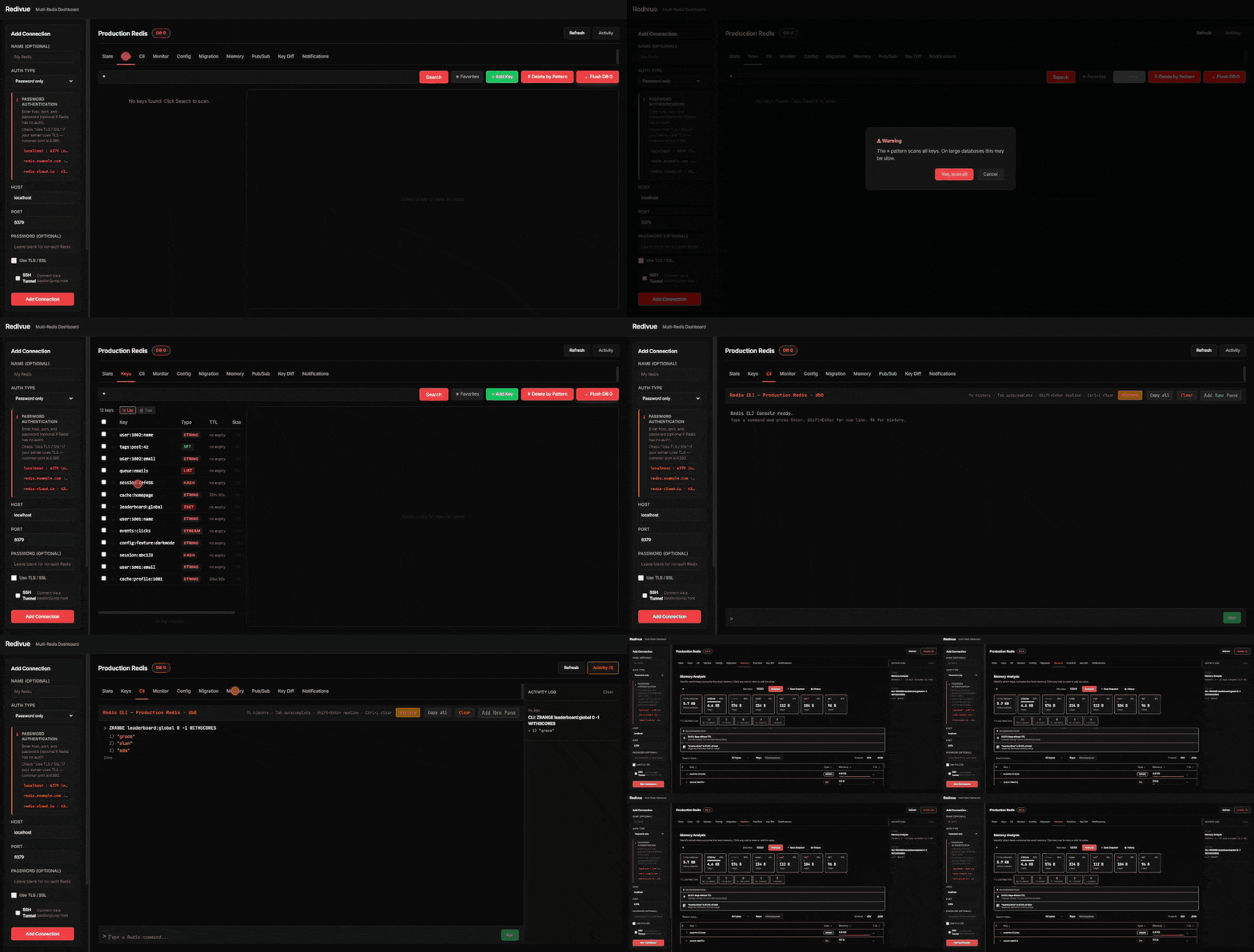
Why Redivue?
- Actually free and open source. No paywalled "Pro" tier, no forced account, no phone-home telemetry — the entire feature set in this README is in the codebase today.
- Multi-instance from one screen. Add every Redis you touch — local, Docker, ACL-secured, behind an SSH bastion, TLS/mTLS, Sentinel, Cluster — and switch between them from the sidebar.
- Stateless backend. Connection details live in your browser's
localStorage, not a database Redivue owns. Point it at any Redis you already have; nothing to migrate to adopt it, nothing to migrate away from it either. - Deploy once, use from any browser. Most open-source Redis GUIs are Electron desktop apps that every teammate installs separately. Redivue is a single container you put on your own infra — everyone opens a URL, nobody installs anything.
Features
Everything below is in the codebase today — no "Pro" tier gating any of it. For what each one actually does and how to use it, see the User Guide; this is the scan-it-in-10- seconds version.
Dashboard & connections
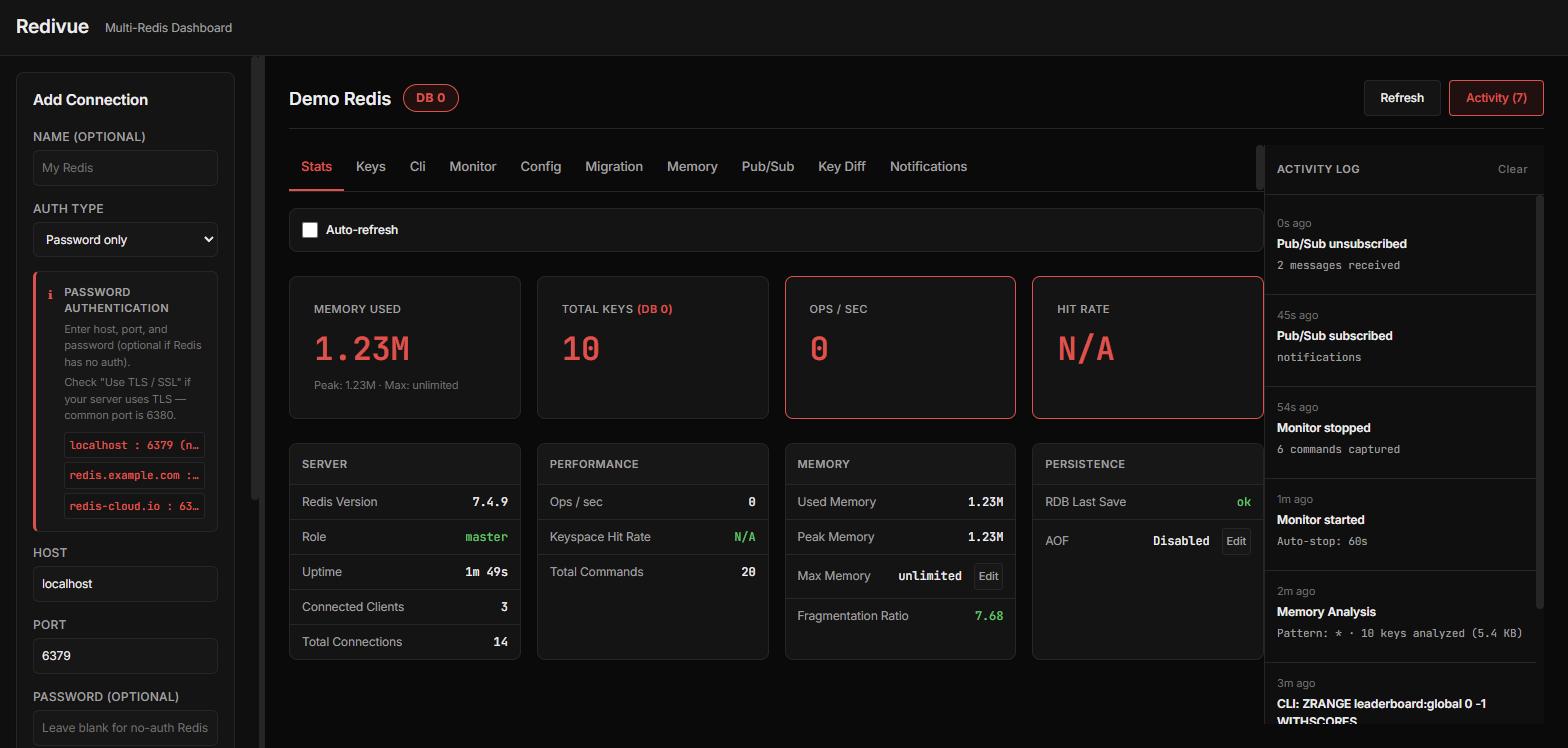
- Stats dashboard — memory, keys, clients, uptime, version, role, AOF status, last
BGSAVE - Live config editing from the dashboard —
maxmemory(with presets) and AOF toggle, no CLI needed - Connection health indicator with a live key-count badge in the sidebar
- Database selector (DB 0–15) per connection, with
FLUSHDBconfirmation
Keys & data
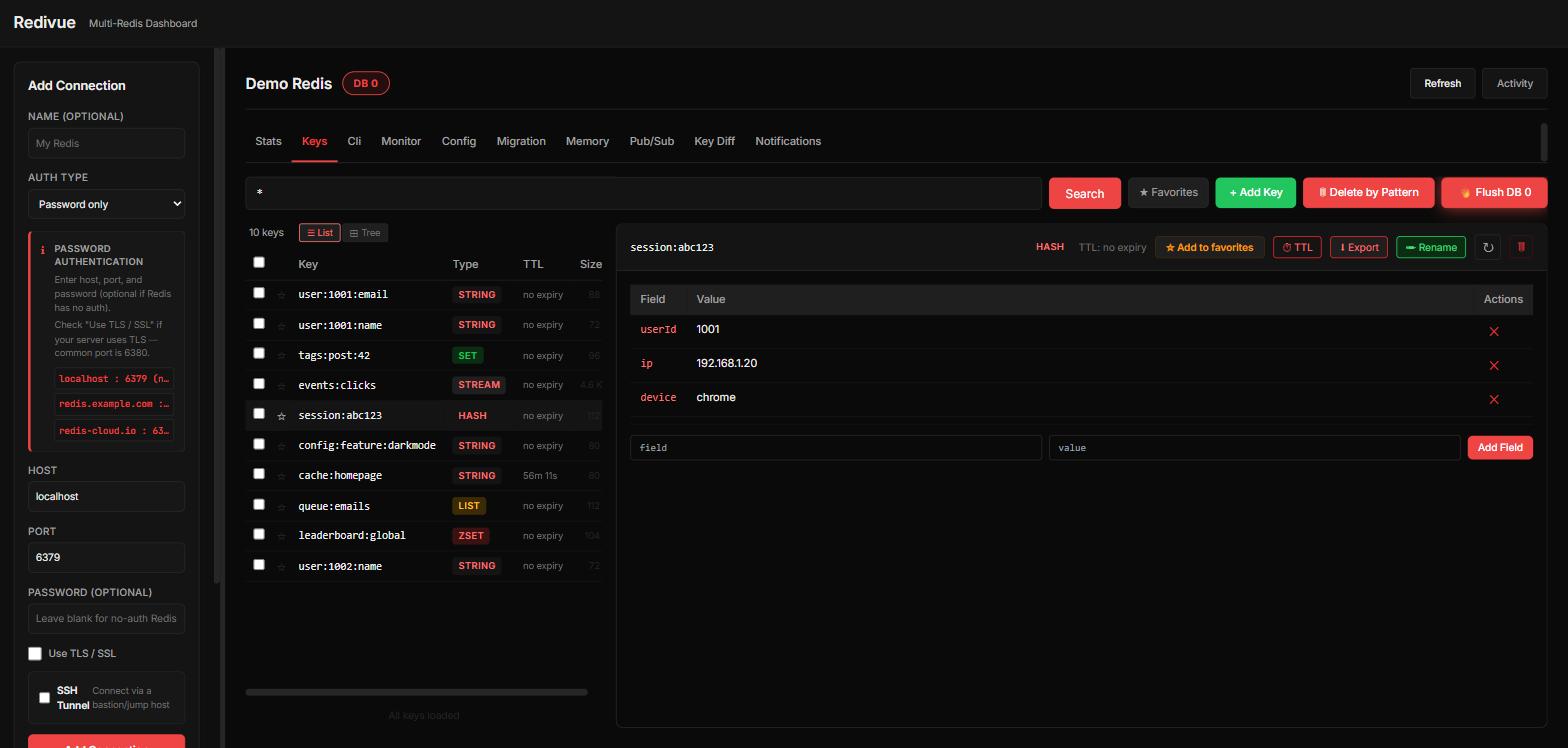
- Keys browser with SCAN-based pagination, pattern search, and namespace tree view (
user:1:profile→ folders) - Full CRUD for every Redis type — String, Hash, List, Set, Sorted Set, Stream, and RedisJSON
- Value formatters: JSON tree, HEX dump, Binary, Timestamp, plus GZIP/Deflate/ZSTD/LZ4/Snappy decompression
- Per-key memory size (
MEMORY USAGE), TTL countdown, bulk TTL/delete/export (JSON & CSV) by pattern or selection - Copy/migrate keys across databases and connections, including a type-agnostic
DUMP/RESTOREfallback for module types - Search history (last 10 patterns) and starred key bookmarks, exportable as JSON
CLI & scripting
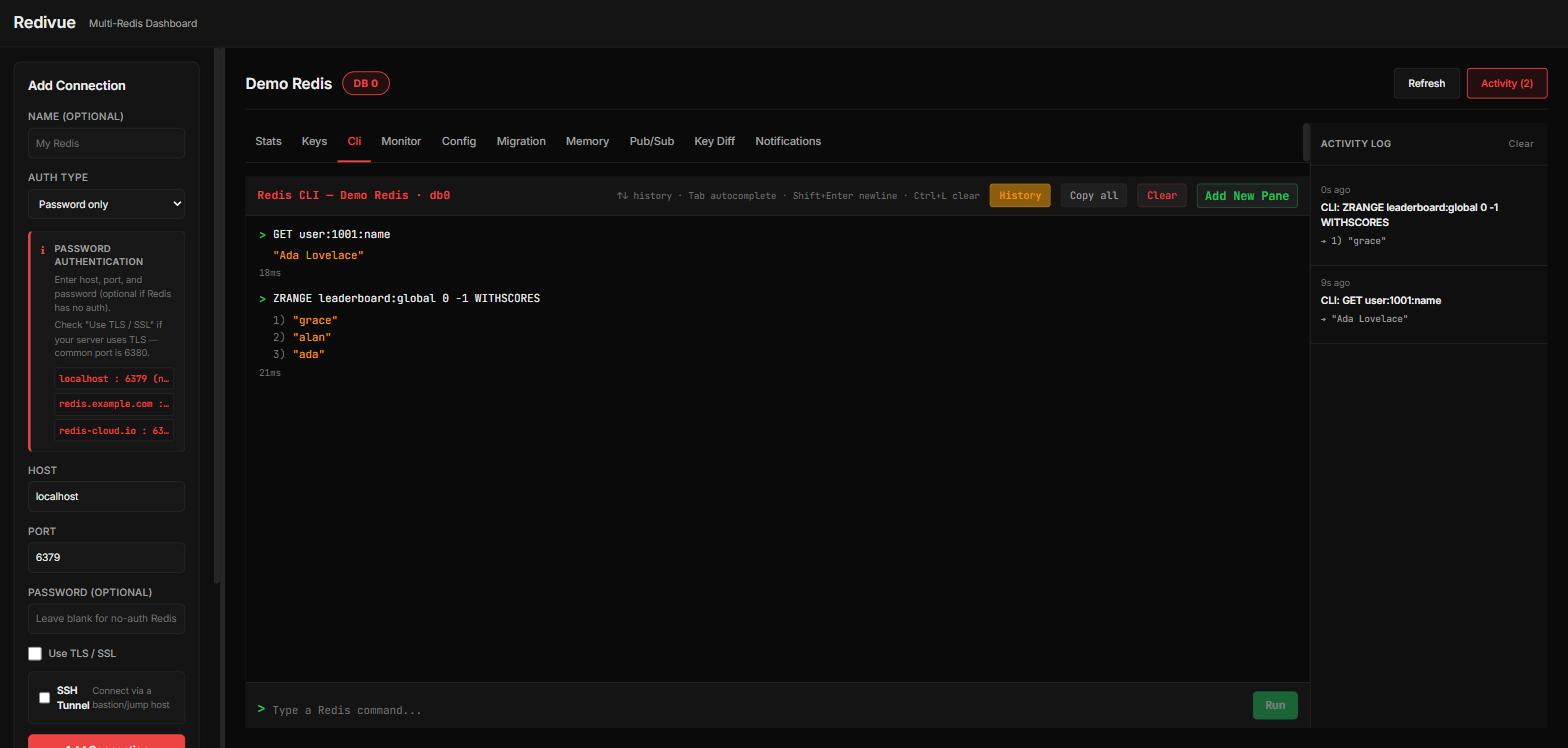
- Full CLI console — 150+ Redis commands with autocomplete, syntax help, history, favorites, and confirmation on destructive commands (
FLUSHALL,SHUTDOWN, …) - Bulk import: run commands straight from a
.txt/.redis/.clifile with progress tracking
Observability
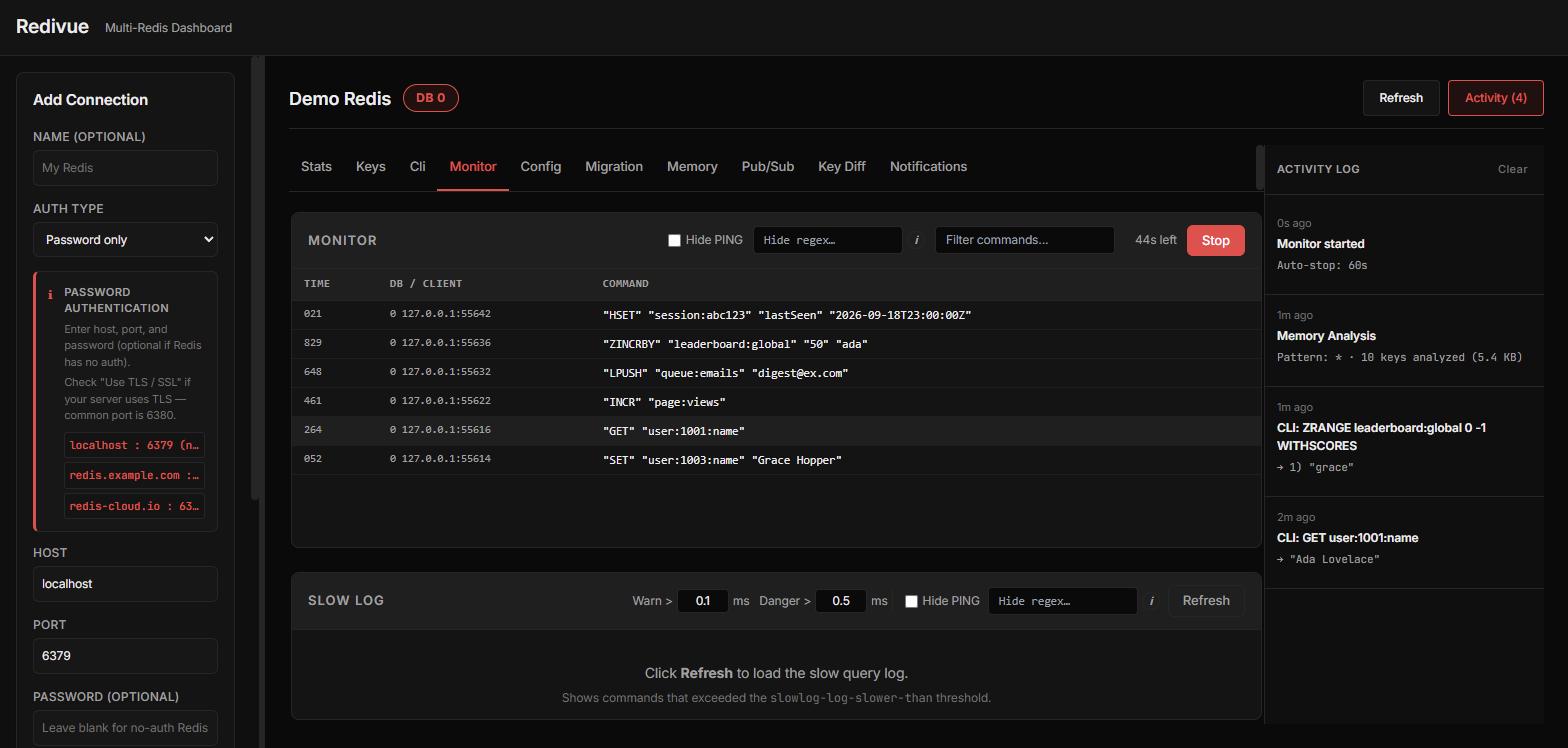
- Real-time
MONITORstream with filtering, latency coloring, and auto-stop - Slow log viewer with stats (avg/min/max latency, top offenders)
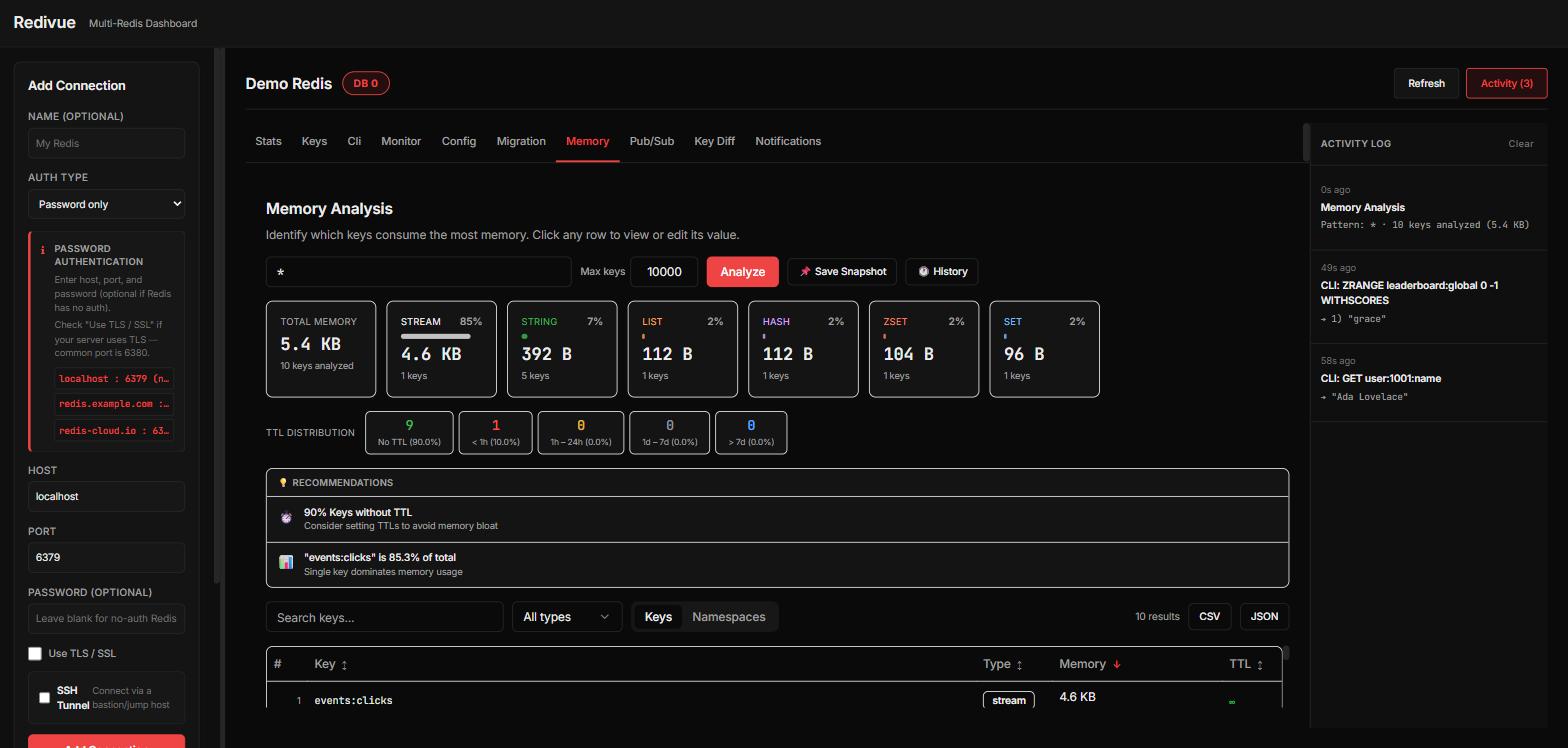
- Memory Analysis: top-N consumers, per-type breakdown, TTL distribution, snapshot history, and smart recommendations (large keys, missing TTLs, dominant keys)
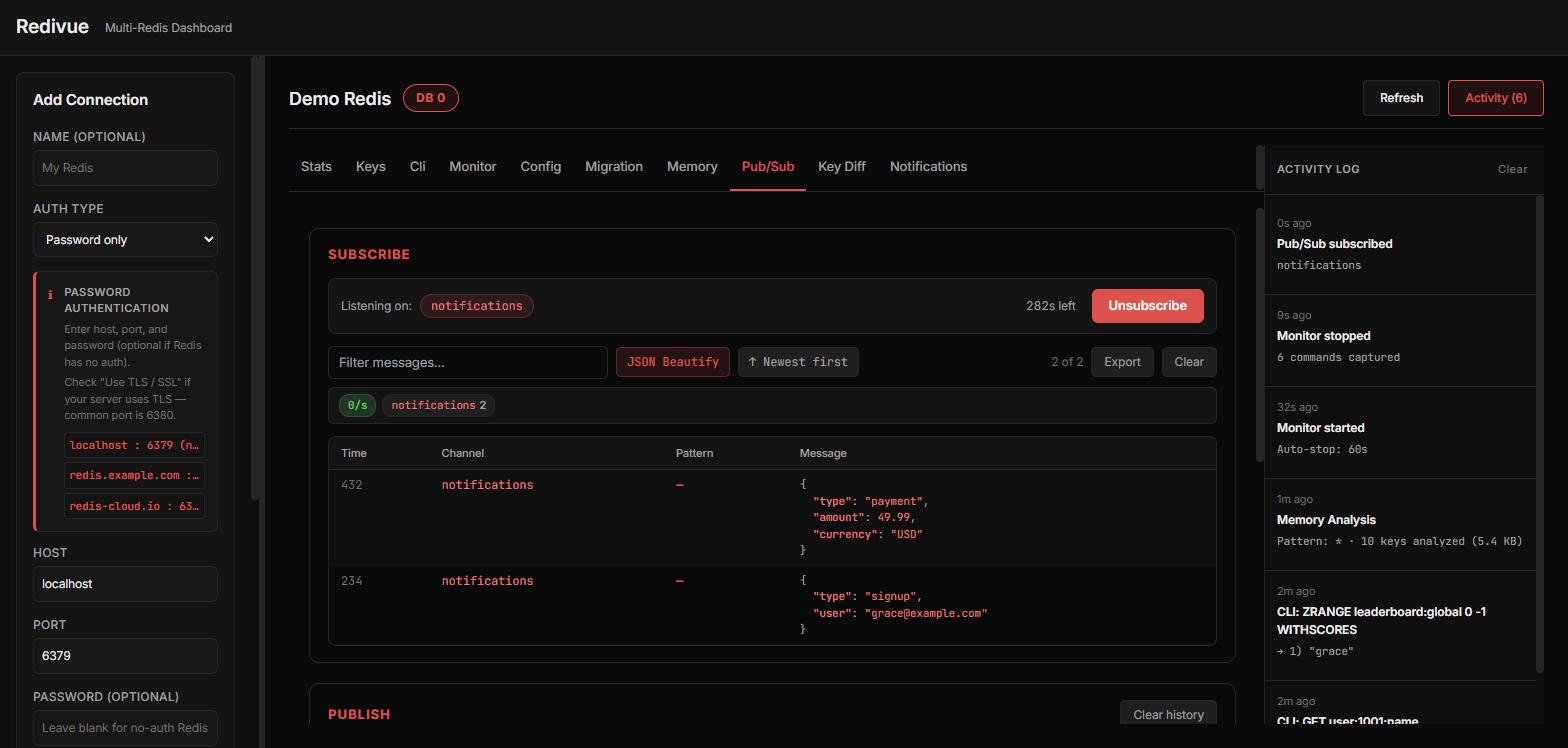
- Pub/Sub publisher + subscriber with channel discovery, message-rate counter, and JSON highlighting
- Keyspace notifications viewer (enable + stream key events live)
Connectivity
- Auth methods: password, Redis 6+ ACL (username/password), full connection URL (
redis:///rediss://), Sentinel, Cluster, Unix socket - SSH tunneling (password or private key) for instances behind a bastion host
- TLS/mTLS: system CA, skip-verify, custom CA, client certificates
- Encrypted connection list export/import (move your saved connections between machines)
Extras
- Key Diff — compare (and sync) the same key across two connections, side by side
- Resizable sidebar, per-connection state, activity log with undo on mutations
See the User Guide for how to actually use all of the above, FEATURES.md for the itemized changelog-style development history, and TODO.txt for what's next.
Quick Start
Docker
docker run -p 127.0.0.1:8080:8080 ghcr.io/abidinberkay/redivue:latest
Or with Compose:
services:
  redivue:
    image: ghcr.io/abidinberkay/redivue:latest
    ports:
      - "127.0.0.1:8080:8080"
    restart: unless-stopped
Open http://localhost:8080 and add a connection to any Redis reachable from the container
(use host.docker.internal instead of localhost to reach a Redis running on your host; on Linux,
also add --add-host=host.docker.internal:host-gateway). Images are published for linux/amd64
and linux/arm64.
The port is bound to 127.0.0.1 on purpose: Redivue has no login of its own, so anyone who can
reach it can run commands against your saved connections. To open it under any name other than
localhost (a LAN IP, a domain), list that name in REDIVUE_ALLOWED_HOSTS — see
DEPLOYMENT.md and SECURITY.md first.
From source
Prerequisites: Java 21, Node.js 20.19+ (22+ recommended), Maven 3.8+.
git clone https://github.com/abidinberkay/Redivue.git
cd Redivue/backend
mvn clean install       # builds the frontend too, and copies it into the jar
mvn spring-boot:run
Open http://localhost:8080. No test Redis is bundled — point Redivue at one you already have,
or spin up a throwaway: docker run -d -p 6379:6379 redis:7-alpine.
To build the container image yourself instead of pulling it: docker build -t redivue .
Development mode (hot reload on the frontend):
# Terminal 1
cd backend && mvn spring-boot:run

# Terminal 2
cd frontend && npm install && npm run dev
The Vite dev server runs on :3000 and proxies /api to the backend on :8080.
Connecting to Redis
| Method | Best for | What you enter |
|---|---|---|
| Password | Legacy single-password Redis (most common) | Host, port, password |
| ACL (Redis 6+) | Redis with --aclfile user accounts | Host, port, username, password |
| URL | Managed Redis (ElastiCache, Redis Cloud, …) | redis://user:pass@host:6379/0 or rediss:// for TLS |
| Sentinel / Cluster | HA / sharded deployments | Master name + sentinel nodes, or cluster node list |
| Unix socket | Local Redis on the same host | Socket path |
SSH tunneling and TLS (including mutual TLS) are available as add-ons on top of any of the above — see the connection form's advanced sections.
Architecture
- Backend: Spring Boot 3, Java 21, Lettuce (async Redis client), SSE for real-time streams (Monitor, Pub/Sub, Keyspace notifications)
- Frontend: React 18 + TypeScript, Vite, Tailwind CSS + Radix UI primitives (shadcn-style)
- State: No database of its own — connections and preferences live in browser
localStorage; every API call is stateless and carries its own connection info
Redivue/
├── backend/                          # Spring Boot application
│   ├── src/main/java/com/redivue/
│   │   ├── controller/                 # REST + SSE endpoints
│   │   ├── service/                    # RedisService, MonitorService, PubSubService, KeyspaceService
│   │   ├── config/                     # CORS, TLS, SSH tunnel, Redis URI helpers
│   │   └── model/                      # Request/response DTOs
│   ├── src/main/resources/static/    # Built frontend (generated by `mvn clean install`)
│   └── pom.xml                       # Also drives the frontend build (npm install + build)
├── frontend/                         # React + TypeScript (Vite)
│   └── src/
│       ├── features/                   # One folder per feature: keys, cli, monitor, memory, pubsub, keydiff, migration, keyspace, connections, dashboard
│       ├── components/ui/              # shadcn-style Radix primitives
│       └── types/                      # Shared TypeScript types
├── deploy/                           # docker-compose + nginx for a production-style setup
├── Dockerfile                        # Multi-stage build — single jar, frontend baked in
├── GUIDE.md                          # User guide — what each feature does and how to use it
├── FEATURES.md                       # Development history — itemized, changelog-style
├── DEPLOYMENT.md                     # Running Redivue on a server — TLS, reverse proxy, auth
├── SECURITY.md                       # Threat model — read before exposing this beyond localhost
├── CONTRIBUTING.md                   # Architecture notes for contributors
└── CODE_OF_CONDUCT.md                # Community standards
Security
Redivue is a local admin/dev tool with no built-in authentication — same trust model as
running redis-cli or RedisInsight on your own machine. Do not expose it to an untrusted
network without putting your own auth (reverse proxy, VPN, basic auth) in front of it. Read
SECURITY.md for the full threat model before deploying it anywhere but
localhost, and DEPLOYMENT.md for a production Compose + nginx + TLS setup.
Contributing
Contributions are welcome — see CONTRIBUTING.md for architecture notes,
conventions, and known quirks. FEATURES.md and TODO.txt track what's done and what's next.
Everyone participating is expected to follow the Code of Conduct.
License
Similar repos


Self-hosted, open-source Redis GUI — browse keys, CLI, live monitor, memory analysis. One Docker container, no account, no telemetry.
TypeScript
0
24 commits
updated Oct 5, 2026
See what people are saying
README
Redivue
A free, open-source, self-hosted Redis GUI — manage multiple Redis instances from one dashboard: browse and edit keys, run a full CLI, watch live traffic, analyze memory, and more. Built as an open alternative to RedisInsight, with no telemetry, no cloud account, and no license server.
Why Redivue?
- Actually free and open source. No paywalled "Pro" tier, no forced account, no phone-home telemetry — the entire feature set in this README is in the codebase today.
- Multi-instance from one screen. Add every Redis you touch — local, Docker, ACL-secured, behind an SSH bastion, TLS/mTLS, Sentinel, Cluster — and switch between them from the sidebar.
- Stateless backend. Connection details live in your browser's
localStorage, not a database Redivue owns. Point it at any Redis you already have; nothing to migrate to adopt it, nothing to migrate away from it either. - Deploy once, use from any browser. Most open-source Redis GUIs are Electron desktop apps that every teammate installs separately. Redivue is a single container you put on your own infra — everyone opens a URL, nobody installs anything.
Features
Everything below is in the codebase today — no "Pro" tier gating any of it. For what each one actually does and how to use it, see the User Guide; this is the scan-it-in-10- seconds version.
Dashboard & connections
- Stats dashboard — memory, keys, clients, uptime, version, role, AOF status, last
BGSAVE - Live config editing from the dashboard —
maxmemory(with presets) and AOF toggle, no CLI needed - Connection health indicator with a live key-count badge in the sidebar
- Database selector (DB 0–15) per connection, with
FLUSHDBconfirmation
Keys & data
- Keys browser with SCAN-based pagination, pattern search, and namespace tree view (
user:1:profile→ folders) - Full CRUD for every Redis type — String, Hash, List, Set, Sorted Set, Stream, and RedisJSON
- Value formatters: JSON tree, HEX dump, Binary, Timestamp, plus GZIP/Deflate/ZSTD/LZ4/Snappy decompression
- Per-key memory size (
MEMORY USAGE), TTL countdown, bulk TTL/delete/export (JSON & CSV) by pattern or selection - Copy/migrate keys across databases and connections, including a type-agnostic
DUMP/RESTOREfallback for module types - Search history (last 10 patterns) and starred key bookmarks, exportable as JSON
CLI & scripting
- Full CLI console — 150+ Redis commands with autocomplete, syntax help, history, favorites, and confirmation on destructive commands (
FLUSHALL,SHUTDOWN, …) - Bulk import: run commands straight from a
.txt/.redis/.clifile with progress tracking
Observability
- Real-time
MONITORstream with filtering, latency coloring, and auto-stop - Slow log viewer with stats (avg/min/max latency, top offenders)
- Memory Analysis: top-N consumers, per-type breakdown, TTL distribution, snapshot history, and smart recommendations (large keys, missing TTLs, dominant keys)
- Pub/Sub publisher + subscriber with channel discovery, message-rate counter, and JSON highlighting
- Keyspace notifications viewer (enable + stream key events live)
Connectivity
- Auth methods: password, Redis 6+ ACL (username/password), full connection URL (
redis:///rediss://), Sentinel, Cluster, Unix socket - SSH tunneling (password or private key) for instances behind a bastion host
- TLS/mTLS: system CA, skip-verify, custom CA, client certificates
- Encrypted connection list export/import (move your saved connections between machines)
Extras
- Key Diff — compare (and sync) the same key across two connections, side by side
- Resizable sidebar, per-connection state, activity log with undo on mutations
See the User Guide for how to actually use all of the above, FEATURES.md for the itemized changelog-style development history, and TODO.txt for what's next.
Quick Start
Docker
docker run -p 127.0.0.1:8080:8080 ghcr.io/abidinberkay/redivue:latest
Or with Compose:
services:
  redivue:
    image: ghcr.io/abidinberkay/redivue:latest
    ports:
      - "127.0.0.1:8080:8080"
    restart: unless-stopped
Open http://localhost:8080 and add a connection to any Redis reachable from the container
(use host.docker.internal instead of localhost to reach a Redis running on your host; on Linux,
also add --add-host=host.docker.internal:host-gateway). Images are published for linux/amd64
and linux/arm64.
The port is bound to 127.0.0.1 on purpose: Redivue has no login of its own, so anyone who can
reach it can run commands against your saved connections. To open it under any name other than
localhost (a LAN IP, a domain), list that name in REDIVUE_ALLOWED_HOSTS — see
DEPLOYMENT.md and SECURITY.md first.
From source
Prerequisites: Java 21, Node.js 20.19+ (22+ recommended), Maven 3.8+.
git clone https://github.com/abidinberkay/Redivue.git
cd Redivue/backend
mvn clean install       # builds the frontend too, and copies it into the jar
mvn spring-boot:run
Open http://localhost:8080. No test Redis is bundled — point Redivue at one you already have,
or spin up a throwaway: docker run -d -p 6379:6379 redis:7-alpine.
To build the container image yourself instead of pulling it: docker build -t redivue .
Development mode (hot reload on the frontend):
# Terminal 1
cd backend && mvn spring-boot:run

# Terminal 2
cd frontend && npm install && npm run dev
The Vite dev server runs on :3000 and proxies /api to the backend on :8080.
Connecting to Redis
| Method | Best for | What you enter |
|---|---|---|
| Password | Legacy single-password Redis (most common) | Host, port, password |
| ACL (Redis 6+) | Redis with --aclfile user accounts | Host, port, username, password |
| URL | Managed Redis (ElastiCache, Redis Cloud, …) | redis://user:pass@host:6379/0 or rediss:// for TLS |
| Sentinel / Cluster | HA / sharded deployments | Master name + sentinel nodes, or cluster node list |
| Unix socket | Local Redis on the same host | Socket path |
SSH tunneling and TLS (including mutual TLS) are available as add-ons on top of any of the above — see the connection form's advanced sections.
Architecture
- Backend: Spring Boot 3, Java 21, Lettuce (async Redis client), SSE for real-time streams (Monitor, Pub/Sub, Keyspace notifications)
- Frontend: React 18 + TypeScript, Vite, Tailwind CSS + Radix UI primitives (shadcn-style)
- State: No database of its own — connections and preferences live in browser
localStorage; every API call is stateless and carries its own connection info
Redivue/
├── backend/                          # Spring Boot application
│   ├── src/main/java/com/redivue/
│   │   ├── controller/                 # REST + SSE endpoints
│   │   ├── service/                    # RedisService, MonitorService, PubSubService, KeyspaceService
│   │   ├── config/                     # CORS, TLS, SSH tunnel, Redis URI helpers
│   │   └── model/                      # Request/response DTOs
│   ├── src/main/resources/static/    # Built frontend (generated by `mvn clean install`)
│   └── pom.xml                       # Also drives the frontend build (npm install + build)
├── frontend/                         # React + TypeScript (Vite)
│   └── src/
│       ├── features/                   # One folder per feature: keys, cli, monitor, memory, pubsub, keydiff, migration, keyspace, connections, dashboard
│       ├── components/ui/              # shadcn-style Radix primitives
│       └── types/                      # Shared TypeScript types
├── deploy/                           # docker-compose + nginx for a production-style setup
├── Dockerfile                        # Multi-stage build — single jar, frontend baked in
├── GUIDE.md                          # User guide — what each feature does and how to use it
├── FEATURES.md                       # Development history — itemized, changelog-style
├── DEPLOYMENT.md                     # Running Redivue on a server — TLS, reverse proxy, auth
├── SECURITY.md                       # Threat model — read before exposing this beyond localhost
├── CONTRIBUTING.md                   # Architecture notes for contributors
└── CODE_OF_CONDUCT.md                # Community standards
Security
Redivue is a local admin/dev tool with no built-in authentication — same trust model as
running redis-cli or RedisInsight on your own machine. Do not expose it to an untrusted
network without putting your own auth (reverse proxy, VPN, basic auth) in front of it. Read
SECURITY.md for the full threat model before deploying it anywhere but
localhost, and DEPLOYMENT.md for a production Compose + nginx + TLS setup.
Contributing
Contributions are welcome — see CONTRIBUTING.md for architecture notes,
conventions, and known quirks. FEATURES.md and TODO.txt track what's done and what's next.
Everyone participating is expected to follow the Code of Conduct.