
See what people are saying
README
iCli - PostgreSQL query and index advisor
iCli is a Go CLI that reads PostgreSQL query statistics, explains the most expensive queries, identifies execution-plan bottlenecks, detects missing foreign key indexes, and reports unused indexes.
[!NOTE] 🔒 Read-Only Guarantee:
iClionly executes read-only SQL queries (SELECTmetadata andEXPLAINplan analysis). It never mutates, inserts, or deletes any data in your database.
Demo
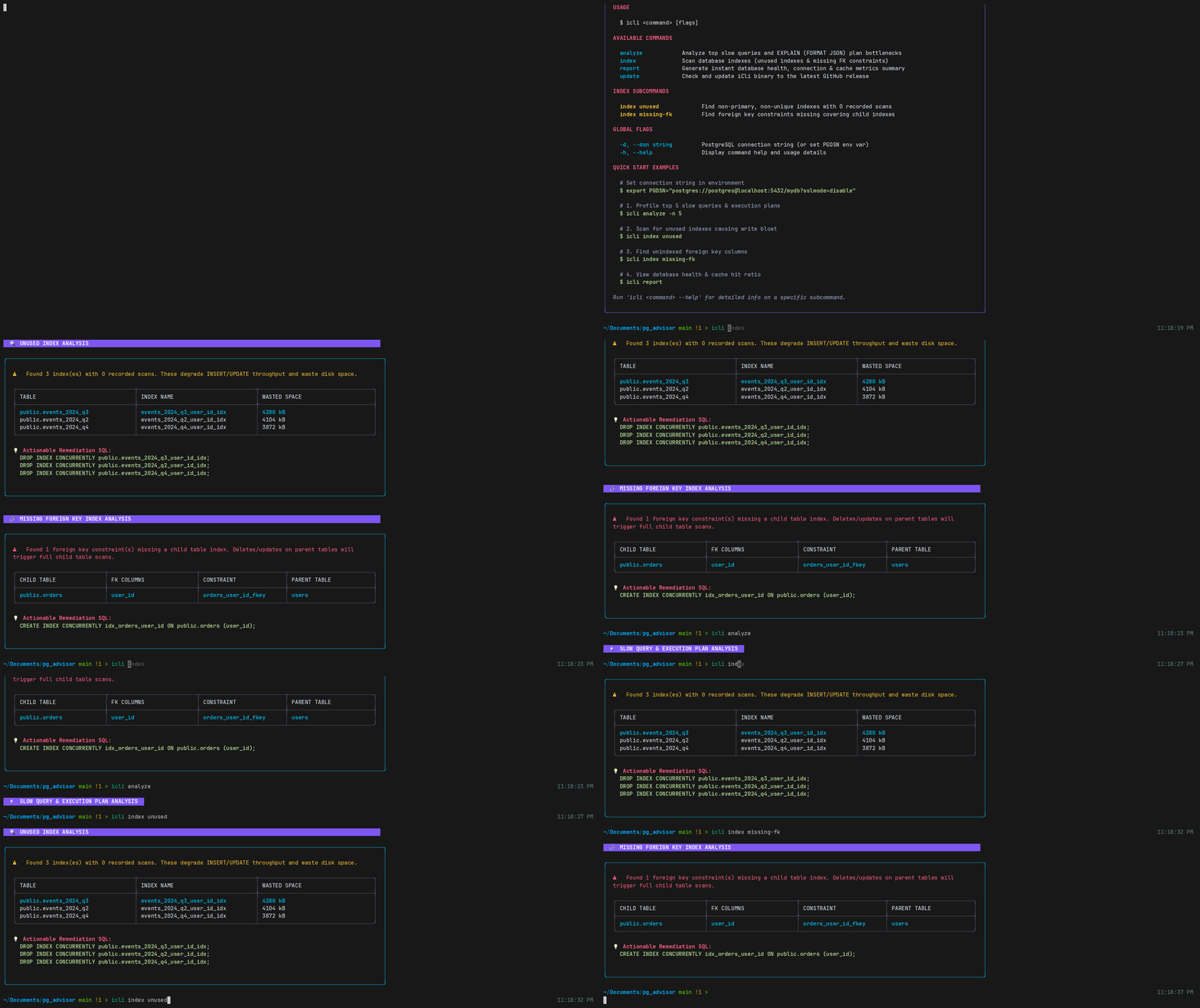
Features
- Expensive Query Analysis: Identifies slow and resource-heavy queries using
pg_stat_statements. - Execution Plan Profiling: Runs
EXPLAIN (FORMAT JSON)and detects plan bottlenecks (e.g., sequential scans, disk sort spillage, inefficient joins). - Missing Foreign Key Index Detection: Finds foreign key constraints on child tables without a covering index, preventing severe sequential scan table locks on parent
UPDATEorDELETEoperations. - Unused Index Scanner: Identifies non-primary, non-unique indexes with zero recorded scans that degrade
INSERT/UPDATEperformance. - Database Health Reports: Displays real-time database connection metrics, cache hit ratios, and server metadata via
icli report. - Modern Terminal UI: Formats findings into container cards, severity badges, rounded tables, and ready-to-run SQL remediation snippets powered by Lipgloss.
Requirements
- Go 1.25 or later.
- PostgreSQL with
pg_stat_statementsenabled.
Enable the extension at the server level, then restart PostgreSQL:
ALTER SYSTEM SET shared_preload_libraries = 'pg_stat_statements';
After restarting PostgreSQL, enable it in the target database:
CREATE EXTENSION IF NOT EXISTS pg_stat_statements;
On a Homebrew PostgreSQL installation, restart with:
brew services restart postgresql@18
Quick Start
Install via go install
If you have Go installed, you can install icli directly:
go install github.com/abhiraj-ku/pg_adv/cmd/icli@latest
Run Locally / From Source
Clone the repository and run the CLI with a PostgreSQL connection string.
DSN resolution order:
-d/--dsnPGDSNenvironment variable
Examples:
git clone https://github.com/abhiraj-ku/iCli.git
cd iCli
export PGDSN="postgres://postgres@localhost:5432/postgres?sslmode=disable"

# Display interactive CLI commands menu & guide
go run ./cmd/icli

# Analyze top slow queries & execution plans
go run ./cmd/icli analyze -n 5

# Scan for unused indexes and missing foreign key indexes
go run ./cmd/icli index
go run ./cmd/icli index unused
go run ./cmd/icli index missing-fk

# Generate an instant database health summary report
go run ./cmd/icli report
Or pass the DSN explicitly:
go run ./cmd/icli analyze -d="postgres://postgres@localhost:5432/postgres?sslmode=disable"
The long-form flag is also supported:
go run ./cmd/icli analyze --dsn="postgres://postgres@localhost:5432/postgres?sslmode=disable"
Build a binary with:
go build -o icli ./cmd/icli
export PGDSN="postgres://postgres@localhost:5432/postgres?sslmode=disable"
./icli analyze
Developer Setup
Prerequisites
- Go 1.25 or later
- PostgreSQL instance running locally or remotely
pg_stat_statementsenabled in the target database- A valid DSN available through either
-d/--dsnorPGDSN
Local database setup
Create a local PostgreSQL database and enable the extension:
CREATE EXTENSION IF NOT EXISTS pg_stat_statements;
Then export the connection string for local development:
export PGDSN="postgres://postgres@localhost:5432/postgres?sslmode=disable"
Repo layout
cmd/icli— CLI entrypoint and subcommand routing (analyze,index,report,update)internals/analyzer— execution-plan issue detection rulesinternals/db— PostgreSQL queries (pg_stat_statements, unused indexes, missing foreign key indexes)internals/health— database health stats collection (cache hit ratio, active connections)internals/report— modern Lipgloss terminal TUI rendering
Common dev commands
go test ./...
go run ./cmd/icli
go run ./cmd/icli report
GOFLAGS=-mod=mod go run ./cmd/icli
Troubleshooting
- If you see
connection refused, confirm PostgreSQL is running and the host/port are correct. - If the slow query report is empty, ensure
pg_stat_statementsis enabled and queries have been executed. - If the DSN is missing, pass
-d/--dsnor exportPGDSN. - If formatting looks odd in a narrow terminal, run it in a wider terminal or resize the window.
Releases
Prebuilt releases are available for these platforms on the GitHub Releases page:
| Platform | Architecture | Archive name pattern |
|---|---|---|
| Linux | x86_64 | icli_Linux_x86_64.tar.gz |
| macOS (Apple Silicon, M-series) | ARM 64-bit | icli_Darwin_arm64.tar.gz |
Download the archive for your platform from the Releases page, extract it, and run icli:
tar -xzf icli_Darwin_arm64.tar.gz
./icli -dsn="postgres://user:password@localhost:5432/database?sslmode=disable"
Windows and Intel macOS binaries are not included in releases.
How It Works
- Reads the PostgreSQL server version to select the correct execution-time column (
total_timevstotal_exec_time). - Queries
pg_stat_statementsand excludesiCli's internal telemetry queries. - Sanitizes parameter placeholders before requesting an
EXPLAIN (FORMAT JSON)plan. - Walks execution plans and reports bottlenecks like sequential scans, disk sort spillage, and inefficient nested loops.
- Queries
pg_stat_user_indexesandpg_indexto find non-primary, non-unique indexes with 0 recorded scans. - Inspects
pg_constraint,pg_attribute, andpg_indexto detect unindexed foreign keys on child tables.
Similar repos


Languages
Go
100.0%
See what people are saying
README
iCli - PostgreSQL query and index advisor
iCli is a Go CLI that reads PostgreSQL query statistics, explains the most expensive queries, identifies execution-plan bottlenecks, detects missing foreign key indexes, and reports unused indexes.
[!NOTE] 🔒 Read-Only Guarantee:
iClionly executes read-only SQL queries (SELECTmetadata andEXPLAINplan analysis). It never mutates, inserts, or deletes any data in your database.
Demo
Features
- Expensive Query Analysis: Identifies slow and resource-heavy queries using
pg_stat_statements. - Execution Plan Profiling: Runs
EXPLAIN (FORMAT JSON)and detects plan bottlenecks (e.g., sequential scans, disk sort spillage, inefficient joins). - Missing Foreign Key Index Detection: Finds foreign key constraints on child tables without a covering index, preventing severe sequential scan table locks on parent
UPDATEorDELETEoperations. - Unused Index Scanner: Identifies non-primary, non-unique indexes with zero recorded scans that degrade
INSERT/UPDATEperformance. - Database Health Reports: Displays real-time database connection metrics, cache hit ratios, and server metadata via
icli report. - Modern Terminal UI: Formats findings into container cards, severity badges, rounded tables, and ready-to-run SQL remediation snippets powered by Lipgloss.
Requirements
- Go 1.25 or later.
- PostgreSQL with
pg_stat_statementsenabled.
Enable the extension at the server level, then restart PostgreSQL:
ALTER SYSTEM SET shared_preload_libraries = 'pg_stat_statements';
After restarting PostgreSQL, enable it in the target database:
CREATE EXTENSION IF NOT EXISTS pg_stat_statements;
On a Homebrew PostgreSQL installation, restart with:
brew services restart postgresql@18
Quick Start
Install via go install
If you have Go installed, you can install icli directly:
go install github.com/abhiraj-ku/pg_adv/cmd/icli@latest
Run Locally / From Source
Clone the repository and run the CLI with a PostgreSQL connection string.
DSN resolution order:
-d/--dsnPGDSNenvironment variable
Examples:
git clone https://github.com/abhiraj-ku/iCli.git
cd iCli
export PGDSN="postgres://postgres@localhost:5432/postgres?sslmode=disable"

# Display interactive CLI commands menu & guide
go run ./cmd/icli

# Analyze top slow queries & execution plans
go run ./cmd/icli analyze -n 5

# Scan for unused indexes and missing foreign key indexes
go run ./cmd/icli index
go run ./cmd/icli index unused
go run ./cmd/icli index missing-fk

# Generate an instant database health summary report
go run ./cmd/icli report
Or pass the DSN explicitly:
go run ./cmd/icli analyze -d="postgres://postgres@localhost:5432/postgres?sslmode=disable"
The long-form flag is also supported:
go run ./cmd/icli analyze --dsn="postgres://postgres@localhost:5432/postgres?sslmode=disable"
Build a binary with:
go build -o icli ./cmd/icli
export PGDSN="postgres://postgres@localhost:5432/postgres?sslmode=disable"
./icli analyze
Developer Setup
Prerequisites
- Go 1.25 or later
- PostgreSQL instance running locally or remotely
pg_stat_statementsenabled in the target database- A valid DSN available through either
-d/--dsnorPGDSN
Local database setup
Create a local PostgreSQL database and enable the extension:
CREATE EXTENSION IF NOT EXISTS pg_stat_statements;
Then export the connection string for local development:
export PGDSN="postgres://postgres@localhost:5432/postgres?sslmode=disable"
Repo layout
cmd/icli— CLI entrypoint and subcommand routing (analyze,index,report,update)internals/analyzer— execution-plan issue detection rulesinternals/db— PostgreSQL queries (pg_stat_statements, unused indexes, missing foreign key indexes)internals/health— database health stats collection (cache hit ratio, active connections)internals/report— modern Lipgloss terminal TUI rendering
Common dev commands
go test ./...
go run ./cmd/icli
go run ./cmd/icli report
GOFLAGS=-mod=mod go run ./cmd/icli
Troubleshooting
- If you see
connection refused, confirm PostgreSQL is running and the host/port are correct. - If the slow query report is empty, ensure
pg_stat_statementsis enabled and queries have been executed. - If the DSN is missing, pass
-d/--dsnor exportPGDSN. - If formatting looks odd in a narrow terminal, run it in a wider terminal or resize the window.
Releases
Prebuilt releases are available for these platforms on the GitHub Releases page:
| Platform | Architecture | Archive name pattern |
|---|---|---|
| Linux | x86_64 | icli_Linux_x86_64.tar.gz |
| macOS (Apple Silicon, M-series) | ARM 64-bit | icli_Darwin_arm64.tar.gz |
Download the archive for your platform from the Releases page, extract it, and run icli:
tar -xzf icli_Darwin_arm64.tar.gz
./icli -dsn="postgres://user:password@localhost:5432/database?sslmode=disable"
Windows and Intel macOS binaries are not included in releases.
How It Works
- Reads the PostgreSQL server version to select the correct execution-time column (
total_timevstotal_exec_time). - Queries
pg_stat_statementsand excludesiCli's internal telemetry queries. - Sanitizes parameter placeholders before requesting an
EXPLAIN (FORMAT JSON)plan. - Walks execution plans and reports bottlenecks like sequential scans, disk sort spillage, and inefficient nested loops.
- Queries
pg_stat_user_indexesandpg_indexto find non-primary, non-unique indexes with 0 recorded scans. - Inspects
pg_constraint,pg_attribute, andpg_indexto detect unindexed foreign keys on child tables.
Similar repos
Languages
Go
100.0%