Screenshots that look good by default: capture an area, blur what's private, circle what matters, set it on a beautiful background. Free, open source, Windows & macOS.
TypeScript
2
4 commits
updated Oct 12, 2026

Screenshots that look good by default. Press Print Screen, select an area, blur what's private, circle what matters. Clicadre sets your capture on a clean background, ready to paste.
Download · Watch the demo (35 s) · Français · How it works · Build from source
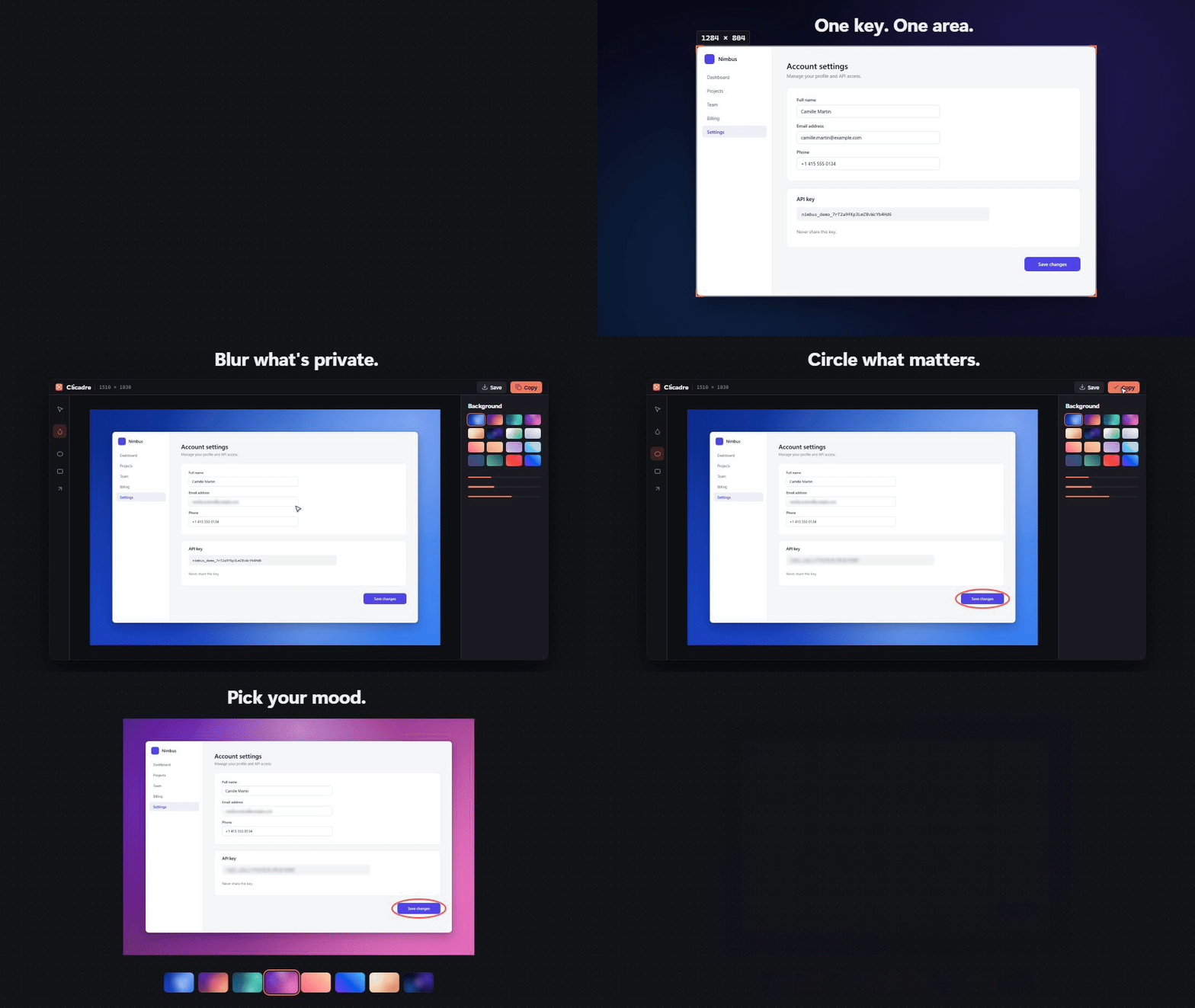
Raw screenshots are fine for you and harsh for everyone else. Sharp window edges, no breathing room, private details left in plain sight. The fix usually means three apps, or a paid one.
Clicadre does the whole job in one pass, in about five seconds:
| One key | Print Screen opens a frozen view of your screen. Drag an area, release, done. |
| Private by design | Blur emails, names, tokens before anything leaves your machine. Redaction is baked into the exported pixels and cannot be undone by the recipient. |
| Point at things | Circles, rectangles and arrows that stay editable: move them, resize them, recolor them. |
| Beautiful by default | Your capture lands on a background with padding, rounded corners and a soft shadow. 8 generated wallpapers, 10 gradients, or your own two-color gradient. |
| Fast and light | Native Rust core, ~3 MB installer, opens in a blink. No Electron. |
| Yours | Free and open source (MIT). No account, no cloud, no telemetry. Nothing is sent anywhere. |
| Bilingual | English and French, switchable at any time. |
| Windows Snipping Tool | ShareX | CleanShot X | Clicadre | |
|---|---|---|---|---|
| Price | Free | Free | Paid | Free |
| Open source | No | Yes | No | Yes (MIT) |
| Windows | Yes | Yes | No | Yes |
| macOS | No | No | Yes | Yes |
| Blur | No | Yes | Yes | Yes |
| One-click background, padding, shadow | No | Via image effects setup | Yes | Yes, applied automatically |
| Learning curve | Low | High | Low | Low |
Pictures/Clicadre.Grab the latest installer from Releases:
Clicadre_x.y.z_x64-setup.exe (per-user install, no admin rights needed)Clicadre_x.y.z_aarch64.dmg (Apple Silicon) or _x64.dmg (Intel)Builds are not code-signed yet. Windows SmartScreen may show "Unknown publisher": click More info → Run anyway. On macOS, right-click the app and choose Open the first time, then allow Screen Recording in System Settings.
Windows 11 reserves Print Screen for its own Snipping Tool. Clicadre can hand the key over in one click: open Settings (top-right) and turn on Print Screen opens Clicadre.
This flips a single per-user setting (HKCU\Control Panel\Keyboard\PrintScreenKeyForSnippingEnabled), the same switch as Windows Settings → Accessibility → Keyboard. Turn it off to give the key back. If the Snipping Tool still opens, sign out and back in once.
The fallback shortcut Ctrl+Shift+X always works (⌘+Shift+2 on macOS).
flowchart LR
    K["Print Screen<br/>global shortcut"] --> C["Rust core<br/>captures the monitor<br/>under the cursor (xcap)"]
    C -- "raw RGBA over IPC" --> O["Overlay window<br/>frozen screen, drag to select"]
    O -- "selection rectangle" --> R["Rust core<br/>crops the pixels"]
    R -- "raw RGBA over IPC" --> E["Editor window<br/>blur · shapes · background"]
    E -- "rendered PNG / RGBA" --> X["Clipboard (arboard)<br/>or Pictures/Clicadre"]
xcap and keeps the pixels in memory. Nothing is written to disk.src-tauri/ Rust core (Tauri 2)
src/lib.rs capture → crop → clipboard / file, window orchestration
src/shortcut.rs global shortcuts (Print Screen + fallback)
src/settings.rs language, Print Screen hand-over, launch at startup
src/tray.rs notification-area icon and menu
src/
overlay/ region selection (frozen screen, loupe, dimensions)
editor/ editor UI, render pipeline, generated backgrounds
lib/ i18n (en/fr), IPC helpers, icons
styles/ design tokens (OKLCH), overlay and editor styles
video/ Remotion project for the demo video
| Layer | Choice | Why |
|---|---|---|
| App shell | Tauri 2 | Native window, tray and shortcuts with the system webview: small binary, low memory |
| Core | Rust | Screen capture, cropping, clipboard and file IO off the UI thread |
| Capture | xcap | Cross-platform monitor capture |
| Clipboard | arboard | Image clipboard on Windows and macOS |
| UI | TypeScript + Vite, no framework | ~50 KB of JS, Canvas 2D rendering, instant startup |
| Design | OKLCH tokens, system fonts | Native feel on each OS, consistent contrast |
| Demo video | Remotion | Motion design written in React, rendered to MP4/GIF |
Prerequisites: Node.js 20+, Rust, and the Tauri prerequisites for your OS (on Windows: Visual Studio Build Tools with the Desktop development with C++ workload).
git clone https://github.com/abg5f/clicadre.git
cd clicadre
npm install
npm run app:dev      # run with hot reload
npm run app:build    # build installers into src-tauri/target/release/bundle
On Windows, run Cargo from PowerShell or cmd. Git Bash ships its own
linkcommand, which shadows the MSVC linker.
Clicadre works fully offline. It has no network code, no analytics and no account. Captures stay in memory until you copy or save them.
Issues and pull requests are welcome. Please keep the UI quiet (one accent color, system fonts) and run npm run build and cargo clippy before opening a PR.
MIT © abg5f
Screenshots that look good by default: capture an area, blur what's private, circle what matters, set it on a beautiful background. Free, open source, Windows & macOS.
TypeScript
2
4 commits
updated Oct 12, 2026
Screenshots that look good by default. Press Print Screen, select an area, blur what's private, circle what matters. Clicadre sets your capture on a clean background, ready to paste.
Download · Watch the demo (35 s) · Français · How it works · Build from source
Raw screenshots are fine for you and harsh for everyone else. Sharp window edges, no breathing room, private details left in plain sight. The fix usually means three apps, or a paid one.
Clicadre does the whole job in one pass, in about five seconds:
| One key | Print Screen opens a frozen view of your screen. Drag an area, release, done. |
| Private by design | Blur emails, names, tokens before anything leaves your machine. Redaction is baked into the exported pixels and cannot be undone by the recipient. |
| Point at things | Circles, rectangles and arrows that stay editable: move them, resize them, recolor them. |
| Beautiful by default | Your capture lands on a background with padding, rounded corners and a soft shadow. 8 generated wallpapers, 10 gradients, or your own two-color gradient. |
| Fast and light | Native Rust core, ~3 MB installer, opens in a blink. No Electron. |
| Yours | Free and open source (MIT). No account, no cloud, no telemetry. Nothing is sent anywhere. |
| Bilingual | English and French, switchable at any time. |
| Windows Snipping Tool | ShareX | CleanShot X | Clicadre | |
|---|---|---|---|---|
| Price | Free | Free | Paid | Free |
| Open source | No | Yes | No | Yes (MIT) |
| Windows | Yes | Yes | No | Yes |
| macOS | No | No | Yes | Yes |
| Blur | No | Yes | Yes | Yes |
| One-click background, padding, shadow | No | Via image effects setup | Yes | Yes, applied automatically |
| Learning curve | Low | High | Low | Low |
Pictures/Clicadre.Grab the latest installer from Releases:
Clicadre_x.y.z_x64-setup.exe (per-user install, no admin rights needed)Clicadre_x.y.z_aarch64.dmg (Apple Silicon) or _x64.dmg (Intel)Builds are not code-signed yet. Windows SmartScreen may show "Unknown publisher": click More info → Run anyway. On macOS, right-click the app and choose Open the first time, then allow Screen Recording in System Settings.
Windows 11 reserves Print Screen for its own Snipping Tool. Clicadre can hand the key over in one click: open Settings (top-right) and turn on Print Screen opens Clicadre.
This flips a single per-user setting (HKCU\Control Panel\Keyboard\PrintScreenKeyForSnippingEnabled), the same switch as Windows Settings → Accessibility → Keyboard. Turn it off to give the key back. If the Snipping Tool still opens, sign out and back in once.
The fallback shortcut Ctrl+Shift+X always works (⌘+Shift+2 on macOS).
flowchart LR
    K["Print Screen<br/>global shortcut"] --> C["Rust core<br/>captures the monitor<br/>under the cursor (xcap)"]
    C -- "raw RGBA over IPC" --> O["Overlay window<br/>frozen screen, drag to select"]
    O -- "selection rectangle" --> R["Rust core<br/>crops the pixels"]
    R -- "raw RGBA over IPC" --> E["Editor window<br/>blur · shapes · background"]
    E -- "rendered PNG / RGBA" --> X["Clipboard (arboard)<br/>or Pictures/Clicadre"]
xcap and keeps the pixels in memory. Nothing is written to disk.src-tauri/ Rust core (Tauri 2)
src/lib.rs capture → crop → clipboard / file, window orchestration
src/shortcut.rs global shortcuts (Print Screen + fallback)
src/settings.rs language, Print Screen hand-over, launch at startup
src/tray.rs notification-area icon and menu
src/
overlay/ region selection (frozen screen, loupe, dimensions)
editor/ editor UI, render pipeline, generated backgrounds
lib/ i18n (en/fr), IPC helpers, icons
styles/ design tokens (OKLCH), overlay and editor styles
video/ Remotion project for the demo video
| Layer | Choice | Why |
|---|---|---|
| App shell | Tauri 2 | Native window, tray and shortcuts with the system webview: small binary, low memory |
| Core | Rust | Screen capture, cropping, clipboard and file IO off the UI thread |
| Capture | xcap | Cross-platform monitor capture |
| Clipboard | arboard | Image clipboard on Windows and macOS |
| UI | TypeScript + Vite, no framework | ~50 KB of JS, Canvas 2D rendering, instant startup |
| Design | OKLCH tokens, system fonts | Native feel on each OS, consistent contrast |
| Demo video | Remotion | Motion design written in React, rendered to MP4/GIF |
Prerequisites: Node.js 20+, Rust, and the Tauri prerequisites for your OS (on Windows: Visual Studio Build Tools with the Desktop development with C++ workload).
git clone https://github.com/abg5f/clicadre.git
cd clicadre
npm install
npm run app:dev      # run with hot reload
npm run app:build    # build installers into src-tauri/target/release/bundle
On Windows, run Cargo from PowerShell or cmd. Git Bash ships its own
linkcommand, which shadows the MSVC linker.
Clicadre works fully offline. It has no network code, no analytics and no account. Captures stay in memory until you copy or save them.
Issues and pull requests are welcome. Please keep the UI quiet (one accent color, system fonts) and run npm run build and cargo clippy before opening a PR.
MIT © abg5f



