Multi-Purpose Launcher with a lot of features. Highly Customizable and fast.
Rust
3,080
1,744 commits
updated Oct 8, 2026
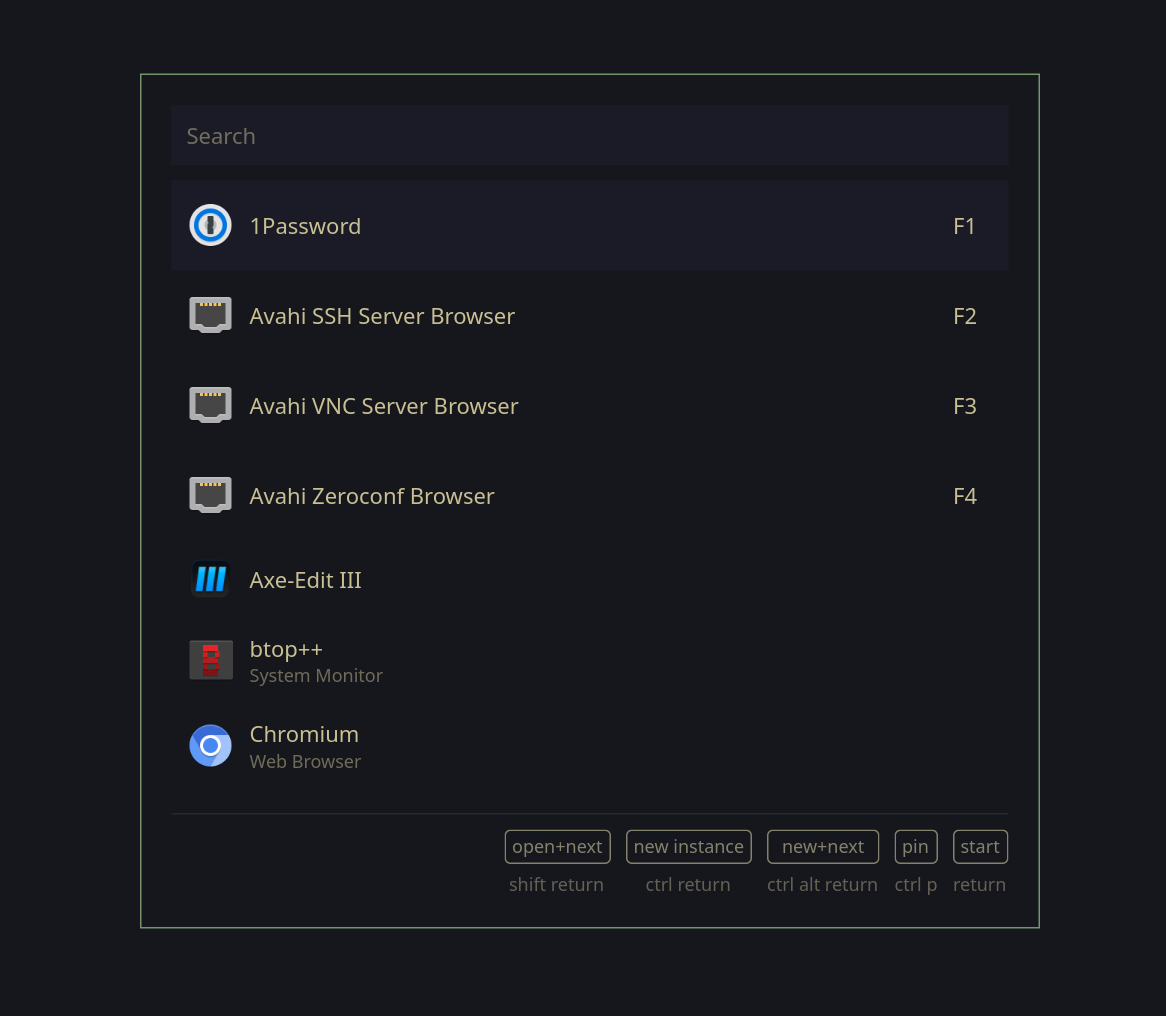
A fast, customizable application launcher built with GTK4 and Rust, designed for Linux desktop environments. Walker provides a clean, modern interface for launching applications, running commands, performing calculations, and more.

The following Elephant providers are implemented by default:
= prefix/ prefix: prefix. prefix; prefix# Clone the repository
git clone https://github.com/abenz1267/walker.git
cd walker
# Build with Cargo
cargo build --release
# Run Walker
./target/release/walker
Add walker and elephant to the inputs of your configs flake.nix and set walker to follow elephant
elephant.url = "github:abenz1267/elephant";

walker = {
  url = "github:abenz1267/walker";
  inputs.elephant.follows = "elephant";
};
You have 3 options for installing walker.
Option A (Home Manager Module): Import the home-manager module to your home-manager config and enable walker.
imports = [inputs.walker.homeManagerModules.default];

programs.walker.enable = true;
Option B (NixOS Module): Import the nixos module in your NixOS config and enable walker
imports = [inputs.walker.nixosModules.default];

programs.walker.enable = true;
Note: this option doesn't support the
runAsServiceoption; It is recommended that you launch the elephant and walker services using your desktop instead.
Option C (Package): Add inputs.walker.packages.<system>.default to your system packages or home-manager packages. replace <system> with your system architecture. Note: This option doesn't support configuration using nix.
home.packages = [inputs.walker.packages.<system>.default];
environment.systemPackages = [inputs.walker.packages.<system>.default];
programs.walker = {
  enable = true;
  runAsService = true; # Note: this option isn't supported in the NixOS module only in the home-manager module

  # All options from the config.toml can be used here https://github.com/abenz1267/walker/blob/master/resources/config.toml
  config = {
    theme = "your theme name";
    placeholders."default" = { input = "Search"; list = "Example"; };
    providers.prefixes = [
      {provider = "websearch"; prefix = "+";}
      {provider = "providerlist"; prefix = "_";}
    ];
    keybinds.quick_activate = ["F1" "F2" "F3"];
  };

  # Set `programs.walker.config.theme="your theme name"` to choose the default theme
  themes = {
    "your theme name" = {
      # Check out the default css theme as an example https://github.com/abenz1267/walker/blob/master/resources/themes/default/style.css
      style = " /* css */ ";

      # Check out the default layouts for examples https://github.com/abenz1267/walker/tree/master/resources/themes/default
      layouts = {
        "layout" = " <!-- xml --> ";
        "item_calc" = " <!-- xml --> ";
        # other provider layouts
      };
    };
    "other theme name" = {
        # ...
    };
    # more themes
  };
};
Optionally, there is 2 binary caches which can be used by adding the following to you config:
nix.settings = {
  extra-substituters = ["https://walker.cachix.org" "https://walker-git.cachix.org"];
  extra-trusted-public-keys = ["walker.cachix.org-1:fG8q+uAaMqhsMxWjwvk0IMb4mFPFLqHjuvfwQxE4oJM=" "walker-git.cachix.org-1:vmC0ocfPWh0S/vRAQGtChuiZBTAe4wiKDeyyXM0/7pM="];
};
Make sure elephant is running and you have providers installed. elephant-providerlist and f.e. elephant-desktopapplications.
Launch Walker with walker.
In order to improve startup performance, run a Walker service with:
walker --gapplication-service
If the service is running, you can either open Walker with:
walker
or for an even faster launch make a socket call, f.e. with openbsd-netcat:
nc -U /run/user/1000/walker/walker.sock
The downside of the socket call is that it does not handle any commandline options, so it's just a faster alternative to a simple walker call.
When Walker runs as a service, it can watch Niri's event stream and open automatically whenever an empty workspace receives focus:
[niri]
launch_on_empty_workspace = true
launch_on_startup = true
cmd_on_esc = "niri msg action focus-workspace-previous"
launch_on_startup opens Walker once when the initially focused workspace is empty. cmd_on_esc
is optional and only runs when Escape closes Walker after an automatic launch.
Automatic launches are deferred while Niri's overview is open and rechecked when it closes.
The following modifier keys are valid: ctrl, alt, shift, super.
To get a full list of possible key values, look here: GDK key-values.
F.e. pub const GDK_KEY_semicolon: c_int = 59; means that ctrl semicolon would be a valid keybind.
Configuration should be done in ~/.config/walker.
Check out the default config.
You can customize Walker's appearance by creating a custom theme. Checkout resources/themes/default for the default theme. Themes inherit the default theme by default, so if you just want to change the CSS, you can just create themes/yours/style.css.
You can customize rendering of list items for each provider individually, f.e. "item_files.xml" will define the layout for items sourced from the files provider.
Please refer to the GTK4 docs to checkout how to write *.xml files for GTK4.
You can set the default theme in your config.toml f.e. theme = "yours".
Please do not make PRs to fix single typos. Fix all or nothing.
This project is licensed under the GNU General Public License v3.0 - see the LICENSE file for details.
(top 24 of 63)
499 followers · starred Aug 2024
376 followers · starred Aug 2026
244 followers · starred Mar 2026
180 followers · starred Jul 2025
Multi-Purpose Launcher with a lot of features. Highly Customizable and fast.
Rust
3,080
1,744 commits
updated Oct 8, 2026
A fast, customizable application launcher built with GTK4 and Rust, designed for Linux desktop environments. Walker provides a clean, modern interface for launching applications, running commands, performing calculations, and more.
The following Elephant providers are implemented by default:
= prefix/ prefix: prefix. prefix; prefix# Clone the repository
git clone https://github.com/abenz1267/walker.git
cd walker
# Build with Cargo
cargo build --release
# Run Walker
./target/release/walker
Add walker and elephant to the inputs of your configs flake.nix and set walker to follow elephant
elephant.url = "github:abenz1267/elephant";

walker = {
  url = "github:abenz1267/walker";
  inputs.elephant.follows = "elephant";
};
You have 3 options for installing walker.
Option A (Home Manager Module): Import the home-manager module to your home-manager config and enable walker.
imports = [inputs.walker.homeManagerModules.default];

programs.walker.enable = true;
Option B (NixOS Module): Import the nixos module in your NixOS config and enable walker
imports = [inputs.walker.nixosModules.default];

programs.walker.enable = true;
Note: this option doesn't support the
runAsServiceoption; It is recommended that you launch the elephant and walker services using your desktop instead.
Option C (Package): Add inputs.walker.packages.<system>.default to your system packages or home-manager packages. replace <system> with your system architecture. Note: This option doesn't support configuration using nix.
home.packages = [inputs.walker.packages.<system>.default];
environment.systemPackages = [inputs.walker.packages.<system>.default];
programs.walker = {
  enable = true;
  runAsService = true; # Note: this option isn't supported in the NixOS module only in the home-manager module

  # All options from the config.toml can be used here https://github.com/abenz1267/walker/blob/master/resources/config.toml
  config = {
    theme = "your theme name";
    placeholders."default" = { input = "Search"; list = "Example"; };
    providers.prefixes = [
      {provider = "websearch"; prefix = "+";}
      {provider = "providerlist"; prefix = "_";}
    ];
    keybinds.quick_activate = ["F1" "F2" "F3"];
  };

  # Set `programs.walker.config.theme="your theme name"` to choose the default theme
  themes = {
    "your theme name" = {
      # Check out the default css theme as an example https://github.com/abenz1267/walker/blob/master/resources/themes/default/style.css
      style = " /* css */ ";

      # Check out the default layouts for examples https://github.com/abenz1267/walker/tree/master/resources/themes/default
      layouts = {
        "layout" = " <!-- xml --> ";
        "item_calc" = " <!-- xml --> ";
        # other provider layouts
      };
    };
    "other theme name" = {
        # ...
    };
    # more themes
  };
};
Optionally, there is 2 binary caches which can be used by adding the following to you config:
nix.settings = {
  extra-substituters = ["https://walker.cachix.org" "https://walker-git.cachix.org"];
  extra-trusted-public-keys = ["walker.cachix.org-1:fG8q+uAaMqhsMxWjwvk0IMb4mFPFLqHjuvfwQxE4oJM=" "walker-git.cachix.org-1:vmC0ocfPWh0S/vRAQGtChuiZBTAe4wiKDeyyXM0/7pM="];
};
Make sure elephant is running and you have providers installed. elephant-providerlist and f.e. elephant-desktopapplications.
Launch Walker with walker.
In order to improve startup performance, run a Walker service with:
walker --gapplication-service
If the service is running, you can either open Walker with:
walker
or for an even faster launch make a socket call, f.e. with openbsd-netcat:
nc -U /run/user/1000/walker/walker.sock
The downside of the socket call is that it does not handle any commandline options, so it's just a faster alternative to a simple walker call.
When Walker runs as a service, it can watch Niri's event stream and open automatically whenever an empty workspace receives focus:
[niri]
launch_on_empty_workspace = true
launch_on_startup = true
cmd_on_esc = "niri msg action focus-workspace-previous"
launch_on_startup opens Walker once when the initially focused workspace is empty. cmd_on_esc
is optional and only runs when Escape closes Walker after an automatic launch.
Automatic launches are deferred while Niri's overview is open and rechecked when it closes.
The following modifier keys are valid: ctrl, alt, shift, super.
To get a full list of possible key values, look here: GDK key-values.
F.e. pub const GDK_KEY_semicolon: c_int = 59; means that ctrl semicolon would be a valid keybind.
Configuration should be done in ~/.config/walker.
Check out the default config.
You can customize Walker's appearance by creating a custom theme. Checkout resources/themes/default for the default theme. Themes inherit the default theme by default, so if you just want to change the CSS, you can just create themes/yours/style.css.
You can customize rendering of list items for each provider individually, f.e. "item_files.xml" will define the layout for items sourced from the files provider.
Please refer to the GTK4 docs to checkout how to write *.xml files for GTK4.
You can set the default theme in your config.toml f.e. theme = "yours".
Please do not make PRs to fix single typos. Fix all or nothing.
This project is licensed under the GNU General Public License v3.0 - see the LICENSE file for details.
(top 24 of 63)
499 followers · starred Aug 2024
376 followers · starred Aug 2026
244 followers · starred Mar 2026
180 followers · starred Jul 2025