
Unofficial skill that teaches coding agents to build with TypeSafe AI's Jev: typed decisions, calibrated confidence, and prior art from 150+ community projects.
See the codeSee what people are saying
README
Building with TypeSafe Jev
Typed decisions with calibrated confidence, for your coding agent.
Links to 150+ community projects, sorted by shape, with a code sketch for each.


English · 简体中文 · 日本語 · 한국어 · Tiếng Việt · Português (BR) · Italiano
[!NOTE] This is an unofficial, community skill. It is not made, reviewed, or endorsed by TypeSafe AI. TypeSafe publishes its own skill at typesafe-ai/skills. See How this differs from the official skill.
Coding agents treat Jev like one more chat model. This skill teaches them to design for it: typed questions, calibrated confidence, and links to 150+ community projects, sorted by how they work, with a code sketch for each pattern. It installs in Claude Code, Codex, Antigravity CLI, Muse, and Muse Code.
Jev is a System One model. It does not write text. You send it content and a set of typed questions, and it answers each one with a value and a calibrated probability, usually in 100 to 200 ms:
- Choice picks one option from a list. Example: route a ticket to billing, shipping, or support.
- Score places the content on a scale you describe. Example: grade a pull request from "ignores the spec" to "meets the spec".
- Noul gives the probability that a yes/no statement is true. Example: "this shell command deletes files outside the project."
Install
Claude Code
claude plugin marketplace add aaddrick/building-with-typesafe-jev
claude plugin install building-with-typesafe-jev@building-with-typesafe-jev
The skill loads on its own when you work on Jev code. To load it by hand, type:
/building-with-typesafe-jev:building-with-typesafe-jev
Codex
codex plugin marketplace add aaddrick/building-with-typesafe-jev
codex plugin add building-with-typesafe-jev@building-with-typesafe-jev
Start a new thread. Codex loads the skill when the task matches. To load it by hand, type:
$building-with-typesafe-jev:building-with-typesafe-jev
Antigravity CLI
agy plugin install https://github.com/aaddrick/building-with-typesafe-jev
Check that it installed:
agy plugin list
Start a new session. Antigravity CLI loads the skill when the task matches. To load it by hand, type:
/building-with-typesafe-jev:building-with-typesafe-jev
Coming from Gemini CLI? If agy plugin import gemini brought this extension over, run the install command above anyway so the current copy replaces the imported one.
Muse (muse.ai)
Muse loads skills from ~/workspace/skills/ on its own computer. Paste this command into a Muse chat and ask Muse to run it:
curl -fsSL https://raw.githubusercontent.com/aaddrick/building-with-typesafe-jev/main/scripts/install_muse.sh | bash
The script copies the skill folder there and rewrites the SKILL.md header into the shape Muse reads. Start a new chat. Muse loads the skill when the task matches. To update, run the command again.
Muse Code
Clone the repository:
git clone https://github.com/aaddrick/building-with-typesafe-jev.git
Install the skill for every project:
muse skills install building-with-typesafe-jev/skills/building-with-typesafe-jev --scope user
Check that it installed:
muse skills list
Start a new session. Muse Code loads the skill when the task matches. To load it by hand, type:
/building-with-typesafe-jev
Any other agent that reads SKILL.md
Copy the skills/building-with-typesafe-jev/ folder into your agent's skills folder. Keep the whole folder. SKILL.md links to the files beside it.
Set up an API key (optional, recommended)
The skill works without a key. With TYPESAFE_API_KEY set in the agent's shell, the agent can check its design against the live API before the code reaches your project. That catches wrong field names, and questions Jev reads differently than you meant. Each call costs a fraction of a cent.
Create, store, and troubleshoot a key
Create a key (four steps in the TypeSafe console)
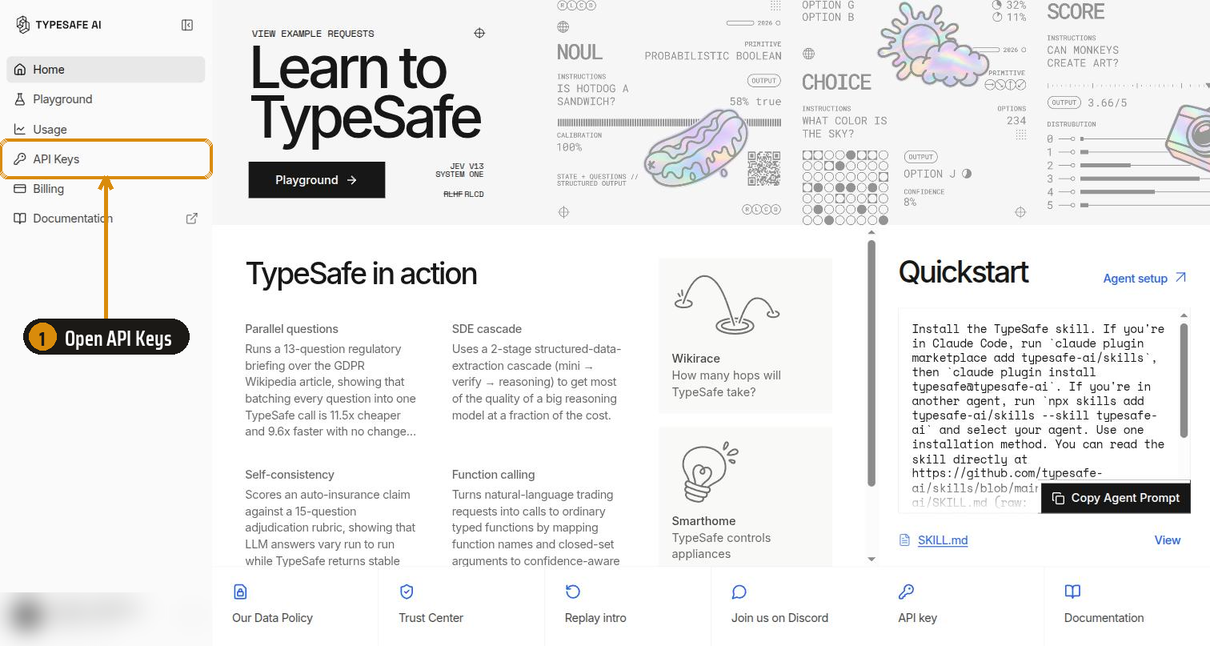
Step 1. Sign in at console.typesafe.ai and open API Keys in the sidebar.
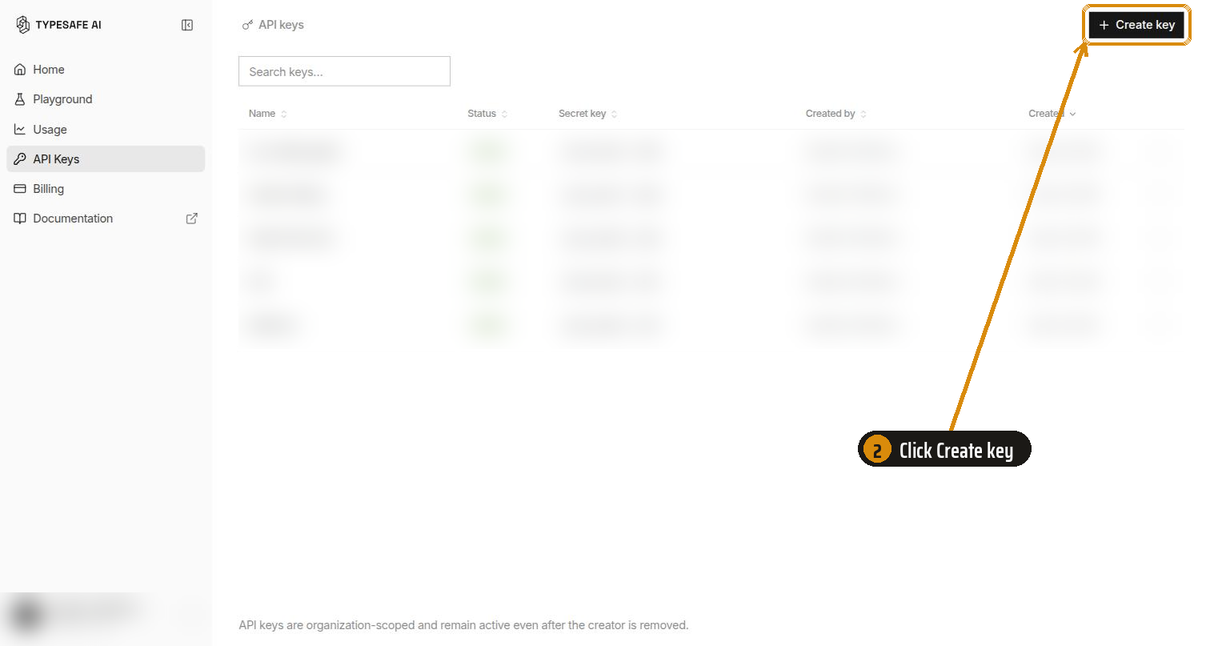
Step 2. Click Create key at the top right.
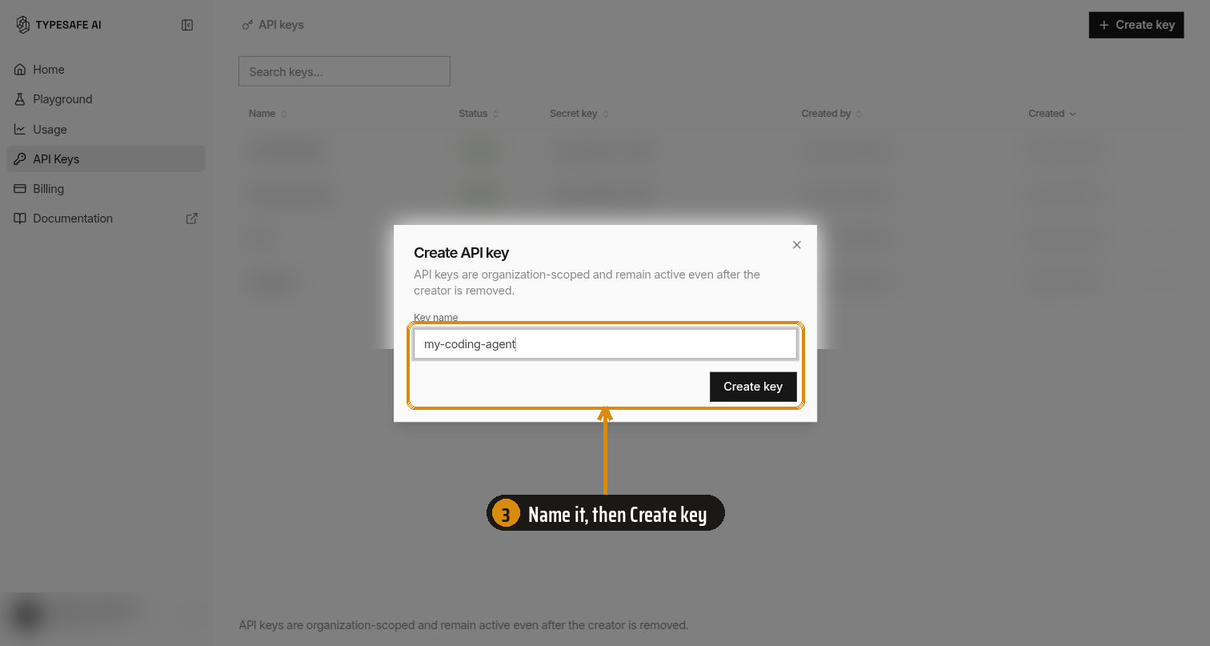
Step 3. Name the key after where it will live, such as the machine or the agent. Then click Create key.
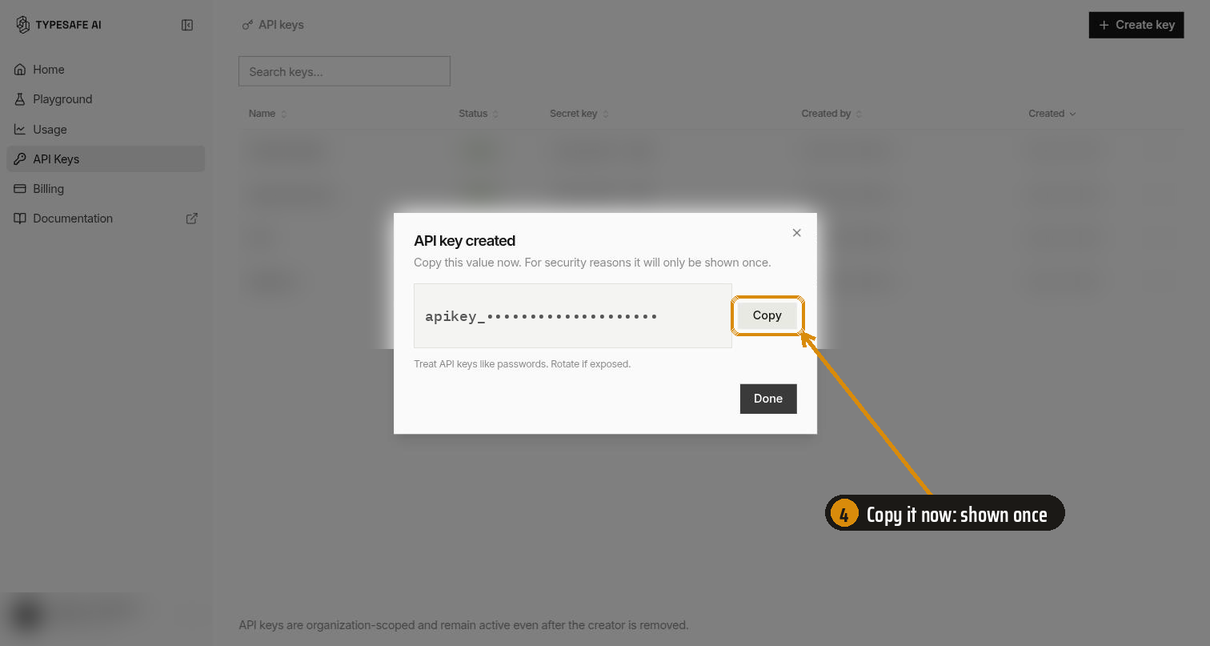
Step 4. Copy the key now. The console shows it once. If you lose it, create a new one and revoke the old one.
Store the key (macOS, Linux, Windows)
Keep the key in its own file, readable only by you, and export it as TYPESAFE_API_KEY. Agents often start shells without a terminal, so each section puts the key where those shells can see it. Pick your system.
macOS (zsh, the default shell)
Save the key to a private file:
mkdir -p ~/.config/typesafe && umask 077 && printf 'export TYPESAFE_API_KEY=%s\n' 'YOUR_KEY' > ~/.config/typesafe/env
Load it from ~/.zshenv. Every zsh reads that file, including shells that agents start without a terminal. ~/.zshrc is read only by interactive shells.
echo '[ -f ~/.config/typesafe/env ] && . ~/.config/typesafe/env' >> ~/.zshenv
Open a new terminal and check it. The command prints the length of the key, not the key:
echo ${#TYPESAFE_API_KEY}
Linux with bash (Ubuntu, Debian, Mint, Fedora, Arch)
Save the key to a private file:
mkdir -p ~/.config/typesafe && umask 077 && printf 'export TYPESAFE_API_KEY=%s\n' 'YOUR_KEY' > ~/.config/typesafe/env
Load it from the top of ~/.bashrc. Ubuntu, Debian, Mint, and Arch start ~/.bashrc with a line that stops early when no terminal is attached. A line below that guard never runs for agent shells. The top of the file is safe on every distribution:
sed -i '1i [ -f ~/.config/typesafe/env ] \&\& . ~/.config/typesafe/env' ~/.bashrc
Open a new terminal and check it:
echo ${#TYPESAFE_API_KEY}
Linux with zsh
Follow the macOS steps. zsh reads ~/.zshenv the same way on Linux.
Linux with fish
fish reads every file in ~/.config/fish/conf.d/, with or without a terminal:
mkdir -p ~/.config/fish/conf.d; and echo 'set -gx TYPESAFE_API_KEY YOUR_KEY' > ~/.config/fish/conf.d/typesafe.fish; and chmod 600 ~/.config/fish/conf.d/typesafe.fish
string length -- $TYPESAFE_API_KEY
Windows (PowerShell)
Store the key as a user environment variable. New terminals and apps see it. Terminals that are already open do not:
[Environment]::SetEnvironmentVariable('TYPESAFE_API_KEY', 'YOUR_KEY', 'User')
Open a new terminal and check it:
$env:TYPESAFE_API_KEY.Length
WSL: Windows variables do not reach WSL by default. Inside WSL, follow the Linux with bash steps.
Desktop apps and IDE extensions
An app you start from the dock, the start menu, or a desktop launcher does not read your shell files.
- Windows: the user environment variable above already covers these apps.
- Linux (systemd): add the line
TYPESAFE_API_KEY=YOUR_KEYto~/.config/environment.d/typesafe.conf, then log out and back in. - macOS: start the app from a terminal, or set the variable in the app's own settings. macOS has no simple per-user file that desktop apps read.
If the agent cannot see the key
Ask the agent to run echo ${#TYPESAFE_API_KEY} (or $env:TYPESAFE_API_KEY.Length on Windows). If it prints 0 or nothing, check these in order:
- You started the agent before you stored the key. Agent shells copy the environment of the program that started them. Quit the agent and start it from a new terminal.
- You started the agent from the dock, the start menu, or an IDE. Those apps do not read your shell files. See "Desktop apps and IDE extensions" above.
- Codex filters the environment. If
~/.codex/config.tomlsetsinclude_onlyunder[shell_environment_policy], addTYPESAFE_API_KEYto it. If it setsignore_default_excludes = false, Codex drops every variable withKEYin its name. Remove that line. - WSL. Windows variables do not reach WSL. Store the key inside WSL with the Linux steps.
How it was tested
We gave a coding agent six Jev tasks, such as a support-ticket triage function and an approval gate for shell commands. Each task ran 10 times with this skill, with no skill, and with the official skill, each arm in its own isolated container. The agent had the docs but no API key, so graders checked the code it wrote. Checks that need judgment went to three LLM judges from three providers (Claude Opus, GPT-6 Sol, Kimi K3), and the majority decided.
| No skill | This skill | Official skill | |
|---|---|---|---|
| Average score | 0.65 ± 0.05 | 0.96 ± 0.02 | 0.77 ± 0.04 |
Score is the share of checks passed, averaged over 10 runs per task.
Where the skill made the difference (runs out of 10 that passed):
| The agent's code... | No skill | This skill | Official skill |
|---|---|---|---|
| counted in code, instead of asking Jev for a number | 1 | 8 | 0 |
| named a field of the input in its questions | 0 | 10 | 1 |
| pinned or logged the Jev model version | 0 | 10 | 0 |
| gave the department list a catch-all option | 3 | 10 | 6 |
| kept more than one path while walking 1,200 categories | 1 | 10 | 7 |
| kept a plain-code backstop for destructive commands | 7 | 10 | 2 |
read score as a position from 0 to n-1 | 9 | 10 | 5 |
Each of these rows beats no skill, the official skill, or both by more than chance at 95%.
More detail:
- evals/README.md: results by case, and how to run the suite
- evals/docs/results.md: every check, each judge's scores, cost, tokens, and method
- evals/docs/cases.md: the six tasks and what each check looks for
- evals/docs/harness.md: how a run works, the isolated containers, and how to keep a batch
- evals/docs/lessons.md: what broke while the suite was being built
What is inside
The skill loads in layers, so the agent reads only what the task needs.
| File | What it holds | When the agent reads it |
|---|---|---|
SKILL.md | Which primitive to pick, 11 design rules, how to use probabilities and confidence, common mistakes | Every Jev task |
api-reference.md | HTTP API, Python and JavaScript SDKs, limits, errors, environment variables | When it writes the code |
patterns.md | The 4 official patterns and techniques from 18 cookbooks, with their thresholds | When it designs a workflow |
prior-art/INDEX.md | A map from "what I want to build" to a shape, plus ideas that failed | Before it designs something new |
prior-art/*.md | 11 shape files: a code sketch, field lessons, and linked projects | One or two per design |
The prior-art library
Most catalogs sort projects by industry. This library sorts them by implementation shape. A game bot, a drone, and a trading bot share one shape: a control loop. Sorted that way, the three share one code sketch and one set of field lessons. The 11 shapes:
- Control loops: games, drones, robots, markets.
- Select from candidates: browser and phone agents, tool calling without an LLM, extraction, routers.
- Gates: tool-call approval, "done" checks, CI, money, content.
- Stream filters: slop filters, moderation, email, logs, bulk labels.
- Ranking and matching: rerankers, entity matching, graph and taxonomy walks.
- Judges and evals: rubric judges, trace grading, code review as triage.
- Incremental and real-time: dubbing, voice, keystroke-driven interfaces.
- Agent context and memory: compaction, memory gates, memory expiry, effort control.
- Pairing with an LLM: planner and actor, verify-then-escalate, distillation.
- Answers as data: features for classical models, research instruments, benchmarks.
- Embedding in infrastructure: SQL functions, vector databases, CI hooks, Home Assistant.
The index also lists the ideas that failed in the field: chess, code review as the only reviewer, perception, and calibration taken on trust. A failed attempt saves the next builder from repeating it.
How this differs from the official skill
The official TypeSafe skill is one file of design guidance. For API details, it sends the agent to the live docs on every task. The two skills have different names and do not conflict, so you can install both, though the evals did not test them together.
This skill holds more inside the skill itself: exact API shapes, cookbook thresholds, community failure modes, and the prior-art library. The agent can design without a network round trip and see what others built first.
Jev changes fast. The skill is a snapshot of docs.typesafe.ai and the community on 2026-09-25, and it tells the agent the live docs win on any conflict. If a fact is wrong, please open an issue with a link to the source.
Credits
The facts about the API come from TypeSafe AI's public documentation and cookbooks. The prior art comes from the builders who published their projects, from the Hacker News community, and from these indexes: awesome-jev-typesafe, JevDirectory, awesome-jev-use-cases, and awesome-typesafe-jev. Each shape file links to the original projects.
TypeSafe, Jev, and System One are names of TypeSafe AI. This project uses them only to say what the skill is for.
License
MIT. See LICENSE.
Contributors

6 commits
Similar repos


Languages
Python
97.9%
Shell
2.0%
Unofficial skill that teaches coding agents to build with TypeSafe AI's Jev: typed decisions, calibrated confidence, and prior art from 150+ community projects.
See the codeSee what people are saying
README
Building with TypeSafe Jev
Typed decisions with calibrated confidence, for your coding agent.
Links to 150+ community projects, sorted by shape, with a code sketch for each.
English · 简体中文 · 日本語 · 한국어 · Tiếng Việt · Português (BR) · Italiano
[!NOTE] This is an unofficial, community skill. It is not made, reviewed, or endorsed by TypeSafe AI. TypeSafe publishes its own skill at typesafe-ai/skills. See How this differs from the official skill.
Coding agents treat Jev like one more chat model. This skill teaches them to design for it: typed questions, calibrated confidence, and links to 150+ community projects, sorted by how they work, with a code sketch for each pattern. It installs in Claude Code, Codex, Antigravity CLI, Muse, and Muse Code.
Jev is a System One model. It does not write text. You send it content and a set of typed questions, and it answers each one with a value and a calibrated probability, usually in 100 to 200 ms:
- Choice picks one option from a list. Example: route a ticket to billing, shipping, or support.
- Score places the content on a scale you describe. Example: grade a pull request from "ignores the spec" to "meets the spec".
- Noul gives the probability that a yes/no statement is true. Example: "this shell command deletes files outside the project."
Install
Claude Code
claude plugin marketplace add aaddrick/building-with-typesafe-jev
claude plugin install building-with-typesafe-jev@building-with-typesafe-jev
The skill loads on its own when you work on Jev code. To load it by hand, type:
/building-with-typesafe-jev:building-with-typesafe-jev
Codex
codex plugin marketplace add aaddrick/building-with-typesafe-jev
codex plugin add building-with-typesafe-jev@building-with-typesafe-jev
Start a new thread. Codex loads the skill when the task matches. To load it by hand, type:
$building-with-typesafe-jev:building-with-typesafe-jev
Antigravity CLI
agy plugin install https://github.com/aaddrick/building-with-typesafe-jev
Check that it installed:
agy plugin list
Start a new session. Antigravity CLI loads the skill when the task matches. To load it by hand, type:
/building-with-typesafe-jev:building-with-typesafe-jev
Coming from Gemini CLI? If agy plugin import gemini brought this extension over, run the install command above anyway so the current copy replaces the imported one.
Muse (muse.ai)
Muse loads skills from ~/workspace/skills/ on its own computer. Paste this command into a Muse chat and ask Muse to run it:
curl -fsSL https://raw.githubusercontent.com/aaddrick/building-with-typesafe-jev/main/scripts/install_muse.sh | bash
The script copies the skill folder there and rewrites the SKILL.md header into the shape Muse reads. Start a new chat. Muse loads the skill when the task matches. To update, run the command again.
Muse Code
Clone the repository:
git clone https://github.com/aaddrick/building-with-typesafe-jev.git
Install the skill for every project:
muse skills install building-with-typesafe-jev/skills/building-with-typesafe-jev --scope user
Check that it installed:
muse skills list
Start a new session. Muse Code loads the skill when the task matches. To load it by hand, type:
/building-with-typesafe-jev
Any other agent that reads SKILL.md
Copy the skills/building-with-typesafe-jev/ folder into your agent's skills folder. Keep the whole folder. SKILL.md links to the files beside it.
Set up an API key (optional, recommended)
The skill works without a key. With TYPESAFE_API_KEY set in the agent's shell, the agent can check its design against the live API before the code reaches your project. That catches wrong field names, and questions Jev reads differently than you meant. Each call costs a fraction of a cent.
Create, store, and troubleshoot a key
Create a key (four steps in the TypeSafe console)
Step 1. Sign in at console.typesafe.ai and open API Keys in the sidebar.
Step 2. Click Create key at the top right.
Step 3. Name the key after where it will live, such as the machine or the agent. Then click Create key.
Step 4. Copy the key now. The console shows it once. If you lose it, create a new one and revoke the old one.
Store the key (macOS, Linux, Windows)
Keep the key in its own file, readable only by you, and export it as TYPESAFE_API_KEY. Agents often start shells without a terminal, so each section puts the key where those shells can see it. Pick your system.
macOS (zsh, the default shell)
Save the key to a private file:
mkdir -p ~/.config/typesafe && umask 077 && printf 'export TYPESAFE_API_KEY=%s\n' 'YOUR_KEY' > ~/.config/typesafe/env
Load it from ~/.zshenv. Every zsh reads that file, including shells that agents start without a terminal. ~/.zshrc is read only by interactive shells.
echo '[ -f ~/.config/typesafe/env ] && . ~/.config/typesafe/env' >> ~/.zshenv
Open a new terminal and check it. The command prints the length of the key, not the key:
echo ${#TYPESAFE_API_KEY}
Linux with bash (Ubuntu, Debian, Mint, Fedora, Arch)
Save the key to a private file:
mkdir -p ~/.config/typesafe && umask 077 && printf 'export TYPESAFE_API_KEY=%s\n' 'YOUR_KEY' > ~/.config/typesafe/env
Load it from the top of ~/.bashrc. Ubuntu, Debian, Mint, and Arch start ~/.bashrc with a line that stops early when no terminal is attached. A line below that guard never runs for agent shells. The top of the file is safe on every distribution:
sed -i '1i [ -f ~/.config/typesafe/env ] \&\& . ~/.config/typesafe/env' ~/.bashrc
Open a new terminal and check it:
echo ${#TYPESAFE_API_KEY}
Linux with zsh
Follow the macOS steps. zsh reads ~/.zshenv the same way on Linux.
Linux with fish
fish reads every file in ~/.config/fish/conf.d/, with or without a terminal:
mkdir -p ~/.config/fish/conf.d; and echo 'set -gx TYPESAFE_API_KEY YOUR_KEY' > ~/.config/fish/conf.d/typesafe.fish; and chmod 600 ~/.config/fish/conf.d/typesafe.fish
string length -- $TYPESAFE_API_KEY
Windows (PowerShell)
Store the key as a user environment variable. New terminals and apps see it. Terminals that are already open do not:
[Environment]::SetEnvironmentVariable('TYPESAFE_API_KEY', 'YOUR_KEY', 'User')
Open a new terminal and check it:
$env:TYPESAFE_API_KEY.Length
WSL: Windows variables do not reach WSL by default. Inside WSL, follow the Linux with bash steps.
Desktop apps and IDE extensions
An app you start from the dock, the start menu, or a desktop launcher does not read your shell files.
- Windows: the user environment variable above already covers these apps.
- Linux (systemd): add the line
TYPESAFE_API_KEY=YOUR_KEYto~/.config/environment.d/typesafe.conf, then log out and back in. - macOS: start the app from a terminal, or set the variable in the app's own settings. macOS has no simple per-user file that desktop apps read.
If the agent cannot see the key
Ask the agent to run echo ${#TYPESAFE_API_KEY} (or $env:TYPESAFE_API_KEY.Length on Windows). If it prints 0 or nothing, check these in order:
- You started the agent before you stored the key. Agent shells copy the environment of the program that started them. Quit the agent and start it from a new terminal.
- You started the agent from the dock, the start menu, or an IDE. Those apps do not read your shell files. See "Desktop apps and IDE extensions" above.
- Codex filters the environment. If
~/.codex/config.tomlsetsinclude_onlyunder[shell_environment_policy], addTYPESAFE_API_KEYto it. If it setsignore_default_excludes = false, Codex drops every variable withKEYin its name. Remove that line. - WSL. Windows variables do not reach WSL. Store the key inside WSL with the Linux steps.
How it was tested
We gave a coding agent six Jev tasks, such as a support-ticket triage function and an approval gate for shell commands. Each task ran 10 times with this skill, with no skill, and with the official skill, each arm in its own isolated container. The agent had the docs but no API key, so graders checked the code it wrote. Checks that need judgment went to three LLM judges from three providers (Claude Opus, GPT-6 Sol, Kimi K3), and the majority decided.
| No skill | This skill | Official skill | |
|---|---|---|---|
| Average score | 0.65 ± 0.05 | 0.96 ± 0.02 | 0.77 ± 0.04 |
Score is the share of checks passed, averaged over 10 runs per task.
Where the skill made the difference (runs out of 10 that passed):
| The agent's code... | No skill | This skill | Official skill |
|---|---|---|---|
| counted in code, instead of asking Jev for a number | 1 | 8 | 0 |
| named a field of the input in its questions | 0 | 10 | 1 |
| pinned or logged the Jev model version | 0 | 10 | 0 |
| gave the department list a catch-all option | 3 | 10 | 6 |
| kept more than one path while walking 1,200 categories | 1 | 10 | 7 |
| kept a plain-code backstop for destructive commands | 7 | 10 | 2 |
read score as a position from 0 to n-1 | 9 | 10 | 5 |
Each of these rows beats no skill, the official skill, or both by more than chance at 95%.
More detail:
- evals/README.md: results by case, and how to run the suite
- evals/docs/results.md: every check, each judge's scores, cost, tokens, and method
- evals/docs/cases.md: the six tasks and what each check looks for
- evals/docs/harness.md: how a run works, the isolated containers, and how to keep a batch
- evals/docs/lessons.md: what broke while the suite was being built
What is inside
The skill loads in layers, so the agent reads only what the task needs.
| File | What it holds | When the agent reads it |
|---|---|---|
SKILL.md | Which primitive to pick, 11 design rules, how to use probabilities and confidence, common mistakes | Every Jev task |
api-reference.md | HTTP API, Python and JavaScript SDKs, limits, errors, environment variables | When it writes the code |
patterns.md | The 4 official patterns and techniques from 18 cookbooks, with their thresholds | When it designs a workflow |
prior-art/INDEX.md | A map from "what I want to build" to a shape, plus ideas that failed | Before it designs something new |
prior-art/*.md | 11 shape files: a code sketch, field lessons, and linked projects | One or two per design |
The prior-art library
Most catalogs sort projects by industry. This library sorts them by implementation shape. A game bot, a drone, and a trading bot share one shape: a control loop. Sorted that way, the three share one code sketch and one set of field lessons. The 11 shapes:
- Control loops: games, drones, robots, markets.
- Select from candidates: browser and phone agents, tool calling without an LLM, extraction, routers.
- Gates: tool-call approval, "done" checks, CI, money, content.
- Stream filters: slop filters, moderation, email, logs, bulk labels.
- Ranking and matching: rerankers, entity matching, graph and taxonomy walks.
- Judges and evals: rubric judges, trace grading, code review as triage.
- Incremental and real-time: dubbing, voice, keystroke-driven interfaces.
- Agent context and memory: compaction, memory gates, memory expiry, effort control.
- Pairing with an LLM: planner and actor, verify-then-escalate, distillation.
- Answers as data: features for classical models, research instruments, benchmarks.
- Embedding in infrastructure: SQL functions, vector databases, CI hooks, Home Assistant.
The index also lists the ideas that failed in the field: chess, code review as the only reviewer, perception, and calibration taken on trust. A failed attempt saves the next builder from repeating it.
How this differs from the official skill
The official TypeSafe skill is one file of design guidance. For API details, it sends the agent to the live docs on every task. The two skills have different names and do not conflict, so you can install both, though the evals did not test them together.
This skill holds more inside the skill itself: exact API shapes, cookbook thresholds, community failure modes, and the prior-art library. The agent can design without a network round trip and see what others built first.
Jev changes fast. The skill is a snapshot of docs.typesafe.ai and the community on 2026-09-25, and it tells the agent the live docs win on any conflict. If a fact is wrong, please open an issue with a link to the source.
Credits
The facts about the API come from TypeSafe AI's public documentation and cookbooks. The prior art comes from the builders who published their projects, from the Hacker News community, and from these indexes: awesome-jev-typesafe, JevDirectory, awesome-jev-use-cases, and awesome-typesafe-jev. Each shape file links to the original projects.
TypeSafe, Jev, and System One are names of TypeSafe AI. This project uses them only to say what the skill is for.
License
MIT. See LICENSE.
Similar repos
Contributors
6 commits
Languages
Python
97.9%
Shell
2.0%