A GUI tool for offline transcription of speech recordings, including speaker diarization, utilizing state-of-the-art machine learning models.
Python
1,220
1,227 commits
updated Oct 19, 2026

aTrain is a tool for automatically transcribing speech recordings utilizing state-of-the-art machine learning models without uploading any data. It was developed by researchers at the Business Analytics and Data Science-Center at the University of Graz and tested by researchers from the Know-Center Graz.

aTrain is published on Flathub for Linux and the Microsoft Store for Windows. Additional download types can be found here.
How release builds are signed: see the Code signing policy.
aTrain offers the following benefits:
Fast and accurate 🚀
aTrain provides a user friendly access to the faster-whisper implementation of OpenAI’s Whisper model, ensuring best in class transcription quality (see Wollin-Geiring et al. 2023) paired with higher speeds on your local computer. Transcription when selecting the highest-quality model takes only around three times the audio length on current mobile CPUs typically found in middle-class business notebooks (e.g., Core i5 12th Gen, Ryzen Series 6000).
Speaker detection 🗣️
aTrain has a speaker detection mode based on pyannote.audio and can analyze each text segment to determine which speaker it belongs to.
Privacy Preservation and GDPR compliance 🔒
aTrain processes the provided speech recordings completely offline on your own device and does not send recordings or transcriptions to the internet. This helps researchers to maintain data privacy requirements arising from ethical guidelines or to comply with legal requirements such as the GDPR.
Multi-language support 🌍
aTrain-core can process speech recordings a total of 99 languages, including Afrikaans, Arabic, Armenian, Azerbaijani, Belarusian, Bosnian, Bulgarian, Catalan, Chinese, Croatian, Czech, Danish, Dutch, English, Estonian, Finnish, French, Galician, German, Greek, Hebrew, Hindi, Hungarian, Icelandic, Indonesian, Italian, Japanese, Kannada, Kazakh, Korean, Latvian, Lithuanian, Macedonian, Malay, Marathi, Maori, Nepali, Norwegian, Persian, Polish, Portuguese, Romanian, Russian, Serbian, Slovak, Slovenian, Spanish, Swahili, Swedish, Tagalog, Tamil, Thai, Turkish, Ukrainian, Urdu, Vietnamese, and Welsh. A full list can be found here. Note that transcription quality varies with language; word error rates for the different languages can be found here.
MAXQDA, ATLAS.ti and nVivo compatible output 📄
aTrain-core provides transcription files that are seamlessly importable into the most popular tools for qualitative analysis, ATLAS.ti, MAXQDA and nVivo. This allows you to directly play audio for the corresponding text segment by clicking on its timestamp. Go to the tutorial for MAXQDA and NVivo.
Nvidia GPU support 🖥️
aTrain can either run on the CPU or an NVIDIA GPU (CUDA toolkit installation required). A CUDA-enabled NVIDIA GPU significantly improves the speed of transcriptions and speaker detection, reducing transcription time to 20% of audio length on current entry-level gaming notebooks.
| Screenshot 1 | Screenshot 2 |
|---|---|
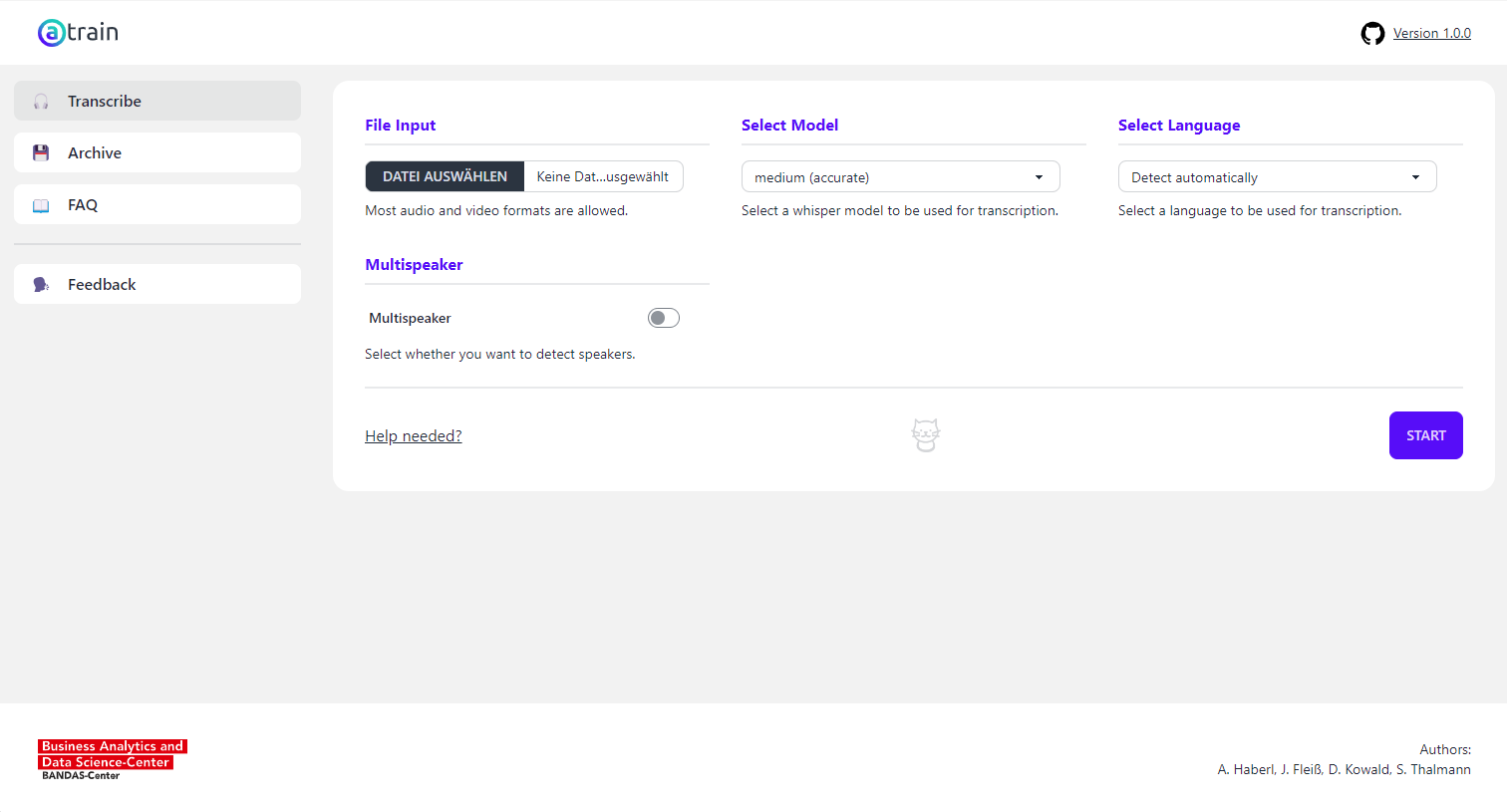 | 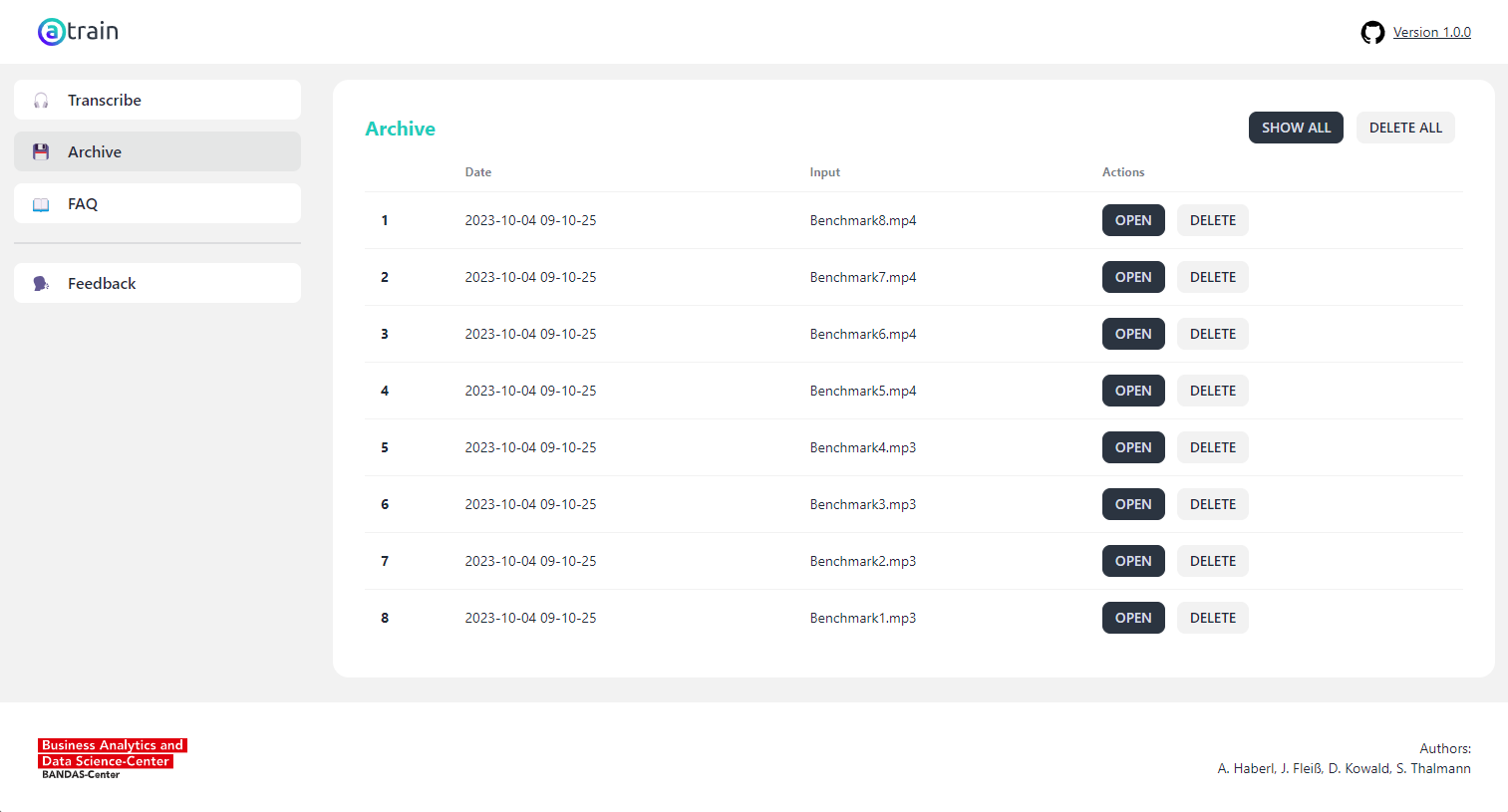 |
For testing the processing time of aTrain-core we transcribe a conversation between Christine Lagarde and Andrea Enria at the Fifth ECB Forum on Banking Supervision 2023 published on YouTube by the European Central Bank under a Creative Commons license , downloaded as 320p MP4 video file. The file has a duration of exactly 22 minutes and was transcribed on different computing devices with speaker detection enabled. The figure below shows the processing time of each transcription.
Transcription Time (incl. speaker detection) for 00:22:00 File:
| Computing Device | large-v3 | Distil large-v3 | large-v3-turbo |
|---|---|---|---|
| CPU: Ryzen 6850U | 00:26:12 | 00:13:30 | 00:18:30 |
| CPU: Apple M1 | 00:33:15 | 00:21:40 | 00:??:?? |
| CPU: Intel i9-10940X | 00:10:25 | 00:04:36 | 00:??:?? |
| CPU: Intel i7-8750H | 00:??:?? | 00:??:?? | 00:19:16 |
| GPU: RTX 2080 Ti | 00:01:44 | 00:01:06 | 00:??:?? |
| GPU: RTX 2070 Max-Q | 00:05:59 | 00:??:?? | 00:04:37 |
For headless transcription pipelines (servers, automation, scripts) aTrain is also installable via pip and exposes a CLI.
Until aTrain ships on PyPI, install directly from the GitHub repo. Engine only (CLI usage):
pip install "aTrain @ git+https://github.com/aTrainTranscription/aTrain.git"
For aTrain start (the desktop / browser app), add the GUI extras:
pip install "aTrain[gui] @ git+https://github.com/aTrainTranscription/aTrain.git"
On Windows, prepend the PyTorch CUDA index for the cu128 torch wheel:
pip install ... --extra-index-url https://download.pytorch.org/whl/cu128
On Linux the PyPI torch wheel already bundles CUDA; macOS is CPU-only. NVIDIA CUDA GPU support currently covers Windows and Debian-based Linux.
💡 Linux + slow disk: if
pip installkeeps killing the torch wheel collection, retry with--no-cache-dir.
When aTrain reaches PyPI (planned, not yet), the install command becomes
pip install aTrain and pip install 'aTrain[gui]'.
⚠️ Experimental: Running
aTrain startas a headless browser/server app is experimental. Some browser-mode functionality may still be incomplete.
By default, aTrain start opens the native desktop app. Use --no-native to
run it in browser mode. The following options are available for browser/server
deployments:
| Option | Description |
|---|---|
--no-native | Run without a native desktop window. |
--no-show | Do not automatically open a browser tab. |
--host HOST | Bind to a specific IP address. |
--port PORT | Listen on a specific port. |
For example, to run a server on port 8080 without opening a browser tab:
aTrain start --no-native --no-show --host 0.0.0.0 --port 8080
A guide for setting up aTrain as a service is available in the Linux service guide.
Default settings:
aTrain_core transcribe /path/to/audio/file.mp3
With overrides:
aTrain_core transcribe /path/to/audio/file.mp3 \
    --model <MODEL> --language <LANGUAGE> \
    --speaker-detection --speaker-count <N> \
    --device <DEVICE> --compute-type <COMPUTE_TYPE>
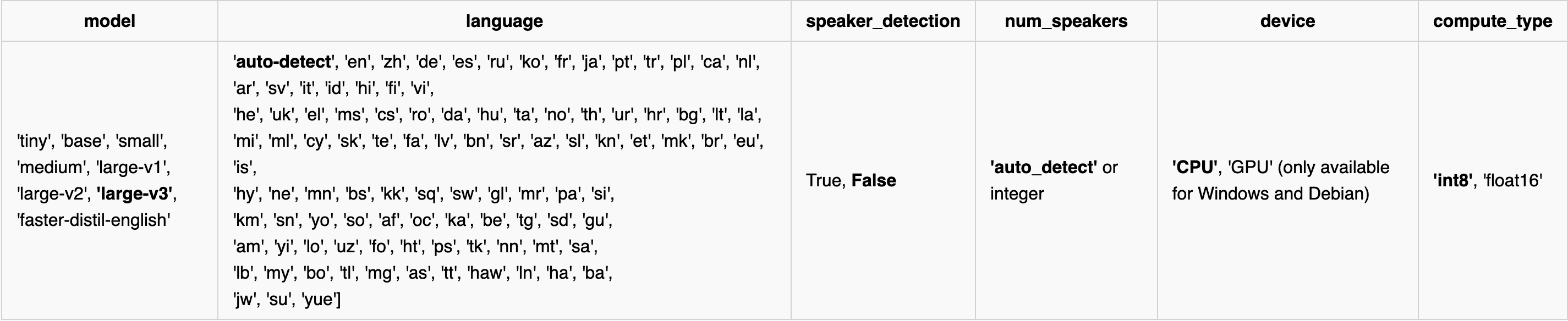
The full list of model configurations (with defaults in bold):
💡 Distilled models (e.g.
faster-distil-english) need an explicit--languageflag since they are single-language only.
aTrain init                # download the required models in one go
aTrain_core load <MODEL>   # download a specific model
aTrain_core load all       # download every supported model
aTrain_core remove <MODEL> # delete a specific model
Planned in the near future.
Full user documentation lives in docs/:
See CONTRIBUTING.md for local development setup, building a standalone executable, and the branching model. aTrain uses uv as its recommended package manager.
The GIFs and Icons in aTrain are from tenor and flaticon.
Free code signing provided by SignPath.io, certificate by SignPath Foundation.
139 followers · starred Apr 2026
1,863 followers · starred May 2024
155 followers · starred May 2025
102 followers · starred Aug 2024
A GUI tool for offline transcription of speech recordings, including speaker diarization, utilizing state-of-the-art machine learning models.
Python
1,220
1,227 commits
updated Oct 19, 2026
aTrain is a tool for automatically transcribing speech recordings utilizing state-of-the-art machine learning models without uploading any data. It was developed by researchers at the Business Analytics and Data Science-Center at the University of Graz and tested by researchers from the Know-Center Graz.
aTrain is published on Flathub for Linux and the Microsoft Store for Windows. Additional download types can be found here.
How release builds are signed: see the Code signing policy.
aTrain offers the following benefits:
Fast and accurate 🚀
aTrain provides a user friendly access to the faster-whisper implementation of OpenAI’s Whisper model, ensuring best in class transcription quality (see Wollin-Geiring et al. 2023) paired with higher speeds on your local computer. Transcription when selecting the highest-quality model takes only around three times the audio length on current mobile CPUs typically found in middle-class business notebooks (e.g., Core i5 12th Gen, Ryzen Series 6000).
Speaker detection 🗣️
aTrain has a speaker detection mode based on pyannote.audio and can analyze each text segment to determine which speaker it belongs to.
Privacy Preservation and GDPR compliance 🔒
aTrain processes the provided speech recordings completely offline on your own device and does not send recordings or transcriptions to the internet. This helps researchers to maintain data privacy requirements arising from ethical guidelines or to comply with legal requirements such as the GDPR.
Multi-language support 🌍
aTrain-core can process speech recordings a total of 99 languages, including Afrikaans, Arabic, Armenian, Azerbaijani, Belarusian, Bosnian, Bulgarian, Catalan, Chinese, Croatian, Czech, Danish, Dutch, English, Estonian, Finnish, French, Galician, German, Greek, Hebrew, Hindi, Hungarian, Icelandic, Indonesian, Italian, Japanese, Kannada, Kazakh, Korean, Latvian, Lithuanian, Macedonian, Malay, Marathi, Maori, Nepali, Norwegian, Persian, Polish, Portuguese, Romanian, Russian, Serbian, Slovak, Slovenian, Spanish, Swahili, Swedish, Tagalog, Tamil, Thai, Turkish, Ukrainian, Urdu, Vietnamese, and Welsh. A full list can be found here. Note that transcription quality varies with language; word error rates for the different languages can be found here.
MAXQDA, ATLAS.ti and nVivo compatible output 📄
aTrain-core provides transcription files that are seamlessly importable into the most popular tools for qualitative analysis, ATLAS.ti, MAXQDA and nVivo. This allows you to directly play audio for the corresponding text segment by clicking on its timestamp. Go to the tutorial for MAXQDA and NVivo.
Nvidia GPU support 🖥️
aTrain can either run on the CPU or an NVIDIA GPU (CUDA toolkit installation required). A CUDA-enabled NVIDIA GPU significantly improves the speed of transcriptions and speaker detection, reducing transcription time to 20% of audio length on current entry-level gaming notebooks.
| Screenshot 1 | Screenshot 2 |
|---|---|
| |
For testing the processing time of aTrain-core we transcribe a conversation between Christine Lagarde and Andrea Enria at the Fifth ECB Forum on Banking Supervision 2023 published on YouTube by the European Central Bank under a Creative Commons license , downloaded as 320p MP4 video file. The file has a duration of exactly 22 minutes and was transcribed on different computing devices with speaker detection enabled. The figure below shows the processing time of each transcription.
Transcription Time (incl. speaker detection) for 00:22:00 File:
| Computing Device | large-v3 | Distil large-v3 | large-v3-turbo |
|---|---|---|---|
| CPU: Ryzen 6850U | 00:26:12 | 00:13:30 | 00:18:30 |
| CPU: Apple M1 | 00:33:15 | 00:21:40 | 00:??:?? |
| CPU: Intel i9-10940X | 00:10:25 | 00:04:36 | 00:??:?? |
| CPU: Intel i7-8750H | 00:??:?? | 00:??:?? | 00:19:16 |
| GPU: RTX 2080 Ti | 00:01:44 | 00:01:06 | 00:??:?? |
| GPU: RTX 2070 Max-Q | 00:05:59 | 00:??:?? | 00:04:37 |
For headless transcription pipelines (servers, automation, scripts) aTrain is also installable via pip and exposes a CLI.
Until aTrain ships on PyPI, install directly from the GitHub repo. Engine only (CLI usage):
pip install "aTrain @ git+https://github.com/aTrainTranscription/aTrain.git"
For aTrain start (the desktop / browser app), add the GUI extras:
pip install "aTrain[gui] @ git+https://github.com/aTrainTranscription/aTrain.git"
On Windows, prepend the PyTorch CUDA index for the cu128 torch wheel:
pip install ... --extra-index-url https://download.pytorch.org/whl/cu128
On Linux the PyPI torch wheel already bundles CUDA; macOS is CPU-only. NVIDIA CUDA GPU support currently covers Windows and Debian-based Linux.
💡 Linux + slow disk: if
pip installkeeps killing the torch wheel collection, retry with--no-cache-dir.
When aTrain reaches PyPI (planned, not yet), the install command becomes
pip install aTrain and pip install 'aTrain[gui]'.
⚠️ Experimental: Running
aTrain startas a headless browser/server app is experimental. Some browser-mode functionality may still be incomplete.
By default, aTrain start opens the native desktop app. Use --no-native to
run it in browser mode. The following options are available for browser/server
deployments:
| Option | Description |
|---|---|
--no-native | Run without a native desktop window. |
--no-show | Do not automatically open a browser tab. |
--host HOST | Bind to a specific IP address. |
--port PORT | Listen on a specific port. |
For example, to run a server on port 8080 without opening a browser tab:
aTrain start --no-native --no-show --host 0.0.0.0 --port 8080
A guide for setting up aTrain as a service is available in the Linux service guide.
Default settings:
aTrain_core transcribe /path/to/audio/file.mp3
With overrides:
aTrain_core transcribe /path/to/audio/file.mp3 \
    --model <MODEL> --language <LANGUAGE> \
    --speaker-detection --speaker-count <N> \
    --device <DEVICE> --compute-type <COMPUTE_TYPE>
The full list of model configurations (with defaults in bold):
💡 Distilled models (e.g.
faster-distil-english) need an explicit--languageflag since they are single-language only.
aTrain init                # download the required models in one go
aTrain_core load <MODEL>   # download a specific model
aTrain_core load all       # download every supported model
aTrain_core remove <MODEL> # delete a specific model
Planned in the near future.
Full user documentation lives in docs/:
See CONTRIBUTING.md for local development setup, building a standalone executable, and the branching model. aTrain uses uv as its recommended package manager.
The GIFs and Icons in aTrain are from tenor and flaticon.
Free code signing provided by SignPath.io, certificate by SignPath Foundation.
139 followers · starred Apr 2026
1,863 followers · starred May 2024
155 followers · starred May 2025
102 followers · starred Aug 2024



