
A customisable animated pet that lives on top of your terminal window and reacts to your shell
Swift
7
59 commits
updated Sep 17, 2026
See what people are saying (1)
README
terminal-pet



A little animated Tamagotchi-like companion that lives on top of your terminal window and reacts to what you do in the shell.
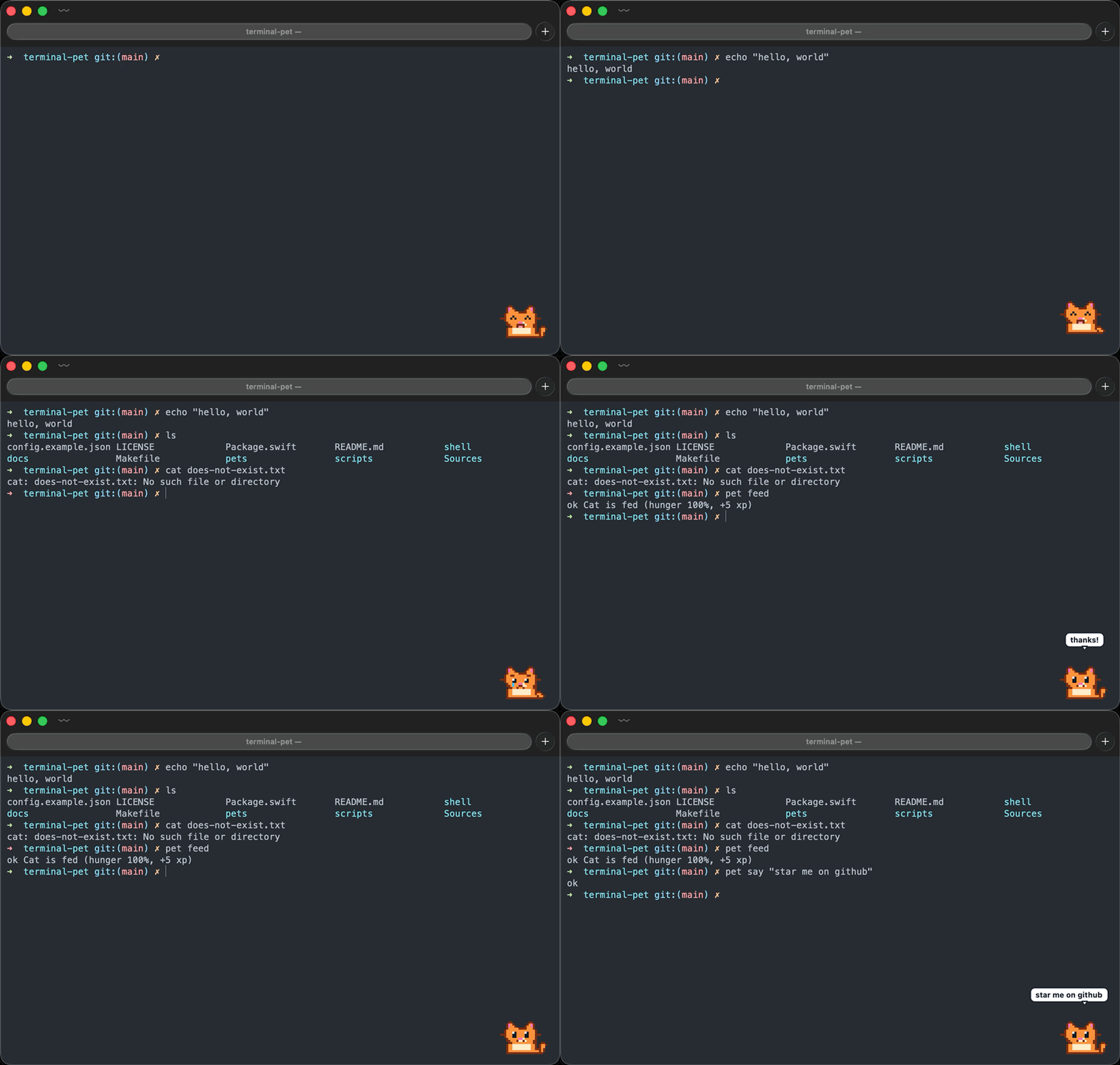

- Sits in the corner of whichever terminal window is in front (or perched on its title bar, if you prefer), and follows it when you move or resize it.
- Hides when the terminal isn't the active app, so it never gets in the way.
- Watches your zsh session: working while a command runs, happy when it succeeds, sad when it fails, sleeping when you've been away for a while.
- Is a little Tamagotchi: it gets hungry over the day and asks for food, gains xp and levels from the commands you run, keeps streaks of successful commands, and talks in a speech bubble. Click it or
pet feedit. - Fully customisable: drop in your own animated GIFs (or APNGs) for each state, or point it at a single GIF and it'll just loop that.
macOS only for now (native Swift/AppKit, no dependencies). Linux and Windows are on the roadmap.
Install
Requires macOS 13 or later. Works with zsh, bash and fish.
Homebrew
brew install Zezoo123/tap/terminal-pet
terminal-pet setup
From source (needs the Xcode Command Line Tools, xcode-select --install)
git clone https://github.com/Zezoo123/terminal-pet.git
cd terminal-pet
make install            # builds and installs to ~/.local (override with PREFIX=/usr/local)
~/.local/bin/terminal-pet setup
setup detects your shell from $SHELL, adds the matching plugin to its startup file, and puts terminal-pet on your PATH if it isn't already (--shell bash to pick explicitly, --print to only show the lines). Then open a new terminal and start the pet:
terminal-pet            # detaches and gives you the prompt back; `make launchd` starts it at login
terminal-pet stop       # when you've had enough
Run any command and watch it react.
Doing it by hand instead of setup
| shell | add to | line |
|---|---|---|
| zsh | ~/.zshrc | source ~/.local/share/terminal-pet/terminal-pet.plugin.zsh |
| bash | ~/.bash_profile (or ~/.bashrc) | source ~/.local/share/terminal-pet/terminal-pet.plugin.bash |
| fish | ~/.config/fish/conf.d/terminal-pet.fish | source ~/.local/share/terminal-pet/terminal-pet.fish |
And export PATH="$HOME/.local/bin:$PATH" (fish_add_path ~/.local/bin in fish) if ~/.local/bin isn't on your PATH. With Homebrew the files live under $(brew --prefix)/opt/terminal-pet/share/terminal-pet/ instead.
zsh plugin managers can load the plugin straight from the repo (the app still has to be installed): zinit light Zezoo123/terminal-pet, antigen bundle Zezoo123/terminal-pet, or clone it into $ZSH_CUSTOM/plugins/terminal-pet for oh-my-zsh.
Try it without installing
make run # runs in the foreground with the repo's pets, Ctrl-C to quit
Shell integration
Each plugin hooks the shell's "command is about to run" and "prompt is about to show" events and sends one line over a Unix socket (/tmp/terminal-pet-<uid>.sock). It is a no-op when the pet isn't running.
| shell | plugin | how it talks |
|---|---|---|
| zsh | shell/terminal-pet.plugin.zsh | add-zsh-hook preexec/precmd, zsh's built-in zsocket, nothing spawned |
| bash | shell/terminal-pet.plugin.bash | DEBUG trap + PROMPT_COMMAND (or bash-preexec if present), terminal-pet send in the background |
| fish | shell/terminal-pet.fish | fish_preexec / fish_postexec events, terminal-pet send in the background |
It also gives you a pet command:
pet            # poke it
pet feed       # feed it
pet stats      # level, xp, hunger, streaks, age
pet say hi     # speech bubble (try it at the end of a long script)
pet name Bob   # give it a name
pet ghost      # switch to another pet (any name from `pet list`, a folder, or a .gif)
pet sad        # force a state: idle | working | happy | sad | sleeping | eating | hungry | celebrate | pushing | scared
pet scale 4    # resize
pet anchor inside-bottom-left
pet list       # what's installed
pet status
pet quit
Caring for it
| Hunger | Full after feeding, empty about 8 hours later. Below 25% it looks hungry (daydreaming about its favourite snack) and asks for food every few minutes. pet feed (+5 xp). |
| XP and levels | +1 xp per successful command, +5 per meal. Level 2 at 20 xp, 3 at 80, 4 at 180, 5 at 320, and so on. It announces level-ups. |
| Streaks | Consecutive successful commands. It celebrates 5, 10, 25, 50, 100... and mourns a lost streak of 5 or more. |
| Speech | Reacts with short bubbles. pet say "tests passed" from any script, or terminal-pet say ... from bash, Makefiles, CI. |
Everything is kept in ~/.config/terminal-pet/stats.json. Delete it to start over.
It knows what you're running
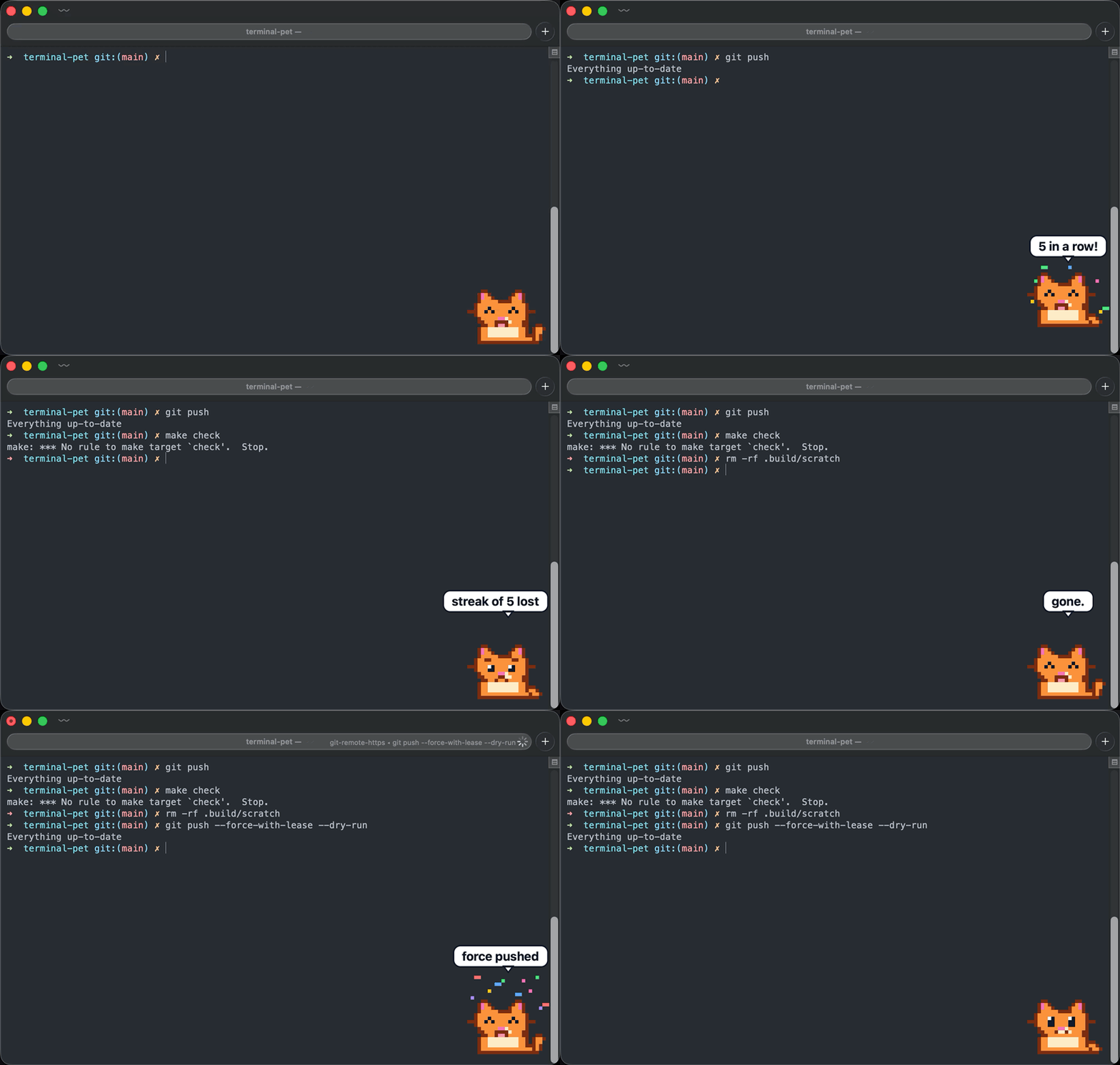
The pet reads the command line and reacts to the ones that matter:
| you run | it does |
|---|---|
git push | a parcel floats up while it pushes, confetti when it lands, "push rejected" when it doesn't |
git push --force | gets scared first |
git merge, gh pr merge | confetti on "merged!", sulks on "conflicts..." |
git rebase | nervous the whole time |
gh pr create, gh release create, git clone | confetti |
make, cargo build, swift build, npm run build | "building..." then "build ok!" or "build failed" |
pytest, npm test, cargo test, go test, jest | "testing..." then "tests pass!" or "tests failed" |
brew install, npm install, pip install, cargo add | "installing..." then "installed" |
rm -rf, sudo, terraform apply | wide-eyed and sweating until it's over |
The full list is in Reactions.swift. Add your own in the config; they're checked before the built-in ones, first match wins, patterns are case-insensitive regular expressions matched against the command line:
{
  "reactions": [
    { "match": "^deploy\\b",
      "start":   { "state": "scared",    "say": "deploying..." },
      "success": { "state": "celebrate", "say": "live!" },
      "failure": { "state": "sad",       "say": "rollback?" } },
    { "match": "^make coffee", "success": { "say": "finally" } }
  ]
}
Each of start, success, failure is optional, and so are state and say inside them. States: idle, working, happy, sad, sleeping, eating, hungry, celebrate, pushing, scared.
Changing things on the fly
While a pet is running, the CLI talks to it instead of starting another one, and every change is written to the config file so it sticks:
terminal-pet --pet ghost                 # ok now showing Ghost (saved to config)
terminal-pet --scale 4
terminal-pet --anchor top-right
terminal-pet status                      # pet=Ghost state=idle anchor=top-right scale=4.0 ...
The same flags with no pet running start one with those settings.
Anything else can send raw events with terminal-pet send <event>, e.g. from a Makefile, a CI script, or bash:
terminal-pet send preexec make
terminal-pet send precmd 1      # exit status
Bundled pets
| name | who |
|---|---|
blob | a round blue blob (default) |
cat | an orange tabby that wags its tail |
ghost | a floating ghost that bobs up and down |
robot | a boxy robot whose screen face and antenna light change with its mood |
chick | a yellow chick that flaps its wings when a command succeeds |
dog | a floppy-eared dog, tongue out when happy, carries its bone |
frog | a wide-mouthed frog that hops on success and dreams of flies |
penguin | a penguin that waddles while working and flaps its flippers |
Pick one with "pet": "cat" in the config or terminal-pet --pet cat. terminal-pet pets lists everything installed.
Configuration
~/.config/terminal-pet/config.json (created by make install, every key optional):
| key | default | meaning |
|---|---|---|
pet | "blob" | pet name, a directory, or a single .gif file |
scale | 3 | size multiplier for the sprite |
anchor | "inside-bottom-right" | inside-bottom-right, inside-bottom-left, inside-top-right, inside-top-left (over the window content), or top-right, top-left (perched on the title bar) |
offsetX / offsetY | 16 / 16 | nudge from the anchor, in points |
idleAfter | 90 | seconds of inactivity before it falls asleep |
reactionSeconds | 2.5 | how long happy/sad is shown |
pollHz | 30 | how often it checks where the terminal window is |
smooth | false | bilinear scaling instead of crisp pixels (for photo-like GIFs) |
terminals | see example | app names or bundle IDs treated as terminals (Terminal, iTerm2, kitty, Alacritty, WezTerm, Ghostty, Warp, Hyper, Tabby, Rio by default) |
reactions | [] | your own command reactions, see below |
Flags override the file for one run: terminal-pet --pet ~/Downloads/cat.gif --scale 1 --anchor top-right.
Making your own pet
A pet is a folder with one animated image per state: idle, working, happy, sad, sleeping, eating, hungry, celebrate, pushing, scared. Missing states fall back sensibly (eating and celebrate to happy, pushing and scared to working, everything else to idle), so a single idle.gif is enough.
~/.config/terminal-pet/pets/cat/
├── pet.json      (optional)
├── idle.gif
├── working.gif
├── happy.gif
├── sad.gif
├── sleeping.gif
└── eating.gif
pet.json lets you name it and use different file names:
{ "name": "Cat", "states": { "idle": "sit.gif", "working": "typing.gif" } }
GIF and APNG are both supported and per-frame delays are respected. Pixel art is drawn with nearest-neighbour scaling, so a 24x24 sprite at scale: 3 is crisp. terminal-pet pets lists everything it can find. Pets are searched in $TERMINAL_PET_PETS_DIR, ~/.config/terminal-pet/pets, then the installed share directory.
The bundled pets are all generated from scripts/gen-pets.swift: each one is a small ASCII-art body plus shared helpers for eyes, mouths, tears and Zs. make pets regenerates them and writes a contact sheet to .build/pets-sheet.png. Copy one of the func cat()-style definitions to make a new character. make demo re-records the README demo from a real Terminal window (asks for Screen Recording permission once; no ffmpeg needed).
How it works
Sources/terminal-pet/TerminalTracker.swiftfinds the frontmost terminal window throughCGWindowListCopyWindowInfo. Window bounds aren't permission-gated, so no Accessibility or Screen Recording prompts.PetPanel.swiftis a borderless, transparent, non-activatingNSPanelat floating level. Clicking it never steals focus.AnimationView.swiftdecodes frames with ImageIO and drives the timing itself, so state changes restart cleanly.EventServer.swiftis a ~100-line Unix socket listener;shell/terminal-pet.plugin.zshis the client.
Contributing
New pets, new terminals, and new shells are the best ways to help. See CONTRIBUTING.md; adding a pet is about 60 lines of Swift.
Roadmap
- Sound / notification on long command completion
- tmux awareness (which pane is active)
- Linux (X11/Wayland overlay) and Windows
License
MIT
Contributors

59 commits
Similar repos


Languages
Swift
84.5%
Shell
12.8%
Makefile
1.8%
A customisable animated pet that lives on top of your terminal window and reacts to your shell
Swift
7
59 commits
updated Sep 17, 2026
See what people are saying (1)
README
terminal-pet
A little animated Tamagotchi-like companion that lives on top of your terminal window and reacts to what you do in the shell.
- Sits in the corner of whichever terminal window is in front (or perched on its title bar, if you prefer), and follows it when you move or resize it.
- Hides when the terminal isn't the active app, so it never gets in the way.
- Watches your zsh session: working while a command runs, happy when it succeeds, sad when it fails, sleeping when you've been away for a while.
- Is a little Tamagotchi: it gets hungry over the day and asks for food, gains xp and levels from the commands you run, keeps streaks of successful commands, and talks in a speech bubble. Click it or
pet feedit. - Fully customisable: drop in your own animated GIFs (or APNGs) for each state, or point it at a single GIF and it'll just loop that.
macOS only for now (native Swift/AppKit, no dependencies). Linux and Windows are on the roadmap.
Install
Requires macOS 13 or later. Works with zsh, bash and fish.
Homebrew
brew install Zezoo123/tap/terminal-pet
terminal-pet setup
From source (needs the Xcode Command Line Tools, xcode-select --install)
git clone https://github.com/Zezoo123/terminal-pet.git
cd terminal-pet
make install            # builds and installs to ~/.local (override with PREFIX=/usr/local)
~/.local/bin/terminal-pet setup
setup detects your shell from $SHELL, adds the matching plugin to its startup file, and puts terminal-pet on your PATH if it isn't already (--shell bash to pick explicitly, --print to only show the lines). Then open a new terminal and start the pet:
terminal-pet            # detaches and gives you the prompt back; `make launchd` starts it at login
terminal-pet stop       # when you've had enough
Run any command and watch it react.
Doing it by hand instead of setup
| shell | add to | line |
|---|---|---|
| zsh | ~/.zshrc | source ~/.local/share/terminal-pet/terminal-pet.plugin.zsh |
| bash | ~/.bash_profile (or ~/.bashrc) | source ~/.local/share/terminal-pet/terminal-pet.plugin.bash |
| fish | ~/.config/fish/conf.d/terminal-pet.fish | source ~/.local/share/terminal-pet/terminal-pet.fish |
And export PATH="$HOME/.local/bin:$PATH" (fish_add_path ~/.local/bin in fish) if ~/.local/bin isn't on your PATH. With Homebrew the files live under $(brew --prefix)/opt/terminal-pet/share/terminal-pet/ instead.
zsh plugin managers can load the plugin straight from the repo (the app still has to be installed): zinit light Zezoo123/terminal-pet, antigen bundle Zezoo123/terminal-pet, or clone it into $ZSH_CUSTOM/plugins/terminal-pet for oh-my-zsh.
Try it without installing
make run # runs in the foreground with the repo's pets, Ctrl-C to quit
Shell integration
Each plugin hooks the shell's "command is about to run" and "prompt is about to show" events and sends one line over a Unix socket (/tmp/terminal-pet-<uid>.sock). It is a no-op when the pet isn't running.
| shell | plugin | how it talks |
|---|---|---|
| zsh | shell/terminal-pet.plugin.zsh | add-zsh-hook preexec/precmd, zsh's built-in zsocket, nothing spawned |
| bash | shell/terminal-pet.plugin.bash | DEBUG trap + PROMPT_COMMAND (or bash-preexec if present), terminal-pet send in the background |
| fish | shell/terminal-pet.fish | fish_preexec / fish_postexec events, terminal-pet send in the background |
It also gives you a pet command:
pet            # poke it
pet feed       # feed it
pet stats      # level, xp, hunger, streaks, age
pet say hi     # speech bubble (try it at the end of a long script)
pet name Bob   # give it a name
pet ghost      # switch to another pet (any name from `pet list`, a folder, or a .gif)
pet sad        # force a state: idle | working | happy | sad | sleeping | eating | hungry | celebrate | pushing | scared
pet scale 4    # resize
pet anchor inside-bottom-left
pet list       # what's installed
pet status
pet quit
Caring for it
| Hunger | Full after feeding, empty about 8 hours later. Below 25% it looks hungry (daydreaming about its favourite snack) and asks for food every few minutes. pet feed (+5 xp). |
| XP and levels | +1 xp per successful command, +5 per meal. Level 2 at 20 xp, 3 at 80, 4 at 180, 5 at 320, and so on. It announces level-ups. |
| Streaks | Consecutive successful commands. It celebrates 5, 10, 25, 50, 100... and mourns a lost streak of 5 or more. |
| Speech | Reacts with short bubbles. pet say "tests passed" from any script, or terminal-pet say ... from bash, Makefiles, CI. |
Everything is kept in ~/.config/terminal-pet/stats.json. Delete it to start over.
It knows what you're running
The pet reads the command line and reacts to the ones that matter:
| you run | it does |
|---|---|
git push | a parcel floats up while it pushes, confetti when it lands, "push rejected" when it doesn't |
git push --force | gets scared first |
git merge, gh pr merge | confetti on "merged!", sulks on "conflicts..." |
git rebase | nervous the whole time |
gh pr create, gh release create, git clone | confetti |
make, cargo build, swift build, npm run build | "building..." then "build ok!" or "build failed" |
pytest, npm test, cargo test, go test, jest | "testing..." then "tests pass!" or "tests failed" |
brew install, npm install, pip install, cargo add | "installing..." then "installed" |
rm -rf, sudo, terraform apply | wide-eyed and sweating until it's over |
The full list is in Reactions.swift. Add your own in the config; they're checked before the built-in ones, first match wins, patterns are case-insensitive regular expressions matched against the command line:
{
  "reactions": [
    { "match": "^deploy\\b",
      "start":   { "state": "scared",    "say": "deploying..." },
      "success": { "state": "celebrate", "say": "live!" },
      "failure": { "state": "sad",       "say": "rollback?" } },
    { "match": "^make coffee", "success": { "say": "finally" } }
  ]
}
Each of start, success, failure is optional, and so are state and say inside them. States: idle, working, happy, sad, sleeping, eating, hungry, celebrate, pushing, scared.
Changing things on the fly
While a pet is running, the CLI talks to it instead of starting another one, and every change is written to the config file so it sticks:
terminal-pet --pet ghost                 # ok now showing Ghost (saved to config)
terminal-pet --scale 4
terminal-pet --anchor top-right
terminal-pet status                      # pet=Ghost state=idle anchor=top-right scale=4.0 ...
The same flags with no pet running start one with those settings.
Anything else can send raw events with terminal-pet send <event>, e.g. from a Makefile, a CI script, or bash:
terminal-pet send preexec make
terminal-pet send precmd 1      # exit status
Bundled pets
| name | who |
|---|---|
blob | a round blue blob (default) |
cat | an orange tabby that wags its tail |
ghost | a floating ghost that bobs up and down |
robot | a boxy robot whose screen face and antenna light change with its mood |
chick | a yellow chick that flaps its wings when a command succeeds |
dog | a floppy-eared dog, tongue out when happy, carries its bone |
frog | a wide-mouthed frog that hops on success and dreams of flies |
penguin | a penguin that waddles while working and flaps its flippers |
Pick one with "pet": "cat" in the config or terminal-pet --pet cat. terminal-pet pets lists everything installed.
Configuration
~/.config/terminal-pet/config.json (created by make install, every key optional):
| key | default | meaning |
|---|---|---|
pet | "blob" | pet name, a directory, or a single .gif file |
scale | 3 | size multiplier for the sprite |
anchor | "inside-bottom-right" | inside-bottom-right, inside-bottom-left, inside-top-right, inside-top-left (over the window content), or top-right, top-left (perched on the title bar) |
offsetX / offsetY | 16 / 16 | nudge from the anchor, in points |
idleAfter | 90 | seconds of inactivity before it falls asleep |
reactionSeconds | 2.5 | how long happy/sad is shown |
pollHz | 30 | how often it checks where the terminal window is |
smooth | false | bilinear scaling instead of crisp pixels (for photo-like GIFs) |
terminals | see example | app names or bundle IDs treated as terminals (Terminal, iTerm2, kitty, Alacritty, WezTerm, Ghostty, Warp, Hyper, Tabby, Rio by default) |
reactions | [] | your own command reactions, see below |
Flags override the file for one run: terminal-pet --pet ~/Downloads/cat.gif --scale 1 --anchor top-right.
Making your own pet
A pet is a folder with one animated image per state: idle, working, happy, sad, sleeping, eating, hungry, celebrate, pushing, scared. Missing states fall back sensibly (eating and celebrate to happy, pushing and scared to working, everything else to idle), so a single idle.gif is enough.
~/.config/terminal-pet/pets/cat/
├── pet.json      (optional)
├── idle.gif
├── working.gif
├── happy.gif
├── sad.gif
├── sleeping.gif
└── eating.gif
pet.json lets you name it and use different file names:
{ "name": "Cat", "states": { "idle": "sit.gif", "working": "typing.gif" } }
GIF and APNG are both supported and per-frame delays are respected. Pixel art is drawn with nearest-neighbour scaling, so a 24x24 sprite at scale: 3 is crisp. terminal-pet pets lists everything it can find. Pets are searched in $TERMINAL_PET_PETS_DIR, ~/.config/terminal-pet/pets, then the installed share directory.
The bundled pets are all generated from scripts/gen-pets.swift: each one is a small ASCII-art body plus shared helpers for eyes, mouths, tears and Zs. make pets regenerates them and writes a contact sheet to .build/pets-sheet.png. Copy one of the func cat()-style definitions to make a new character. make demo re-records the README demo from a real Terminal window (asks for Screen Recording permission once; no ffmpeg needed).
How it works
Sources/terminal-pet/TerminalTracker.swiftfinds the frontmost terminal window throughCGWindowListCopyWindowInfo. Window bounds aren't permission-gated, so no Accessibility or Screen Recording prompts.PetPanel.swiftis a borderless, transparent, non-activatingNSPanelat floating level. Clicking it never steals focus.AnimationView.swiftdecodes frames with ImageIO and drives the timing itself, so state changes restart cleanly.EventServer.swiftis a ~100-line Unix socket listener;shell/terminal-pet.plugin.zshis the client.
Contributing
New pets, new terminals, and new shells are the best ways to help. See CONTRIBUTING.md; adding a pet is about 60 lines of Swift.
Roadmap
- Sound / notification on long command completion
- tmux awareness (which pane is active)
- Linux (X11/Wayland overlay) and Windows
License
MIT
Similar repos
Contributors
59 commits
Languages
Swift
84.5%
Shell
12.8%
Makefile
1.8%