
A Jellyfin plugin that adds native two-factor authentication (TOTP, email OTP) with trusted device tokens, TV device pairing, LAN bypass, and API key bypass. Server-side enforcement — works with all clients including web, mobile, TV, and service integrations like Sonarr/Radarr.
C#
285
401 commits
updated Oct 1, 2026
README

██████╗ ███████╗ █████╗
╚════██╗██╔════╝██╔══██╗
 █████╔╝█████╗  ███████║
██╔═══╝ ██╔══╝  ██╔══██║
███████╗██║     ██║  ██║
╚══════╝╚═╝     ╚═╝  ╚═╝


🔐 Jellyfin Security
Comprehensive authentication and hardening for Jellyfin: TOTP, passkeys, email OTP, OIDC/SSO sign-in, brute-force IP banning, impossible-travel detection, per-user IP allowlist, device pairing, trusted-browser cookies, and a full audit log - all from one plugin.
Why this exists: for self-hosters who want a complete auth + hardening layer without standing up a separate identity stack. Full IdPs like Authentik (with OIDC or LDAP outposts) and Authelia work great with Jellyfin and offer features this plugin doesn't - they're often the right call for serious deployments. This plugin is for the case where you'd rather get TOTP, passkeys, OIDC sign-in, brute-force protection, impossible-travel detection, IP allowlist, audit logging, and a proper admin UI as a single Jellyfin plugin — no extra containers, no LDAP outpost, no proxy-auth header juggling, native Jellyfin user model end-to-end.
📖 New: step-by-step guides live in the Wiki — Installation, First-Time Setup, OIDC / SSO, Account Protection, Admin Guide, and Troubleshooting.
🛡️ Security posture - what to check before you trust this with your server
You don't have to take my word for it. Every signal below is automated and visible to anyone, including you:
- CI badge — every push and PR builds and runs the full xUnit test suite (597 tests covering crypto, parsers, authentication flows, translations, and middleware). Green = tests pass.
- CodeQL badge — GitHub's static security scanner runs the
security-extended+security-and-qualityC# query packs on every push, PR, and weekly. Green = no security findings. - OpenSSF Scorecard — the Linux Foundation's automated security-posture rating (0–10). Scores branch protection, CodeQL, dependency updates, pinned actions, signed releases, security policy, token permissions, and more. Click the badge to see the per-check breakdown.
- Test suite — 597 xUnit tests covering the security-critical code paths (cookie HMAC, TOTP replay protection, recovery-code PBKDF2, CIDR parser, X-Forwarded-For trust-walk, refuse-LAN-bypass-when-XFF-missing guard, device-token binding, AES-GCM v2 AAD, HIBP k-anonymity hashing, atomic challenge consumption, OIDC redirect_uri proxy-header resolution, OIDC userinfo claim merge, SMTP port 465 socket-option mapping, step-up code verification, step-up action classification, ChallengeStore step-up tokens). Runs on every PR + push.
- Open security advisories — historical vulnerabilities filed via SECURITY.md, with patch versions, severity, and CVE references.
- Dependabot PRs — security and version updates for every NuGet dependency. Frequent merges = vulnerabilities don't sit unpatched.
- Pull request review history — non-trivial changes go through review even when the maintainer is solo, and the diff is public.
- Release SHA-256 checksums — every release ships with
.md5and.sha256files alongside the.zipso you can verify the artifact wasn't tampered with after upload. - Threat model in SECURITY.md — explicit list of what the plugin defends against and what it intentionally does not. No hand-waving "secure by design" claims.
If any of these go red, file an issue or DM @zack154 on Discord — fixing
visible trust signals is treated as a high-priority bug.
🆕 What's new in v2.6.3
No more lockouts, and Jellyfin 12 sign-in is finished. Since v2.6.0 the plugin gained a safety net so that uninstalling, disabling, or losing it never strands the accounts that used it; finished OIDC sign-in for TVs and other keyboard-less devices; wired up the GeoIP alerts; and cleared the OIDC→2FA and libsodium crash reports. In-place upgrade from any 2.5.x or 2.6.x, no schema migration or config reset.
v2.6.3
- 🔓 Uninstalling or disabling the plugin never locks you out (#233, #232; camarigor) — passkeys, app passwords and OIDC move an account onto the plugin's sign-in provider. The plugin now hands those accounts back to Jellyfin's own provider on uninstall or disable, and reclaims them on the next start, so a removed, disabled, or non-loading plugin can no longer refuse sign-in for those accounts (administrators included). This fixes the lockout root cause behind #213.
Also since v2.6.0
- 📺 OIDC sign-in on a TV (#216; #218/#219/#220, camarigor) — the sign-in prompt shows a QR code you scan to finish the consent on a phone, a new Public base URL setting makes the OIDC
redirect_uri, pairing QRs and reset links use the right public host, and a device that completed a second-screen approval can optionally be remembered (opt-in, off by default). (v2.6.2) - 📍 GeoIP alerts actually fire (#215/#217, camarigor) — the suspicious-login and impossible-travel detectors are now called on every completed sign-in, with a Diagnostics check that proves sign-ins are reaching them. (v2.6.2)
- 🔑 OIDC → 2FA hand-off (#204/#205, Faffu) — an OIDC user who also has plugin 2FA now reaches the TOTP prompt instead of stopping on "HTTP 401". (v2.6.1)
- 💥 No more
libsodiumcore dumps (#203/#212, camarigor) — the recovery-code PDF path no longer drags in the wrong native library, and the correct one is repaired for the host's architecture at load. (v2.6.1) - 🔌 Clearer Seerr / Jellyseerr guidance (#228, #230/#231) — those apps want an app password or Quick Connect; a plain username/password sign-in correctly gets a 2FA challenge. (v2.6.2)
- 597 passing tests. Sigstore-signed and SLSA build-provenance attested.
Full version history is in the Changelog below and on GitHub Releases.
📑 Table of contents
- How it works
- Features
- Screenshots
- Installation
- First-time setup
- Daily use
- Admin guide
- SSO / OIDC sign-in (v2.0)
- Brute-force IP banning (v2.0)
- Impossible-travel detection (v2.0)
- Per-user IP allowlist (v2.0)
- Step-up authentication (v2.5)
- Encrypted configuration exports (v2.5)
- Security score & admin overview (v2.5)
- Internationalization (v2.5)
- Indefinite device trust (v2.5)
- Hardened self-service factor changes (v2.5.6)
- OIDC step-up factor for users (v2.5.7)
- Hide built-in 2FA / Passkey login buttons (v2.5.7)
- OIDC private / VPN / LAN endpoints (v2.5.7)
- Verified-token persistence (v2.5.7)
- SMTP setup (email OTP)
- Recovery — locked out
- Troubleshooting
- Architecture
- API endpoints
- Security model
- Limitations
- Changelog
- Credits
- Support the project
- License
⚡ How it works
- Each user opts into 2FA via
/TwoFactorAuth/Setup— scans a QR code with an authenticator app and saves recovery codes. - On normal login, Jellyfin's
SessionStartedevent fires. The plugin checks if the user has 2FA enabled. - If yes, the plugin blocks all subsequent API requests from that session until the user completes 2FA via
/TwoFactorAuth/Login. - The challenge page names the Jellyfin account being verified. After successful verification, a signed
__2fa_trustcookie is set in the browser. For 30 days, that browser doesn't need 2FA again — but new browsers/devices still do. - The block applies regardless of how the user authenticated (Jellyfin web, mobile API, anything that creates a session).
The standard Jellyfin login page gets a small "Sign in with 2FA" button injected so users with 2FA enrolled can route directly to the plugin's login form. The injected controls are Base URL-aware and are restored after Jellyfin's single-page navigation, including the official Android web shell.
🧩 Features
Organized by capability. Per-version history lives in the Changelog and on GitHub Releases.
Jellyfin compatibility
- Runs on Jellyfin 10.11.x and 12.x from one plugin — a .NET 9 build (
targetAbi 10.11.0.0) and a .NET 10 build (targetAbi 12.0.0.0) are published under the same catalog entry, and Jellyfin installs the one matching your server automatically. Existing installs auto-update, and upgrading a server from 10.11 to 12 switches builds on the next update. - Multi-architecture native support —
linux-x64,linux-arm64, andlinux-musl-x64native libraries are bundled, so recovery-code PDFs and native crypto work on x86, Raspberry Pi, Apple-Silicon Linux, and Alpine. - Modern authorization headers — the plugin's pages and endpoints accept Jellyfin's current
Authorization: MediaBrowser Token, required once 12 disables legacy authorization.
Authentication
- TOTP (RFC 6238), compatible with Google Authenticator, Authy, 1Password, Microsoft Authenticator, Bitwarden, and others.
- Passkeys / WebAuthn for Face ID, Touch ID, Windows Hello, security keys, and password managers; credentials request the portable ES256 algorithm so they work across Linux, ARM, Windows, and iOS.
- 10 single-use recovery codes generated at enrollment, stored as per-code-salted PBKDF2-HMAC-SHA256 hashes (600k iterations), shown once.
- Email OTP fallback via configurable SMTP — 8-digit codes expire in 5 minutes and are single-use.
- Per-device trust via a signed HTTP-only cookie (HMAC-SHA256, 30-day expiry,
SameSite=Strict). - Account-aware challenges show the username being verified before a TOTP, recovery, email, or passkey response is submitted.
SSO / OIDC sign-in
- Any OIDC identity provider — Google, Microsoft/Entra, Apple, Authelia, Authentik, Keycloak, PocketID, Cloudflare Access, or any OIDC-compliant IdP, with PKCE and full id_token signature validation.
- Group / role authorization — allowed-users, admin elevation, and role→library mapping, including Keycloak nested
realm_access/resource_accessroles. - Onboarding controls — opt-in exact-username linking, verified-email matching, forced local-password setup, and template-user permission inheritance for auto-created users.
- RP-initiated logout — ends the IdP session on sign-out (opt-in per provider) so "Sign in with…" prompts again.
- Sign in on a TV / keyboard-less device — the OIDC prompt shows a QR of the authorize URL so the consent can be finished on a phone (device flow), with an optional "remember this device after a second-screen approval" (off by default).
- Correct public links — a Public base URL setting (falling back to Jellyfin's own published server URI) makes the OIDC
redirect_uri, pairing QRs, and password-reset email link use the server's real public host rather than the address a direct/LAN client reached it on. - Per-provider tuning — custom button text/icon, IdP email auto-fill from a configurable claim, private/LAN IdP allow, and an "omit
prompt=login" toggle for IdPs that reject forced re-auth.
Enforcement
- Session-level enforcement via
ISessionManager.SessionStarted— works for all clients, not just web. - API-level request blocking — even valid Jellyfin tokens get 401 until 2FA is completed.
- Per-IP rate limiting on verify (10/min) and email send (5/5min); per-challenge attempt limit (5 before the challenge is burned).
- Per-user lockout after 5 failed attempts (15-minute cool-down, configurable).
- LAN bypass (configurable CIDR ranges), and a force-2FA-for-all-users mode.
- Disable password sign-in — OIDC / Quick-Connect-only mode with independently toggleable admin / LAN / exempt-CIDR escape hatches.
Brute-force & anomaly protection
- Brute-force IP banning — auto-bans source IPs that exceed N failed sign-ins in M minutes, persisted across restarts, with an admin list/unban UI.
- Impossible-travel detection — flags consecutive sign-ins that exceed commercial-jet cruise speed, using MaxMind GeoLite2-City for geolocation.
- Per-user IP allowlist — pin high-value accounts (e.g. admin) to specific CIDRs so sign-in is refused from everywhere else.
Step-up authentication
- Configurable level (
Off/Destructive/AllConfigChanges/Everything) re-prompts for 2FA on sensitive admin actions, covering the OIDC provider form and every gated admin call. - Hardened self-service — proof of an existing factor is required before adding or replacing TOTP, recovery codes, an app password, or a passkey.
- The step-up proof accepts a typed TOTP, an emailed 8-digit code, or a passkey, so no admin is locked out by their choice of factor.
Security
- TOTP secrets encrypted at rest with AES-GCM using a persistent 32-byte key (survives restarts); cookie signatures use HMAC-SHA256.
- Constant-time comparison for all secret material (
CryptographicOperations.FixedTimeEquals). - TOTP replay prevention (used time-steps tracked per user); recovery codes marked used immediately on validation, so a stolen code can't be retried.
- Atomic file writes for user data — a crash mid-write can't corrupt 2FA state.
- Generic error messages prevent account enumeration ("invalid credentials" whether the password or the code is wrong).
- No lockout if the plugin goes away — uninstalling or disabling the plugin hands accounts it had moved onto its own sign-in provider (via passkey / app password / OIDC) back to Jellyfin's default provider, and reclaims them on the next start, so a removed or disabled plugin never refuses sign-in for those accounts (a plugin that cannot load at all has a documented recovery path).
Native client support
- App passwords — revocable long random passwords for native apps (Swiftfin, Findroid, Symfonium, Seerr, etc.), stored as PBKDF2-SHA256 hashes; entered in the client's password field to bypass 2FA for that client only.
- Device pairing: passwordless users can pair native clients by approving a pending request from the Setup page. A paired device only skips 2FA while the admin has
BareDeviceIdBypassEnabledturned on, which is off by default (see First-time setup). - Remembering a second-screen approval (
PairDeviceOnSecondScreenApproval, off by default): a sign-in someone approved on another screen, the OIDC login QR on a TV or a Quick Connect code, adds that device to the user's paired devices instead of forgetting it. The record is visible and revocable on the Setup page, and it only waives 2FA where the bare device ID bypass is enabled. - Quick Connect pass-through — a 2FA-verified user approving a Quick Connect code lets the new device inherit verified status, so TVs sign in without a TOTP prompt.
- Active sessions view — see every active session with device/IP/last-activity and sign them out individually.
- Official Android / mobile hand-off — preserves Base URLs, returns to the app after verification, and recognises the trusted session on follow-up requests.
Admin, scoring & diagnostics
- 12-factor security score with an auth-activity overview chart (1w / 1m / 1y range, hover tooltips, server-side bucket backfill).
- Audit log of every 2FA-related event — paginated, filterable, sortable, hash-chained, and rebuildable after disk corruption (1000 entries default, 90-day prune).
- Encrypted configuration exports — passphrase-protected (AES-256-GCM, PBKDF2-SHA256 600k) envelopes for back-up and migration.
- Self-diagnostics — keys, auth-provider wiring, inject middleware, audit-chain integrity, and a GeoIP check that retries, falls back to an in-memory open, and reports per-database why a database failed to load instead of a blank "Fail".
UI & internationalization
- Polished login page with lockout countdown and low-recovery-code warning; a unified Setup page (TOTP, recovery codes, email backup, pending device approvals, paired devices, app passwords, trusted browsers, active sessions).
- Admin dashboard with users, devices, sortable audit log, and settings with a Test SMTP button; injected "Sign in with 2FA" button and a "Two-Factor Auth" navigation entry (desktop/mobile sidebar, and on Jellyfin 12's layout the avatar menu below Profile and the preferences list).
- 8 languages (English, German, Spanish, French, Italian, Japanese, Portuguese, Chinese) at full key parity, following Jellyfin's own display language automatically and served on cache-immune paths.
Notifications
- Push notifications for login events via ntfy, Gotify, generic webhooks (HMAC-signed, with custom headers), or email, with authentication for each channel.
- Self-hosted LAN targets supported via an opt-in "Allow notifications to private/LAN addresses" toggle (default off; link-local / cloud-metadata always blocked).
- Repeated native-client session events are deduplicated by logical user/device identity, so changing forwarded addresses don't produce notification storms.
📸 Screenshots
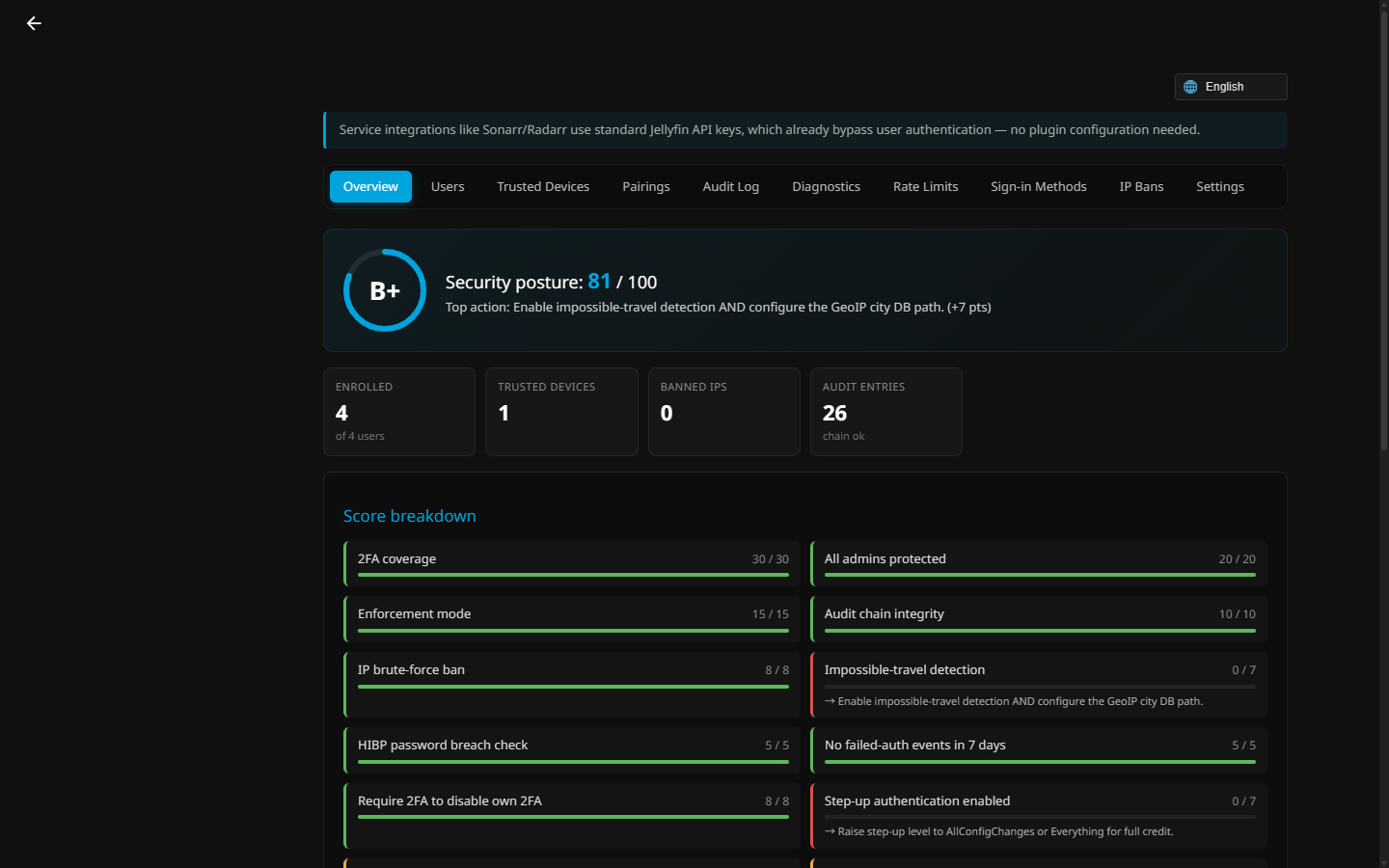
Admin overview — a live security-posture score with an actionable breakdown of every hardening factor.
| Sign in — SSO / 2FA / passkey | Verify your identity (2FA) |
|---|---|
 |  |
| Authenticator (TOTP) enrollment | 2FA login portal |
 |  |
| Per-user 2FA management | Login audit log |
 |  |
| OIDC / SSO providers | Settings |
 |  |
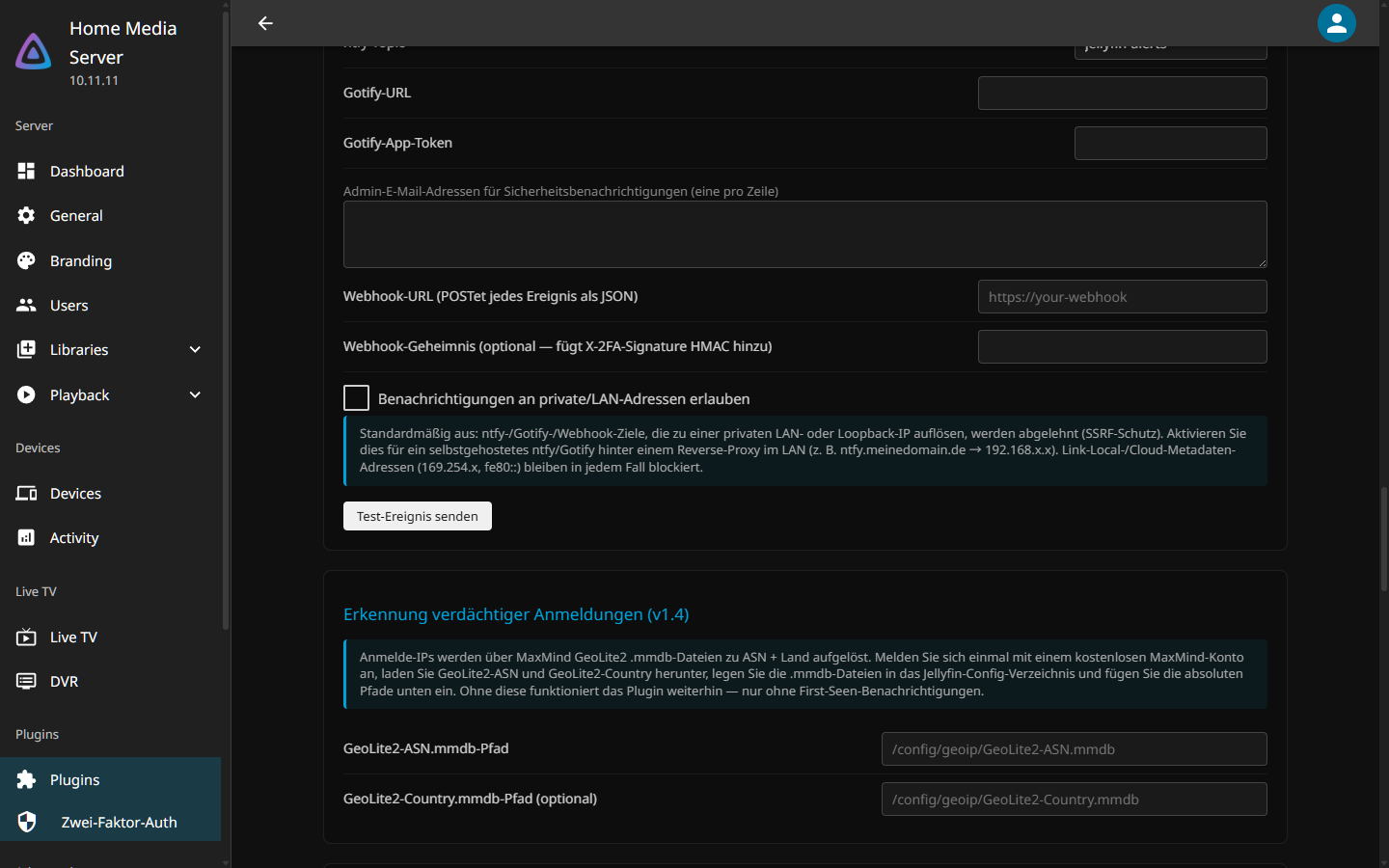
Every screen is fully translated across 8 languages (example — German):
⚙️ Installation
Requires Jellyfin 10.11+. The plugin depends on the auth-provider APIs introduced in 10.11. If your server is on 10.10.x or older, the plugin will not appear in the Catalogue after adding the repository — Jellyfin silently filters out plugins whose
targetAbiis newer than the server. Check your version under Dashboard → About; upgrade to 10.11+ if needed.
- Open Jellyfin → Dashboard → Plugins → Repositories
- Click + and add this URL:
https://raw.githubusercontent.com/ZL154/JellyfinSecurity/main/manifest.json
- Save and refresh plugins
- Go to the Catalogue tab → install Jellyfin Security
- Restart Jellyfin
Jellyfin 12
Jellyfin 12 moved to .NET 10, and a plugin compiled against 10.11 (.NET 9) will not load there. As of v2.6.0 the plugin ships two builds from one source and both are published in the same catalog entry: a .NET 9 package (targetAbi 10.11.0.0) for Jellyfin 10.11.x and a .NET 10 package (targetAbi 12.0.0.0) for Jellyfin 12.x. Jellyfin's catalog installs the build that matches your server's version, so there is nothing to choose. Installing from the catalog, or letting an existing install auto-update, does the right thing on both, and upgrading a 10.11 server to 12 later switches it to the .NET 10 build automatically.
If you install manually from the Releases page, pick the matching zip: ...v2.6.0.0-jf12.zip on Jellyfin 12, and the plain ...v2.6.0.0.zip on Jellyfin 10.11.
One thing looks different on 12: its default web layout has no side drawer, so the Two-Factor Auth entry lives in the avatar menu (below Profile) and in the user preferences list instead. Jellyfin 12 also disables the legacy authorization headers by default; the plugin's pages and endpoints already send Authorization: MediaBrowser Token (#174, #180), so nothing needs changing on that side.
Build from source
# Windows
.\build.ps1 -Install
# Linux/macOS
chmod +x build.sh && ./build.sh --install
Manual install
Download the release ZIP and extract the complete TwoFactorAuth/ directory into <jellyfin-data>/plugins/. Keep every bundled DLL, meta.json, logo.png, and the runtimes/ directory together. Do not cherry-pick only the main plugin DLL: OIDC, passkeys, GeoIP, recovery-code PDFs, and multi-architecture native support require the packaged dependencies.
Release builds validate the plugin version, Jellyfin metadata, required assemblies, case-sensitive file names, and artwork before the ZIP is produced.
Plugin directories by OS:
- Docker:
/config/plugins/TwoFactorAuth/ - Linux:
~/.local/share/jellyfin/plugins/TwoFactorAuth/ - Windows:
%LOCALAPPDATA%\jellyfin\plugins\TwoFactorAuth\
Restart Jellyfin after copying.
🚀 First-time setup
As an admin
- Install the plugin from the manifest URL in Dashboard → Plugins → Repositories → Add, then install Two-Factor Authentication from the catalog and restart Jellyfin.
- Go to Dashboard → Plugins → Two-Factor Authentication
- Open the Settings tab and verify:
- ✅ Enabled — master switch
- ✅ Require for all users — off by default. When on, every user with a password must enroll (existing trusted sessions keep working). When off, 2FA is opt-in per user.
- ✅ LAN Bypass — skip 2FA when the request comes from a LAN IP (192.168/16, 10/8, 172.16/12 by default). Adds convenience, reduces prompts on local devices.
- Email OTP — optional fallback if a user loses their authenticator. Requires SMTP config below.
- If you're behind a reverse proxy (Cloudflare, nginx, Caddy, Traefik):
- Enable Trust X-Forwarded-For
- Add your proxy IPs (or Cloudflare's IP ranges) to Trusted Proxy CIDRs
- Without this, rate limiting collapses to a single bucket because every request looks like it comes from the proxy's loopback.
- Optional: configure Notifications (Gotify, ntfy, or webhook) to get alerts when someone triggers a 2FA prompt.
As a user (enroll in 2FA)
- Sign in to Jellyfin normally (no 2FA yet)
- Open Profile → Two-Factor Authentication, or Two-Factor Auth in the avatar menu on Jellyfin 12 (or visit
https://your-jellyfin/TwoFactorAuth/Setup) - Click Set up Authenticator App
- Scan the QR code with your authenticator (Google Authenticator, Authy, 1Password, Bitwarden, etc.)
- Enter the 6-digit code shown in the app to confirm
- Generate recovery codes — you get 10 single-use codes. Save them in your password manager. Each one can sign you in if you lose your phone.
- (Optional) Add your email under Email OTP if you want email as a backup factor.
Signing in with 2FA on the web
From this point, every login from a new browser prompts for a code:
- Sign in at
/webwith username + password as usual - You will be redirected to the 2FA challenge page, which shows Signing in as username
- Enter the 6-digit code from your authenticator
- Done — this browser is trusted for 30 days (cookie bound to your device)
Passkeys (v1.4) — sign in with Face ID / fingerprint / YubiKey
Passkeys replace the 6-digit code with a biometric or hardware tap. They are phishing-resistant (the credential is bound to your exact domain) and require no typing.
Important — server config first. Passkeys require HTTPS AND the WebAuthn Relying Party ID + origin to match the URL the browser is on. In Dashboard → Plugins → Two-Factor Authentication → Settings → WebAuthn / passkeys:
- Relying Party ID: enter your public hostname only —
jellyfin.example.com. Nohttps://, no port, no path. - Allowed origins: one per line, full origin including scheme and port — e.g.
https://jellyfin.example.comandhttps://jellyfin.example.com:8096. Add every URL users actually hit.
If you skip this, browsers will refuse to register or use passkeys (Apple Safari is the strictest).
New registrations request ES256, the WebAuthn-required portable algorithm. This avoids the Ed25519/libsodium dependency that caused registration failures on some Linux, ARM, Windows, iOS, and password-manager combinations. Existing valid passkeys continue to work.
Add a passkey on a desktop browser
- Open the Setup page on the URL you configured above
- Setup → Passkeys card → optionally type a label → Add a passkey
- Browser prompts your platform authenticator (Windows Hello / Touch ID / a YubiKey USB key)
- Tap / scan / confirm — the passkey is saved
Add a passkey on iPhone (Safari)
- Open Safari and visit your Jellyfin HTTPS URL — must be the URL configured as the WebAuthn origin, not the bare LAN IP
- Sign in with username + password + 2FA code
- Setup → Passkeys → label it (e.g. "iPhone") → Add a passkey
- iOS shows "Save passkey for ...?" — confirm with Face ID / Touch ID
- The passkey is saved to iCloud Keychain and syncs to every Apple device on the same Apple ID
Add a passkey on Android (Chrome)
- Open Chrome on Android and visit your Jellyfin HTTPS URL
- Sign in with username + password + 2FA code
- Setup → Passkeys → label it (e.g. "Pixel 8") → Add a passkey
- Android shows "Save passkey to Google Password Manager?" — confirm with fingerprint / face unlock
- The passkey now lives in your Google account and syncs to every Android signed in with the same Google account
Common Android gotchas:
- "Add a passkey" does nothing → your phone needs a screen lock (PIN/pattern/biometric). Android refuses to create passkeys without one.
- "No passkey provider available" → Settings → Passwords & accounts → Passwords → enable Google Password Manager, or set Bitwarden / 1Password as your default credential provider.
- Samsung Internet sometimes hides the passkey button — use Chrome instead.
Using a passkey to sign in
- Visit your Jellyfin URL → enter username + password as usual
- At the 2FA challenge page → tap 🔑 Use a passkey instead
- The browser prompts your authenticator → confirm with biometric / hardware key
- You're in. No code typed.
What passkeys do NOT do
- Native apps (Findroid, Streamyfin, Swiftfin, official Jellyfin app) cannot use passkeys. WebAuthn is a browser-only API; native apps have no hook to call it. For app sign-in use device pairing (below) and the app's own biometric lock (Findroid → Settings → Biometric authentication, Swiftfin → Settings → Security → Lock with Face ID, etc.).
- Passkeys do not replace your password — they replace the 2FA code step. You still enter username + password first.
Native apps / TVs (Jellyfin for Tizen, Swiftfin, Jellyfin Android, etc.)
The official Jellyfin Android app and compatible web-shell clients can use the injected 2FA/SSO hand-off. If the buttons are missing after an upgrade, follow the mobile cache steps.
TVs and native clients that cannot display the browser challenge can use device pairing instead, as long as the admin has turned on BareDeviceIdBypassEnabled. It is off by default since v2.5.6, because a device ID is chosen by the client and is not a secret: anyone who has the password and sends a paired device's ID skips the second factor. There is no switch for it on the admin page; set <BareDeviceIdBypassEnabled>true</BareDeviceIdBypassEnabled> in /config/plugins/configurations/Jellyfin.Plugin.TwoFactorAuth.xml and restart Jellyfin. With it off, Trust below still records the device, but the retry gets the 2FA challenge again; use an app password instead.
- Open the native app and sign in with your username + password
- The app will show "Invalid" or fail to load — that's expected. The server recorded a pending pairing for this device.
- On any already-trusted device (your laptop, phone browser), go to Setup → Devices Waiting for Approval
- You'll see the TV/app listed. Click Trust.
- Back on the TV/app, retry sign-in. With
BareDeviceIdBypassEnabledon, it now works and stays paired until you revoke it on the Setup page.
This way a TV/console/media-box that can't type a TOTP code still gets its own credential you can revoke later.
Native apps that can't do the pairing flow (scripts, older tools)
Use app passwords: in Setup → App Passwords → Generate. You get a one-time shown random password. Use it in the app in place of your Jellyfin password. The plugin matches it via PBKDF2 hash and bypasses the 2FA prompt. Each app password can be revoked independently.
🔄 Daily use
Web login (browser)
- On the standard Jellyfin login page, click the 🔐 Sign in with Two-Factor Authentication button
- Enter your username, password, and 6-digit code from your app
- After first sign-in on this browser, you won't be asked for the code again for 30 days
Mobile / TV apps (Swiftfin, Findroid, Jellyfin for Tizen, Android TV, etc.)
On the official Android app, sign in normally and complete the injected 2FA page; after verification the app returns to Jellyfin and the trusted session is recognised on its follow-up requests.
For clients without that browser-capable flow, use the device pairing process described in First-time setup, which needs BareDeviceIdBypassEnabled turned on (see there):
- Sign in on the TV/mobile app with your password
- It'll fail once — that's normal, the server recorded a pending pairing
- Approve the device from Setup on any already-trusted browser
- Retry on the TV/app. With
BareDeviceIdBypassEnabledon, it now works until you revoke the device.
Alternative: generate an app password in Setup and use it in place of your real password. Useful for older apps or anything that can't tolerate the pairing-request delay, and it works with the default settings.
Sonarr / Radarr / Overseerr / Jellyseerr
Use Jellyfin's standard API keys (Dashboard → API Keys) for the connection between these apps and Jellyfin. API key auth bypasses user authentication entirely, so 2FA doesn't apply to that connection.
Seerr and Jellyseerr also let people sign in with their Jellyfin username and password, and the API key does not cover that sign-in: the app forwards the credentials to Jellyfin as that user. An account with TOTP or a passkey gets the 2FA challenge, which these apps cannot complete, so the sign-in fails. Have each user create an app password (the Setup page asks for TOTP on the account first) and use it in the app instead of their Jellyfin password, or sign in with Quick Connect where the app offers it (Seerr 3.4 and later). Putting the app's address in the LAN bypass list also works, but then every sign-in that arrives through the app skips 2FA. Do not add the app's address to Trusted proxy CIDRs instead: with proxy support on, Seerr forwards the left-most X-Forwarded-For address it received, which the client can write itself, so the LAN bypass would follow whatever address the client claims.
🛠️ Admin guide
The admin dashboard at Dashboard → Plugins → Two-Factor Authentication has 5 tabs:
Users
Per-user 2FA status: TOTP on/off, trusted device count, recovery codes remaining, email address (for OTP), lockout status.
- Set per-user email — for email OTP delivery (admin sets these manually)
- Toggle 2FA on/off — disabling wipes all 2FA state for that user (secret, codes, devices)
- Require password setup (v2.5.16, #104, andrewdunndev) — flags the user to set a new local Jellyfin password on their next OIDC sign-in (SMTP-less local-password recovery). Their existing password stays valid until they complete setup. Step-up gated, like other privileged user actions.
Trusted Devices
Every trusted device across all users with last-used time and expiry. Revoke any to force 2FA on that browser's next login.
Pairings
Pending TV/native-client pairing requests. Approve or deny each request and show its QR code from the dashboard.
Audit Log
Paginated, filterable login attempt history. Tracks success, failures, lockouts, bypasses, and challenge issuances. Choose Newest first or Oldest first; the selected order remains active while navigating the dashboard.
Settings
- General — plugin toggle, force 2FA for all users, email OTP toggle
- LAN Bypass — CIDR ranges, X-Forwarded-For trust, trusted proxies
- Security — failed-attempt threshold, lockout duration, audit log size, and OIDC onboarding password policy (minimum length plus optional uppercase, lowercase, number, and symbol requirements)
- SMTP — host, port, SSL, credentials, from-address (required for email OTP)
- Push Notifications — ntfy URL/topic, Gotify URL/token, admin email addresses
- Hardening (v2.5) —
RequireTwoFactorToDisable(re-prompts before a user can self-disable 2FA),StepUpLevel(which admin actions re-prompt for 2FA),AllowIndefiniteTrust(gates the user-side opt-in for never-expiring trust),DefaultLanguage(server-wide UI default; users can still override per-user) - Audit chain (v2.5) — Rebuild audit chain button repairs the hash chain after disk corruption / manual edits (step-up gated)
🌐 SSO / OIDC sign-in (v2.0)
Lets users sign in with Google / Microsoft / Authelia / Authentik / Keycloak / PocketID / Cloudflare Access / etc. instead of (or alongside) a Jellyfin password. 2FA-less accounts work too — SSO replaces the password.
Matching logic when a user signs in via OIDC:
- Existing SSO link on this Jellyfin user (matched by the IdP's stable
sub) → signs in - A verified email returned by the IdP matches exactly one non-admin Jellyfin user → signs in and links for next time
- If Link existing users by matching username or the broader Auto-create users permission is enabled for this provider, an exact username match may link one non-admin Jellyfin user
- Nothing matched + "Auto-create Jellyfin users" is enabled → a new Jellyfin account is created
- Nothing matched + auto-create is OFF → sign-in refused with "No Jellyfin user matched"
Implicit email/username linking is refused for administrators, ambiguous matches, a different subject already linked to that provider, or one IdP subject already linked elsewhere. Admins link explicitly from their Setup page.
Linking from the Setup page (v2.5.13, #95): any signed-in user — including admins — can link a new provider from /TwoFactorAuth/Setup → Linked Sign-In Methods → "Link a new provider". It opens the IdP in a popup and links by subject to the current account, so admins can link without tripping the anti-takeover guard that blocks implicit admin linking during a normal sign-in.
Setting up a Google provider (walkthrough)
1. Register a Google OAuth client
- Go to Google Cloud Console → create a project (or pick existing)
- OAuth consent screen → External → fill App name / support email → add your Gmail as a test user → Finish
- Credentials → + Create credentials → OAuth client ID → Web application
- Authorised redirect URIs — leave this open for now, we'll fill it in step 2c with the exact URL the plugin shows you.
- Save. Copy the Client ID + Client secret from the dialog.
2. Add the provider in Jellyfin
- Jellyfin admin → Plugins → Jellyfin Security → Sign-in Methods tab → "Add provider…"
- Preset: Google. Paste Client ID + Secret. Username claim:
email. Save. - After save, the provider list shows the exact
redirect_urito register at the IdP — it'shttps://YOUR-JELLYFIN-HOSTNAME/TwoFactorAuth/Oidc/Callback/<slug>, where<slug>is derived from the Display name you chose (e.g. Google →google, Login with Google →login-with-google). Go back to Google Cloud Console → Credentials → your OAuth client → add this exact URL to Authorised redirect URIs and save. If the slug doesn't match what's registered, the IdP returnsredirect_uri_mismatchand sign-in fails (issue #28).
3. Make sure each Jellyfin user has their Gmail configured
- Either: each user sets their email on the Setup page (
/TwoFactorAuth/Setup), or - admin fills it in Jellyfin Security → Users tab's email column (press Tab after typing to save)
4. Done. Sign out and the login page now shows a "Sign in with Google" button. Click → Google consent → bridge page → signed in.
Other providers
| Preset | Discovery auto-filled | Notes |
|---|---|---|
| ✅ | Username claim: email | |
| Microsoft / Entra | ✅ | Replace common in discovery URL with tenant ID for single-tenant apps |
| Apple | ✅ | Returns email only on first sign-in; no email_verified claim |
| Authelia | — | Paste https://authelia.domain/.well-known/openid-configuration |
| Authentik | — | Copy discovery URL from provider details in Authentik admin; see expired or incompatible signing certificates |
| Keycloak | — | https://keycloak.domain/realms/<realm>/.well-known/openid-configuration |
| PocketID | — | https://pocketid.domain/.well-known/openid-configuration |
| Cloudflare Access | — | SaaS → OIDC app → discovery URL ends /cdn-cgi/access/sso/oidc/<app-id>/.well-known/openid-configuration |
| GitHub | ❌ | OAuth2 only, not OIDC — not yet supported |
| Discord | ❌ | OAuth2 only, not OIDC — not yet supported |
Per-provider options
- Enable SSO (v2.5.13, #97) — master switch: the provider is active and its sign-in URL works (e.g. for your own custom button). Turn off to fully disable the provider while keeping its config saved.
- Show built-in button on login page (v2.5.13, #97) — whether the plugin renders its own "Sign in with X" button. Turn off to keep SSO live (URL still works) but hide the built-in button so you can use your own.
- Allowed groups — sign-in refused unless the IdP's
groups/rolesclaim contains at least one of these. (v2.5.17) Keycloak nests roles underrealm_access/resource_accessrather than a flat claim — the plugin now reads those too (here, and for Admin groups + role→library mapping); request the built-inrolesscope on the provider and enable "Add to ID token" on the realm-roles mapper. - Verified-email account linking (v2.5.17, #95) — a first-time OIDC sign-in whose verified email (
email_verified: true) matches a Jellyfin user's configured email is linked to that account instead of creating a duplicate. - Link existing users by matching username (v2.5.20, opt-in) — after stable-subject and verified-email matching, allow an exact username match for one non-admin user without enabling account creation. Off by default. The broader Auto-create users permission also allows this pre-existing-user match for upgrade compatibility. Ambiguous matches and subject conflicts are refused instead of guessing.
- Admin groups + "Elevate matching users to administrator" (v2.5.13, #96) — with the elevate toggle on (default off), any user whose
groupsclaim matches an entry here is granted Jellyfin admin on sign-in. Grant-only (never auto-revokes); every elevation logged at WARN. Only enable for an IdP you fully control — a compromised IdP that controls the groups claim could elevate any account. - Template user for auto-created accounts (v2.5.13, #93) — when auto-create makes a new user, copy this user's permissions + library access instead of Jellyfin's broad defaults. Leave on "(Jellyfin defaults)" to keep built-in behaviour. Tip: pick a restricted, non-admin user.
- Require IdP MFA — refuses sign-in unless the id_token's
amrclaim indicates MFA (mfa,hwk,otp,sca) - Auto-create users — creates a new Jellyfin account for unmatched IdP identities. Only enable for IdPs where you trust everyone with an account (not public Google).
- Skip plugin 2FA — default ON; the IdP already authenticated. Disable only if you want belt-and-braces.
- Force password setup on first sign-in (v2.5.14; hardened through v2.5.20) — flag auto-created OIDC users to set a local Jellyfin password on first sign-in. The page names the account and enforces the configured minimum length plus optional uppercase, lowercase, digit, and symbol requirements. Before accepting a password it revalidates the live IdP session and requires a short-lived, single-use onboarding proof. Cancel and sign out revokes the temporary Jellyfin session; an unfinished newly-created account is removed, while an existing account is never deleted.
- Also sign out at the provider (#134, opt-in): on Sign out, hand the browser to the provider's
end_session_endpointso the IdP session ends too, instead of leaving it live for the next visitor to that browser. Off by default. Requires the provider to publishend_session_endpointin its discovery document; if it doesn't, sign-out silently stays local. The plugin sendsclient_idand notid_token_hint, since it never retains id_tokens. Keycloak (>= 18) and Authentik accept that form, and an OP that insists onid_token_hintwill show its own generic sign-out page instead. Only the browser bridge participates; native-app sign-in keeps stock local sign-out. - Return URL after provider sign-out (#134, optional): an absolute
https://URL sent aspost_logout_redirect_uriso the browser comes back to Jellyfin instead of stopping on the IdP's logged-out page. Leave empty (the default) to stop there, which is what most people want. Register the exact URL at the provider first, because most OPs reject the entire sign-out request when it carries an unregistered redirect.{server}/TwoFactorAuth/Oidc/LoggedOutis provided for this. - Don't force re-authentication (
prompt=login) (v2.5.19, #119, opt-in) — compatibility switch for IdPs such as Authentik that rejectprompt=login. Leave it off unless needed because forced re-authentication protects account-link, step-up, and onboarding validation flows from silently accepting an existing IdP session. - Additional allowed CIDRs (v2.5.16, #103, andrewdunndev — Advanced) — comma-separated CIDRs the SSRF guard will permit for this provider's endpoints, on top of "Allow private endpoints". For addresses the guard correctly rejects but you deliberately trust — e.g. the rootless Podman host-gateway
169.254.1.2/32./0is rejected; each listed CIDR bypasses safety checks for matching addresses, so only list addresses you own. See OIDC private / VPN / LAN endpoints.
🚫 Brute-force IP banning (v2.0)
Auto-bans source IPs that hammer the login endpoint. Fail2Ban-style, entirely in-process — no external service needed.
Configure: Jellyfin Security → Settings → "Brute-Force Protection":
- Failure threshold (default 10)
- Window (default 10 min)
- Ban duration (default 24 h)
- Exempt CIDRs (never banned — e.g. your office IP)
Always exempt: LAN-bypass CIDRs, trusted-proxy CIDRs, anything in the exempt list.
Manage bans: Jellyfin Security → IP Bans tab lists all active bans with expiry. Click "Unban" to clear. You can also manually ban an IP here (e.g. "someone who's been guessing").
Bans persist across restarts via <config>/plugins/configurations/TwoFactorAuth/ip-bans.json.
✈️ Impossible-travel detection (v2.0)
Flags sign-ins where the geographic distance vs. elapsed time exceeds commercial-jet cruise speed. London → Tokyo in 30 minutes ≈ Mach 20: notification fires.
Requires: MaxMind GeoLite2-City.mmdb. Free account, download the City DB, drop it in /config/geoip/, paste the path in Settings → Impossible-Travel Detection. The path must be the one the Jellyfin process sees (inside the container, for Docker) and readable by the user Jellyfin runs as; the Diagnostics tab tells you which of those is not the case.
Signal path: Triggers the same Notification channels the plugin already uses (ntfy, Gotify, webhook, admin emails). Includes distance, duration, inferred speed, and country hop in the message.
Off by default; enable in Settings once the city DB is in place.
🔒 Per-user IP allowlist (v2.0)
Pin a user account to specific CIDRs. Empty = no restriction (default). Useful for admin accounts where lateral exposure hurts most.
Configure (user self-service): Setup page → IP Allowlist card → one CIDR per line → Save.
Configure (admin, per user): PUT /TwoFactorAuth/IpAllowlist/User/{userId} (UI not wired in yet; edit the user JSON or use the API).
⚠ Self-lockout risk: if you typo a CIDR, you can't sign in. Recover by editing /config/plugins/configurations/TwoFactorAuth/users/<your-guid>.json and clearing IpAllowlistCidrs.
🔐 Step-up authentication (v2.5)
Re-prompts the admin for a fresh 2FA challenge before sensitive operations. Defends against a logged-in session being hijacked or left unattended on a workstation.
Configure: Jellyfin Security → Settings → Hardening → Step-up level:
| Level | What re-prompts |
|---|---|
Off | Nothing. (Default — opt in deliberately.) |
Destructive | Deleting users, wiping 2FA state, rebuilding the audit chain, removing OIDC providers. |
AllConfigChanges | All of Destructive, plus toggling settings, editing SMTP / push / brute-force / impossible-travel config. |
Everything | All of AllConfigChanges, plus viewing audit log, listing IP bans, exporting config. (Strongest — least convenient.) |
How the flow looks:
- Admin clicks a gated action (e.g. Rebuild audit chain).
- UI shows a 2FA challenge modal.
- Admin enters the 6-digit code (or passkey / recovery code).
- Action proceeds. Step-up token is single-use; re-prompts next time.
Related setting: RequireTwoFactorToDisable — when on, users can't disable their own 2FA without entering a fresh code first. Stops a stolen session cookie from being used to switch 2FA off.
📦 Encrypted configuration exports (v2.5)
Back up or migrate plugin configuration (settings, OIDC providers, trusted CIDRs, brute-force config, etc.) without leaking secrets.
Export (admin):
- Admin dashboard → Config → Export.
- Enter a passphrase (10+ chars recommended; longer is better).
- Download the
.json.encenvelope. Treat it like a password — its strength is the passphrase's.
Import (admin):
- Admin dashboard → Config → Import.
- Upload the
.json.encfile → enter the same passphrase → review the preview of what will change → confirm.
Crypto envelope (so you can audit it):
- KDF: PBKDF2-SHA256, 600 000 iterations, 32-byte derived key, 16-byte random salt per export.
- Cipher: AES-256-GCM with 12-byte random nonce.
- AAD: Plugin version + envelope version, so an export captured under v2.5 can't be replayed against a future incompatible schema.
- Versioned envelope:
{ "v": 1, "salt": "...", "nonce": "...", "ct": "...", "tag": "..." }— future versions can change parameters without breaking decryption of older exports.
⚠ No back door: a lost passphrase means the export is unrecoverable. The plugin author cannot decrypt your file. Store the passphrase in your password manager separately from the export file.
📊 Security score & admin overview (v2.5)
A 12-factor security score (raw 130 points, normalized to 100) and a live auth-activity chart on the admin dashboard.
In v2.5.20, posture checks initialise independently on Jellyfin 10.11.11. A failed or unavailable diagnostic is reported for that factor without leaving the score on Computing..., and dashboard tab navigation remains usable.
12 score factors
| Factor | Points | What it checks |
|---|---|---|
| Coverage | 30 | % of live users enrolled in 2FA (deleted accounts are no longer counted, v2.5.18) |
| Admin coverage | 20 | All admins specifically have 2FA on |
| Enforcement | 15 | RequireForAll is on |
| Audit chain | 10 | Hash chain is intact (no breakage) |
| IP ban | 8 | Brute-force banning enabled with sane threshold |
| Impossible travel | 7 | Functional — requires GeoIpCityDbPath set to a valid MaxMind file |
| HIBP | 5 | Have-I-Been-Pwned password check enabled |
| Clean 7-day audit | 5 | No failed admin sign-ins in the last 7 days |
| Require-to-disable | 8 | RequireTwoFactorToDisable is on |
| Step-up | 7 | StepUpLevel is Destructive or stronger |
| Webhook | 5 | Push notifications (ntfy / Gotify / webhook) configured |
| Recovery codes | 5 | At least one user has generated recovery codes |
Auth-activity overview
Admin dashboard → Overview tab shows a stacked-area chart of successful / failed / blocked sign-ins.
- Range selector: 1 week / 1 month / 1 year. Buckets are server-side: per-hour for 1w, per-day for 1m, per-month for 1y.
- Sparse-range backfill: empty buckets are filled with zero on the server so a 1-year chart still spans 12 bars even if only one month has data — no collapsed-bar UX.
- Hover tooltips show exact counts and the bucket date.
- Dashed gridlines at 25 / 50 / 75 % and first / middle / last x-axis date markers so values are readable without hovering.
🌍 Internationalization (v2.5)
Every user-visible string in the setup, login, challenge, OIDC onboarding, admin pages, and injected desktop/mobile sidebar is translatable. Ships with 8 first-class languages at full key parity (847 keys each).
| Language | Locale | Display name in picker |
|---|---|---|
| English | en | English |
| Deutsch | de | Deutsch |
| Español | es | Español |
| Français | fr | Français |
| Italiano | it | Italiano |
| 日本語 | ja | 日本語 |
| Português | pt | Português |
| 中文 | zh | 中文 |
How the active language is chosen (first match wins):
- Explicit URL override such as
?lang=de. - Signed-in user's plugin language preference.
- The plugin language remembered in browser storage.
- A specific non-English server-wide
DefaultLanguage. - Jellyfin's active page language, then the browser language.
- The server default, then English.
The injected dashboard entry updates its label live when Jellyfin's language changes and is available in both desktop and mobile navigation.
Native-name picker — the picker shows each language in its own script ("Deutsch", "日本語", "中文") rather than locale codes, so a user who only reads Japanese can find their language without reading English.
Implementation notes (for translators / contributors):
- Translation bundles live in
src/Jellyfin.Plugin.TwoFactorAuth/Pages/translations/<lang>.jsonand are served via/TwoFactorAuth/translations/{lang}with strong caching. - The shared
tfa-i18n.jshelper exposeswindow.tfaI18n.tr(key, fallback),loadTranslations(lang),applyTranslations(root),renderLanguagePicker(container),getEffectiveLanguage(), and areadypromise so dynamic JS-rendered content doesn't render in English before the bundle loads. /TwoFactorAuth/public-configexposes the server-wide default language to anonymous pages (login / challenge) without leaking other config.
Want to add a language? Copy translations/en.json → translate → drop in translations/<your-locale>.json. The picker auto-discovers new files. Pull requests welcome.
🕰️ Indefinite device trust (v2.5)
Lets a user mark a specific trusted browser or paired device as "trusted forever" instead of "trusted for 30 days." Useful for a personal phone or home TV where the user would rather have one less prompt and accept the residual risk if the device is lost.
Admin gate (default off): Jellyfin Security → Settings → Hardening → AllowIndefiniteTrust. When off, the user-side opt-in toggle is hidden entirely — no way to enable per-device. When on, users see an Indefinite trust toggle on each of their trusted browsers / paired devices.
User opt-in (per device):
- Setup page → Trusted Devices or Paired Devices card.
- Click the Indefinite trust toggle on the device you want to never expire.
- Confirm. The trust cookie's expiry is set to 100 years and the middleware skips the normal expiry check for this device.
Revoke / undo: same toggle off. Or revoke the device entirely from Setup → Trusted Devices.
⚠ Tradeoff — an indefinite-trust device is your weakest link. If someone steals the laptop, that browser is signed in until you revoke it. Don't enable on shared / borrowed machines, and revoke immediately on device loss. The admin gate exists so org admins can keep this off entirely if their threat model doesn't tolerate the tradeoff.
🔐 Hardened self-service factor changes (v2.5.6)
Closes the stolen-session takeover path. Before v2.5.6, an attacker who hijacked an authenticated browser cookie could silently enroll their own authenticator (add a passkey, generate a new TOTP secret, regenerate recovery codes) without ever proving they were the legitimate user — the original 2FA only gated login, not factor changes. v2.5.6 closes that.
Setting: Jellyfin Security → Settings → Hardening → Hardened security for users (factor changes). Tri-state:
- Off — users can change 2FA factors without a current code (legacy behaviour, ≤ v2.5.5).
- User choice — exposes a per-user toggle on the Setup page; each user opts in individually.
- Forced (default) — every user must submit a current factor before adding/replacing any 2FA factor.
Covered mutations — adding/replacing TOTP, regenerating recovery codes, creating an app password, adding/removing a passkey, enabling/disabling email OTP. All gated.
Proof of factor — the step-up prompt accepts any of:
- A current TOTP code from the user's authenticator app
- An unused recovery code
- A passkey assertion (when the user has at least one passkey enrolled)
- An emailed 8-digit step-up code (when the user has a configured email + SMTP is set up)
- An OIDC re-auth via a linked IdP (v2.5.7 — see below)
Step-up tokens are single-use, 60-second TTL, and bound to the requesting user — they can't be replayed or reused for a second mutation.
🔑 OIDC step-up factor for users (v2.5.7)
Lets a user satisfy the hardened self-service step-up by re-authenticating to a linked OIDC provider, instead of needing a TOTP / passkey / recovery code. Useful for users whose only configured factor is OIDC (common in OIDC-only deployments — see "Hide built-in login buttons" below).
How it works:
- Step-up modal renders a "🌐 Verify with ProviderName" button per IdP the user has linked (data from
GET /TwoFactorAuth/Oidc/MyLinks). - Click opens the IdP in a popup window (520×720) with
prompt=loginso the IdP must actually re-authenticate the user — silent SSO confirmation is rejected. - The IdP redirects to the standard
/TwoFactorAuth/Oidc/Callback/{providerId}endpoint. The state token marks this as a step-up flow. - Callback validates: the state token is bound to the current user; the IdP-returned
submatches the user's storedSsoLinkfor that provider. Both must match. Signing into a different IdP account doesn't grant step-up. - On match, the server mints a step-up token, returns an HTML page that
postMessages it back to the opener (same-origin only), and closes the popup. - The modal stores the token and proceeds with the factor mutation.
Security guards:
prompt=logindefeats a hijacked-session attacker who clicks "Sign in with X" hoping for a silent confirmation.- Subject-match against
SsoLinkdefeats a hijacked-session attacker who happens to have their own account at the same IdP. - State token is single-use, 10-minute TTL, bound to the requesting user id and provider id.
- Popup
postMessagetarget is restricted towindow.location.origin, never'*'.
The "Verify with X" buttons only appear in the step-up modal when the user has at least one OIDC link; they don't add UI for users who don't use OIDC.
🙈 Hide built-in 2FA / Passkey login buttons (v2.5.7)
For OIDC-only deployments where every user signs in through your IdP and the plugin's injected sign-in shortcuts add noise. Two independent admin toggles in Settings → Hardening:
- Hide the "Sign in with Two-Factor Authentication" button — removes the 2FA shortcut
inject.jsadds to Jellyfin's main login page. - Hide the "Sign in with passkey" button — removes the passkey shortcut.
Each is independent — pick any combination. Configured OIDC provider buttons stay visible regardless of these flags.
Login-link placement & Forgot-password (v2.5.16, #79, ZEROX7): an opt-in Settings → Hardening → "Show the SSO / 2FA / passkey links below the Use Quick Connect button" toggle (default off) moves the injected links beneath Quick Connect instead of directly under Sign In. Separately, the native "Forgot password" link is now hidden automatically when there's no visible password field (e.g. OIDC-only login), since there'd be nothing to recover.
⚠ The /TwoFactorAuth/Login page still works directly even when both toggles are on. Admins/fallback users can always reach it by URL, so you don't lock yourself out of the plugin's login flow if your IdP becomes unreachable.
🌐 OIDC private / VPN / LAN endpoints (v2.5.7)
Lets you point the plugin at an IdP that lives on a private network (Tailscale, Wireguard, LAN-only Authentik / Authelia / Pocket ID, etc.). Without this toggle, v2.5.5's SSRF guard rejects any OIDC discovery URL that resolves to an RFC1918 / loopback / link-local address, or that uses plain http.
Setting: per-provider, in the OIDC provider edit form → Allow private / VPN / LAN endpoints (marked Advanced, default off).
Granularity: per-provider. A public Google + a private Authentik can coexist — Google keeps the strict SSRF guard, Authentik gets the bypass. The toggle scopes to ONE provider's discovery / token / userinfo / jwks fetches; other providers are unaffected.
⚠ Trade-off — enabling this for a provider whose discovery URL gets tampered with would let an attacker pivot the plugin into your internal services (e.g. AWS IMDS at 169.254.169.254, internal admin APIs, the Docker daemon socket via host networking). Only enable for IdPs you intentionally host on private networks where the network boundary IS the security boundary.
Finer-grained alternative (v2.5.16, #103, andrewdunndev) — even with "Allow private networks" on, the guard still blocks link-local addresses (169.254.0.0/16, the IMDS range), which catches the rootless-Podman host-gateway 169.254.1.2 (host.containers.internal). Rather than open the whole private bypass, use the per-provider "Additional allowed CIDRs" field to allowlist exactly that one address (169.254.1.2/32). It's surgical (/0 and out-of-range prefixes are rejected) and each listed CIDR only bypasses the check for matching addresses.
The OIDC spec doesn't let admins mix-and-match per-endpoint — the IdP's discovery document dictates which token / userinfo / jwks URLs the plugin fetches, and they all live in the same network as discovery. So per-provider is the natural granularity.
💾 Verified-token persistence (v2.5.7)
Closes the "session permanently 403'd after restart" issue (#52). Before v2.5.7, the plugin tracked which access tokens had completed 2FA in an in-memory dictionary. After a docker compose down/up (or any process restart), that dictionary was empty — but the user's Jellyfin auth token was still valid in Jellyfin's DB. The failsafe BlockToken then triggered on every SessionStarted reconnect, and RequestBlockerMiddleware 403'd every API call. The user couldn't even reach /Users/Me/Logout — they had to wipe local storage.
Fix: SHA-256 hashes of verified tokens persist to {plugin-data}/verified_tokens.json. On every restart, the hashes are loaded back into the in-memory set, so already-verified sessions stay verified.
What's stored:
- 64-char hex SHA-256 hash of each verified token (one-way, leak-resistant — a stolen sidecar yields no usable tokens).
- ISO-8601 UTC expiry timestamp (30-day TTL per entry).
- Cap at 5000 most-recent entries to bound disk usage.
What's NOT stored — never the plaintext token, never user ids, never device ids. Just hash + expiry.
Operational signal — after the first restart following a successful login, the log emits [2FA] Loaded N verified-token hashes from /config/plugins/configurations/TwoFactorAuth/verified_tokens.json. That confirms persistence is active.
📧 SMTP setup (email OTP)
Email OTP requires SMTP credentials. Common providers:
Gmail (with app password)
SMTP Host: smtp.gmail.com
SMTP Port: 587
Use SSL/TLS: ✓
SMTP Username: your-email@gmail.com
SMTP Password: <generate at https://myaccount.google.com/apppasswords>
From Address: your-email@gmail.com
From Name: Jellyfin 2FA
Generic SMTP relay
SMTP Host: mail.example.com
SMTP Port: 587 (STARTTLS) or 465 (implicit TLS)
Use SSL/TLS: ✓
Per-user email addresses
Email OTP needs the user's email address. In Admin → Users, edit each user's email field. The plugin doesn't auto-pull from Jellyfin user metadata (Jellyfin's User entity exposes email inconsistently across versions).
🆘 Recovery — locked out
Lost authenticator app + have recovery codes
Sign in via /TwoFactorAuth/Login. In the code field, enter one of your recovery codes (format: XXXXX-XXXXX). Click "Use a recovery code instead" if your authenticator app field is showing. (v2.5.18) If you're already signed in and hit the "Verify your identity" screen, it now shows a Recovery tab too (whenever you have unused recovery codes), so you can fall back to a recovery code mid-session.
Lost authenticator AND lost recovery codes (admin)
SSH into the Jellyfin server and edit the user data file:
# Path
/config/plugins/configurations/TwoFactorAuth/users/{userId}.json

# Set:
"TotpEnabled": false,
"TotpVerified": false,
"EncryptedTotpSecret": null,
"RecoveryCodes": [],
"TrustedDevices": []
Restart Jellyfin. The user can now log in normally and re-enroll.
Sign-in refused after the plugin stopped loading (InvalidAuthProvider)
Signing in with a passkey, creating an app password, or signing in through SSO moves that account onto the plugin's own sign-in provider. If Jellyfin then stops loading the plugin (for example a build made for another Jellyfin version, or missing files), it has no provider for those accounts and refuses their password, the correct one included, administrators too. The Jellyfin log shows:
User alice was found with invalid/missing Authentication Provider Jellyfin.Plugin.TwoFactorAuth.Services.TwoFactorAuthProvider. Assigning user to InvalidAuthProvider until this is corrected
Authentication request for alice has been denied (IP: ...).
Uninstalling or disabling the plugin from Dashboard → Plugins no longer causes this: the plugin first hands those accounts back to Jellyfin's own provider, and takes them back the next time it starts. The steps below are for a plugin that does not load at all, which never gets that chance.
-
Get the plugin loading again, if you can. Nothing is lost: the accounts sign in as before as soon as it loads. If Dashboard → Plugins lists it as Disabled, enable it and restart Jellyfin. With no administrator able to sign in, set
"status": "Active"in the plugin'smeta.json(in its folder under/config/plugins/) and restart Jellyfin. -
If an administrator can still sign in, open Dashboard → Users, pick the account and press Save without changing anything. With the plugin not loaded, Jellyfin offers only its own provider, so saving the profile moves the account onto it. If another sign-in plugin (LDAP, for example) is installed, the page shows Authentication Provider: pick the one the account should use.
-
If no administrator can sign in, move the accounts in Jellyfin's database. Stop Jellyfin, run the commands below (with the
sqlite3tool) and start Jellyfin again:# In the official Docker image the database is data/jellyfin.db inside the folder mounted at /config. # Elsewhere, find it with: find / -name jellyfin.db 2>/dev/null cp /path/to/jellyfin.db* /path/to/backup/ # The accounts on the plugin's provider sqlite3 /path/to/jellyfin.db "SELECT Username FROM Users WHERE AuthenticationProviderId = 'Jellyfin.Plugin.TwoFactorAuth.Services.TwoFactorAuthProvider';" # Move them to Jellyfin's own provider; prints how many were moved sqlite3 /path/to/jellyfin.db "UPDATE Users SET AuthenticationProviderId = 'Jellyfin.Server.Implementations.Users.DefaultAuthenticationProvider' WHERE AuthenticationProviderId = 'Jellyfin.Plugin.TwoFactorAuth.Services.TwoFactorAuthProvider'; SELECT changes();"
The plugin does not undo steps 2 and 3. Once it runs again, an account moved this way still gets its second factor, but its app passwords are refused until it creates a new one; after that, its older app passwords work again too.
To always have a way in, keep one administrator account that never signs in with a passkey, never creates an app password and never signs in through SSO. That account stays on Jellyfin's own provider, so it can sign in and run step 2 for the others even when the plugin does not load.
🛠️ Troubleshooting
2FA / SSO buttons or the Security sidebar are missing on Android or mobile web
The Android app and mobile browsers can retain Jellyfin's web shell from before the plugin was installed or upgraded. The plugin now prevents its patched index.html from being cached, but an older shell already stored on a device may still need one manual refresh:
- Official Android app: force-stop Jellyfin, then clear the app's cache (not its storage/data) and reopen it.
- Mobile browser: close every Jellyfin tab, reopen the exact Jellyfin URL, and perform a hard reload. A private/incognito tab is a quick way to confirm whether local cache is involved.
- If Jellyfin uses a Base URL such as
/jellyfin, make sure the device opens that full URL, for examplehttps://media.example.com/jellyfin. - Open
<your Jellyfin URL>/TwoFactorAuth/injectin the same browser. It should return JavaScript, not a 404 or a proxy error. - If you use nginx, Cloudflare, or another reverse proxy, do not cache
/web/index.html,/web/, or/TwoFactorAuth/*.
After one successful refresh, the login buttons and the Two-Factor Auth entry (sidebar on 10.11, avatar menu on Jellyfin 12) should appear normally. Clearing the full app storage is not normally required and will sign the device out.
SSO sign-in fails with "Sign-in token could not be verified"
From v2.5.21 this message is much rarer, and when it does appear it now tells you what to fix. Instead of one generic string, the sign-in page reports the actual cause — an expired IdP certificate, a signing-key mismatch, a Client ID mismatch, clock drift, or an unsupported signing algorithm. Follow whatever it says; the full technical detail is in the Jellyfin server log.
Two changes in v2.5.21 are worth knowing about:
Expired signing certificates no longer block sign-in. Authentik generates self-signed signing certificates that expire after one year and does not rotate them automatically. Earlier versions rejected the token once that certificate lapsed (IDX10249), even though the signature itself was still valid — an outage with no security benefit, since the plugin fetches the JWKS over TLS from the issuer's own discovery endpoint and that, not the certificate's validity window, is the trust anchor. The signature is still fully verified on every sign-in; only the certificate's expiry date is no longer treated as fatal. You should still renew it (System → Certificates in Authentik), but a lapsed certificate will not lock your users out.
If the error mentions the signing algorithm, the provider is signing with HMAC (HS256) rather than a key pair. In Authentik that means the provider has no Signing Key selected. Pick an RSA certificate there. The plugin accepts the standard asymmetric OIDC algorithms (RS256/384/512, ES256/384/512, PS256/384/512) and deliberately refuses HMAC and none — that allowlist is what closes the RS256→HS256 algorithm-confusion attack, so it is not configurable.
If the error names a RSA-OAEP / RSA-OAEP-256 (or another RSA-*, ECDH-ES*, *KW, or dir) algorithm, that is a key-encryption algorithm, not a signing one: your IdP is returning an encrypted ID token (JWE), and the plugin, like most OIDC clients, verifies a signed token (JWS) against your IdP's published keys rather than decrypting one. In Authentik this is the provider's Encryption Key under Advanced protocol settings — set it to blank / --------- so Authentik returns the plain signed JWT the plugin can verify. Keep the Signing Key set (an RS256 certificate is fine); it is only the Encryption Key that causes this. Encrypting the ID token buys little here anyway, since the exchange is already over TLS and the token is validated server-side. Encrypted (JWE) ID tokens are not supported today. (Reported in discussion #188.)
If you changed or rotated the signing key and sign-in still fails, restart Jellyfin so the JWKS cache picks up the new key. See Authentik's certificate management and OAuth2/OIDC provider documentation.
Chromium console errors about Permissions-Policy and synchronous XHR
If you deployed the Permissions-Policy header from Jellyfin's official nginx example, Chromium-based browsers log:
Error with Permissions-Policy header: Unrecognized feature: 'ambient-light-sensor'.
Error with Permissions-Policy header: Unrecognized feature: 'battery'.
Error with Permissions-Policy header: Unrecognized feature: 'document-domain'.
Error with Permissions-Policy header: Unrecognized feature: 'interest-cohort'.
[Violation] Permissions policy violation: Synchronous requests are disabled by permissions policy.
The first four are harmless: those features were removed from the spec, so Chromium warns and ignores them. Dropping them from the header silences the noise:
add_header Permissions-Policy "accelerometer=(), bluetooth=(), camera=(), clipboard-read=(), display-capture=(), encrypted-media=(), gamepad=(), geolocation=(), gyroscope=(), hid=(), idle-detection=(), keyboard-map=(), local-fonts=(), magnetometer=(), microphone=(), payment=(), publickey-credentials-get=(), serial=(), sync-xhr=(), usb=(), xr-spatial-tracking=()" always;
The sync-xhr violation does not come from this plugin. Jellyfin Security issues no synchronous XMLHttpRequest anywhere — every request it makes, on every page, uses fetch() — so you can keep the strict sync-xhr=() baseline. The violation is raised by another plugin's bundled jQuery calling $.ajax({ async: false }), and the culprit is named on the line above the inject.js frame in the stack trace.
Jellyfin Security patched XMLHttpRequest.prototype.send globally, which put inject.js in the stack of those third-party calls and made it look responsible. As of v2.5.21 the plugin passes synchronous requests straight through untouched, so the stack trace now points at the real caller. If a plugin genuinely needs synchronous XHR, either report it upstream or relax the header to sync-xhr=(self) for that deployment.
Plugin breaking your server
Disable the plugin without uninstalling:
# Edit
/config/plugins/configurations/Jellyfin.Plugin.TwoFactorAuth.xml

# Set
<Enabled>false</Enabled>
Restart Jellyfin. All 2FA enforcement turns off; users can log in normally.
Enabled is read by the plugin itself, so it only helps while Jellyfin still loads the plugin. If the plugin does not load at all and accounts are refused, see Sign-in refused after the plugin stopped loading.
Behind SWAG / fail2ban: other services on the same proxy go offline after a 2FA login
Fixed at the source in v2.4.12 — on a current build you should not hit this. Requests blocked pending 2FA now return 403, not 401, and SWAG's default
nginx-unauthorizedjail only counts 401s, so a normal 2FA login no longer trips a ban (issue #36). The injected script also short-circuits the follow-up API calls so the browser stops hammering the server while the challenge is open. The tuning below is kept only for older builds, or if you run a custom jail that also bans on 403.
If you run Jellyfin behind SWAG (linuxserver.io's all-in-one nginx + fail2ban + Let's Encrypt container) or any other stack with a fail2ban jail watching for HTTP 401s, on a build older than v2.4.12 you may have seen this symptom:
- Jellyfin works fine on the LAN
- External access via the reverse proxy fails with
ERR_CONNECTION_REFUSED - Other applications behind the same proxy also become unreachable
- Brief recovery every ~10–15 minutes, then it fails again
Why this happens. When 2FA enforcement is on and a user logs in, the plugin's RequestBlockerMiddleware 401s every post-login API call from the browser (/Sessions/Capabilities/Full, /DisplayPreferences/usersettings, /socket, /System/Endpoint, etc.) until the user completes 2FA — that's roughly 15 401s in a few seconds per legitimate login.
SWAG's default nginx-unauthorized fail2ban jail watches the nginx access log for any 401 response code (regardless of which backend produced it) and bans the source IP after 5 in 10 minutes. A single 2FA login trips it. The ~15-minute recovery cycle matches the jail's default bantime = 600.
The "everything else breaks" symptom depends on what IP fail2ban actually bans:
- If SWAG sees Cloudflare's edge IP (you're behind Cloudflare) → it bans Cloudflare → all external traffic to all services fails
- If SWAG sees the Docker bridge gateway IP (misconfigured forwarded headers) → inter-container traffic dies → SWAG can't reach any backend
- If SWAG sees the user's real client IP → only they get locked out
Fix. Drop this into /config/fail2ban/jail.d/jellyfin.local:
[nginx-unauthorized]
maxretry = 30
findtime = 600
That changes "ban after 5 401s in 10 min" → "ban after 30 401s in 10 min." A normal 2FA login generates ~15 401s, so 30 gives ~2× headroom while still catching real brute-force (hundreds of 401s per minute).
Scale by user count — fail2ban counts per source IP, and if you're behind Cloudflare or a similar CDN, ALL your users share the same source IP from fail2ban's view. Simultaneous logins compound:
| Users on the server | Recommended maxretry |
|---|---|
| 1 (solo) | 30 |
| 2–3 (small household) | 50 |
| 4–6 (family) | 100 |
| 10+ (community / extended) | 150 or enabled = false |
Restart SWAG (docker restart swag or your equivalent) after the change.
Alternative — disable the jail entirely. If you'd rather not patch fail2ban:
[nginx-unauthorized]
enabled = false
You lose protection against generic 401-burst attacks on all apps behind SWAG (not just Jellyfin), but the other default SWAG jails (nginx-http-auth, nginx-badbots, nginx-botsearch, nginx-deny) still cover the common brute-force vectors.
Why this isn't strictly a plugin bug. The plugin behaves correctly per HTTP/OAuth (401 on unverified tokens). SWAG's fail2ban behaves correctly per brute-force-protection norms. The collision sits in the gap between the two — fail2ban can't tell a legitimate 2FA enforcement burst from an attack just by reading status codes in the access log. This was resolved at the source in v2.4.12 (issue #36): the blocked-request response is now 403, which the default nginx-unauthorized jail does not count, so a normal 2FA login no longer trips it. The jail-threshold tuning above is only needed on older builds or a custom jail that also bans on 403.
🏗️ Architecture
The plugin uses 5 ASP.NET Core middleware components plus an ISessionManager.SessionStarted event handler:
IndexHtmlInjectionMiddleware— injects the Base URL-aware login/dashboard script into Jellyfin'sindex.html, prevents stale web-shell caching, and restores controls after single-page navigationTrustCookieMiddleware— checks the__2fa_trustcookie on auth requests; if valid, marks the user as pre-verified for the upcoming sessionTwoFactorEnforcementMiddleware— inspects responses from auth endpoints (catches the auth response shape regardless of which Jellyfin route was used)RequestBlockerMiddleware— blocks API requests from authenticated users who haven't completed 2FA yet (returns 401)AuthenticationEventHandler(hosted service) — subscribes toSessionStarted; if a session for a 2FA-enabled user starts without verification, the user is added to the blocker's blocklist. Repeated native-client events for the same logical user/device are deduplicated before notifications are sent.
Persistent state:
users/{userId}.json— per-user TOTP secret (AES-GCM encrypted), recovery codes (per-code-salted PBKDF2-HMAC-SHA256, 600k iterations), trusted devices, lockout statesecret.key— 32-byte AES-GCM key for TOTP secret encryptioncookie.key— 32-byte HMAC-SHA256 key for trust cookie signingaudit.json— login attempt log
All file writes use atomic write-then-rename so crashes mid-write don't corrupt user state.
📡 API endpoints
User-facing (anonymous or self-auth)
GET  /TwoFactorAuth/Login                                — login page (HTML)
GET  /TwoFactorAuth/Setup                                — enrollment page (HTML)
GET  /TwoFactorAuth/Challenge?token=...                  — challenge page (HTML)
GET  /TwoFactorAuth/inject                               — cache-resistant login/dashboard injection script
POST /TwoFactorAuth/Authenticate                         — username + password + code login
POST /TwoFactorAuth/Verify                               — verify code against challenge token
POST /TwoFactorAuth/Email/Send                           — request email OTP for current challenge

POST /TwoFactorAuth/Setup/Totp                           — generate TOTP secret + QR (auth)
POST /TwoFactorAuth/Setup/Totp/Confirm                   — confirm TOTP enrollment (auth)
POST /TwoFactorAuth/Setup/Disable                        — disable 2FA for self (auth)
POST /TwoFactorAuth/RecoveryCodes/Generate               — generate recovery codes (auth)
GET  /TwoFactorAuth/RecoveryCodes/Status                 — count remaining (auth)

GET  /TwoFactorAuth/Devices                              — own trusted devices (auth)
DELETE /TwoFactorAuth/Devices/{id}                       — revoke own trusted device (auth)
POST /TwoFactorAuth/Devices/Register                     — pre-register device ID (auth)
Admin-only (RequiresElevation)
GET    /TwoFactorAuth/Users                              — all users with 2FA status
POST   /TwoFactorAuth/Users/{id}/Toggle                  — enable/disable 2FA for user
GET    /TwoFactorAuth/AllTrustedDevices                  — devices across all users
DELETE /TwoFactorAuth/Users/{userId}/Devices/{deviceId}  — admin revoke
GET    /TwoFactorAuth/AuditLog                           — login history
GET    /TwoFactorAuth/Pairings                           — pending TV pairings
POST   /TwoFactorAuth/Pairings/{code}/Approve            — approve pairing
POST   /TwoFactorAuth/Pairings/{code}/Deny               — deny pairing
GET    /TwoFactorAuth/ApiKeys                            — list managed API keys
POST   /TwoFactorAuth/ApiKeys                            — generate new API key
DELETE /TwoFactorAuth/ApiKeys/{id}                       — delete API key
POST   /TwoFactorAuth/Sessions/{id}/Revoke               — revoke an active session
🔒 Security model
| Threat | Mitigation |
|---|---|
| Stolen password (no 2FA bypass) | All sessions blocked until 2FA completed; correct password alone gives 401 on every API call |
| TOTP brute force on the 6-digit code space | Per-IP rate limit (10/min on verify, 10/min on auth), per-challenge attempt limit (5), per-user lockout (5 failures → 15min) |
| Stolen recovery code | Marked used immediately on validation regardless of password outcome — can't be retried |
| Stolen trust cookie | HMAC-SHA256 signed with persistent server-side key; HttpOnly, Secure, SameSite=Strict; tied to a server-side trust record (revocable) |
| Account enumeration | Identical "invalid credentials" message whether password is wrong, user doesn't exist, or 2FA code is wrong |
| Disk corruption mid-write | Atomic write-then-rename for all user state files |
| TOTP secret theft from disk | AES-GCM encrypted with persistent 32-byte key |
| Replay attacks on TOTP | Used time-steps tracked per user |
| Timing attacks | CryptographicOperations.FixedTimeEquals on all secret comparisons |
| OIDC account-link confusion | Stable-subject links take precedence; implicit email/username matching is non-admin only, opt-in where applicable, and refuses ambiguous or conflicting identities |
| Stale OIDC onboarding page/session theft | Live IdP revalidation plus a short-lived single-use proof is required before setting the password; cancel revokes the temporary server session |
| Expired or unapproved OIDC signing key | Standard issuer/audience/nonce/certificate validation plus an explicit RSA/ECDSA/RSA-PSS algorithm allowlist |
| Service integrations breaking | Standard Jellyfin API keys bypass user auth — Sonarr/Radarr unaffected |
| Authelia/Authentik breaking native apps | Native plugin, no proxy dependency |
⚠️ Limitations
- Native clients without a browser challenge — the official Android web shell can complete the injected 2FA/SSO hand-off, but clients such as Swiftfin, Findroid, and many TV apps do not expose that browser flow. Use device pairing or an app password for those clients.
- TV pairing UI — approval and management live in the plugin's Setup/admin pages; most TV clients do not display a plugin-specific pairing screen.
- Quick Connect — works as Jellyfin's normal flow but creates a session subject to 2FA enforcement (user will be blocked until they complete 2FA via
/TwoFactorAuth/Login). - Email OTP requires admin to set per-user email — Jellyfin's user entity doesn't expose email consistently across versions, so admins enter emails in the Users tab.
- Cookie isn't bound to IP — a stolen trust cookie works from any IP for 30 days, within the signed deviceId. Revoke the device in admin if a browser is compromised.
📝 Changelog
2.6.3
- Handed accounts back to Jellyfin's own authentication provider when the plugin is uninstalled or disabled, and reclaimed them on the next start, so a removed, disabled, or non-loading plugin no longer refuses sign-in for accounts that a passkey, app password, or OIDC had moved onto the plugin's provider (administrators included). Added a README recovery section for a plugin that cannot load (#233, fixes #232, root cause behind #213).
- 597 passing tests. Both ABIs built, signed, SLSA-attested, and validated live on Jellyfin 10.11 and 12 (uninstall/disable hand-back and reinstall reclaim).
2.6.2
- OIDC sign-in works on a TV or other keyboard-less device: the sign-in prompt shows a QR of the authorize URL to finish the consent on a phone (#218), and a device that completed a second-screen approval can optionally be remembered (opt-in, off by default) (#220) (#216).
- Added a Public base URL resolver so the OIDC
redirect_uri, pairing QRs, and password-reset email link use the server's real public address instead of the request host (a LAN address for a TV that reaches Jellyfin directly). Empty by default, falling back to Jellyfin's own published server URI; the value comes only from admin config, never a request header (#219). - Wired the GeoIP suspicious-login and impossible-travel detectors to every completed sign-in (they shipped implemented but nothing called them), fire-and-forget so they can never delay or fail a login, plus a Diagnostics check that sign-ins reach them; session-start audit records now use the proxy-resolved client address (#217, #231, fixes #215).
- Corrected the README guidance for Seerr / Jellyseerr (use an app password or Quick Connect; a username/password sign-in correctly gets a 2FA challenge) and for device pairing, and warned against adding a proxy's address to the trusted-proxy CIDRs (#230, addresses #228).
- Bumped Fido2 to 4.1.0 (with the
RPID/RPNamerename) and routine test tooling; QuestPDF and IdentityModel pins deliberately held (#229).
2.6.1
- Fixed OIDC sign-in for a user who also has plugin 2FA: the callback now recognises the
TwoFactorRequiredresponse and continues to the TOTP prompt instead of stopping on "Sign-in could not be completed. Error: HTTP 401". Applies to both the browser callback and the in-app webview (#205, fixes #204). - Fixed random
libsodium.socore dumps (seen on the linuxserver.io image on Jellyfin 12): the recovery-code PDF path no longer eagerly loadslibsodium, and the plugin repairs the architecture-correct native library at load;libsodiumis loaded only when a passkey is actually used (#212, fixes #203).
2.6.0
- Added Jellyfin 12 support without dropping 10.11: the plugin now builds twice from one source, a .NET 9 package (
targetAbi 10.11.0.0) for Jellyfin 10.11.x and a .NET 10 package (targetAbi 12.0.0.0) for Jellyfin 12.x, both published in the onemanifest.jsonunder the same GUID so Jellyfin's catalog routes each host to its build (#196, #172). - Routed the OIDC provider form and the shared admin helpers (user-2FA toggle, require-password-setup, audit log) through the step-up-aware fetch, so a step-up-gated action shows the prompt instead of a bare "Save failed", and Delete works (#198, #199).
- Made the admin step-up modal accept an emailed code or a passkey in addition to a typed TOTP, so admins whose second factor is email OTP or a passkey are not locked out (#194, #195).
- Reworked the GeoIP loader to keep the failure reason, retry, and fall back to an in-memory open, and made the Diagnostics tab report per-database why a database did not load instead of a blank "Fail" (#200, refs #51).
- Fixed in-app OIDC sign-in freezing on a blank screen on Jellyfin 12 (the stored credential now carries a resolvable address in the connection mode 12 expects) and gave 12 users a working path back to the setup page after 12's route changes (#191, #193).
- Closed the QuestPDF bump (#190): it stays pinned at 2026.5.0 because later versions render an invalid recovery-codes PDF.
- 500 passing tests. Both ABIs built, signed, SLSA-attested, and validated on live Jellyfin 10.11 and 12 servers.
2.5.22
- Fixed a security-control bypass: "Disable password sign-in" did not fully hold. The deprecated
POST /Users/{userId}/Authenticateendpoint was not gated (and also skipped empty-password blocking and per-account lockout), and the SSO waiver was a string-prefix test rather than a live token lookup. Both are fixed; valid credentials were always still required (reported privately by @camarigor). - Added OIDC RP-initiated logout: signing out of Jellyfin can end the identity-provider session too, opt-in per provider and off by default (#170, #134).
- The security score now credits a server that has turned password sign-in off, additive and graded by how many escape hatches remain open (#160).
- A user at their maximum simultaneous-session limit now gets the real reason instead of a 500, and the refusal no longer feeds the per-IP ban counter (#178).
- The plugin's pages and endpoints accept Jellyfin's current
Authorization: MediaBrowser Tokenheader alongside the legacyX-Emby-Token, required once legacy authorization is disabled on Jellyfin 12 (#174, #180). - Hardening: the trust-cookie middleware's matching endpoint blind spot is closed (it had failed closed, so was never exploitable), and private vulnerability reporting is enabled.
2.5.21
- Fixed the post-sign-in bounce back to the login page after a successful 2FA or SSO login: the client-side 2FA-pending flag is now cleared on every completion path, and stored credentials record connection mode Manual instead of Remote so Jellyfin Web can resolve the server address (#137, #98).
- Fixed a dead branch in the XHR interceptor that made the 2FA-pending flag impossible to clear over XHR (#137).
- Fixed the Setup page and the challenge page's credential handoff to honour Jellyfin's configured Base URL instead of the origin root, which had made both fail with "We couldn't verify your Jellyfin session" behind a path-mounted reverse proxy (#144).
- Added
GET /TwoFactorAuth/Users/{id}/Summaryand pointed the admin Users details panel at it, so expanding a row no longer hits the step-up-gated export and fails with "Failed to load details"; the per-user Export button now prompts for step-up instead of failing silently (#156). - Stopped rejecting OIDC id_tokens because the IdP's X.509 signing certificate has expired — the signature is still fully verified against the discovery-advertised JWKS — and replaced the generic verification failure with specific, internals-free causes (#142, #98).
- Added ntfy access-token and username/password authentication, so notifications no longer require a world-writable topic (#143).
- Added custom webhook headers with header-injection validation and reserved-header protection (#143).
- Changed the admin notification test to dispatch to every configured channel and report per-channel results, instead of requiring a webhook URL and reporting a flat success (#143).
- Changed the security-score notification factor to credit ntfy or Gotify, not only a webhook (#143).
- Made the XHR interceptor pass synchronous requests through untouched so another plugin's
sync-xhrPermissions-Policy violation is attributed to its real caller, and documented an obsolete-feature-freePermissions-Policyheader (#149). - Removed an unused admin download helper whose bare promise rejection surfaced as an "Uncaught (in promise)" console error (#149).
- Completed all 855 translation keys in 8 languages. 387/387 tests pass. In-place upgrade with no schema or config migration.
2.5.20
- Fixed Android/mobile login injection, stale-shell caching, external-browser OIDC hand-off, Base URL handling, and the successful-2FA return path (#64, #137, #138).
- Added clear account identity to the 2FA challenge and OIDC first-login password page, plus secure onboarding cancellation (#134).
- Hardened OIDC onboarding with short-lived single-use proofs, live session revalidation, conflict-safe opt-in exact username linking, and symbol password requirements (#133, #135, #136).
- Added audit-log sort order, reliable desktop/mobile dashboard navigation, live sidebar translation, and packaged plugin artwork (#130, #131).
- Prevented Gotify/ntfy storms by deduplicating repeated native-client session challenges independently of changing forwarded IP addresses (#124).
- Made new passkeys portable by requesting ES256 instead of Ed25519, which avoids native-libsodium failures across supported Jellyfin platforms (#102).
- Repaired Jellyfin plugin metadata/version packaging and added fail-fast release checks for missing assemblies or artwork (#123).
- Fixed security-posture computation and admin navigation on Jellyfin 10.11.11.
- Synced recovery-code documentation to the implemented per-code-salted PBKDF2-HMAC-SHA256 600,000-iteration policy.
- Completed all 847 translation keys in 8 languages. 344/344 tests pass. In-place upgrade with no schema or config migration. (Shipped 2026-07-24.)
2.5.19
- Added an opt-in per-provider toggle to omit
prompt=loginfor IdPs such as Authentik that reject forced re-authentication (#119). - Added actionable OIDC discovery errors and automatic issuer-root fallback to
/.well-known/openid-configuration(#120). - 266/266 tests pass. In-place upgrade. (Shipped 2026-07-13.)
2.5.18
- Recovery codes on the verify-identity challenge —
TwoFactorEnforcementMiddlewareandTwoFactorAuthProvidernow addrecoveryto the challenge's method list whenever the user has unused recovery codes, not only during an emergency lockout (ForceRecoveryOnNextLogin). The Recovery tab in the challenge UI is therefore reachable in the normal verify flow, matching the login portal (which always offered "Use a recovery code instead"). - Security-score coverage counts live users — the "2FA coverage" factor previously divided by every stored
UserTwoFactorDatarecord, including orphaned records left behind by deleted accounts, which capped the score; it now counts live Jellyfin users via the ABI-safeEnumerateUsers()shim. - HTML-capable translations — the i18n loader gained an opt-in
data-i18n-htmlattribute (innerHTML) so the SSO redirect-URI hint renders its<code>snippet instead of literal markup, in all 8 languages. 266/266 tests pass. In-place upgrade. (Shipped 2026-07-03.)
2.5.17
- App-password sessions on native clients (bug #107, DarkJackal87) — after a successful app-password login, follow-up requests returned 403 ("Two-factor authentication required") when the client's device id differed from the login request. A user-scoped one-shot now marks the session 2FA-satisfied regardless, and is consumed only by its own session so it can't leak to an unrelated later login.
- Self-hosted ntfy / Gotify / webhooks deliver (bug #116, Arson31) — a target resolving to a private LAN IP was refused by the SSRF guard, silently dropping every notification. New opt-in "Allow notifications to private/LAN addresses" (default off) permits private / loopback targets while keeping link-local / cloud-metadata blocked; honoured in both the dispatch guard and the pinned client's connect-time re-resolution. ntfy now publishes to
{server}/{topic}(topic as a path segment, not a header). - OIDC verified-email linking (bug #95, chrisbehectik) — a boolean
email_verifiedsurfaced as the C# string "True", so the exact== "true"check read verified emails as unverified and skipped account matching; now compared case-insensitively. - Keycloak nested roles (feature #95, BoBeR182) — Keycloak nests roles under
realm_access.roles/resource_access.{client}.rolesrather than a flat claim; these are now read from the id_token and/userinfoto drive "Allowed groups", "Admin groups", and role→library mapping. 266/266 tests pass. In-place upgrade. (Shipped 2026-07-03.)
2.5.16
- App passwords now work with native / third-party clients (bug #102, #107, #108) — a TOTP-only account stayed on Jellyfin's
DefaultAuthenticationProvider, where the app-password check (which lives in the plugin's provider) never runs, so the submitted app password was validated against the real password and rejected. Creating an app password now reassigns the user'sAuthenticationProviderIdto the plugin provider (same as the passkey / OIDC paths). Re-create any existing app password after updating. - OIDC set-password onboarding hardened (bug #100, Re4mstr) — shows the configured complexity policy instead of a hardcoded "16"; on a policy-fetch failure it shows a clear error + a "Continue to Jellyfin" escape instead of silently using a weak default; back-button can no longer skip the forced step.
- Operator-configurable SSRF egress allowlist (feature #103, @andrewdunndev) — per-provider "Additional allowed CIDRs" permits chosen non-RFC1918 / link-local IdP addresses;
/0and out-of-range prefixes rejected. - Admin re-arm for SMTP-less recovery (feature #104, @andrewdunndev) — "Require password setup" on the Users tab flags a user to set a new local password on next OIDC sign-in; existing password stays valid until completion.
- Login-page tidy-ups (feature #79, ZEROX7) — opt-in "links below Quick Connect"; hide native "Forgot password" when there's no password field.
- In-app sign-in recovery (bug #64) — an expired / proxy-blocked one-time sign-in code now prompts a restart instead of a dead retry.
- Translations completed and aligned across all 8 languages (incl. the #103/#104 admin UI that was English-only). 266/266 tests pass. In-place upgrade. (Shipped 2026-06-27.)
2.5.15
- Setup page survives reverse-proxy HTML rewriting (bug #95, chrisbehectik) — an nginx
sub_filteron the head-closing tag (common for rebranding "Jellyfin" in the browser tab) was also matching that tag where it appeared inside one of the Setup page's own inline-JS strings (the recovery-codes print template), injecting a script-closing tag mid-script — which dumped the rest of the page as raw text and left "Linked Sign-In Methods" stuck on "Loading…". The print template now builds every structural tag in split pieces, so no closinghead/title/style/scripttag appears as a literal substring for a proxysub_filterto latch onto. 266/266 tests pass. In-place upgrade. (Shipped 2026-06-23.)
2.5.14
- Web client no longer bricked by a stale pending-2FA flag (bug #99, #98) — a per-browser pending-2FA state could short-circuit every API call ("server cannot be reached"); the client now routes you to the 2FA portal instead of dead-ending, and the OIDC bridge clears the stale flag before loading the app.
- OIDC group→library, group→admin, and template-user copy now persist (bug #65, #96, #93) — these were written via an API that doesn't save user-policy fields on Jellyfin 10.11.x; now applied via
UpdatePolicyAsync(the same path the dashboard uses). - "Two-Factor Authentication" entry returns on non-English UIs (bug #101) — it was anchored to the English word "Profile"; now anchored by href.
- Editable callback slug (bug #94) — rename a provider's callback/redirect URL in place (migrating existing SSO links) to fix a typo'd slug without delete+re-add.
- Force-password-on-OIDC-onboarding (feature #100) — optional per-provider toggle + configurable complexity policy. 266/266 tests pass. In-place upgrade. (Shipped 2026-06-23.)
2.5.13
- Admins can link OIDC from the Setup page (bug #95, yannolerobot) — "Link a new provider" now runs a dedicated authenticated link flow (
Oidc/LinkBegin→ popup → link bysub) instead of the normal sign-in, which routes through the resolver that deliberately refuses implicit admin links. Refuses if the identity is already linked to a different Jellyfin user. - IdP group → Jellyfin admin (bug #96, raffaeletani) —
AdminGroupsis now consumed, behind a new opt-in "Elevate matching users to administrator" toggle (default off). Grant-only (never auto-revokes); every elevation logged at WARN. Off-by-default, so a default install is unchanged. - Template user for auto-created accounts (feature #93, Re4mstr) — optional per-provider template; auto-created OIDC users copy that user's permissions + preferences instead of Jellyfin defaults.
- Split "Enable SSO" from "Show built-in button on login page" (feature #97, chrisbehectik) — a provider can stay enabled (its sign-in URL works for a custom button) while the plugin's built-in button is hidden.
- OIDC sign-in no longer silently bounces to login (bug #98, Re4mstr) — when the post-auth
AuthenticateByNamefails (commonly an auth proxy intercepting it), the bridge page shows the real error + an auth-proxy hint + a manual link instead of an endless login loop. - Not a code bug: "sing-in-with" callback URL (#94) — the callback path is derived from the provider's Display Name, so it reflects a typo in that name; rename the provider for a clean URL.
- New admin-UI strings translated across all 8 languages. 266/266 tests pass. In-place upgrade — every persisted record carries over. (Shipped 2026-06-21.)
2.5.8
- Admin Save Settings now triggers the step-up modal (fix #57) — when
StepUpLevelis set toAllConfigChangesor above, clicking Save in the admin UI used to silently fail with no UI prompt because the main config save call went through Jellyfin's built-in ApiClient helper, which doesn't know about the plugin'sstepUpRequiredresponse. Re-wired through the existing step-up-aware fetch wrapper so the same TOTP modal that gates every other admin action now also gates plugin-config saves. StepUpLeveldropdown persists across saves — enum-serialization mismatch was making the dropdown go blank after every save, and silently posting0(Off) which reset the level on the server. The dropdown's<option value=>strings now match Jellyfin'sJsonStringEnumConverterwire format.- Admin Users tab shows ALL Jellyfin users (fix #55 followup, Dasnap) — previously listed only users with plugin-side data files, so users who'd never interacted with the plugin were invisible until their next login. Enumeration now starts from Jellyfin's user table and merges plugin data per user, defaulting to all-zero counts for unenrolled users. Single-user read failures no longer 500 the whole listing.
- Trusted-proxy CIDR misconfig guidance (fix #56, derpacco) — admins typing broad RFC1918 ranges (e.g.
10.0.0.0/8) into Trusted Proxy CIDRs caused LAN bypass to silently refuse for every LAN client (the SEC-H3 guard from v2.4.12 can't distinguish "stale-XFF proxy" from "direct LAN client in a broad range"). Added a help block under the admin field spelling out the trap, and promoted the SEC-H3 refusal log to Information level on first hit per peer IP so admins see the actionable diagnostic in their logs without filtering for Debug. - Pending-pair Deny / Approve / QR buttons no longer fail silently — wrapped each click handler so a server error surfaces via
alert+console.errorinstead of leaving the button looking dead. Touches the disabled-during-request UX too. - Textarea clipping fixed —
.tfa-inputnow usesbox-sizing: border-boxsowidth:100%textareas (LAN CIDRs, Trusted Proxy CIDRs, Admin emails, Exempt CIDRs, Restore JSON) sit inside their parent panels instead of bleeding the horizontal padding outside. - Two CodeQL alerts dismissed as false positives —
cs/cleartext-storage-of-sensitive-informationon the SEC-H3 log line was flagging CIDR strings as if they were credentials. CIDRs are admin-configured network topology, already in cleartext inPluginConfiguration.xmlby necessity, and the SEC-H3 diagnostic depends on surfacing the matched CIDR. - 254/254 tests pass. In-place upgrade — every persisted record carries over.
2.5.7
- OIDC step-up for users — users who only have an IdP linked (no TOTP / passkey / recovery code / email OTP) can now satisfy
SelfServiceStepUpMode=Forcedby re-authenticating to that IdP in a popup. Subject match against the storedSsoLinkis enforced, so signing into a different IdP account doesn't grant step-up. - Verified-session state survives restart (fix #52) —
/Users/Foogetting 403'd byRequestBlockerMiddlewareafterdocker compose down/upis gone. The plugin now persists SHA-256 hashes of verified tokens to a sidecar JSON, so the in-memory verified-set is rehydrated on every restart instead of locking out every active session. - OIDC private / VPN / LAN endpoints (fix #54) — new per-provider toggle lets you point the plugin at a LAN-only Authentik / Authelia / Pocket ID / etc. without the v2.5.5 SSRF guard rejecting it. Public-Internet IdPs keep the strict guard.
- Hide built-in 2FA / Passkey login buttons (feature #48) — two independent admin toggles for OIDC-only deployments. Pick any combination of "show 2FA", "show passkey", "show neither" — your configured IdP buttons stay visible regardless.
- User-listing crash fix (fix #55) — junk
Guid.Emptylockout entries from brute-force testing no longer 500 the Users tab. Two layers: defensive skip in the listing + write-refuse at the store boundary. - Login-page 8-digit OTP fix (fix #50) — the embedded login page now accepts 8-digit email OTP codes; the v2.5.5 brute-force hardening changed the digit count but
login.htmlwas missed. Thanks to @duongynhi000005-oss for the PR. - Better error feedback on pending-pair actions — Approve / Deny / QR buttons now show a spinner during the request and surface server errors via alert +
console.error, instead of silently looking dead. - 254/254 tests pass. Clean build with
TreatWarningsAsErrors=true. In-place upgrade — every persisted record (TOTP, passkeys, OIDC links, trusted browsers, paired devices, audit history) carries over. (Shipped 2026-06-05.)
2.5.6
- Critical: bare DeviceId can no longer bypass 2FA. New
BareDeviceIdBypassEnabledflag (default off). The signed trusted-device cookie path is unchanged. - Issue #28 — OIDC redirect_uri behind TLS-terminating proxies. New providers default to
ForceHttps=true; existing providers also get https automatically. - Issue #48 — OIDC pre-existing-user link. No more duplicate-user errors when a Jellyfin user with the matching username already exists.
- Issue #49 — login showed "incorrect username or password" instead of 2FA. Race between
inject.jsand Jellyfin's bundled scripts fixed. - Issue #50 — Email OTP digit-count UI mismatch. Server-side fix (login.html caught up in v2.5.7).
- Hardened self-service (
SelfServiceStepUpMode, defaultForced) — adding/replacing TOTP, recovery codes, app password, or passkey now requires proof of an existing factor. - Email step-up — for users who don't have TOTP/passkey but do have email, the step-up modal can mail them an 8-digit code.
2.5.5
- OIDC empty-password sign-in path closed. Auto-provisioned OIDC users now get a 256-bit random password at creation so Jellyfin's default auth provider stops treating them as accepting any password.
- TOTP rotate endpoint fixed — earlier versions rejected the current code unconditionally.
- General security hardening: OIDC token algorithm allowlist, OIDC discovery URL validation, recovery-code PBKDF2 iteration bump, email-OTP storage hardening, GeoIP path validation, log scrubbing, and a handful of small race fixes.
BlockEmptyPasswordLogin(default off) — when true, the plugin refuses empty/whitespace passwords for all users.
2.5.4
- Issue #35 — Cloudflare Tunnel re-block after legit login. All four legitimate-bypass branches now call
MarkTokenVerifiedso the 30-day verified flag short-circuits laterSessionStartedre-evaluations regardless of proxy IP rotation. - Jellyfin 10.11.10 SDK bump with the
IUserManager.Usersproperty →GetUsers()method rename handled via reflection so the same DLL still loads on 10.11.0–10.11.9.
2.5.0 — Hardening, observability, i18n, and indefinite trust
Hardening
- Step-up authentication — configurable level (
Off/Destructive/AllConfigChanges/Everything) re-prompts the admin for 2FA before sensitive operations. Step-up tokens are single-use. - Encrypted configuration exports — passphrase-protected backup/migration. AES-256-GCM with PBKDF2-SHA256 (600 000 iterations) key derivation, versioned envelope so future schema changes don't break old exports.
- Audit-chain rebuild — admin action (step-up gated) to repair audit-log hash continuity after disk corruption or manual edits.
RequireTwoFactorToDisableflag — re-prompts for 2FA before a user can disable their own 2FA.
Observability
- 12-factor security score (was 5). New factors: clean-7d audit, require-to-disable, step-up coverage, webhook configured, recovery codes generated, impossible-travel as a functional check. Raw 130 pts normalized to a 100 ceiling. Translatable factor labels with interpolation data.
- Admin Dashboard Overview — auth-activity stacked-area chart with 1w / 1m / 1y range selector, hover tooltips, dashed gridlines at 25/50/75 %, x-axis date markers. Server-side bucket backfill so sparse 1-year data still spans the full range.
/Dashboard/Overviewendpoint — accepts?range=1w|1m|1y. Backs the chart and the score breakdown.
Internationalization
- 8 languages (en / de / es / fr / it / ja / pt / zh) at full key parity — 664 keys each.
tfa-i18n.jsshared helper —tr() / loadTranslations() / applyTranslations() / renderLanguagePicker() / getEffectiveLanguage()+ areadypromise so dynamic JS-rendered content waits for the bundle.- Native-name picker — shows each language in its own script ("Deutsch", "日本語", "中文") instead of locale codes.
- Resolution order: URL
?lang=→ per-user pref →localStorage→ serverDefaultLanguage→ English. - Admin Settings → Default Language — server-wide picker; users can still override per-user.
/TwoFactorAuth/public-config— exposes default language to anonymous pages./TwoFactorAuth/translations/{lang}— embedded-resource endpoint with strong caching.
Indefinite device trust (opt-in)
- Admin-gated
AllowIndefiniteTrustconfig flag — default off. When off the user-side toggle is hidden entirely. - Per-device opt-in for trusted browsers and paired devices. Trust cookie expiry = 100 years; middleware skips expiry check for records flagged
IndefiniteTrust=true. - Revoke instantly from the same Setup-page card.
Other fixes
admin-script.jsexternalized fromadmin.htmlso Jellyfin's SPAloadViewtemplate-literal stripping no longer breaks the dashboard with aSyntaxError: Unexpected token 'class'./Dashboard/OverviewDTOs flattened to force camelCase JSON serialization.- Setup page stashes
/Users/MeId into a module-scope_myUserIdso the indefinite-trust toggle works withoutwindow.ApiClient(which isn't loaded on the Setup page). - Admin enumeration uses
_userManager.Users.HasPermission(PermissionKind.IsAdministrator)directly (typed extension method) — fixes the 0/0 admin count regression. - All dynamic JS-rendered content deferred behind
window.tfaI18n.readyso it doesn't render in English before the translation bundle loads.
Tests: 254/254 pass. Clean build with TreatWarningsAsErrors=true.
Upgrade: in-place — existing TOTP enrollments, passkeys, OIDC links, trusted browsers, paired devices, and audit history all carry over.
2.3.0 — Security maintenance and forced enrollment
Security
- Fixed some security issues and tightened the sign-in flow. Details are intentionally kept high-level in public release notes.
- Strengthened passkey verification requirements and OIDC sign-in handling.
Fixes
Require 2FA for all usersnow has a proper forced-enrollment flow for users who do not have 2FA set up yet.- Standard Jellyfin login, plugin login, passkey verification, and Google/OIDC sign-in were tested together so each path keeps the intended 2FA behavior.
- Fixed a Settings-page layout overlap in the NAT hairpin warning row.
2.2.3 — PDF font fix
Fixes
- Recovery-code PDF now actually renders the text. v2.2.2 swapped the font from
Fonts.SegoeUIto"Lato"thinking QuestPDF auto-loaded Lato — it doesn't, the constant is just a name. Skia's fallback found nothing usable inside the Jellyfin Docker container (no system fonts) and rendered every glyph as an empty box. - Lato-Regular and Lato-Bold are now embedded as resources in the plugin DLL and registered with QuestPDF's
FontManagerin theRecoveryCodePdfServicestatic constructor. Works on any container regardless of installed system fonts.
2.2.2 — UX polish
Fixes
- Recovery-code PDF now renders correctly inside Linux containers — the previous build used
Fonts.SegoeUI/Fonts.Consolas(Windows-only fonts), which produced a PDF full of empty glyph boxes when generated on a Linux host. Switched to the cross-platformLatofont that QuestPDF bundles by default. - 2FA challenge page now exposes a Recovery code tab alongside Authenticator and Email, so a user who lost their authenticator can sign in directly from the challenge screen instead of having to reach the standalone Login page.
UI
- All Setup-page confirmation prompts (regenerate recovery codes, revoke device / app password / trusted browser, disable 2FA, emergency lockout, etc.) now use a dark-themed in-page modal instead of the browser's native
confirm()popup. Esc cancels, Enter confirms, click outside cancels.
2.2.1 — Multi-architecture support
New
- Recovery-code PDF generation (QuestPDF) now works on linux-x64, linux-arm64, and linux-musl-x64 containers. Previously only
linux-x64shipped working native libs, so Pi / Apple-Silicon-Linux / Alpine deployments couldn't generate the recovery PDF. - Runtime architecture + libc detection (
Architecture.X64/Arm64+/lib/ld-musl-*sniff) inRecoveryCodePdfServicepicks the right RID's natives at startup, copies them next to the plugin DLL where QuestPDF probes, andNativeLibrary.Loads them in dependency order before the first render. - PDF init now wraps in try/catch — if native deps fail to load on an unsupported runtime, the rest of the plugin keeps working and PDF render throws a clear
InvalidOperationExceptioninstead of taking the whole plugin down.
Build
build.shrewritten as a fat-package builder: managed assemblies published once without RID, then per-RID native libs (linux-x64,linux-arm64,linux-musl-x64) bundled intoruntimes/<rid>/native/with a copy at the plugin root.- New
.github/workflows/build-multiarch.ymlruns the fat build inside amcr.microsoft.com/dotnet/sdk:9.0Docker container and publishes the zip + MD5 + SHA256 to a GitHub Release.
Credit
- Multi-arch QuestPDF runtime fix and fat-package build flow contributed by @glauciocampos (originally cut as
v2.1.0.1in their fork). Thanks Glaucio.
2.2.0 — Hardening + performance
Hardening
- Internal hardening pass on the auth pipeline: cookie attribute handling behind reverse proxies, stricter forwarded-header handling, additional input bounds on auth endpoints, tightened token binding.
- Trusted-browser cookie now correctly carries the
Secureflag when Jellyfin sits behind a TLS-terminating proxy (Cloudflare, Caddy, nginx, Traefik). Enable by setting TrustForwardedFor + TrustedProxyCidrs in plugin settings.
Performance
- In-memory caches on the hot auth path: per-user data, audit log, parsed CIDRs, and the patched
/web/index. Disk I/O on every login is now near-zero. - Login latency improved by replacing an internal polling wait with immediate signaling — fewer 50–500ms ticks per successful sign-in.
- Audit log is now background-flushed instead of rewritten on every event, and stored as compact JSON. Existing logs continue to read fine.
No breaking changes. In-place upgrade — existing TOTP enrollments, passkeys, OIDC links, trusted browsers, paired devices, and audit history all carry over.
2.1.0 — Passkey primary login
New
- "Sign in with passkey" button on the standard Jellyfin login page, below the 2FA button. Type username → click → authenticator prompt (Face ID / Touch ID / Windows Hello / YubiKey) → signed in. No password needed, no 2FA challenge layered on top. Uses the same one-shot bridge-token mechanism as OIDC.
- New endpoints
POST /TwoFactorAuth/Passkey/LoginBegin+POST /TwoFactorAuth/Passkey/LoginComplete(anonymous, rate-limited 20/5min per IP).
Fix
inject.jsnow served withCache-Control: no-storeso CDN / reverse-proxy caching doesn't pin old script after plugin upgrades. If you hit this on v2.0 (Cloudflare 24h default), just upgrade — new buttons and hardening now appear immediately without a manual purge.
Note: WebAuthn requires a secure context (HTTPS, or plain localhost). The passkey button is hidden when accessing Jellyfin over plain-HTTP LAN IPs — that's a browser rule, not a plugin limit.
2.0.0 — Jellyfin Security
Plugin rename from "Two-Factor Authentication" to "Jellyfin Security" (GUID unchanged — upgrades in place). The plugin now spans the whole auth + hardening stack.
New features
- OIDC / SSO sign-in — Google, Microsoft, Apple, Authelia, Authentik, Keycloak, PocketID, Cloudflare Access, or any OIDC-compliant provider via discovery. PKCE (S256), id_token signature + issuer + audience + nonce validation, optional AMR-based IdP-MFA enforcement, optional group allowlist.
- Brute-force IP banning — threshold + window + duration configurable. LAN / trusted-proxy / exempt CIDRs never banned. Bans persist across restarts. Admin IP Bans tab lists/unbans.
- Impossible-travel detection — Haversine distance vs. time exceeding configured km/h fires a notification via existing channels. Uses GeoLite2-City.
- Per-user IP allowlist — pin high-value accounts to specific CIDRs. Self-service in Setup.
- Login-page provider buttons — anonymous public-providers endpoint; inject.js renders "Sign in with X" below the normal form.
- OIDC bridge auth — server-side one-time bridge tokens wire the OIDC success back into a Jellyfin session without relying on fragment params or the SPA router. Auto-reassigns the user's
AuthenticationProviderIdon first link so bridge tokens authenticate correctly. - Admin UI refresh — pill-style tab bar, new Sign-in Methods and IP Bans tabs, new Settings sections for brute-force and impossible-travel.
Security hardening
X-Forwarded-Host/Protoonly honoured when direct peer is inTrustedProxyCidrs(prevents redirect_uri poisoning).- Rate limit on
/Oidc/Login(20 per 5 min per IP). - Bridge HTML uses
JsonSerializer.Serializefor JS context injection + strict CSP +Cache-Control: no-store. returnUrlon sign-in validated to same-origin relative paths.- New
/TwoFactorAuth/MyStatus(auth-only) so the user Setup page shows correct TOTP state without admin permission.
Bug fixes
- TOTP replay cache now cleared on new-secret generation — fixed "Invalid code" false-positive when Begin Setup ran twice.
- Setup page no longer silently shows "NOT SET UP" for non-admin users (was calling admin-only
/Usersendpoint).
1.4.2 — Fix gzip-encoded /web/ corruption
Critical fix for anyone upgrading to 1.4.x. The IndexHtml injection middleware (which inserts <script src="/TwoFactorAuth/inject.js"> into Jellyfin's main index page) was reading the response buffer as UTF-8 text without checking Content-Encoding. When Jellyfin served the pre-gzipped index.html.gz static asset, the middleware read compressed bytes as text, mangled them, and wrote garbage back — the browser then tried to render the binary gzip payload as text, producing a wall of mojibake and the entire web UI refusing to load.
Fix: strip Accept-Encoding from the incoming /web/ request before the response is generated, so Kestrel's static-file handler responds with identity-encoded HTML we can safely inject into. Only applied to the three specific paths the middleware intercepts (/web/, /web, /web/index.html) — other assets still compress normally. Cost: one uncompressed ~50KB HTML per page load. Negligible.
If you're on 1.4.0 or 1.4.1 and the web UI renders as random characters, upgrade.
1.4.1 — Tizen / reverse-proxy bug fix
Critical regression fix. Samsung Tizen (Smart TV) clients behind any reverse proxy (Caddy, nginx, Cloudflare Tunnel, etc) couldn't sign in after upgrading to v1.4 — password entry returned "Invalid username or password" immediately. Root cause: the TV's AuthenticateByName request arrives at the server without an X-Emby-Device-Id header and with a reformatted X-Emby-Authorization that the plugin's parser couldn't extract a deviceId from. No deviceId meant paired-device and registered-device bypasses silently skipped, and the middleware rewrote the auth response as a 2FA challenge — which the native Tizen app can't render, so it just looped on "Invalid".
Fixes:
- Enforcement middleware now reads
SessionInfo.DeviceIdfrom Jellyfin's auth response body as a fallback when request headers don't carry a deviceId. That value is always present and authoritative. RegisteredDeviceIdsbypass lookup now uses the same UA-hash normalisation asPairedDevicesso Tizen webview deviceIds (which include a per-session timestamp suffix that changes on every app restart) match across restarts.- Removed dev-only diagnostic log lines accumulated during the investigation.
If you're on Tizen / Jellyfin for Smart TV and couldn't sign in after v1.4, this release fixes it. No re-pair needed.
1.4.0 — Passkeys + safety net
New factors
- Passkeys / WebAuthn as a 2nd-factor option. Sign in with Face ID, Windows Hello, Touch ID, a YubiKey, or any FIDO2 authenticator. Phishing-resistant (signature is bound to your domain). Add and remove passkeys from Setup → Passkeys. Passkey verification replaces the OTP step at the 2FA challenge — username + password still happen first.
User self-service
- "I lost my phone" emergency lockout — single button on Setup. Terminates every session, revokes every trusted/paired device, requires recovery code or email OTP to sign back in.
- TOTP secret rotation — replace your authenticator seed without admin involvement (current code + a recovery code).
- Recovery codes PDF + print — download as PDF or print directly from the browser instead of the .txt download.
- QR-pair-from-phone — Setup page renders a QR an already-signed-in phone can scan to add this browser as a paired device. Reverse direction of the existing TV pairing.
autocomplete="one-time-code"on the OTP input — iOS picks codes from Messages.
Admin tools
- Overview / adoption dashboard — % enrolled, recent enrollments, failed verifies + lockouts in last 24h, users past the configured enrollment deadline.
- Diagnostics tab — run a green/red checklist (signing keys readable, audit chain intact, IAuthenticationProvider registered, recovery hash format upgrade complete, etc.). Each configured GeoIP database gets its own row saying where it loaded from, or why not: file not visible to the Jellyfin process (and as which user), rejected path, or open error; re-running the checklist retries the load.
- Rate-limit observability — see when buckets trip, key by key, since last restart.
- Bulk user actions — disable 2FA / rotate recovery / revoke paired / revoke trusted / force logout, applied across N users at once.
- User search + filter in the Users tab.
- Force-logout user button per row — kills every session, clears trust state.
- Per-user GDPR export — JSON dump of everything we have on file (no secrets).
- Webhook events — POST
{event, user, ip, timestamp, payload}to any URL. Optional HMAC-SHA256 signature header (X-2FA-Signature: sha256=...) computed over<unix-timestamp>.<body>. The unix timestamp is also exposed asX-2FA-Timestampso receivers can do replay/skew checks without parsing the JSON body. Events: lockout, new device, recovery used, suspicious login, passkey registered, TOTP rotated, emergency lockout, admin force-logout.
Privacy note: webhook payloads include the username, source IP, device name, and (for suspicious-login events) ASN + country code. Don't send webhooks to a third-party service you wouldn't share that data with. By default the plugin refuses to dispatch to RFC1918, loopback, link-local (incl. cloud metadata 169.254/16) or IPv6 private/link-local addresses as a basic SSRF guard. (v2.5.17) If your ntfy/Gotify/webhook is self-hosted on a private LAN IP, opt in with the "Allow notifications to private/LAN addresses" setting — link-local / cloud-metadata stay blocked either way. - Suspicious-login alerts — first sign-in from a never-seen ASN/country fires a notification. Requires admin to drop free MaxMind GeoLite2 .mmdb files into the config dir (paths configurable in Settings).
Security & integrity
- Audit log hash chain — each entry's hash chains the previous, so silent tampering with
audit.jsonis detectable. The Diagnostics tab verifies the chain on demand. - Per-user concurrent-session cap — admin sets a default and per-user override; oldest non-paired sessions get evicted when over the limit.
- NAT-hairpin self-IP bypass (opt-in) — admin can have the plugin auto-discover the server's public IP at startup and treat hairpinned requests as LAN. Documented with an explicit warning about the IoT/guest-WiFi blast radius.
Tunables
- Pre-verify window (the brief allowance after a successful verify so follow-up sessions go through) — configurable 30s–900s.
- Trust cookie TTL — configurable 1d–90d.
- Optional enrollment deadline — flagged on the Overview dashboard.
New dependencies bundled (Linux x64 native libs included; Windows / macOS users currently need Docker or to manually supply libsodium):
- Fido2NetLib (MIT) — FIDO2 / WebAuthn server-side
- MaxMind.Db (Apache 2.0) — offline ASN/country lookup
- QuestPDF (Community license — free under USD 1M revenue) — recovery-codes PDF render
1.3.3 — Security hardening
Critical fixes
- Trust cookie now signs the
deviceIdand expiry into the payload. A stolen cookie can no longer be replayed with an attacker-chosenX-Emby-Device-Idheader (device substitution bypass). Cookie rotates on every use. - Token-approval race between the SessionStarted event handler and response-intercept middleware is now bound to
(userId, deviceId, token)and single-consume — closes a narrow timing window that could leak a bypass. - Recovery codes upgraded from plain SHA-256 to PBKDF2-SHA256 (100k iters, per-code salt). Legacy codes still validate seamlessly; new generations write the hardened format.
- Open redirect in
/TwoFactorAuth/Challenge?return=closed — same-origin check withjavascript:/data:/file:rejection.
High-severity fixes
PairedDevice/TrustedDevicedeviceIdcomparisons are now case-sensitive (Ordinal). PreviouslyOrdinalIgnoreCaseallowed case-variant bypass.- Pairing approve refuses records with
Guid.Emptyuser or emptydeviceId(phantom-user write prevention). RegisteredDeviceIdscapped at 50 per user with 128-char printable-ASCII validation — no more storage-inflation DoS.IsAuthPathis now anchored to^/Users/…instead of substringContains— closes a confused-deputy path where a third-party plugin's response could be rewritten as a 2FA challenge.X-Frame-Options: DENY,CSP frame-ancestors 'none',X-Content-Type-Options: nosniff,Referrer-Policy: no-referreron all embedded pages (anti-clickjacking).- Rate limiter is now reverse-proxy aware via
TrustForwardedFor+TrustedProxyCidrs. IPv6 is bucketed by/64to prevent host-rotation bypass. /Verifynow has a per-user rate limit (15 per 15 min) in addition to per-IP./Pairings/Initiateinput (Username,DeviceName) sanitized against control characters and HTML-significant bytes; length-capped at 64.
Medium-severity fixes
inject.jsredirects to a hardcoded/TwoFactorAuth/Challenge?token=…path instead of trusting the server body'sChallengePageUrl.TestSmtpadmin endpoint no longer echoesex.Message— full detail goes to server logs.- Device revocation (both paired and trusted) wipes in-memory pre-verified flags and calls
Logout(accessToken)on any live session for that device. PairConfirmrecords a short-TTL seen-signature set — the same signed pairing token can only be used once.- API keys are now stored as SHA-256 hash + short preview. Raw key is shown once on create. Legacy plaintext keys auto-migrate on first load; the API key listing never returns the raw secret.
CookieSigner.Verifylength-checks signatures beforeFixedTimeEqualsto eliminate the throw/non-throw timing oracle.
Quality of life
- Settings tile now renders inline with Profile/Quick Connect/Display under the user section of themed drawers (JellyFlare, StarTrack, KefinTweaks). Previously appeared in a floating bottom-left position.
- Dev-only log chatter moved to Debug. Info/Warn retained only for audit-worthy events (challenge issued, bypass applied, lockout, paired device added/revoked).
- LAN bypass now auto-registers the
deviceIdand clears stale pending pairings for the same device — browsers that alternate between LAN and Cloudflare (NAT hairpin) no longer accumulate pending entries.
1.3.2
- Fixed DI circular dependency when registering
IAuthenticationProvider(TwoFactorAuthProvidernow resolvesIUserManagerlazily viaIApplicationHost). - Samsung Tizen / Jellyfin for Tizen pairing works end-to-end.
- Login loop fixed by removing access-token blocking — middleware response-intercept is now the only gate.
🙏 Credits
Contributors who have shipped substantive changes to this plugin:
- @glauciocampos — multi-architecture QuestPDF runtime fix and fat-package build flow (v2.2.1). Originally cut as
v2.1.0.1in their fork. Pi / Apple-Silicon-Linux / Alpine deployments work because of this. - @andrewdunndev — configurable SSRF allowlist for non-RFC1918 / link-local IdP addresses (#103), and an admin endpoint to re-arm local-password recovery for SMTP-less setups (#104).
Maintained by @ZL154. PRs and issue reports welcome.
❤ Support the project
2FA for Jellyfin is built and maintained in my spare time. If it's protecting your server and you'd like to support ongoing development, any of these means a lot:
- ⭐ Star this repo — it's free and helps others find it
- 💖 Sponsor on GitHub — one-off or monthly, every dollar reaches the project
- ☕ Buy me a coffee on Ko-fi — one-off tips
Not expected, just appreciated. Security issues reported responsibly are equally valuable.
📜 License
MIT — see LICENSE.
| You can | You must | You cannot |
|---|---|---|
| Use on any server, personal or commercial | Keep the copyright notice in any redistribution | Hold the authors liable for damage |
| Fork and modify | Claim author endorsement of your fork | |
| Redistribute, modified or unmodified |
⭐ If you use this plugin, consider starring the repository.
Similar repos


Languages
C#
69.2%
HTML
16.0%
JavaScript
13.6%
A Jellyfin plugin that adds native two-factor authentication (TOTP, email OTP) with trusted device tokens, TV device pairing, LAN bypass, and API key bypass. Server-side enforcement — works with all clients including web, mobile, TV, and service integrations like Sonarr/Radarr.
C#
285
401 commits
updated Oct 1, 2026
README
██████╗ ███████╗ █████╗
╚════██╗██╔════╝██╔══██╗
 █████╔╝█████╗  ███████║
██╔═══╝ ██╔══╝  ██╔══██║
███████╗██║     ██║  ██║
╚══════╝╚═╝     ╚═╝  ╚═╝
🔐 Jellyfin Security
Comprehensive authentication and hardening for Jellyfin: TOTP, passkeys, email OTP, OIDC/SSO sign-in, brute-force IP banning, impossible-travel detection, per-user IP allowlist, device pairing, trusted-browser cookies, and a full audit log - all from one plugin.
Why this exists: for self-hosters who want a complete auth + hardening layer without standing up a separate identity stack. Full IdPs like Authentik (with OIDC or LDAP outposts) and Authelia work great with Jellyfin and offer features this plugin doesn't - they're often the right call for serious deployments. This plugin is for the case where you'd rather get TOTP, passkeys, OIDC sign-in, brute-force protection, impossible-travel detection, IP allowlist, audit logging, and a proper admin UI as a single Jellyfin plugin — no extra containers, no LDAP outpost, no proxy-auth header juggling, native Jellyfin user model end-to-end.
📖 New: step-by-step guides live in the Wiki — Installation, First-Time Setup, OIDC / SSO, Account Protection, Admin Guide, and Troubleshooting.
🛡️ Security posture - what to check before you trust this with your server
You don't have to take my word for it. Every signal below is automated and visible to anyone, including you:
- CI badge — every push and PR builds and runs the full xUnit test suite (597 tests covering crypto, parsers, authentication flows, translations, and middleware). Green = tests pass.
- CodeQL badge — GitHub's static security scanner runs the
security-extended+security-and-qualityC# query packs on every push, PR, and weekly. Green = no security findings. - OpenSSF Scorecard — the Linux Foundation's automated security-posture rating (0–10). Scores branch protection, CodeQL, dependency updates, pinned actions, signed releases, security policy, token permissions, and more. Click the badge to see the per-check breakdown.
- Test suite — 597 xUnit tests covering the security-critical code paths (cookie HMAC, TOTP replay protection, recovery-code PBKDF2, CIDR parser, X-Forwarded-For trust-walk, refuse-LAN-bypass-when-XFF-missing guard, device-token binding, AES-GCM v2 AAD, HIBP k-anonymity hashing, atomic challenge consumption, OIDC redirect_uri proxy-header resolution, OIDC userinfo claim merge, SMTP port 465 socket-option mapping, step-up code verification, step-up action classification, ChallengeStore step-up tokens). Runs on every PR + push.
- Open security advisories — historical vulnerabilities filed via SECURITY.md, with patch versions, severity, and CVE references.
- Dependabot PRs — security and version updates for every NuGet dependency. Frequent merges = vulnerabilities don't sit unpatched.
- Pull request review history — non-trivial changes go through review even when the maintainer is solo, and the diff is public.
- Release SHA-256 checksums — every release ships with
.md5and.sha256files alongside the.zipso you can verify the artifact wasn't tampered with after upload. - Threat model in SECURITY.md — explicit list of what the plugin defends against and what it intentionally does not. No hand-waving "secure by design" claims.
If any of these go red, file an issue or DM @zack154 on Discord — fixing
visible trust signals is treated as a high-priority bug.
🆕 What's new in v2.6.3
No more lockouts, and Jellyfin 12 sign-in is finished. Since v2.6.0 the plugin gained a safety net so that uninstalling, disabling, or losing it never strands the accounts that used it; finished OIDC sign-in for TVs and other keyboard-less devices; wired up the GeoIP alerts; and cleared the OIDC→2FA and libsodium crash reports. In-place upgrade from any 2.5.x or 2.6.x, no schema migration or config reset.
v2.6.3
- 🔓 Uninstalling or disabling the plugin never locks you out (#233, #232; camarigor) — passkeys, app passwords and OIDC move an account onto the plugin's sign-in provider. The plugin now hands those accounts back to Jellyfin's own provider on uninstall or disable, and reclaims them on the next start, so a removed, disabled, or non-loading plugin can no longer refuse sign-in for those accounts (administrators included). This fixes the lockout root cause behind #213.
Also since v2.6.0
- 📺 OIDC sign-in on a TV (#216; #218/#219/#220, camarigor) — the sign-in prompt shows a QR code you scan to finish the consent on a phone, a new Public base URL setting makes the OIDC
redirect_uri, pairing QRs and reset links use the right public host, and a device that completed a second-screen approval can optionally be remembered (opt-in, off by default). (v2.6.2) - 📍 GeoIP alerts actually fire (#215/#217, camarigor) — the suspicious-login and impossible-travel detectors are now called on every completed sign-in, with a Diagnostics check that proves sign-ins are reaching them. (v2.6.2)
- 🔑 OIDC → 2FA hand-off (#204/#205, Faffu) — an OIDC user who also has plugin 2FA now reaches the TOTP prompt instead of stopping on "HTTP 401". (v2.6.1)
- 💥 No more
libsodiumcore dumps (#203/#212, camarigor) — the recovery-code PDF path no longer drags in the wrong native library, and the correct one is repaired for the host's architecture at load. (v2.6.1) - 🔌 Clearer Seerr / Jellyseerr guidance (#228, #230/#231) — those apps want an app password or Quick Connect; a plain username/password sign-in correctly gets a 2FA challenge. (v2.6.2)
- 597 passing tests. Sigstore-signed and SLSA build-provenance attested.
Full version history is in the Changelog below and on GitHub Releases.
📑 Table of contents
- How it works
- Features
- Screenshots
- Installation
- First-time setup
- Daily use
- Admin guide
- SSO / OIDC sign-in (v2.0)
- Brute-force IP banning (v2.0)
- Impossible-travel detection (v2.0)
- Per-user IP allowlist (v2.0)
- Step-up authentication (v2.5)
- Encrypted configuration exports (v2.5)
- Security score & admin overview (v2.5)
- Internationalization (v2.5)
- Indefinite device trust (v2.5)
- Hardened self-service factor changes (v2.5.6)
- OIDC step-up factor for users (v2.5.7)
- Hide built-in 2FA / Passkey login buttons (v2.5.7)
- OIDC private / VPN / LAN endpoints (v2.5.7)
- Verified-token persistence (v2.5.7)
- SMTP setup (email OTP)
- Recovery — locked out
- Troubleshooting
- Architecture
- API endpoints
- Security model
- Limitations
- Changelog
- Credits
- Support the project
- License
⚡ How it works
- Each user opts into 2FA via
/TwoFactorAuth/Setup— scans a QR code with an authenticator app and saves recovery codes. - On normal login, Jellyfin's
SessionStartedevent fires. The plugin checks if the user has 2FA enabled. - If yes, the plugin blocks all subsequent API requests from that session until the user completes 2FA via
/TwoFactorAuth/Login. - The challenge page names the Jellyfin account being verified. After successful verification, a signed
__2fa_trustcookie is set in the browser. For 30 days, that browser doesn't need 2FA again — but new browsers/devices still do. - The block applies regardless of how the user authenticated (Jellyfin web, mobile API, anything that creates a session).
The standard Jellyfin login page gets a small "Sign in with 2FA" button injected so users with 2FA enrolled can route directly to the plugin's login form. The injected controls are Base URL-aware and are restored after Jellyfin's single-page navigation, including the official Android web shell.
🧩 Features
Organized by capability. Per-version history lives in the Changelog and on GitHub Releases.
Jellyfin compatibility
- Runs on Jellyfin 10.11.x and 12.x from one plugin — a .NET 9 build (
targetAbi 10.11.0.0) and a .NET 10 build (targetAbi 12.0.0.0) are published under the same catalog entry, and Jellyfin installs the one matching your server automatically. Existing installs auto-update, and upgrading a server from 10.11 to 12 switches builds on the next update. - Multi-architecture native support —
linux-x64,linux-arm64, andlinux-musl-x64native libraries are bundled, so recovery-code PDFs and native crypto work on x86, Raspberry Pi, Apple-Silicon Linux, and Alpine. - Modern authorization headers — the plugin's pages and endpoints accept Jellyfin's current
Authorization: MediaBrowser Token, required once 12 disables legacy authorization.
Authentication
- TOTP (RFC 6238), compatible with Google Authenticator, Authy, 1Password, Microsoft Authenticator, Bitwarden, and others.
- Passkeys / WebAuthn for Face ID, Touch ID, Windows Hello, security keys, and password managers; credentials request the portable ES256 algorithm so they work across Linux, ARM, Windows, and iOS.
- 10 single-use recovery codes generated at enrollment, stored as per-code-salted PBKDF2-HMAC-SHA256 hashes (600k iterations), shown once.
- Email OTP fallback via configurable SMTP — 8-digit codes expire in 5 minutes and are single-use.
- Per-device trust via a signed HTTP-only cookie (HMAC-SHA256, 30-day expiry,
SameSite=Strict). - Account-aware challenges show the username being verified before a TOTP, recovery, email, or passkey response is submitted.
SSO / OIDC sign-in
- Any OIDC identity provider — Google, Microsoft/Entra, Apple, Authelia, Authentik, Keycloak, PocketID, Cloudflare Access, or any OIDC-compliant IdP, with PKCE and full id_token signature validation.
- Group / role authorization — allowed-users, admin elevation, and role→library mapping, including Keycloak nested
realm_access/resource_accessroles. - Onboarding controls — opt-in exact-username linking, verified-email matching, forced local-password setup, and template-user permission inheritance for auto-created users.
- RP-initiated logout — ends the IdP session on sign-out (opt-in per provider) so "Sign in with…" prompts again.
- Sign in on a TV / keyboard-less device — the OIDC prompt shows a QR of the authorize URL so the consent can be finished on a phone (device flow), with an optional "remember this device after a second-screen approval" (off by default).
- Correct public links — a Public base URL setting (falling back to Jellyfin's own published server URI) makes the OIDC
redirect_uri, pairing QRs, and password-reset email link use the server's real public host rather than the address a direct/LAN client reached it on. - Per-provider tuning — custom button text/icon, IdP email auto-fill from a configurable claim, private/LAN IdP allow, and an "omit
prompt=login" toggle for IdPs that reject forced re-auth.
Enforcement
- Session-level enforcement via
ISessionManager.SessionStarted— works for all clients, not just web. - API-level request blocking — even valid Jellyfin tokens get 401 until 2FA is completed.
- Per-IP rate limiting on verify (10/min) and email send (5/5min); per-challenge attempt limit (5 before the challenge is burned).
- Per-user lockout after 5 failed attempts (15-minute cool-down, configurable).
- LAN bypass (configurable CIDR ranges), and a force-2FA-for-all-users mode.
- Disable password sign-in — OIDC / Quick-Connect-only mode with independently toggleable admin / LAN / exempt-CIDR escape hatches.
Brute-force & anomaly protection
- Brute-force IP banning — auto-bans source IPs that exceed N failed sign-ins in M minutes, persisted across restarts, with an admin list/unban UI.
- Impossible-travel detection — flags consecutive sign-ins that exceed commercial-jet cruise speed, using MaxMind GeoLite2-City for geolocation.
- Per-user IP allowlist — pin high-value accounts (e.g. admin) to specific CIDRs so sign-in is refused from everywhere else.
Step-up authentication
- Configurable level (
Off/Destructive/AllConfigChanges/Everything) re-prompts for 2FA on sensitive admin actions, covering the OIDC provider form and every gated admin call. - Hardened self-service — proof of an existing factor is required before adding or replacing TOTP, recovery codes, an app password, or a passkey.
- The step-up proof accepts a typed TOTP, an emailed 8-digit code, or a passkey, so no admin is locked out by their choice of factor.
Security
- TOTP secrets encrypted at rest with AES-GCM using a persistent 32-byte key (survives restarts); cookie signatures use HMAC-SHA256.
- Constant-time comparison for all secret material (
CryptographicOperations.FixedTimeEquals). - TOTP replay prevention (used time-steps tracked per user); recovery codes marked used immediately on validation, so a stolen code can't be retried.
- Atomic file writes for user data — a crash mid-write can't corrupt 2FA state.
- Generic error messages prevent account enumeration ("invalid credentials" whether the password or the code is wrong).
- No lockout if the plugin goes away — uninstalling or disabling the plugin hands accounts it had moved onto its own sign-in provider (via passkey / app password / OIDC) back to Jellyfin's default provider, and reclaims them on the next start, so a removed or disabled plugin never refuses sign-in for those accounts (a plugin that cannot load at all has a documented recovery path).
Native client support
- App passwords — revocable long random passwords for native apps (Swiftfin, Findroid, Symfonium, Seerr, etc.), stored as PBKDF2-SHA256 hashes; entered in the client's password field to bypass 2FA for that client only.
- Device pairing: passwordless users can pair native clients by approving a pending request from the Setup page. A paired device only skips 2FA while the admin has
BareDeviceIdBypassEnabledturned on, which is off by default (see First-time setup). - Remembering a second-screen approval (
PairDeviceOnSecondScreenApproval, off by default): a sign-in someone approved on another screen, the OIDC login QR on a TV or a Quick Connect code, adds that device to the user's paired devices instead of forgetting it. The record is visible and revocable on the Setup page, and it only waives 2FA where the bare device ID bypass is enabled. - Quick Connect pass-through — a 2FA-verified user approving a Quick Connect code lets the new device inherit verified status, so TVs sign in without a TOTP prompt.
- Active sessions view — see every active session with device/IP/last-activity and sign them out individually.
- Official Android / mobile hand-off — preserves Base URLs, returns to the app after verification, and recognises the trusted session on follow-up requests.
Admin, scoring & diagnostics
- 12-factor security score with an auth-activity overview chart (1w / 1m / 1y range, hover tooltips, server-side bucket backfill).
- Audit log of every 2FA-related event — paginated, filterable, sortable, hash-chained, and rebuildable after disk corruption (1000 entries default, 90-day prune).
- Encrypted configuration exports — passphrase-protected (AES-256-GCM, PBKDF2-SHA256 600k) envelopes for back-up and migration.
- Self-diagnostics — keys, auth-provider wiring, inject middleware, audit-chain integrity, and a GeoIP check that retries, falls back to an in-memory open, and reports per-database why a database failed to load instead of a blank "Fail".
UI & internationalization
- Polished login page with lockout countdown and low-recovery-code warning; a unified Setup page (TOTP, recovery codes, email backup, pending device approvals, paired devices, app passwords, trusted browsers, active sessions).
- Admin dashboard with users, devices, sortable audit log, and settings with a Test SMTP button; injected "Sign in with 2FA" button and a "Two-Factor Auth" navigation entry (desktop/mobile sidebar, and on Jellyfin 12's layout the avatar menu below Profile and the preferences list).
- 8 languages (English, German, Spanish, French, Italian, Japanese, Portuguese, Chinese) at full key parity, following Jellyfin's own display language automatically and served on cache-immune paths.
Notifications
- Push notifications for login events via ntfy, Gotify, generic webhooks (HMAC-signed, with custom headers), or email, with authentication for each channel.
- Self-hosted LAN targets supported via an opt-in "Allow notifications to private/LAN addresses" toggle (default off; link-local / cloud-metadata always blocked).
- Repeated native-client session events are deduplicated by logical user/device identity, so changing forwarded addresses don't produce notification storms.
📸 Screenshots
Admin overview — a live security-posture score with an actionable breakdown of every hardening factor.
| Sign in — SSO / 2FA / passkey | Verify your identity (2FA) |
|---|---|
| |
| Authenticator (TOTP) enrollment | 2FA login portal |
| |
| Per-user 2FA management | Login audit log |
| |
| OIDC / SSO providers | Settings |
| |
Every screen is fully translated across 8 languages (example — German):
⚙️ Installation
Requires Jellyfin 10.11+. The plugin depends on the auth-provider APIs introduced in 10.11. If your server is on 10.10.x or older, the plugin will not appear in the Catalogue after adding the repository — Jellyfin silently filters out plugins whose
targetAbiis newer than the server. Check your version under Dashboard → About; upgrade to 10.11+ if needed.
- Open Jellyfin → Dashboard → Plugins → Repositories
- Click + and add this URL:
https://raw.githubusercontent.com/ZL154/JellyfinSecurity/main/manifest.json
- Save and refresh plugins
- Go to the Catalogue tab → install Jellyfin Security
- Restart Jellyfin
Jellyfin 12
Jellyfin 12 moved to .NET 10, and a plugin compiled against 10.11 (.NET 9) will not load there. As of v2.6.0 the plugin ships two builds from one source and both are published in the same catalog entry: a .NET 9 package (targetAbi 10.11.0.0) for Jellyfin 10.11.x and a .NET 10 package (targetAbi 12.0.0.0) for Jellyfin 12.x. Jellyfin's catalog installs the build that matches your server's version, so there is nothing to choose. Installing from the catalog, or letting an existing install auto-update, does the right thing on both, and upgrading a 10.11 server to 12 later switches it to the .NET 10 build automatically.
If you install manually from the Releases page, pick the matching zip: ...v2.6.0.0-jf12.zip on Jellyfin 12, and the plain ...v2.6.0.0.zip on Jellyfin 10.11.
One thing looks different on 12: its default web layout has no side drawer, so the Two-Factor Auth entry lives in the avatar menu (below Profile) and in the user preferences list instead. Jellyfin 12 also disables the legacy authorization headers by default; the plugin's pages and endpoints already send Authorization: MediaBrowser Token (#174, #180), so nothing needs changing on that side.
Build from source
# Windows
.\build.ps1 -Install
# Linux/macOS
chmod +x build.sh && ./build.sh --install
Manual install
Download the release ZIP and extract the complete TwoFactorAuth/ directory into <jellyfin-data>/plugins/. Keep every bundled DLL, meta.json, logo.png, and the runtimes/ directory together. Do not cherry-pick only the main plugin DLL: OIDC, passkeys, GeoIP, recovery-code PDFs, and multi-architecture native support require the packaged dependencies.
Release builds validate the plugin version, Jellyfin metadata, required assemblies, case-sensitive file names, and artwork before the ZIP is produced.
Plugin directories by OS:
- Docker:
/config/plugins/TwoFactorAuth/ - Linux:
~/.local/share/jellyfin/plugins/TwoFactorAuth/ - Windows:
%LOCALAPPDATA%\jellyfin\plugins\TwoFactorAuth\
Restart Jellyfin after copying.
🚀 First-time setup
As an admin
- Install the plugin from the manifest URL in Dashboard → Plugins → Repositories → Add, then install Two-Factor Authentication from the catalog and restart Jellyfin.
- Go to Dashboard → Plugins → Two-Factor Authentication
- Open the Settings tab and verify:
- ✅ Enabled — master switch
- ✅ Require for all users — off by default. When on, every user with a password must enroll (existing trusted sessions keep working). When off, 2FA is opt-in per user.
- ✅ LAN Bypass — skip 2FA when the request comes from a LAN IP (192.168/16, 10/8, 172.16/12 by default). Adds convenience, reduces prompts on local devices.
- Email OTP — optional fallback if a user loses their authenticator. Requires SMTP config below.
- If you're behind a reverse proxy (Cloudflare, nginx, Caddy, Traefik):
- Enable Trust X-Forwarded-For
- Add your proxy IPs (or Cloudflare's IP ranges) to Trusted Proxy CIDRs
- Without this, rate limiting collapses to a single bucket because every request looks like it comes from the proxy's loopback.
- Optional: configure Notifications (Gotify, ntfy, or webhook) to get alerts when someone triggers a 2FA prompt.
As a user (enroll in 2FA)
- Sign in to Jellyfin normally (no 2FA yet)
- Open Profile → Two-Factor Authentication, or Two-Factor Auth in the avatar menu on Jellyfin 12 (or visit
https://your-jellyfin/TwoFactorAuth/Setup) - Click Set up Authenticator App
- Scan the QR code with your authenticator (Google Authenticator, Authy, 1Password, Bitwarden, etc.)
- Enter the 6-digit code shown in the app to confirm
- Generate recovery codes — you get 10 single-use codes. Save them in your password manager. Each one can sign you in if you lose your phone.
- (Optional) Add your email under Email OTP if you want email as a backup factor.
Signing in with 2FA on the web
From this point, every login from a new browser prompts for a code:
- Sign in at
/webwith username + password as usual - You will be redirected to the 2FA challenge page, which shows Signing in as username
- Enter the 6-digit code from your authenticator
- Done — this browser is trusted for 30 days (cookie bound to your device)
Passkeys (v1.4) — sign in with Face ID / fingerprint / YubiKey
Passkeys replace the 6-digit code with a biometric or hardware tap. They are phishing-resistant (the credential is bound to your exact domain) and require no typing.
Important — server config first. Passkeys require HTTPS AND the WebAuthn Relying Party ID + origin to match the URL the browser is on. In Dashboard → Plugins → Two-Factor Authentication → Settings → WebAuthn / passkeys:
- Relying Party ID: enter your public hostname only —
jellyfin.example.com. Nohttps://, no port, no path. - Allowed origins: one per line, full origin including scheme and port — e.g.
https://jellyfin.example.comandhttps://jellyfin.example.com:8096. Add every URL users actually hit.
If you skip this, browsers will refuse to register or use passkeys (Apple Safari is the strictest).
New registrations request ES256, the WebAuthn-required portable algorithm. This avoids the Ed25519/libsodium dependency that caused registration failures on some Linux, ARM, Windows, iOS, and password-manager combinations. Existing valid passkeys continue to work.
Add a passkey on a desktop browser
- Open the Setup page on the URL you configured above
- Setup → Passkeys card → optionally type a label → Add a passkey
- Browser prompts your platform authenticator (Windows Hello / Touch ID / a YubiKey USB key)
- Tap / scan / confirm — the passkey is saved
Add a passkey on iPhone (Safari)
- Open Safari and visit your Jellyfin HTTPS URL — must be the URL configured as the WebAuthn origin, not the bare LAN IP
- Sign in with username + password + 2FA code
- Setup → Passkeys → label it (e.g. "iPhone") → Add a passkey
- iOS shows "Save passkey for ...?" — confirm with Face ID / Touch ID
- The passkey is saved to iCloud Keychain and syncs to every Apple device on the same Apple ID
Add a passkey on Android (Chrome)
- Open Chrome on Android and visit your Jellyfin HTTPS URL
- Sign in with username + password + 2FA code
- Setup → Passkeys → label it (e.g. "Pixel 8") → Add a passkey
- Android shows "Save passkey to Google Password Manager?" — confirm with fingerprint / face unlock
- The passkey now lives in your Google account and syncs to every Android signed in with the same Google account
Common Android gotchas:
- "Add a passkey" does nothing → your phone needs a screen lock (PIN/pattern/biometric). Android refuses to create passkeys without one.
- "No passkey provider available" → Settings → Passwords & accounts → Passwords → enable Google Password Manager, or set Bitwarden / 1Password as your default credential provider.
- Samsung Internet sometimes hides the passkey button — use Chrome instead.
Using a passkey to sign in
- Visit your Jellyfin URL → enter username + password as usual
- At the 2FA challenge page → tap 🔑 Use a passkey instead
- The browser prompts your authenticator → confirm with biometric / hardware key
- You're in. No code typed.
What passkeys do NOT do
- Native apps (Findroid, Streamyfin, Swiftfin, official Jellyfin app) cannot use passkeys. WebAuthn is a browser-only API; native apps have no hook to call it. For app sign-in use device pairing (below) and the app's own biometric lock (Findroid → Settings → Biometric authentication, Swiftfin → Settings → Security → Lock with Face ID, etc.).
- Passkeys do not replace your password — they replace the 2FA code step. You still enter username + password first.
Native apps / TVs (Jellyfin for Tizen, Swiftfin, Jellyfin Android, etc.)
The official Jellyfin Android app and compatible web-shell clients can use the injected 2FA/SSO hand-off. If the buttons are missing after an upgrade, follow the mobile cache steps.
TVs and native clients that cannot display the browser challenge can use device pairing instead, as long as the admin has turned on BareDeviceIdBypassEnabled. It is off by default since v2.5.6, because a device ID is chosen by the client and is not a secret: anyone who has the password and sends a paired device's ID skips the second factor. There is no switch for it on the admin page; set <BareDeviceIdBypassEnabled>true</BareDeviceIdBypassEnabled> in /config/plugins/configurations/Jellyfin.Plugin.TwoFactorAuth.xml and restart Jellyfin. With it off, Trust below still records the device, but the retry gets the 2FA challenge again; use an app password instead.
- Open the native app and sign in with your username + password
- The app will show "Invalid" or fail to load — that's expected. The server recorded a pending pairing for this device.
- On any already-trusted device (your laptop, phone browser), go to Setup → Devices Waiting for Approval
- You'll see the TV/app listed. Click Trust.
- Back on the TV/app, retry sign-in. With
BareDeviceIdBypassEnabledon, it now works and stays paired until you revoke it on the Setup page.
This way a TV/console/media-box that can't type a TOTP code still gets its own credential you can revoke later.
Native apps that can't do the pairing flow (scripts, older tools)
Use app passwords: in Setup → App Passwords → Generate. You get a one-time shown random password. Use it in the app in place of your Jellyfin password. The plugin matches it via PBKDF2 hash and bypasses the 2FA prompt. Each app password can be revoked independently.
🔄 Daily use
Web login (browser)
- On the standard Jellyfin login page, click the 🔐 Sign in with Two-Factor Authentication button
- Enter your username, password, and 6-digit code from your app
- After first sign-in on this browser, you won't be asked for the code again for 30 days
Mobile / TV apps (Swiftfin, Findroid, Jellyfin for Tizen, Android TV, etc.)
On the official Android app, sign in normally and complete the injected 2FA page; after verification the app returns to Jellyfin and the trusted session is recognised on its follow-up requests.
For clients without that browser-capable flow, use the device pairing process described in First-time setup, which needs BareDeviceIdBypassEnabled turned on (see there):
- Sign in on the TV/mobile app with your password
- It'll fail once — that's normal, the server recorded a pending pairing
- Approve the device from Setup on any already-trusted browser
- Retry on the TV/app. With
BareDeviceIdBypassEnabledon, it now works until you revoke the device.
Alternative: generate an app password in Setup and use it in place of your real password. Useful for older apps or anything that can't tolerate the pairing-request delay, and it works with the default settings.
Sonarr / Radarr / Overseerr / Jellyseerr
Use Jellyfin's standard API keys (Dashboard → API Keys) for the connection between these apps and Jellyfin. API key auth bypasses user authentication entirely, so 2FA doesn't apply to that connection.
Seerr and Jellyseerr also let people sign in with their Jellyfin username and password, and the API key does not cover that sign-in: the app forwards the credentials to Jellyfin as that user. An account with TOTP or a passkey gets the 2FA challenge, which these apps cannot complete, so the sign-in fails. Have each user create an app password (the Setup page asks for TOTP on the account first) and use it in the app instead of their Jellyfin password, or sign in with Quick Connect where the app offers it (Seerr 3.4 and later). Putting the app's address in the LAN bypass list also works, but then every sign-in that arrives through the app skips 2FA. Do not add the app's address to Trusted proxy CIDRs instead: with proxy support on, Seerr forwards the left-most X-Forwarded-For address it received, which the client can write itself, so the LAN bypass would follow whatever address the client claims.
🛠️ Admin guide
The admin dashboard at Dashboard → Plugins → Two-Factor Authentication has 5 tabs:
Users
Per-user 2FA status: TOTP on/off, trusted device count, recovery codes remaining, email address (for OTP), lockout status.
- Set per-user email — for email OTP delivery (admin sets these manually)
- Toggle 2FA on/off — disabling wipes all 2FA state for that user (secret, codes, devices)
- Require password setup (v2.5.16, #104, andrewdunndev) — flags the user to set a new local Jellyfin password on their next OIDC sign-in (SMTP-less local-password recovery). Their existing password stays valid until they complete setup. Step-up gated, like other privileged user actions.
Trusted Devices
Every trusted device across all users with last-used time and expiry. Revoke any to force 2FA on that browser's next login.
Pairings
Pending TV/native-client pairing requests. Approve or deny each request and show its QR code from the dashboard.
Audit Log
Paginated, filterable login attempt history. Tracks success, failures, lockouts, bypasses, and challenge issuances. Choose Newest first or Oldest first; the selected order remains active while navigating the dashboard.
Settings
- General — plugin toggle, force 2FA for all users, email OTP toggle
- LAN Bypass — CIDR ranges, X-Forwarded-For trust, trusted proxies
- Security — failed-attempt threshold, lockout duration, audit log size, and OIDC onboarding password policy (minimum length plus optional uppercase, lowercase, number, and symbol requirements)
- SMTP — host, port, SSL, credentials, from-address (required for email OTP)
- Push Notifications — ntfy URL/topic, Gotify URL/token, admin email addresses
- Hardening (v2.5) —
RequireTwoFactorToDisable(re-prompts before a user can self-disable 2FA),StepUpLevel(which admin actions re-prompt for 2FA),AllowIndefiniteTrust(gates the user-side opt-in for never-expiring trust),DefaultLanguage(server-wide UI default; users can still override per-user) - Audit chain (v2.5) — Rebuild audit chain button repairs the hash chain after disk corruption / manual edits (step-up gated)
🌐 SSO / OIDC sign-in (v2.0)
Lets users sign in with Google / Microsoft / Authelia / Authentik / Keycloak / PocketID / Cloudflare Access / etc. instead of (or alongside) a Jellyfin password. 2FA-less accounts work too — SSO replaces the password.
Matching logic when a user signs in via OIDC:
- Existing SSO link on this Jellyfin user (matched by the IdP's stable
sub) → signs in - A verified email returned by the IdP matches exactly one non-admin Jellyfin user → signs in and links for next time
- If Link existing users by matching username or the broader Auto-create users permission is enabled for this provider, an exact username match may link one non-admin Jellyfin user
- Nothing matched + "Auto-create Jellyfin users" is enabled → a new Jellyfin account is created
- Nothing matched + auto-create is OFF → sign-in refused with "No Jellyfin user matched"
Implicit email/username linking is refused for administrators, ambiguous matches, a different subject already linked to that provider, or one IdP subject already linked elsewhere. Admins link explicitly from their Setup page.
Linking from the Setup page (v2.5.13, #95): any signed-in user — including admins — can link a new provider from /TwoFactorAuth/Setup → Linked Sign-In Methods → "Link a new provider". It opens the IdP in a popup and links by subject to the current account, so admins can link without tripping the anti-takeover guard that blocks implicit admin linking during a normal sign-in.
Setting up a Google provider (walkthrough)
1. Register a Google OAuth client
- Go to Google Cloud Console → create a project (or pick existing)
- OAuth consent screen → External → fill App name / support email → add your Gmail as a test user → Finish
- Credentials → + Create credentials → OAuth client ID → Web application
- Authorised redirect URIs — leave this open for now, we'll fill it in step 2c with the exact URL the plugin shows you.
- Save. Copy the Client ID + Client secret from the dialog.
2. Add the provider in Jellyfin
- Jellyfin admin → Plugins → Jellyfin Security → Sign-in Methods tab → "Add provider…"
- Preset: Google. Paste Client ID + Secret. Username claim:
email. Save. - After save, the provider list shows the exact
redirect_urito register at the IdP — it'shttps://YOUR-JELLYFIN-HOSTNAME/TwoFactorAuth/Oidc/Callback/<slug>, where<slug>is derived from the Display name you chose (e.g. Google →google, Login with Google →login-with-google). Go back to Google Cloud Console → Credentials → your OAuth client → add this exact URL to Authorised redirect URIs and save. If the slug doesn't match what's registered, the IdP returnsredirect_uri_mismatchand sign-in fails (issue #28).
3. Make sure each Jellyfin user has their Gmail configured
- Either: each user sets their email on the Setup page (
/TwoFactorAuth/Setup), or - admin fills it in Jellyfin Security → Users tab's email column (press Tab after typing to save)
4. Done. Sign out and the login page now shows a "Sign in with Google" button. Click → Google consent → bridge page → signed in.
Other providers
| Preset | Discovery auto-filled | Notes |
|---|---|---|
| ✅ | Username claim: email | |
| Microsoft / Entra | ✅ | Replace common in discovery URL with tenant ID for single-tenant apps |
| Apple | ✅ | Returns email only on first sign-in; no email_verified claim |
| Authelia | — | Paste https://authelia.domain/.well-known/openid-configuration |
| Authentik | — | Copy discovery URL from provider details in Authentik admin; see expired or incompatible signing certificates |
| Keycloak | — | https://keycloak.domain/realms/<realm>/.well-known/openid-configuration |
| PocketID | — | https://pocketid.domain/.well-known/openid-configuration |
| Cloudflare Access | — | SaaS → OIDC app → discovery URL ends /cdn-cgi/access/sso/oidc/<app-id>/.well-known/openid-configuration |
| GitHub | ❌ | OAuth2 only, not OIDC — not yet supported |
| Discord | ❌ | OAuth2 only, not OIDC — not yet supported |
Per-provider options
- Enable SSO (v2.5.13, #97) — master switch: the provider is active and its sign-in URL works (e.g. for your own custom button). Turn off to fully disable the provider while keeping its config saved.
- Show built-in button on login page (v2.5.13, #97) — whether the plugin renders its own "Sign in with X" button. Turn off to keep SSO live (URL still works) but hide the built-in button so you can use your own.
- Allowed groups — sign-in refused unless the IdP's
groups/rolesclaim contains at least one of these. (v2.5.17) Keycloak nests roles underrealm_access/resource_accessrather than a flat claim — the plugin now reads those too (here, and for Admin groups + role→library mapping); request the built-inrolesscope on the provider and enable "Add to ID token" on the realm-roles mapper. - Verified-email account linking (v2.5.17, #95) — a first-time OIDC sign-in whose verified email (
email_verified: true) matches a Jellyfin user's configured email is linked to that account instead of creating a duplicate. - Link existing users by matching username (v2.5.20, opt-in) — after stable-subject and verified-email matching, allow an exact username match for one non-admin user without enabling account creation. Off by default. The broader Auto-create users permission also allows this pre-existing-user match for upgrade compatibility. Ambiguous matches and subject conflicts are refused instead of guessing.
- Admin groups + "Elevate matching users to administrator" (v2.5.13, #96) — with the elevate toggle on (default off), any user whose
groupsclaim matches an entry here is granted Jellyfin admin on sign-in. Grant-only (never auto-revokes); every elevation logged at WARN. Only enable for an IdP you fully control — a compromised IdP that controls the groups claim could elevate any account. - Template user for auto-created accounts (v2.5.13, #93) — when auto-create makes a new user, copy this user's permissions + library access instead of Jellyfin's broad defaults. Leave on "(Jellyfin defaults)" to keep built-in behaviour. Tip: pick a restricted, non-admin user.
- Require IdP MFA — refuses sign-in unless the id_token's
amrclaim indicates MFA (mfa,hwk,otp,sca) - Auto-create users — creates a new Jellyfin account for unmatched IdP identities. Only enable for IdPs where you trust everyone with an account (not public Google).
- Skip plugin 2FA — default ON; the IdP already authenticated. Disable only if you want belt-and-braces.
- Force password setup on first sign-in (v2.5.14; hardened through v2.5.20) — flag auto-created OIDC users to set a local Jellyfin password on first sign-in. The page names the account and enforces the configured minimum length plus optional uppercase, lowercase, digit, and symbol requirements. Before accepting a password it revalidates the live IdP session and requires a short-lived, single-use onboarding proof. Cancel and sign out revokes the temporary Jellyfin session; an unfinished newly-created account is removed, while an existing account is never deleted.
- Also sign out at the provider (#134, opt-in): on Sign out, hand the browser to the provider's
end_session_endpointso the IdP session ends too, instead of leaving it live for the next visitor to that browser. Off by default. Requires the provider to publishend_session_endpointin its discovery document; if it doesn't, sign-out silently stays local. The plugin sendsclient_idand notid_token_hint, since it never retains id_tokens. Keycloak (>= 18) and Authentik accept that form, and an OP that insists onid_token_hintwill show its own generic sign-out page instead. Only the browser bridge participates; native-app sign-in keeps stock local sign-out. - Return URL after provider sign-out (#134, optional): an absolute
https://URL sent aspost_logout_redirect_uriso the browser comes back to Jellyfin instead of stopping on the IdP's logged-out page. Leave empty (the default) to stop there, which is what most people want. Register the exact URL at the provider first, because most OPs reject the entire sign-out request when it carries an unregistered redirect.{server}/TwoFactorAuth/Oidc/LoggedOutis provided for this. - Don't force re-authentication (
prompt=login) (v2.5.19, #119, opt-in) — compatibility switch for IdPs such as Authentik that rejectprompt=login. Leave it off unless needed because forced re-authentication protects account-link, step-up, and onboarding validation flows from silently accepting an existing IdP session. - Additional allowed CIDRs (v2.5.16, #103, andrewdunndev — Advanced) — comma-separated CIDRs the SSRF guard will permit for this provider's endpoints, on top of "Allow private endpoints". For addresses the guard correctly rejects but you deliberately trust — e.g. the rootless Podman host-gateway
169.254.1.2/32./0is rejected; each listed CIDR bypasses safety checks for matching addresses, so only list addresses you own. See OIDC private / VPN / LAN endpoints.
🚫 Brute-force IP banning (v2.0)
Auto-bans source IPs that hammer the login endpoint. Fail2Ban-style, entirely in-process — no external service needed.
Configure: Jellyfin Security → Settings → "Brute-Force Protection":
- Failure threshold (default 10)
- Window (default 10 min)
- Ban duration (default 24 h)
- Exempt CIDRs (never banned — e.g. your office IP)
Always exempt: LAN-bypass CIDRs, trusted-proxy CIDRs, anything in the exempt list.
Manage bans: Jellyfin Security → IP Bans tab lists all active bans with expiry. Click "Unban" to clear. You can also manually ban an IP here (e.g. "someone who's been guessing").
Bans persist across restarts via <config>/plugins/configurations/TwoFactorAuth/ip-bans.json.
✈️ Impossible-travel detection (v2.0)
Flags sign-ins where the geographic distance vs. elapsed time exceeds commercial-jet cruise speed. London → Tokyo in 30 minutes ≈ Mach 20: notification fires.
Requires: MaxMind GeoLite2-City.mmdb. Free account, download the City DB, drop it in /config/geoip/, paste the path in Settings → Impossible-Travel Detection. The path must be the one the Jellyfin process sees (inside the container, for Docker) and readable by the user Jellyfin runs as; the Diagnostics tab tells you which of those is not the case.
Signal path: Triggers the same Notification channels the plugin already uses (ntfy, Gotify, webhook, admin emails). Includes distance, duration, inferred speed, and country hop in the message.
Off by default; enable in Settings once the city DB is in place.
🔒 Per-user IP allowlist (v2.0)
Pin a user account to specific CIDRs. Empty = no restriction (default). Useful for admin accounts where lateral exposure hurts most.
Configure (user self-service): Setup page → IP Allowlist card → one CIDR per line → Save.
Configure (admin, per user): PUT /TwoFactorAuth/IpAllowlist/User/{userId} (UI not wired in yet; edit the user JSON or use the API).
⚠ Self-lockout risk: if you typo a CIDR, you can't sign in. Recover by editing /config/plugins/configurations/TwoFactorAuth/users/<your-guid>.json and clearing IpAllowlistCidrs.
🔐 Step-up authentication (v2.5)
Re-prompts the admin for a fresh 2FA challenge before sensitive operations. Defends against a logged-in session being hijacked or left unattended on a workstation.
Configure: Jellyfin Security → Settings → Hardening → Step-up level:
| Level | What re-prompts |
|---|---|
Off | Nothing. (Default — opt in deliberately.) |
Destructive | Deleting users, wiping 2FA state, rebuilding the audit chain, removing OIDC providers. |
AllConfigChanges | All of Destructive, plus toggling settings, editing SMTP / push / brute-force / impossible-travel config. |
Everything | All of AllConfigChanges, plus viewing audit log, listing IP bans, exporting config. (Strongest — least convenient.) |
How the flow looks:
- Admin clicks a gated action (e.g. Rebuild audit chain).
- UI shows a 2FA challenge modal.
- Admin enters the 6-digit code (or passkey / recovery code).
- Action proceeds. Step-up token is single-use; re-prompts next time.
Related setting: RequireTwoFactorToDisable — when on, users can't disable their own 2FA without entering a fresh code first. Stops a stolen session cookie from being used to switch 2FA off.
📦 Encrypted configuration exports (v2.5)
Back up or migrate plugin configuration (settings, OIDC providers, trusted CIDRs, brute-force config, etc.) without leaking secrets.
Export (admin):
- Admin dashboard → Config → Export.
- Enter a passphrase (10+ chars recommended; longer is better).
- Download the
.json.encenvelope. Treat it like a password — its strength is the passphrase's.
Import (admin):
- Admin dashboard → Config → Import.
- Upload the
.json.encfile → enter the same passphrase → review the preview of what will change → confirm.
Crypto envelope (so you can audit it):
- KDF: PBKDF2-SHA256, 600 000 iterations, 32-byte derived key, 16-byte random salt per export.
- Cipher: AES-256-GCM with 12-byte random nonce.
- AAD: Plugin version + envelope version, so an export captured under v2.5 can't be replayed against a future incompatible schema.
- Versioned envelope:
{ "v": 1, "salt": "...", "nonce": "...", "ct": "...", "tag": "..." }— future versions can change parameters without breaking decryption of older exports.
⚠ No back door: a lost passphrase means the export is unrecoverable. The plugin author cannot decrypt your file. Store the passphrase in your password manager separately from the export file.
📊 Security score & admin overview (v2.5)
A 12-factor security score (raw 130 points, normalized to 100) and a live auth-activity chart on the admin dashboard.
In v2.5.20, posture checks initialise independently on Jellyfin 10.11.11. A failed or unavailable diagnostic is reported for that factor without leaving the score on Computing..., and dashboard tab navigation remains usable.
12 score factors
| Factor | Points | What it checks |
|---|---|---|
| Coverage | 30 | % of live users enrolled in 2FA (deleted accounts are no longer counted, v2.5.18) |
| Admin coverage | 20 | All admins specifically have 2FA on |
| Enforcement | 15 | RequireForAll is on |
| Audit chain | 10 | Hash chain is intact (no breakage) |
| IP ban | 8 | Brute-force banning enabled with sane threshold |
| Impossible travel | 7 | Functional — requires GeoIpCityDbPath set to a valid MaxMind file |
| HIBP | 5 | Have-I-Been-Pwned password check enabled |
| Clean 7-day audit | 5 | No failed admin sign-ins in the last 7 days |
| Require-to-disable | 8 | RequireTwoFactorToDisable is on |
| Step-up | 7 | StepUpLevel is Destructive or stronger |
| Webhook | 5 | Push notifications (ntfy / Gotify / webhook) configured |
| Recovery codes | 5 | At least one user has generated recovery codes |
Auth-activity overview
Admin dashboard → Overview tab shows a stacked-area chart of successful / failed / blocked sign-ins.
- Range selector: 1 week / 1 month / 1 year. Buckets are server-side: per-hour for 1w, per-day for 1m, per-month for 1y.
- Sparse-range backfill: empty buckets are filled with zero on the server so a 1-year chart still spans 12 bars even if only one month has data — no collapsed-bar UX.
- Hover tooltips show exact counts and the bucket date.
- Dashed gridlines at 25 / 50 / 75 % and first / middle / last x-axis date markers so values are readable without hovering.
🌍 Internationalization (v2.5)
Every user-visible string in the setup, login, challenge, OIDC onboarding, admin pages, and injected desktop/mobile sidebar is translatable. Ships with 8 first-class languages at full key parity (847 keys each).
| Language | Locale | Display name in picker |
|---|---|---|
| English | en | English |
| Deutsch | de | Deutsch |
| Español | es | Español |
| Français | fr | Français |
| Italiano | it | Italiano |
| 日本語 | ja | 日本語 |
| Português | pt | Português |
| 中文 | zh | 中文 |
How the active language is chosen (first match wins):
- Explicit URL override such as
?lang=de. - Signed-in user's plugin language preference.
- The plugin language remembered in browser storage.
- A specific non-English server-wide
DefaultLanguage. - Jellyfin's active page language, then the browser language.
- The server default, then English.
The injected dashboard entry updates its label live when Jellyfin's language changes and is available in both desktop and mobile navigation.
Native-name picker — the picker shows each language in its own script ("Deutsch", "日本語", "中文") rather than locale codes, so a user who only reads Japanese can find their language without reading English.
Implementation notes (for translators / contributors):
- Translation bundles live in
src/Jellyfin.Plugin.TwoFactorAuth/Pages/translations/<lang>.jsonand are served via/TwoFactorAuth/translations/{lang}with strong caching. - The shared
tfa-i18n.jshelper exposeswindow.tfaI18n.tr(key, fallback),loadTranslations(lang),applyTranslations(root),renderLanguagePicker(container),getEffectiveLanguage(), and areadypromise so dynamic JS-rendered content doesn't render in English before the bundle loads. /TwoFactorAuth/public-configexposes the server-wide default language to anonymous pages (login / challenge) without leaking other config.
Want to add a language? Copy translations/en.json → translate → drop in translations/<your-locale>.json. The picker auto-discovers new files. Pull requests welcome.
🕰️ Indefinite device trust (v2.5)
Lets a user mark a specific trusted browser or paired device as "trusted forever" instead of "trusted for 30 days." Useful for a personal phone or home TV where the user would rather have one less prompt and accept the residual risk if the device is lost.
Admin gate (default off): Jellyfin Security → Settings → Hardening → AllowIndefiniteTrust. When off, the user-side opt-in toggle is hidden entirely — no way to enable per-device. When on, users see an Indefinite trust toggle on each of their trusted browsers / paired devices.
User opt-in (per device):
- Setup page → Trusted Devices or Paired Devices card.
- Click the Indefinite trust toggle on the device you want to never expire.
- Confirm. The trust cookie's expiry is set to 100 years and the middleware skips the normal expiry check for this device.
Revoke / undo: same toggle off. Or revoke the device entirely from Setup → Trusted Devices.
⚠ Tradeoff — an indefinite-trust device is your weakest link. If someone steals the laptop, that browser is signed in until you revoke it. Don't enable on shared / borrowed machines, and revoke immediately on device loss. The admin gate exists so org admins can keep this off entirely if their threat model doesn't tolerate the tradeoff.
🔐 Hardened self-service factor changes (v2.5.6)
Closes the stolen-session takeover path. Before v2.5.6, an attacker who hijacked an authenticated browser cookie could silently enroll their own authenticator (add a passkey, generate a new TOTP secret, regenerate recovery codes) without ever proving they were the legitimate user — the original 2FA only gated login, not factor changes. v2.5.6 closes that.
Setting: Jellyfin Security → Settings → Hardening → Hardened security for users (factor changes). Tri-state:
- Off — users can change 2FA factors without a current code (legacy behaviour, ≤ v2.5.5).
- User choice — exposes a per-user toggle on the Setup page; each user opts in individually.
- Forced (default) — every user must submit a current factor before adding/replacing any 2FA factor.
Covered mutations — adding/replacing TOTP, regenerating recovery codes, creating an app password, adding/removing a passkey, enabling/disabling email OTP. All gated.
Proof of factor — the step-up prompt accepts any of:
- A current TOTP code from the user's authenticator app
- An unused recovery code
- A passkey assertion (when the user has at least one passkey enrolled)
- An emailed 8-digit step-up code (when the user has a configured email + SMTP is set up)
- An OIDC re-auth via a linked IdP (v2.5.7 — see below)
Step-up tokens are single-use, 60-second TTL, and bound to the requesting user — they can't be replayed or reused for a second mutation.
🔑 OIDC step-up factor for users (v2.5.7)
Lets a user satisfy the hardened self-service step-up by re-authenticating to a linked OIDC provider, instead of needing a TOTP / passkey / recovery code. Useful for users whose only configured factor is OIDC (common in OIDC-only deployments — see "Hide built-in login buttons" below).
How it works:
- Step-up modal renders a "🌐 Verify with ProviderName" button per IdP the user has linked (data from
GET /TwoFactorAuth/Oidc/MyLinks). - Click opens the IdP in a popup window (520×720) with
prompt=loginso the IdP must actually re-authenticate the user — silent SSO confirmation is rejected. - The IdP redirects to the standard
/TwoFactorAuth/Oidc/Callback/{providerId}endpoint. The state token marks this as a step-up flow. - Callback validates: the state token is bound to the current user; the IdP-returned
submatches the user's storedSsoLinkfor that provider. Both must match. Signing into a different IdP account doesn't grant step-up. - On match, the server mints a step-up token, returns an HTML page that
postMessages it back to the opener (same-origin only), and closes the popup. - The modal stores the token and proceeds with the factor mutation.
Security guards:
prompt=logindefeats a hijacked-session attacker who clicks "Sign in with X" hoping for a silent confirmation.- Subject-match against
SsoLinkdefeats a hijacked-session attacker who happens to have their own account at the same IdP. - State token is single-use, 10-minute TTL, bound to the requesting user id and provider id.
- Popup
postMessagetarget is restricted towindow.location.origin, never'*'.
The "Verify with X" buttons only appear in the step-up modal when the user has at least one OIDC link; they don't add UI for users who don't use OIDC.
🙈 Hide built-in 2FA / Passkey login buttons (v2.5.7)
For OIDC-only deployments where every user signs in through your IdP and the plugin's injected sign-in shortcuts add noise. Two independent admin toggles in Settings → Hardening:
- Hide the "Sign in with Two-Factor Authentication" button — removes the 2FA shortcut
inject.jsadds to Jellyfin's main login page. - Hide the "Sign in with passkey" button — removes the passkey shortcut.
Each is independent — pick any combination. Configured OIDC provider buttons stay visible regardless of these flags.
Login-link placement & Forgot-password (v2.5.16, #79, ZEROX7): an opt-in Settings → Hardening → "Show the SSO / 2FA / passkey links below the Use Quick Connect button" toggle (default off) moves the injected links beneath Quick Connect instead of directly under Sign In. Separately, the native "Forgot password" link is now hidden automatically when there's no visible password field (e.g. OIDC-only login), since there'd be nothing to recover.
⚠ The /TwoFactorAuth/Login page still works directly even when both toggles are on. Admins/fallback users can always reach it by URL, so you don't lock yourself out of the plugin's login flow if your IdP becomes unreachable.
🌐 OIDC private / VPN / LAN endpoints (v2.5.7)
Lets you point the plugin at an IdP that lives on a private network (Tailscale, Wireguard, LAN-only Authentik / Authelia / Pocket ID, etc.). Without this toggle, v2.5.5's SSRF guard rejects any OIDC discovery URL that resolves to an RFC1918 / loopback / link-local address, or that uses plain http.
Setting: per-provider, in the OIDC provider edit form → Allow private / VPN / LAN endpoints (marked Advanced, default off).
Granularity: per-provider. A public Google + a private Authentik can coexist — Google keeps the strict SSRF guard, Authentik gets the bypass. The toggle scopes to ONE provider's discovery / token / userinfo / jwks fetches; other providers are unaffected.
⚠ Trade-off — enabling this for a provider whose discovery URL gets tampered with would let an attacker pivot the plugin into your internal services (e.g. AWS IMDS at 169.254.169.254, internal admin APIs, the Docker daemon socket via host networking). Only enable for IdPs you intentionally host on private networks where the network boundary IS the security boundary.
Finer-grained alternative (v2.5.16, #103, andrewdunndev) — even with "Allow private networks" on, the guard still blocks link-local addresses (169.254.0.0/16, the IMDS range), which catches the rootless-Podman host-gateway 169.254.1.2 (host.containers.internal). Rather than open the whole private bypass, use the per-provider "Additional allowed CIDRs" field to allowlist exactly that one address (169.254.1.2/32). It's surgical (/0 and out-of-range prefixes are rejected) and each listed CIDR only bypasses the check for matching addresses.
The OIDC spec doesn't let admins mix-and-match per-endpoint — the IdP's discovery document dictates which token / userinfo / jwks URLs the plugin fetches, and they all live in the same network as discovery. So per-provider is the natural granularity.
💾 Verified-token persistence (v2.5.7)
Closes the "session permanently 403'd after restart" issue (#52). Before v2.5.7, the plugin tracked which access tokens had completed 2FA in an in-memory dictionary. After a docker compose down/up (or any process restart), that dictionary was empty — but the user's Jellyfin auth token was still valid in Jellyfin's DB. The failsafe BlockToken then triggered on every SessionStarted reconnect, and RequestBlockerMiddleware 403'd every API call. The user couldn't even reach /Users/Me/Logout — they had to wipe local storage.
Fix: SHA-256 hashes of verified tokens persist to {plugin-data}/verified_tokens.json. On every restart, the hashes are loaded back into the in-memory set, so already-verified sessions stay verified.
What's stored:
- 64-char hex SHA-256 hash of each verified token (one-way, leak-resistant — a stolen sidecar yields no usable tokens).
- ISO-8601 UTC expiry timestamp (30-day TTL per entry).
- Cap at 5000 most-recent entries to bound disk usage.
What's NOT stored — never the plaintext token, never user ids, never device ids. Just hash + expiry.
Operational signal — after the first restart following a successful login, the log emits [2FA] Loaded N verified-token hashes from /config/plugins/configurations/TwoFactorAuth/verified_tokens.json. That confirms persistence is active.
📧 SMTP setup (email OTP)
Email OTP requires SMTP credentials. Common providers:
Gmail (with app password)
SMTP Host: smtp.gmail.com
SMTP Port: 587
Use SSL/TLS: ✓
SMTP Username: your-email@gmail.com
SMTP Password: <generate at https://myaccount.google.com/apppasswords>
From Address: your-email@gmail.com
From Name: Jellyfin 2FA
Generic SMTP relay
SMTP Host: mail.example.com
SMTP Port: 587 (STARTTLS) or 465 (implicit TLS)
Use SSL/TLS: ✓
Per-user email addresses
Email OTP needs the user's email address. In Admin → Users, edit each user's email field. The plugin doesn't auto-pull from Jellyfin user metadata (Jellyfin's User entity exposes email inconsistently across versions).
🆘 Recovery — locked out
Lost authenticator app + have recovery codes
Sign in via /TwoFactorAuth/Login. In the code field, enter one of your recovery codes (format: XXXXX-XXXXX). Click "Use a recovery code instead" if your authenticator app field is showing. (v2.5.18) If you're already signed in and hit the "Verify your identity" screen, it now shows a Recovery tab too (whenever you have unused recovery codes), so you can fall back to a recovery code mid-session.
Lost authenticator AND lost recovery codes (admin)
SSH into the Jellyfin server and edit the user data file:
# Path
/config/plugins/configurations/TwoFactorAuth/users/{userId}.json

# Set:
"TotpEnabled": false,
"TotpVerified": false,
"EncryptedTotpSecret": null,
"RecoveryCodes": [],
"TrustedDevices": []
Restart Jellyfin. The user can now log in normally and re-enroll.
Sign-in refused after the plugin stopped loading (InvalidAuthProvider)
Signing in with a passkey, creating an app password, or signing in through SSO moves that account onto the plugin's own sign-in provider. If Jellyfin then stops loading the plugin (for example a build made for another Jellyfin version, or missing files), it has no provider for those accounts and refuses their password, the correct one included, administrators too. The Jellyfin log shows:
User alice was found with invalid/missing Authentication Provider Jellyfin.Plugin.TwoFactorAuth.Services.TwoFactorAuthProvider. Assigning user to InvalidAuthProvider until this is corrected
Authentication request for alice has been denied (IP: ...).
Uninstalling or disabling the plugin from Dashboard → Plugins no longer causes this: the plugin first hands those accounts back to Jellyfin's own provider, and takes them back the next time it starts. The steps below are for a plugin that does not load at all, which never gets that chance.
-
Get the plugin loading again, if you can. Nothing is lost: the accounts sign in as before as soon as it loads. If Dashboard → Plugins lists it as Disabled, enable it and restart Jellyfin. With no administrator able to sign in, set
"status": "Active"in the plugin'smeta.json(in its folder under/config/plugins/) and restart Jellyfin. -
If an administrator can still sign in, open Dashboard → Users, pick the account and press Save without changing anything. With the plugin not loaded, Jellyfin offers only its own provider, so saving the profile moves the account onto it. If another sign-in plugin (LDAP, for example) is installed, the page shows Authentication Provider: pick the one the account should use.
-
If no administrator can sign in, move the accounts in Jellyfin's database. Stop Jellyfin, run the commands below (with the
sqlite3tool) and start Jellyfin again:# In the official Docker image the database is data/jellyfin.db inside the folder mounted at /config. # Elsewhere, find it with: find / -name jellyfin.db 2>/dev/null cp /path/to/jellyfin.db* /path/to/backup/ # The accounts on the plugin's provider sqlite3 /path/to/jellyfin.db "SELECT Username FROM Users WHERE AuthenticationProviderId = 'Jellyfin.Plugin.TwoFactorAuth.Services.TwoFactorAuthProvider';" # Move them to Jellyfin's own provider; prints how many were moved sqlite3 /path/to/jellyfin.db "UPDATE Users SET AuthenticationProviderId = 'Jellyfin.Server.Implementations.Users.DefaultAuthenticationProvider' WHERE AuthenticationProviderId = 'Jellyfin.Plugin.TwoFactorAuth.Services.TwoFactorAuthProvider'; SELECT changes();"
The plugin does not undo steps 2 and 3. Once it runs again, an account moved this way still gets its second factor, but its app passwords are refused until it creates a new one; after that, its older app passwords work again too.
To always have a way in, keep one administrator account that never signs in with a passkey, never creates an app password and never signs in through SSO. That account stays on Jellyfin's own provider, so it can sign in and run step 2 for the others even when the plugin does not load.
🛠️ Troubleshooting
2FA / SSO buttons or the Security sidebar are missing on Android or mobile web
The Android app and mobile browsers can retain Jellyfin's web shell from before the plugin was installed or upgraded. The plugin now prevents its patched index.html from being cached, but an older shell already stored on a device may still need one manual refresh:
- Official Android app: force-stop Jellyfin, then clear the app's cache (not its storage/data) and reopen it.
- Mobile browser: close every Jellyfin tab, reopen the exact Jellyfin URL, and perform a hard reload. A private/incognito tab is a quick way to confirm whether local cache is involved.
- If Jellyfin uses a Base URL such as
/jellyfin, make sure the device opens that full URL, for examplehttps://media.example.com/jellyfin. - Open
<your Jellyfin URL>/TwoFactorAuth/injectin the same browser. It should return JavaScript, not a 404 or a proxy error. - If you use nginx, Cloudflare, or another reverse proxy, do not cache
/web/index.html,/web/, or/TwoFactorAuth/*.
After one successful refresh, the login buttons and the Two-Factor Auth entry (sidebar on 10.11, avatar menu on Jellyfin 12) should appear normally. Clearing the full app storage is not normally required and will sign the device out.
SSO sign-in fails with "Sign-in token could not be verified"
From v2.5.21 this message is much rarer, and when it does appear it now tells you what to fix. Instead of one generic string, the sign-in page reports the actual cause — an expired IdP certificate, a signing-key mismatch, a Client ID mismatch, clock drift, or an unsupported signing algorithm. Follow whatever it says; the full technical detail is in the Jellyfin server log.
Two changes in v2.5.21 are worth knowing about:
Expired signing certificates no longer block sign-in. Authentik generates self-signed signing certificates that expire after one year and does not rotate them automatically. Earlier versions rejected the token once that certificate lapsed (IDX10249), even though the signature itself was still valid — an outage with no security benefit, since the plugin fetches the JWKS over TLS from the issuer's own discovery endpoint and that, not the certificate's validity window, is the trust anchor. The signature is still fully verified on every sign-in; only the certificate's expiry date is no longer treated as fatal. You should still renew it (System → Certificates in Authentik), but a lapsed certificate will not lock your users out.
If the error mentions the signing algorithm, the provider is signing with HMAC (HS256) rather than a key pair. In Authentik that means the provider has no Signing Key selected. Pick an RSA certificate there. The plugin accepts the standard asymmetric OIDC algorithms (RS256/384/512, ES256/384/512, PS256/384/512) and deliberately refuses HMAC and none — that allowlist is what closes the RS256→HS256 algorithm-confusion attack, so it is not configurable.
If the error names a RSA-OAEP / RSA-OAEP-256 (or another RSA-*, ECDH-ES*, *KW, or dir) algorithm, that is a key-encryption algorithm, not a signing one: your IdP is returning an encrypted ID token (JWE), and the plugin, like most OIDC clients, verifies a signed token (JWS) against your IdP's published keys rather than decrypting one. In Authentik this is the provider's Encryption Key under Advanced protocol settings — set it to blank / --------- so Authentik returns the plain signed JWT the plugin can verify. Keep the Signing Key set (an RS256 certificate is fine); it is only the Encryption Key that causes this. Encrypting the ID token buys little here anyway, since the exchange is already over TLS and the token is validated server-side. Encrypted (JWE) ID tokens are not supported today. (Reported in discussion #188.)
If you changed or rotated the signing key and sign-in still fails, restart Jellyfin so the JWKS cache picks up the new key. See Authentik's certificate management and OAuth2/OIDC provider documentation.
Chromium console errors about Permissions-Policy and synchronous XHR
If you deployed the Permissions-Policy header from Jellyfin's official nginx example, Chromium-based browsers log:
Error with Permissions-Policy header: Unrecognized feature: 'ambient-light-sensor'.
Error with Permissions-Policy header: Unrecognized feature: 'battery'.
Error with Permissions-Policy header: Unrecognized feature: 'document-domain'.
Error with Permissions-Policy header: Unrecognized feature: 'interest-cohort'.
[Violation] Permissions policy violation: Synchronous requests are disabled by permissions policy.
The first four are harmless: those features were removed from the spec, so Chromium warns and ignores them. Dropping them from the header silences the noise:
add_header Permissions-Policy "accelerometer=(), bluetooth=(), camera=(), clipboard-read=(), display-capture=(), encrypted-media=(), gamepad=(), geolocation=(), gyroscope=(), hid=(), idle-detection=(), keyboard-map=(), local-fonts=(), magnetometer=(), microphone=(), payment=(), publickey-credentials-get=(), serial=(), sync-xhr=(), usb=(), xr-spatial-tracking=()" always;
The sync-xhr violation does not come from this plugin. Jellyfin Security issues no synchronous XMLHttpRequest anywhere — every request it makes, on every page, uses fetch() — so you can keep the strict sync-xhr=() baseline. The violation is raised by another plugin's bundled jQuery calling $.ajax({ async: false }), and the culprit is named on the line above the inject.js frame in the stack trace.
Jellyfin Security patched XMLHttpRequest.prototype.send globally, which put inject.js in the stack of those third-party calls and made it look responsible. As of v2.5.21 the plugin passes synchronous requests straight through untouched, so the stack trace now points at the real caller. If a plugin genuinely needs synchronous XHR, either report it upstream or relax the header to sync-xhr=(self) for that deployment.
Plugin breaking your server
Disable the plugin without uninstalling:
# Edit
/config/plugins/configurations/Jellyfin.Plugin.TwoFactorAuth.xml

# Set
<Enabled>false</Enabled>
Restart Jellyfin. All 2FA enforcement turns off; users can log in normally.
Enabled is read by the plugin itself, so it only helps while Jellyfin still loads the plugin. If the plugin does not load at all and accounts are refused, see Sign-in refused after the plugin stopped loading.
Behind SWAG / fail2ban: other services on the same proxy go offline after a 2FA login
Fixed at the source in v2.4.12 — on a current build you should not hit this. Requests blocked pending 2FA now return 403, not 401, and SWAG's default
nginx-unauthorizedjail only counts 401s, so a normal 2FA login no longer trips a ban (issue #36). The injected script also short-circuits the follow-up API calls so the browser stops hammering the server while the challenge is open. The tuning below is kept only for older builds, or if you run a custom jail that also bans on 403.
If you run Jellyfin behind SWAG (linuxserver.io's all-in-one nginx + fail2ban + Let's Encrypt container) or any other stack with a fail2ban jail watching for HTTP 401s, on a build older than v2.4.12 you may have seen this symptom:
- Jellyfin works fine on the LAN
- External access via the reverse proxy fails with
ERR_CONNECTION_REFUSED - Other applications behind the same proxy also become unreachable
- Brief recovery every ~10–15 minutes, then it fails again
Why this happens. When 2FA enforcement is on and a user logs in, the plugin's RequestBlockerMiddleware 401s every post-login API call from the browser (/Sessions/Capabilities/Full, /DisplayPreferences/usersettings, /socket, /System/Endpoint, etc.) until the user completes 2FA — that's roughly 15 401s in a few seconds per legitimate login.
SWAG's default nginx-unauthorized fail2ban jail watches the nginx access log for any 401 response code (regardless of which backend produced it) and bans the source IP after 5 in 10 minutes. A single 2FA login trips it. The ~15-minute recovery cycle matches the jail's default bantime = 600.
The "everything else breaks" symptom depends on what IP fail2ban actually bans:
- If SWAG sees Cloudflare's edge IP (you're behind Cloudflare) → it bans Cloudflare → all external traffic to all services fails
- If SWAG sees the Docker bridge gateway IP (misconfigured forwarded headers) → inter-container traffic dies → SWAG can't reach any backend
- If SWAG sees the user's real client IP → only they get locked out
Fix. Drop this into /config/fail2ban/jail.d/jellyfin.local:
[nginx-unauthorized]
maxretry = 30
findtime = 600
That changes "ban after 5 401s in 10 min" → "ban after 30 401s in 10 min." A normal 2FA login generates ~15 401s, so 30 gives ~2× headroom while still catching real brute-force (hundreds of 401s per minute).
Scale by user count — fail2ban counts per source IP, and if you're behind Cloudflare or a similar CDN, ALL your users share the same source IP from fail2ban's view. Simultaneous logins compound:
| Users on the server | Recommended maxretry |
|---|---|
| 1 (solo) | 30 |
| 2–3 (small household) | 50 |
| 4–6 (family) | 100 |
| 10+ (community / extended) | 150 or enabled = false |
Restart SWAG (docker restart swag or your equivalent) after the change.
Alternative — disable the jail entirely. If you'd rather not patch fail2ban:
[nginx-unauthorized]
enabled = false
You lose protection against generic 401-burst attacks on all apps behind SWAG (not just Jellyfin), but the other default SWAG jails (nginx-http-auth, nginx-badbots, nginx-botsearch, nginx-deny) still cover the common brute-force vectors.
Why this isn't strictly a plugin bug. The plugin behaves correctly per HTTP/OAuth (401 on unverified tokens). SWAG's fail2ban behaves correctly per brute-force-protection norms. The collision sits in the gap between the two — fail2ban can't tell a legitimate 2FA enforcement burst from an attack just by reading status codes in the access log. This was resolved at the source in v2.4.12 (issue #36): the blocked-request response is now 403, which the default nginx-unauthorized jail does not count, so a normal 2FA login no longer trips it. The jail-threshold tuning above is only needed on older builds or a custom jail that also bans on 403.
🏗️ Architecture
The plugin uses 5 ASP.NET Core middleware components plus an ISessionManager.SessionStarted event handler:
IndexHtmlInjectionMiddleware— injects the Base URL-aware login/dashboard script into Jellyfin'sindex.html, prevents stale web-shell caching, and restores controls after single-page navigationTrustCookieMiddleware— checks the__2fa_trustcookie on auth requests; if valid, marks the user as pre-verified for the upcoming sessionTwoFactorEnforcementMiddleware— inspects responses from auth endpoints (catches the auth response shape regardless of which Jellyfin route was used)RequestBlockerMiddleware— blocks API requests from authenticated users who haven't completed 2FA yet (returns 401)AuthenticationEventHandler(hosted service) — subscribes toSessionStarted; if a session for a 2FA-enabled user starts without verification, the user is added to the blocker's blocklist. Repeated native-client events for the same logical user/device are deduplicated before notifications are sent.
Persistent state:
users/{userId}.json— per-user TOTP secret (AES-GCM encrypted), recovery codes (per-code-salted PBKDF2-HMAC-SHA256, 600k iterations), trusted devices, lockout statesecret.key— 32-byte AES-GCM key for TOTP secret encryptioncookie.key— 32-byte HMAC-SHA256 key for trust cookie signingaudit.json— login attempt log
All file writes use atomic write-then-rename so crashes mid-write don't corrupt user state.
📡 API endpoints
User-facing (anonymous or self-auth)
GET  /TwoFactorAuth/Login                                — login page (HTML)
GET  /TwoFactorAuth/Setup                                — enrollment page (HTML)
GET  /TwoFactorAuth/Challenge?token=...                  — challenge page (HTML)
GET  /TwoFactorAuth/inject                               — cache-resistant login/dashboard injection script
POST /TwoFactorAuth/Authenticate                         — username + password + code login
POST /TwoFactorAuth/Verify                               — verify code against challenge token
POST /TwoFactorAuth/Email/Send                           — request email OTP for current challenge

POST /TwoFactorAuth/Setup/Totp                           — generate TOTP secret + QR (auth)
POST /TwoFactorAuth/Setup/Totp/Confirm                   — confirm TOTP enrollment (auth)
POST /TwoFactorAuth/Setup/Disable                        — disable 2FA for self (auth)
POST /TwoFactorAuth/RecoveryCodes/Generate               — generate recovery codes (auth)
GET  /TwoFactorAuth/RecoveryCodes/Status                 — count remaining (auth)

GET  /TwoFactorAuth/Devices                              — own trusted devices (auth)
DELETE /TwoFactorAuth/Devices/{id}                       — revoke own trusted device (auth)
POST /TwoFactorAuth/Devices/Register                     — pre-register device ID (auth)
Admin-only (RequiresElevation)
GET    /TwoFactorAuth/Users                              — all users with 2FA status
POST   /TwoFactorAuth/Users/{id}/Toggle                  — enable/disable 2FA for user
GET    /TwoFactorAuth/AllTrustedDevices                  — devices across all users
DELETE /TwoFactorAuth/Users/{userId}/Devices/{deviceId}  — admin revoke
GET    /TwoFactorAuth/AuditLog                           — login history
GET    /TwoFactorAuth/Pairings                           — pending TV pairings
POST   /TwoFactorAuth/Pairings/{code}/Approve            — approve pairing
POST   /TwoFactorAuth/Pairings/{code}/Deny               — deny pairing
GET    /TwoFactorAuth/ApiKeys                            — list managed API keys
POST   /TwoFactorAuth/ApiKeys                            — generate new API key
DELETE /TwoFactorAuth/ApiKeys/{id}                       — delete API key
POST   /TwoFactorAuth/Sessions/{id}/Revoke               — revoke an active session
🔒 Security model
| Threat | Mitigation |
|---|---|
| Stolen password (no 2FA bypass) | All sessions blocked until 2FA completed; correct password alone gives 401 on every API call |
| TOTP brute force on the 6-digit code space | Per-IP rate limit (10/min on verify, 10/min on auth), per-challenge attempt limit (5), per-user lockout (5 failures → 15min) |
| Stolen recovery code | Marked used immediately on validation regardless of password outcome — can't be retried |
| Stolen trust cookie | HMAC-SHA256 signed with persistent server-side key; HttpOnly, Secure, SameSite=Strict; tied to a server-side trust record (revocable) |
| Account enumeration | Identical "invalid credentials" message whether password is wrong, user doesn't exist, or 2FA code is wrong |
| Disk corruption mid-write | Atomic write-then-rename for all user state files |
| TOTP secret theft from disk | AES-GCM encrypted with persistent 32-byte key |
| Replay attacks on TOTP | Used time-steps tracked per user |
| Timing attacks | CryptographicOperations.FixedTimeEquals on all secret comparisons |
| OIDC account-link confusion | Stable-subject links take precedence; implicit email/username matching is non-admin only, opt-in where applicable, and refuses ambiguous or conflicting identities |
| Stale OIDC onboarding page/session theft | Live IdP revalidation plus a short-lived single-use proof is required before setting the password; cancel revokes the temporary server session |
| Expired or unapproved OIDC signing key | Standard issuer/audience/nonce/certificate validation plus an explicit RSA/ECDSA/RSA-PSS algorithm allowlist |
| Service integrations breaking | Standard Jellyfin API keys bypass user auth — Sonarr/Radarr unaffected |
| Authelia/Authentik breaking native apps | Native plugin, no proxy dependency |
⚠️ Limitations
- Native clients without a browser challenge — the official Android web shell can complete the injected 2FA/SSO hand-off, but clients such as Swiftfin, Findroid, and many TV apps do not expose that browser flow. Use device pairing or an app password for those clients.
- TV pairing UI — approval and management live in the plugin's Setup/admin pages; most TV clients do not display a plugin-specific pairing screen.
- Quick Connect — works as Jellyfin's normal flow but creates a session subject to 2FA enforcement (user will be blocked until they complete 2FA via
/TwoFactorAuth/Login). - Email OTP requires admin to set per-user email — Jellyfin's user entity doesn't expose email consistently across versions, so admins enter emails in the Users tab.
- Cookie isn't bound to IP — a stolen trust cookie works from any IP for 30 days, within the signed deviceId. Revoke the device in admin if a browser is compromised.
📝 Changelog
2.6.3
- Handed accounts back to Jellyfin's own authentication provider when the plugin is uninstalled or disabled, and reclaimed them on the next start, so a removed, disabled, or non-loading plugin no longer refuses sign-in for accounts that a passkey, app password, or OIDC had moved onto the plugin's provider (administrators included). Added a README recovery section for a plugin that cannot load (#233, fixes #232, root cause behind #213).
- 597 passing tests. Both ABIs built, signed, SLSA-attested, and validated live on Jellyfin 10.11 and 12 (uninstall/disable hand-back and reinstall reclaim).
2.6.2
- OIDC sign-in works on a TV or other keyboard-less device: the sign-in prompt shows a QR of the authorize URL to finish the consent on a phone (#218), and a device that completed a second-screen approval can optionally be remembered (opt-in, off by default) (#220) (#216).
- Added a Public base URL resolver so the OIDC
redirect_uri, pairing QRs, and password-reset email link use the server's real public address instead of the request host (a LAN address for a TV that reaches Jellyfin directly). Empty by default, falling back to Jellyfin's own published server URI; the value comes only from admin config, never a request header (#219). - Wired the GeoIP suspicious-login and impossible-travel detectors to every completed sign-in (they shipped implemented but nothing called them), fire-and-forget so they can never delay or fail a login, plus a Diagnostics check that sign-ins reach them; session-start audit records now use the proxy-resolved client address (#217, #231, fixes #215).
- Corrected the README guidance for Seerr / Jellyseerr (use an app password or Quick Connect; a username/password sign-in correctly gets a 2FA challenge) and for device pairing, and warned against adding a proxy's address to the trusted-proxy CIDRs (#230, addresses #228).
- Bumped Fido2 to 4.1.0 (with the
RPID/RPNamerename) and routine test tooling; QuestPDF and IdentityModel pins deliberately held (#229).
2.6.1
- Fixed OIDC sign-in for a user who also has plugin 2FA: the callback now recognises the
TwoFactorRequiredresponse and continues to the TOTP prompt instead of stopping on "Sign-in could not be completed. Error: HTTP 401". Applies to both the browser callback and the in-app webview (#205, fixes #204). - Fixed random
libsodium.socore dumps (seen on the linuxserver.io image on Jellyfin 12): the recovery-code PDF path no longer eagerly loadslibsodium, and the plugin repairs the architecture-correct native library at load;libsodiumis loaded only when a passkey is actually used (#212, fixes #203).
2.6.0
- Added Jellyfin 12 support without dropping 10.11: the plugin now builds twice from one source, a .NET 9 package (
targetAbi 10.11.0.0) for Jellyfin 10.11.x and a .NET 10 package (targetAbi 12.0.0.0) for Jellyfin 12.x, both published in the onemanifest.jsonunder the same GUID so Jellyfin's catalog routes each host to its build (#196, #172). - Routed the OIDC provider form and the shared admin helpers (user-2FA toggle, require-password-setup, audit log) through the step-up-aware fetch, so a step-up-gated action shows the prompt instead of a bare "Save failed", and Delete works (#198, #199).
- Made the admin step-up modal accept an emailed code or a passkey in addition to a typed TOTP, so admins whose second factor is email OTP or a passkey are not locked out (#194, #195).
- Reworked the GeoIP loader to keep the failure reason, retry, and fall back to an in-memory open, and made the Diagnostics tab report per-database why a database did not load instead of a blank "Fail" (#200, refs #51).
- Fixed in-app OIDC sign-in freezing on a blank screen on Jellyfin 12 (the stored credential now carries a resolvable address in the connection mode 12 expects) and gave 12 users a working path back to the setup page after 12's route changes (#191, #193).
- Closed the QuestPDF bump (#190): it stays pinned at 2026.5.0 because later versions render an invalid recovery-codes PDF.
- 500 passing tests. Both ABIs built, signed, SLSA-attested, and validated on live Jellyfin 10.11 and 12 servers.
2.5.22
- Fixed a security-control bypass: "Disable password sign-in" did not fully hold. The deprecated
POST /Users/{userId}/Authenticateendpoint was not gated (and also skipped empty-password blocking and per-account lockout), and the SSO waiver was a string-prefix test rather than a live token lookup. Both are fixed; valid credentials were always still required (reported privately by @camarigor). - Added OIDC RP-initiated logout: signing out of Jellyfin can end the identity-provider session too, opt-in per provider and off by default (#170, #134).
- The security score now credits a server that has turned password sign-in off, additive and graded by how many escape hatches remain open (#160).
- A user at their maximum simultaneous-session limit now gets the real reason instead of a 500, and the refusal no longer feeds the per-IP ban counter (#178).
- The plugin's pages and endpoints accept Jellyfin's current
Authorization: MediaBrowser Tokenheader alongside the legacyX-Emby-Token, required once legacy authorization is disabled on Jellyfin 12 (#174, #180). - Hardening: the trust-cookie middleware's matching endpoint blind spot is closed (it had failed closed, so was never exploitable), and private vulnerability reporting is enabled.
2.5.21
- Fixed the post-sign-in bounce back to the login page after a successful 2FA or SSO login: the client-side 2FA-pending flag is now cleared on every completion path, and stored credentials record connection mode Manual instead of Remote so Jellyfin Web can resolve the server address (#137, #98).
- Fixed a dead branch in the XHR interceptor that made the 2FA-pending flag impossible to clear over XHR (#137).
- Fixed the Setup page and the challenge page's credential handoff to honour Jellyfin's configured Base URL instead of the origin root, which had made both fail with "We couldn't verify your Jellyfin session" behind a path-mounted reverse proxy (#144).
- Added
GET /TwoFactorAuth/Users/{id}/Summaryand pointed the admin Users details panel at it, so expanding a row no longer hits the step-up-gated export and fails with "Failed to load details"; the per-user Export button now prompts for step-up instead of failing silently (#156). - Stopped rejecting OIDC id_tokens because the IdP's X.509 signing certificate has expired — the signature is still fully verified against the discovery-advertised JWKS — and replaced the generic verification failure with specific, internals-free causes (#142, #98).
- Added ntfy access-token and username/password authentication, so notifications no longer require a world-writable topic (#143).
- Added custom webhook headers with header-injection validation and reserved-header protection (#143).
- Changed the admin notification test to dispatch to every configured channel and report per-channel results, instead of requiring a webhook URL and reporting a flat success (#143).
- Changed the security-score notification factor to credit ntfy or Gotify, not only a webhook (#143).
- Made the XHR interceptor pass synchronous requests through untouched so another plugin's
sync-xhrPermissions-Policy violation is attributed to its real caller, and documented an obsolete-feature-freePermissions-Policyheader (#149). - Removed an unused admin download helper whose bare promise rejection surfaced as an "Uncaught (in promise)" console error (#149).
- Completed all 855 translation keys in 8 languages. 387/387 tests pass. In-place upgrade with no schema or config migration.
2.5.20
- Fixed Android/mobile login injection, stale-shell caching, external-browser OIDC hand-off, Base URL handling, and the successful-2FA return path (#64, #137, #138).
- Added clear account identity to the 2FA challenge and OIDC first-login password page, plus secure onboarding cancellation (#134).
- Hardened OIDC onboarding with short-lived single-use proofs, live session revalidation, conflict-safe opt-in exact username linking, and symbol password requirements (#133, #135, #136).
- Added audit-log sort order, reliable desktop/mobile dashboard navigation, live sidebar translation, and packaged plugin artwork (#130, #131).
- Prevented Gotify/ntfy storms by deduplicating repeated native-client session challenges independently of changing forwarded IP addresses (#124).
- Made new passkeys portable by requesting ES256 instead of Ed25519, which avoids native-libsodium failures across supported Jellyfin platforms (#102).
- Repaired Jellyfin plugin metadata/version packaging and added fail-fast release checks for missing assemblies or artwork (#123).
- Fixed security-posture computation and admin navigation on Jellyfin 10.11.11.
- Synced recovery-code documentation to the implemented per-code-salted PBKDF2-HMAC-SHA256 600,000-iteration policy.
- Completed all 847 translation keys in 8 languages. 344/344 tests pass. In-place upgrade with no schema or config migration. (Shipped 2026-07-24.)
2.5.19
- Added an opt-in per-provider toggle to omit
prompt=loginfor IdPs such as Authentik that reject forced re-authentication (#119). - Added actionable OIDC discovery errors and automatic issuer-root fallback to
/.well-known/openid-configuration(#120). - 266/266 tests pass. In-place upgrade. (Shipped 2026-07-13.)
2.5.18
- Recovery codes on the verify-identity challenge —
TwoFactorEnforcementMiddlewareandTwoFactorAuthProvidernow addrecoveryto the challenge's method list whenever the user has unused recovery codes, not only during an emergency lockout (ForceRecoveryOnNextLogin). The Recovery tab in the challenge UI is therefore reachable in the normal verify flow, matching the login portal (which always offered "Use a recovery code instead"). - Security-score coverage counts live users — the "2FA coverage" factor previously divided by every stored
UserTwoFactorDatarecord, including orphaned records left behind by deleted accounts, which capped the score; it now counts live Jellyfin users via the ABI-safeEnumerateUsers()shim. - HTML-capable translations — the i18n loader gained an opt-in
data-i18n-htmlattribute (innerHTML) so the SSO redirect-URI hint renders its<code>snippet instead of literal markup, in all 8 languages. 266/266 tests pass. In-place upgrade. (Shipped 2026-07-03.)
2.5.17
- App-password sessions on native clients (bug #107, DarkJackal87) — after a successful app-password login, follow-up requests returned 403 ("Two-factor authentication required") when the client's device id differed from the login request. A user-scoped one-shot now marks the session 2FA-satisfied regardless, and is consumed only by its own session so it can't leak to an unrelated later login.
- Self-hosted ntfy / Gotify / webhooks deliver (bug #116, Arson31) — a target resolving to a private LAN IP was refused by the SSRF guard, silently dropping every notification. New opt-in "Allow notifications to private/LAN addresses" (default off) permits private / loopback targets while keeping link-local / cloud-metadata blocked; honoured in both the dispatch guard and the pinned client's connect-time re-resolution. ntfy now publishes to
{server}/{topic}(topic as a path segment, not a header). - OIDC verified-email linking (bug #95, chrisbehectik) — a boolean
email_verifiedsurfaced as the C# string "True", so the exact== "true"check read verified emails as unverified and skipped account matching; now compared case-insensitively. - Keycloak nested roles (feature #95, BoBeR182) — Keycloak nests roles under
realm_access.roles/resource_access.{client}.rolesrather than a flat claim; these are now read from the id_token and/userinfoto drive "Allowed groups", "Admin groups", and role→library mapping. 266/266 tests pass. In-place upgrade. (Shipped 2026-07-03.)
2.5.16
- App passwords now work with native / third-party clients (bug #102, #107, #108) — a TOTP-only account stayed on Jellyfin's
DefaultAuthenticationProvider, where the app-password check (which lives in the plugin's provider) never runs, so the submitted app password was validated against the real password and rejected. Creating an app password now reassigns the user'sAuthenticationProviderIdto the plugin provider (same as the passkey / OIDC paths). Re-create any existing app password after updating. - OIDC set-password onboarding hardened (bug #100, Re4mstr) — shows the configured complexity policy instead of a hardcoded "16"; on a policy-fetch failure it shows a clear error + a "Continue to Jellyfin" escape instead of silently using a weak default; back-button can no longer skip the forced step.
- Operator-configurable SSRF egress allowlist (feature #103, @andrewdunndev) — per-provider "Additional allowed CIDRs" permits chosen non-RFC1918 / link-local IdP addresses;
/0and out-of-range prefixes rejected. - Admin re-arm for SMTP-less recovery (feature #104, @andrewdunndev) — "Require password setup" on the Users tab flags a user to set a new local password on next OIDC sign-in; existing password stays valid until completion.
- Login-page tidy-ups (feature #79, ZEROX7) — opt-in "links below Quick Connect"; hide native "Forgot password" when there's no password field.
- In-app sign-in recovery (bug #64) — an expired / proxy-blocked one-time sign-in code now prompts a restart instead of a dead retry.
- Translations completed and aligned across all 8 languages (incl. the #103/#104 admin UI that was English-only). 266/266 tests pass. In-place upgrade. (Shipped 2026-06-27.)
2.5.15
- Setup page survives reverse-proxy HTML rewriting (bug #95, chrisbehectik) — an nginx
sub_filteron the head-closing tag (common for rebranding "Jellyfin" in the browser tab) was also matching that tag where it appeared inside one of the Setup page's own inline-JS strings (the recovery-codes print template), injecting a script-closing tag mid-script — which dumped the rest of the page as raw text and left "Linked Sign-In Methods" stuck on "Loading…". The print template now builds every structural tag in split pieces, so no closinghead/title/style/scripttag appears as a literal substring for a proxysub_filterto latch onto. 266/266 tests pass. In-place upgrade. (Shipped 2026-06-23.)
2.5.14
- Web client no longer bricked by a stale pending-2FA flag (bug #99, #98) — a per-browser pending-2FA state could short-circuit every API call ("server cannot be reached"); the client now routes you to the 2FA portal instead of dead-ending, and the OIDC bridge clears the stale flag before loading the app.
- OIDC group→library, group→admin, and template-user copy now persist (bug #65, #96, #93) — these were written via an API that doesn't save user-policy fields on Jellyfin 10.11.x; now applied via
UpdatePolicyAsync(the same path the dashboard uses). - "Two-Factor Authentication" entry returns on non-English UIs (bug #101) — it was anchored to the English word "Profile"; now anchored by href.
- Editable callback slug (bug #94) — rename a provider's callback/redirect URL in place (migrating existing SSO links) to fix a typo'd slug without delete+re-add.
- Force-password-on-OIDC-onboarding (feature #100) — optional per-provider toggle + configurable complexity policy. 266/266 tests pass. In-place upgrade. (Shipped 2026-06-23.)
2.5.13
- Admins can link OIDC from the Setup page (bug #95, yannolerobot) — "Link a new provider" now runs a dedicated authenticated link flow (
Oidc/LinkBegin→ popup → link bysub) instead of the normal sign-in, which routes through the resolver that deliberately refuses implicit admin links. Refuses if the identity is already linked to a different Jellyfin user. - IdP group → Jellyfin admin (bug #96, raffaeletani) —
AdminGroupsis now consumed, behind a new opt-in "Elevate matching users to administrator" toggle (default off). Grant-only (never auto-revokes); every elevation logged at WARN. Off-by-default, so a default install is unchanged. - Template user for auto-created accounts (feature #93, Re4mstr) — optional per-provider template; auto-created OIDC users copy that user's permissions + preferences instead of Jellyfin defaults.
- Split "Enable SSO" from "Show built-in button on login page" (feature #97, chrisbehectik) — a provider can stay enabled (its sign-in URL works for a custom button) while the plugin's built-in button is hidden.
- OIDC sign-in no longer silently bounces to login (bug #98, Re4mstr) — when the post-auth
AuthenticateByNamefails (commonly an auth proxy intercepting it), the bridge page shows the real error + an auth-proxy hint + a manual link instead of an endless login loop. - Not a code bug: "sing-in-with" callback URL (#94) — the callback path is derived from the provider's Display Name, so it reflects a typo in that name; rename the provider for a clean URL.
- New admin-UI strings translated across all 8 languages. 266/266 tests pass. In-place upgrade — every persisted record carries over. (Shipped 2026-06-21.)
2.5.8
- Admin Save Settings now triggers the step-up modal (fix #57) — when
StepUpLevelis set toAllConfigChangesor above, clicking Save in the admin UI used to silently fail with no UI prompt because the main config save call went through Jellyfin's built-in ApiClient helper, which doesn't know about the plugin'sstepUpRequiredresponse. Re-wired through the existing step-up-aware fetch wrapper so the same TOTP modal that gates every other admin action now also gates plugin-config saves. StepUpLeveldropdown persists across saves — enum-serialization mismatch was making the dropdown go blank after every save, and silently posting0(Off) which reset the level on the server. The dropdown's<option value=>strings now match Jellyfin'sJsonStringEnumConverterwire format.- Admin Users tab shows ALL Jellyfin users (fix #55 followup, Dasnap) — previously listed only users with plugin-side data files, so users who'd never interacted with the plugin were invisible until their next login. Enumeration now starts from Jellyfin's user table and merges plugin data per user, defaulting to all-zero counts for unenrolled users. Single-user read failures no longer 500 the whole listing.
- Trusted-proxy CIDR misconfig guidance (fix #56, derpacco) — admins typing broad RFC1918 ranges (e.g.
10.0.0.0/8) into Trusted Proxy CIDRs caused LAN bypass to silently refuse for every LAN client (the SEC-H3 guard from v2.4.12 can't distinguish "stale-XFF proxy" from "direct LAN client in a broad range"). Added a help block under the admin field spelling out the trap, and promoted the SEC-H3 refusal log to Information level on first hit per peer IP so admins see the actionable diagnostic in their logs without filtering for Debug. - Pending-pair Deny / Approve / QR buttons no longer fail silently — wrapped each click handler so a server error surfaces via
alert+console.errorinstead of leaving the button looking dead. Touches the disabled-during-request UX too. - Textarea clipping fixed —
.tfa-inputnow usesbox-sizing: border-boxsowidth:100%textareas (LAN CIDRs, Trusted Proxy CIDRs, Admin emails, Exempt CIDRs, Restore JSON) sit inside their parent panels instead of bleeding the horizontal padding outside. - Two CodeQL alerts dismissed as false positives —
cs/cleartext-storage-of-sensitive-informationon the SEC-H3 log line was flagging CIDR strings as if they were credentials. CIDRs are admin-configured network topology, already in cleartext inPluginConfiguration.xmlby necessity, and the SEC-H3 diagnostic depends on surfacing the matched CIDR. - 254/254 tests pass. In-place upgrade — every persisted record carries over.
2.5.7
- OIDC step-up for users — users who only have an IdP linked (no TOTP / passkey / recovery code / email OTP) can now satisfy
SelfServiceStepUpMode=Forcedby re-authenticating to that IdP in a popup. Subject match against the storedSsoLinkis enforced, so signing into a different IdP account doesn't grant step-up. - Verified-session state survives restart (fix #52) —
/Users/Foogetting 403'd byRequestBlockerMiddlewareafterdocker compose down/upis gone. The plugin now persists SHA-256 hashes of verified tokens to a sidecar JSON, so the in-memory verified-set is rehydrated on every restart instead of locking out every active session. - OIDC private / VPN / LAN endpoints (fix #54) — new per-provider toggle lets you point the plugin at a LAN-only Authentik / Authelia / Pocket ID / etc. without the v2.5.5 SSRF guard rejecting it. Public-Internet IdPs keep the strict guard.
- Hide built-in 2FA / Passkey login buttons (feature #48) — two independent admin toggles for OIDC-only deployments. Pick any combination of "show 2FA", "show passkey", "show neither" — your configured IdP buttons stay visible regardless.
- User-listing crash fix (fix #55) — junk
Guid.Emptylockout entries from brute-force testing no longer 500 the Users tab. Two layers: defensive skip in the listing + write-refuse at the store boundary. - Login-page 8-digit OTP fix (fix #50) — the embedded login page now accepts 8-digit email OTP codes; the v2.5.5 brute-force hardening changed the digit count but
login.htmlwas missed. Thanks to @duongynhi000005-oss for the PR. - Better error feedback on pending-pair actions — Approve / Deny / QR buttons now show a spinner during the request and surface server errors via alert +
console.error, instead of silently looking dead. - 254/254 tests pass. Clean build with
TreatWarningsAsErrors=true. In-place upgrade — every persisted record (TOTP, passkeys, OIDC links, trusted browsers, paired devices, audit history) carries over. (Shipped 2026-06-05.)
2.5.6
- Critical: bare DeviceId can no longer bypass 2FA. New
BareDeviceIdBypassEnabledflag (default off). The signed trusted-device cookie path is unchanged. - Issue #28 — OIDC redirect_uri behind TLS-terminating proxies. New providers default to
ForceHttps=true; existing providers also get https automatically. - Issue #48 — OIDC pre-existing-user link. No more duplicate-user errors when a Jellyfin user with the matching username already exists.
- Issue #49 — login showed "incorrect username or password" instead of 2FA. Race between
inject.jsand Jellyfin's bundled scripts fixed. - Issue #50 — Email OTP digit-count UI mismatch. Server-side fix (login.html caught up in v2.5.7).
- Hardened self-service (
SelfServiceStepUpMode, defaultForced) — adding/replacing TOTP, recovery codes, app password, or passkey now requires proof of an existing factor. - Email step-up — for users who don't have TOTP/passkey but do have email, the step-up modal can mail them an 8-digit code.
2.5.5
- OIDC empty-password sign-in path closed. Auto-provisioned OIDC users now get a 256-bit random password at creation so Jellyfin's default auth provider stops treating them as accepting any password.
- TOTP rotate endpoint fixed — earlier versions rejected the current code unconditionally.
- General security hardening: OIDC token algorithm allowlist, OIDC discovery URL validation, recovery-code PBKDF2 iteration bump, email-OTP storage hardening, GeoIP path validation, log scrubbing, and a handful of small race fixes.
BlockEmptyPasswordLogin(default off) — when true, the plugin refuses empty/whitespace passwords for all users.
2.5.4
- Issue #35 — Cloudflare Tunnel re-block after legit login. All four legitimate-bypass branches now call
MarkTokenVerifiedso the 30-day verified flag short-circuits laterSessionStartedre-evaluations regardless of proxy IP rotation. - Jellyfin 10.11.10 SDK bump with the
IUserManager.Usersproperty →GetUsers()method rename handled via reflection so the same DLL still loads on 10.11.0–10.11.9.
2.5.0 — Hardening, observability, i18n, and indefinite trust
Hardening
- Step-up authentication — configurable level (
Off/Destructive/AllConfigChanges/Everything) re-prompts the admin for 2FA before sensitive operations. Step-up tokens are single-use. - Encrypted configuration exports — passphrase-protected backup/migration. AES-256-GCM with PBKDF2-SHA256 (600 000 iterations) key derivation, versioned envelope so future schema changes don't break old exports.
- Audit-chain rebuild — admin action (step-up gated) to repair audit-log hash continuity after disk corruption or manual edits.
RequireTwoFactorToDisableflag — re-prompts for 2FA before a user can disable their own 2FA.
Observability
- 12-factor security score (was 5). New factors: clean-7d audit, require-to-disable, step-up coverage, webhook configured, recovery codes generated, impossible-travel as a functional check. Raw 130 pts normalized to a 100 ceiling. Translatable factor labels with interpolation data.
- Admin Dashboard Overview — auth-activity stacked-area chart with 1w / 1m / 1y range selector, hover tooltips, dashed gridlines at 25/50/75 %, x-axis date markers. Server-side bucket backfill so sparse 1-year data still spans the full range.
/Dashboard/Overviewendpoint — accepts?range=1w|1m|1y. Backs the chart and the score breakdown.
Internationalization
- 8 languages (en / de / es / fr / it / ja / pt / zh) at full key parity — 664 keys each.
tfa-i18n.jsshared helper —tr() / loadTranslations() / applyTranslations() / renderLanguagePicker() / getEffectiveLanguage()+ areadypromise so dynamic JS-rendered content waits for the bundle.- Native-name picker — shows each language in its own script ("Deutsch", "日本語", "中文") instead of locale codes.
- Resolution order: URL
?lang=→ per-user pref →localStorage→ serverDefaultLanguage→ English. - Admin Settings → Default Language — server-wide picker; users can still override per-user.
/TwoFactorAuth/public-config— exposes default language to anonymous pages./TwoFactorAuth/translations/{lang}— embedded-resource endpoint with strong caching.
Indefinite device trust (opt-in)
- Admin-gated
AllowIndefiniteTrustconfig flag — default off. When off the user-side toggle is hidden entirely. - Per-device opt-in for trusted browsers and paired devices. Trust cookie expiry = 100 years; middleware skips expiry check for records flagged
IndefiniteTrust=true. - Revoke instantly from the same Setup-page card.
Other fixes
admin-script.jsexternalized fromadmin.htmlso Jellyfin's SPAloadViewtemplate-literal stripping no longer breaks the dashboard with aSyntaxError: Unexpected token 'class'./Dashboard/OverviewDTOs flattened to force camelCase JSON serialization.- Setup page stashes
/Users/MeId into a module-scope_myUserIdso the indefinite-trust toggle works withoutwindow.ApiClient(which isn't loaded on the Setup page). - Admin enumeration uses
_userManager.Users.HasPermission(PermissionKind.IsAdministrator)directly (typed extension method) — fixes the 0/0 admin count regression. - All dynamic JS-rendered content deferred behind
window.tfaI18n.readyso it doesn't render in English before the translation bundle loads.
Tests: 254/254 pass. Clean build with TreatWarningsAsErrors=true.
Upgrade: in-place — existing TOTP enrollments, passkeys, OIDC links, trusted browsers, paired devices, and audit history all carry over.
2.3.0 — Security maintenance and forced enrollment
Security
- Fixed some security issues and tightened the sign-in flow. Details are intentionally kept high-level in public release notes.
- Strengthened passkey verification requirements and OIDC sign-in handling.
Fixes
Require 2FA for all usersnow has a proper forced-enrollment flow for users who do not have 2FA set up yet.- Standard Jellyfin login, plugin login, passkey verification, and Google/OIDC sign-in were tested together so each path keeps the intended 2FA behavior.
- Fixed a Settings-page layout overlap in the NAT hairpin warning row.
2.2.3 — PDF font fix
Fixes
- Recovery-code PDF now actually renders the text. v2.2.2 swapped the font from
Fonts.SegoeUIto"Lato"thinking QuestPDF auto-loaded Lato — it doesn't, the constant is just a name. Skia's fallback found nothing usable inside the Jellyfin Docker container (no system fonts) and rendered every glyph as an empty box. - Lato-Regular and Lato-Bold are now embedded as resources in the plugin DLL and registered with QuestPDF's
FontManagerin theRecoveryCodePdfServicestatic constructor. Works on any container regardless of installed system fonts.
2.2.2 — UX polish
Fixes
- Recovery-code PDF now renders correctly inside Linux containers — the previous build used
Fonts.SegoeUI/Fonts.Consolas(Windows-only fonts), which produced a PDF full of empty glyph boxes when generated on a Linux host. Switched to the cross-platformLatofont that QuestPDF bundles by default. - 2FA challenge page now exposes a Recovery code tab alongside Authenticator and Email, so a user who lost their authenticator can sign in directly from the challenge screen instead of having to reach the standalone Login page.
UI
- All Setup-page confirmation prompts (regenerate recovery codes, revoke device / app password / trusted browser, disable 2FA, emergency lockout, etc.) now use a dark-themed in-page modal instead of the browser's native
confirm()popup. Esc cancels, Enter confirms, click outside cancels.
2.2.1 — Multi-architecture support
New
- Recovery-code PDF generation (QuestPDF) now works on linux-x64, linux-arm64, and linux-musl-x64 containers. Previously only
linux-x64shipped working native libs, so Pi / Apple-Silicon-Linux / Alpine deployments couldn't generate the recovery PDF. - Runtime architecture + libc detection (
Architecture.X64/Arm64+/lib/ld-musl-*sniff) inRecoveryCodePdfServicepicks the right RID's natives at startup, copies them next to the plugin DLL where QuestPDF probes, andNativeLibrary.Loads them in dependency order before the first render. - PDF init now wraps in try/catch — if native deps fail to load on an unsupported runtime, the rest of the plugin keeps working and PDF render throws a clear
InvalidOperationExceptioninstead of taking the whole plugin down.
Build
build.shrewritten as a fat-package builder: managed assemblies published once without RID, then per-RID native libs (linux-x64,linux-arm64,linux-musl-x64) bundled intoruntimes/<rid>/native/with a copy at the plugin root.- New
.github/workflows/build-multiarch.ymlruns the fat build inside amcr.microsoft.com/dotnet/sdk:9.0Docker container and publishes the zip + MD5 + SHA256 to a GitHub Release.
Credit
- Multi-arch QuestPDF runtime fix and fat-package build flow contributed by @glauciocampos (originally cut as
v2.1.0.1in their fork). Thanks Glaucio.
2.2.0 — Hardening + performance
Hardening
- Internal hardening pass on the auth pipeline: cookie attribute handling behind reverse proxies, stricter forwarded-header handling, additional input bounds on auth endpoints, tightened token binding.
- Trusted-browser cookie now correctly carries the
Secureflag when Jellyfin sits behind a TLS-terminating proxy (Cloudflare, Caddy, nginx, Traefik). Enable by setting TrustForwardedFor + TrustedProxyCidrs in plugin settings.
Performance
- In-memory caches on the hot auth path: per-user data, audit log, parsed CIDRs, and the patched
/web/index. Disk I/O on every login is now near-zero. - Login latency improved by replacing an internal polling wait with immediate signaling — fewer 50–500ms ticks per successful sign-in.
- Audit log is now background-flushed instead of rewritten on every event, and stored as compact JSON. Existing logs continue to read fine.
No breaking changes. In-place upgrade — existing TOTP enrollments, passkeys, OIDC links, trusted browsers, paired devices, and audit history all carry over.
2.1.0 — Passkey primary login
New
- "Sign in with passkey" button on the standard Jellyfin login page, below the 2FA button. Type username → click → authenticator prompt (Face ID / Touch ID / Windows Hello / YubiKey) → signed in. No password needed, no 2FA challenge layered on top. Uses the same one-shot bridge-token mechanism as OIDC.
- New endpoints
POST /TwoFactorAuth/Passkey/LoginBegin+POST /TwoFactorAuth/Passkey/LoginComplete(anonymous, rate-limited 20/5min per IP).
Fix
inject.jsnow served withCache-Control: no-storeso CDN / reverse-proxy caching doesn't pin old script after plugin upgrades. If you hit this on v2.0 (Cloudflare 24h default), just upgrade — new buttons and hardening now appear immediately without a manual purge.
Note: WebAuthn requires a secure context (HTTPS, or plain localhost). The passkey button is hidden when accessing Jellyfin over plain-HTTP LAN IPs — that's a browser rule, not a plugin limit.
2.0.0 — Jellyfin Security
Plugin rename from "Two-Factor Authentication" to "Jellyfin Security" (GUID unchanged — upgrades in place). The plugin now spans the whole auth + hardening stack.
New features
- OIDC / SSO sign-in — Google, Microsoft, Apple, Authelia, Authentik, Keycloak, PocketID, Cloudflare Access, or any OIDC-compliant provider via discovery. PKCE (S256), id_token signature + issuer + audience + nonce validation, optional AMR-based IdP-MFA enforcement, optional group allowlist.
- Brute-force IP banning — threshold + window + duration configurable. LAN / trusted-proxy / exempt CIDRs never banned. Bans persist across restarts. Admin IP Bans tab lists/unbans.
- Impossible-travel detection — Haversine distance vs. time exceeding configured km/h fires a notification via existing channels. Uses GeoLite2-City.
- Per-user IP allowlist — pin high-value accounts to specific CIDRs. Self-service in Setup.
- Login-page provider buttons — anonymous public-providers endpoint; inject.js renders "Sign in with X" below the normal form.
- OIDC bridge auth — server-side one-time bridge tokens wire the OIDC success back into a Jellyfin session without relying on fragment params or the SPA router. Auto-reassigns the user's
AuthenticationProviderIdon first link so bridge tokens authenticate correctly. - Admin UI refresh — pill-style tab bar, new Sign-in Methods and IP Bans tabs, new Settings sections for brute-force and impossible-travel.
Security hardening
X-Forwarded-Host/Protoonly honoured when direct peer is inTrustedProxyCidrs(prevents redirect_uri poisoning).- Rate limit on
/Oidc/Login(20 per 5 min per IP). - Bridge HTML uses
JsonSerializer.Serializefor JS context injection + strict CSP +Cache-Control: no-store. returnUrlon sign-in validated to same-origin relative paths.- New
/TwoFactorAuth/MyStatus(auth-only) so the user Setup page shows correct TOTP state without admin permission.
Bug fixes
- TOTP replay cache now cleared on new-secret generation — fixed "Invalid code" false-positive when Begin Setup ran twice.
- Setup page no longer silently shows "NOT SET UP" for non-admin users (was calling admin-only
/Usersendpoint).
1.4.2 — Fix gzip-encoded /web/ corruption
Critical fix for anyone upgrading to 1.4.x. The IndexHtml injection middleware (which inserts <script src="/TwoFactorAuth/inject.js"> into Jellyfin's main index page) was reading the response buffer as UTF-8 text without checking Content-Encoding. When Jellyfin served the pre-gzipped index.html.gz static asset, the middleware read compressed bytes as text, mangled them, and wrote garbage back — the browser then tried to render the binary gzip payload as text, producing a wall of mojibake and the entire web UI refusing to load.
Fix: strip Accept-Encoding from the incoming /web/ request before the response is generated, so Kestrel's static-file handler responds with identity-encoded HTML we can safely inject into. Only applied to the three specific paths the middleware intercepts (/web/, /web, /web/index.html) — other assets still compress normally. Cost: one uncompressed ~50KB HTML per page load. Negligible.
If you're on 1.4.0 or 1.4.1 and the web UI renders as random characters, upgrade.
1.4.1 — Tizen / reverse-proxy bug fix
Critical regression fix. Samsung Tizen (Smart TV) clients behind any reverse proxy (Caddy, nginx, Cloudflare Tunnel, etc) couldn't sign in after upgrading to v1.4 — password entry returned "Invalid username or password" immediately. Root cause: the TV's AuthenticateByName request arrives at the server without an X-Emby-Device-Id header and with a reformatted X-Emby-Authorization that the plugin's parser couldn't extract a deviceId from. No deviceId meant paired-device and registered-device bypasses silently skipped, and the middleware rewrote the auth response as a 2FA challenge — which the native Tizen app can't render, so it just looped on "Invalid".
Fixes:
- Enforcement middleware now reads
SessionInfo.DeviceIdfrom Jellyfin's auth response body as a fallback when request headers don't carry a deviceId. That value is always present and authoritative. RegisteredDeviceIdsbypass lookup now uses the same UA-hash normalisation asPairedDevicesso Tizen webview deviceIds (which include a per-session timestamp suffix that changes on every app restart) match across restarts.- Removed dev-only diagnostic log lines accumulated during the investigation.
If you're on Tizen / Jellyfin for Smart TV and couldn't sign in after v1.4, this release fixes it. No re-pair needed.
1.4.0 — Passkeys + safety net
New factors
- Passkeys / WebAuthn as a 2nd-factor option. Sign in with Face ID, Windows Hello, Touch ID, a YubiKey, or any FIDO2 authenticator. Phishing-resistant (signature is bound to your domain). Add and remove passkeys from Setup → Passkeys. Passkey verification replaces the OTP step at the 2FA challenge — username + password still happen first.
User self-service
- "I lost my phone" emergency lockout — single button on Setup. Terminates every session, revokes every trusted/paired device, requires recovery code or email OTP to sign back in.
- TOTP secret rotation — replace your authenticator seed without admin involvement (current code + a recovery code).
- Recovery codes PDF + print — download as PDF or print directly from the browser instead of the .txt download.
- QR-pair-from-phone — Setup page renders a QR an already-signed-in phone can scan to add this browser as a paired device. Reverse direction of the existing TV pairing.
autocomplete="one-time-code"on the OTP input — iOS picks codes from Messages.
Admin tools
- Overview / adoption dashboard — % enrolled, recent enrollments, failed verifies + lockouts in last 24h, users past the configured enrollment deadline.
- Diagnostics tab — run a green/red checklist (signing keys readable, audit chain intact, IAuthenticationProvider registered, recovery hash format upgrade complete, etc.). Each configured GeoIP database gets its own row saying where it loaded from, or why not: file not visible to the Jellyfin process (and as which user), rejected path, or open error; re-running the checklist retries the load.
- Rate-limit observability — see when buckets trip, key by key, since last restart.
- Bulk user actions — disable 2FA / rotate recovery / revoke paired / revoke trusted / force logout, applied across N users at once.
- User search + filter in the Users tab.
- Force-logout user button per row — kills every session, clears trust state.
- Per-user GDPR export — JSON dump of everything we have on file (no secrets).
- Webhook events — POST
{event, user, ip, timestamp, payload}to any URL. Optional HMAC-SHA256 signature header (X-2FA-Signature: sha256=...) computed over<unix-timestamp>.<body>. The unix timestamp is also exposed asX-2FA-Timestampso receivers can do replay/skew checks without parsing the JSON body. Events: lockout, new device, recovery used, suspicious login, passkey registered, TOTP rotated, emergency lockout, admin force-logout.
Privacy note: webhook payloads include the username, source IP, device name, and (for suspicious-login events) ASN + country code. Don't send webhooks to a third-party service you wouldn't share that data with. By default the plugin refuses to dispatch to RFC1918, loopback, link-local (incl. cloud metadata 169.254/16) or IPv6 private/link-local addresses as a basic SSRF guard. (v2.5.17) If your ntfy/Gotify/webhook is self-hosted on a private LAN IP, opt in with the "Allow notifications to private/LAN addresses" setting — link-local / cloud-metadata stay blocked either way. - Suspicious-login alerts — first sign-in from a never-seen ASN/country fires a notification. Requires admin to drop free MaxMind GeoLite2 .mmdb files into the config dir (paths configurable in Settings).
Security & integrity
- Audit log hash chain — each entry's hash chains the previous, so silent tampering with
audit.jsonis detectable. The Diagnostics tab verifies the chain on demand. - Per-user concurrent-session cap — admin sets a default and per-user override; oldest non-paired sessions get evicted when over the limit.
- NAT-hairpin self-IP bypass (opt-in) — admin can have the plugin auto-discover the server's public IP at startup and treat hairpinned requests as LAN. Documented with an explicit warning about the IoT/guest-WiFi blast radius.
Tunables
- Pre-verify window (the brief allowance after a successful verify so follow-up sessions go through) — configurable 30s–900s.
- Trust cookie TTL — configurable 1d–90d.
- Optional enrollment deadline — flagged on the Overview dashboard.
New dependencies bundled (Linux x64 native libs included; Windows / macOS users currently need Docker or to manually supply libsodium):
- Fido2NetLib (MIT) — FIDO2 / WebAuthn server-side
- MaxMind.Db (Apache 2.0) — offline ASN/country lookup
- QuestPDF (Community license — free under USD 1M revenue) — recovery-codes PDF render
1.3.3 — Security hardening
Critical fixes
- Trust cookie now signs the
deviceIdand expiry into the payload. A stolen cookie can no longer be replayed with an attacker-chosenX-Emby-Device-Idheader (device substitution bypass). Cookie rotates on every use. - Token-approval race between the SessionStarted event handler and response-intercept middleware is now bound to
(userId, deviceId, token)and single-consume — closes a narrow timing window that could leak a bypass. - Recovery codes upgraded from plain SHA-256 to PBKDF2-SHA256 (100k iters, per-code salt). Legacy codes still validate seamlessly; new generations write the hardened format.
- Open redirect in
/TwoFactorAuth/Challenge?return=closed — same-origin check withjavascript:/data:/file:rejection.
High-severity fixes
PairedDevice/TrustedDevicedeviceIdcomparisons are now case-sensitive (Ordinal). PreviouslyOrdinalIgnoreCaseallowed case-variant bypass.- Pairing approve refuses records with
Guid.Emptyuser or emptydeviceId(phantom-user write prevention). RegisteredDeviceIdscapped at 50 per user with 128-char printable-ASCII validation — no more storage-inflation DoS.IsAuthPathis now anchored to^/Users/…instead of substringContains— closes a confused-deputy path where a third-party plugin's response could be rewritten as a 2FA challenge.X-Frame-Options: DENY,CSP frame-ancestors 'none',X-Content-Type-Options: nosniff,Referrer-Policy: no-referreron all embedded pages (anti-clickjacking).- Rate limiter is now reverse-proxy aware via
TrustForwardedFor+TrustedProxyCidrs. IPv6 is bucketed by/64to prevent host-rotation bypass. /Verifynow has a per-user rate limit (15 per 15 min) in addition to per-IP./Pairings/Initiateinput (Username,DeviceName) sanitized against control characters and HTML-significant bytes; length-capped at 64.
Medium-severity fixes
inject.jsredirects to a hardcoded/TwoFactorAuth/Challenge?token=…path instead of trusting the server body'sChallengePageUrl.TestSmtpadmin endpoint no longer echoesex.Message— full detail goes to server logs.- Device revocation (both paired and trusted) wipes in-memory pre-verified flags and calls
Logout(accessToken)on any live session for that device. PairConfirmrecords a short-TTL seen-signature set — the same signed pairing token can only be used once.- API keys are now stored as SHA-256 hash + short preview. Raw key is shown once on create. Legacy plaintext keys auto-migrate on first load; the API key listing never returns the raw secret.
CookieSigner.Verifylength-checks signatures beforeFixedTimeEqualsto eliminate the throw/non-throw timing oracle.
Quality of life
- Settings tile now renders inline with Profile/Quick Connect/Display under the user section of themed drawers (JellyFlare, StarTrack, KefinTweaks). Previously appeared in a floating bottom-left position.
- Dev-only log chatter moved to Debug. Info/Warn retained only for audit-worthy events (challenge issued, bypass applied, lockout, paired device added/revoked).
- LAN bypass now auto-registers the
deviceIdand clears stale pending pairings for the same device — browsers that alternate between LAN and Cloudflare (NAT hairpin) no longer accumulate pending entries.
1.3.2
- Fixed DI circular dependency when registering
IAuthenticationProvider(TwoFactorAuthProvidernow resolvesIUserManagerlazily viaIApplicationHost). - Samsung Tizen / Jellyfin for Tizen pairing works end-to-end.
- Login loop fixed by removing access-token blocking — middleware response-intercept is now the only gate.
🙏 Credits
Contributors who have shipped substantive changes to this plugin:
- @glauciocampos — multi-architecture QuestPDF runtime fix and fat-package build flow (v2.2.1). Originally cut as
v2.1.0.1in their fork. Pi / Apple-Silicon-Linux / Alpine deployments work because of this. - @andrewdunndev — configurable SSRF allowlist for non-RFC1918 / link-local IdP addresses (#103), and an admin endpoint to re-arm local-password recovery for SMTP-less setups (#104).
Maintained by @ZL154. PRs and issue reports welcome.
❤ Support the project
2FA for Jellyfin is built and maintained in my spare time. If it's protecting your server and you'd like to support ongoing development, any of these means a lot:
- ⭐ Star this repo — it's free and helps others find it
- 💖 Sponsor on GitHub — one-off or monthly, every dollar reaches the project
- ☕ Buy me a coffee on Ko-fi — one-off tips
Not expected, just appreciated. Security issues reported responsibly are equally valuable.
📜 License
MIT — see LICENSE.
| You can | You must | You cannot |
|---|---|---|
| Use on any server, personal or commercial | Keep the copyright notice in any redistribution | Hold the authors liable for damage |
| Fork and modify | Claim author endorsement of your fork | |
| Redistribute, modified or unmodified |
⭐ If you use this plugin, consider starring the repository.
Similar repos
Languages
C#
69.2%
HTML
16.0%
JavaScript
13.6%