
Explore teeth, jaws, nerves, tissues, root canals, cross-sections and layered dental structures in 3D.
See the codeSee what people are saying
README
Dental Scope
Explore Dental Anatomy in 3D.
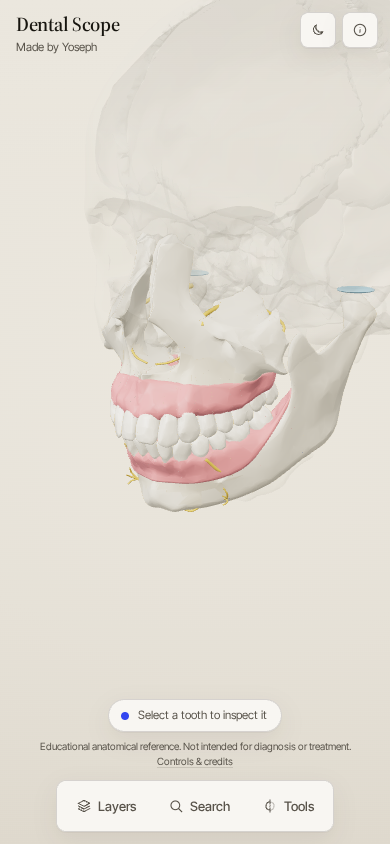
Dental Scope is an open-source, interactive 3D dental anatomy explorer. Start with the whole mouth — jaws, gingiva, the complete permanent dentition, nerves and the temporomandibular joints — and move all the way down to the enamel, dentin, pulp chamber and root canals of a single tooth.
Educational anatomical reference. Not intended for diagnosis or treatment.
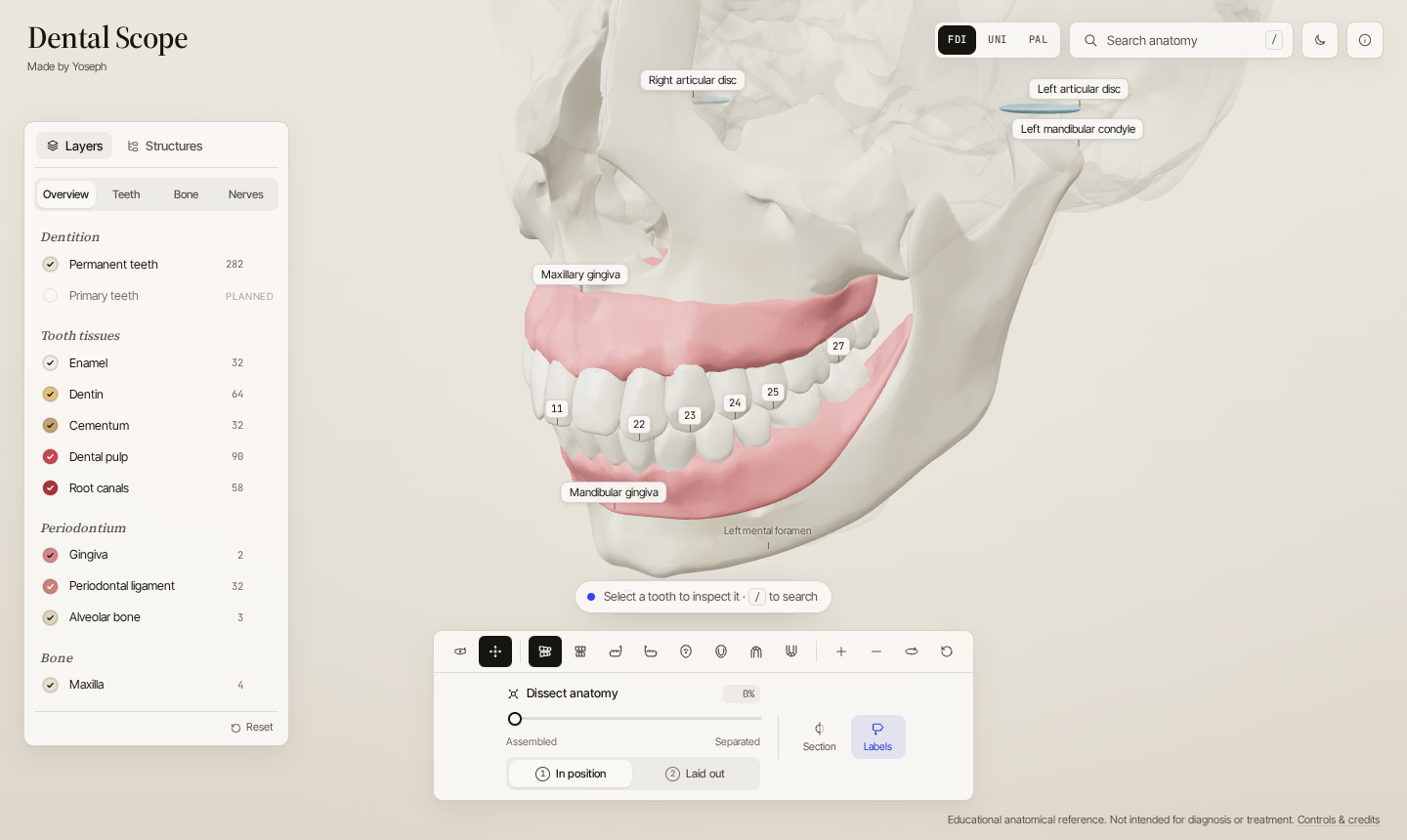
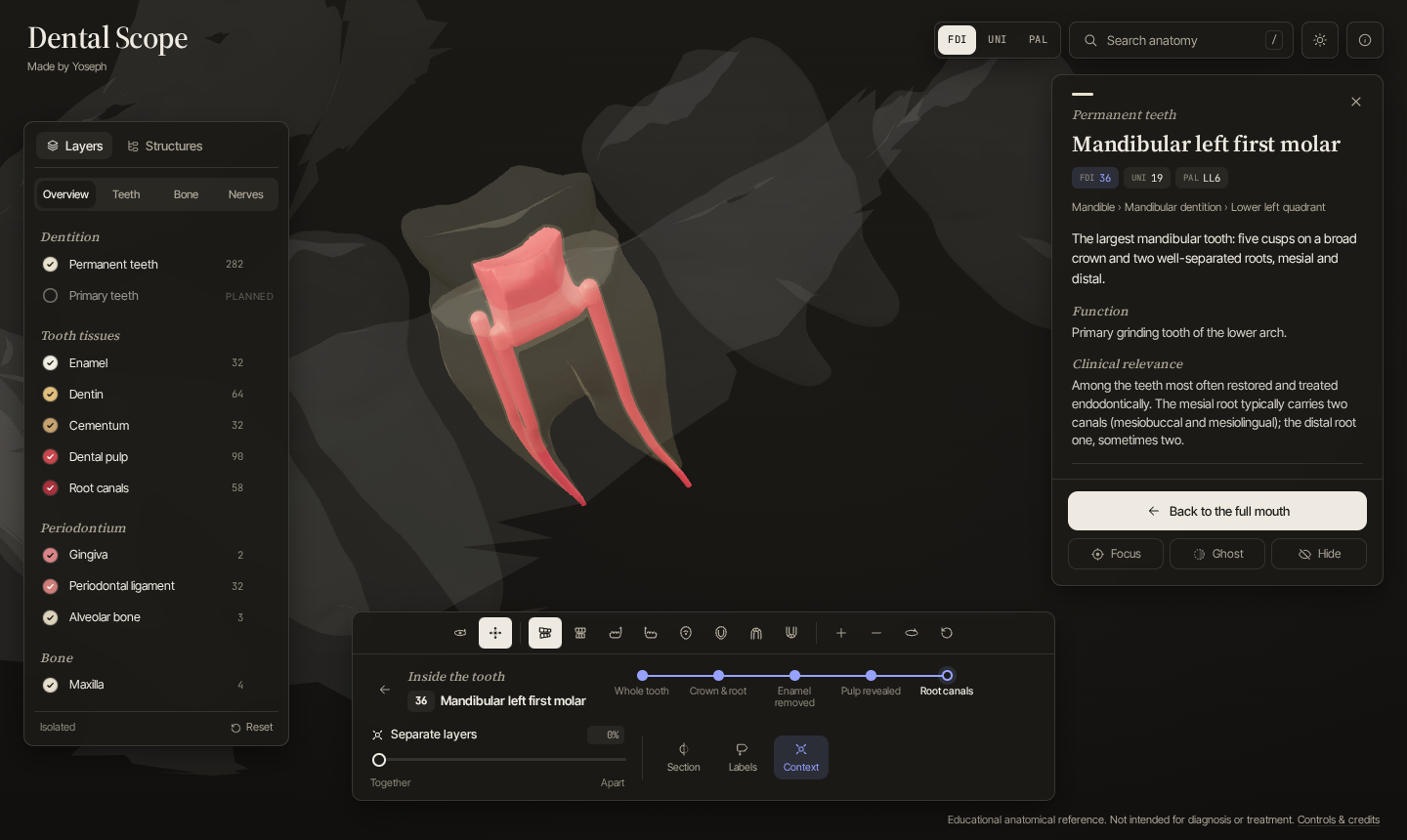
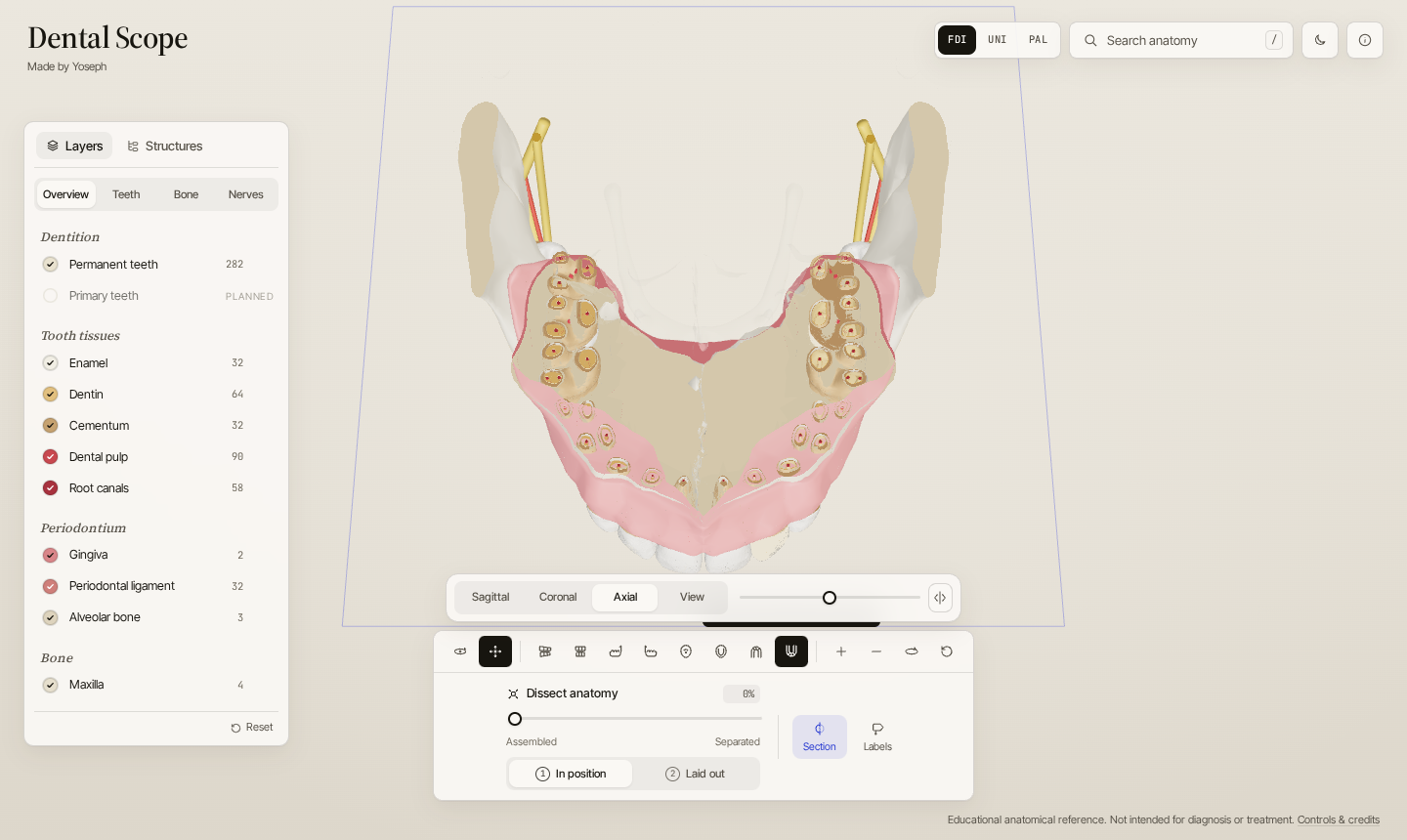
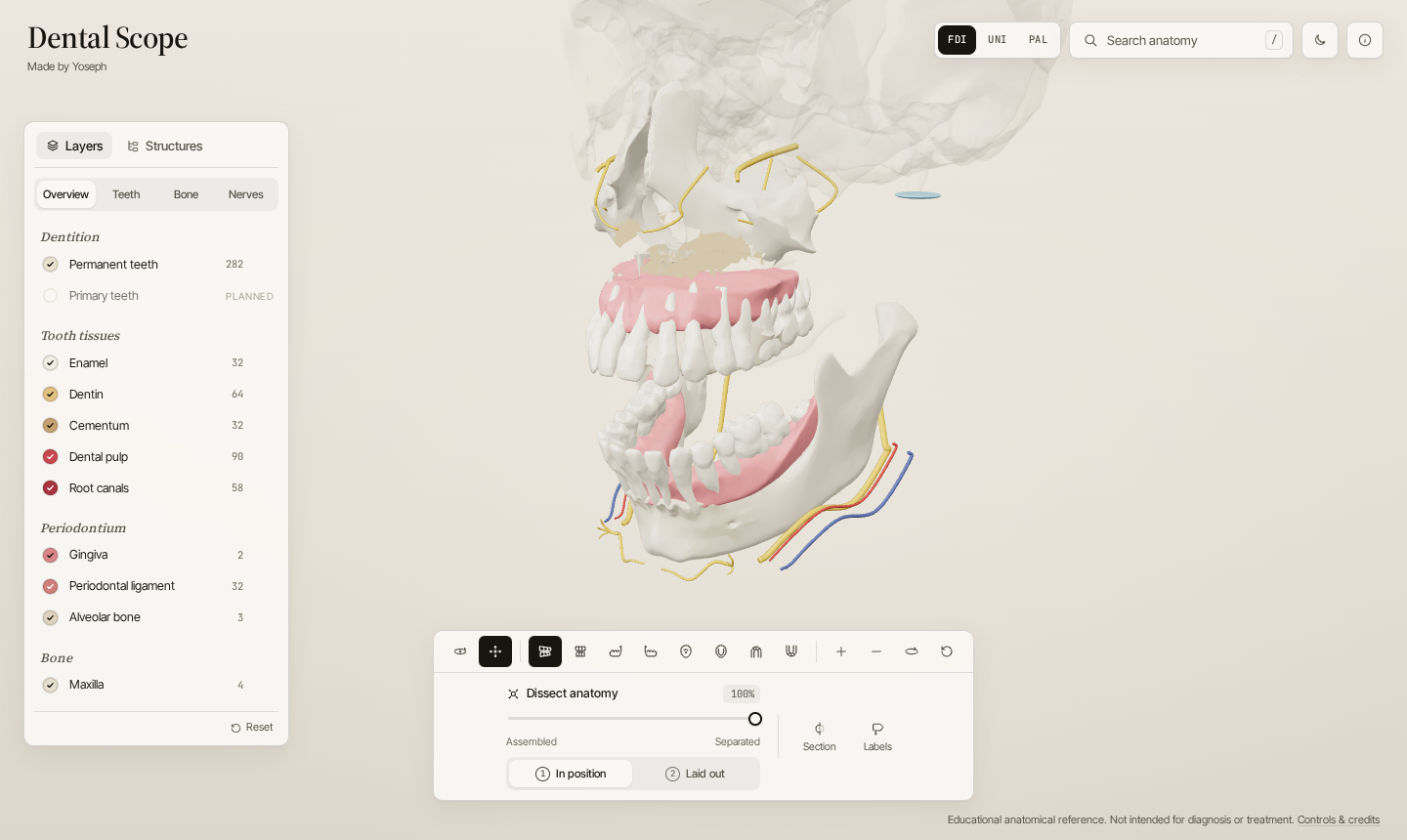
| Inside a tooth | Cross-section through the arch | Dissected anatomy |
|---|---|---|
 |  |  |
Features
- Mouth → jaw → dentition → tooth → tissue. One continuous scene; no separate "tooth viewer".
- All 32 permanent teeth, individually selectable, named anatomically, with FDI, Universal and Palmer numbering (switchable).
- Inside every tooth: enamel, coronal and radicular dentin, cementum, periodontal ligament, pulp chamber with pulp horns, and one canal per root in its most common configuration (e.g. MB2 in maxillary first molars, two mesial canals in mandibular first molars). Five dissection levels peel the tooth layer by layer.
- Dissection at two levels: the whole mouth (Dissect anatomy: jaws apart, gum and teeth lifted off in clean tiers, bone see-through so the nerves and vessels stay where they run) and a single tooth (Separate layers: enamel shell, dentin, pulp and canals apart).
- Cross-sections: sagittal, coronal, axial or view-aligned planes; inside a tooth they switch to mesiodistal, buccolingual and horizontal. Cut surfaces render as solid tissue, so enamel thickness, dentin and pulp read clearly — across all 32 teeth at once.
- Search by name, tooth number in any system (
11,#8,UR6,fdi 36), tissue, synonym (gums,wisdom tooth,IAN,cuspid). - Layers for 19 dental categories with show, show-only, translucent and hide; plus hide/ghost/isolate per structure and a full hierarchy tree.
- Premium camera: arcing focus transitions, bounding-box framing, eight view presets including occlusal views, optical centre that stays clear of panels.
- Labels that anchor to anatomy, declutter by priority, hide when occluded or too small, and select on click.
- Deep links:
/tooth/36,/tooth/36/dissect,/structure/inferior-alveolar-nerve-left. - English, Swedish, German, Spanish and Latin: switch with the flags at the top (Latin has no country, so it gets a Roman SPQR vexillum). Everything is translated by hand, including anatomical names, descriptions, search terms and the about page (
/about/sv/,/about/de/,/about/es/,/about/la/). Add?lang=sv,de,esorlato a link to open it in that language. Latin uses Terminologia Anatomica names and a Neo-Latin interface. Translations live insrc/i18n/andsrc/content/<lang>/. - Honest data: every structure shows whether it is source, derived, modeled, atlas or schematic geometry; all text shows its review status.
- Responsive (bottom sheets on phones), keyboard-accessible (tree view, shortcuts, focus rings), reduced-motion aware, light and dark themes.
- Fast: ≈1 MB of geometry for first paint, the rest streams in; ≈205 KB per tooth's internal anatomy on average, loaded on demand; render-on-demand loop.
Tech stack
Vite · React 19 · TypeScript (strict) · Three.js (imperative engine) · Zustand · glTF + meshopt compression. Asset pipeline: Python (NumPy, SciPy, scikit-image, trimesh) + glTF Transform.
Getting started
npm install
npm run dev        # http://localhost:5173
npm test           # unit tests (Vitest)
npm run typecheck
npm run build      # static site in dist/ (includes a 404.html SPA fallback)
The built site is fully static. For a sub-path deployment set DS_BASE, e.g. DS_BASE=/dental-scope/ npm run build; with a relative base (DS_BASE=./) deep links switch to hash URLs (#/tooth/36) so the build works from any folder. Set VITE_DS_REPO_URL to link the “Made by Yoseph” credit and the About dialog to the repository; when it is unset the credit is plain text, so a build never advertises a private repository. The live site is deployed by Vercel from main; set VITE_DS_REPO_URL and DS_SITE_URL in the Vercel project's environment variables.
Set DS_SITE_URL to the public address of the deployment (e.g. https://user.github.io/dental-scope/) to add canonical URLs, social-preview tags with og-image.png, structured data and sitemap.xml. On Vercel, set it in the project's environment variables. Every build also writes robots.txt and a static entry page per tooth (tooth/36/) so those deep links return their own title and description instead of the 404 fallback. Crawlers only read robots.txt at the domain root, so for a project site under a sub-path submit sitemap.xml in the search engine's webmaster tools instead.
Every build also writes a text-first guide page for every tooth and structure in all five languages: English at the root (teeth/36-mandibular-left-first-molar/), the others under sv/, de/, es/ and la/ with translated slugs (sv/tander/36-vanster-forsta-molar-i-underkaken/). A guide page stays noindex until its own text reaches 150 words (MIN_INDEX_WORDS in src/app/guide.ts); only indexable pages go into sitemap.xml, with hreflang links between their language versions. Once a tooth's English guide page is indexable, the matching explorer entry page (tooth/36/) leaves the index so the two don't compete. Vercel preview deployments (or any build with DS_PREVIEW=1) are noindex everywhere and robots.txt blocks all crawlers.
Keyboard
/ search · Esc clear / leave tooth · F focus · I isolate · H hide · G ghost · D inside tooth · [ ] dissection level · E dissect anatomy / separate tooth layers · C section · L labels · arrows orbit · + − zoom · R reset
Architecture
src/
  app/       routing, search/sharing metadata, repository link
  anatomy/   structure registry, tooth tables, notation     ← anatomy is data
  content/   educational text (JSON) + resolver
  search/    index + scorer
  state/     Zustand store, pure visibility resolver
  engine/    Three.js engine: loading, materials, picking, camera, explode, section, labels
  ui/        React panels (no per-frame rendering)
  modes/     Explore + scaffolds for Learn / Quiz / Compare
tools/pipeline/   BodyParts3D → production GLB
- React renders the chrome; the engine owns Three.js and subscribes to the store. Nothing re-renders React per frame.
- One pure function decides every mesh's visibility (categories, hide/ghost, isolation, dissection level, section) and accepts extra filters — the hook for future timeline and procedure modes.
- Loading is staged: jaws & teeth → skull & muscles → nerves & vessels → a tooth's internals on demand.
Details and a handoff guide (commands, runtime flows, where to start): docs/architecture.md. Data research: docs/dental-data-research.md.
Anatomical data and attribution
3D anatomy is derived from BodyParts3D, © The Database Center for Life Science, licensed under CC BY-SA 2.1 Japan. Third molars, alveolar bone and TMJ regions are derived from it; internal tooth anatomy is modeled inside each real tooth shape. Most nerves and vessels follow the Z-Anatomy atlas (CC BY-SA 4.0), fitted onto these jaws; the superior alveolar nerves, the inferior alveolar vein, the pterygoid plexus and the joint discs are schematic. See CREDITS.md and docs/assets.md; the statements in the app's About dialog are sourced in docs/sources.md.
Roadmap
- Expert review of all educational text (see docs/content.md)
- Atlas nerve and vessel paths (Z-Anatomy, CC BY-SA 4.0)
- CBCT-derived canals where licences allow
- Primary dentition and an eruption timeline (mixed dentition by age)
- Learn mode: guided lessons as data
- Quiz mode: identify highlighted structures
- Compare mode: two teeth side by side
- Salivary glands, tongue and oral mucosa
- Procedure modules: caries, restoration, root canal treatment, crown, implant, extraction, orthodontic movement, impaction
- Anatomical variation (e.g. C-shaped canals, extra roots)
- Localisation
Contributing
See CONTRIBUTING.md. Reviews of the anatomical text by dental professionals are especially welcome.
Licence
- Code: MIT
- 3D models (
public/models/): CC BY-SA 2.1 JP (derived from BodyParts3D) - Educational text (
src/content/): CC BY-SA 4.0
Similar repos




Languages
TypeScript
79.2%
Python
13.2%
CSS
6.6%
Explore teeth, jaws, nerves, tissues, root canals, cross-sections and layered dental structures in 3D.
See the codeSee what people are saying
README
Dental Scope
Explore Dental Anatomy in 3D.
Dental Scope is an open-source, interactive 3D dental anatomy explorer. Start with the whole mouth — jaws, gingiva, the complete permanent dentition, nerves and the temporomandibular joints — and move all the way down to the enamel, dentin, pulp chamber and root canals of a single tooth.
Educational anatomical reference. Not intended for diagnosis or treatment.
| Inside a tooth | Cross-section through the arch | Dissected anatomy |
|---|---|---|
| | |
Features
- Mouth → jaw → dentition → tooth → tissue. One continuous scene; no separate "tooth viewer".
- All 32 permanent teeth, individually selectable, named anatomically, with FDI, Universal and Palmer numbering (switchable).
- Inside every tooth: enamel, coronal and radicular dentin, cementum, periodontal ligament, pulp chamber with pulp horns, and one canal per root in its most common configuration (e.g. MB2 in maxillary first molars, two mesial canals in mandibular first molars). Five dissection levels peel the tooth layer by layer.
- Dissection at two levels: the whole mouth (Dissect anatomy: jaws apart, gum and teeth lifted off in clean tiers, bone see-through so the nerves and vessels stay where they run) and a single tooth (Separate layers: enamel shell, dentin, pulp and canals apart).
- Cross-sections: sagittal, coronal, axial or view-aligned planes; inside a tooth they switch to mesiodistal, buccolingual and horizontal. Cut surfaces render as solid tissue, so enamel thickness, dentin and pulp read clearly — across all 32 teeth at once.
- Search by name, tooth number in any system (
11,#8,UR6,fdi 36), tissue, synonym (gums,wisdom tooth,IAN,cuspid). - Layers for 19 dental categories with show, show-only, translucent and hide; plus hide/ghost/isolate per structure and a full hierarchy tree.
- Premium camera: arcing focus transitions, bounding-box framing, eight view presets including occlusal views, optical centre that stays clear of panels.
- Labels that anchor to anatomy, declutter by priority, hide when occluded or too small, and select on click.
- Deep links:
/tooth/36,/tooth/36/dissect,/structure/inferior-alveolar-nerve-left. - English, Swedish, German, Spanish and Latin: switch with the flags at the top (Latin has no country, so it gets a Roman SPQR vexillum). Everything is translated by hand, including anatomical names, descriptions, search terms and the about page (
/about/sv/,/about/de/,/about/es/,/about/la/). Add?lang=sv,de,esorlato a link to open it in that language. Latin uses Terminologia Anatomica names and a Neo-Latin interface. Translations live insrc/i18n/andsrc/content/<lang>/. - Honest data: every structure shows whether it is source, derived, modeled, atlas or schematic geometry; all text shows its review status.
- Responsive (bottom sheets on phones), keyboard-accessible (tree view, shortcuts, focus rings), reduced-motion aware, light and dark themes.
- Fast: ≈1 MB of geometry for first paint, the rest streams in; ≈205 KB per tooth's internal anatomy on average, loaded on demand; render-on-demand loop.
Tech stack
Vite · React 19 · TypeScript (strict) · Three.js (imperative engine) · Zustand · glTF + meshopt compression. Asset pipeline: Python (NumPy, SciPy, scikit-image, trimesh) + glTF Transform.
Getting started
npm install
npm run dev        # http://localhost:5173
npm test           # unit tests (Vitest)
npm run typecheck
npm run build      # static site in dist/ (includes a 404.html SPA fallback)
The built site is fully static. For a sub-path deployment set DS_BASE, e.g. DS_BASE=/dental-scope/ npm run build; with a relative base (DS_BASE=./) deep links switch to hash URLs (#/tooth/36) so the build works from any folder. Set VITE_DS_REPO_URL to link the “Made by Yoseph” credit and the About dialog to the repository; when it is unset the credit is plain text, so a build never advertises a private repository. The live site is deployed by Vercel from main; set VITE_DS_REPO_URL and DS_SITE_URL in the Vercel project's environment variables.
Set DS_SITE_URL to the public address of the deployment (e.g. https://user.github.io/dental-scope/) to add canonical URLs, social-preview tags with og-image.png, structured data and sitemap.xml. On Vercel, set it in the project's environment variables. Every build also writes robots.txt and a static entry page per tooth (tooth/36/) so those deep links return their own title and description instead of the 404 fallback. Crawlers only read robots.txt at the domain root, so for a project site under a sub-path submit sitemap.xml in the search engine's webmaster tools instead.
Every build also writes a text-first guide page for every tooth and structure in all five languages: English at the root (teeth/36-mandibular-left-first-molar/), the others under sv/, de/, es/ and la/ with translated slugs (sv/tander/36-vanster-forsta-molar-i-underkaken/). A guide page stays noindex until its own text reaches 150 words (MIN_INDEX_WORDS in src/app/guide.ts); only indexable pages go into sitemap.xml, with hreflang links between their language versions. Once a tooth's English guide page is indexable, the matching explorer entry page (tooth/36/) leaves the index so the two don't compete. Vercel preview deployments (or any build with DS_PREVIEW=1) are noindex everywhere and robots.txt blocks all crawlers.
Keyboard
/ search · Esc clear / leave tooth · F focus · I isolate · H hide · G ghost · D inside tooth · [ ] dissection level · E dissect anatomy / separate tooth layers · C section · L labels · arrows orbit · + − zoom · R reset
Architecture
src/
  app/       routing, search/sharing metadata, repository link
  anatomy/   structure registry, tooth tables, notation     ← anatomy is data
  content/   educational text (JSON) + resolver
  search/    index + scorer
  state/     Zustand store, pure visibility resolver
  engine/    Three.js engine: loading, materials, picking, camera, explode, section, labels
  ui/        React panels (no per-frame rendering)
  modes/     Explore + scaffolds for Learn / Quiz / Compare
tools/pipeline/   BodyParts3D → production GLB
- React renders the chrome; the engine owns Three.js and subscribes to the store. Nothing re-renders React per frame.
- One pure function decides every mesh's visibility (categories, hide/ghost, isolation, dissection level, section) and accepts extra filters — the hook for future timeline and procedure modes.
- Loading is staged: jaws & teeth → skull & muscles → nerves & vessels → a tooth's internals on demand.
Details and a handoff guide (commands, runtime flows, where to start): docs/architecture.md. Data research: docs/dental-data-research.md.
Anatomical data and attribution
3D anatomy is derived from BodyParts3D, © The Database Center for Life Science, licensed under CC BY-SA 2.1 Japan. Third molars, alveolar bone and TMJ regions are derived from it; internal tooth anatomy is modeled inside each real tooth shape. Most nerves and vessels follow the Z-Anatomy atlas (CC BY-SA 4.0), fitted onto these jaws; the superior alveolar nerves, the inferior alveolar vein, the pterygoid plexus and the joint discs are schematic. See CREDITS.md and docs/assets.md; the statements in the app's About dialog are sourced in docs/sources.md.
Roadmap
- Expert review of all educational text (see docs/content.md)
- Atlas nerve and vessel paths (Z-Anatomy, CC BY-SA 4.0)
- CBCT-derived canals where licences allow
- Primary dentition and an eruption timeline (mixed dentition by age)
- Learn mode: guided lessons as data
- Quiz mode: identify highlighted structures
- Compare mode: two teeth side by side
- Salivary glands, tongue and oral mucosa
- Procedure modules: caries, restoration, root canal treatment, crown, implant, extraction, orthodontic movement, impaction
- Anatomical variation (e.g. C-shaped canals, extra roots)
- Localisation
Contributing
See CONTRIBUTING.md. Reviews of the anatomical text by dental professionals are especially welcome.
Licence
- Code: MIT
- 3D models (
public/models/): CC BY-SA 2.1 JP (derived from BodyParts3D) - Educational text (
src/content/): CC BY-SA 4.0
Similar repos
Languages
TypeScript
79.2%
Python
13.2%
CSS
6.6%