[News] BlendedMVS dataset is released!!! (project link).
MVSNet is a deep learning architecture for depth map inference from unstructured multi-view images, and R-MVSNet is its extension for scalable learning-based MVS reconstruction. If you find this project useful for your research, please cite:
@article{yao2018mvsnet,
  title={MVSNet: Depth Inference for Unstructured Multi-view Stereo},
  author={Yao, Yao and Luo, Zixin and Li, Shiwei and Fang, Tian and Quan, Long},
  journal={European Conference on Computer Vision (ECCV)},
  year={2018}
}
@article{yao2019recurrent,
  title={Recurrent MVSNet for High-resolution Multi-view Stereo Depth Inference},
  author={Yao, Yao and Luo, Zixin and Li, Shiwei and Shen, Tianwei and Fang, Tian and Quan, Long},
  journal={Computer Vision and Pattern Recognition (CVPR)},
  year={2019}
}
If BlendedMVS dataset is used in your research, please also cite:
@article{yao2020blendedmvs,
  title={BlendedMVS: A Large-scale Dataset for Generalized Multi-view Stereo Networks},
  author={Yao, Yao and Luo, Zixin and Li, Shiwei and Zhang, Jingyang and Ren, Yufan and Zhou, Lei and Fang, Tian and Quan, Long},
  journal={Computer Vision and Pattern Recognition (CVPR)},
  year={2020}
}
git clone https://github.com/YoYo000/MVSNetsudo pip install -r requirements.txtcd MVSNet/mvsnetpython train.py --regularization '3DCNNs' --train_blendedmvs --max_w 768 --max_h 576 --max_d 128 --online_augmentation python train.py --regularization '3DCNNs' --train_dtu --max_w 640 --max_h 512 --max_d 128 python train.py --regularization '3DCNNs' --train_eth3d --max_w 896 --max_h 480 --max_d 128 python train.py --regularization 'GRU' --train_blendedmvs --max_w 768 --max_h 576 --max_d 128 --online_augmentation python train.py --regularization 'GRU' --train_dtu --max_w 640 --max_h 512 --max_d 128 python train.py --regularization 'GRU' --train_eth3d --max_w 896 --max_h 480 --max_d 128 --blendedmvs_data_root, --dtu_data_root and --eth3d_data_root--log_folder and --model_folder--train_blendedmvs with --train_blendedmvgpython validate.py --regularization '3DCNNs' --validate_set blendedmvs --max_w 768 --max_h 576 --max_d 128python validate.py --regularization '3DCNNs' --validate_set dtu --max_w 640 --max_h 512 --max_d 128python validate.py --regularization '3DCNNs' --validate_set eth3d --max_w 896 --max_h 480 --max_d 128python validate.py --regularization 'GRU' --validate_set blendedmvs --max_w 768 --max_h 576 --max_d 128python validate.py --regularization 'GRU' --validate_set dtu --max_w 640 --max_h 512 --max_d 128python validate.py --regularization 'GRU' --validate_set eth3d --max_w 896 --max_h 480 --max_d 128--pretrained_model_ckpt_path and --ckpt_step--blendedmvs_data_root, --dtu_data_root and --eth3d_data_root--validation_result_pathTEST_DATA_FOLDER folderpython test.py --dense_folder TEST_DATA_FOLDER --regularization '3DCNNs' --max_w 1152 --max_h 864 --max_d 192 --interval_scale 1.06python test.py --dense_folder TEST_DATA_FOLDER --regularization 'GRU' --max_w 1600 --max_h 1200 --max_d 256 --interval_scale 0.8--pretrained_model_ckpt_path and --ckpt_step--dense_folderTEST_DATA_FOLDER/depths_mvsnet using python visualize.py .pfm. For example, the depth map and probability map for image 00000012 should look like: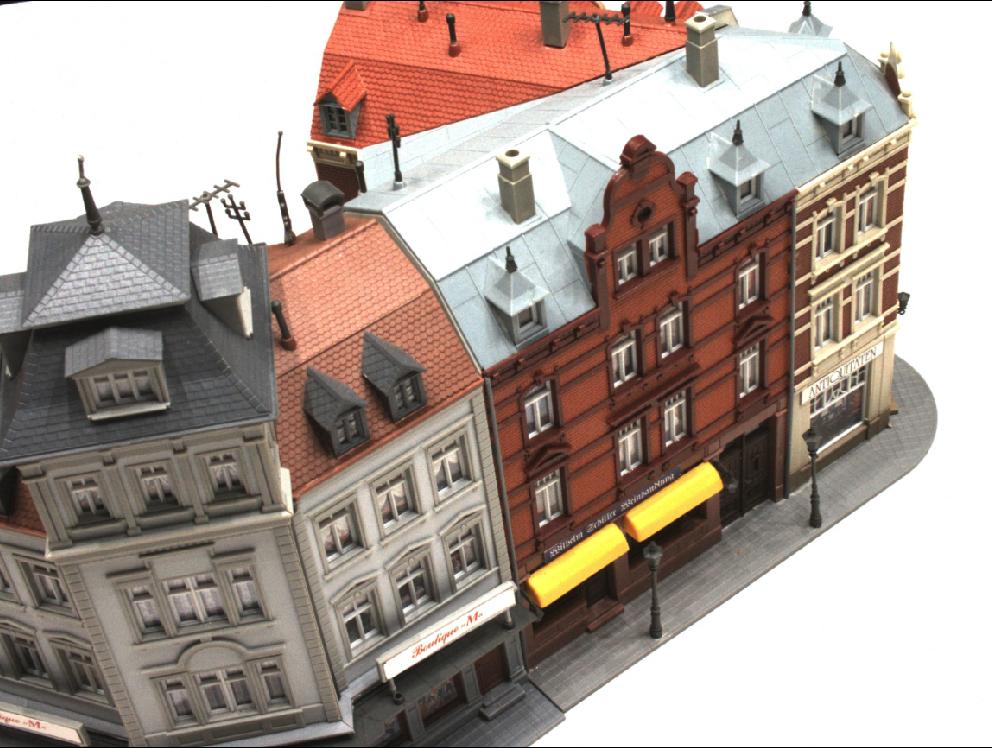 | 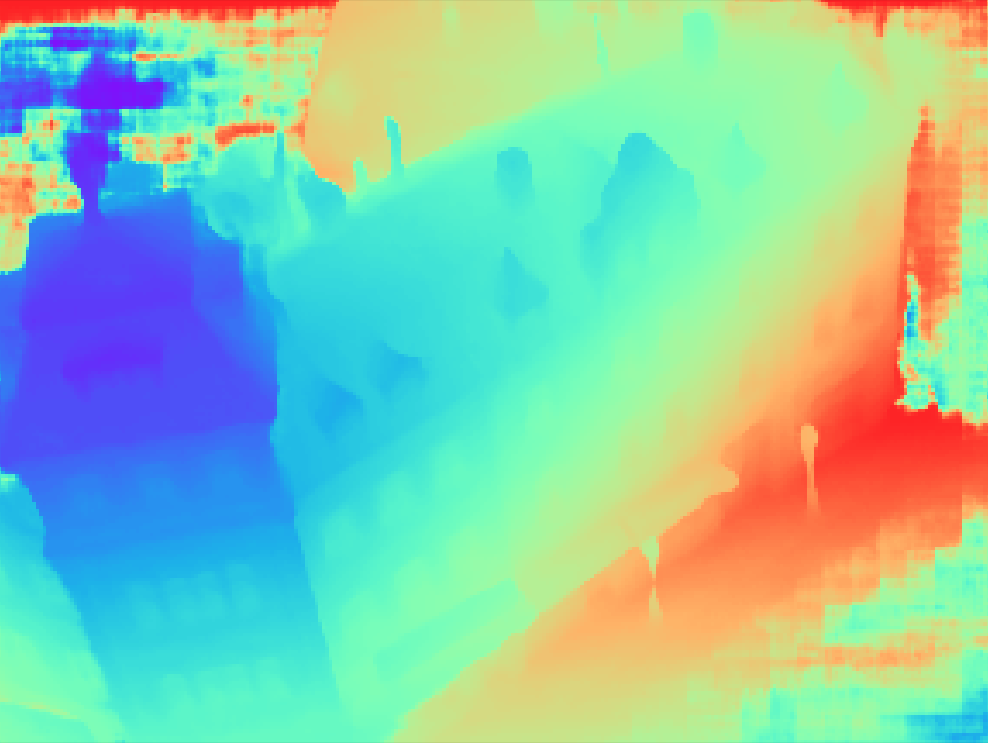 | 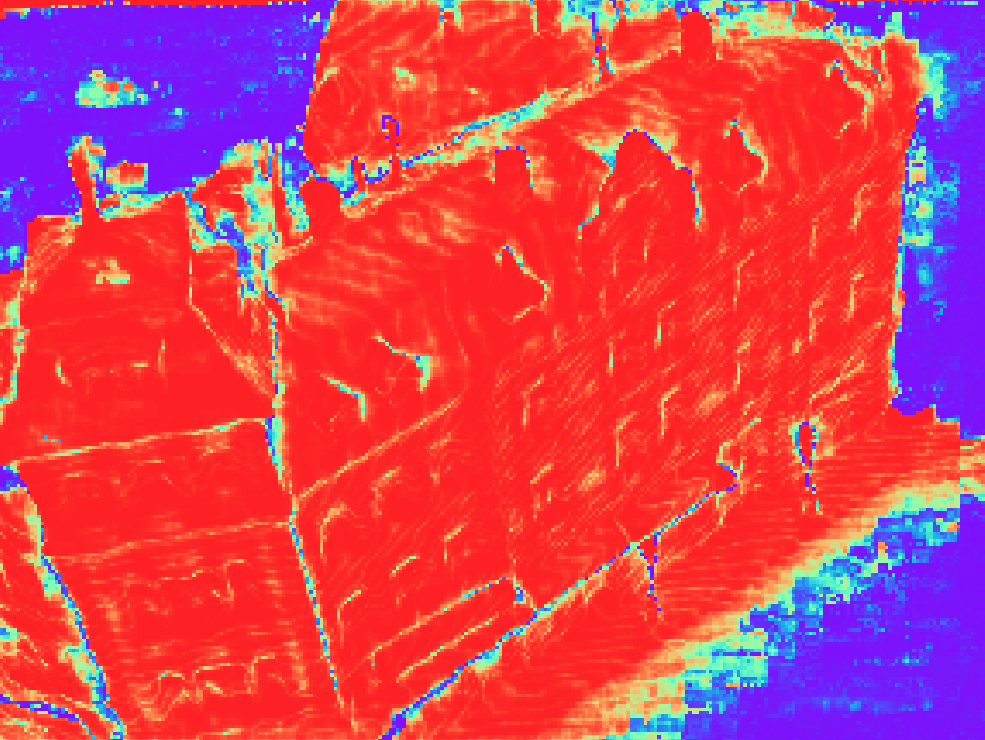 |
|---|---|---|
| reference image | depth map | probability map |
R/MVSNet itself only produces per-view depth maps. To generate the 3D point cloud, we need to apply depth map filter/fusion for post-processing. As our implementation of this part is depended on the Altizure internal library, currently we could not provide the corresponding code. Fortunately, depth map filter/fusion is a general step in MVS reconstruction, and there are similar implementations in other open-source MVS algorithms. We provide the script depthfusion.py to utilize fusibile for post-processing (thank Silvano Galliani for the excellent code!).
To run the post-processing:
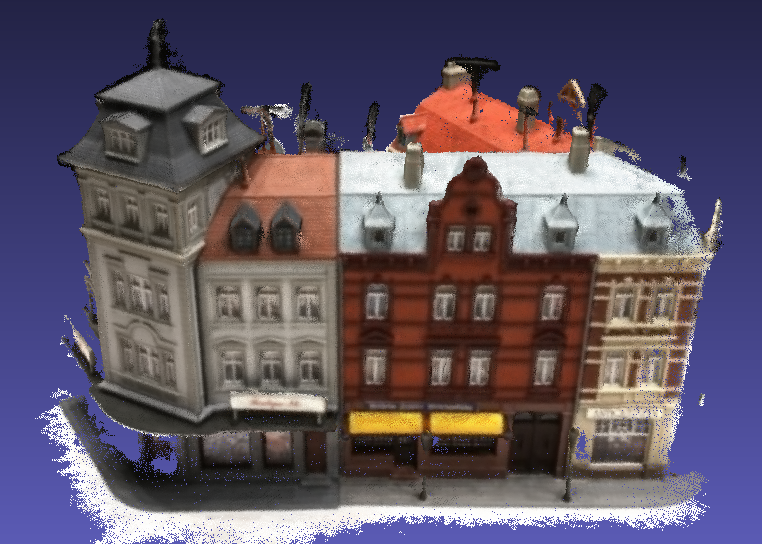
git clone https://github.com/YoYo000/fusibilecmake . and make, which will generate the executable at FUSIBILE_EXE_PATHpython depthfusion.py --dense_folder TEST_DATA_FOLDER --fusibile_exe_path FUSIBILE_EXE_PATH --prob_threshold 0.3TEST_DATA_FOLDER/points_mvsnet/consistencyCheck-TIME/final3d_model.ply.We observe that depthfusion.py produce similar but quantitatively worse result to our own implementation. For detailed differences, please refer to MVSNet paper and Galliani's paper. The point cloud for scan9 should look like:
 | 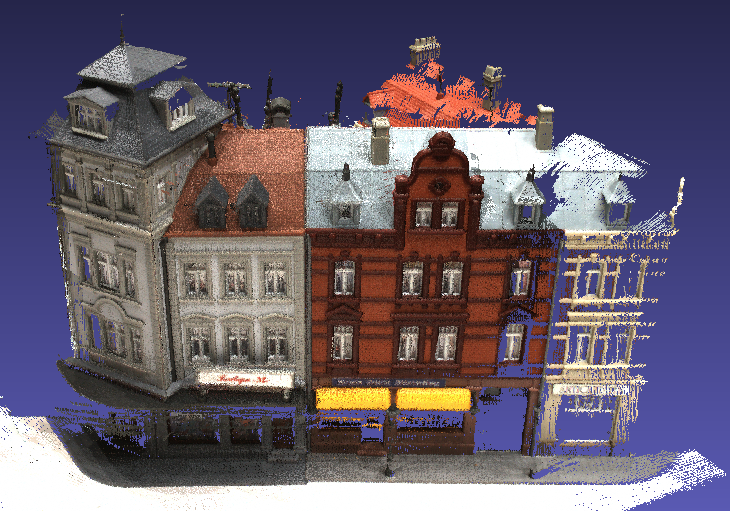 |
|---|---|
| point cloud result | ground truth point cloud |
The following steps are required to reproduce depth map/point cloud results:
R-MVSNet point cloud results with full post-processing are also provided: DTU evaluation point clouds
Each project folder should contain the following
.
├── images
│   ├── 00000000.jpg
│   ├── 00000001.jpg
│   └── ...
├── cams
│   ├── 00000000_cam.txt
│   ├── 00000001_cam.txt
│   └── ...
└── pair.txt
If you want to apply R/MVSNet to your own data, please structure your data into such a folder. We also provide a simple script colmap2mvsnet.py to convert COLMAP SfM result to R/MVSNet input.
All image files are stored in the images folder. We index each image using an 8 digit number starting from 00000000. The following camera and output files use the same indexes as well.
The camera parameter of one image is stored in a cam.txt file. The text file contains the camera extrinsic E = [R|t], intrinsic K and the depth range:
extrinsic
E00 E01 E02 E03
E10 E11 E12 E13
E20 E21 E22 E23
E30 E31 E32 E33

intrinsic
K00 K01 K02
K10 K11 K12
K20 K21 K22

DEPTH_MIN DEPTH_INTERVAL (DEPTH_NUM DEPTH_MAX)
Note that the depth range and depth resolution are determined by the minimum depth DEPTH_MIN, the interval between two depth samples DEPTH_INTERVAL, and also the depth sample number DEPTH_NUM (or max_d in the training/testing scripts if DEPTH_NUM is not provided). We also left the interval_scale for controlling the depth resolution. The maximum depth is then computed as:
DEPTH_MAX = DEPTH_MIN + (interval_scale * DEPTH_INTERVAL) * (max_d - 1)
We store the view selection result in the pair.txt. For each reference image, we calculate its view selection scores with each of the other views, and store the 10 best views in the pair.txt file:
TOTAL_IMAGE_NUM
IMAGE_ID0                       # index of reference image 0
10 ID0 SCORE0 ID1 SCORE1 ...    # 10 best source images for reference image 0
IMAGE_ID1                       # index of reference image 1
10 ID0 SCORE0 ID1 SCORE1 ...    # 10 best source images for reference image 1
...
We provide a script to convert COLMAP SfM result to R/MVSNet input. After recovering SfM result and undistorting all images, COLMAP should generate a dense folder COLMAP/dense/ containing an undistorted image folder COLMAP/dense/images/ and an undistorted camera folder COLMAP/dense/sparse/. Then, you can apply the following script to generate the R/MVSNet input:
python colmap2mvsnet.py --dense_folder COLMAP/dense
The depth sample number will be automatically computed using the inverse depth setting. If you want to generate the MVSNet input with a fixed depth sample number (e.g., 256), you could specified the depth number via --max_d 256.
The test.py script will create a depths_mvsnet folder to store the running results, including the depth maps, probability maps, scaled/cropped images and the corresponding cameras. The depth and probability maps are stored in .pfm format. We provide the python IO for pfm files in the preprocess.py script, and for the c++ IO, we refer users to the Cimg library. To inspect the pfm format results, you can simply type python visualize.py .pfm.
README.mdvalidate.py script for depth map validationphotometric_augmentation.py script for online augmentation durig trainingcolmap2mvsnet.py script to convert COLMAP SfM result to MVSNet input, including depth range estimation and view selectiontf.contrib.image.transform for differentiable homography warping. Reconstruction is now x2 faster!310 followers · starred Oct 2024
170 followers · starred May 2021
80 followers · starred Jan 2021
116 followers · starred Jul 2021
[News] BlendedMVS dataset is released!!! (project link).
MVSNet is a deep learning architecture for depth map inference from unstructured multi-view images, and R-MVSNet is its extension for scalable learning-based MVS reconstruction. If you find this project useful for your research, please cite:
@article{yao2018mvsnet,
  title={MVSNet: Depth Inference for Unstructured Multi-view Stereo},
  author={Yao, Yao and Luo, Zixin and Li, Shiwei and Fang, Tian and Quan, Long},
  journal={European Conference on Computer Vision (ECCV)},
  year={2018}
}
@article{yao2019recurrent,
  title={Recurrent MVSNet for High-resolution Multi-view Stereo Depth Inference},
  author={Yao, Yao and Luo, Zixin and Li, Shiwei and Shen, Tianwei and Fang, Tian and Quan, Long},
  journal={Computer Vision and Pattern Recognition (CVPR)},
  year={2019}
}
If BlendedMVS dataset is used in your research, please also cite:
@article{yao2020blendedmvs,
  title={BlendedMVS: A Large-scale Dataset for Generalized Multi-view Stereo Networks},
  author={Yao, Yao and Luo, Zixin and Li, Shiwei and Zhang, Jingyang and Ren, Yufan and Zhou, Lei and Fang, Tian and Quan, Long},
  journal={Computer Vision and Pattern Recognition (CVPR)},
  year={2020}
}
git clone https://github.com/YoYo000/MVSNetsudo pip install -r requirements.txtcd MVSNet/mvsnetpython train.py --regularization '3DCNNs' --train_blendedmvs --max_w 768 --max_h 576 --max_d 128 --online_augmentation python train.py --regularization '3DCNNs' --train_dtu --max_w 640 --max_h 512 --max_d 128 python train.py --regularization '3DCNNs' --train_eth3d --max_w 896 --max_h 480 --max_d 128 python train.py --regularization 'GRU' --train_blendedmvs --max_w 768 --max_h 576 --max_d 128 --online_augmentation python train.py --regularization 'GRU' --train_dtu --max_w 640 --max_h 512 --max_d 128 python train.py --regularization 'GRU' --train_eth3d --max_w 896 --max_h 480 --max_d 128 --blendedmvs_data_root, --dtu_data_root and --eth3d_data_root--log_folder and --model_folder--train_blendedmvs with --train_blendedmvgpython validate.py --regularization '3DCNNs' --validate_set blendedmvs --max_w 768 --max_h 576 --max_d 128python validate.py --regularization '3DCNNs' --validate_set dtu --max_w 640 --max_h 512 --max_d 128python validate.py --regularization '3DCNNs' --validate_set eth3d --max_w 896 --max_h 480 --max_d 128python validate.py --regularization 'GRU' --validate_set blendedmvs --max_w 768 --max_h 576 --max_d 128python validate.py --regularization 'GRU' --validate_set dtu --max_w 640 --max_h 512 --max_d 128python validate.py --regularization 'GRU' --validate_set eth3d --max_w 896 --max_h 480 --max_d 128--pretrained_model_ckpt_path and --ckpt_step--blendedmvs_data_root, --dtu_data_root and --eth3d_data_root--validation_result_pathTEST_DATA_FOLDER folderpython test.py --dense_folder TEST_DATA_FOLDER --regularization '3DCNNs' --max_w 1152 --max_h 864 --max_d 192 --interval_scale 1.06python test.py --dense_folder TEST_DATA_FOLDER --regularization 'GRU' --max_w 1600 --max_h 1200 --max_d 256 --interval_scale 0.8--pretrained_model_ckpt_path and --ckpt_step--dense_folderTEST_DATA_FOLDER/depths_mvsnet using python visualize.py .pfm. For example, the depth map and probability map for image 00000012 should look like: | | |
|---|---|---|
| reference image | depth map | probability map |
R/MVSNet itself only produces per-view depth maps. To generate the 3D point cloud, we need to apply depth map filter/fusion for post-processing. As our implementation of this part is depended on the Altizure internal library, currently we could not provide the corresponding code. Fortunately, depth map filter/fusion is a general step in MVS reconstruction, and there are similar implementations in other open-source MVS algorithms. We provide the script depthfusion.py to utilize fusibile for post-processing (thank Silvano Galliani for the excellent code!).
To run the post-processing:
git clone https://github.com/YoYo000/fusibilecmake . and make, which will generate the executable at FUSIBILE_EXE_PATHpython depthfusion.py --dense_folder TEST_DATA_FOLDER --fusibile_exe_path FUSIBILE_EXE_PATH --prob_threshold 0.3TEST_DATA_FOLDER/points_mvsnet/consistencyCheck-TIME/final3d_model.ply.We observe that depthfusion.py produce similar but quantitatively worse result to our own implementation. For detailed differences, please refer to MVSNet paper and Galliani's paper. The point cloud for scan9 should look like:
| |
|---|---|
| point cloud result | ground truth point cloud |
The following steps are required to reproduce depth map/point cloud results:
R-MVSNet point cloud results with full post-processing are also provided: DTU evaluation point clouds
Each project folder should contain the following
.
├── images
│   ├── 00000000.jpg
│   ├── 00000001.jpg
│   └── ...
├── cams
│   ├── 00000000_cam.txt
│   ├── 00000001_cam.txt
│   └── ...
└── pair.txt
If you want to apply R/MVSNet to your own data, please structure your data into such a folder. We also provide a simple script colmap2mvsnet.py to convert COLMAP SfM result to R/MVSNet input.
All image files are stored in the images folder. We index each image using an 8 digit number starting from 00000000. The following camera and output files use the same indexes as well.
The camera parameter of one image is stored in a cam.txt file. The text file contains the camera extrinsic E = [R|t], intrinsic K and the depth range:
extrinsic
E00 E01 E02 E03
E10 E11 E12 E13
E20 E21 E22 E23
E30 E31 E32 E33

intrinsic
K00 K01 K02
K10 K11 K12
K20 K21 K22

DEPTH_MIN DEPTH_INTERVAL (DEPTH_NUM DEPTH_MAX)
Note that the depth range and depth resolution are determined by the minimum depth DEPTH_MIN, the interval between two depth samples DEPTH_INTERVAL, and also the depth sample number DEPTH_NUM (or max_d in the training/testing scripts if DEPTH_NUM is not provided). We also left the interval_scale for controlling the depth resolution. The maximum depth is then computed as:
DEPTH_MAX = DEPTH_MIN + (interval_scale * DEPTH_INTERVAL) * (max_d - 1)
We store the view selection result in the pair.txt. For each reference image, we calculate its view selection scores with each of the other views, and store the 10 best views in the pair.txt file:
TOTAL_IMAGE_NUM
IMAGE_ID0                       # index of reference image 0
10 ID0 SCORE0 ID1 SCORE1 ...    # 10 best source images for reference image 0
IMAGE_ID1                       # index of reference image 1
10 ID0 SCORE0 ID1 SCORE1 ...    # 10 best source images for reference image 1
...
We provide a script to convert COLMAP SfM result to R/MVSNet input. After recovering SfM result and undistorting all images, COLMAP should generate a dense folder COLMAP/dense/ containing an undistorted image folder COLMAP/dense/images/ and an undistorted camera folder COLMAP/dense/sparse/. Then, you can apply the following script to generate the R/MVSNet input:
python colmap2mvsnet.py --dense_folder COLMAP/dense
The depth sample number will be automatically computed using the inverse depth setting. If you want to generate the MVSNet input with a fixed depth sample number (e.g., 256), you could specified the depth number via --max_d 256.
The test.py script will create a depths_mvsnet folder to store the running results, including the depth maps, probability maps, scaled/cropped images and the corresponding cameras. The depth and probability maps are stored in .pfm format. We provide the python IO for pfm files in the preprocess.py script, and for the c++ IO, we refer users to the Cimg library. To inspect the pfm format results, you can simply type python visualize.py .pfm.
README.mdvalidate.py script for depth map validationphotometric_augmentation.py script for online augmentation durig trainingcolmap2mvsnet.py script to convert COLMAP SfM result to MVSNet input, including depth range estimation and view selectiontf.contrib.image.transform for differentiable homography warping. Reconstruction is now x2 faster!310 followers · starred Oct 2024
170 followers · starred May 2021
80 followers · starred Jan 2021
116 followers · starred Jul 2021



