🏎️ SimGent (Simulator Agent) — Independent open-source AI pit wall, 2D race replay & motorsport telemetry analytics (1950–2026). Unofficial fan project.
See the code

Independent Open-Source Motorsport Telemetry Cockpit, 2D Vector Replay Player, & Autonomous AI Race Engineer (1950–2026)










Experience the Live Application: 👉 https://simgent.tonyyang.work 📖 Engineering Deep-Dive & Interview Playbook: 👉
DICTIONARY.md
[!IMPORTANT] Legal Notice & Trademark Disclaimer (Nominative Fair Use): SimGent (Simulator Agent) is an independent, non-commercial open-source research and educational demonstration project developed by fans. SimGent is not affiliated, associated, authorized, endorsed by, or in any way officially connected with Formula One Licensing B.V., Formula One World Championship Limited, the FIA (Fédération Internationale de l'Automobile), Formula One Management (FOM), or any Formula 1 constructor, team, or driver.
All trademarks, service marks, trade names, and team identities referenced within this repository and application (including but not limited to F1, FORMULA ONE, FORMULA 1, FIA FORMULA ONE WORLD CHAMPIONSHIP, team marks, and circuit names) are the property of their respective owners. They are used only to refer to the real teams, drivers, events and circuits, for historical identification, technical analysis and education. No commercial relationship, sponsorship, license, or endorsement is expressed or implied.
Every race weekend, my kids and I sit together watching the Grand Prix. Between safety car restarts, undercut attempts, and telemetry deltas, they would constantly ask:
Commercial timing screens are locked behind paywalls or designed like 1990s spreadsheets that kids can't explore. I wanted to build something intuitive and inspiring for them: a 60 FPS interactive 2D replay cockpit paired with an autonomous AI Race Engineer they could talk to in plain English.
What started as a family race-day side project became SimGent (short for Simulator Agent) — an open-source race replay and pit wall agent covering every World Championship race since 1950.
What is real data and what is modelled. Results, grids, pit stops and championship standings come from Jolpica-F1 (OpenF1 fills in sprint and qualifying sessions before Jolpica publishes them). Lap-by-lap replays use real lap times from 1996 onwards; earlier races are reconstructed from the results (finishing order, laps completed, retirements). Car positions within a lap and the speed profile are modelled from the circuit outline. There is no car telemetry (speed, throttle, brake) in the data. Every race is shown on the layout actually raced that year, with its length, turns and direction from F1DB. Outlines come from bacinger/f1-circuits, OpenStreetMap (Jerez, Fuji, Korea, Reims-Gueux 1950-51) and, for the other historic layouts, f1-circuits-svg, whose start/finish line is estimated.
Unobstructed racing line view across 40+ Grand Prix circuits, 20+ synchronized car models in team-inspired colors, timing tower, lap-time and gap charts, and session debriefs.
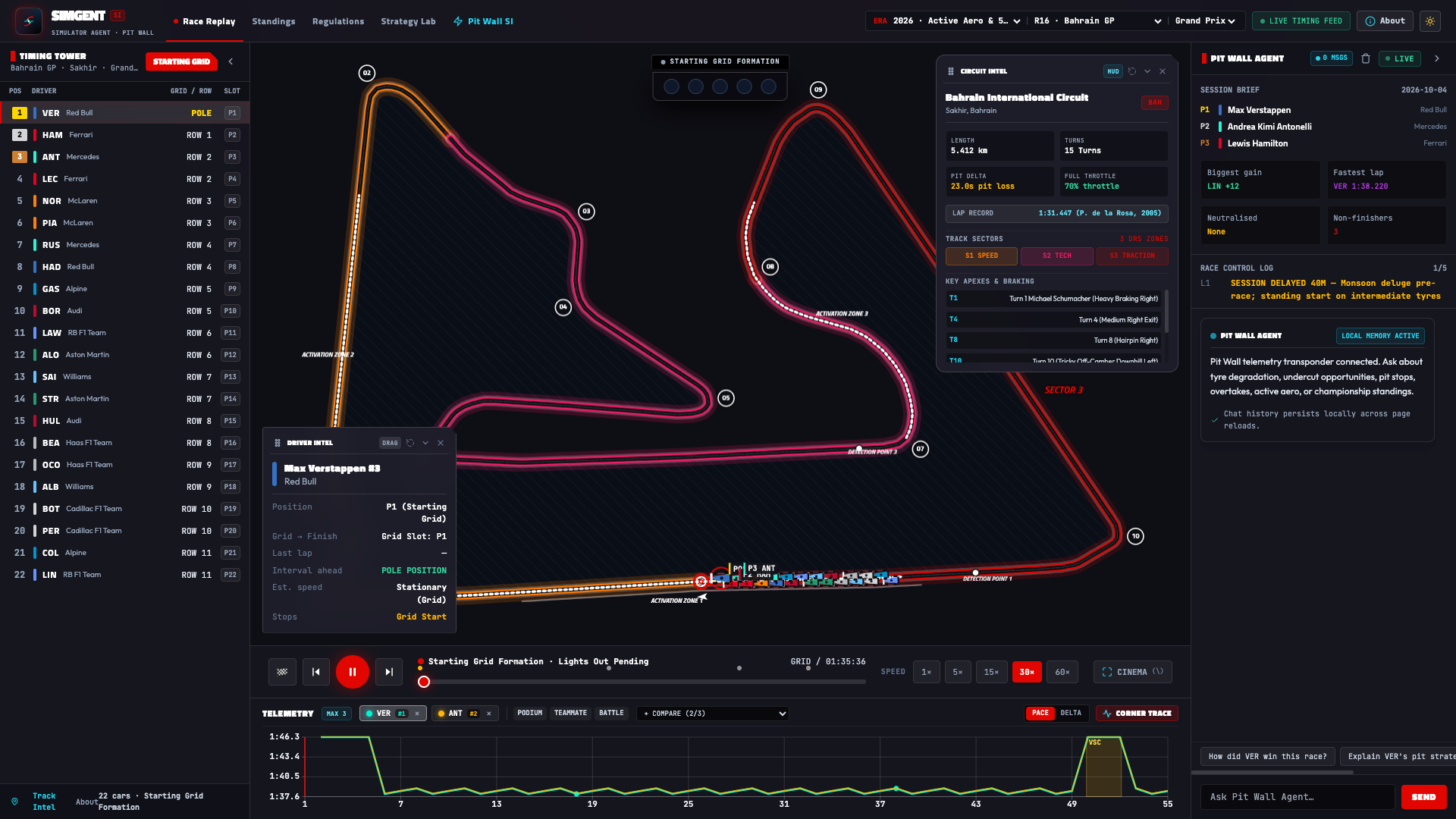
High-contrast day theme engineered for daylight readability with full SVG vector sharpness and collapsible telemetry HUDs.
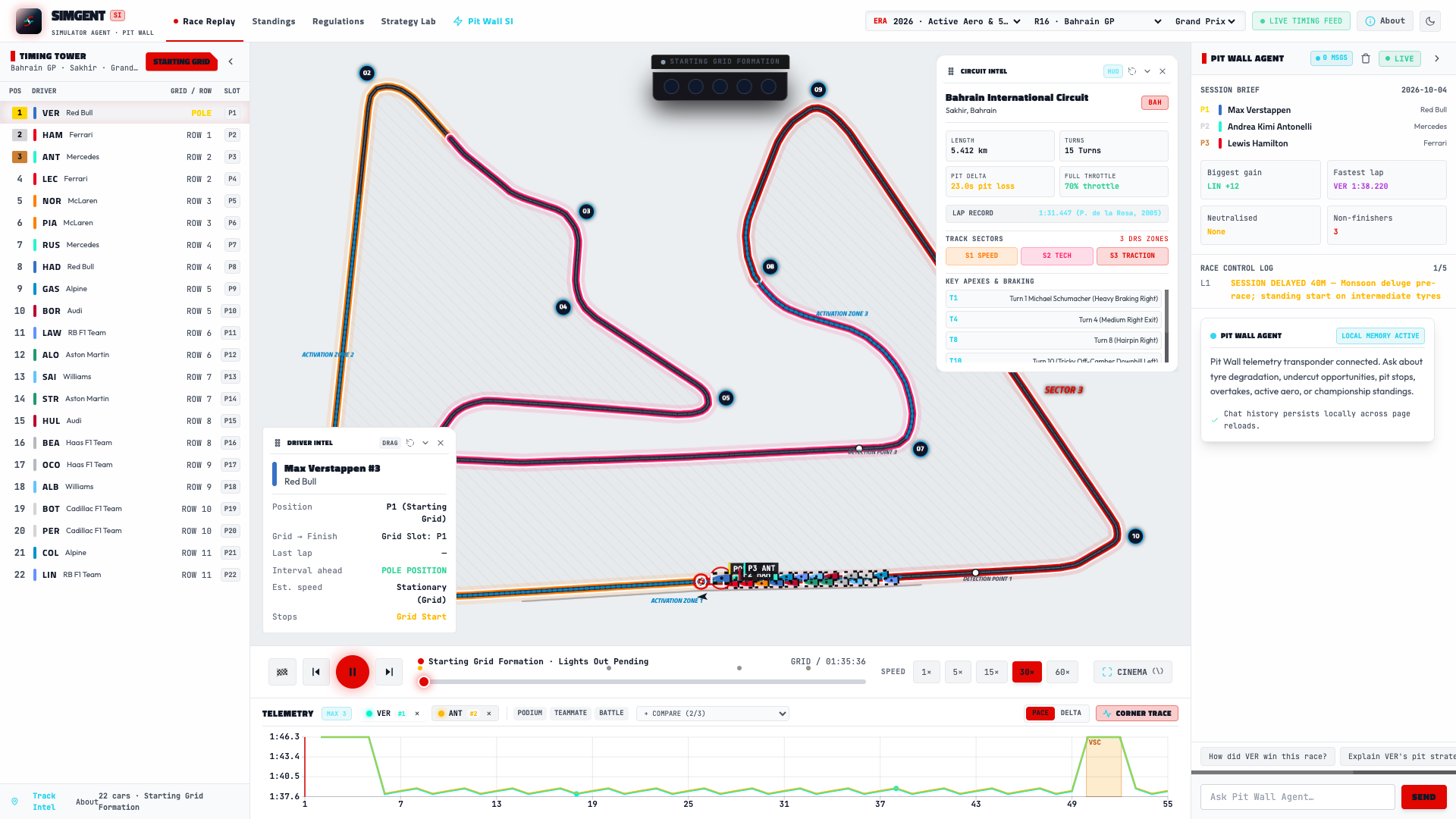
Natural language race engineer answering tactical, strategy, and incident queries. The AI emits interactive A2UI action cards ([EXPLORE 2021 REPLAY]) that directly scrub the replay camera and telemetry timeline to the exact lap and corner of the incident.
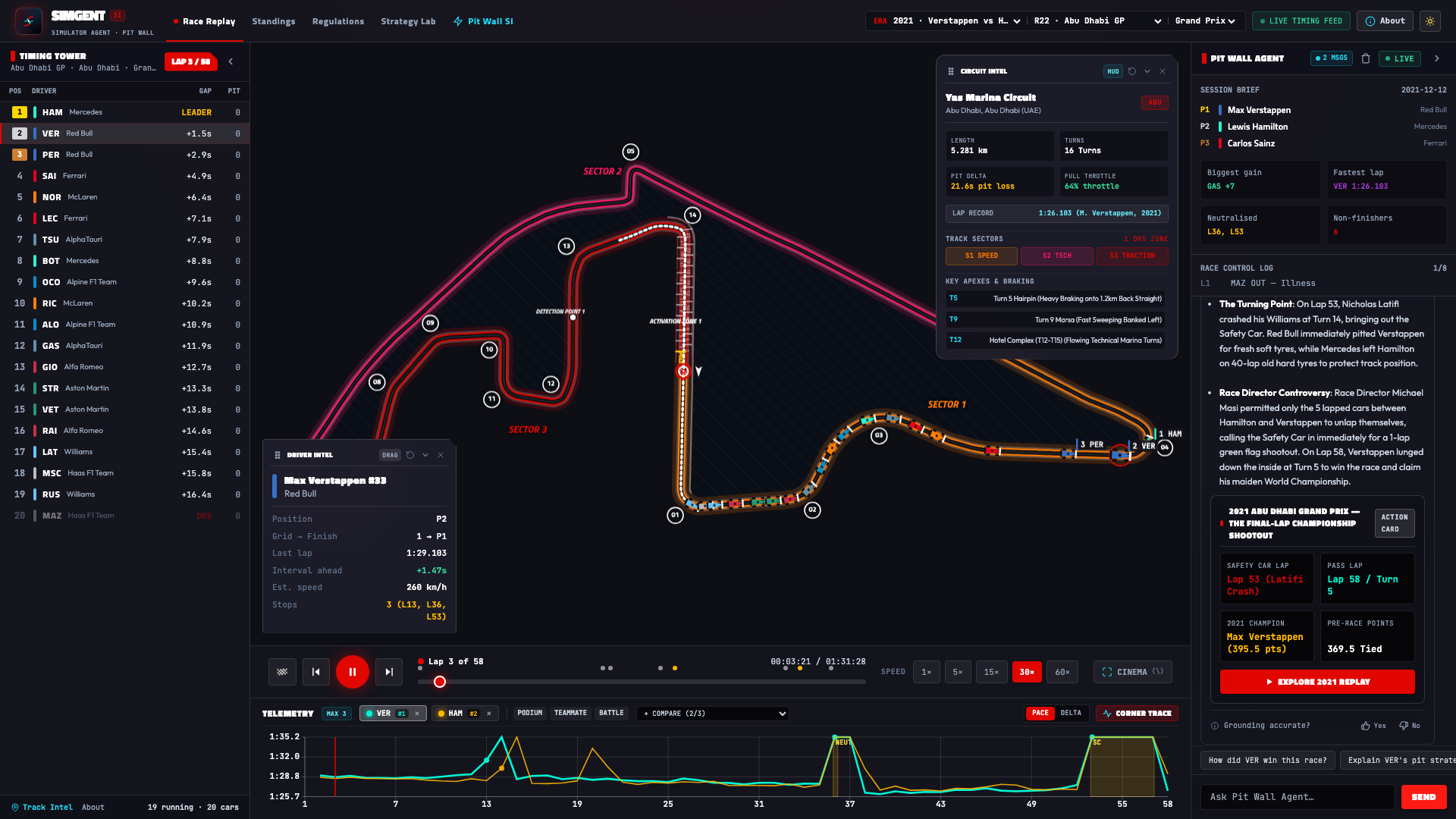
In-depth technical comparison of engine architectures, electrical deployment splits, active aerodynamics (X/Z-mode), and chassis regulations across 75+ years of Grand Prix racing history.
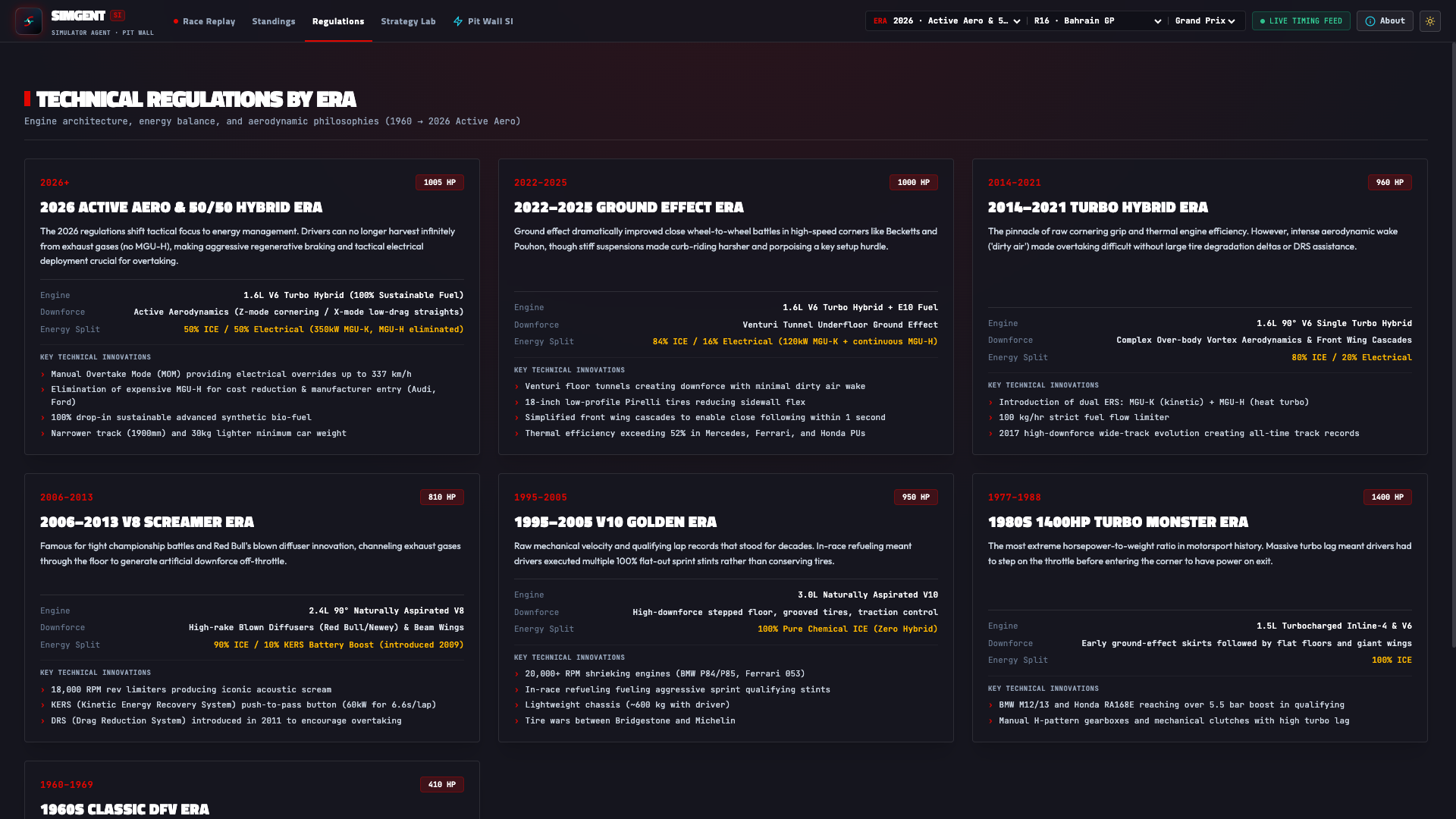
Full-distance tactical race battle simulations between any two driver strategies. Features non-linear tire degradation curves, fuel burn-off dynamics, and a 200-iteration Monte Carlo engine with stochastic win probabilities.
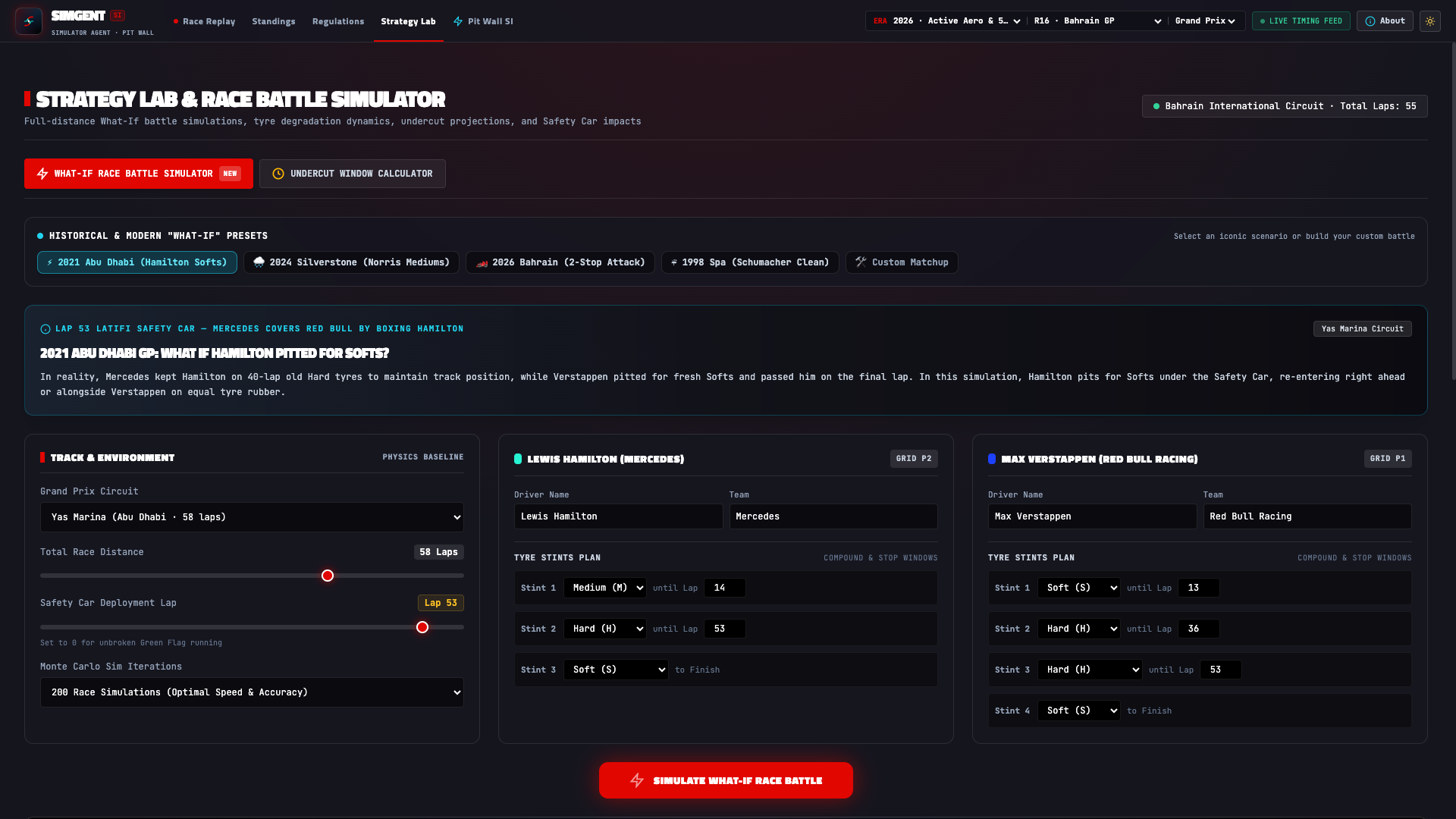
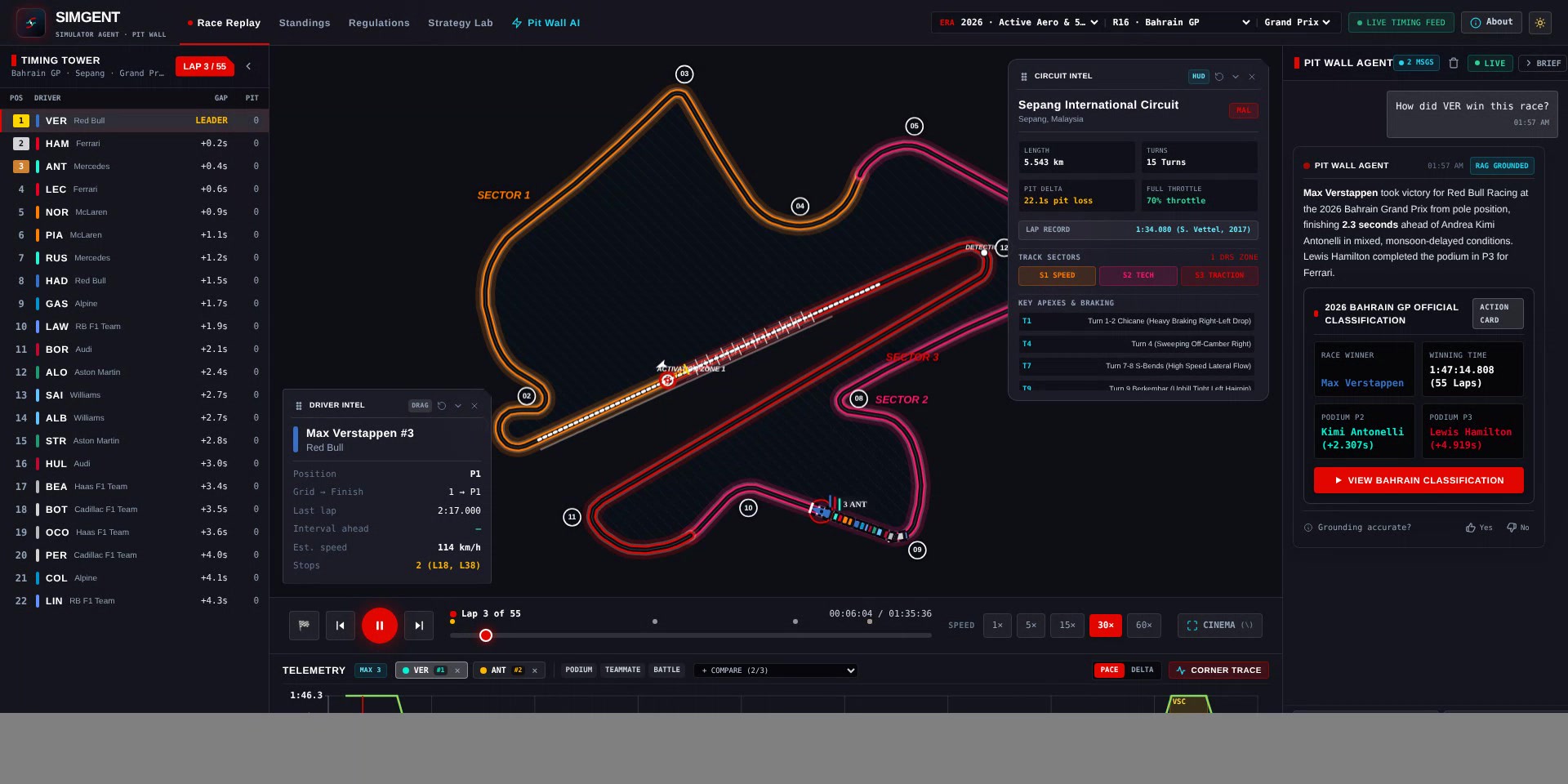
🎥 Demo (about 40 seconds): Watch the screen recording (MP4), or see it on tonyyang.work.
f1-circuits.geojson).#E80020, Red Bull #3671C6, McLaren #FF8000, Mercedes #27F4D2, Aston Martin #229971, etc.).[JUMP TO LAP 17 REPLAY]) that scrub the replay directly to the incident.flowchart TD
subgraph ClientLayer["🖥️ Frontend Cockpit & Client Interfaces"]
UI["High-Performance Web Cockpit\n(Tailwind CSS + HTML5 Canvas + WebGL)"]
Mobile["Responsive Mobile Deck\n(Collapsible HUD + Ergonomic Touch Targets)"]
ExternalLLM["Cursor / Claude Desktop / MCP Clients\n(stdio JSON-RPC)"]
end
subgraph SecurityLayer["🛡️ Pit Wall Security & Edge Guardrails"]
RateLimit["In-Memory Token Bucket Limiter\n(60 req/min per IP)"]
Sanitizer["Input Sanitizer & Unicode Normalizer\n(Max 500 Chars)"]
InjectionGuard["Adversarial Prompt Injection Shield\n(Checked before model routing)"]
CardSanitizer["Tactical Card Sanitizer\n(Hex Color + XSS Escape Enforcement)"]
end
subgraph RouterLayer["⚡ Dynamic Multi-LLM Orchestrator"]
Router["Multi-Tier LLM Router\n(app/tools/llm_router.py)"]
T1["Tier 1: Groq Cloud\n(Llama 3.3 70B Versatile · Account-specific quotas)"]
T2["Tier 2: Local Edge Ollama\n(Qwen 2.5 / DeepSeek R1 Distill)"]
T3["Tier 3: Gemini 2.5 Flash\n(Account-specific quotas and pricing)"]
T0["Tier 0: Deterministic Telemetry Transponder\n(Zero API Calls · Local fallback)"]
end
subgraph EngineLayer["⚙️ Core Telemetry & Simulation Engines"]
ReplayEngine["Temporal Replay Engine\n(app/tools/race_replay.py)"]
TelemetryEngine["Telemetry Synthesizer & Delta Computer\n(app/tools/f1_telemetry.py)"]
JolpicaSync["Jolpica / Ergast Synchronizer\n(app/tools/jolpica_sync.py)"]
MCPServer["SimGent MCP Server\n(mcp_server.py)"]
end
subgraph DataLayer["💾 Indexed Database & Local Cache"]
GeoJSON["f1-circuits.geojson\n(Normalized 2D Vector Geometry)"]
JolpicaCache["Historical JSON Data Cache\n(1950–2026 Season Races, Laps, Results)"]
TelemetryBlueprints["Track Curvature & Speed Blueprints\n(40+ Formula 1 Circuits)"]
end
UI --> RateLimit
Mobile --> RateLimit
ExternalLLM --> MCPServer
RateLimit --> Sanitizer --> InjectionGuard
InjectionGuard -->|Valid Query| Router
InjectionGuard -->|Adversarial Detected| UI
Router -->|Primary| T1
Router -->|Failover 1| T2
Router -->|Failover 2| T3
Router -->|Failover 3 / Offline| T0
T1 & T2 & T3 & T0 --> CardSanitizer --> UI
UI <--> ReplayEngine
UI <--> TelemetryEngine
MCPServer <--> ReplayEngine
MCPServer <--> TelemetryEngine
ReplayEngine <--> JolpicaCache
ReplayEngine <--> GeoJSON
TelemetryEngine <--> TelemetryBlueprints
JolpicaSync <--> JolpicaCache
sequenceDiagram
    autonumber
    actor User as 👤 Race Fan / Analyst
    participant Front as 🖥️ Cockpit UI
    participant Guard as 🛡️ Security Guardrail
    participant Router as ⚡ LLM Router
    participant Agent as 🏎️ Pit Wall AI Agent
    participant DB as 💾 Telemetry Engine

    User->>Front: "Why did Hamilton retire in Australia 2024?"
    Front->>Guard: POST /api/chat {query, context}
    Guard->>Guard: Check Rate Limit (60 RPM) & Adversarial Injection
    alt Clean Query
        Guard->>Router: Forward Sanitized Prompt
        Router->>Agent: Route to Groq / Gemini / Deterministic Engine
        Agent->>DB: Ingest Leader Laps & Curated Steward Incident Logs
        DB-->>Agent: Return Power Unit Failure at Turn 10 (Lap 17)
        Agent->>Agent: Construct Tactical Card (type: retirement_card)
        Agent-->>Front: Return Debrief Text + Jump-to-Replay Card
        Front->>User: Render Tactical Card
        User->>Front: Click "JUMP TO LAP 17 REPLAY"
        Front->>DB: Fetch 2024 Round 3 Albert Park Telemetry
        Front->>Front: Seek Replay Scrubber to Lap 17 & Trigger VSC Incident Banner
    end
SimGent uses a layered set of edge guardrails that keep the public demo resilient to API abuse and runaway token costs:
| Defense Tier | Mechanism | Target / SLA |
|---|---|---|
| Tier 0: Edge Rate Limiter | In-Memory Token Bucket Algorithm | Caps requests at 60 RPM per client IP (frontend/main.py). |
| Tier 1: Input Normalizer | Pydantic Schema Validation & Character Cap | Strips non-printable characters; caps prompts at 500 characters max. |
| Tier 2: Adversarial Guard | Pattern-based Injection Deflector | Intercepts DAN, roleplay jailbreaks, prompt leakage (check_prompt_injection()) before model routing. |
| Tier 3: Prompt Enclosure | Structured XML Boundary Quarantine | Wraps all queries in <security_protocol>, <f1_session_context>, and <user_question> tags before LLM consumption. |
| Tier 4: Card Sanitizer | Strict Schema Validation & HTML Escaping | Enforces valid hex codes (#FFFFFF), whitelist action types, and prevents DOM injection. |
Deployment costs depend on your individual setup. SimGent does not promise free hosting or a zero cloud bill. Your provider, region, billing plan, traffic, resource settings, storage, logs, builds and optional model APIs determine your charges. The demo’s configuration is an example, not a cost estimate for your deployment.
The public demo runs on Google Cloud Run, configured with --min-instances=0 --max-instances=1 --cpu-throttling, 512 MiB memory and one vCPU. Scale-to-zero reduces idle compute usage; it does not guarantee a zero bill. Requests, network transfer, builds, image storage, logging, and the budget function can incur charges. Free allowances depend on the billing account and current Cloud Run pricing.
The default deterministic engine makes no external model call. Optional Groq, Gemini, or local Ollama use has provider-specific quotas, billing or hardware costs. This is a Gemini-assisted build with optional Gemini integration; the hosted demo currently uses the local engine.
An alert-driven budget function can request manual scaling to zero. Billing notifications and shutdown take time: this mechanism is not a guaranteed spending cap. Configure billing controls appropriate to your account and review the Google Cloud budget documentation. Scaling to zero also makes the application unavailable until an operator restores it.
SimGent includes a native MCP server (mcp_server.py) conforming to Model Context Protocol v1.0. You can connect Claude Desktop or Cursor directly to your telemetry brain:
Add to your claude_desktop_config.json:
{
  "mcpServers": {
    "f1-simgent": {
      "command": "python",
      "args": ["/path/to/SimgentF1/mcp_server.py"]
    }
  }
}
SimGent includes a two-tier automated testing suite: Python unit/integration checks, plus a headless-Chromium Playwright E2E suite:
tests/test_guardrails_matrix.py): Verification of safety interceptors, weapons refusal, out-of-scope domain redirects, unsupported data notices, and deterministic telemetry calculation.tests/e2e_playwright_suite.js): Real browser automation validating 2D Hermite spline rendering, timing tower data, multi-turn chat, antecedent pronoun resolution, localStorage persistence across page reloads, A2UI two-way action card navigation, and live rate-limit enforcement.The automated dependency audit checks the application and budget-tool Python hash locks and the npm lockfile. CodeQL, bounded fuzzing, the full integration/browser suite, Python compatibility tests, and a non-root container build/smoke test also run on pull requests. Check the current PR verification results and the audit report for evidence and limitations. A green run records those checks at that commit; it is not a security certification or a guarantee of future results.
# Install browser test prerequisites after Python setup
npm ci
npx playwright install chromium

# Starts a temporary local server and runs Python + browser suites
npm test
Or via standard npm:
npm test                  # Run full test suite
npm run test:unit         # Run the Python unittest suite
npm run test:guardrails   # Run the focused guardrail matrix
npm run test:e2e          # Browser suite only; start the app separately
npm run test:e2e:headed   # Watch the real browser interact with the UI live
📖 For complete test matrix specifications and CI/CD details, see the
tests/README.mdguide.
The Python dependency hash lock and npm lockfile provide reproducible installs. package.json is private because npm is used for development tooling, not publishing the application as a library. The container runs as a dedicated non-root user. See the build guide for runtime choices and validation.
For the remaining work and acceptance criteria, see Public beta readiness.
Runtime versions checked on October 8, 2026: Python 3.14.8, Node 26.11.1 (stable Current), and npm 12.2.0. Node 24.21.0 is the LTS alternative. See the Python releases, Node release schedule, and npm package. Older Python 3.10 is no longer included in the supported runtime range.
For Node tooling, use nvm install / nvm use where nvm is available, then npm install --global [email protected]. Other version managers can select the same versions. packageManager records the npm version; CI explicitly installs it.
.venv using your explicitly selected Python 3.14.8 interpreter.# 1. Clone repository
git clone https://github.com/YangKuoshih/SimgentF1.git
cd SimgentF1
# 2. Create and activate the exact Python version (install uv first)
uv python install 3.14.8
uv venv --seed --python 3.14.8 .venv
source .venv/bin/activate # On Windows: .venv\Scripts\activate
# 3. Install dependencies
python -m pip install --require-hashes -r requirements.txt
# 4. (Optional) Configure AI / LLM Providers
# Core telemetry and replay features do not require model API keys.
# Optional provider access has account-specific pricing and quotas:
cp .env.example .env
# Edit .env and supply your GROQ_API_KEY or GEMINI_API_KEY
# 5. Launch the local telemetry cockpit
python frontend/main.py
Once started, access the application in your browser:
Run the automated verification suites locally:
# 1. Guardrails & safety matrix
python3 tests/test_guardrails_matrix.py

# 2. What-If Strategy Simulator & Historical Presets
python3 -m unittest tests/test_strategy_simulator.py

# 3. Pit Wall Agent Historical Intelligence & Milestones (1950–2026)
python3 -m unittest tests/test_f1_history_agent.py

# 4. Credential & container sanitization audit (basic tracked-file checks)
python3 tests/verify_security_sanitization.py

# 5. Sessions & historical eras resilience (1950 to 2026 Grand Prix, Qualifying, Sprints)
python3 tests/test_sessions_and_eras.py

# 6. Native Model Context Protocol (MCP) server tests
python3 tests/test_mcp_server.py

# Or run the all-in-one test suite runner:
./run_tests.sh
If you prefer running via Docker:
docker build -t f1-simgent .
docker run -p 8080:8080 f1-simgent
Then navigate to http://localhost:8080.
This repository and the hosted application at simgent.tonyyang.work are provided strictly for non-commercial educational, analytical, and archival purposes. Names and marks are used only to refer to the real teams, drivers, events and circuits.
F1, FORMULA ONE, FORMULA 1, FIA FORMULA ONE WORLD CHAMPIONSHIP, PADDOCK CLUB, and related logos, designs, and word marks are registered trademarks of Formula One Licensing B.V.Results, timing and historical records come from two community APIs, neither affiliated with Formula 1:
The cached copies in data/cache/ (and anything derived from them) stay under CC BY-NC-SA 4.0: credit the source, non-commercial use only, and share adaptations under the same license. See data/cache/LICENSE.md.
Circuit layouts:
data/circuit-layouts.json by scripts/build_circuit_layouts.py; see data/CIRCUIT-LAYOUTS-LICENSE.md.Geographic circuit outlines come from two sources:
data/f1-circuits.geojson), MIT License, © 2019-2025 Tomislav Bacinger (license).data/osm-circuits.geojson: Jerez, Fuji, Korea and Reims-Gueux), © OpenStreetMap contributors, available under the Open Database License (ODbL) 1.0. The app credits OpenStreetMap on the track map when these outlines are shown. Reuse the file under the ODbL and keep the credit. See data/OSM-LICENSE.md; scripts/import_osm_circuits.py rebuilds it.The source code is distributed under the MIT License. See LICENSE.
The race data in data/cache/ is not covered by the MIT License. It comes from Jolpica-F1 and OpenF1 and is licensed under CC BY-NC-SA 4.0 (attribution, non-commercial, share-alike). See data/cache/LICENSE.md and NOTICE.md.
The OpenStreetMap circuit outlines in data/osm-circuits.geojson are © OpenStreetMap contributors and licensed under the ODbL 1.0, not MIT. See data/OSM-LICENSE.md. The bacinger/f1-circuits outlines are MIT (license).
See CONTRIBUTING.md and SECURITY.md. Public seeds
live in data/seed/; feedback and learned memory live in ignored data/runtime/
or SIMGENT_RUNTIME_DIR. Admin APIs are disabled unless SIMGENT_ADMIN_TOKEN
is configured in the process environment. Anonymous feedback waits for admin review.
🏎️ SimGent (Simulator Agent) — Independent open-source AI pit wall, 2D race replay & motorsport telemetry analytics (1950–2026). Unofficial fan project.
See the code
Independent Open-Source Motorsport Telemetry Cockpit, 2D Vector Replay Player, & Autonomous AI Race Engineer (1950–2026)
Experience the Live Application: 👉 https://simgent.tonyyang.work 📖 Engineering Deep-Dive & Interview Playbook: 👉
DICTIONARY.md
[!IMPORTANT] Legal Notice & Trademark Disclaimer (Nominative Fair Use): SimGent (Simulator Agent) is an independent, non-commercial open-source research and educational demonstration project developed by fans. SimGent is not affiliated, associated, authorized, endorsed by, or in any way officially connected with Formula One Licensing B.V., Formula One World Championship Limited, the FIA (Fédération Internationale de l'Automobile), Formula One Management (FOM), or any Formula 1 constructor, team, or driver.
All trademarks, service marks, trade names, and team identities referenced within this repository and application (including but not limited to F1, FORMULA ONE, FORMULA 1, FIA FORMULA ONE WORLD CHAMPIONSHIP, team marks, and circuit names) are the property of their respective owners. They are used only to refer to the real teams, drivers, events and circuits, for historical identification, technical analysis and education. No commercial relationship, sponsorship, license, or endorsement is expressed or implied.
Every race weekend, my kids and I sit together watching the Grand Prix. Between safety car restarts, undercut attempts, and telemetry deltas, they would constantly ask:
Commercial timing screens are locked behind paywalls or designed like 1990s spreadsheets that kids can't explore. I wanted to build something intuitive and inspiring for them: a 60 FPS interactive 2D replay cockpit paired with an autonomous AI Race Engineer they could talk to in plain English.
What started as a family race-day side project became SimGent (short for Simulator Agent) — an open-source race replay and pit wall agent covering every World Championship race since 1950.
What is real data and what is modelled. Results, grids, pit stops and championship standings come from Jolpica-F1 (OpenF1 fills in sprint and qualifying sessions before Jolpica publishes them). Lap-by-lap replays use real lap times from 1996 onwards; earlier races are reconstructed from the results (finishing order, laps completed, retirements). Car positions within a lap and the speed profile are modelled from the circuit outline. There is no car telemetry (speed, throttle, brake) in the data. Every race is shown on the layout actually raced that year, with its length, turns and direction from F1DB. Outlines come from bacinger/f1-circuits, OpenStreetMap (Jerez, Fuji, Korea, Reims-Gueux 1950-51) and, for the other historic layouts, f1-circuits-svg, whose start/finish line is estimated.
Unobstructed racing line view across 40+ Grand Prix circuits, 20+ synchronized car models in team-inspired colors, timing tower, lap-time and gap charts, and session debriefs.
High-contrast day theme engineered for daylight readability with full SVG vector sharpness and collapsible telemetry HUDs.
Natural language race engineer answering tactical, strategy, and incident queries. The AI emits interactive A2UI action cards ([EXPLORE 2021 REPLAY]) that directly scrub the replay camera and telemetry timeline to the exact lap and corner of the incident.
In-depth technical comparison of engine architectures, electrical deployment splits, active aerodynamics (X/Z-mode), and chassis regulations across 75+ years of Grand Prix racing history.
Full-distance tactical race battle simulations between any two driver strategies. Features non-linear tire degradation curves, fuel burn-off dynamics, and a 200-iteration Monte Carlo engine with stochastic win probabilities.
🎥 Demo (about 40 seconds): Watch the screen recording (MP4), or see it on tonyyang.work.
f1-circuits.geojson).#E80020, Red Bull #3671C6, McLaren #FF8000, Mercedes #27F4D2, Aston Martin #229971, etc.).[JUMP TO LAP 17 REPLAY]) that scrub the replay directly to the incident.flowchart TD
subgraph ClientLayer["🖥️ Frontend Cockpit & Client Interfaces"]
UI["High-Performance Web Cockpit\n(Tailwind CSS + HTML5 Canvas + WebGL)"]
Mobile["Responsive Mobile Deck\n(Collapsible HUD + Ergonomic Touch Targets)"]
ExternalLLM["Cursor / Claude Desktop / MCP Clients\n(stdio JSON-RPC)"]
end
subgraph SecurityLayer["🛡️ Pit Wall Security & Edge Guardrails"]
RateLimit["In-Memory Token Bucket Limiter\n(60 req/min per IP)"]
Sanitizer["Input Sanitizer & Unicode Normalizer\n(Max 500 Chars)"]
InjectionGuard["Adversarial Prompt Injection Shield\n(Checked before model routing)"]
CardSanitizer["Tactical Card Sanitizer\n(Hex Color + XSS Escape Enforcement)"]
end
subgraph RouterLayer["⚡ Dynamic Multi-LLM Orchestrator"]
Router["Multi-Tier LLM Router\n(app/tools/llm_router.py)"]
T1["Tier 1: Groq Cloud\n(Llama 3.3 70B Versatile · Account-specific quotas)"]
T2["Tier 2: Local Edge Ollama\n(Qwen 2.5 / DeepSeek R1 Distill)"]
T3["Tier 3: Gemini 2.5 Flash\n(Account-specific quotas and pricing)"]
T0["Tier 0: Deterministic Telemetry Transponder\n(Zero API Calls · Local fallback)"]
end
subgraph EngineLayer["⚙️ Core Telemetry & Simulation Engines"]
ReplayEngine["Temporal Replay Engine\n(app/tools/race_replay.py)"]
TelemetryEngine["Telemetry Synthesizer & Delta Computer\n(app/tools/f1_telemetry.py)"]
JolpicaSync["Jolpica / Ergast Synchronizer\n(app/tools/jolpica_sync.py)"]
MCPServer["SimGent MCP Server\n(mcp_server.py)"]
end
subgraph DataLayer["💾 Indexed Database & Local Cache"]
GeoJSON["f1-circuits.geojson\n(Normalized 2D Vector Geometry)"]
JolpicaCache["Historical JSON Data Cache\n(1950–2026 Season Races, Laps, Results)"]
TelemetryBlueprints["Track Curvature & Speed Blueprints\n(40+ Formula 1 Circuits)"]
end
UI --> RateLimit
Mobile --> RateLimit
ExternalLLM --> MCPServer
RateLimit --> Sanitizer --> InjectionGuard
InjectionGuard -->|Valid Query| Router
InjectionGuard -->|Adversarial Detected| UI
Router -->|Primary| T1
Router -->|Failover 1| T2
Router -->|Failover 2| T3
Router -->|Failover 3 / Offline| T0
T1 & T2 & T3 & T0 --> CardSanitizer --> UI
UI <--> ReplayEngine
UI <--> TelemetryEngine
MCPServer <--> ReplayEngine
MCPServer <--> TelemetryEngine
ReplayEngine <--> JolpicaCache
ReplayEngine <--> GeoJSON
TelemetryEngine <--> TelemetryBlueprints
JolpicaSync <--> JolpicaCache
sequenceDiagram
    autonumber
    actor User as 👤 Race Fan / Analyst
    participant Front as 🖥️ Cockpit UI
    participant Guard as 🛡️ Security Guardrail
    participant Router as ⚡ LLM Router
    participant Agent as 🏎️ Pit Wall AI Agent
    participant DB as 💾 Telemetry Engine

    User->>Front: "Why did Hamilton retire in Australia 2024?"
    Front->>Guard: POST /api/chat {query, context}
    Guard->>Guard: Check Rate Limit (60 RPM) & Adversarial Injection
    alt Clean Query
        Guard->>Router: Forward Sanitized Prompt
        Router->>Agent: Route to Groq / Gemini / Deterministic Engine
        Agent->>DB: Ingest Leader Laps & Curated Steward Incident Logs
        DB-->>Agent: Return Power Unit Failure at Turn 10 (Lap 17)
        Agent->>Agent: Construct Tactical Card (type: retirement_card)
        Agent-->>Front: Return Debrief Text + Jump-to-Replay Card
        Front->>User: Render Tactical Card
        User->>Front: Click "JUMP TO LAP 17 REPLAY"
        Front->>DB: Fetch 2024 Round 3 Albert Park Telemetry
        Front->>Front: Seek Replay Scrubber to Lap 17 & Trigger VSC Incident Banner
    end
SimGent uses a layered set of edge guardrails that keep the public demo resilient to API abuse and runaway token costs:
| Defense Tier | Mechanism | Target / SLA |
|---|---|---|
| Tier 0: Edge Rate Limiter | In-Memory Token Bucket Algorithm | Caps requests at 60 RPM per client IP (frontend/main.py). |
| Tier 1: Input Normalizer | Pydantic Schema Validation & Character Cap | Strips non-printable characters; caps prompts at 500 characters max. |
| Tier 2: Adversarial Guard | Pattern-based Injection Deflector | Intercepts DAN, roleplay jailbreaks, prompt leakage (check_prompt_injection()) before model routing. |
| Tier 3: Prompt Enclosure | Structured XML Boundary Quarantine | Wraps all queries in <security_protocol>, <f1_session_context>, and <user_question> tags before LLM consumption. |
| Tier 4: Card Sanitizer | Strict Schema Validation & HTML Escaping | Enforces valid hex codes (#FFFFFF), whitelist action types, and prevents DOM injection. |
Deployment costs depend on your individual setup. SimGent does not promise free hosting or a zero cloud bill. Your provider, region, billing plan, traffic, resource settings, storage, logs, builds and optional model APIs determine your charges. The demo’s configuration is an example, not a cost estimate for your deployment.
The public demo runs on Google Cloud Run, configured with --min-instances=0 --max-instances=1 --cpu-throttling, 512 MiB memory and one vCPU. Scale-to-zero reduces idle compute usage; it does not guarantee a zero bill. Requests, network transfer, builds, image storage, logging, and the budget function can incur charges. Free allowances depend on the billing account and current Cloud Run pricing.
The default deterministic engine makes no external model call. Optional Groq, Gemini, or local Ollama use has provider-specific quotas, billing or hardware costs. This is a Gemini-assisted build with optional Gemini integration; the hosted demo currently uses the local engine.
An alert-driven budget function can request manual scaling to zero. Billing notifications and shutdown take time: this mechanism is not a guaranteed spending cap. Configure billing controls appropriate to your account and review the Google Cloud budget documentation. Scaling to zero also makes the application unavailable until an operator restores it.
SimGent includes a native MCP server (mcp_server.py) conforming to Model Context Protocol v1.0. You can connect Claude Desktop or Cursor directly to your telemetry brain:
Add to your claude_desktop_config.json:
{
  "mcpServers": {
    "f1-simgent": {
      "command": "python",
      "args": ["/path/to/SimgentF1/mcp_server.py"]
    }
  }
}
SimGent includes a two-tier automated testing suite: Python unit/integration checks, plus a headless-Chromium Playwright E2E suite:
tests/test_guardrails_matrix.py): Verification of safety interceptors, weapons refusal, out-of-scope domain redirects, unsupported data notices, and deterministic telemetry calculation.tests/e2e_playwright_suite.js): Real browser automation validating 2D Hermite spline rendering, timing tower data, multi-turn chat, antecedent pronoun resolution, localStorage persistence across page reloads, A2UI two-way action card navigation, and live rate-limit enforcement.The automated dependency audit checks the application and budget-tool Python hash locks and the npm lockfile. CodeQL, bounded fuzzing, the full integration/browser suite, Python compatibility tests, and a non-root container build/smoke test also run on pull requests. Check the current PR verification results and the audit report for evidence and limitations. A green run records those checks at that commit; it is not a security certification or a guarantee of future results.
# Install browser test prerequisites after Python setup
npm ci
npx playwright install chromium

# Starts a temporary local server and runs Python + browser suites
npm test
Or via standard npm:
npm test                  # Run full test suite
npm run test:unit         # Run the Python unittest suite
npm run test:guardrails   # Run the focused guardrail matrix
npm run test:e2e          # Browser suite only; start the app separately
npm run test:e2e:headed   # Watch the real browser interact with the UI live
📖 For complete test matrix specifications and CI/CD details, see the
tests/README.mdguide.
The Python dependency hash lock and npm lockfile provide reproducible installs. package.json is private because npm is used for development tooling, not publishing the application as a library. The container runs as a dedicated non-root user. See the build guide for runtime choices and validation.
For the remaining work and acceptance criteria, see Public beta readiness.
Runtime versions checked on October 8, 2026: Python 3.14.8, Node 26.11.1 (stable Current), and npm 12.2.0. Node 24.21.0 is the LTS alternative. See the Python releases, Node release schedule, and npm package. Older Python 3.10 is no longer included in the supported runtime range.
For Node tooling, use nvm install / nvm use where nvm is available, then npm install --global [email protected]. Other version managers can select the same versions. packageManager records the npm version; CI explicitly installs it.
.venv using your explicitly selected Python 3.14.8 interpreter.# 1. Clone repository
git clone https://github.com/YangKuoshih/SimgentF1.git
cd SimgentF1
# 2. Create and activate the exact Python version (install uv first)
uv python install 3.14.8
uv venv --seed --python 3.14.8 .venv
source .venv/bin/activate # On Windows: .venv\Scripts\activate
# 3. Install dependencies
python -m pip install --require-hashes -r requirements.txt
# 4. (Optional) Configure AI / LLM Providers
# Core telemetry and replay features do not require model API keys.
# Optional provider access has account-specific pricing and quotas:
cp .env.example .env
# Edit .env and supply your GROQ_API_KEY or GEMINI_API_KEY
# 5. Launch the local telemetry cockpit
python frontend/main.py
Once started, access the application in your browser:
Run the automated verification suites locally:
# 1. Guardrails & safety matrix
python3 tests/test_guardrails_matrix.py

# 2. What-If Strategy Simulator & Historical Presets
python3 -m unittest tests/test_strategy_simulator.py

# 3. Pit Wall Agent Historical Intelligence & Milestones (1950–2026)
python3 -m unittest tests/test_f1_history_agent.py

# 4. Credential & container sanitization audit (basic tracked-file checks)
python3 tests/verify_security_sanitization.py

# 5. Sessions & historical eras resilience (1950 to 2026 Grand Prix, Qualifying, Sprints)
python3 tests/test_sessions_and_eras.py

# 6. Native Model Context Protocol (MCP) server tests
python3 tests/test_mcp_server.py

# Or run the all-in-one test suite runner:
./run_tests.sh
If you prefer running via Docker:
docker build -t f1-simgent .
docker run -p 8080:8080 f1-simgent
Then navigate to http://localhost:8080.
This repository and the hosted application at simgent.tonyyang.work are provided strictly for non-commercial educational, analytical, and archival purposes. Names and marks are used only to refer to the real teams, drivers, events and circuits.
F1, FORMULA ONE, FORMULA 1, FIA FORMULA ONE WORLD CHAMPIONSHIP, PADDOCK CLUB, and related logos, designs, and word marks are registered trademarks of Formula One Licensing B.V.Results, timing and historical records come from two community APIs, neither affiliated with Formula 1:
The cached copies in data/cache/ (and anything derived from them) stay under CC BY-NC-SA 4.0: credit the source, non-commercial use only, and share adaptations under the same license. See data/cache/LICENSE.md.
Circuit layouts:
data/circuit-layouts.json by scripts/build_circuit_layouts.py; see data/CIRCUIT-LAYOUTS-LICENSE.md.Geographic circuit outlines come from two sources:
data/f1-circuits.geojson), MIT License, © 2019-2025 Tomislav Bacinger (license).data/osm-circuits.geojson: Jerez, Fuji, Korea and Reims-Gueux), © OpenStreetMap contributors, available under the Open Database License (ODbL) 1.0. The app credits OpenStreetMap on the track map when these outlines are shown. Reuse the file under the ODbL and keep the credit. See data/OSM-LICENSE.md; scripts/import_osm_circuits.py rebuilds it.The source code is distributed under the MIT License. See LICENSE.
The race data in data/cache/ is not covered by the MIT License. It comes from Jolpica-F1 and OpenF1 and is licensed under CC BY-NC-SA 4.0 (attribution, non-commercial, share-alike). See data/cache/LICENSE.md and NOTICE.md.
The OpenStreetMap circuit outlines in data/osm-circuits.geojson are © OpenStreetMap contributors and licensed under the ODbL 1.0, not MIT. See data/OSM-LICENSE.md. The bacinger/f1-circuits outlines are MIT (license).
See CONTRIBUTING.md and SECURITY.md. Public seeds
live in data/seed/; feedback and learned memory live in ignored data/runtime/
or SIMGENT_RUNTIME_DIR. Admin APIs are disabled unless SIMGENT_ADMIN_TOKEN
is configured in the process environment. Anonymous feedback waits for admin review.



