AI Novel Generator is a locally hosted application for fiction planning and writing. It provides story settings, hierarchical planning, chapter editing, entity management, and configurable AI generation workflows. Generated candidates can be reviewed and edited before saving.
The frontend uses Next.js, the backend uses FastAPI, and project data is stored in MongoDB. AI operations use model services configured by the user.
Current main contains the rewritten application. The previous version is preserved on old. Their data structures differ. Back up legacy data and use a separate database for this version.
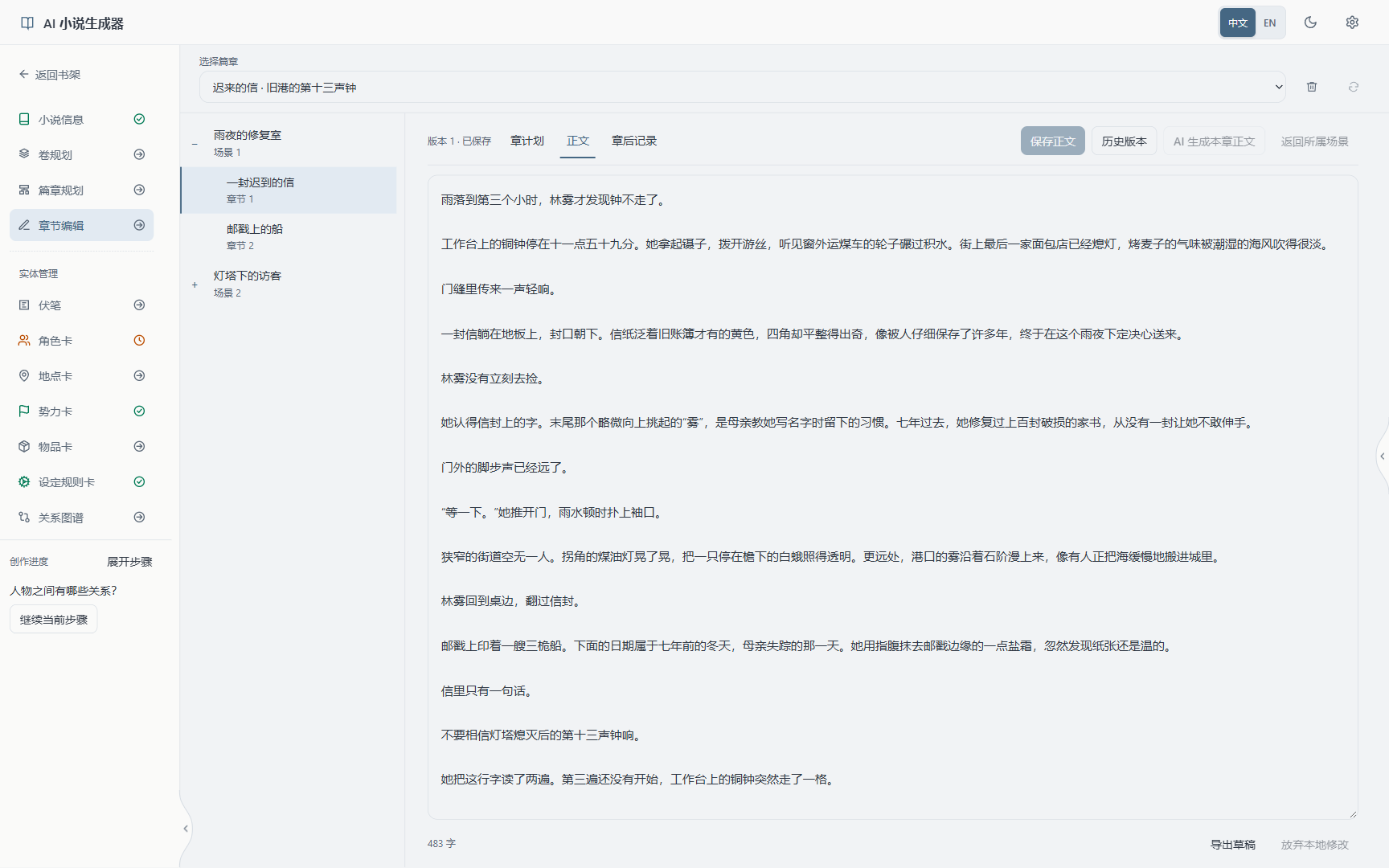
The screenshots show the running application with the fictional demo novel Letters from the Fog Harbor, captured at a desktop 16:10 ratio. The application supports responsive mobile layouts, Chinese and English, and light and dark themes. Screenshots use the Chinese interface.
The bookshelf supports creating, viewing, and managing projects. The novel information page stores the title, core idea, main plot, introduction, worldbuilding, writing style, narrative point of view, and intended length. These fields support manual editing; selected fields also support AI creation or revision.
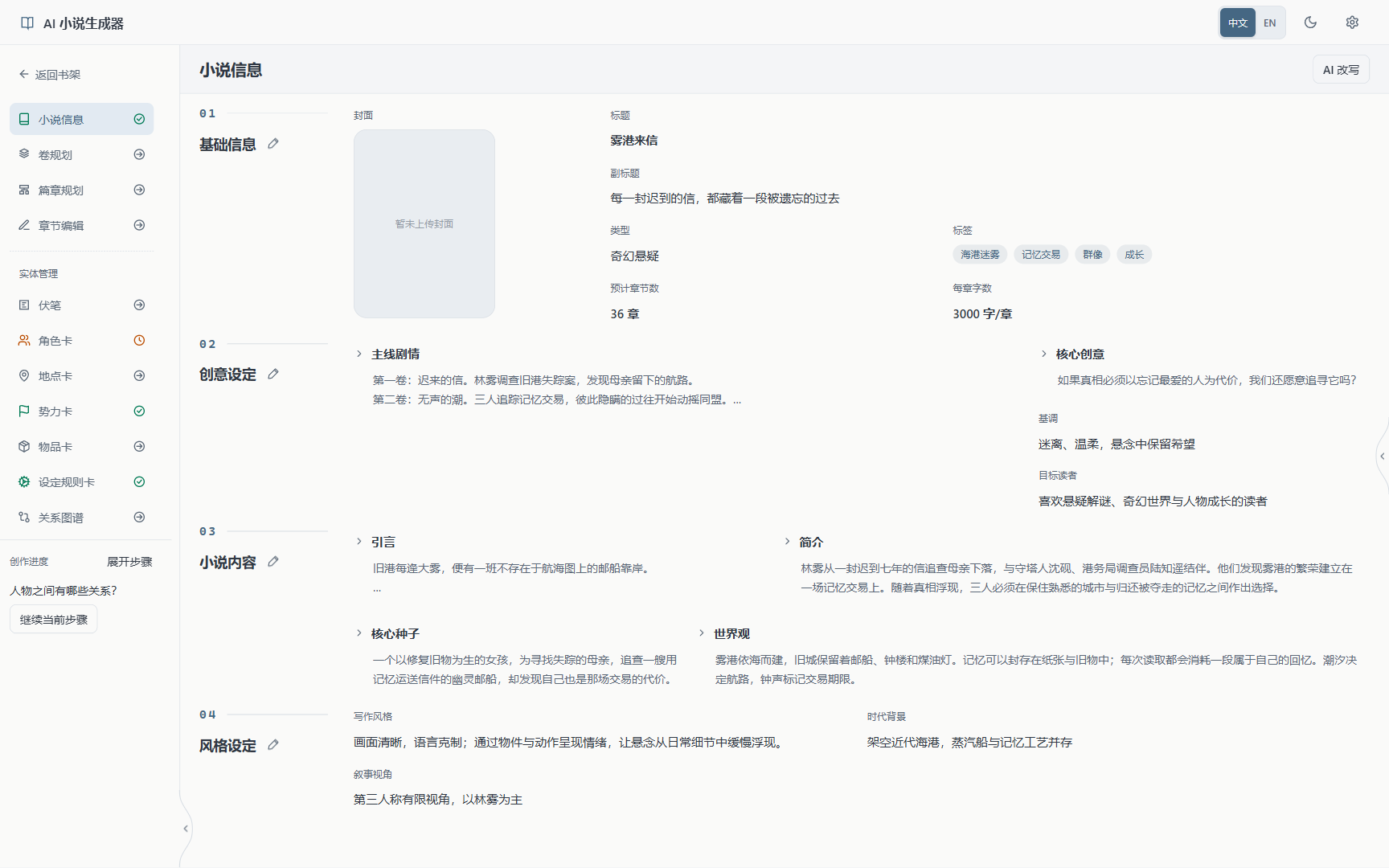
The application develops a story from its core into progressively more detailed plans. The built-in novel creation workflow expands an idea into a compressed story, extracts the core idea and seed, and generates the novel information. The core-seed prompt uses the first step of the Snowflake Method to describe the protagonist, conflict, action, and consequences.
Subsequent content is organized as volumes → arcs → scenes → chapter plans → prose. Each level can be edited independently.
| Level | Planning content | Demo example |
|---|---|---|
| Story core | Main character, central event, objective, and consequences | A restorer receives a letter from her missing mother and investigates a ship that carries memories |
| Volume | Stage objective, conflict, turning points, and starting and ending states | Investigate the ship's route and find evidence that her mother is alive |
| Arc | Related events and their progression | Investigate disappearances and establish the connection between letters and harbor bells |
| Scene | A specific event, participants, and change | An old letter arrives at the workshop on a rainy night |
| Chapter plan | Chapter objective, beats, length, and content requirements | Identify the handwriting, examine the postmark, and end with a bell |
| Prose | Chapter text based on the plan | Describe the letter's arrival at the workshop |
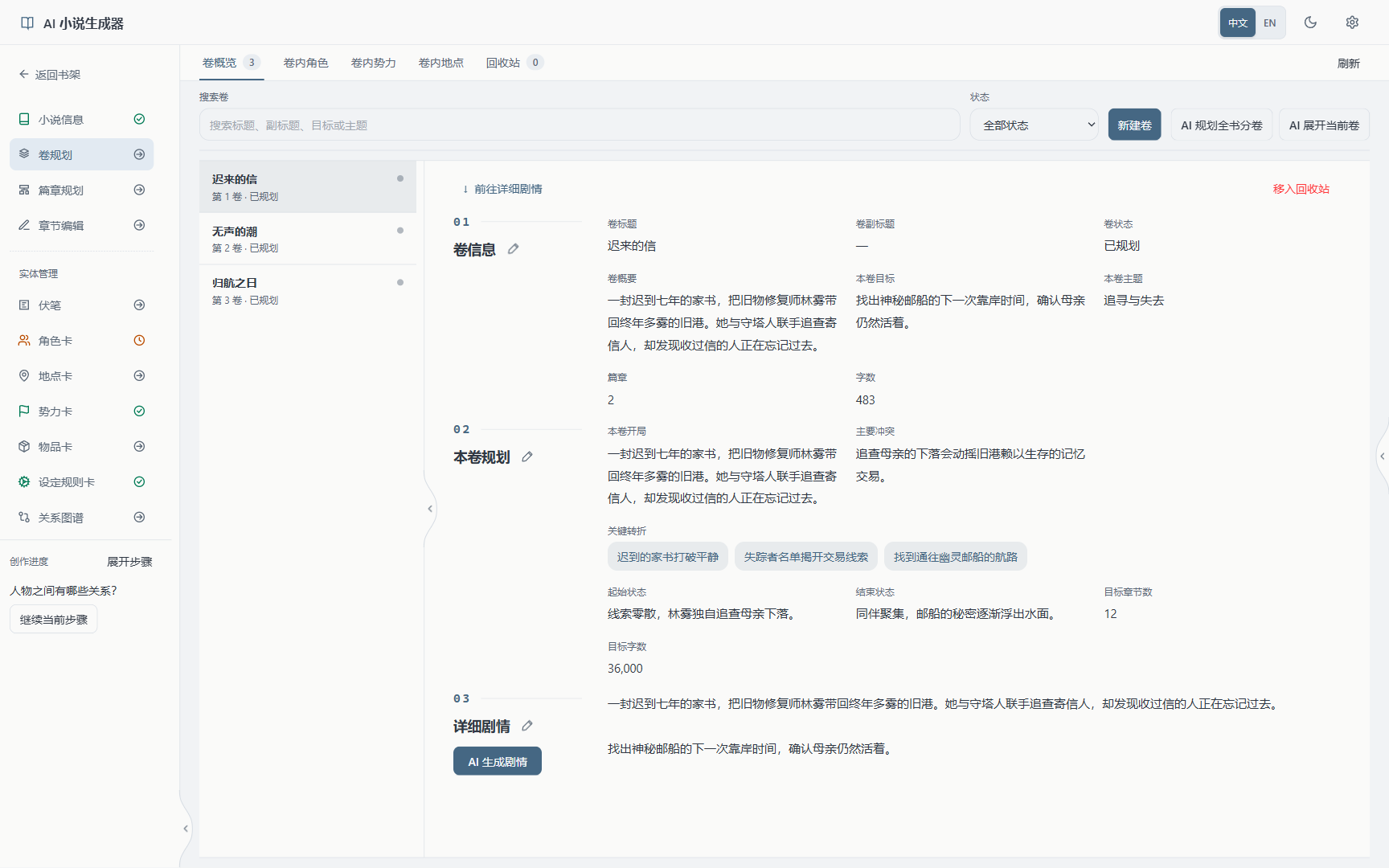
Volume planning also manages the characters, factions, and locations used in that volume. Arc, scene, and chapter generation use higher-level plans and related material as inputs.
The chapter editor includes the directory, chapter plan, manuscript, and chapter records. Manuscripts support manual editing and AI generation.
Generated candidates are saved after confirmation. Chapter records provide access to confirmed character and world states at specific story positions.
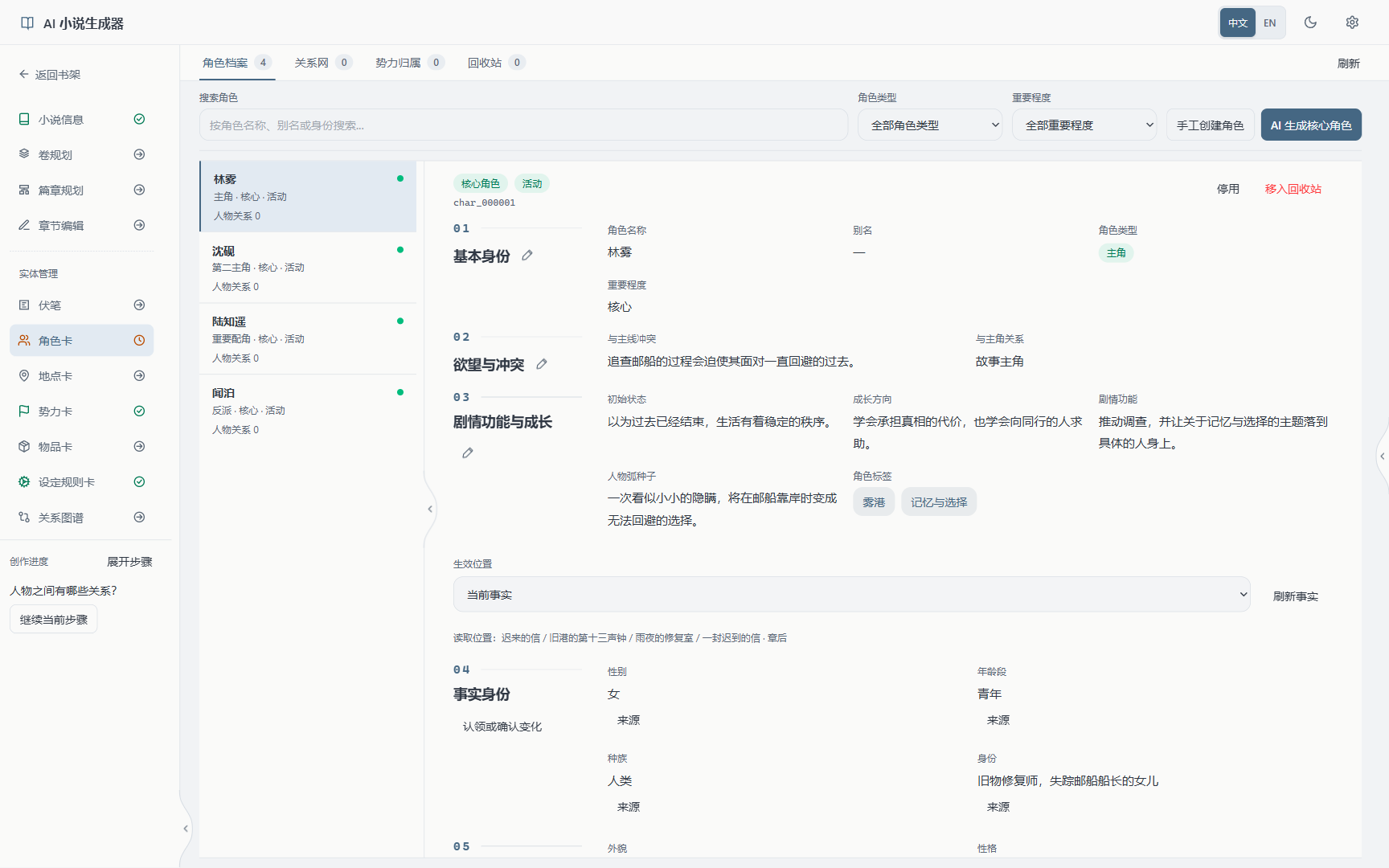
Character cards store profiles, desires, fears, conflicts with the main plot, growth directions, and story roles. Character information can be confirmed and read at the beginning of the story, the start of a volume, or before and after a chapter.
| Module | Managed content |
|---|---|
| Characters | Profiles, growth plans, information at story positions, and relationships |
| Factions | Goals, public stances, hidden motives, resources, and character membership |
| Locations | Place information and the locations used in each volume |
| Items | Item profiles, owners, and transfer records |
| World rules | Rules, applicable scope, restrictions, and costs |
| Foreshadowing | Clues, related story records, and payoff status |
| Relationship graph | Visual representation of characters, factions, and their relationships |
| Novel assistant | Queries against the current project, discussion, and review of proposed changes |
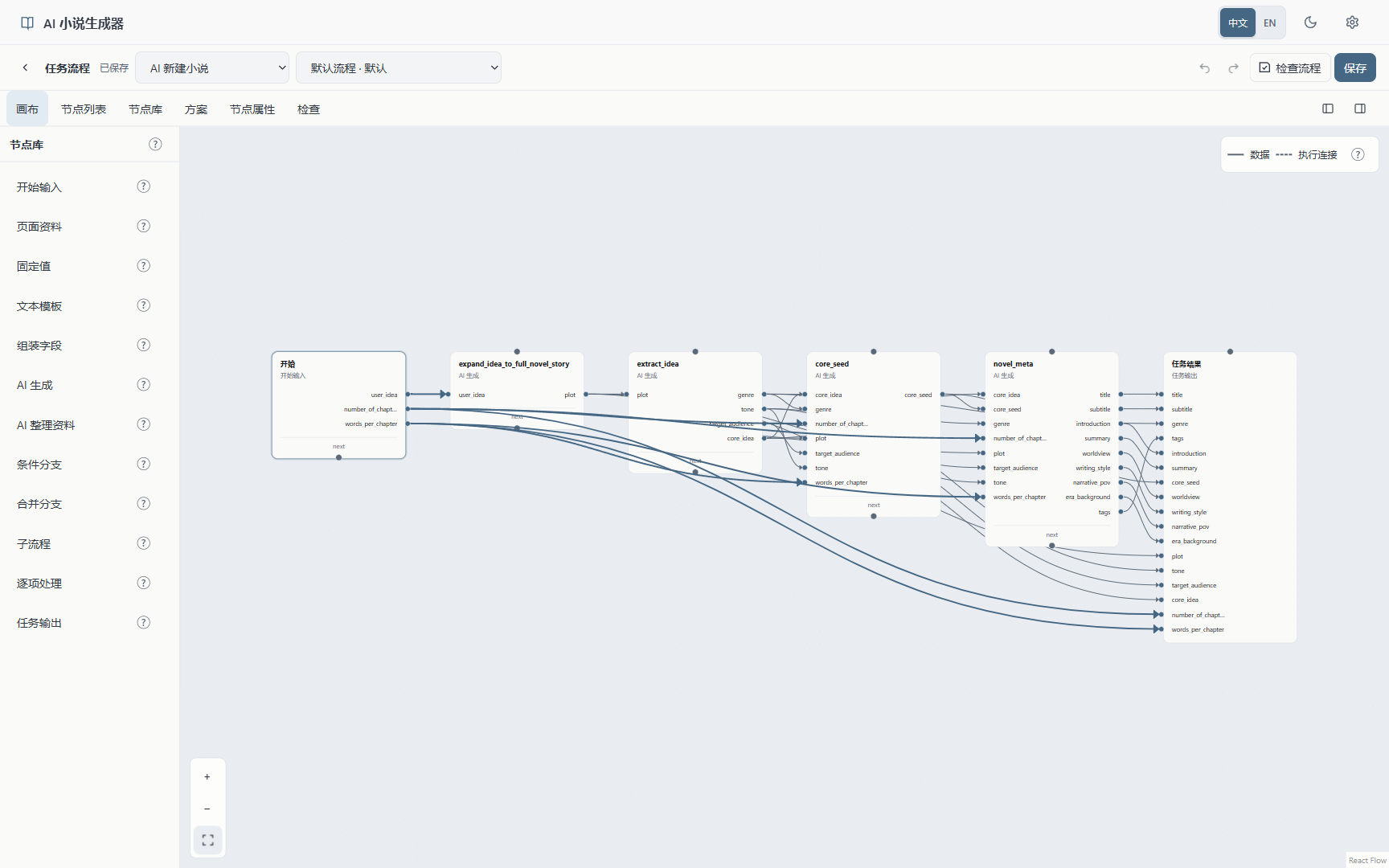
AI operations consist of nodes and connections. Nodes read project data, prepare context, call models, or return results. Connections define data transfer and execution order.
Built-in schemes cover novel creation, character and faction generation, volume planning, arcs, scenes, chapter prose, and post-chapter checks. Each task's workflow can be edited on the canvas.
| Node | Function |
|---|---|
| Input / Page context | Accept operation parameters or read data from the current novel and writing position |
| Constant / Text template | Supply fixed content or insert input fields into a template |
| Compose fields | Organize multiple inputs into specified fields |
| AI generation | Call a model for text or structured output |
| AI context preparation | Query and select related material from the current novel |
| Condition / Merge | Select an execution path or collect branch results |
| Subflow / For each | Call reusable steps or execute a workflow for each array item |
| Output | Return the final candidate to the application page for review and saving |
Custom workflows combine these node types. Inputs and outputs are defined by fields and types; more complex configurations involve JSON structures.
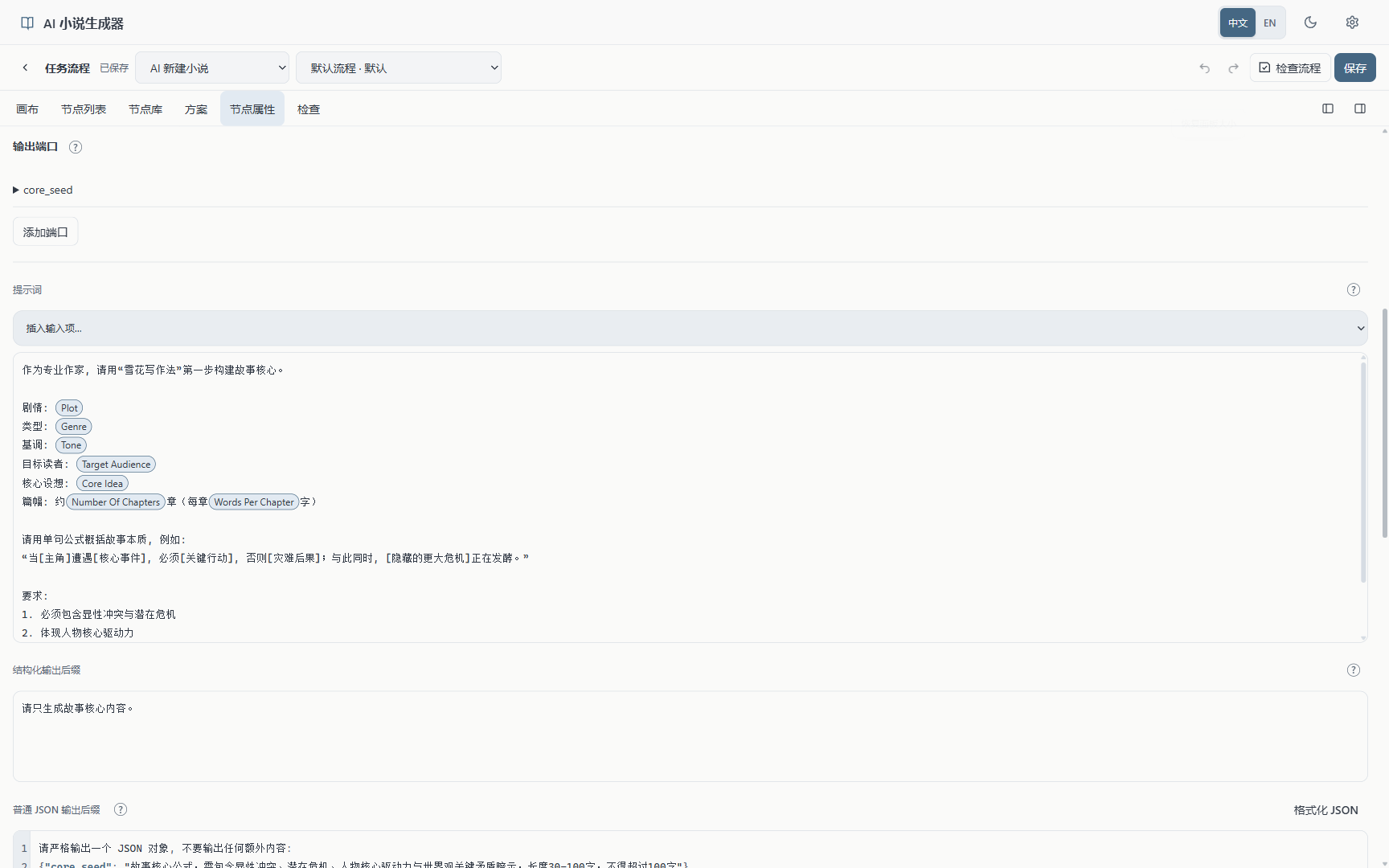
Nodes support editing names, prompts, input and output fields, model settings, and generation parameters. Different AI nodes within a workflow can use different models.
Prompts support input-field tokens. For example, the core-seed node reads the plot, genre, tone, audience, and intended length, then generates the story core according to its prompt. Changes to prompts and model settings apply to subsequent executions.
The editor supports undo, redo, scheme revisions, and context previews. Context previews check inputs and connections without calling a model.
The application has a browser interface, a Python backend, and MongoDB storage. Windows users can manage the services with the desktop launcher, or start them in separate terminals.
| Dependency | Requirement |
|---|---|
| Python | 3.13 or 3.14, with a recent patch release |
| Node.js and npm | Node.js 20.9 or later, using a maintained release |
| MongoDB | A replica set; a single-node setup is provided below |
| Docker | Needed for the bundled MongoDB setup; optional with an existing replica set |
| Model service | Your own API key, endpoint, and model name |
Saving arcs and chapters requires MongoDB multi-document transactions and a replica set.
Run these commands in PowerShell:
git clone https://github.com/YILING0013/AI_NovelGenerator.git
cd AI_NovelGenerator
python -m venv .venv
.\.venv\Scripts\python.exe -m pip install -r requirements.txt
cd frontend
npm ci
cd ..
On macOS and Linux, the virtual environment interpreter is .venv/bin/python. See manual startup below.
If you already have a MongoDB replica set, configure its connection address directly. For the bundled Docker setup, first make sure local port 27017 is available:
docker compose -f compose.mongodb.yaml up -d
docker compose -f compose.mongodb.yaml exec mongodb mongosh
Inside the MongoDB shell, run:
rs.initiate({
  _id: "rs0",
  members: [{ _id: 0, host: "localhost:27017" }]
})
exit()
Run rs.initiate only once for a new data volume. Back in PowerShell, run docker compose -f compose.mongodb.yaml ps and check that the service is healthy.
On first setup, copy backend/config/config_default.yaml to backend/config/config.yaml. If your local configuration already exists, edit it instead of replacing your saved model settings.
Set these values:
mongodb_url: "mongodb://127.0.0.1:27017/?replicaSet=rs0&directConnection=true"
mongo_database_name: "novel_generator"
mongo_transaction_mode: "required"
The bundled configuration uses named volumes, publishes its port only on 127.0.0.1, and has no database password. Restart the backend after changing its database connection.
On Windows, double-click start.bat, then start the services in the desktop launcher. The launcher manages ports, logs, and service shutdown. Production mode builds the frontend on first use and after relevant source or configuration changes.
| Service | Default address |
|---|---|
| Writing interface | http://127.0.0.1:3300 |
| Backend | http://127.0.0.1:8200 |
| API documentation | http://127.0.0.1:8200/docs |
Closing the launcher stops the services it started. Stop services before changing ports. If a port is occupied, identify the existing process before starting another instance.
Open Settings, enter your provider's API key, endpoint, and model name, and enable that configuration. The project includes adapters for OpenAI, DeepSeek, Gemini, Claude, and corresponding compatible endpoints. Supported parameters depend on the adapter and provider.
Basic usage:
The application includes built-in workflows. API keys are configured by the user, and model usage is billed by the selected provider.
From the project root, start the backend:
.\.venv\Scripts\python.exe main.py
In another terminal, start the frontend:
cd frontend
npm run build
npm run start -- --hostname 127.0.0.1 --port 3300
For a custom backend address, set NEXT_PUBLIC_API_BASE before building. In PowerShell, for example: $env:NEXT_PUBLIC_API_BASE = "http://127.0.0.1:8200". The desktop launcher sets this address for the ports it manages.
NOVEL_GENERATOR_MONGODB_URL and NOVEL_GENERATOR_MONGO_DATABASE_NAME can override the corresponding database settings.
Novel data is stored in the configured MongoDB database and local files. AI actions send relevant context to the configured model service, which performs inference.
| What to back up | Location |
|---|---|
| Novels, characters, plans, and writing records | MongoDB |
| Model settings and API keys | backend/config/config.yaml |
| Custom workflows and other runtime state | data/ |
| Uploaded assets, including covers | static/ |
Back up and stop services before updating code, reinstalling dependencies, and rebuilding the frontend. The legacy and rewritten versions use different data structures and should use separate databases.
The application is intended for local use and has no public-facing user authentication. Do not directly expose it or an unauthenticated MongoDB deployment to the internet. Remove credentials, personal paths, and private manuscripts from public reports.
Arc or chapter save failures: Check that MongoDB is initialized as a writable replica set, then verify mongodb_url and mongo_transaction_mode. Restart the backend after configuration changes.
AI operation prerequisites: The page lists the required steps. Changes to higher-level plans, plot, or related material may require review and confirmation.
Custom model endpoints: Endpoint addresses and model names are configurable. The endpoint must support the selected adapter's request format. Output formats and parameters depend on the model service.
Interface support: Responsive mobile layouts, light and dark themes, and Chinese and English are supported. This guide shows the desktop interface.
Legacy code and discussions: The previous version is preserved on old. Earlier issues and PRs were closed for the rewrite. Closure does not indicate that every historical report was resolved.
backend/               API, data access, generation logic, and built-in prompts
frontend/              Next.js writing interface
desktop_launcher/      Desktop launcher and local service management
.github/               Collaboration templates and README screenshots
main.py                Backend entry point
launcher.py            Launcher entry point
start.bat              Windows startup script
compose.mongodb.yaml   Local single-node MongoDB replica set
requirements.txt       Python dependencies
Built with Next.js 16, React 19, HeroUI, React Flow, FastAPI, PyMongo, MongoDB, and PySide6.
Use the Issue forms for reproducible problems and ideas. Include your version, environment, reproduction steps, expected and actual results, and redacted screenshots or logs.
Read the contribution guide before opening a PR. Work from current main, explain the problem you are solving, and describe your validation. If a legacy issue still applies, open a current-version report and link the earlier discussion.
Licensed under the GNU Affero General Public License v3.0. See LICENSE for the full text.
AI Novel Generator is a locally hosted application for fiction planning and writing. It provides story settings, hierarchical planning, chapter editing, entity management, and configurable AI generation workflows. Generated candidates can be reviewed and edited before saving.
The frontend uses Next.js, the backend uses FastAPI, and project data is stored in MongoDB. AI operations use model services configured by the user.
Current main contains the rewritten application. The previous version is preserved on old. Their data structures differ. Back up legacy data and use a separate database for this version.
The screenshots show the running application with the fictional demo novel Letters from the Fog Harbor, captured at a desktop 16:10 ratio. The application supports responsive mobile layouts, Chinese and English, and light and dark themes. Screenshots use the Chinese interface.
The bookshelf supports creating, viewing, and managing projects. The novel information page stores the title, core idea, main plot, introduction, worldbuilding, writing style, narrative point of view, and intended length. These fields support manual editing; selected fields also support AI creation or revision.
The application develops a story from its core into progressively more detailed plans. The built-in novel creation workflow expands an idea into a compressed story, extracts the core idea and seed, and generates the novel information. The core-seed prompt uses the first step of the Snowflake Method to describe the protagonist, conflict, action, and consequences.
Subsequent content is organized as volumes → arcs → scenes → chapter plans → prose. Each level can be edited independently.
| Level | Planning content | Demo example |
|---|---|---|
| Story core | Main character, central event, objective, and consequences | A restorer receives a letter from her missing mother and investigates a ship that carries memories |
| Volume | Stage objective, conflict, turning points, and starting and ending states | Investigate the ship's route and find evidence that her mother is alive |
| Arc | Related events and their progression | Investigate disappearances and establish the connection between letters and harbor bells |
| Scene | A specific event, participants, and change | An old letter arrives at the workshop on a rainy night |
| Chapter plan | Chapter objective, beats, length, and content requirements | Identify the handwriting, examine the postmark, and end with a bell |
| Prose | Chapter text based on the plan | Describe the letter's arrival at the workshop |
Volume planning also manages the characters, factions, and locations used in that volume. Arc, scene, and chapter generation use higher-level plans and related material as inputs.
The chapter editor includes the directory, chapter plan, manuscript, and chapter records. Manuscripts support manual editing and AI generation.
Generated candidates are saved after confirmation. Chapter records provide access to confirmed character and world states at specific story positions.
Character cards store profiles, desires, fears, conflicts with the main plot, growth directions, and story roles. Character information can be confirmed and read at the beginning of the story, the start of a volume, or before and after a chapter.
| Module | Managed content |
|---|---|
| Characters | Profiles, growth plans, information at story positions, and relationships |
| Factions | Goals, public stances, hidden motives, resources, and character membership |
| Locations | Place information and the locations used in each volume |
| Items | Item profiles, owners, and transfer records |
| World rules | Rules, applicable scope, restrictions, and costs |
| Foreshadowing | Clues, related story records, and payoff status |
| Relationship graph | Visual representation of characters, factions, and their relationships |
| Novel assistant | Queries against the current project, discussion, and review of proposed changes |
AI operations consist of nodes and connections. Nodes read project data, prepare context, call models, or return results. Connections define data transfer and execution order.
Built-in schemes cover novel creation, character and faction generation, volume planning, arcs, scenes, chapter prose, and post-chapter checks. Each task's workflow can be edited on the canvas.
| Node | Function |
|---|---|
| Input / Page context | Accept operation parameters or read data from the current novel and writing position |
| Constant / Text template | Supply fixed content or insert input fields into a template |
| Compose fields | Organize multiple inputs into specified fields |
| AI generation | Call a model for text or structured output |
| AI context preparation | Query and select related material from the current novel |
| Condition / Merge | Select an execution path or collect branch results |
| Subflow / For each | Call reusable steps or execute a workflow for each array item |
| Output | Return the final candidate to the application page for review and saving |
Custom workflows combine these node types. Inputs and outputs are defined by fields and types; more complex configurations involve JSON structures.
Nodes support editing names, prompts, input and output fields, model settings, and generation parameters. Different AI nodes within a workflow can use different models.
Prompts support input-field tokens. For example, the core-seed node reads the plot, genre, tone, audience, and intended length, then generates the story core according to its prompt. Changes to prompts and model settings apply to subsequent executions.
The editor supports undo, redo, scheme revisions, and context previews. Context previews check inputs and connections without calling a model.
The application has a browser interface, a Python backend, and MongoDB storage. Windows users can manage the services with the desktop launcher, or start them in separate terminals.
| Dependency | Requirement |
|---|---|
| Python | 3.13 or 3.14, with a recent patch release |
| Node.js and npm | Node.js 20.9 or later, using a maintained release |
| MongoDB | A replica set; a single-node setup is provided below |
| Docker | Needed for the bundled MongoDB setup; optional with an existing replica set |
| Model service | Your own API key, endpoint, and model name |
Saving arcs and chapters requires MongoDB multi-document transactions and a replica set.
Run these commands in PowerShell:
git clone https://github.com/YILING0013/AI_NovelGenerator.git
cd AI_NovelGenerator
python -m venv .venv
.\.venv\Scripts\python.exe -m pip install -r requirements.txt
cd frontend
npm ci
cd ..
On macOS and Linux, the virtual environment interpreter is .venv/bin/python. See manual startup below.
If you already have a MongoDB replica set, configure its connection address directly. For the bundled Docker setup, first make sure local port 27017 is available:
docker compose -f compose.mongodb.yaml up -d
docker compose -f compose.mongodb.yaml exec mongodb mongosh
Inside the MongoDB shell, run:
rs.initiate({
  _id: "rs0",
  members: [{ _id: 0, host: "localhost:27017" }]
})
exit()
Run rs.initiate only once for a new data volume. Back in PowerShell, run docker compose -f compose.mongodb.yaml ps and check that the service is healthy.
On first setup, copy backend/config/config_default.yaml to backend/config/config.yaml. If your local configuration already exists, edit it instead of replacing your saved model settings.
Set these values:
mongodb_url: "mongodb://127.0.0.1:27017/?replicaSet=rs0&directConnection=true"
mongo_database_name: "novel_generator"
mongo_transaction_mode: "required"
The bundled configuration uses named volumes, publishes its port only on 127.0.0.1, and has no database password. Restart the backend after changing its database connection.
On Windows, double-click start.bat, then start the services in the desktop launcher. The launcher manages ports, logs, and service shutdown. Production mode builds the frontend on first use and after relevant source or configuration changes.
| Service | Default address |
|---|---|
| Writing interface | http://127.0.0.1:3300 |
| Backend | http://127.0.0.1:8200 |
| API documentation | http://127.0.0.1:8200/docs |
Closing the launcher stops the services it started. Stop services before changing ports. If a port is occupied, identify the existing process before starting another instance.
Open Settings, enter your provider's API key, endpoint, and model name, and enable that configuration. The project includes adapters for OpenAI, DeepSeek, Gemini, Claude, and corresponding compatible endpoints. Supported parameters depend on the adapter and provider.
Basic usage:
The application includes built-in workflows. API keys are configured by the user, and model usage is billed by the selected provider.
From the project root, start the backend:
.\.venv\Scripts\python.exe main.py
In another terminal, start the frontend:
cd frontend
npm run build
npm run start -- --hostname 127.0.0.1 --port 3300
For a custom backend address, set NEXT_PUBLIC_API_BASE before building. In PowerShell, for example: $env:NEXT_PUBLIC_API_BASE = "http://127.0.0.1:8200". The desktop launcher sets this address for the ports it manages.
NOVEL_GENERATOR_MONGODB_URL and NOVEL_GENERATOR_MONGO_DATABASE_NAME can override the corresponding database settings.
Novel data is stored in the configured MongoDB database and local files. AI actions send relevant context to the configured model service, which performs inference.
| What to back up | Location |
|---|---|
| Novels, characters, plans, and writing records | MongoDB |
| Model settings and API keys | backend/config/config.yaml |
| Custom workflows and other runtime state | data/ |
| Uploaded assets, including covers | static/ |
Back up and stop services before updating code, reinstalling dependencies, and rebuilding the frontend. The legacy and rewritten versions use different data structures and should use separate databases.
The application is intended for local use and has no public-facing user authentication. Do not directly expose it or an unauthenticated MongoDB deployment to the internet. Remove credentials, personal paths, and private manuscripts from public reports.
Arc or chapter save failures: Check that MongoDB is initialized as a writable replica set, then verify mongodb_url and mongo_transaction_mode. Restart the backend after configuration changes.
AI operation prerequisites: The page lists the required steps. Changes to higher-level plans, plot, or related material may require review and confirmation.
Custom model endpoints: Endpoint addresses and model names are configurable. The endpoint must support the selected adapter's request format. Output formats and parameters depend on the model service.
Interface support: Responsive mobile layouts, light and dark themes, and Chinese and English are supported. This guide shows the desktop interface.
Legacy code and discussions: The previous version is preserved on old. Earlier issues and PRs were closed for the rewrite. Closure does not indicate that every historical report was resolved.
backend/               API, data access, generation logic, and built-in prompts
frontend/              Next.js writing interface
desktop_launcher/      Desktop launcher and local service management
.github/               Collaboration templates and README screenshots
main.py                Backend entry point
launcher.py            Launcher entry point
start.bat              Windows startup script
compose.mongodb.yaml   Local single-node MongoDB replica set
requirements.txt       Python dependencies
Built with Next.js 16, React 19, HeroUI, React Flow, FastAPI, PyMongo, MongoDB, and PySide6.
Use the Issue forms for reproducible problems and ideas. Include your version, environment, reproduction steps, expected and actual results, and redacted screenshots or logs.
Read the contribution guide before opening a PR. Work from current main, explain the problem you are solving, and describe your validation. If a legacy issue still applies, open a current-version report and link the earlier discussion.
Licensed under the GNU Affero General Public License v3.0. See LICENSE for the full text.



