
README
 SeeNav-Agent: Enhancing Vision-Language Navigation with Visual Prompt and Step-Level Policy Optimization


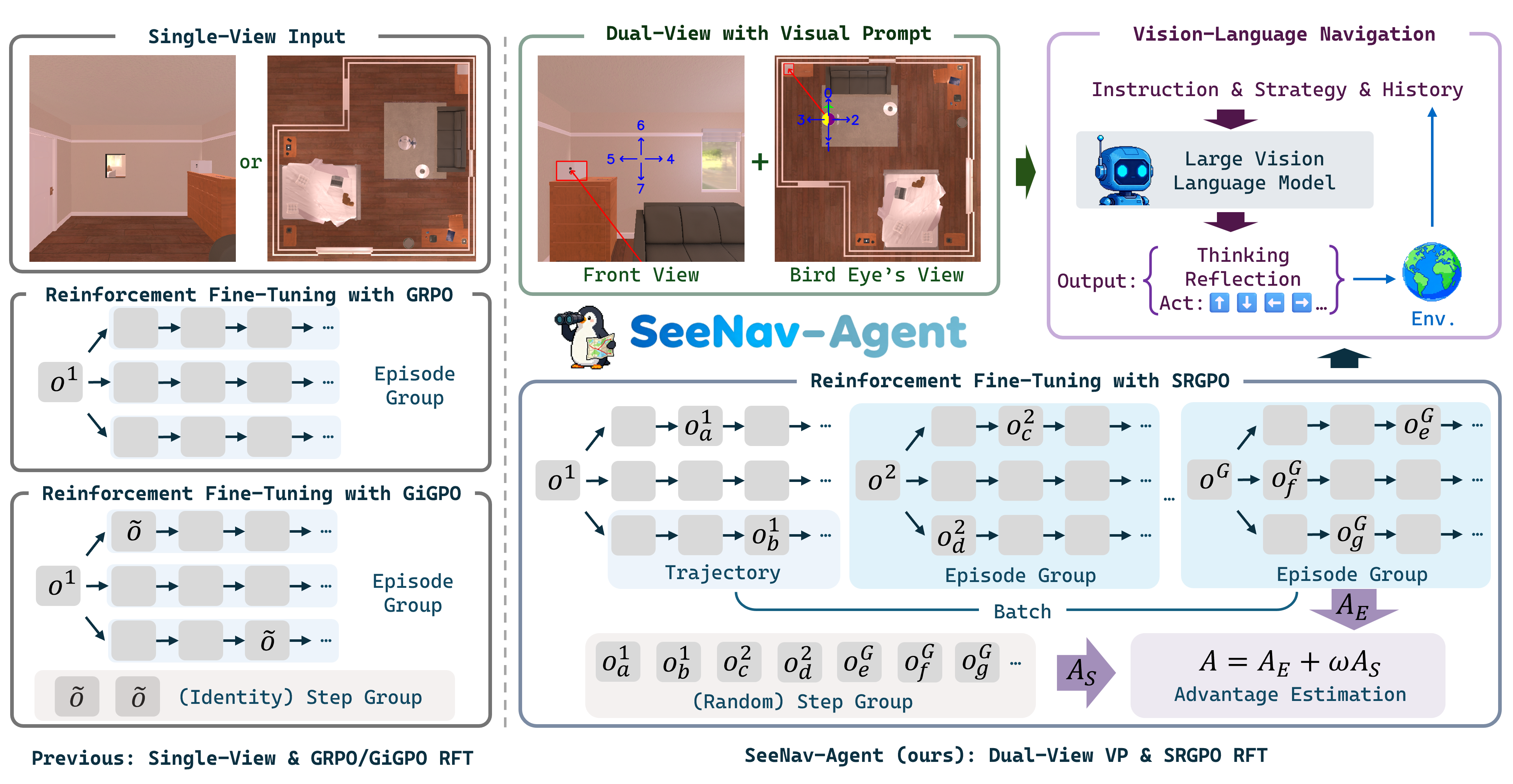
We propose SeeNav-Agent, a novel LVLM-based embodied navigation framework that includes a zero-shot dual-view visual prompt technique for the input side and an efficient RFT algorithm named SRGPO for post-training.
🔥 Updates
- 2025/12/3: Release our paper and model checkpoints.
🚀 Highlights
-
🚫 Zero-Shot Visual Prompt: No extra training for performance improvement with visual prompt.
-
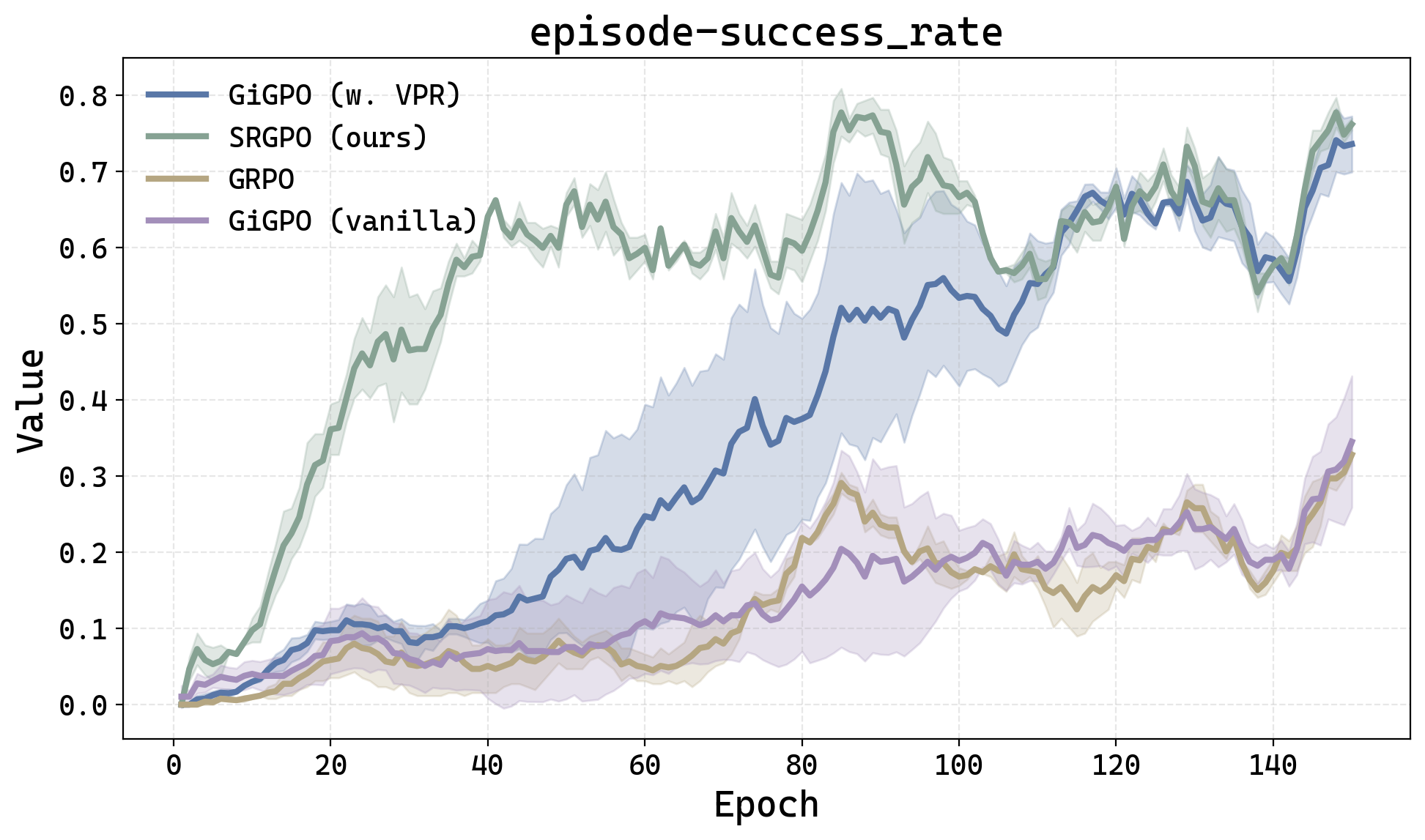
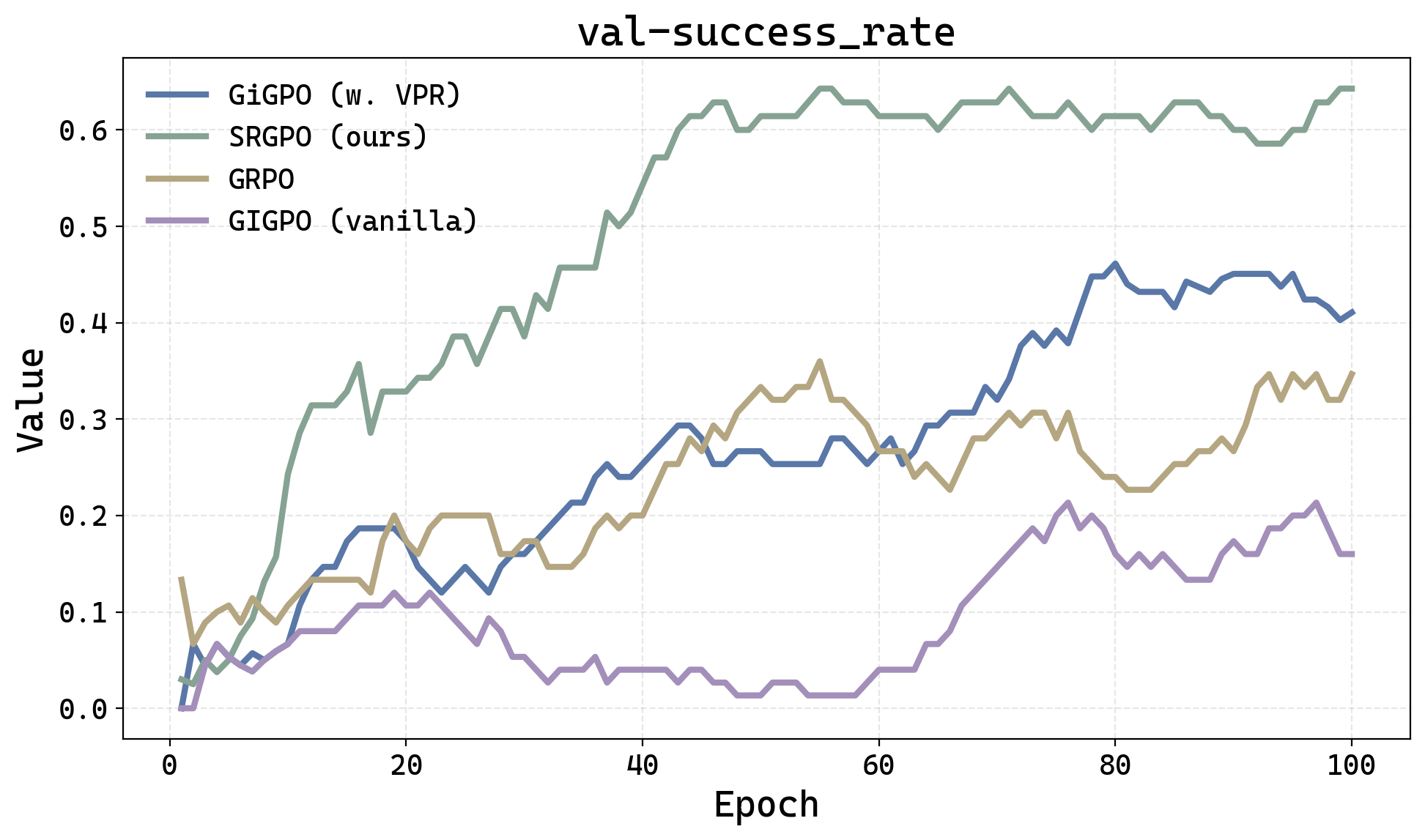
🗲 Efficient Step-Level Advantage Calculation: Step-Level groups are randomly sampled from the entire batch.
-
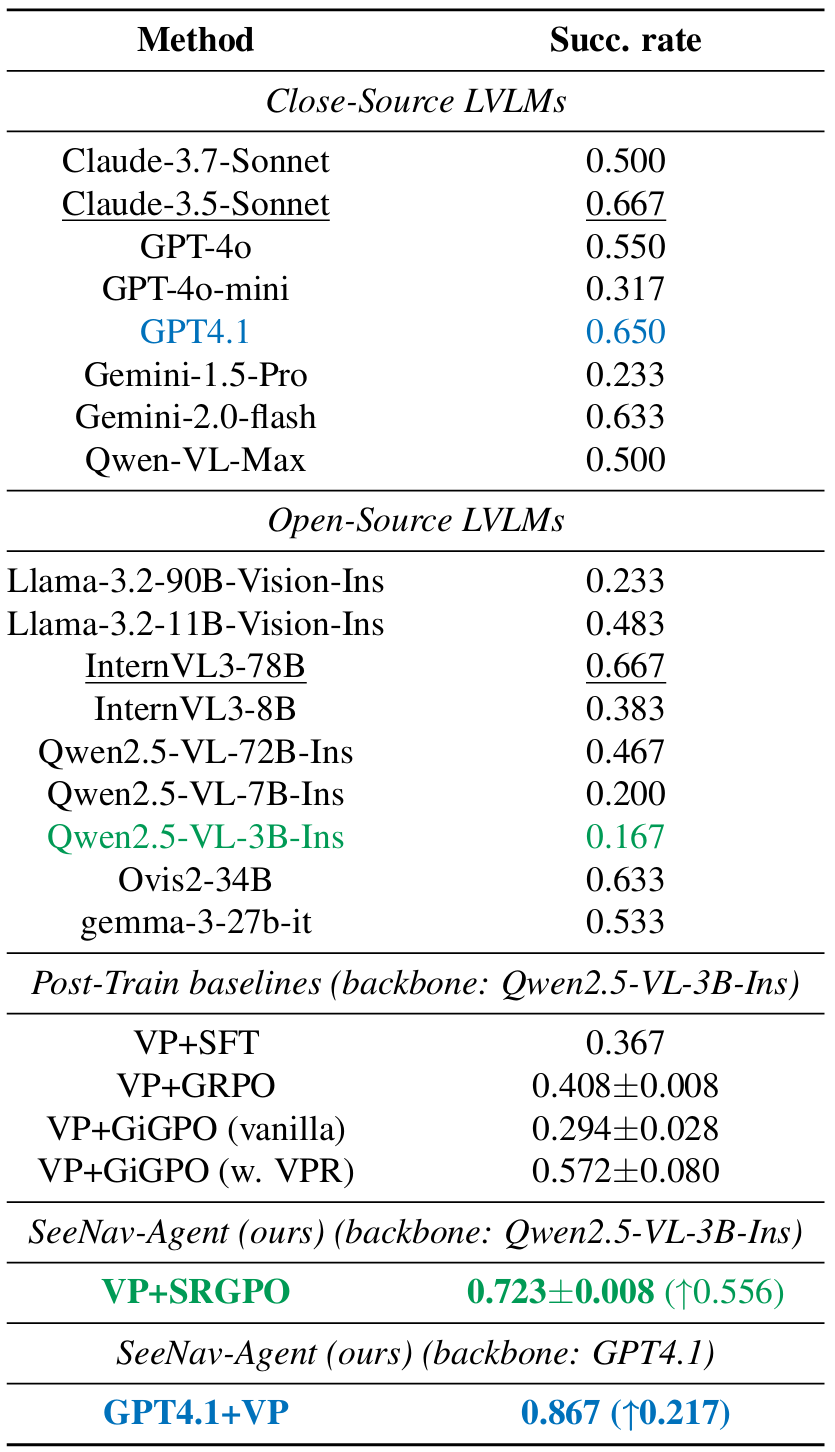
📈 Significant Gains: +20.0pp (GPT4.1+VP) and +5.6pp (Qwen2.5-VL-3B+VP+SRGPO) improvements on EmbodiedBench-Navigation.
📖 Summary
-
🎨 Dual-View Visual Prompt: We apply visual prompt techniques directly on the input dual-view image to reduce the visual hallucination.
-
🔁 Step Reward Group Policy Optimization (SRGPO): By defining a state-independent verifiable process reward function, we achieve efficient step-level random grouping and advantage estimation.
📋 Results on EmbodiedBench-Navigation
📝 Main Results
🖌️ Training Curves for RFT
🖍️ Testing Curves for OOD-Scenes
📦 Checkpoint
| base model | env | 🤗 link |
|---|---|---|
| Qwen2.5-VL-3B-Instruct-SRGPO | EmbodiedBench-Nav | Qwen2.5-VL-3B-Instruct-SRGPO |
🛠️ Usage
Setup
-
Setup a seperate environment for evaluation according to: EmbodiedBench-Nav and Qwen3-VL to support Qwen2.5-VL-3B-Instruct.
-
Clone the evaluation environment to a seperate training environment by:
conda create --name <your_env_for_train> --clone <your_env_for_eval>
conda activate <your_env_for_train>
- Further setup the seperate training environment according to: verl-agent and also Qwen3-VL to support Qwen2.5-VL-3B-Instruct.
Evaluation
Use the following command to evaluate the model on EmbodiedBench:
conda activate <your_env_for_eval>
cd SeeNav
python testEBNav.py
HINT: you need to first set your endpoint, API-key and api_version in SeeNav/planner/models/remote_model.py
Training
verl-agent/examples/srgpo_trainer contains example scripts for SRGPO-based training on EmbodiedBench-Navigation.
-
Modify
run_ebnav.shaccording to your setup. -
Run the following command:
conda activate <your_env_for_train>
cd verl-agent
bash examples/srgpo_trainer/run_ebnav.sh
📚 Citation
If you find this work helpful in your research, please consider citing:
@article{wang2025seenav,
  title={SeeNav-Agent: Enhancing Vision-Language Navigation with Visual Prompt and Step-Level Policy Optimization},
  author={Zhengcheng Wang and Zichuan Lin and Yijun Yang and Haobo Fu and Deheng Ye},
  journal={arXiv preprint arXiv:2512.02631},
  year={2025}
}
Acknowledgements
Our code is built with reference to the code of the following projects: verl-agent and EmbodiedBench.
Similar repos


Languages
Python
64.7%
Jupyter Notebook
20.2%
C
9.2%
Shell
3.4%
PDDL
1.2%
README
SeeNav-Agent: Enhancing Vision-Language Navigation with Visual Prompt and Step-Level Policy Optimization
We propose SeeNav-Agent, a novel LVLM-based embodied navigation framework that includes a zero-shot dual-view visual prompt technique for the input side and an efficient RFT algorithm named SRGPO for post-training.
🔥 Updates
- 2025/12/3: Release our paper and model checkpoints.
🚀 Highlights
-
🚫 Zero-Shot Visual Prompt: No extra training for performance improvement with visual prompt.
-
🗲 Efficient Step-Level Advantage Calculation: Step-Level groups are randomly sampled from the entire batch.
-
📈 Significant Gains: +20.0pp (GPT4.1+VP) and +5.6pp (Qwen2.5-VL-3B+VP+SRGPO) improvements on EmbodiedBench-Navigation.
📖 Summary
-
🎨 Dual-View Visual Prompt: We apply visual prompt techniques directly on the input dual-view image to reduce the visual hallucination.
-
🔁 Step Reward Group Policy Optimization (SRGPO): By defining a state-independent verifiable process reward function, we achieve efficient step-level random grouping and advantage estimation.
📋 Results on EmbodiedBench-Navigation
📝 Main Results
🖌️ Training Curves for RFT
🖍️ Testing Curves for OOD-Scenes
📦 Checkpoint
| base model | env | 🤗 link |
|---|---|---|
| Qwen2.5-VL-3B-Instruct-SRGPO | EmbodiedBench-Nav | Qwen2.5-VL-3B-Instruct-SRGPO |
🛠️ Usage
Setup
-
Setup a seperate environment for evaluation according to: EmbodiedBench-Nav and Qwen3-VL to support Qwen2.5-VL-3B-Instruct.
-
Clone the evaluation environment to a seperate training environment by:
conda create --name <your_env_for_train> --clone <your_env_for_eval>
conda activate <your_env_for_train>
- Further setup the seperate training environment according to: verl-agent and also Qwen3-VL to support Qwen2.5-VL-3B-Instruct.
Evaluation
Use the following command to evaluate the model on EmbodiedBench:
conda activate <your_env_for_eval>
cd SeeNav
python testEBNav.py
HINT: you need to first set your endpoint, API-key and api_version in SeeNav/planner/models/remote_model.py
Training
verl-agent/examples/srgpo_trainer contains example scripts for SRGPO-based training on EmbodiedBench-Navigation.
-
Modify
run_ebnav.shaccording to your setup. -
Run the following command:
conda activate <your_env_for_train>
cd verl-agent
bash examples/srgpo_trainer/run_ebnav.sh
📚 Citation
If you find this work helpful in your research, please consider citing:
@article{wang2025seenav,
  title={SeeNav-Agent: Enhancing Vision-Language Navigation with Visual Prompt and Step-Level Policy Optimization},
  author={Zhengcheng Wang and Zichuan Lin and Yijun Yang and Haobo Fu and Deheng Ye},
  journal={arXiv preprint arXiv:2512.02631},
  year={2025}
}
Acknowledgements
Our code is built with reference to the code of the following projects: verl-agent and EmbodiedBench.
Similar repos
Languages
Python
64.7%
Jupyter Notebook
20.2%
C
9.2%
Shell
3.4%
PDDL
1.2%