
README

Sway is an incredible window manager, and certainly one of the most well established wayland window managers. However, it is restricted to only include the functionality that existed in i3. This fork ditches the simple wlr_renderer, and replaces it with our fx_renderer, capable of rendering with fancy GLES2 effects. This, along with a couple of minor changes, expands sway's featureset to include the following:
- Blur
- Anti-aliased rounded corners, borders, and titlebars
- Shadows
- Dim unfocused windows
- Scratchpad treated as minimize: Allows docks, or panels with a taskbar, to correctly interpret minimize / unminimize requests (thanks to LCBCrion)
- nixify the repo: Allows nixos users to easily contribute to and test this project

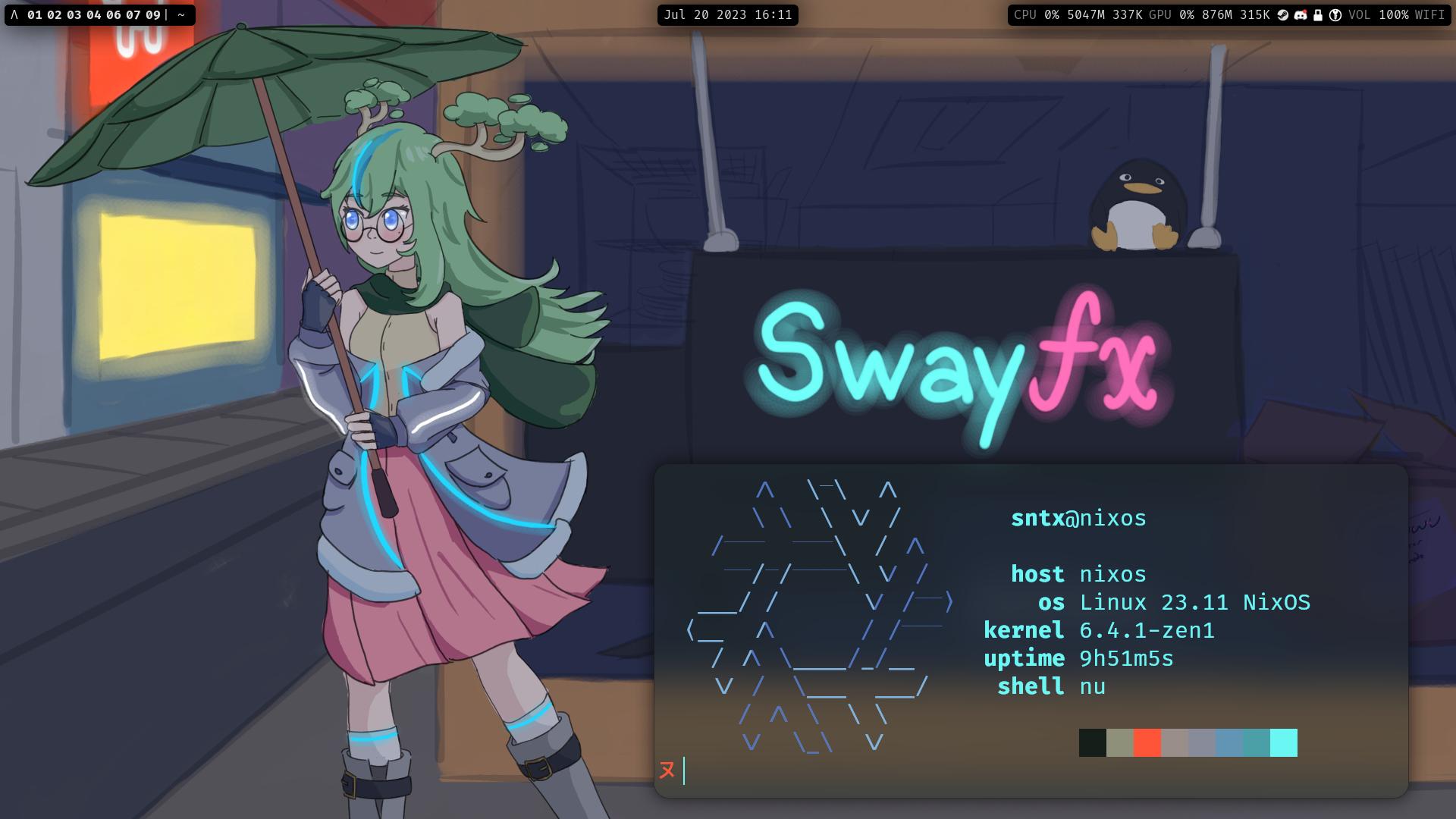
For Fedora users, SwayFX is also available in copr or in the Terra repository.
New Configuration Options
- Animations:
animation_duration_ms <integer value 0-5000> - Window blur:
blur enable|disableblur_xray enable|disable: this will set floating windows to blur based on the background, not the windows below. You probably want to set this todisable:)blur_passes <integer value 0 - 10>blur_radius <integer value 0 - 10>blur_noise <float value 0 - 1>blur_brightness <float value 0 - 2>blur_contrast <float value 0 - 2>blur_saturation <float value 0 - 2>
- Corner radius:
corner_radius <val> - Window shadows:
shadows enable|disableshadows_on_csd enable|disable(Note: The shadow might not fit some windows)shadow_blur_radius <integer value 0 - 99>shadow_color <hex color with alpha> ex, #0000007Fshadow_offset <x offset> <y offset>shadow_inactive_color <hex color with alpha> ex, #0000007F
- LayerShell effects (to blur panels / notifications etc):
layer_effects <layer namespace> <effects>- The current layer namespaces can be shown with
swaymsg -r -t get_outputs | jq '.[0].layer_shell_surfaces | .[] | .namespace' - Example:
layer_effects "waybar" blur enable; shadows enable; corner_radius 6- Note: If an application uses gtk, its namespace is likely to be "gtk-layer-shell"
- SwayIPC Example:
swaymsg layer_effects "waybar" "blur enable"(you can only set one effect at a time throughswaymsg) - Config Example:
layer_effects "waybar" { blur enable; blur_xray enable; blur_ignore_transparent enable; shadows enable; corner_radius 20; } - Available Effects:
blur <enable|disable>blur_xray <enable|disable>blur_ignore_transparent <enable|disable>shadows <enable|disable>corner_radius <int>reset: To reset/disable all previously applied effects to the layer application
- Dim unfocused windows:
default_dim_inactive <float value 0.0 - 1.0>for_window [CRITERIA_HERE] dim_inactive <float value 0.0 - 1.0>dim_inactive_colors.unfocused <hex color> ex, #000000FFdim_inactive_colors.urgent <hex color> ex, #900000FF
- Keep/remove separator border between titlebar and content:
titlebar_separator enable|disable - Treat Scratchpad as minimized:
scratchpad_minimize enable|disable: we recommend keeping this setting off, as there are many kinks to iron out here
Compiling From Source
Nix
If you have Nix installed, you can build and run SwayFX easily:
nix build
./result/bin/sway
You can also bring up a development shell and follow the build instructions below, without installing all of the dependencies manually:
nix develop
Debian
Check INSTALL-deb.md
Container (Docker)
To build SwayFX inside a container, install Docker and run the following commands from inside this repository:
# build the container and run it (which builds SwayFX)
docker compose up --build

# become root to install the previously built files
sudo bash

# copy all files into the host file system at /usr/local/
while read -r FILE; do
  NEW_FILE=/usr/local${FILE#opt}
  NEW_DIR=$(dirname "${NEW_FILE}")
  [[ -d ${NEW_DIR} ]] || mkdir -p "${NEW_DIR}"

  echo "Creating '${NEW_FILE}'"
  cp "${FILE}" "${NEW_FILE}"
done < <(command find opt/ -type f)
Manual Steps
Install dependencies:
- meson *
- wlroots
- wayland
- wayland-protocols *
- pcre2
- json-c
- pango
- cairo
- scenefx
- gdk-pixbuf2 (optional: additional image formats for system tray)
- [swaybg] (optional: wallpaper)
- [scdoc] (optional: man pages) *
- git (optional: version info) *
* Compile-time dep
Run these commands:
meson build/
ninja -C build/
sudo ninja -C build/ install
On systems without logind nor seatd, you need to suid the sway binary:
sudo chmod a+s /usr/local/bin/sway
SwayFX will drop root permissions shortly after startup.
Contributing
SwayFX would love to receive any new features that you're willing to build! Generally, we'd like to focus on eye-candy type improvements to keep our scope appropriate. If you'd like to build something that you think may be out of that focus, please raise an issue and we can discuss whether or not it will fit within this project.
Acknowledgements
The SwayFX team would like to first and foremost thank the maintainers and contributors of the Sway window manager. We are but a humble group of Sway enthusiasts who wanted to expand upon your creation.
We would also like to thank the talented artists in our community for contibuting the visual assets that give this project charm:
- pkdesuwu and honchokomodo for creating the swayfx mascot: https://twitter.com/pkdesuwu/status/1664517033017368576
- spooky_skeleton for the swayfx logo, and Basil for making some fine adjustments to it
Lastly, we would like to thank you, the community, for enjoying and using window manager that we have spent so much time maintaining.
Similar repos


Languages
C
98.1%
Meson
1.2%
README
Sway is an incredible window manager, and certainly one of the most well established wayland window managers. However, it is restricted to only include the functionality that existed in i3. This fork ditches the simple wlr_renderer, and replaces it with our fx_renderer, capable of rendering with fancy GLES2 effects. This, along with a couple of minor changes, expands sway's featureset to include the following:
- Blur
- Anti-aliased rounded corners, borders, and titlebars
- Shadows
- Dim unfocused windows
- Scratchpad treated as minimize: Allows docks, or panels with a taskbar, to correctly interpret minimize / unminimize requests (thanks to LCBCrion)
- nixify the repo: Allows nixos users to easily contribute to and test this project
For Fedora users, SwayFX is also available in copr or in the Terra repository.
New Configuration Options
- Animations:
animation_duration_ms <integer value 0-5000> - Window blur:
blur enable|disableblur_xray enable|disable: this will set floating windows to blur based on the background, not the windows below. You probably want to set this todisable:)blur_passes <integer value 0 - 10>blur_radius <integer value 0 - 10>blur_noise <float value 0 - 1>blur_brightness <float value 0 - 2>blur_contrast <float value 0 - 2>blur_saturation <float value 0 - 2>
- Corner radius:
corner_radius <val> - Window shadows:
shadows enable|disableshadows_on_csd enable|disable(Note: The shadow might not fit some windows)shadow_blur_radius <integer value 0 - 99>shadow_color <hex color with alpha> ex, #0000007Fshadow_offset <x offset> <y offset>shadow_inactive_color <hex color with alpha> ex, #0000007F
- LayerShell effects (to blur panels / notifications etc):
layer_effects <layer namespace> <effects>- The current layer namespaces can be shown with
swaymsg -r -t get_outputs | jq '.[0].layer_shell_surfaces | .[] | .namespace' - Example:
layer_effects "waybar" blur enable; shadows enable; corner_radius 6- Note: If an application uses gtk, its namespace is likely to be "gtk-layer-shell"
- SwayIPC Example:
swaymsg layer_effects "waybar" "blur enable"(you can only set one effect at a time throughswaymsg) - Config Example:
layer_effects "waybar" { blur enable; blur_xray enable; blur_ignore_transparent enable; shadows enable; corner_radius 20; } - Available Effects:
blur <enable|disable>blur_xray <enable|disable>blur_ignore_transparent <enable|disable>shadows <enable|disable>corner_radius <int>reset: To reset/disable all previously applied effects to the layer application
- Dim unfocused windows:
default_dim_inactive <float value 0.0 - 1.0>for_window [CRITERIA_HERE] dim_inactive <float value 0.0 - 1.0>dim_inactive_colors.unfocused <hex color> ex, #000000FFdim_inactive_colors.urgent <hex color> ex, #900000FF
- Keep/remove separator border between titlebar and content:
titlebar_separator enable|disable - Treat Scratchpad as minimized:
scratchpad_minimize enable|disable: we recommend keeping this setting off, as there are many kinks to iron out here
Compiling From Source
Nix
If you have Nix installed, you can build and run SwayFX easily:
nix build
./result/bin/sway
You can also bring up a development shell and follow the build instructions below, without installing all of the dependencies manually:
nix develop
Debian
Check INSTALL-deb.md
Container (Docker)
To build SwayFX inside a container, install Docker and run the following commands from inside this repository:
# build the container and run it (which builds SwayFX)
docker compose up --build

# become root to install the previously built files
sudo bash

# copy all files into the host file system at /usr/local/
while read -r FILE; do
  NEW_FILE=/usr/local${FILE#opt}
  NEW_DIR=$(dirname "${NEW_FILE}")
  [[ -d ${NEW_DIR} ]] || mkdir -p "${NEW_DIR}"

  echo "Creating '${NEW_FILE}'"
  cp "${FILE}" "${NEW_FILE}"
done < <(command find opt/ -type f)
Manual Steps
Install dependencies:
- meson *
- wlroots
- wayland
- wayland-protocols *
- pcre2
- json-c
- pango
- cairo
- scenefx
- gdk-pixbuf2 (optional: additional image formats for system tray)
- [swaybg] (optional: wallpaper)
- [scdoc] (optional: man pages) *
- git (optional: version info) *
* Compile-time dep
Run these commands:
meson build/
ninja -C build/
sudo ninja -C build/ install
On systems without logind nor seatd, you need to suid the sway binary:
sudo chmod a+s /usr/local/bin/sway
SwayFX will drop root permissions shortly after startup.
Contributing
SwayFX would love to receive any new features that you're willing to build! Generally, we'd like to focus on eye-candy type improvements to keep our scope appropriate. If you'd like to build something that you think may be out of that focus, please raise an issue and we can discuss whether or not it will fit within this project.
Acknowledgements
The SwayFX team would like to first and foremost thank the maintainers and contributors of the Sway window manager. We are but a humble group of Sway enthusiasts who wanted to expand upon your creation.
We would also like to thank the talented artists in our community for contibuting the visual assets that give this project charm:
- pkdesuwu and honchokomodo for creating the swayfx mascot: https://twitter.com/pkdesuwu/status/1664517033017368576
- spooky_skeleton for the swayfx logo, and Basil for making some fine adjustments to it
Lastly, we would like to thank you, the community, for enjoying and using window manager that we have spent so much time maintaining.
Similar repos
Languages
C
98.1%
Meson
1.2%