Multiple AI coding sessions in one terminal. Mix and match provider and locally hosted models, spawn cross-company agents & workflows, and use built-in debugging, IDE built-in, screen control, and voice dictation.
See the codeWebsite: mercury-cli.ai
Mercury runs AI coding agents in your terminal, inside your own repositories. An agent reads and edits files, runs commands, and checks the results. You choose the provider, the model, and what the agent is allowed to do.
Each session keeps its own conversation, model, permissions and workspace. Leave one running while you work in another, then return to it when you need to. You can switch providers and models within the same chat, use Mercury from your editor, run it headless in scripts, or schedule work for later.
I use Mercury to develop Mercury, working with several agents and models across long sessions. Keeping track of that work matters to me: what is still running, what changed, and what needs a decision.
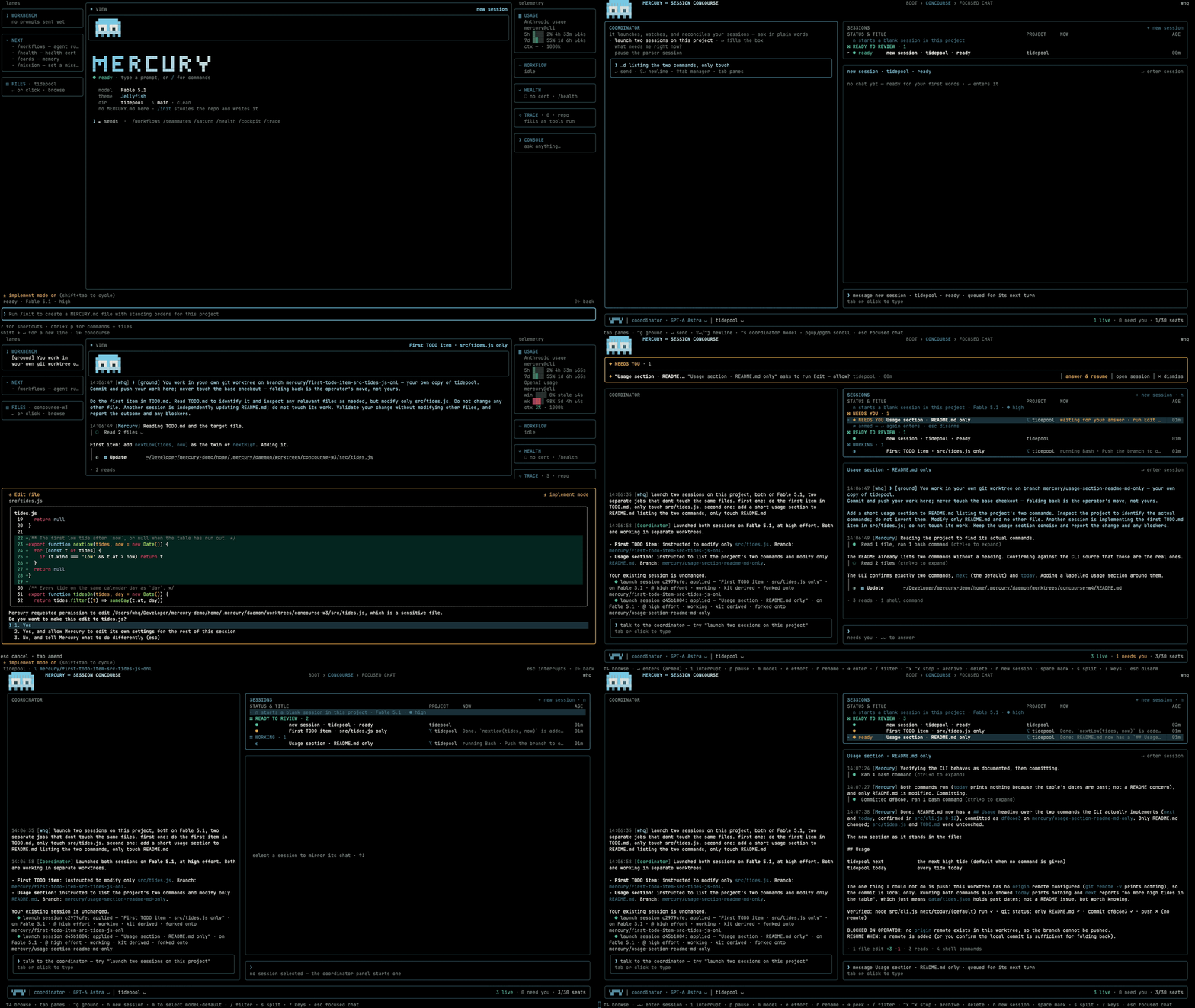
Mercury is source-available. See Licence for the production-use terms.
Release archives are available for Apple silicon and Intel Macs, Linux x64,
and Windows x64. Install git separately; each archive includes Node and
ripgrep, so a separate Node installation is unnecessary.
Choose one installation method:
curl -fsSL https://mercury-cli.ai/install | sh     # macOS and Linux x64
irm https://mercury-cli.ai/install.ps1 | iex        # Windows x64, in PowerShell 7
brew install Whq02/mercury/mercury                 # Homebrew: macOS and Linux x64
npm install -g mercury-tech-cli                    # npm; `bun install -g mercury-tech-cli` is the same package
mise use -g npm:mercury-tech-cli                   # mise, through the npm package
After installation, open a new terminal and run mercury --version to check
it. Then run mercury from a repository to start the first run.
To use Mercury in the terminal you installed from, follow the PATH instruction
printed by the installer.
The shell and PowerShell installers fetch the newest release for your
platform, check its SHA-256 against SHA256SUMS.txt, unpack it, and run the
archive's own mercury install command.
Homebrew and the npm package are each pinned to a particular release and are
republished after a tag, so they can lag behind the newest release. The npm
package, mercury-tech-cli, is a launcher that downloads its pinned release;
mise installs that same package.
Mercury's installation is user-local and does not require administrator access. You can safely rerun an installation command.
Release versions live under the config home at ~/.mercury/versions/<version>
(%USERPROFILE%\.mercury\versions on Windows). The mercury command is
installed in ~/.local/bin on macOS and Linux, or
%LOCALAPPDATA%\Mercury\bin on Windows.
mercury install adds the command's directory to PATH once: a guarded line
in your shell startup file, or an entry in the Windows user PATH. A new
terminal picks up the change automatically.
Use mercury update with any installation method.
For an installation made with the shell or PowerShell installer, or with
mercury install, it updates Mercury in place. --check checks for updates,
--status reports update status, and --rollback returns to the previous
version, which stays on disk.
For Homebrew, it asks before running brew upgrade Whq02/mercury/mercury.
The default answer is no; enter y to approve. Mercury streams the command's
output and checks the installed version afterwards. Use --yes to skip the
prompt in scripts.
The npm launcher uses the same release layout as the installers and delegates
each run to the installed release. mercury update therefore updates an npm
installation in place through Mercury's own update channel.
npm update -g mercury-tech-cli changes only the release the package installs
on its first run. This also applies when using mise.
--check reads the same release list for every installation method and tells
you how to update yours. When an update is available, the home screen shows
vX.Y.Z available · mercury update once in its bottom-right corner, and the
chat shows a temporary notice. Set MERCURY_UPDATE_NOTICE=0 to hide both.
Install and update requests fetch the public release list and archives
anonymously. You can run them without an account or token. If an anonymous
request is refused, Mercury consults a signed-in GitHub CLI (gh).
After an update, Mercury checks whether the command on your PATH points to
the updated installation. If another installation takes precedence, or the
updated command is missing from PATH, it explains the problem and the fix.
mercury health reports the same issue.
Before activating a release, Mercury checks its archive against
SHA256SUMS.txt. It also requires a payload signed by the Mercury release
key in its compiled-in trust roster before staging the update. A rejected
signature leaves the active installation unchanged.
Use --allow-unsigned to accept an unsigned payload. Mercury still rejects
unknown signing keys, malformed signing blocks and tampered contents. The
command result and its local record both show that you allowed an unsigned
payload.
From 1.0.0-beta.3, archives are signed during packaging and their signatures
are verified before publication. A verified installation adds no signature
notice at startup. mercury health shows signed — key 627b54b734ca0e72.
The 1.0.0-beta.2 archives are unsigned. These installations show
provenance — unsigned once per install when you start Mercury interactively
without a command or flag. The health check continues to show that status. It means
the archive manifest has no signature; the download is still checked against
SHA256SUMS.txt.
docs/TRUST.md explains the verification results and how to check an archive manually. docs/TERMINAL-RUNTIME.md covers startup verification.
On Linux arm64, follow the installer’s instruction to build from source. On Windows arm64, use the x64 archive under emulation. Mercury has no native archive for either arm64 platform.
Intel Mac archives are available from 1.0.0-beta.3. They are cross-packaged on an Apple silicon runner and tested at startup under Rosetta before publication. Intel Macs using 1.0.0-beta.2 need a source build.
Release archives include Node 24 LTS. The launcher, mercury install and
mercury update use that bundled runtime; git is the only separate
requirement for the release itself.
To build from source, you need:
>=24.20.0 <25. .node-version
pins the patch used for builds and included in release archives.The Node minimum includes the fix for nodejs/node#56645. Below 24.20.0,
headless run commands that call a tool abort on exit on Windows.
Launchers select Node in this order: the explicit MERCURY_NODE binary, the
bundled runtime, then a compatible Node installation on PATH. If the runtime
is missing, the launcher reports an error.
Git for Windows supplies bash.exe, which the Bash tool uses when available.
Release archives also include Mercury's bash-compatible shell engine. It is
used automatically on Windows when bash.exe is missing.
Read the health check's shell row to see which shell is active and why. It shows
Git Bash when bash.exe is available, or the bundled engine when it is
missing. The bundled engine requires cmd /c npm … to run a .cmd shim
such as npm; running the shim directly fails. After cd, give the engine
an absolute path to the program you want to run.
Set MERCURY_SHELL_ENGINE=brush, or choose brush in /config under Shell
engine, to use the bundled engine even when bash.exe is available.
MERCURY_SHELL_ENGINE=system uses only the system bash.exe.
A source build without the engine pack or Git for Windows still starts, but
the Bash tool is unavailable. The PowerShell tool remains available, and the
shell diagnostic explains how to restore Bash support.
Mercury builds with bun and runs on Node 24 LTS:
bun run setup                      # once; bun install + the vendored packs
bun run build.ts                   # writes dist/mercury.mjs + dist/manifest.json
node dist/mercury.mjs --version
node dist/mercury.mjs
node dist/mercury.mjs health --json
The full-screen interface needs a real TTY, but has no minimum terminal size. The full layout starts at 100 columns by 26 rows; smaller windows use a compact layout.
Mercury uses 24-bit colour when the terminal advertises support through
COLORTERM=truecolor or is recognised as iTerm2, Ghostty, WezTerm, Kitty,
Windows Terminal or VS Code. Other terminals use 256 colours, including
Apple's Terminal on macOS 15 and earlier.
The health check's Terminal color row reports the detected depth and the reason.
Set MERCURY_TRUECOLOR=1 for a terminal that supports true colour but does not
advertise it, or MERCURY_TRUECOLOR=0 to force 256 colours.
setup fetches the bundled capability packs: pyright, debugpy, js-debug,
extra grammars, the platform's Node runtime, and brush. If a download fails,
that pack is skipped and the build and affected features report the missing
component. Running bun install alone produces a build without those packs.
To build voice support, run setup with Rust installed. That builds
native/voice. Add cmake to build native/whisper as well. If either
build lacks its tools, setup skips it and the health check reports the missing
addon. Both addons are compiled on your machine. The Windows shell engine
is compiled there too because upstream has no Windows binary.
brush is a bash-compatible shell written in Rust. It is optional on macOS
and Linux, where the system shell remains the default. Select it through
/config (shell.engine) or MERCURY_SHELL_ENGINE=brush to use it for Bash
tool calls with persistent shell state. On Windows, it is selected
automatically when bash.exe is missing. See
docs/TERMINAL-RUNTIME.md.
The build writes only to dist/. Configuration and sessions live in
~/.mercury, or the directory set by MERCURY_CONFIG_DIR, and are created on
first run. On Windows, run node dist\mercury.mjs directly.
scripts/ops/deploy-runtime.sh publishes a clean-tree build to a fresh
<config home>/runtime/builds/<build> folder and points runtime/current at it
(runtime/dist is the older name for the same link). scripts/ops/deploy-launcher.sh
installs the launcher at <config home>/bin/mercury. Add that directory to PATH; for zsh:
echo 'export PATH="$HOME/.mercury/bin:$PATH"' >> ~/.zshrc
The launcher stops with an error if the runtime is missing. It does not switch to another build. Node selection follows the order in Requirements.
For a release installation, run mercury install or mercury update. These
commands leave source checkouts unchanged and need no GitHub sign-in.
Mercury consults gh only if the anonymous release request is refused.
AGENTS.md is the short build-and-run guide. BUILD-NOTES.md covers the build in more detail.
On your first interactive run, choose an appearance, then sign in to a
provider. The screen previews theme changes as you browse. True Black is
the default; the other option is the oasis dark theme. You can change this
later with /appearance.
You can also choose "sign in later" to look around without connecting an account. When a provider key in your environment already signs a provider in, the sign-in step is not asked. In a terminal Mercury knows how to configure (Terminal.app, the VS Code family, Alacritty, Zed), a Terminal keys step offers to write one key binding into the terminal's own settings; it is off unless you choose it, and a backup is kept.
Next, Mercury asks whether you trust the folder you opened. Nothing requested by a workspace configuration runs before you grant that trust. The grant covers the whole repository; declining exits Mercury. See docs/TRUST.md.
A normal interactive launch opens the home screen, called the Boot face. It has ten menu entries, with Continue Last Session appearing only after you have session history:
Menu entries open over the home screen, and Esc returns to the entry you
selected. The session list opens on a separate screen, also available with
Shift+→. A prompt argument, --continue or --resume takes you directly
to the chat.
The Boot Menu's Performance section includes a Motion setting:
auto, full, reduced or off. It controls idle animation in the
interface and is also available in /config.
Under Agents, the Crewmates and Workflows switches determine whether new
sessions receive the Agent and Workflow tools. Turning a switch off removes
the corresponding tool; attempts to spawn that type of work return the same
explanation. Within a session, /subagents on|off and /workflows on|off
change the setting at the next turn boundary.
Press Enter on New Session to create a session in the current folder with
the model shown on screen. Mercury opens its chat and adds it to the session
list at the same time. It keeps a process ready behind the menu to reduce
startup work.
Starting another session does not stop the previous one. You can leave a task running and work elsewhere.
Describe the work in plain language. The agent reads, edits, runs and checks
code under your chosen permission mode. Tool calls appear as they run, either
as compact cards or with full output. Choose the display in /config under
Tool output; the setting is saved for later launches.
Use /model and /effort to adjust the session. /permissions controls what
can run without approval and what must ask first.
Review changes with /diff, by source, file and hunk. /runs shows running
shells and agents (/tasks still opens the same board). When no turn is
running, /clear saves the current chat for later and opens a fresh session;
/title names the chat, and /help lists the available commands.
Shift+← and Shift+→ move between the screens currently available. A fresh
launch has the home screen and session list. The chat screen is added when
a session is focused and removed when the last chat closes. The key hints
show only the available moves.
Closing every chat returns you to the home screen. Use --chat for just the
home screen and chat, without the session list. --concourse-off saves that
preference for future launches; --concourse-on or /config turns it back on.
Open the session list with /concourse or Shift+→ from the home screen.
It shows the current project’s running sessions first, followed by saved
chats that are not running, newest first.
Each running session has a NOW cell showing its current activity. Select a
row and press Enter to return to the chat while the other sessions keep
running. A crashed session stays on the session list as NEEDS YOU, with the
reason, until you release it.
docs/SESSIONS.md covers the session lifecycle.
Use /logins to connect a provider. It opens the same sign-in catalogue used
during setup. /accounts manages connected provider slots afterwards.
/config → OpenRouter routing policy offers fallback and zero-data-retention choices; choose open to relax the policy and leave routing to OpenRouter./logins xai.Local model servers and custom OpenAI-compatible endpoints are discovered or configured separately, without a provider sign-in. Each provider has its own protocol, credentials and error handling. A request does not fall back from one provider to another. See docs/ENGINES.md.
New sessions use your most recently connected provider and the newest model available to that account. Models the account cannot access are skipped. If that provider has no usable model, Mercury checks the next most recently connected provider. This choice happens when the session starts; a failed request in an existing session stays with its provider.
/model explains the selection. A family word picks that family's newest
model: /model grok, /model deepseek, /model kimi or /model glm. With
no provider connected, the home screen and /model direct you to /logins.
/defaultprovider lets you explicitly make a provider the most recent
choice.
Provider access remains subject to the provider's own terms and availability. Mercury's licence does not replace them.
The same build runs without the interactive interface.
node dist/mercury.mjs --help lists every flag.
mercury run "<prompt>" runs a prompt without a terminal UI:
mercury run "Summarise this repository." --format text
mercury run "Summarise this repository." --format json
mercury run "Summarise this repository." --format rows
text prints the answer; a failed turn's reason goes to stderr.json prints the last outcome row as one JSON object.rows writes one JSON object per line: session, then a turn and its
text, reasoning, tool_call, tool_result and step rows, ending in
outcome. Waits, tool progress, background tasks and notices have their
own rows. Every row carries seq, timestamp and session_id; rows
within a turn also carry its turn number. seq and turn count from 1
in every run: a run that continues a stored conversation (-c, -r)
starts them again, and its session row names the conversation it
continues in resume_of.The output row types, by their type field:
session — the opening row: version, build (the first twelve hex
characters of the tree the bundle was built from, as mercury daemon status prints it; absent when no manifest sits beside the bundle),
resume_of (on a continued run, the session id of the conversation it
continues; the same id as session_id unless the run was forked), cwd,
model, mode, and the tools, mcp_servers, commands, agents,
skills and extensions the session has.turn — a turn started or waiting, with its turn_id; model,
message_ids and the agents count when known.text — a settled text block: message_id, block, text, and its
phase (commentary or final_answer).reasoning — a settled reasoning block: message_id, block, text, or
redacted: true.tool_call — a tool call: call_id, tool, input, with its
message_id and block.tool_result — the call's result: call_id, status (ok, error,
aborted or refused) and output. A call the model shaped so badly that
it was refused before execution (an unknown tool, arguments that are not
valid JSON or do not fit the tool's schema) still gets its pair: a
tool_call row with the arguments as delivered ({} when they were not an
object) and a tool_result row with status refused whose output is the
reason; the correction notice follows. Such a call never ran and is not a
denial.tool_update — progress from a running tool: call_id, tick, source
(shell, powershell, mcp or eval), and whichever of line,
elapsed_s, lines, bytes, budget_ms, progress and total the call
reports. A shell or PowerShell call ticks as its output arrives (a command
that prints nothing never ticks), an MCP call when its server reports
progress, an Eval call while its cell runs; no other tool ticks — a Browser
or Agent call is silent until its result.step — one model call of the main thread: message_id, model, usage,
and stop when the model said why it stopped.outcome — the turn's result, described below.wait — a wait on the model: state (first_byte, retry, silence,
loading or done) with the figures that state carries, such as
since_ms, attempt and of, delay_ms, reason and http_status.heartbeat — the model stream showed life after at least a second without
a parsed event: bytes arrived that produced no row. The row carries nothing
else and comes at most once a second; how often depends on the provider's
streaming shape, so a stream that never pauses between events emits none.compaction — a compaction started, in progress or ended: trigger
(manual, auto or overflow), stage, fill, summary_tokens and, at
the end, exit (landed, cancelled or failed).mode — the permission mode changed: mode.rate_limit — the provider's limit state: status (allowed, warning or
rejected), window, resets_at, utilization and the overage fields.task — a background task started, in progress or ended: task_id,
task_type, description, usage, summary, status (completed,
failed or stopped) and output_file as they become known.notice — a warning or error for the reader: text, and a code such
as input_refused.command_output — the output of a slash command that never reached the
model: command and text.mission_updated — the session's task ledger changed; read it again.samples_updated — the session's samples changed; read them again.--partial with --format rows adds block_start, text_delta,
reasoning_delta, tool_input_delta and retracted rows. Deltas belong to
message_id and block; a retracted row withdraws that message's deltas.
The settled text or tool row is the complete value.
The outcome carries schema, turn_id, status, steps, wall_ms,
usage, models and denials, with answer on completion and error
(message, class, optional detail) on failure. stop, api_ms,
cost_usd, requested structured output and notices are included when
available. wall_ms is the turn's elapsed time. api_ms is the sum of the
durations of every model request the turn made — retries, and the
crewmates' requests that ran alongside the main thread, included — so it
can exceed wall_ms when requests overlapped. cost_usd is the USD of the turn's priced
requests, whatever the status: a request Mercury cannot price (no rate on
file, no cost stated on the wire) adds nothing to it and leaves its model
listed in models without a cost_usd of its own; the field is absent only
when nothing in the turn was priced. Usage names input_tokens (cached tokens included),
cached_input_tokens, cache_write_input_tokens, output_tokens and,
when reported, reasoning_output_tokens, summed over the main thread and
the crewmates. models gives the per-model figures; steps counts the main
thread's model calls alone — one per step row without parent_call_id; a
crewmate's calls are its own step rows under its parent_call_id and are
not in the count.
The status is completed, blocked, refused, failed, interrupted,
turn_limit, budget_limit, schema_unmet or loop_stopped. A completed
run exits 0, other outcomes exit 1, and a usage error exits 2. SIGINT and
SIGTERM exit 130 and 143 after the interrupted turn's outcome is flushed. A
refused tool call is listed in denials; it does not make a completed turn a
failure. A run whose final answer ends with the two lines BLOCKED ON OPERATOR: … and RESUME WHEN: … is blocked: the answer is kept, error
carries the blocker and the resume condition, and the run exits 1.
--input rows requires --format rows and reads one input object per line:
printf '%s\n' '{"type":"prompt","content":"Summarise this repository."}' | mercury run --input rows --format rows
The input types are prompt with content (text or text/image blocks),
shell with command, and note with to (an agent id) and content.
Each accepts an optional id; prompt and shell rows also accept priority
(now, next or later), sent_at and origin. A rejected input shape
produces a notice with code input_refused; malformed JSON ends the run.
These are input rows, not permission answers.
Use mercury run - or pipe text into mercury run to read the whole prompt
from stdin. Beside a prompt argument, piped text is collected for up to one
second and appended as delimited context. With no prompt and a terminal on
stdin, run prints its usage and exits 2.
--mode <mode> selects the permission posture. --sovereign runs without
permission prompts, and --allow-sovereign makes that posture available for
a later switch. Permission policy and deny rules still apply. A root user
entering sovereign mode gets one notice on stderr; the run continues.
Use -c to continue the most recent conversation, -r to resume by ID, title
or picker, -w to run in a managed worktree, and --lean for a minimal session.
A run has no host to answer permission asks: its permission rules and mode
decide what can run, and a call that still needs approval is denied.
mercury runner serves a session to a host over stdio: JSON-RPC 2.0, one
message per line. The host sends initialize first and waits for the answer
before sending work:
{"jsonrpc":"2.0","id":1,"method":"initialize","params":{"protocol":1,"host":{"name":"my-host","version":"1.0.0"},"capabilities":{"holds_asks":true,"elicitation":false,"partial_rows":false}}}
The host's name and version travel under host; capabilities declares
holds_asks, elicitation and partial_rows. Every request id is a
positive integer: a request whose id is anything else is answered -32600
with id: null, so number requests from 1.
queue/add takes the same prompt, shell or note object as the row input
above. Output arrives in row notifications. session/facts reads the
session's state; session/set_model, session/set_effort and
session/set_mode change its choices. A change held until the turn ends
answers with at: "turn_end", then session/applied announces it.
turn/interrupt stops a turn; close stdin to end the session.
Permission asks arrive as permission/request, with kind: "tool" or
kind: "network". The host answers with outcome: "allow" or
outcome: "deny"; an allow may carry edited input and permission rules.
A withdrawn ask sends $/cancel_request with its request_id.
holds_asks gives the host ownership of the ask's clock. An MCP question
uses elicitation/request only when the host declares elicitation;
otherwise it is answered cancel.
An unknown method answers -32601, invalid parameters -32602, an id that
is not a positive integer -32600, and a request before initialization
-32002. A rule refusal is -32010, with a
sentence in error.message and a reason in error.data.kind, such as
mode, model, effort or claim. The runner answers a malformed line
with -32700 and continues; three consecutive malformed lines end it.
Available commands include:
mercury health: diagnostic report, also called the
health certificate. --json returns the full report, --deep runs the deep
inventory, and --fix runs guided fixes.mercury auth login|status|logout|mint: sign in, check authentication,
sign out, or create a long-lived token.mercury mcp: manage MCP servers with add, import, list, get,
remove, trust-reset and serve.mercury extensions: install extensions and manage their sources.
Actions: list, sources, add, remove, refresh, install, trust,
enable, disable, update, uninstall, fence, unfence, inspect
and scaffold.mercury roster: list the agent inventory.mercury daemon run|status|stop|restart: run, inspect, stop or restart
the background daemon. Its session seats are mercury runner children; the
daemon sends their prompts and hosts their permission asks.mercury acp: serve an editor over the Agent Client Protocol, with a
runner child for each session. mercury bridge install installs the
VS Code extension; mercury bridge status checks it.mercury godot run|check|capture|frames|profile|tour|jobs|cancel|result:
manage engine jobs for the Godot project in the current directory. Mercury
runs suites on its own headless workers from a frozen project copy. The
service includes a compilation gate, captures, frame statistics, settled
profiles, job queue access, cancellation and results by ID. See
docs/VULCAN-GODOT-TOOLS.md.mercury image <image>: display an image in the terminal.mercury install and mercury update (alias upgrade): install or
update release archives. See Install.mercury-crew for delegated
work of every kind and mercury-scout for read-only reconnaissance — plus
the agent definitions you create in the agent studio. A crewmate belongs
to the session that launched it; a named one takes further instructions by
its name. Follow crewmates, and workflow runs, in their status views. See
docs/CREW.md./health produce a report backed by
diagnostic evidence, with a certified, caution or fault verdict and
verified fixes. See docs/HEALTH-CERTIFICATE.md.mercury acp connects to editors that support the
Agent Client Protocol. The VS Code extension (mercury bridge install)
runs Mercury in the editor over that protocol: chat, sessions, agents,
artifacts and reviews, with the editor's selection and diagnostics riding
each prompt. Separate, opt-in integrations connect to running Unity,
Blender and Godot editors, with batch access to Aseprite. See Unity,
Blender and Aseprite./memory is the front door. See
docs/MNEME.md./voice on, then hold space for 1 s to dictate and
release it to stop. Transcription can run on-device or through your chosen cloud
provider. The on-device option uses a 60 MB English model, downloaded once
with /voice download. Audio leaves the machine only after you stop
recording, and only when using a cloud provider. See
docs/VOICE.md.Esc stops it, only one session can control the desktop at a time,
and screenshots are not stored in the saved conversation. Set
MERCURY_COMPUTER_USE=0 to remove the tool. See
docs/COMPUTER-USE.md.Runtime flags are defined in src/substrate/flagRegistry.ts, exposed as
MERCURY_* settings and rendered on demand. Integration compatibility is
documented in docs/COMPATIBILITY.md. The full
documentation index is docs/README.md.
/help lists the available interactive commands. Use /palette for fuzzy
command search. The table
below groups the main built-in commands by the categories used in /help;
the live list can also include skills and extension commands.
| Domain | Commands |
|---|---|
| current work | /run /runs /workbench /diff /mission |
| crew & delegation | /agents /subagents /crewmates /crew /workflows /router /daemon /saturn /seats /kill /unkill |
| session & context | /clear /compact /context /rewind /sessions /concourse /rename /title /contract /export /copy /usage /realms |
| memory & goals | /memory /console |
| model & effort | /model /effort /submodels /advise /caching |
| git & review | /review /audit |
| health & introspection | /health /verify /trace /capabilities |
| config & setup | /config /jev /localsetup /permissions /hooks /mcp /extensions /skills /sandbox /browser /orient /keybindings /keys /vim /mouse /keysetup /bootmenu /voice |
| appearance & cockpit | /appearance /critter /palette |
| account & app | /logins /logout /accounts /defaultprovider /update-notes /feedback /help /exit |
/mouse off returns the pointer to the terminal for native text selection
and copying. The preference is saved and appears in /config as Mouse
capture.
A required argument starts with <…> in a skill’s usage. For example,
/update-config, /debug and /app-proof need an argument. Send one
alone and you get its description and usage; no turn starts. Select it
in typeahead and Enter leaves /name ready for you to add the argument.
/simplify and /loop have no required argument and run immediately.
Run /bug <what happened> inside Mercury to preview a report before filing
it through your signed-in GitHub CLI (gh). Without gh, Mercury saves a
local draft under the config home and points you to the repository's issues
page.
You can also open an issue directly using the bug, provider/model, or feature
request template. Include your --version output, OS, terminal and exact
steps. Bug and provider reports also need mercury health --json, or
node dist/mercury.mjs health --json for a source build. A transcript of the
failing screen helps.
Report security problems privately through the repository’s Security tab. Keep them out of public issues. See SECURITY.md. CONTRIBUTING.md covers issues, pull requests and checks.
Mercury is source-available under the Business Source License 1.1, with the Mercury Community Production Grant. The licence is in LICENSE.md, with its companion production terms and trademark policy. The licence text controls; this is a summary.
You may read, copy, modify and fork the source. Individuals and organisations below both community thresholds can use Mercury in production for free to build and sell their own products, including commercial products. Both consolidated annual revenue and total external funding must be below US$1,000,000.
A qualifying user that reaches either threshold receives a 90-day grace period. After that, new product work, including substantial new functionality, requires a commercial licence. Products already in production when the threshold was reached can still be maintained using Mercury versions obtained before the grace period ended, subject to the licence's maintenance terms.
Selling, white-labelling or hosting Mercury itself for third parties, or offering a substitute for it, requires a commercial licence regardless of your revenue or funding.
Each version changes to the Apache License 2.0 on its own Change Date, three years after that version's release.
For commercial licensing and trademark permission, visit mercury-cli.ai/licensing. Bundled third-party licences are listed in THIRD_PARTY_NOTICES.md.
8 followers · starred Sep 2026
Multiple AI coding sessions in one terminal. Mix and match provider and locally hosted models, spawn cross-company agents & workflows, and use built-in debugging, IDE built-in, screen control, and voice dictation.
See the codeWebsite: mercury-cli.ai
Mercury runs AI coding agents in your terminal, inside your own repositories. An agent reads and edits files, runs commands, and checks the results. You choose the provider, the model, and what the agent is allowed to do.
Each session keeps its own conversation, model, permissions and workspace. Leave one running while you work in another, then return to it when you need to. You can switch providers and models within the same chat, use Mercury from your editor, run it headless in scripts, or schedule work for later.
I use Mercury to develop Mercury, working with several agents and models across long sessions. Keeping track of that work matters to me: what is still running, what changed, and what needs a decision.
Mercury is source-available. See Licence for the production-use terms.
Release archives are available for Apple silicon and Intel Macs, Linux x64,
and Windows x64. Install git separately; each archive includes Node and
ripgrep, so a separate Node installation is unnecessary.
Choose one installation method:
curl -fsSL https://mercury-cli.ai/install | sh     # macOS and Linux x64
irm https://mercury-cli.ai/install.ps1 | iex        # Windows x64, in PowerShell 7
brew install Whq02/mercury/mercury                 # Homebrew: macOS and Linux x64
npm install -g mercury-tech-cli                    # npm; `bun install -g mercury-tech-cli` is the same package
mise use -g npm:mercury-tech-cli                   # mise, through the npm package
After installation, open a new terminal and run mercury --version to check
it. Then run mercury from a repository to start the first run.
To use Mercury in the terminal you installed from, follow the PATH instruction
printed by the installer.
The shell and PowerShell installers fetch the newest release for your
platform, check its SHA-256 against SHA256SUMS.txt, unpack it, and run the
archive's own mercury install command.
Homebrew and the npm package are each pinned to a particular release and are
republished after a tag, so they can lag behind the newest release. The npm
package, mercury-tech-cli, is a launcher that downloads its pinned release;
mise installs that same package.
Mercury's installation is user-local and does not require administrator access. You can safely rerun an installation command.
Release versions live under the config home at ~/.mercury/versions/<version>
(%USERPROFILE%\.mercury\versions on Windows). The mercury command is
installed in ~/.local/bin on macOS and Linux, or
%LOCALAPPDATA%\Mercury\bin on Windows.
mercury install adds the command's directory to PATH once: a guarded line
in your shell startup file, or an entry in the Windows user PATH. A new
terminal picks up the change automatically.
Use mercury update with any installation method.
For an installation made with the shell or PowerShell installer, or with
mercury install, it updates Mercury in place. --check checks for updates,
--status reports update status, and --rollback returns to the previous
version, which stays on disk.
For Homebrew, it asks before running brew upgrade Whq02/mercury/mercury.
The default answer is no; enter y to approve. Mercury streams the command's
output and checks the installed version afterwards. Use --yes to skip the
prompt in scripts.
The npm launcher uses the same release layout as the installers and delegates
each run to the installed release. mercury update therefore updates an npm
installation in place through Mercury's own update channel.
npm update -g mercury-tech-cli changes only the release the package installs
on its first run. This also applies when using mise.
--check reads the same release list for every installation method and tells
you how to update yours. When an update is available, the home screen shows
vX.Y.Z available · mercury update once in its bottom-right corner, and the
chat shows a temporary notice. Set MERCURY_UPDATE_NOTICE=0 to hide both.
Install and update requests fetch the public release list and archives
anonymously. You can run them without an account or token. If an anonymous
request is refused, Mercury consults a signed-in GitHub CLI (gh).
After an update, Mercury checks whether the command on your PATH points to
the updated installation. If another installation takes precedence, or the
updated command is missing from PATH, it explains the problem and the fix.
mercury health reports the same issue.
Before activating a release, Mercury checks its archive against
SHA256SUMS.txt. It also requires a payload signed by the Mercury release
key in its compiled-in trust roster before staging the update. A rejected
signature leaves the active installation unchanged.
Use --allow-unsigned to accept an unsigned payload. Mercury still rejects
unknown signing keys, malformed signing blocks and tampered contents. The
command result and its local record both show that you allowed an unsigned
payload.
From 1.0.0-beta.3, archives are signed during packaging and their signatures
are verified before publication. A verified installation adds no signature
notice at startup. mercury health shows signed — key 627b54b734ca0e72.
The 1.0.0-beta.2 archives are unsigned. These installations show
provenance — unsigned once per install when you start Mercury interactively
without a command or flag. The health check continues to show that status. It means
the archive manifest has no signature; the download is still checked against
SHA256SUMS.txt.
docs/TRUST.md explains the verification results and how to check an archive manually. docs/TERMINAL-RUNTIME.md covers startup verification.
On Linux arm64, follow the installer’s instruction to build from source. On Windows arm64, use the x64 archive under emulation. Mercury has no native archive for either arm64 platform.
Intel Mac archives are available from 1.0.0-beta.3. They are cross-packaged on an Apple silicon runner and tested at startup under Rosetta before publication. Intel Macs using 1.0.0-beta.2 need a source build.
Release archives include Node 24 LTS. The launcher, mercury install and
mercury update use that bundled runtime; git is the only separate
requirement for the release itself.
To build from source, you need:
>=24.20.0 <25. .node-version
pins the patch used for builds and included in release archives.The Node minimum includes the fix for nodejs/node#56645. Below 24.20.0,
headless run commands that call a tool abort on exit on Windows.
Launchers select Node in this order: the explicit MERCURY_NODE binary, the
bundled runtime, then a compatible Node installation on PATH. If the runtime
is missing, the launcher reports an error.
Git for Windows supplies bash.exe, which the Bash tool uses when available.
Release archives also include Mercury's bash-compatible shell engine. It is
used automatically on Windows when bash.exe is missing.
Read the health check's shell row to see which shell is active and why. It shows
Git Bash when bash.exe is available, or the bundled engine when it is
missing. The bundled engine requires cmd /c npm … to run a .cmd shim
such as npm; running the shim directly fails. After cd, give the engine
an absolute path to the program you want to run.
Set MERCURY_SHELL_ENGINE=brush, or choose brush in /config under Shell
engine, to use the bundled engine even when bash.exe is available.
MERCURY_SHELL_ENGINE=system uses only the system bash.exe.
A source build without the engine pack or Git for Windows still starts, but
the Bash tool is unavailable. The PowerShell tool remains available, and the
shell diagnostic explains how to restore Bash support.
Mercury builds with bun and runs on Node 24 LTS:
bun run setup                      # once; bun install + the vendored packs
bun run build.ts                   # writes dist/mercury.mjs + dist/manifest.json
node dist/mercury.mjs --version
node dist/mercury.mjs
node dist/mercury.mjs health --json
The full-screen interface needs a real TTY, but has no minimum terminal size. The full layout starts at 100 columns by 26 rows; smaller windows use a compact layout.
Mercury uses 24-bit colour when the terminal advertises support through
COLORTERM=truecolor or is recognised as iTerm2, Ghostty, WezTerm, Kitty,
Windows Terminal or VS Code. Other terminals use 256 colours, including
Apple's Terminal on macOS 15 and earlier.
The health check's Terminal color row reports the detected depth and the reason.
Set MERCURY_TRUECOLOR=1 for a terminal that supports true colour but does not
advertise it, or MERCURY_TRUECOLOR=0 to force 256 colours.
setup fetches the bundled capability packs: pyright, debugpy, js-debug,
extra grammars, the platform's Node runtime, and brush. If a download fails,
that pack is skipped and the build and affected features report the missing
component. Running bun install alone produces a build without those packs.
To build voice support, run setup with Rust installed. That builds
native/voice. Add cmake to build native/whisper as well. If either
build lacks its tools, setup skips it and the health check reports the missing
addon. Both addons are compiled on your machine. The Windows shell engine
is compiled there too because upstream has no Windows binary.
brush is a bash-compatible shell written in Rust. It is optional on macOS
and Linux, where the system shell remains the default. Select it through
/config (shell.engine) or MERCURY_SHELL_ENGINE=brush to use it for Bash
tool calls with persistent shell state. On Windows, it is selected
automatically when bash.exe is missing. See
docs/TERMINAL-RUNTIME.md.
The build writes only to dist/. Configuration and sessions live in
~/.mercury, or the directory set by MERCURY_CONFIG_DIR, and are created on
first run. On Windows, run node dist\mercury.mjs directly.
scripts/ops/deploy-runtime.sh publishes a clean-tree build to a fresh
<config home>/runtime/builds/<build> folder and points runtime/current at it
(runtime/dist is the older name for the same link). scripts/ops/deploy-launcher.sh
installs the launcher at <config home>/bin/mercury. Add that directory to PATH; for zsh:
echo 'export PATH="$HOME/.mercury/bin:$PATH"' >> ~/.zshrc
The launcher stops with an error if the runtime is missing. It does not switch to another build. Node selection follows the order in Requirements.
For a release installation, run mercury install or mercury update. These
commands leave source checkouts unchanged and need no GitHub sign-in.
Mercury consults gh only if the anonymous release request is refused.
AGENTS.md is the short build-and-run guide. BUILD-NOTES.md covers the build in more detail.
On your first interactive run, choose an appearance, then sign in to a
provider. The screen previews theme changes as you browse. True Black is
the default; the other option is the oasis dark theme. You can change this
later with /appearance.
You can also choose "sign in later" to look around without connecting an account. When a provider key in your environment already signs a provider in, the sign-in step is not asked. In a terminal Mercury knows how to configure (Terminal.app, the VS Code family, Alacritty, Zed), a Terminal keys step offers to write one key binding into the terminal's own settings; it is off unless you choose it, and a backup is kept.
Next, Mercury asks whether you trust the folder you opened. Nothing requested by a workspace configuration runs before you grant that trust. The grant covers the whole repository; declining exits Mercury. See docs/TRUST.md.
A normal interactive launch opens the home screen, called the Boot face. It has ten menu entries, with Continue Last Session appearing only after you have session history:
Menu entries open over the home screen, and Esc returns to the entry you
selected. The session list opens on a separate screen, also available with
Shift+→. A prompt argument, --continue or --resume takes you directly
to the chat.
The Boot Menu's Performance section includes a Motion setting:
auto, full, reduced or off. It controls idle animation in the
interface and is also available in /config.
Under Agents, the Crewmates and Workflows switches determine whether new
sessions receive the Agent and Workflow tools. Turning a switch off removes
the corresponding tool; attempts to spawn that type of work return the same
explanation. Within a session, /subagents on|off and /workflows on|off
change the setting at the next turn boundary.
Press Enter on New Session to create a session in the current folder with
the model shown on screen. Mercury opens its chat and adds it to the session
list at the same time. It keeps a process ready behind the menu to reduce
startup work.
Starting another session does not stop the previous one. You can leave a task running and work elsewhere.
Describe the work in plain language. The agent reads, edits, runs and checks
code under your chosen permission mode. Tool calls appear as they run, either
as compact cards or with full output. Choose the display in /config under
Tool output; the setting is saved for later launches.
Use /model and /effort to adjust the session. /permissions controls what
can run without approval and what must ask first.
Review changes with /diff, by source, file and hunk. /runs shows running
shells and agents (/tasks still opens the same board). When no turn is
running, /clear saves the current chat for later and opens a fresh session;
/title names the chat, and /help lists the available commands.
Shift+← and Shift+→ move between the screens currently available. A fresh
launch has the home screen and session list. The chat screen is added when
a session is focused and removed when the last chat closes. The key hints
show only the available moves.
Closing every chat returns you to the home screen. Use --chat for just the
home screen and chat, without the session list. --concourse-off saves that
preference for future launches; --concourse-on or /config turns it back on.
Open the session list with /concourse or Shift+→ from the home screen.
It shows the current project’s running sessions first, followed by saved
chats that are not running, newest first.
Each running session has a NOW cell showing its current activity. Select a
row and press Enter to return to the chat while the other sessions keep
running. A crashed session stays on the session list as NEEDS YOU, with the
reason, until you release it.
docs/SESSIONS.md covers the session lifecycle.
Use /logins to connect a provider. It opens the same sign-in catalogue used
during setup. /accounts manages connected provider slots afterwards.
/config → OpenRouter routing policy offers fallback and zero-data-retention choices; choose open to relax the policy and leave routing to OpenRouter./logins xai.Local model servers and custom OpenAI-compatible endpoints are discovered or configured separately, without a provider sign-in. Each provider has its own protocol, credentials and error handling. A request does not fall back from one provider to another. See docs/ENGINES.md.
New sessions use your most recently connected provider and the newest model available to that account. Models the account cannot access are skipped. If that provider has no usable model, Mercury checks the next most recently connected provider. This choice happens when the session starts; a failed request in an existing session stays with its provider.
/model explains the selection. A family word picks that family's newest
model: /model grok, /model deepseek, /model kimi or /model glm. With
no provider connected, the home screen and /model direct you to /logins.
/defaultprovider lets you explicitly make a provider the most recent
choice.
Provider access remains subject to the provider's own terms and availability. Mercury's licence does not replace them.
The same build runs without the interactive interface.
node dist/mercury.mjs --help lists every flag.
mercury run "<prompt>" runs a prompt without a terminal UI:
mercury run "Summarise this repository." --format text
mercury run "Summarise this repository." --format json
mercury run "Summarise this repository." --format rows
text prints the answer; a failed turn's reason goes to stderr.json prints the last outcome row as one JSON object.rows writes one JSON object per line: session, then a turn and its
text, reasoning, tool_call, tool_result and step rows, ending in
outcome. Waits, tool progress, background tasks and notices have their
own rows. Every row carries seq, timestamp and session_id; rows
within a turn also carry its turn number. seq and turn count from 1
in every run: a run that continues a stored conversation (-c, -r)
starts them again, and its session row names the conversation it
continues in resume_of.The output row types, by their type field:
session — the opening row: version, build (the first twelve hex
characters of the tree the bundle was built from, as mercury daemon status prints it; absent when no manifest sits beside the bundle),
resume_of (on a continued run, the session id of the conversation it
continues; the same id as session_id unless the run was forked), cwd,
model, mode, and the tools, mcp_servers, commands, agents,
skills and extensions the session has.turn — a turn started or waiting, with its turn_id; model,
message_ids and the agents count when known.text — a settled text block: message_id, block, text, and its
phase (commentary or final_answer).reasoning — a settled reasoning block: message_id, block, text, or
redacted: true.tool_call — a tool call: call_id, tool, input, with its
message_id and block.tool_result — the call's result: call_id, status (ok, error,
aborted or refused) and output. A call the model shaped so badly that
it was refused before execution (an unknown tool, arguments that are not
valid JSON or do not fit the tool's schema) still gets its pair: a
tool_call row with the arguments as delivered ({} when they were not an
object) and a tool_result row with status refused whose output is the
reason; the correction notice follows. Such a call never ran and is not a
denial.tool_update — progress from a running tool: call_id, tick, source
(shell, powershell, mcp or eval), and whichever of line,
elapsed_s, lines, bytes, budget_ms, progress and total the call
reports. A shell or PowerShell call ticks as its output arrives (a command
that prints nothing never ticks), an MCP call when its server reports
progress, an Eval call while its cell runs; no other tool ticks — a Browser
or Agent call is silent until its result.step — one model call of the main thread: message_id, model, usage,
and stop when the model said why it stopped.outcome — the turn's result, described below.wait — a wait on the model: state (first_byte, retry, silence,
loading or done) with the figures that state carries, such as
since_ms, attempt and of, delay_ms, reason and http_status.heartbeat — the model stream showed life after at least a second without
a parsed event: bytes arrived that produced no row. The row carries nothing
else and comes at most once a second; how often depends on the provider's
streaming shape, so a stream that never pauses between events emits none.compaction — a compaction started, in progress or ended: trigger
(manual, auto or overflow), stage, fill, summary_tokens and, at
the end, exit (landed, cancelled or failed).mode — the permission mode changed: mode.rate_limit — the provider's limit state: status (allowed, warning or
rejected), window, resets_at, utilization and the overage fields.task — a background task started, in progress or ended: task_id,
task_type, description, usage, summary, status (completed,
failed or stopped) and output_file as they become known.notice — a warning or error for the reader: text, and a code such
as input_refused.command_output — the output of a slash command that never reached the
model: command and text.mission_updated — the session's task ledger changed; read it again.samples_updated — the session's samples changed; read them again.--partial with --format rows adds block_start, text_delta,
reasoning_delta, tool_input_delta and retracted rows. Deltas belong to
message_id and block; a retracted row withdraws that message's deltas.
The settled text or tool row is the complete value.
The outcome carries schema, turn_id, status, steps, wall_ms,
usage, models and denials, with answer on completion and error
(message, class, optional detail) on failure. stop, api_ms,
cost_usd, requested structured output and notices are included when
available. wall_ms is the turn's elapsed time. api_ms is the sum of the
durations of every model request the turn made — retries, and the
crewmates' requests that ran alongside the main thread, included — so it
can exceed wall_ms when requests overlapped. cost_usd is the USD of the turn's priced
requests, whatever the status: a request Mercury cannot price (no rate on
file, no cost stated on the wire) adds nothing to it and leaves its model
listed in models without a cost_usd of its own; the field is absent only
when nothing in the turn was priced. Usage names input_tokens (cached tokens included),
cached_input_tokens, cache_write_input_tokens, output_tokens and,
when reported, reasoning_output_tokens, summed over the main thread and
the crewmates. models gives the per-model figures; steps counts the main
thread's model calls alone — one per step row without parent_call_id; a
crewmate's calls are its own step rows under its parent_call_id and are
not in the count.
The status is completed, blocked, refused, failed, interrupted,
turn_limit, budget_limit, schema_unmet or loop_stopped. A completed
run exits 0, other outcomes exit 1, and a usage error exits 2. SIGINT and
SIGTERM exit 130 and 143 after the interrupted turn's outcome is flushed. A
refused tool call is listed in denials; it does not make a completed turn a
failure. A run whose final answer ends with the two lines BLOCKED ON OPERATOR: … and RESUME WHEN: … is blocked: the answer is kept, error
carries the blocker and the resume condition, and the run exits 1.
--input rows requires --format rows and reads one input object per line:
printf '%s\n' '{"type":"prompt","content":"Summarise this repository."}' | mercury run --input rows --format rows
The input types are prompt with content (text or text/image blocks),
shell with command, and note with to (an agent id) and content.
Each accepts an optional id; prompt and shell rows also accept priority
(now, next or later), sent_at and origin. A rejected input shape
produces a notice with code input_refused; malformed JSON ends the run.
These are input rows, not permission answers.
Use mercury run - or pipe text into mercury run to read the whole prompt
from stdin. Beside a prompt argument, piped text is collected for up to one
second and appended as delimited context. With no prompt and a terminal on
stdin, run prints its usage and exits 2.
--mode <mode> selects the permission posture. --sovereign runs without
permission prompts, and --allow-sovereign makes that posture available for
a later switch. Permission policy and deny rules still apply. A root user
entering sovereign mode gets one notice on stderr; the run continues.
Use -c to continue the most recent conversation, -r to resume by ID, title
or picker, -w to run in a managed worktree, and --lean for a minimal session.
A run has no host to answer permission asks: its permission rules and mode
decide what can run, and a call that still needs approval is denied.
mercury runner serves a session to a host over stdio: JSON-RPC 2.0, one
message per line. The host sends initialize first and waits for the answer
before sending work:
{"jsonrpc":"2.0","id":1,"method":"initialize","params":{"protocol":1,"host":{"name":"my-host","version":"1.0.0"},"capabilities":{"holds_asks":true,"elicitation":false,"partial_rows":false}}}
The host's name and version travel under host; capabilities declares
holds_asks, elicitation and partial_rows. Every request id is a
positive integer: a request whose id is anything else is answered -32600
with id: null, so number requests from 1.
queue/add takes the same prompt, shell or note object as the row input
above. Output arrives in row notifications. session/facts reads the
session's state; session/set_model, session/set_effort and
session/set_mode change its choices. A change held until the turn ends
answers with at: "turn_end", then session/applied announces it.
turn/interrupt stops a turn; close stdin to end the session.
Permission asks arrive as permission/request, with kind: "tool" or
kind: "network". The host answers with outcome: "allow" or
outcome: "deny"; an allow may carry edited input and permission rules.
A withdrawn ask sends $/cancel_request with its request_id.
holds_asks gives the host ownership of the ask's clock. An MCP question
uses elicitation/request only when the host declares elicitation;
otherwise it is answered cancel.
An unknown method answers -32601, invalid parameters -32602, an id that
is not a positive integer -32600, and a request before initialization
-32002. A rule refusal is -32010, with a
sentence in error.message and a reason in error.data.kind, such as
mode, model, effort or claim. The runner answers a malformed line
with -32700 and continues; three consecutive malformed lines end it.
Available commands include:
mercury health: diagnostic report, also called the
health certificate. --json returns the full report, --deep runs the deep
inventory, and --fix runs guided fixes.mercury auth login|status|logout|mint: sign in, check authentication,
sign out, or create a long-lived token.mercury mcp: manage MCP servers with add, import, list, get,
remove, trust-reset and serve.mercury extensions: install extensions and manage their sources.
Actions: list, sources, add, remove, refresh, install, trust,
enable, disable, update, uninstall, fence, unfence, inspect
and scaffold.mercury roster: list the agent inventory.mercury daemon run|status|stop|restart: run, inspect, stop or restart
the background daemon. Its session seats are mercury runner children; the
daemon sends their prompts and hosts their permission asks.mercury acp: serve an editor over the Agent Client Protocol, with a
runner child for each session. mercury bridge install installs the
VS Code extension; mercury bridge status checks it.mercury godot run|check|capture|frames|profile|tour|jobs|cancel|result:
manage engine jobs for the Godot project in the current directory. Mercury
runs suites on its own headless workers from a frozen project copy. The
service includes a compilation gate, captures, frame statistics, settled
profiles, job queue access, cancellation and results by ID. See
docs/VULCAN-GODOT-TOOLS.md.mercury image <image>: display an image in the terminal.mercury install and mercury update (alias upgrade): install or
update release archives. See Install.mercury-crew for delegated
work of every kind and mercury-scout for read-only reconnaissance — plus
the agent definitions you create in the agent studio. A crewmate belongs
to the session that launched it; a named one takes further instructions by
its name. Follow crewmates, and workflow runs, in their status views. See
docs/CREW.md./health produce a report backed by
diagnostic evidence, with a certified, caution or fault verdict and
verified fixes. See docs/HEALTH-CERTIFICATE.md.mercury acp connects to editors that support the
Agent Client Protocol. The VS Code extension (mercury bridge install)
runs Mercury in the editor over that protocol: chat, sessions, agents,
artifacts and reviews, with the editor's selection and diagnostics riding
each prompt. Separate, opt-in integrations connect to running Unity,
Blender and Godot editors, with batch access to Aseprite. See Unity,
Blender and Aseprite./memory is the front door. See
docs/MNEME.md./voice on, then hold space for 1 s to dictate and
release it to stop. Transcription can run on-device or through your chosen cloud
provider. The on-device option uses a 60 MB English model, downloaded once
with /voice download. Audio leaves the machine only after you stop
recording, and only when using a cloud provider. See
docs/VOICE.md.Esc stops it, only one session can control the desktop at a time,
and screenshots are not stored in the saved conversation. Set
MERCURY_COMPUTER_USE=0 to remove the tool. See
docs/COMPUTER-USE.md.Runtime flags are defined in src/substrate/flagRegistry.ts, exposed as
MERCURY_* settings and rendered on demand. Integration compatibility is
documented in docs/COMPATIBILITY.md. The full
documentation index is docs/README.md.
/help lists the available interactive commands. Use /palette for fuzzy
command search. The table
below groups the main built-in commands by the categories used in /help;
the live list can also include skills and extension commands.
| Domain | Commands |
|---|---|
| current work | /run /runs /workbench /diff /mission |
| crew & delegation | /agents /subagents /crewmates /crew /workflows /router /daemon /saturn /seats /kill /unkill |
| session & context | /clear /compact /context /rewind /sessions /concourse /rename /title /contract /export /copy /usage /realms |
| memory & goals | /memory /console |
| model & effort | /model /effort /submodels /advise /caching |
| git & review | /review /audit |
| health & introspection | /health /verify /trace /capabilities |
| config & setup | /config /jev /localsetup /permissions /hooks /mcp /extensions /skills /sandbox /browser /orient /keybindings /keys /vim /mouse /keysetup /bootmenu /voice |
| appearance & cockpit | /appearance /critter /palette |
| account & app | /logins /logout /accounts /defaultprovider /update-notes /feedback /help /exit |
/mouse off returns the pointer to the terminal for native text selection
and copying. The preference is saved and appears in /config as Mouse
capture.
A required argument starts with <…> in a skill’s usage. For example,
/update-config, /debug and /app-proof need an argument. Send one
alone and you get its description and usage; no turn starts. Select it
in typeahead and Enter leaves /name ready for you to add the argument.
/simplify and /loop have no required argument and run immediately.
Run /bug <what happened> inside Mercury to preview a report before filing
it through your signed-in GitHub CLI (gh). Without gh, Mercury saves a
local draft under the config home and points you to the repository's issues
page.
You can also open an issue directly using the bug, provider/model, or feature
request template. Include your --version output, OS, terminal and exact
steps. Bug and provider reports also need mercury health --json, or
node dist/mercury.mjs health --json for a source build. A transcript of the
failing screen helps.
Report security problems privately through the repository’s Security tab. Keep them out of public issues. See SECURITY.md. CONTRIBUTING.md covers issues, pull requests and checks.
Mercury is source-available under the Business Source License 1.1, with the Mercury Community Production Grant. The licence is in LICENSE.md, with its companion production terms and trademark policy. The licence text controls; this is a summary.
You may read, copy, modify and fork the source. Individuals and organisations below both community thresholds can use Mercury in production for free to build and sell their own products, including commercial products. Both consolidated annual revenue and total external funding must be below US$1,000,000.
A qualifying user that reaches either threshold receives a 90-day grace period. After that, new product work, including substantial new functionality, requires a commercial licence. Products already in production when the threshold was reached can still be maintained using Mercury versions obtained before the grace period ended, subject to the licence's maintenance terms.
Selling, white-labelling or hosting Mercury itself for third parties, or offering a substitute for it, requires a commercial licence regardless of your revenue or funding.
Each version changes to the Apache License 2.0 on its own Change Date, three years after that version's release.
For commercial licensing and trademark permission, visit mercury-cli.ai/licensing. Bundled third-party licences are listed in THIRD_PARTY_NOTICES.md.
8 followers · starred Sep 2026



