原样镜像官方 Codex 桌面应用:每 15 分钟探测、SHA256 可校验、国内直连下载、 Mac 可增量更新 | Verbatim, verifiable mirror of the official Codex desktop app — probed every 15 min, with a Sparkle delta-update feed.
See the code
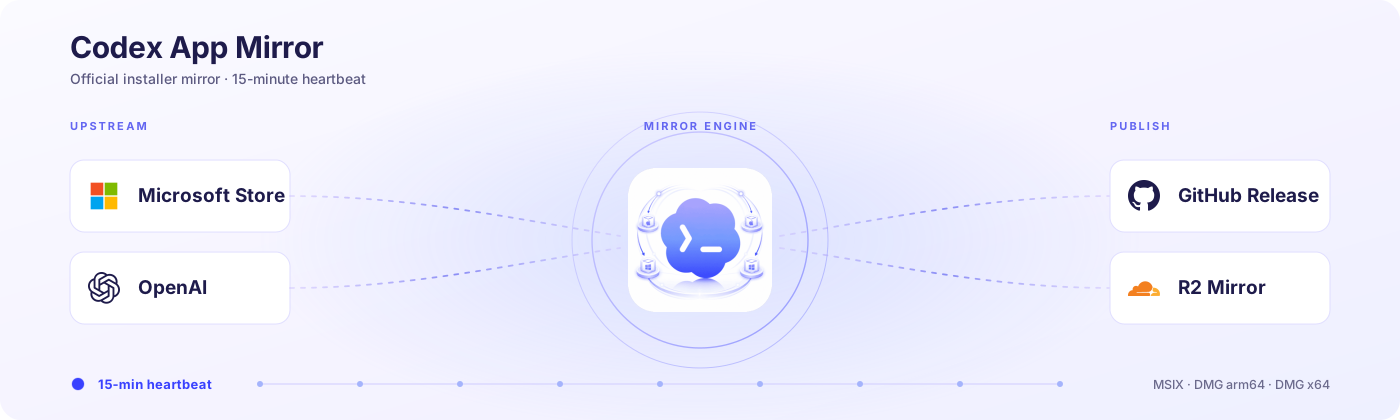
把官方 Codex 桌面应用安装包,原样、可校验、国内可达地镜像到 GitHub Release,
并为 macOS 提供 Sparkle 增量自动更新源。










官网 · Official Website · 中文 · English
🖥️ 不想手动下载?Codex App Manager 是基于本镜像的桌面客户端——一键安装、增量更新、干净卸载官方 Codex。
🖥️ Prefer one click? Codex App Manager — the desktop client built on this mirror — installs, updates and uninstalls official Codex for you.

|
本项目由 DuckCoding 赞助支持 为 Claude Code / Codex / Gemini CLI 提供按量计费的 API 中转服务。 Sponsored by DuckCoding — a pay-as-you-go API relay for Claude Code / Codex / Gemini CLI. |
codex-app-mirror 是面向 OpenAI Codex 桌面应用的安装包镜像与分发项目,用于在 Microsoft Store 或官方下载不便时提供稳定且可校验的获取渠道。项目仅做镜像,不构建、不修改、不重打包:Stable 通道将官方 Windows MSIX 与 macOS DMG 原样发布到 GitHub Release,并经 CDN 短链分发;Linux 版统一 ChatGPT 桌面应用(包含 Codex)在 Preview 期间只进入独立 GitHub prerelease。macOS 端另提供 Sparkle 增量更新 appcast,由下游 Codex App Manager 客户端消费。
| 能力 | 说明 |
|---|---|
| 🪟 Windows MSIX | 直接镜像 Microsoft Store 包,x64 稳定发布,ARM64 纳入 manifest 与镜像路径 |
| 🍎 macOS DMG | Apple Silicon + Intel 双架构,官方原包,零改动 |
| 🐧 Linux Preview | Ubuntu / Debian 的 DEB 与 Fedora 的 RPM,x64 + ARM64;仅发布 GitHub prerelease,不进入 CDN/latest |
| 🔄 增量自动更新 | macOS Sparkle appcast + delta 差量包,pinned EdDSA 签名字节级保真 |
| 🌏 国内可达 | Cloudflare R2 全球节点 + 中国大陆自动分流到 S3 副镜像,同一条短链全自动选路 |
| ⏱️ 15 分钟探测 | Cloudflare Cron 主调度 + GitHub Actions 6 小时兜底,上游一变就发版 |
| 🔐 可校验 | 每个 Release 附 SHA256SUMS.txt 与 release-manifest.json 上游指纹 |
打开 最新 GitHub Release,下载你的平台对应文件:
OpenAI.Codex_..._x64__2p2nqsd0c76g0.MsixOpenAI.Codex_..._arm64__2p2nqsd0c76g0.Msix(当官方下载 URL 已解析时发布)Codex-mac-arm64.dmgCodex-mac-x64.dmgOpenAI 于 2026-08-11 发布了统一 ChatGPT 桌面应用的 Linux Preview,其中包含 ChatGPT、ChatGPT Work 与 Codex。Linux 包不会混入上面的 Stable Latest;请到 GitHub Releases 查找 codex-app-linux-preview-<版本> prerelease:
chatgpt_<版本>_amd64.deb 或 chatgpt_<版本>_arm64.debchatgpt-<版本>-1.x86_64.rpm 或 chatgpt-<版本>-1.aarch64.rpmLinux Preview 是显式隔离的第三通道:stable | beta | linux-preview。它按需输入精确版本,验证 OpenAI APT/RPM 仓库签名与四个包的 SHA-256 后发布;不会推进 GitHub Latest,不会上传 R2/S3,也不创建任何 latest/linux* 短链。官方包安装后会配置 OpenAI 自己的更新仓库,因此后续自动更新默认直接来自 OpenAI。
或直接使用 CDN 短链(推荐,自动按你的网络选最优节点——国内走 S3 副镜像,海外走 R2,只保留当前最新版):
| 平台 | 短链 |
|---|---|
| Windows x64(兼容别名) | https://codexapp.agentsmirror.com/latest/win |
| Windows x64 | https://codexapp.agentsmirror.com/latest/win-x64 |
| Windows ARM64(当前版本可用时) | https://codexapp.agentsmirror.com/latest/win-arm64 |
| Apple Silicon Mac | https://codexapp.agentsmirror.com/latest/mac-arm64 |
| Intel Mac | https://codexapp.agentsmirror.com/latest/mac-intel |
| 校验和 | https://codexapp.agentsmirror.com/latest/checksums |
| Release 指纹 | https://codexapp.agentsmirror.com/latest/manifest |
需要历史版本时,到 GitHub Releases 按 release/tag 查找;短链只指向最新版。建议同时下载 SHA256SUMS.txt 核对文件完整性。release-manifest.json 的机器可校验契约见 docs/manifest-schema.md(JSON Schema)。
macOS 版除了手动下载 DMG,还支持 Sparkle 增量自动更新。下游的 Codex App Manager 客户端会订阅本镜像的 appcast,自动检查新版并只下载版本间的 delta 差量包,而不是每次重拉完整安装包:
镜像逐字节复制官方 Sparkle 归档和 OpenAI 的 EdDSA 签名,只改写 enclosure 的下载地址指向镜像。由于 EdDSA 签的是归档字节本身,只要镜像与官方字节级一致,原始签名依然有效——本镜像不会、也无法伪造签名。如果客户端没有匹配的 delta,会自动回退到完整归档。
每次运行先做一次轻量探测,只有上游真的变了才下载和发版:
catalog-only 状态记录在 manifestETag / Last-Modified / Content-Length 与 appcast 版本字段InRelease 与 RPM repomd.xml,解析带版本的四个包 URL,并对下载结果执行包名、版本、架构、文件清单、嵌入公钥及 RPM 包签名门禁release-manifest.json 做稳定字段比较没有变化就在探测阶段结束,不下载、不发重复 Release。任一平台有变化,则下载所有可下载的安装包、生成校验和与 manifest、构建 Sparkle appcast,发布新的 GitHub Release。
发布后,资产会同步到两套镜像,由一个 Cloudflare Worker 路由:
codexapp-r2.agentsmirror.com)路由器读取请求的 CF-IPCountry,把中国大陆访客分流到 S3 副镜像,其余走 R2——对用户透明,同一条短链全自动选路。
mirror.yml(workflow_dispatch)schedule,每 6 小时一次(11 */6 * * *)——防止 GitHub 计划任务被延迟或跳过时漏检本镜像不只是给人手动下载——它是 Codex App Manager 桌面客户端的更新后端。客户端在本地检测平台与能力,并消费这里的 Sparkle appcast 完成安装与增量更新。镜像保持窄而稳,把"分发与更新"这层基础设施沉淀下来。
➡️ 官网:codexapp.agentsmirror.com · 仓库:Wangnov/Codex-App-Manager
Release 以 Codex 应用内部版本聚合,而不是以 Windows Store 的四段 MSIX 包版本命名。Windows MSIX 包名里的四段版本(例如 26.623.5175.0)仍会记录在 release body 和 release-manifest.json 的平台包字段里;Codex 内部版本来自 Windows 包内的应用 package.json,并与 macOS CFBundleShortVersionString 对齐,例如 26.623.41415。
Release tag 与标题使用内部版本:
codex-app-26.623.41415
Codex App Mirror 26.623.41415
当某个平台尚未发布同一内部版本时,会先创建该内部版本的 prerelease,并在 body 的“版本与发布时间”表格中把缺失平台标记为待官方发布。已发布的架构会立即推进 R2/S3 latest/* 短链;尚未发布该版本的架构会继续指向它自己的当前 latest。四个架构补齐后,同一个 Release 会被补全并提升为正式 latest。
Windows x64 是 Windows 平台的必需包;Windows ARM64 是可选架构。如果 Microsoft Store 在探测和下载之间发生 ARM64 rollout 漂移,本轮会跳过本地 ARM64 上传,并保留上一份校验匹配的 latest/win-arm64;后续探测到稳定包时再补上。
当前 Windows 包名形如:
OpenAI.Codex_<version>_x64__2p2nqsd0c76g0.Msix
OpenAI.Codex_<version>_arm64__2p2nqsd0c76g0.Msix
如果双击 .Msix 时提示“你的系统管理员已阻止此程序。有关详细信息,请与你的系统管理员联系。”,通常不是下载文件损坏,而是当前系统策略不允许从商店外安装 MSIX / AppX 包,或者应用安装器 / AppX 部署服务被管理员禁用。
可以按这个顺序排查:
Add-AppxPackage -Path .\OpenAI.Codex_..._x64__2p2nqsd0c76g0.Msix从 Codex 26.915.31029(MSIX 26.915.3509.0)开始,官方 Windows 包有两处变化。它们都由上游包本身决定,镜像只做原样分发。
1. 安装 MSIX 需要管理员权限。 包清单新增了 packagedServices / localSystemServices 能力,并注册了一个以 LocalSystem 身份自动启动的系统服务 CodexSandboxService.OpenAI.Codex。带系统服务的 MSIX 只能由管理员安装,所以以前不用提权的电脑现在也会被要求管理员权限。
.Msix,或在管理员终端运行 Add-AppxPackage。2. 便携版直接双击 ChatGPT.exe 会报「该进程没有程序包标识符」或「ChatGPT failed to start」。 新版官方 ChatGPT.exe 的默认启动路径需要 MSIX 包身份,而解包后的目录没有这个身份。Manager 在便携安装目录里放了一个原生启动器,请从下面任一入口启动:
LaunchCodex.exe(和 ChatGPT.exe 在同一个目录)。启动器只给子进程指定随包自带的 CLI,不修改官方 ChatGPT.exe 和 app.asar。如果便携版是旧版 Manager 装的,请把 Manager 更新到 v0.5.8 或更高版本,再从 Manager 启动一次,它会补上启动器和开始菜单快捷方式。
macOS DMG 使用 OpenAI Codex 桌面安装器的官方静态地址,并以官方 appcast 锁定版本:
https://persistent.oaistatic.com/codex-app-prod/Codex.dmghttps://persistent.oaistatic.com/codex-app-prod/Codex-latest-x64.dmgWindows MSIX 使用 Microsoft Store metadata 解析:
9PLM9XGG6VKS仓库内的解析器是纯 .NET 实现,不依赖 StoreLib 这类第三方 Store helper 包。
Linux Preview 使用 OpenAI 官方 APT/RPM 仓库元数据,并固定仓库签名公钥指纹 3BFA0E4AE8B8CC16A2D9BA684A3B4A566C4660E4。官方网页入口位于 https://openai.com/codex/;仓库探测结果只发布到独立 prerelease。
MIT。本项目与 OpenAI、Microsoft 无隶属或背书关系。
codex-app-mirror is an installer mirror and distribution project for the OpenAI Codex desktop app, providing a stable, verifiable way to obtain it when the Microsoft Store or official downloads are inconvenient. The project only mirrors — it does not build, modify, or repackage packages. Stable publishes official Windows MSIX and macOS DMG assets verbatim to GitHub Releases and CDN short links. During preview, the unified ChatGPT Linux desktop app (including Codex) is isolated in GitHub prereleases only. For macOS the project also provides a Sparkle incremental-update appcast, consumed by the downstream Codex App Manager client.
| Capability | Detail |
|---|---|
| 🪟 Windows MSIX | Mirrored from the Microsoft Store package: x64 is published, ARM64 is tracked in the manifest and mirror paths |
| 🍎 macOS DMG | Apple Silicon + Intel, official packages, unmodified |
| 🐧 Linux Preview | DEB for Ubuntu/Debian and RPM for Fedora, x64 + ARM64; GitHub prerelease only, never CDN/latest |
| 🔄 Incremental auto-update | macOS Sparkle appcast + delta enclosures, pinned EdDSA signatures kept byte-for-byte |
| 🌏 Reachable in China | Cloudflare R2 globally + auto-failover to an S3 mirror for mainland China; one link, auto-routed |
| ⏱️ 15-minute probe | Cloudflare Cron primary + GitHub Actions 6-hour fallback; releases only when upstream changes |
| 🔐 Verifiable | Every release ships SHA256SUMS.txt and a release-manifest.json of upstream fingerprints |
Open the latest GitHub Release and grab your platform's asset:
OpenAI.Codex_..._x64__2p2nqsd0c76g0.MsixOpenAI.Codex_..._arm64__2p2nqsd0c76g0.Msix (published when the official download URL resolves)Codex-mac-arm64.dmgCodex-mac-x64.dmgOpenAI announced the unified ChatGPT desktop app for Linux Preview on 2026-08-11, including ChatGPT, ChatGPT Work, and Codex. Linux packages are not mixed into Stable Latest. Browse GitHub Releases for a codex-app-linux-preview-<version> prerelease:
chatgpt_<version>_amd64.deb or chatgpt_<version>_arm64.debchatgpt-<version>-1.x86_64.rpm or chatgpt-<version>-1.aarch64.rpmLinux Preview is an explicitly isolated third channel: stable | beta | linux-preview. An on-demand run requires an exact version, verifies OpenAI's signed APT/RPM metadata and all four package checksums, and publishes without advancing GitHub Latest, writing R2/S3, or creating latest/linux* routes. The official packages configure OpenAI's own update repository after installation, so subsequent automatic updates come directly from OpenAI by default.
Or use the CDN short links (recommended — auto-routed to the fastest node: mainland China via the S3 mirror, elsewhere via R2; latest version only):
| Platform | Short link |
|---|---|
| Windows x64 (compat alias) | https://codexapp.agentsmirror.com/latest/win |
| Windows x64 | https://codexapp.agentsmirror.com/latest/win-x64 |
| Windows ARM64 (when available for the current version) | https://codexapp.agentsmirror.com/latest/win-arm64 |
| Apple Silicon Mac | https://codexapp.agentsmirror.com/latest/mac-arm64 |
| Intel Mac | https://codexapp.agentsmirror.com/latest/mac-intel |
| Checksums | https://codexapp.agentsmirror.com/latest/checksums |
| Release manifest | https://codexapp.agentsmirror.com/latest/manifest |
For older versions, browse GitHub Releases by release/tag — the short links only point at the latest. Download SHA256SUMS.txt too if you want to verify integrity. The machine-checkable contract for release-manifest.json lives in docs/manifest-schema.md (JSON Schema).
Beyond manual DMG downloads, macOS supports Sparkle incremental auto-update. The downstream Codex App Manager client subscribes to this mirror's appcast and downloads only the delta between versions rather than the full installer each time:
The mirror copies the official Sparkle archives and OpenAI's EdDSA signatures byte-for-byte, rewriting only the enclosure URL to point at the mirror. Because EdDSA signs the archive bytes themselves, the original signature stays valid as long as the mirror is byte-identical — the mirror never forges or recomputes a signature. Clients with no matching delta fall back to the full archive.
Each run starts with a lightweight probe and only downloads/releases when upstream actually changed:
catalog-only until its URL resolvesETag / Last-Modified / Content-Length and appcast version fieldsInRelease and RPM repomd.xml with a pinned key, resolve four versioned packages, then gate package name, version, architecture, file list, embedded key, and RPM package signaturesrelease-manifest.jsonNo change → it stops after the probe. Any platform changes → it downloads every downloadable installer, writes checksums + manifest, builds the Sparkle appcasts, and publishes a new GitHub Release.
After release, assets sync to two mirrors fronted by a Cloudflare Worker:
codexapp-r2.agentsmirror.com)The router reads CF-IPCountry and sends mainland-China visitors to the S3 mirror, everyone else to R2 — transparent to users, one short link, auto-routed.
mirror.yml (workflow_dispatch) every 15 minutesschedule runs every 6 hours (11 */6 * * *), in case GitHub's scheduler is delayed or skippedThis mirror isn't only for manual downloads — it's the update backend for the Codex App Manager desktop client, which detects platform/capabilities locally and consumes the Sparkle appcast here for install and incremental updates. The mirror stays narrow and stable, owning the "distribution + update" infrastructure layer.
➡️ Website: codexapp.agentsmirror.com · Repo: Wangnov/Codex-App-Manager
Releases are grouped by the Codex app's internal version, not by the four-part Windows Store MSIX package version. The Windows package version from the MSIX moniker (for example 26.623.5175.0) is still recorded in the release body and release-manifest.json as platform package metadata. The Codex app version is read from the Windows package's app package.json and aligned with macOS CFBundleShortVersionString, for example 26.623.41415.
Release tags and titles use the internal version:
codex-app-26.623.41415
Codex App Mirror 26.623.41415
If one platform has not yet published the same internal version, the mirror creates a prerelease for that internal version and marks the missing platform as waiting in the "Versions and publish times" table. Architectures that have shipped immediately advance the R2/S3 latest/* short links; architectures that have not shipped that version keep pointing at their own current latest package. Once all four architectures arrive, the same Release is completed and promoted to latest.
Windows x64 is the required Windows package; Windows ARM64 is an optional architecture. If the Microsoft Store ARM64 rollout drifts between probe and download, that run skips the local ARM64 upload and preserves the previous checksum-matching latest/win-arm64; it is replaced once a stable ARM64 package is detected.
If double-clicking the .Msix shows "This app has been blocked by your system administrator", the package is usually not damaged — Windows is blocking sideloaded MSIX / AppX installation, or App Installer / AppX deployment is disabled by policy.
Add-AppxPackage -Path .\OpenAI.Codex_..._x64__2p2nqsd0c76g0.MsixStarting with Codex 26.915.31029 (MSIX 26.915.3509.0), the official Windows package changed in two ways. Both come from the upstream package itself; this mirror only redistributes it verbatim.
1. Installing the MSIX requires administrator rights. The package manifest now declares the packagedServices / localSystemServices capabilities and registers an auto-start service running as LocalSystem, CodexSandboxService.OpenAI.Codex. Windows only lets administrators install MSIX packages that carry services, so machines that never needed elevation before now ask for it.
.Msix as before, or run Add-AppxPackage from an elevated terminal.2. Double-clicking ChatGPT.exe in a portable install fails with "The process has no package identity" or "ChatGPT failed to start". The new official ChatGPT.exe needs an MSIX package identity on its default startup path, and an extracted folder has none. The Manager places a native launcher in the portable install folder; start Codex from any of these:
LaunchCodex.exe in the install folder (next to ChatGPT.exe).The launcher only points the child process at the CLI bundled with the payload; it does not modify the official ChatGPT.exe or app.asar. If an older Manager created the portable install, update the Manager to v0.5.8 or later and launch Codex from it once; it adds the launcher and the Start menu shortcut.
macOS DMGs use OpenAI's official static URLs, version-pinned via the official appcast:
https://persistent.oaistatic.com/codex-app-prod/Codex.dmghttps://persistent.oaistatic.com/codex-app-prod/Codex-latest-x64.dmgThe Windows MSIX is resolved from Microsoft Store metadata (DisplayCatalog → FE3 → Microsoft CDN). The resolver is implemented directly in .NET and does not depend on third-party Store helpers such as StoreLib.
Linux Preview uses OpenAI's official APT/RPM repository metadata with pinned signing-key fingerprint 3BFA0E4AE8B8CC16A2D9BA684A3B4A566C4660E4. The official web entry point is https://openai.com/codex/; repository snapshots are published only to isolated prereleases.
MIT. Not affiliated with or endorsed by OpenAI or Microsoft.
258 followers · starred Sep 2026
91 followers · starred Jul 2026
26 followers · starred Aug 2026
156 followers · starred Jul 2026
原样镜像官方 Codex 桌面应用:每 15 分钟探测、SHA256 可校验、国内直连下载、 Mac 可增量更新 | Verbatim, verifiable mirror of the official Codex desktop app — probed every 15 min, with a Sparkle delta-update feed.
See the code
把官方 Codex 桌面应用安装包,原样、可校验、国内可达地镜像到 GitHub Release,
并为 macOS 提供 Sparkle 增量自动更新源。
官网 · Official Website · 中文 · English
🖥️ 不想手动下载?Codex App Manager 是基于本镜像的桌面客户端——一键安装、增量更新、干净卸载官方 Codex。
🖥️ Prefer one click? Codex App Manager — the desktop client built on this mirror — installs, updates and uninstalls official Codex for you.
|
|
本项目由 DuckCoding 赞助支持 为 Claude Code / Codex / Gemini CLI 提供按量计费的 API 中转服务。 Sponsored by DuckCoding — a pay-as-you-go API relay for Claude Code / Codex / Gemini CLI. |
codex-app-mirror 是面向 OpenAI Codex 桌面应用的安装包镜像与分发项目,用于在 Microsoft Store 或官方下载不便时提供稳定且可校验的获取渠道。项目仅做镜像,不构建、不修改、不重打包:Stable 通道将官方 Windows MSIX 与 macOS DMG 原样发布到 GitHub Release,并经 CDN 短链分发;Linux 版统一 ChatGPT 桌面应用(包含 Codex)在 Preview 期间只进入独立 GitHub prerelease。macOS 端另提供 Sparkle 增量更新 appcast,由下游 Codex App Manager 客户端消费。
| 能力 | 说明 |
|---|---|
| 🪟 Windows MSIX | 直接镜像 Microsoft Store 包,x64 稳定发布,ARM64 纳入 manifest 与镜像路径 |
| 🍎 macOS DMG | Apple Silicon + Intel 双架构,官方原包,零改动 |
| 🐧 Linux Preview | Ubuntu / Debian 的 DEB 与 Fedora 的 RPM,x64 + ARM64;仅发布 GitHub prerelease,不进入 CDN/latest |
| 🔄 增量自动更新 | macOS Sparkle appcast + delta 差量包,pinned EdDSA 签名字节级保真 |
| 🌏 国内可达 | Cloudflare R2 全球节点 + 中国大陆自动分流到 S3 副镜像,同一条短链全自动选路 |
| ⏱️ 15 分钟探测 | Cloudflare Cron 主调度 + GitHub Actions 6 小时兜底,上游一变就发版 |
| 🔐 可校验 | 每个 Release 附 SHA256SUMS.txt 与 release-manifest.json 上游指纹 |
打开 最新 GitHub Release,下载你的平台对应文件:
OpenAI.Codex_..._x64__2p2nqsd0c76g0.MsixOpenAI.Codex_..._arm64__2p2nqsd0c76g0.Msix(当官方下载 URL 已解析时发布)Codex-mac-arm64.dmgCodex-mac-x64.dmgOpenAI 于 2026-08-11 发布了统一 ChatGPT 桌面应用的 Linux Preview,其中包含 ChatGPT、ChatGPT Work 与 Codex。Linux 包不会混入上面的 Stable Latest;请到 GitHub Releases 查找 codex-app-linux-preview-<版本> prerelease:
chatgpt_<版本>_amd64.deb 或 chatgpt_<版本>_arm64.debchatgpt-<版本>-1.x86_64.rpm 或 chatgpt-<版本>-1.aarch64.rpmLinux Preview 是显式隔离的第三通道:stable | beta | linux-preview。它按需输入精确版本,验证 OpenAI APT/RPM 仓库签名与四个包的 SHA-256 后发布;不会推进 GitHub Latest,不会上传 R2/S3,也不创建任何 latest/linux* 短链。官方包安装后会配置 OpenAI 自己的更新仓库,因此后续自动更新默认直接来自 OpenAI。
或直接使用 CDN 短链(推荐,自动按你的网络选最优节点——国内走 S3 副镜像,海外走 R2,只保留当前最新版):
| 平台 | 短链 |
|---|---|
| Windows x64(兼容别名) | https://codexapp.agentsmirror.com/latest/win |
| Windows x64 | https://codexapp.agentsmirror.com/latest/win-x64 |
| Windows ARM64(当前版本可用时) | https://codexapp.agentsmirror.com/latest/win-arm64 |
| Apple Silicon Mac | https://codexapp.agentsmirror.com/latest/mac-arm64 |
| Intel Mac | https://codexapp.agentsmirror.com/latest/mac-intel |
| 校验和 | https://codexapp.agentsmirror.com/latest/checksums |
| Release 指纹 | https://codexapp.agentsmirror.com/latest/manifest |
需要历史版本时,到 GitHub Releases 按 release/tag 查找;短链只指向最新版。建议同时下载 SHA256SUMS.txt 核对文件完整性。release-manifest.json 的机器可校验契约见 docs/manifest-schema.md(JSON Schema)。
macOS 版除了手动下载 DMG,还支持 Sparkle 增量自动更新。下游的 Codex App Manager 客户端会订阅本镜像的 appcast,自动检查新版并只下载版本间的 delta 差量包,而不是每次重拉完整安装包:
镜像逐字节复制官方 Sparkle 归档和 OpenAI 的 EdDSA 签名,只改写 enclosure 的下载地址指向镜像。由于 EdDSA 签的是归档字节本身,只要镜像与官方字节级一致,原始签名依然有效——本镜像不会、也无法伪造签名。如果客户端没有匹配的 delta,会自动回退到完整归档。
每次运行先做一次轻量探测,只有上游真的变了才下载和发版:
catalog-only 状态记录在 manifestETag / Last-Modified / Content-Length 与 appcast 版本字段InRelease 与 RPM repomd.xml,解析带版本的四个包 URL,并对下载结果执行包名、版本、架构、文件清单、嵌入公钥及 RPM 包签名门禁release-manifest.json 做稳定字段比较没有变化就在探测阶段结束,不下载、不发重复 Release。任一平台有变化,则下载所有可下载的安装包、生成校验和与 manifest、构建 Sparkle appcast,发布新的 GitHub Release。
发布后,资产会同步到两套镜像,由一个 Cloudflare Worker 路由:
codexapp-r2.agentsmirror.com)路由器读取请求的 CF-IPCountry,把中国大陆访客分流到 S3 副镜像,其余走 R2——对用户透明,同一条短链全自动选路。
mirror.yml(workflow_dispatch)schedule,每 6 小时一次(11 */6 * * *)——防止 GitHub 计划任务被延迟或跳过时漏检本镜像不只是给人手动下载——它是 Codex App Manager 桌面客户端的更新后端。客户端在本地检测平台与能力,并消费这里的 Sparkle appcast 完成安装与增量更新。镜像保持窄而稳,把"分发与更新"这层基础设施沉淀下来。
➡️ 官网:codexapp.agentsmirror.com · 仓库:Wangnov/Codex-App-Manager
Release 以 Codex 应用内部版本聚合,而不是以 Windows Store 的四段 MSIX 包版本命名。Windows MSIX 包名里的四段版本(例如 26.623.5175.0)仍会记录在 release body 和 release-manifest.json 的平台包字段里;Codex 内部版本来自 Windows 包内的应用 package.json,并与 macOS CFBundleShortVersionString 对齐,例如 26.623.41415。
Release tag 与标题使用内部版本:
codex-app-26.623.41415
Codex App Mirror 26.623.41415
当某个平台尚未发布同一内部版本时,会先创建该内部版本的 prerelease,并在 body 的“版本与发布时间”表格中把缺失平台标记为待官方发布。已发布的架构会立即推进 R2/S3 latest/* 短链;尚未发布该版本的架构会继续指向它自己的当前 latest。四个架构补齐后,同一个 Release 会被补全并提升为正式 latest。
Windows x64 是 Windows 平台的必需包;Windows ARM64 是可选架构。如果 Microsoft Store 在探测和下载之间发生 ARM64 rollout 漂移,本轮会跳过本地 ARM64 上传,并保留上一份校验匹配的 latest/win-arm64;后续探测到稳定包时再补上。
当前 Windows 包名形如:
OpenAI.Codex_<version>_x64__2p2nqsd0c76g0.Msix
OpenAI.Codex_<version>_arm64__2p2nqsd0c76g0.Msix
如果双击 .Msix 时提示“你的系统管理员已阻止此程序。有关详细信息,请与你的系统管理员联系。”,通常不是下载文件损坏,而是当前系统策略不允许从商店外安装 MSIX / AppX 包,或者应用安装器 / AppX 部署服务被管理员禁用。
可以按这个顺序排查:
Add-AppxPackage -Path .\OpenAI.Codex_..._x64__2p2nqsd0c76g0.Msix从 Codex 26.915.31029(MSIX 26.915.3509.0)开始,官方 Windows 包有两处变化。它们都由上游包本身决定,镜像只做原样分发。
1. 安装 MSIX 需要管理员权限。 包清单新增了 packagedServices / localSystemServices 能力,并注册了一个以 LocalSystem 身份自动启动的系统服务 CodexSandboxService.OpenAI.Codex。带系统服务的 MSIX 只能由管理员安装,所以以前不用提权的电脑现在也会被要求管理员权限。
.Msix,或在管理员终端运行 Add-AppxPackage。2. 便携版直接双击 ChatGPT.exe 会报「该进程没有程序包标识符」或「ChatGPT failed to start」。 新版官方 ChatGPT.exe 的默认启动路径需要 MSIX 包身份,而解包后的目录没有这个身份。Manager 在便携安装目录里放了一个原生启动器,请从下面任一入口启动:
LaunchCodex.exe(和 ChatGPT.exe 在同一个目录)。启动器只给子进程指定随包自带的 CLI,不修改官方 ChatGPT.exe 和 app.asar。如果便携版是旧版 Manager 装的,请把 Manager 更新到 v0.5.8 或更高版本,再从 Manager 启动一次,它会补上启动器和开始菜单快捷方式。
macOS DMG 使用 OpenAI Codex 桌面安装器的官方静态地址,并以官方 appcast 锁定版本:
https://persistent.oaistatic.com/codex-app-prod/Codex.dmghttps://persistent.oaistatic.com/codex-app-prod/Codex-latest-x64.dmgWindows MSIX 使用 Microsoft Store metadata 解析:
9PLM9XGG6VKS仓库内的解析器是纯 .NET 实现,不依赖 StoreLib 这类第三方 Store helper 包。
Linux Preview 使用 OpenAI 官方 APT/RPM 仓库元数据,并固定仓库签名公钥指纹 3BFA0E4AE8B8CC16A2D9BA684A3B4A566C4660E4。官方网页入口位于 https://openai.com/codex/;仓库探测结果只发布到独立 prerelease。
MIT。本项目与 OpenAI、Microsoft 无隶属或背书关系。
codex-app-mirror is an installer mirror and distribution project for the OpenAI Codex desktop app, providing a stable, verifiable way to obtain it when the Microsoft Store or official downloads are inconvenient. The project only mirrors — it does not build, modify, or repackage packages. Stable publishes official Windows MSIX and macOS DMG assets verbatim to GitHub Releases and CDN short links. During preview, the unified ChatGPT Linux desktop app (including Codex) is isolated in GitHub prereleases only. For macOS the project also provides a Sparkle incremental-update appcast, consumed by the downstream Codex App Manager client.
| Capability | Detail |
|---|---|
| 🪟 Windows MSIX | Mirrored from the Microsoft Store package: x64 is published, ARM64 is tracked in the manifest and mirror paths |
| 🍎 macOS DMG | Apple Silicon + Intel, official packages, unmodified |
| 🐧 Linux Preview | DEB for Ubuntu/Debian and RPM for Fedora, x64 + ARM64; GitHub prerelease only, never CDN/latest |
| 🔄 Incremental auto-update | macOS Sparkle appcast + delta enclosures, pinned EdDSA signatures kept byte-for-byte |
| 🌏 Reachable in China | Cloudflare R2 globally + auto-failover to an S3 mirror for mainland China; one link, auto-routed |
| ⏱️ 15-minute probe | Cloudflare Cron primary + GitHub Actions 6-hour fallback; releases only when upstream changes |
| 🔐 Verifiable | Every release ships SHA256SUMS.txt and a release-manifest.json of upstream fingerprints |
Open the latest GitHub Release and grab your platform's asset:
OpenAI.Codex_..._x64__2p2nqsd0c76g0.MsixOpenAI.Codex_..._arm64__2p2nqsd0c76g0.Msix (published when the official download URL resolves)Codex-mac-arm64.dmgCodex-mac-x64.dmgOpenAI announced the unified ChatGPT desktop app for Linux Preview on 2026-08-11, including ChatGPT, ChatGPT Work, and Codex. Linux packages are not mixed into Stable Latest. Browse GitHub Releases for a codex-app-linux-preview-<version> prerelease:
chatgpt_<version>_amd64.deb or chatgpt_<version>_arm64.debchatgpt-<version>-1.x86_64.rpm or chatgpt-<version>-1.aarch64.rpmLinux Preview is an explicitly isolated third channel: stable | beta | linux-preview. An on-demand run requires an exact version, verifies OpenAI's signed APT/RPM metadata and all four package checksums, and publishes without advancing GitHub Latest, writing R2/S3, or creating latest/linux* routes. The official packages configure OpenAI's own update repository after installation, so subsequent automatic updates come directly from OpenAI by default.
Or use the CDN short links (recommended — auto-routed to the fastest node: mainland China via the S3 mirror, elsewhere via R2; latest version only):
| Platform | Short link |
|---|---|
| Windows x64 (compat alias) | https://codexapp.agentsmirror.com/latest/win |
| Windows x64 | https://codexapp.agentsmirror.com/latest/win-x64 |
| Windows ARM64 (when available for the current version) | https://codexapp.agentsmirror.com/latest/win-arm64 |
| Apple Silicon Mac | https://codexapp.agentsmirror.com/latest/mac-arm64 |
| Intel Mac | https://codexapp.agentsmirror.com/latest/mac-intel |
| Checksums | https://codexapp.agentsmirror.com/latest/checksums |
| Release manifest | https://codexapp.agentsmirror.com/latest/manifest |
For older versions, browse GitHub Releases by release/tag — the short links only point at the latest. Download SHA256SUMS.txt too if you want to verify integrity. The machine-checkable contract for release-manifest.json lives in docs/manifest-schema.md (JSON Schema).
Beyond manual DMG downloads, macOS supports Sparkle incremental auto-update. The downstream Codex App Manager client subscribes to this mirror's appcast and downloads only the delta between versions rather than the full installer each time:
The mirror copies the official Sparkle archives and OpenAI's EdDSA signatures byte-for-byte, rewriting only the enclosure URL to point at the mirror. Because EdDSA signs the archive bytes themselves, the original signature stays valid as long as the mirror is byte-identical — the mirror never forges or recomputes a signature. Clients with no matching delta fall back to the full archive.
Each run starts with a lightweight probe and only downloads/releases when upstream actually changed:
catalog-only until its URL resolvesETag / Last-Modified / Content-Length and appcast version fieldsInRelease and RPM repomd.xml with a pinned key, resolve four versioned packages, then gate package name, version, architecture, file list, embedded key, and RPM package signaturesrelease-manifest.jsonNo change → it stops after the probe. Any platform changes → it downloads every downloadable installer, writes checksums + manifest, builds the Sparkle appcasts, and publishes a new GitHub Release.
After release, assets sync to two mirrors fronted by a Cloudflare Worker:
codexapp-r2.agentsmirror.com)The router reads CF-IPCountry and sends mainland-China visitors to the S3 mirror, everyone else to R2 — transparent to users, one short link, auto-routed.
mirror.yml (workflow_dispatch) every 15 minutesschedule runs every 6 hours (11 */6 * * *), in case GitHub's scheduler is delayed or skippedThis mirror isn't only for manual downloads — it's the update backend for the Codex App Manager desktop client, which detects platform/capabilities locally and consumes the Sparkle appcast here for install and incremental updates. The mirror stays narrow and stable, owning the "distribution + update" infrastructure layer.
➡️ Website: codexapp.agentsmirror.com · Repo: Wangnov/Codex-App-Manager
Releases are grouped by the Codex app's internal version, not by the four-part Windows Store MSIX package version. The Windows package version from the MSIX moniker (for example 26.623.5175.0) is still recorded in the release body and release-manifest.json as platform package metadata. The Codex app version is read from the Windows package's app package.json and aligned with macOS CFBundleShortVersionString, for example 26.623.41415.
Release tags and titles use the internal version:
codex-app-26.623.41415
Codex App Mirror 26.623.41415
If one platform has not yet published the same internal version, the mirror creates a prerelease for that internal version and marks the missing platform as waiting in the "Versions and publish times" table. Architectures that have shipped immediately advance the R2/S3 latest/* short links; architectures that have not shipped that version keep pointing at their own current latest package. Once all four architectures arrive, the same Release is completed and promoted to latest.
Windows x64 is the required Windows package; Windows ARM64 is an optional architecture. If the Microsoft Store ARM64 rollout drifts between probe and download, that run skips the local ARM64 upload and preserves the previous checksum-matching latest/win-arm64; it is replaced once a stable ARM64 package is detected.
If double-clicking the .Msix shows "This app has been blocked by your system administrator", the package is usually not damaged — Windows is blocking sideloaded MSIX / AppX installation, or App Installer / AppX deployment is disabled by policy.
Add-AppxPackage -Path .\OpenAI.Codex_..._x64__2p2nqsd0c76g0.MsixStarting with Codex 26.915.31029 (MSIX 26.915.3509.0), the official Windows package changed in two ways. Both come from the upstream package itself; this mirror only redistributes it verbatim.
1. Installing the MSIX requires administrator rights. The package manifest now declares the packagedServices / localSystemServices capabilities and registers an auto-start service running as LocalSystem, CodexSandboxService.OpenAI.Codex. Windows only lets administrators install MSIX packages that carry services, so machines that never needed elevation before now ask for it.
.Msix as before, or run Add-AppxPackage from an elevated terminal.2. Double-clicking ChatGPT.exe in a portable install fails with "The process has no package identity" or "ChatGPT failed to start". The new official ChatGPT.exe needs an MSIX package identity on its default startup path, and an extracted folder has none. The Manager places a native launcher in the portable install folder; start Codex from any of these:
LaunchCodex.exe in the install folder (next to ChatGPT.exe).The launcher only points the child process at the CLI bundled with the payload; it does not modify the official ChatGPT.exe or app.asar. If an older Manager created the portable install, update the Manager to v0.5.8 or later and launch Codex from it once; it adds the launcher and the Start menu shortcut.
macOS DMGs use OpenAI's official static URLs, version-pinned via the official appcast:
https://persistent.oaistatic.com/codex-app-prod/Codex.dmghttps://persistent.oaistatic.com/codex-app-prod/Codex-latest-x64.dmgThe Windows MSIX is resolved from Microsoft Store metadata (DisplayCatalog → FE3 → Microsoft CDN). The resolver is implemented directly in .NET and does not depend on third-party Store helpers such as StoreLib.
Linux Preview uses OpenAI's official APT/RPM repository metadata with pinned signing-key fingerprint 3BFA0E4AE8B8CC16A2D9BA684A3B4A566C4660E4. The official web entry point is https://openai.com/codex/; repository snapshots are published only to isolated prereleases.
MIT. Not affiliated with or endorsed by OpenAI or Microsoft.
258 followers · starred Sep 2026
91 followers · starred Jul 2026
26 followers · starred Aug 2026
156 followers · starred Jul 2026



