
FreeCAD compiled to WebAssembly and running in the browser: the real application, wasm64 + JSPI, same workbenches, same solvers.
See the codeSee what people are saying (1)
README
freecad-web
FreeCAD 1.1.3, compiled to WebAssembly and running in the browser. No install, no plugin, no server-side rendering. The real application, executing locally in your tab.
👉 https://freecad.virtastic.app
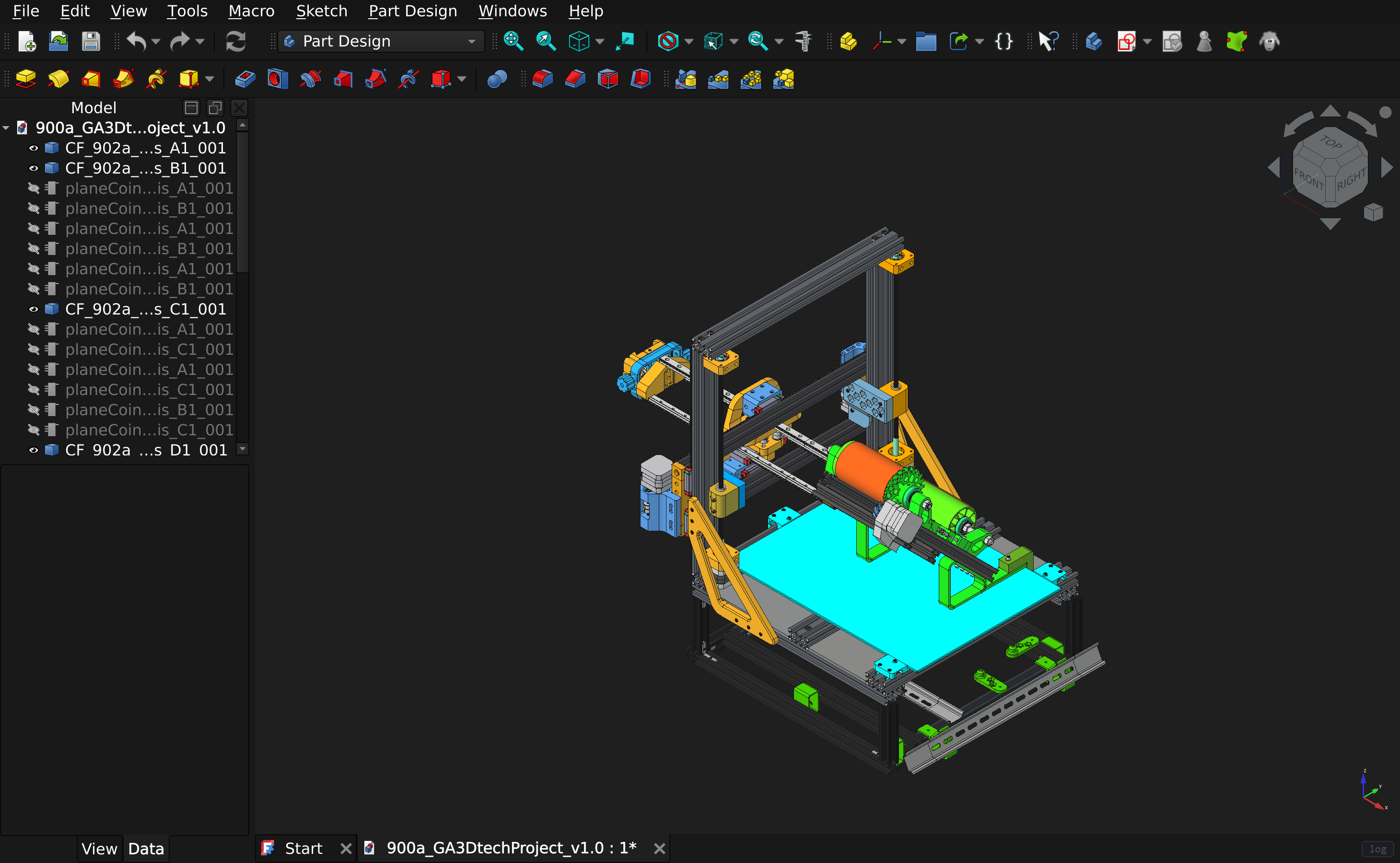
A real 42 MB project, 34 top-level parts, opened from the browser: GA3Dtech's open-hardware GA3D-basicbot-2023 (CERN-OHL-W-2.0). Every screenshot on this page is the application running, captured from the shipped build.
This is not a viewer or a cut-down demo. It is upstream FreeCAD built for
wasm64-emscripten with wasm exceptions and JSPI: the same workbenches, the same commands,
the same OCCT geometry kernel, the same CPython interpreter running the same Python
workbenches, and the same solvers.
Not affiliated with or endorsed by the FreeCAD project. Please report problems here, not to FreeCAD upstream.
What it looks like
Every one of these opened in the browser, from the build that is live right now.
 |  |
| Parametric modelling. Pads, pockets and sketches, with the full feature tree. | EngineBlock, 36 objects. Booleans and fillets on real solid geometry. |
 |  |
| BIM, 361 objects: walls, windows, a site, a section plane and drawing sheets. | ArchDetail, 435 objects. Architectural detailing with materials. |
 |  |
| FEM. Gmsh meshes and CalculiX solves in the tab, within 1% of beam theory. | Assembly, 54 objects, with joints and constraints. |
 |  |
| Draft, 113 objects: wires, arcs, dimensions and text, shown from the top. | An 18 MB STL, imported and shaded. Meshes as well as solids. Dovahkiin Helm Reforged by MHypothetical. |
Run it yourself
Docker is the only thing you need. No Python, no Node, no build tools, no clone.
curl -fsSLO https://github.com/Virtastic/freecad-web/releases/download/v1.0.0/setup.sh
sh setup.sh
# Windows PowerShell
irm https://github.com/Virtastic/freecad-web/releases/download/v1.0.0/setup.ps1 -OutFile setup.ps1
.\setup.ps1
That is the whole install. It checks Docker first and says exactly what to fix if something is wrong, pulls the prebuilt image, starts it, and then proves the running site is correct before telling you it worked. Real output from a first run:
==> Verifying
==> freecad serving contract: http://localhost:8080
  ok   COOP: same-origin
  ok   COEP: require-corp
  ok   root serves the FreeCAD GUI
  ok   legal.html served
  ok   LICENSE served
  ok   GUI links to the license page
  ok   FreeCAD.wasm served
  ok   FreeCAD.js served
  ok   FreeCAD.data served
  ok   FreeCAD.wasm is application/wasm
  ok   payload carries its Python packages

==> contract OK

  freecad-web is running:   http://localhost:8080/
Then open http://localhost:8080/ in Chrome or Edge 137+. Use localhost rather than
the machine's LAN address: the engine needs a secure context to start.
That last check is not decoration. Every asset can return 200 with every header correct while the payload inside the engine is missing its Python packages, which is exactly what both sites served for two days once, with FEM, the Addon Manager and Draft all dead and the app booting happily. The installer looks inside the engine before it claims success.
Options
sh setup.sh | Pull the prebuilt image, falling back to a local build if the registry is unreachable |
sh setup.sh --build | Always build locally from the release artifacts (~445 MB download) |
sh setup.sh --pull | Only pull; fail rather than build |
sh setup.sh --port 9000 | Serve somewhere other than 8080 |
sh setup.sh --tag v1.0.0 | Install a specific release |
sh setup.sh --ref dev | Take the source tree from a branch instead of the release tag |
sh full-build.sh | Clone the repository at a tag and build the container from it (~15 min) |
Running it
The installer leaves you a normal compose project, so nothing here is bespoke:
docker compose ps                      # is it healthy?
docker compose logs -f                 # follow it
docker compose down                    # stop it
docker compose up -d                   # start it again
docker compose --profile share up -d   # add shared sessions and the MCP endpoint
Or skip the installer entirely and run the published image:
docker run -d -p 8080:80 ghcr.io/virtastic/freecad-web:1.0.0
Your documents live in your browser, not in the container, so stopping or removing it does not touch them. The one exception is a session you deliberately share, which is copied to a volume so the link keeps working while your laptop is shut.
QUICKSTART.md covers troubleshooting, updating and uninstalling.
What works
Verified under real mouse and keyboard input against production, not just scripted API calls:
- All 20 workbenches activate on first click.
- ~500 of FreeCAD's own unit tests pass (PartDesign, Part, Draft, Sketcher, Spreadsheet, Mesh, Arch, TechDraw, Assembly, Materials and more).
- Modelling. Sketch by clicking in the viewport, add dimensional constraints through the modal, pad through the task panel, boolean, fillet. Geometry agrees with closed-form answers: a PartDesign pad measured 8262.4 mm³ against an analytic 8262.4.
- FEM end to end. Gmsh meshes and CalculiX solves in the browser, validated to within 1% of beam theory across solids, shells, beams, plane stress, contact, frequency, thermal and nonlinear.
- Files. Open, save, save-as, export and import through FreeCAD's own menus: FCStd, STEP, IGES, STL, 3MF, OpenSCAD CSG, SVG, DXF.
- The Addon Manager lists the real catalogue and installs workbenches and macros, which survive a reload.
- Your work survives a reload. Documents autosave to browser storage on edit and are restored on boot.
Send someone a link
Edit → Share Session… gives a link that opens your document in your environment: your units, your theme, your add-ons, your macros. They need no install, no account and no matching version, and it works whether they open it now or in three days, because the session lives on the server rather than in your tab.
 |  |
| Your side. Press Start sharing, copy the link. Passwords and an expiry if you want them. | Their side. The same model, in their browser, marked read-only. No install, no account. |
One person holds control at a time. Everyone else watches live, read-only, with the editing commands greyed out, keeping their own camera and their own tab. Control can be requested, granted, or taken with the editor password. Work that has not reached the server is kept as a separate document rather than discarded.

Preferences → Sharing → Session: who is here, who is editing, and every action in one place. Two people in this one, the owner holding control.
Rendering still happens in each visitor's own browser. This is not screen sharing.
Let an AI drive it
Preferences → Sharing → MCP mints one URL. Paste it into an AI client and it can see and drive FreeCAD: the object tree, every property, the selection, the views, screenshots, export, and every GUI command, plus arbitrary Python as the backstop. The page has copy buttons for the Claude Code and Codex command lines, so there is nothing to type.

The assistant works inside your tab and inherits its rights, so it is off until you press Enable. SHARING.md covers both features, including what the operator turns on and what the assistant can and cannot do.
Requirements and limits
These are real constraints, stated up front rather than discovered:
| Browser | Chrome or Edge 137+. Firefox and Safari lack JSPI; they are refused up front having downloaded nothing. |
| First load | ~115 MB. Return visits fetch nothing: the engine is held in Cache Storage and reaches Ready in seconds. |
| Memory | A 16 GB heap ceiling (the wasm64 build; V8 caps wasm64 memory there). The app force-saves your documents and warns before it runs out. |
| CalculiX | Single-threaded, so large FEM jobs are slower than desktop. |
| Shared sessions / MCP | Self-hosters need one extra container: docker compose --profile share up -d. Documents you share are stored unencrypted on that server, so anyone with access to it can read them. Nothing leaves your browser until you start a session. |
Documentation
- BUILD-WEH.md is how to reproduce the production build: toolchains, build order, linking, staging, deploy, and a frank record of every trap that cost real time.
- MANUAL-QA.md is the 20-minute human pass, scoped to the things automation is structurally blind to.
- SHARING.md is shared sessions and the AI assistant over MCP: sending a link, joining one, passing control, connecting an AI client, and what the operator turns on.
- QUICKSTART.md is running it yourself with Docker: the three install paths, troubleshooting, updating, uninstalling.
- SECURITY.md is the threat model, including what is deliberate rather than a vulnerability.
- infra/README.md is serving and deployment.
Building
To build the container from a clone, use full-build.sh (or full-build.ps1). That takes
about 15 minutes and needs only git and Docker.
Building the engine is a different thing entirely: a multi-hour, multi-gigabyte cross-compile of FreeCAD and its whole dependency stack. BUILD-WEH.md is the authority; start there.
The vendored source trees (deps/), toolchains (emsdk/, qt/) and build outputs are
gitignored. What this repository holds is everything needed to recreate them: the patch set
in patches/, the configure and build scripts, the link commands, the front-end
shell in play-gui/, and the verification harnesses in scratchpad/.
License
LGPL-2.1-or-later, matching FreeCAD. See LICENSE, and NOTICE for the
third-party components and their licenses. Every file this repository authors carries an
SPDX header (tools/add-spdx-headers.py --check, enforced by the licensing job in CI),
full license texts live in LICENSES/, and the running app serves the same
attribution at /legal.html, linked from the boot screen, including Gmsh and CalculiX,
which ship as separate GPL WebAssembly modules rather than being linked in.
Contributors

1,051 commits
Similar repos


Languages
Python
55.4%
HTML
14.6%
Shell
12.5%
JavaScript
11.4%
C
2.4%
C++
1.8%
FreeCAD compiled to WebAssembly and running in the browser: the real application, wasm64 + JSPI, same workbenches, same solvers.
See the codeSee what people are saying (1)
README
freecad-web
FreeCAD 1.1.3, compiled to WebAssembly and running in the browser. No install, no plugin, no server-side rendering. The real application, executing locally in your tab.
👉 https://freecad.virtastic.app
A real 42 MB project, 34 top-level parts, opened from the browser: GA3Dtech's open-hardware GA3D-basicbot-2023 (CERN-OHL-W-2.0). Every screenshot on this page is the application running, captured from the shipped build.
This is not a viewer or a cut-down demo. It is upstream FreeCAD built for
wasm64-emscripten with wasm exceptions and JSPI: the same workbenches, the same commands,
the same OCCT geometry kernel, the same CPython interpreter running the same Python
workbenches, and the same solvers.
Not affiliated with or endorsed by the FreeCAD project. Please report problems here, not to FreeCAD upstream.
What it looks like
Every one of these opened in the browser, from the build that is live right now.
| |
| Parametric modelling. Pads, pockets and sketches, with the full feature tree. | EngineBlock, 36 objects. Booleans and fillets on real solid geometry. |
| |
| BIM, 361 objects: walls, windows, a site, a section plane and drawing sheets. | ArchDetail, 435 objects. Architectural detailing with materials. |
| |
| FEM. Gmsh meshes and CalculiX solves in the tab, within 1% of beam theory. | Assembly, 54 objects, with joints and constraints. |
| |
| Draft, 113 objects: wires, arcs, dimensions and text, shown from the top. | An 18 MB STL, imported and shaded. Meshes as well as solids. Dovahkiin Helm Reforged by MHypothetical. |
Run it yourself
Docker is the only thing you need. No Python, no Node, no build tools, no clone.
curl -fsSLO https://github.com/Virtastic/freecad-web/releases/download/v1.0.0/setup.sh
sh setup.sh
# Windows PowerShell
irm https://github.com/Virtastic/freecad-web/releases/download/v1.0.0/setup.ps1 -OutFile setup.ps1
.\setup.ps1
That is the whole install. It checks Docker first and says exactly what to fix if something is wrong, pulls the prebuilt image, starts it, and then proves the running site is correct before telling you it worked. Real output from a first run:
==> Verifying
==> freecad serving contract: http://localhost:8080
  ok   COOP: same-origin
  ok   COEP: require-corp
  ok   root serves the FreeCAD GUI
  ok   legal.html served
  ok   LICENSE served
  ok   GUI links to the license page
  ok   FreeCAD.wasm served
  ok   FreeCAD.js served
  ok   FreeCAD.data served
  ok   FreeCAD.wasm is application/wasm
  ok   payload carries its Python packages

==> contract OK

  freecad-web is running:   http://localhost:8080/
Then open http://localhost:8080/ in Chrome or Edge 137+. Use localhost rather than
the machine's LAN address: the engine needs a secure context to start.
That last check is not decoration. Every asset can return 200 with every header correct while the payload inside the engine is missing its Python packages, which is exactly what both sites served for two days once, with FEM, the Addon Manager and Draft all dead and the app booting happily. The installer looks inside the engine before it claims success.
Options
sh setup.sh | Pull the prebuilt image, falling back to a local build if the registry is unreachable |
sh setup.sh --build | Always build locally from the release artifacts (~445 MB download) |
sh setup.sh --pull | Only pull; fail rather than build |
sh setup.sh --port 9000 | Serve somewhere other than 8080 |
sh setup.sh --tag v1.0.0 | Install a specific release |
sh setup.sh --ref dev | Take the source tree from a branch instead of the release tag |
sh full-build.sh | Clone the repository at a tag and build the container from it (~15 min) |
Running it
The installer leaves you a normal compose project, so nothing here is bespoke:
docker compose ps                      # is it healthy?
docker compose logs -f                 # follow it
docker compose down                    # stop it
docker compose up -d                   # start it again
docker compose --profile share up -d   # add shared sessions and the MCP endpoint
Or skip the installer entirely and run the published image:
docker run -d -p 8080:80 ghcr.io/virtastic/freecad-web:1.0.0
Your documents live in your browser, not in the container, so stopping or removing it does not touch them. The one exception is a session you deliberately share, which is copied to a volume so the link keeps working while your laptop is shut.
QUICKSTART.md covers troubleshooting, updating and uninstalling.
What works
Verified under real mouse and keyboard input against production, not just scripted API calls:
- All 20 workbenches activate on first click.
- ~500 of FreeCAD's own unit tests pass (PartDesign, Part, Draft, Sketcher, Spreadsheet, Mesh, Arch, TechDraw, Assembly, Materials and more).
- Modelling. Sketch by clicking in the viewport, add dimensional constraints through the modal, pad through the task panel, boolean, fillet. Geometry agrees with closed-form answers: a PartDesign pad measured 8262.4 mm³ against an analytic 8262.4.
- FEM end to end. Gmsh meshes and CalculiX solves in the browser, validated to within 1% of beam theory across solids, shells, beams, plane stress, contact, frequency, thermal and nonlinear.
- Files. Open, save, save-as, export and import through FreeCAD's own menus: FCStd, STEP, IGES, STL, 3MF, OpenSCAD CSG, SVG, DXF.
- The Addon Manager lists the real catalogue and installs workbenches and macros, which survive a reload.
- Your work survives a reload. Documents autosave to browser storage on edit and are restored on boot.
Send someone a link
Edit → Share Session… gives a link that opens your document in your environment: your units, your theme, your add-ons, your macros. They need no install, no account and no matching version, and it works whether they open it now or in three days, because the session lives on the server rather than in your tab.
| |
| Your side. Press Start sharing, copy the link. Passwords and an expiry if you want them. | Their side. The same model, in their browser, marked read-only. No install, no account. |
One person holds control at a time. Everyone else watches live, read-only, with the editing commands greyed out, keeping their own camera and their own tab. Control can be requested, granted, or taken with the editor password. Work that has not reached the server is kept as a separate document rather than discarded.
Preferences → Sharing → Session: who is here, who is editing, and every action in one place. Two people in this one, the owner holding control.
Rendering still happens in each visitor's own browser. This is not screen sharing.
Let an AI drive it
Preferences → Sharing → MCP mints one URL. Paste it into an AI client and it can see and drive FreeCAD: the object tree, every property, the selection, the views, screenshots, export, and every GUI command, plus arbitrary Python as the backstop. The page has copy buttons for the Claude Code and Codex command lines, so there is nothing to type.
The assistant works inside your tab and inherits its rights, so it is off until you press Enable. SHARING.md covers both features, including what the operator turns on and what the assistant can and cannot do.
Requirements and limits
These are real constraints, stated up front rather than discovered:
| Browser | Chrome or Edge 137+. Firefox and Safari lack JSPI; they are refused up front having downloaded nothing. |
| First load | ~115 MB. Return visits fetch nothing: the engine is held in Cache Storage and reaches Ready in seconds. |
| Memory | A 16 GB heap ceiling (the wasm64 build; V8 caps wasm64 memory there). The app force-saves your documents and warns before it runs out. |
| CalculiX | Single-threaded, so large FEM jobs are slower than desktop. |
| Shared sessions / MCP | Self-hosters need one extra container: docker compose --profile share up -d. Documents you share are stored unencrypted on that server, so anyone with access to it can read them. Nothing leaves your browser until you start a session. |
Documentation
- BUILD-WEH.md is how to reproduce the production build: toolchains, build order, linking, staging, deploy, and a frank record of every trap that cost real time.
- MANUAL-QA.md is the 20-minute human pass, scoped to the things automation is structurally blind to.
- SHARING.md is shared sessions and the AI assistant over MCP: sending a link, joining one, passing control, connecting an AI client, and what the operator turns on.
- QUICKSTART.md is running it yourself with Docker: the three install paths, troubleshooting, updating, uninstalling.
- SECURITY.md is the threat model, including what is deliberate rather than a vulnerability.
- infra/README.md is serving and deployment.
Building
To build the container from a clone, use full-build.sh (or full-build.ps1). That takes
about 15 minutes and needs only git and Docker.
Building the engine is a different thing entirely: a multi-hour, multi-gigabyte cross-compile of FreeCAD and its whole dependency stack. BUILD-WEH.md is the authority; start there.
The vendored source trees (deps/), toolchains (emsdk/, qt/) and build outputs are
gitignored. What this repository holds is everything needed to recreate them: the patch set
in patches/, the configure and build scripts, the link commands, the front-end
shell in play-gui/, and the verification harnesses in scratchpad/.
License
LGPL-2.1-or-later, matching FreeCAD. See LICENSE, and NOTICE for the
third-party components and their licenses. Every file this repository authors carries an
SPDX header (tools/add-spdx-headers.py --check, enforced by the licensing job in CI),
full license texts live in LICENSES/, and the running app serves the same
attribution at /legal.html, linked from the boot screen, including Gmsh and CalculiX,
which ship as separate GPL WebAssembly modules rather than being linked in.
Similar repos
Contributors
1,051 commits
Languages
Python
55.4%
HTML
14.6%
Shell
12.5%
JavaScript
11.4%
C
2.4%
C++
1.8%