Visual Studio Extension for C++ struct memory layout visualization
C#
489
190 commits
updated Jan 15, 2024
Visual Studio Extension for C++ struct memory layout visualization



Download latest from the Visual Studio Marketplace 2022
Download latest from the Visual Studio Marketplace 2019
In C++, the structure layout can be affected by different factors. In order to produce performant data cache oriented code or reduce the structure memory footprint, it is important to be aware of the class layouts at the same spot where code is created, updated, removed or debugged. This extension allows programmers to visualize their structures within Visual Studio with just 1 click.
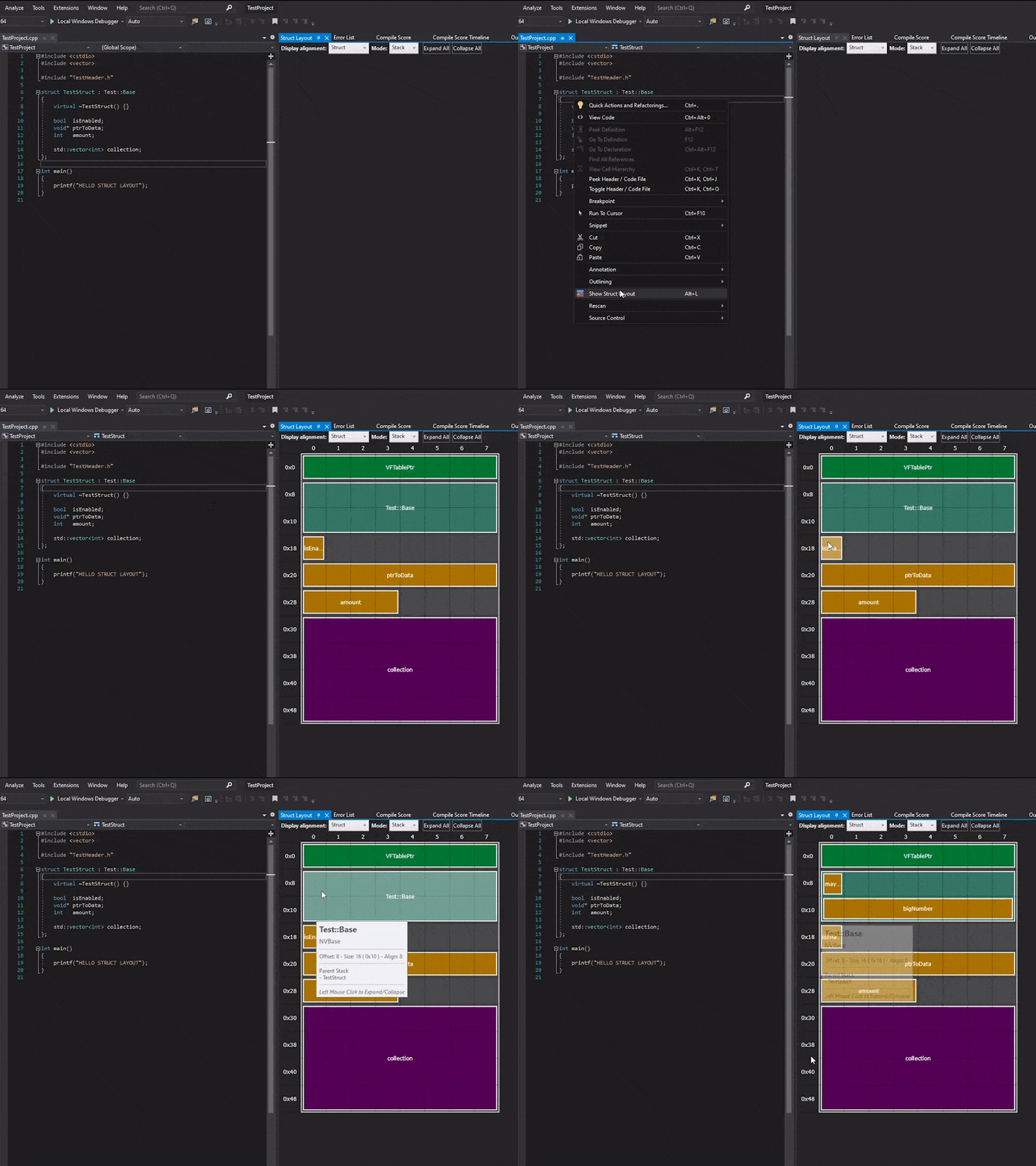
Right click on top of any C++ struct definition and select Show Struct Layout (or press Alt+L) in order to visualize the memory layout.
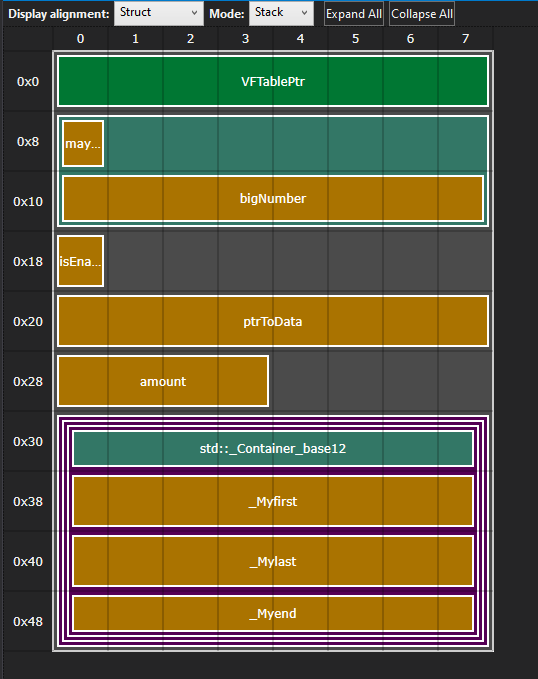
In this visualization mode the types with children are stacked in order to allow navigation in and out and get a better sense of overall structure.
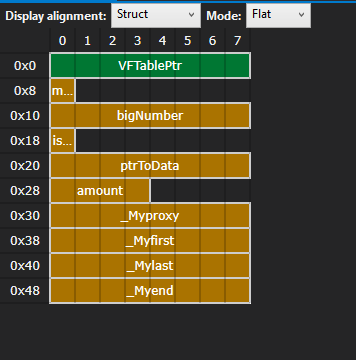
The flat mode skips all groups and only shows one layer, producing a more compact view.
Struct Layout can use different systems to parse the C++ files and extract the memory layout information. Depending on the complexity and quirks of the build system and Visual Studio setup one option will be more convinent than the others. The method used can be changed in the Extension Options Window
When a Layout request is made the extension does the following:
This method will process the file location through a Clang LibTooling executable which will parse the current file and headers. This method can give really accurate results as it retrieves the data directly from the Clang AST but it will need the exact build context to be able to properly understand all the code.
When a query to the clang libtooling is triggered the extension will try to gather the following data from the active project and configuration:
This method takes advantage of the fact that the pdb (Program DataBase) will most likely contain all the layout information for all user defined types. This application uses the DIA SDK (Debug Interface Access) to open and query the pdb. This system can be useful if our setup is not ready to be compiled with a Clang compiler, the build system is quite complex hitting some corner cases or we have some MSVC specific code. The caveat is that we would need to compile the projects before performing any queries keeping the pdbs up to date.
This project is open to code contributions.
If you found this extension useful you can always buy me a cup coffee.

795 followers · starred Oct 2020
555 followers · starred Jul 2023
157 followers · starred Oct 2020
120 followers · starred May 2022
Visual Studio Extension for C++ struct memory layout visualization
C#
489
190 commits
updated Jan 15, 2024
Visual Studio Extension for C++ struct memory layout visualization
Download latest from the Visual Studio Marketplace 2022
Download latest from the Visual Studio Marketplace 2019
In C++, the structure layout can be affected by different factors. In order to produce performant data cache oriented code or reduce the structure memory footprint, it is important to be aware of the class layouts at the same spot where code is created, updated, removed or debugged. This extension allows programmers to visualize their structures within Visual Studio with just 1 click.
Right click on top of any C++ struct definition and select Show Struct Layout (or press Alt+L) in order to visualize the memory layout.
In this visualization mode the types with children are stacked in order to allow navigation in and out and get a better sense of overall structure.
The flat mode skips all groups and only shows one layer, producing a more compact view.
Struct Layout can use different systems to parse the C++ files and extract the memory layout information. Depending on the complexity and quirks of the build system and Visual Studio setup one option will be more convinent than the others. The method used can be changed in the Extension Options Window
When a Layout request is made the extension does the following:
This method will process the file location through a Clang LibTooling executable which will parse the current file and headers. This method can give really accurate results as it retrieves the data directly from the Clang AST but it will need the exact build context to be able to properly understand all the code.
When a query to the clang libtooling is triggered the extension will try to gather the following data from the active project and configuration:
This method takes advantage of the fact that the pdb (Program DataBase) will most likely contain all the layout information for all user defined types. This application uses the DIA SDK (Debug Interface Access) to open and query the pdb. This system can be useful if our setup is not ready to be compiled with a Clang compiler, the build system is quite complex hitting some corner cases or we have some MSVC specific code. The caveat is that we would need to compile the projects before performing any queries keeping the pdbs up to date.
This project is open to code contributions.
If you found this extension useful you can always buy me a cup coffee.
795 followers · starred Oct 2020
555 followers · starred Jul 2023
157 followers · starred Oct 2020
120 followers · starred May 2022