Open-source Platform for learning kubernetes and aws eks and preparation for for Certified Kubernetes exams (CKA ,CKS , CKAD, ICA)
See the code

The SRE Learning Platform is an open-source hub designed to help IT engineers effectively prepare for the CKA (Certified Kubernetes Administrator), CKS (Certified Kubernetes Security Specialist), CKAD (Certified Kubernetes Application Developer), and LFCS (Linux Foundation Certified System Administrator) exams. Additionally, this platform offers invaluable hands-on experience with AWS EKS (Elastic Kubernetes Service), equipping users with practical insights for real-world applications. Whether you're aiming to validate your skills, boost your career prospects in Kubernetes administration, security, application development, or delve into AWS EKS, this platform provides hands-on labs, practice tests, and expert guidance to ensure certification success.
Master Kubernetes concepts, gain practical experience, and excel in the CKA, CKS, and CKAD exams with the SRE Learning Platform.
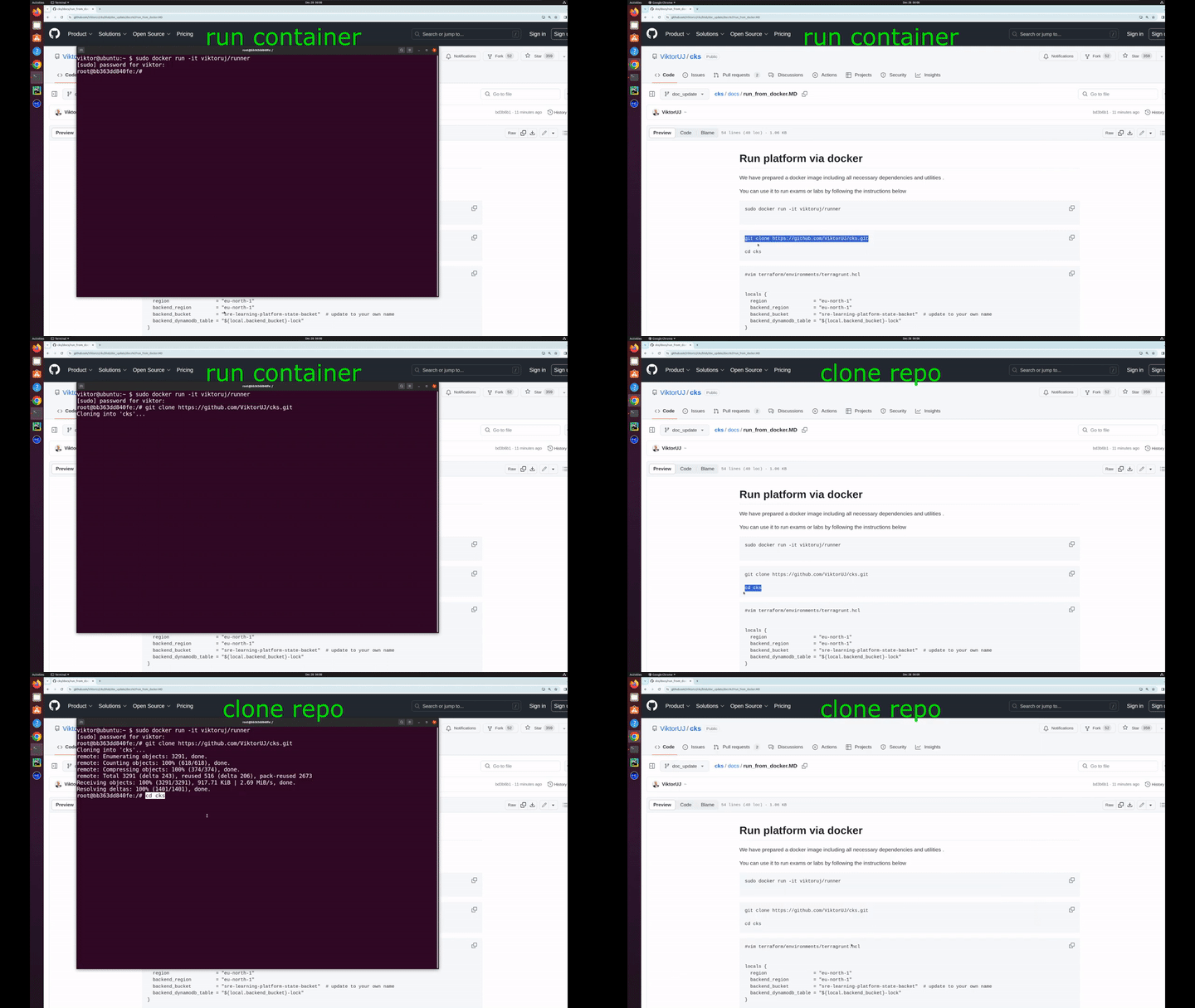
Or you can run via docker ( video instruction )
The repository is organized into the following sections:
k8s version  : [ 1.21 , 1.34 ]   https://kubernetes.io/releases/
Rintime :
    docker                   [1.21 , 1.23]
    cri-o                    [1.21 , 1.29]
    containerd               [1.21 , 1.33]   # cks, cka  default 1.33
    containerd_gvizor        [1.21 , 1.33]
OS for nodes  :
   ubuntu  :  20.04 LTS  ,  22.04 LTS   # cks default  22.04 LTS
CNI :  calico ,culium
Every command should be run from the project's root directory.
make cmdb_get_env_all - get a list of all resources in CMDBUSER_ID='myuser' ENV_ID='01' make cmdb_get_user_env_data - show all created resources of user myuser in environment 01USER_ID='myuser' ENV_ID='01' make cmdb_get_user_env_lock - show all lock resources of user myuser in environment 01USER_ID='myuser' ENV_ID='01' make cmdb_get_user_env_lock - show all lock resources of user myuser in environment 01USER_ID='myuser' make cmdb_get_user_env_lock - show all lock resources of user myuser in all environmentUSER_ID='myuser' make cmdb_get_user_env_data - show all data resources of user myuser in all environmentCMDB_ITEM='CMDB_data_myuser_02_k8s_cluster1' make cmdb_get_item - getting detailed information about CMDB_data_myuser_02_k8s_cluster1 resource.TASK=01 make run_cka_task - create cka hands-on labs number 01TASK=01 make delete_cka_task - delete cka hands-on labsTASK=01 make run_cka_task_clean - run cka_task with clean terragrunt cache for cka_taskmake output_cka_task - show outputs from cka_taskTASK=10 make run_cks_task - create cks hands-on labs number 10TASK=10 make delete_cks_task - delete cks hands-on labsTASK=10 make run_cks_task_clean - run cks_task with clean terragrunt cache for cks_taskmake output_cks_task - show outputs from cks_taskTASK=01 make run_ica_task - create ica hands-on labs number 01TASK=01 make delete_ica_task - delete ica hands-on labsTASK=01 make run_ica_task_clean - run ica_task with clean terragrunt cache for ica_taskmake output_cks_task - show outputs from ica_taskTASK={lab_number} make run_eks_task create hands-on labmake delete_eks_task delete eks lab clustermake lint run linter on the projectTASK={lab_number} make run_cka_taskssh ubuntu@{master_external_ip} -i {key}tail -f /var/log/cloud-init-output.log{lab_number}/README.MD{lab_number}/SOLUTION.MDmake delete_cka_task.terraform folder make clean_cka_task Video instruction for launching CKA mock exam
spot to ondemand in {mock_number}/env.hcl if you needTASK={mock_number} make run_cka_mockworker_pc_ip in terraform outputworker_pc_ip with your ssh key and user ubuntu{mock_number}/README.MD and do tasksssh {kubernetes_nodename} from work pc to connect to nodetime_left on work pc to check timecheck_result on work pc to check resultmake delete_cka_mock{mock_number}/worker/files/solutions) and * Video for mock 01 .{mock_number}/worker/files/tests.bats){lab_number}/scripts/terragrunt.hcl if you changed regionTASK={lab_number} make run_cks_taskssh ubuntu@{master_external_ip} -i {key}tail -f /var/log/cloud-init-output.log{lab_number}/README.MD{lab_number}/SOLUTION.MDmake delete_cks_task.terraform folder make clean_cks_task Video instruction for launching CKS mock exam
{mock_number}/env.hcl if you needspot to ondemand in {mock_number}/env.hcl if you needTASK={mock_number} make run_cks_mock or TASK={mock_number} make run_cks_mock_clean if you'd like to run with clean terragrunt cacheworker_pc_ip in terraform outputworker_pc_ip with your ssh key and user ubuntu{mock_number}/README.MD and do tasksssh {kubernetes_nodename} from work pc to connect to nodetime_left on work pc to check timecheck_result on work pc to check resultmake delete_cks_mock{mock_number}/worker/files/solutions mock 1 solutions and video{mock_number}/worker/files/tests.bats{mock_number}/env.hcl if you needspot to ondemand in {mock_number}/env.hcl if you needTASK={mock_number} make run_ica_mock or TASK={mock_number} make run_ica_mock_clean if you'd like to run with clean terragrunt cacheworker_pc_ip in terraform outputworker_pc_ip with your ssh key and user ubuntu{mock_number}/README.MD and do tasksssh {kubernetes_nodename} from work pc to connect to nodetime_left on work pc to check timecheck_result on work pc to check resultmake delete_ica_mock{mock_number}/worker/files/solutions mock 1 solutions and video{mock_number}/worker/files/tests/Video instruction for launching CKAD mock exam
{mock_number}/env.hcl if you needspot to ondemand in {mock_number}/env.hcl if you needTASK={mock_number} make run_ckad_mock or TASK={mock_number} make run_ckad_mock_clean if you'd like to run with clean terragrunt cacheworker_pc_ip in terraform outputworker_pc_ip with your ssh key and user ubuntu{mock_number}/README.MD and do tasksssh {kubernetes_nodename} from work pc to connect to nodetime_left on work pc to check timecheck_result on work pc to check resultmake delete_ckad_mock{mock_number}/worker/files/solutions mock 1 solutions and video{mock_number}/worker/files/tests.batsVideo instruction for launching HR mock exam
{mock_number}/env.hcl if you needspot to ondemand in {mock_number}/env.hcl if you needTASK={mock_number} make run_hr_mock or TASK={mock_number} make run_hr_mock_clean if you'd like to run with clean terragrunt cacheworker_pc_ip in terraform outputworker_pc_ip with your ssh key and user ubuntu{mock_number}/README.MD and do tasksssh {kubernetes_nodename} from work pc to connect to nodetime_left on work pc to check timecheck_result on work pc to check resultmake delete_hr_mock{mock_number}/worker/files/solutions mock 1 solutions and video{mock_number}/worker/files/tests.batsTASK={lab_number} make run_eks_taskworker_pc_ip in terraform outputssh ubuntu@{worker_pc_ip} -i {key}{lab_number}/README.MD{lab_number}/SOLUTION.MDmake delete_eks_taskIf you want to be part of the project development team, get in touch with us. We are always happy to welcome new members to our development team.
If you want to say thank you or/and support the active development of SRE Learning Platform project :
If you encounter any issues or have questions about the project, you can reach out to:
287 followers · starred Aug 2026
2,288 followers · starred Jun 2025
186 followers · starred Mar 2024
116 followers · starred Feb 2024
Open-source Platform for learning kubernetes and aws eks and preparation for for Certified Kubernetes exams (CKA ,CKS , CKAD, ICA)
See the code
The SRE Learning Platform is an open-source hub designed to help IT engineers effectively prepare for the CKA (Certified Kubernetes Administrator), CKS (Certified Kubernetes Security Specialist), CKAD (Certified Kubernetes Application Developer), and LFCS (Linux Foundation Certified System Administrator) exams. Additionally, this platform offers invaluable hands-on experience with AWS EKS (Elastic Kubernetes Service), equipping users with practical insights for real-world applications. Whether you're aiming to validate your skills, boost your career prospects in Kubernetes administration, security, application development, or delve into AWS EKS, this platform provides hands-on labs, practice tests, and expert guidance to ensure certification success.
Master Kubernetes concepts, gain practical experience, and excel in the CKA, CKS, and CKAD exams with the SRE Learning Platform.
Or you can run via docker ( video instruction )
The repository is organized into the following sections:
k8s version  : [ 1.21 , 1.34 ]   https://kubernetes.io/releases/
Rintime :
    docker                   [1.21 , 1.23]
    cri-o                    [1.21 , 1.29]
    containerd               [1.21 , 1.33]   # cks, cka  default 1.33
    containerd_gvizor        [1.21 , 1.33]
OS for nodes  :
   ubuntu  :  20.04 LTS  ,  22.04 LTS   # cks default  22.04 LTS
CNI :  calico ,culium
Every command should be run from the project's root directory.
make cmdb_get_env_all - get a list of all resources in CMDBUSER_ID='myuser' ENV_ID='01' make cmdb_get_user_env_data - show all created resources of user myuser in environment 01USER_ID='myuser' ENV_ID='01' make cmdb_get_user_env_lock - show all lock resources of user myuser in environment 01USER_ID='myuser' ENV_ID='01' make cmdb_get_user_env_lock - show all lock resources of user myuser in environment 01USER_ID='myuser' make cmdb_get_user_env_lock - show all lock resources of user myuser in all environmentUSER_ID='myuser' make cmdb_get_user_env_data - show all data resources of user myuser in all environmentCMDB_ITEM='CMDB_data_myuser_02_k8s_cluster1' make cmdb_get_item - getting detailed information about CMDB_data_myuser_02_k8s_cluster1 resource.TASK=01 make run_cka_task - create cka hands-on labs number 01TASK=01 make delete_cka_task - delete cka hands-on labsTASK=01 make run_cka_task_clean - run cka_task with clean terragrunt cache for cka_taskmake output_cka_task - show outputs from cka_taskTASK=10 make run_cks_task - create cks hands-on labs number 10TASK=10 make delete_cks_task - delete cks hands-on labsTASK=10 make run_cks_task_clean - run cks_task with clean terragrunt cache for cks_taskmake output_cks_task - show outputs from cks_taskTASK=01 make run_ica_task - create ica hands-on labs number 01TASK=01 make delete_ica_task - delete ica hands-on labsTASK=01 make run_ica_task_clean - run ica_task with clean terragrunt cache for ica_taskmake output_cks_task - show outputs from ica_taskTASK={lab_number} make run_eks_task create hands-on labmake delete_eks_task delete eks lab clustermake lint run linter on the projectTASK={lab_number} make run_cka_taskssh ubuntu@{master_external_ip} -i {key}tail -f /var/log/cloud-init-output.log{lab_number}/README.MD{lab_number}/SOLUTION.MDmake delete_cka_task.terraform folder make clean_cka_task Video instruction for launching CKA mock exam
spot to ondemand in {mock_number}/env.hcl if you needTASK={mock_number} make run_cka_mockworker_pc_ip in terraform outputworker_pc_ip with your ssh key and user ubuntu{mock_number}/README.MD and do tasksssh {kubernetes_nodename} from work pc to connect to nodetime_left on work pc to check timecheck_result on work pc to check resultmake delete_cka_mock{mock_number}/worker/files/solutions) and * Video for mock 01 .{mock_number}/worker/files/tests.bats){lab_number}/scripts/terragrunt.hcl if you changed regionTASK={lab_number} make run_cks_taskssh ubuntu@{master_external_ip} -i {key}tail -f /var/log/cloud-init-output.log{lab_number}/README.MD{lab_number}/SOLUTION.MDmake delete_cks_task.terraform folder make clean_cks_task Video instruction for launching CKS mock exam
{mock_number}/env.hcl if you needspot to ondemand in {mock_number}/env.hcl if you needTASK={mock_number} make run_cks_mock or TASK={mock_number} make run_cks_mock_clean if you'd like to run with clean terragrunt cacheworker_pc_ip in terraform outputworker_pc_ip with your ssh key and user ubuntu{mock_number}/README.MD and do tasksssh {kubernetes_nodename} from work pc to connect to nodetime_left on work pc to check timecheck_result on work pc to check resultmake delete_cks_mock{mock_number}/worker/files/solutions mock 1 solutions and video{mock_number}/worker/files/tests.bats{mock_number}/env.hcl if you needspot to ondemand in {mock_number}/env.hcl if you needTASK={mock_number} make run_ica_mock or TASK={mock_number} make run_ica_mock_clean if you'd like to run with clean terragrunt cacheworker_pc_ip in terraform outputworker_pc_ip with your ssh key and user ubuntu{mock_number}/README.MD and do tasksssh {kubernetes_nodename} from work pc to connect to nodetime_left on work pc to check timecheck_result on work pc to check resultmake delete_ica_mock{mock_number}/worker/files/solutions mock 1 solutions and video{mock_number}/worker/files/tests/Video instruction for launching CKAD mock exam
{mock_number}/env.hcl if you needspot to ondemand in {mock_number}/env.hcl if you needTASK={mock_number} make run_ckad_mock or TASK={mock_number} make run_ckad_mock_clean if you'd like to run with clean terragrunt cacheworker_pc_ip in terraform outputworker_pc_ip with your ssh key and user ubuntu{mock_number}/README.MD and do tasksssh {kubernetes_nodename} from work pc to connect to nodetime_left on work pc to check timecheck_result on work pc to check resultmake delete_ckad_mock{mock_number}/worker/files/solutions mock 1 solutions and video{mock_number}/worker/files/tests.batsVideo instruction for launching HR mock exam
{mock_number}/env.hcl if you needspot to ondemand in {mock_number}/env.hcl if you needTASK={mock_number} make run_hr_mock or TASK={mock_number} make run_hr_mock_clean if you'd like to run with clean terragrunt cacheworker_pc_ip in terraform outputworker_pc_ip with your ssh key and user ubuntu{mock_number}/README.MD and do tasksssh {kubernetes_nodename} from work pc to connect to nodetime_left on work pc to check timecheck_result on work pc to check resultmake delete_hr_mock{mock_number}/worker/files/solutions mock 1 solutions and video{mock_number}/worker/files/tests.batsTASK={lab_number} make run_eks_taskworker_pc_ip in terraform outputssh ubuntu@{worker_pc_ip} -i {key}{lab_number}/README.MD{lab_number}/SOLUTION.MDmake delete_eks_taskIf you want to be part of the project development team, get in touch with us. We are always happy to welcome new members to our development team.
If you want to say thank you or/and support the active development of SRE Learning Platform project :
If you encounter any issues or have questions about the project, you can reach out to:
287 followers · starred Aug 2026
2,288 followers · starred Jun 2025
186 followers · starred Mar 2024
116 followers · starred Feb 2024