
A browser-based real-time AR experience that turns hand gestures into anime-inspired jutsu using computer vision.
See the codeSee what people are saying (1)
README
Shinobi-IRL
A browser-based real-time AR experience that turns hand gestures into anime-inspired jutsu using computer vision.
Live Demo
https://shinobi-irl.vercel.app/
Note: The production experience is camera-first. You must grant camera permissions for the browser to run the computer vision pipeline.
What is Shinobi-IRL?
Shinobi-IRL is an interactive AR web application that brings iconic anime hand signs to life directly in the browser. It leverages MediaPipe's client-side ML models to detect complex hand landmarks and maps them in real time to custom HTML5 Canvas particle systems and Web Audio triggers.
There is no native app to install, no backend processing of video frames, and no plugins required. The entire rendering pipeline executes inside the client using the Canvas 2D API.
Jutsu
Perform the following gestures clearly to the camera to activate the corresponding VFX:
| Gesture | Jutsu |
|---|---|
| Open palm | ✨ Magic Circle |
| Open palm + circular motion | 🌀 Rasengan |
| Fist | ⚡ Lightning |
| Cross hands (index & middle up) | 👥 Shadow Clone |
Demo Video
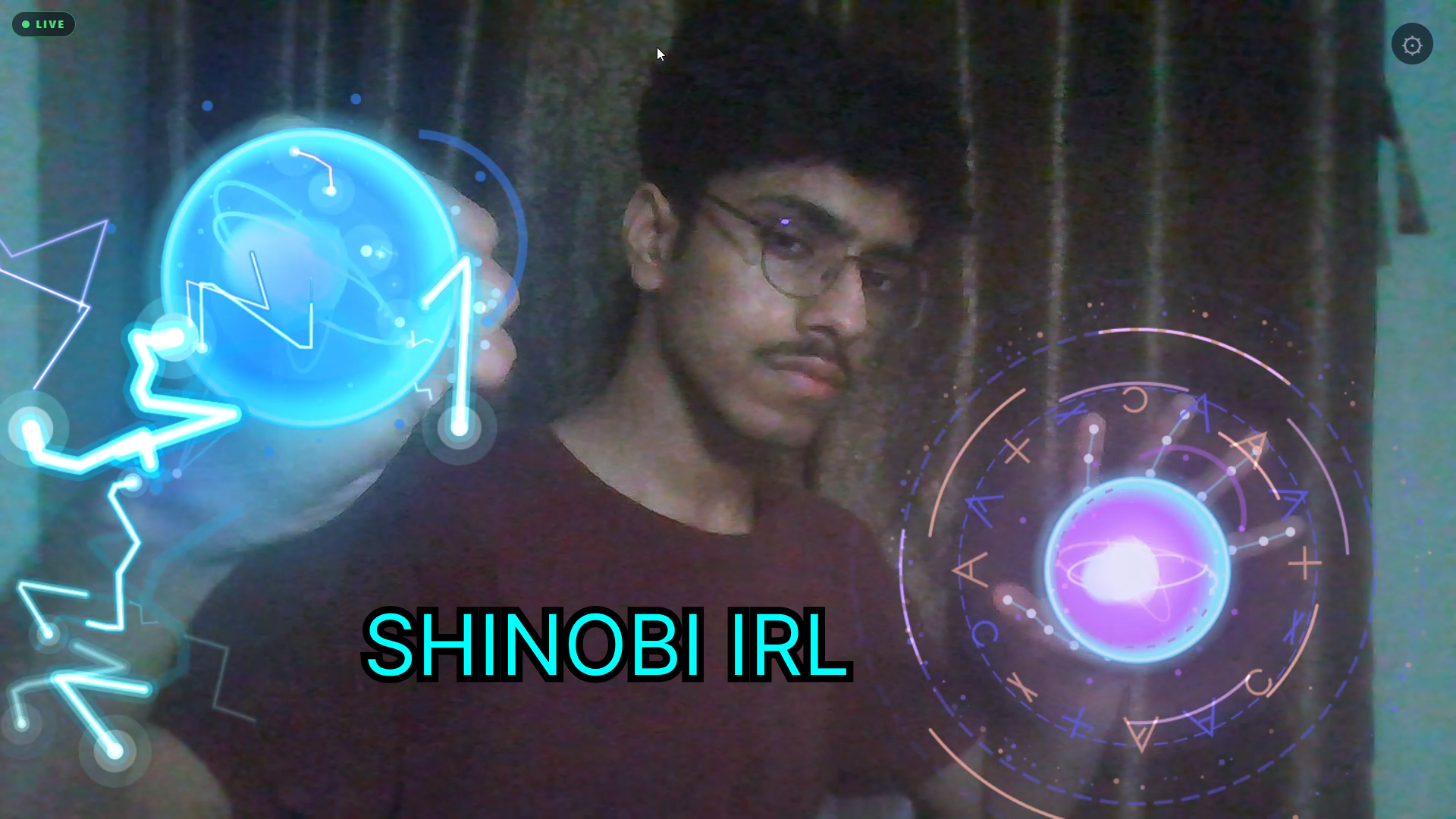
Click on thumbnail to watch the full demo on YouTube.
How It Works
The core pipeline operates on a continuous visual processing tick, distinctly separated from the React rendering tree to ensure high-performance execution:
Camera Stream
      ↓
MediaPipe Hand Landmarker / Image Segmenter
      ↓
21 Hand Landmarks + Semantic Segmentation Mask
      ↓
Gesture Recognition Heuristics
      ↓
Jutsu Lifecycle State Machine
      ↓
Isolated Canvas Renderers & Web Audio API
      ↓
Real-time AR Experience
Technical Architecture
The application is structured to decouple expensive AI inference and Canvas rendering from React's state lifecycle:
- React UI Layer: Handles global layout, camera initialization (
useCamera.ts), settings (SettingsPanel.tsx), and the DOM structure. - Vision Subsystem:
useHandTracking.tsuses@mediapipe/tasks-visionon a scaled-down intermediateaiCanvasbuffer to prevent heavy 1080p frame decoding overhead. - Gesture Detectors: Modular functions (e.g.,
rasenganDetector.ts,shadowCloneDetector.ts) that compute finger extension geometries, orientation angles, and motion histories over time to establish confidence scores with Exponential Moving Average (EMA) smoothing. - Canvas Renderers: Each jutsu manages its own state and renders exclusively to an isolated, absolute-positioned
<canvas>element (e.g.,rasenganRenderer.ts). This avoids shared-context pollution and costlyclearRectcalls over the entire viewport. - Web Audio Manager: (
audioManager.ts) A custom abstraction over the nativeAudioContextthat pre-fetches, decodes, and caches array buffers to achieve low-latency playback when a gesture is recognized. - Analytics Engine: A strictly anonymous PostHog integration (
analytics.ts) focused purely on edge-triggered usage metrics (session_started,jutsu_activated). The camera feed is processed client-side and is not transmitted by the application.
Engineering Challenges
Building a stable real-time VFX layer in the browser required solving several challenges:
- React Frame Isolation: Tying Canvas rendering directly to React
setStateresulted in unacceptable stuttering. The architecture relies on aregisterSinkobserver pattern where hooks inject their frames directly into the renderers, bypassing React entirely. - Gesture Hysteresis: Raw coordinate detection is highly erratic in poor lighting. The detectors implement strict grace periods, frame history buffers, and confidence thresholds to prevent jutsu from flickering or accidentally re-triggering.
- Dual-Hand Coherence: Identifying the Shadow Clone cross-shaped hand seal required dynamically matching handedness correctly and determining the bounding-box intersection ratio (
distance(center, center) / avgSize) to confirm the hands are actually crossed. - Segmentation Mask Extraction: To place clones "behind" and "beside" the user, the app uses MediaPipe
ImageSegmenterto extract the human subject in real time, caching the result to an offscreen buffer before stamping it repeatedly onto the VFX layer. - Browser Audio Restrictions: Modern browsers block autoplaying audio. The AudioContext initializes in a suspended state and safely resumes upon the first user interaction (e.g., clicking "Got it" in the onboarding flow).
Performance
- Downsampled Inference: The
videoelement runs at the device's native resolution, but the ML models consume a heavily downscaled version to maintain smooth inference times. - Heavy Workload Throttling: If
requestAnimationFrameexecution times exceed defined limits (HEAVY_THRESHOLD_MS), the vision pipeline dynamically drops tracking frames to prioritize video smoothness. - Strict Memory Cleanup: Renderers implement deterministic
.destroy()methods tocancelAnimationFrameandclearTimeoutwhen a component unmounts, preventing memory leaks during hot-reloads.
Analytics
The application uses PostHog to track anonymous usage patterns. Privacy is prioritized:
person_profiles: 'never'ensures no cross-session identity graphs are generated.- Session recording and auto-capture are strictly disabled.
- The camera feed never leaves the browser.
- Events are strictly constrained to lightweight interactions:
session_started,camera_started,jutsu_activated.
Project Structure
src/
├── analytics/         # PostHog integration and privacy configurations
├── audio/             # Web Audio API context and buffering manager
├── components/        # React UI, onboarding, and debug panels
├── effects/
│   └── shadowClone/   # Image segmentation and clone compositing
├── gestures/          # Core mathematical heuristics (finger curls, angles)
├── hooks/             # React integrations for vision and camera streams
├── jutsu/
│   ├── lightning/     # Fist detection and lightning bolt fractal generation
│   ├── magicCircle/   # Open palm and geometric circle rendering
│   └── rasengan/      # Circular motion detection and particle systems
├── types/             # Shared TypeScript definitions
└── vision/            # MediaPipe initialization and model loading
Getting Started
To run the project locally:
# Clone the repository
git clone https://github.com/Vikash-Singh-Bhadoriya/Shinobi-IRL.git
cd Shinobi-IRL

# Install dependencies
npm install

# (Optional) Add your environment variables
cp .env.example .env.local

# Start the development server
npm run dev
Open http://localhost:5173/ in your browser.
Debug Mode:
To view real-time diagnostics, landmark confidence thresholds, and bounding boxes, append ?debug to the URL:
http://localhost:5173/?debug
Note: The debug dashboard is strictly locked to local development environments and cannot be accessed in production.
Production Build
To verify type safety and generate optimized production assets:
npm run typecheck
npm run build
Browser Requirements
- Camera Permission: Required to function.
- HTTPS: Browsers mandate secure contexts (
https://orlocalhost) forgetUserMedia. - Modern Browser: Best experienced on recent versions of Chrome, Safari, or Edge.
- Hardware Acceleration: Requires WebGL support for smooth rendering.
Known Limitations
- Lighting Sensitivity: The ML models rely on visual contrast. Dark or strongly backlit environments will degrade hand tracking accuracy.
- Thermal Throttling: Prolonged use of simultaneous ML tracking and Canvas particle generation may cause mobile devices to heat up or throttle performance.
- Gesture Rigidity: Gestures must be presented clearly to the camera. Hands moving too quickly may cause motion blur that disrupts detection.
Credits / Author
Created by Vikash Singh Bhadoriya
Contributors

44 commits
Similar repos


Languages
TypeScript
93.4%
CSS
6.3%
A browser-based real-time AR experience that turns hand gestures into anime-inspired jutsu using computer vision.
See the codeSee what people are saying (1)
README
Shinobi-IRL
A browser-based real-time AR experience that turns hand gestures into anime-inspired jutsu using computer vision.
Live Demo
https://shinobi-irl.vercel.app/
Note: The production experience is camera-first. You must grant camera permissions for the browser to run the computer vision pipeline.
What is Shinobi-IRL?
Shinobi-IRL is an interactive AR web application that brings iconic anime hand signs to life directly in the browser. It leverages MediaPipe's client-side ML models to detect complex hand landmarks and maps them in real time to custom HTML5 Canvas particle systems and Web Audio triggers.
There is no native app to install, no backend processing of video frames, and no plugins required. The entire rendering pipeline executes inside the client using the Canvas 2D API.
Jutsu
Perform the following gestures clearly to the camera to activate the corresponding VFX:
| Gesture | Jutsu |
|---|---|
| Open palm | ✨ Magic Circle |
| Open palm + circular motion | 🌀 Rasengan |
| Fist | ⚡ Lightning |
| Cross hands (index & middle up) | 👥 Shadow Clone |
Demo Video
Click on thumbnail to watch the full demo on YouTube.
How It Works
The core pipeline operates on a continuous visual processing tick, distinctly separated from the React rendering tree to ensure high-performance execution:
Camera Stream
      ↓
MediaPipe Hand Landmarker / Image Segmenter
      ↓
21 Hand Landmarks + Semantic Segmentation Mask
      ↓
Gesture Recognition Heuristics
      ↓
Jutsu Lifecycle State Machine
      ↓
Isolated Canvas Renderers & Web Audio API
      ↓
Real-time AR Experience
Technical Architecture
The application is structured to decouple expensive AI inference and Canvas rendering from React's state lifecycle:
- React UI Layer: Handles global layout, camera initialization (
useCamera.ts), settings (SettingsPanel.tsx), and the DOM structure. - Vision Subsystem:
useHandTracking.tsuses@mediapipe/tasks-visionon a scaled-down intermediateaiCanvasbuffer to prevent heavy 1080p frame decoding overhead. - Gesture Detectors: Modular functions (e.g.,
rasenganDetector.ts,shadowCloneDetector.ts) that compute finger extension geometries, orientation angles, and motion histories over time to establish confidence scores with Exponential Moving Average (EMA) smoothing. - Canvas Renderers: Each jutsu manages its own state and renders exclusively to an isolated, absolute-positioned
<canvas>element (e.g.,rasenganRenderer.ts). This avoids shared-context pollution and costlyclearRectcalls over the entire viewport. - Web Audio Manager: (
audioManager.ts) A custom abstraction over the nativeAudioContextthat pre-fetches, decodes, and caches array buffers to achieve low-latency playback when a gesture is recognized. - Analytics Engine: A strictly anonymous PostHog integration (
analytics.ts) focused purely on edge-triggered usage metrics (session_started,jutsu_activated). The camera feed is processed client-side and is not transmitted by the application.
Engineering Challenges
Building a stable real-time VFX layer in the browser required solving several challenges:
- React Frame Isolation: Tying Canvas rendering directly to React
setStateresulted in unacceptable stuttering. The architecture relies on aregisterSinkobserver pattern where hooks inject their frames directly into the renderers, bypassing React entirely. - Gesture Hysteresis: Raw coordinate detection is highly erratic in poor lighting. The detectors implement strict grace periods, frame history buffers, and confidence thresholds to prevent jutsu from flickering or accidentally re-triggering.
- Dual-Hand Coherence: Identifying the Shadow Clone cross-shaped hand seal required dynamically matching handedness correctly and determining the bounding-box intersection ratio (
distance(center, center) / avgSize) to confirm the hands are actually crossed. - Segmentation Mask Extraction: To place clones "behind" and "beside" the user, the app uses MediaPipe
ImageSegmenterto extract the human subject in real time, caching the result to an offscreen buffer before stamping it repeatedly onto the VFX layer. - Browser Audio Restrictions: Modern browsers block autoplaying audio. The AudioContext initializes in a suspended state and safely resumes upon the first user interaction (e.g., clicking "Got it" in the onboarding flow).
Performance
- Downsampled Inference: The
videoelement runs at the device's native resolution, but the ML models consume a heavily downscaled version to maintain smooth inference times. - Heavy Workload Throttling: If
requestAnimationFrameexecution times exceed defined limits (HEAVY_THRESHOLD_MS), the vision pipeline dynamically drops tracking frames to prioritize video smoothness. - Strict Memory Cleanup: Renderers implement deterministic
.destroy()methods tocancelAnimationFrameandclearTimeoutwhen a component unmounts, preventing memory leaks during hot-reloads.
Analytics
The application uses PostHog to track anonymous usage patterns. Privacy is prioritized:
person_profiles: 'never'ensures no cross-session identity graphs are generated.- Session recording and auto-capture are strictly disabled.
- The camera feed never leaves the browser.
- Events are strictly constrained to lightweight interactions:
session_started,camera_started,jutsu_activated.
Project Structure
src/
├── analytics/         # PostHog integration and privacy configurations
├── audio/             # Web Audio API context and buffering manager
├── components/        # React UI, onboarding, and debug panels
├── effects/
│   └── shadowClone/   # Image segmentation and clone compositing
├── gestures/          # Core mathematical heuristics (finger curls, angles)
├── hooks/             # React integrations for vision and camera streams
├── jutsu/
│   ├── lightning/     # Fist detection and lightning bolt fractal generation
│   ├── magicCircle/   # Open palm and geometric circle rendering
│   └── rasengan/      # Circular motion detection and particle systems
├── types/             # Shared TypeScript definitions
└── vision/            # MediaPipe initialization and model loading
Getting Started
To run the project locally:
# Clone the repository
git clone https://github.com/Vikash-Singh-Bhadoriya/Shinobi-IRL.git
cd Shinobi-IRL

# Install dependencies
npm install

# (Optional) Add your environment variables
cp .env.example .env.local

# Start the development server
npm run dev
Open http://localhost:5173/ in your browser.
Debug Mode:
To view real-time diagnostics, landmark confidence thresholds, and bounding boxes, append ?debug to the URL:
http://localhost:5173/?debug
Note: The debug dashboard is strictly locked to local development environments and cannot be accessed in production.
Production Build
To verify type safety and generate optimized production assets:
npm run typecheck
npm run build
Browser Requirements
- Camera Permission: Required to function.
- HTTPS: Browsers mandate secure contexts (
https://orlocalhost) forgetUserMedia. - Modern Browser: Best experienced on recent versions of Chrome, Safari, or Edge.
- Hardware Acceleration: Requires WebGL support for smooth rendering.
Known Limitations
- Lighting Sensitivity: The ML models rely on visual contrast. Dark or strongly backlit environments will degrade hand tracking accuracy.
- Thermal Throttling: Prolonged use of simultaneous ML tracking and Canvas particle generation may cause mobile devices to heat up or throttle performance.
- Gesture Rigidity: Gestures must be presented clearly to the camera. Hands moving too quickly may cause motion blur that disrupts detection.
Credits / Author
Created by Vikash Singh Bhadoriya
Similar repos
Contributors
44 commits
Languages
TypeScript
93.4%
CSS
6.3%