
Tiny, Performant & 100% Native client for Discord made in Rust
See the codeSee what people are saying (1)
README
Serein
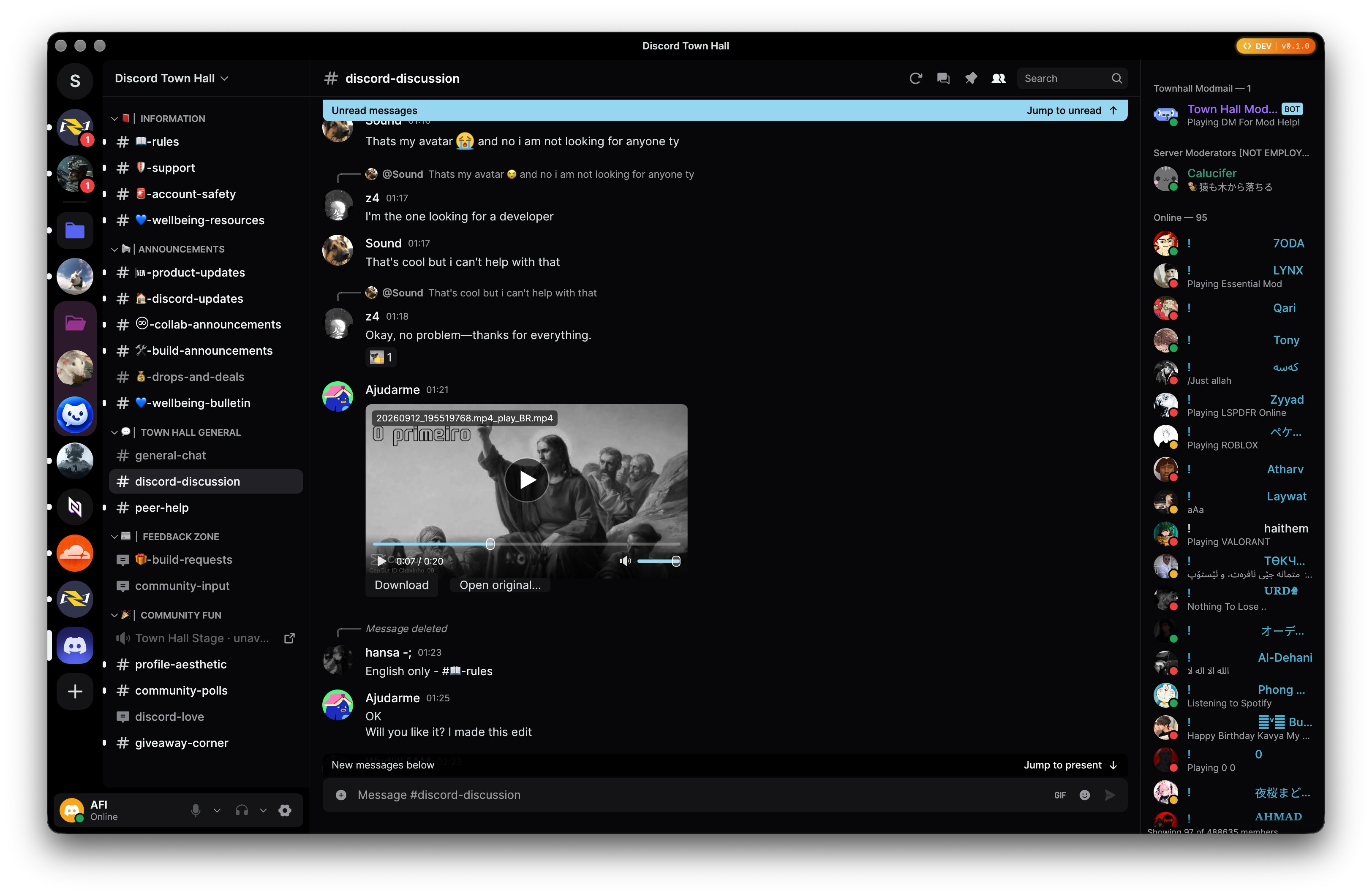
A lightweight, native Discord desktop client written in Rust, powered by egui and wgpu.
💬 Join our Discord server for updates
📦 Downloads • ⚡ Highlights • ✨ Showcase • 📊 Benchmarks • 🛠️ Quick Start • 📋 Features • 🏗️ Architecture






[!WARNING] Unofficial and not endorsed by Discord. Serein communicates directly with Discord's public gateway and REST endpoints for your existing account. Automating normal accounts outside the official OAuth2/bot API violates Discord's Terms of Service and carries risk of account termination. Technical interoperability does not imply platform approval. Review the compatibility matrix and authentication guide before use.
Downloads & Installation
Pre-compiled releases for macOS, Linux, and Windows are published on GitHub Releases.
| Platform | Format | Architectures | Details |
|---|---|---|---|
| Windows | -Setup.exe, .zip | x86_64, aarch64 | Per-user NSIS installer (recommended) or standalone portable archive |
| macOS | Homebrew Cask, .zip | Apple Silicon (aarch64) | Signed and notarized .app bundle |
| Linux | Flatpak (recommended), Repositories (apt, dnf, zypper, pacman), Gentoo ebuild, .AppImage | x86_64 | Flatpak with automatic updates; signed package repositories; portable AppImage |
🐧 Linux (Flatpak, Repositories, Gentoo, AppImage)
1. Flatpak (Recommended)
Flatpak is the recommended distribution format for Linux, featuring sandbox isolation, bundled GNOME/WebKit runtimes, and automatic background updates.
-
One-Click Repository Install (Automatic Updates):
flatpak install --user https://viceverse-cz.github.io/Serein/flatpak/serein.flatpakrefOnce installed, your desktop software store (GNOME Software, KDE Discover) or
flatpak updatewill automatically discover and install updates. -
Standalone Offline Bundle: Download
Serein-linux.flatpakfrom Releases:flatpak install --user ./Serein-linux.flatpak flatpak run cz.viceverse.serein
See Flatpak guide for sandbox permissions and source build details.
2. Native Package Repositories (apt, dnf, zypper, pacman)
Configure the signed package repository for your distribution with one command:
curl -fsSL https://viceverse-cz.github.io/Serein/setup.sh | sh
The script detects your distribution (Ubuntu/Debian, Fedora, openSUSE, Arch Linux), cryptographically verifies the GPG signing key, and configures the repository with an option to install immediately.
After setup, manage Serein with your native package manager:
# Ubuntu / Debian: sudo apt install serein
# Fedora:          sudo dnf install serein
# openSUSE:        sudo zypper install serein
# Arch Linux:      sudo pacman -S serein
Your normal system updates (apt upgrade, dnf upgrade, zypper update, pacman -Syu) will keep Serein updated. See Signed package repositories for manual GPG verification steps.
3. Gentoo (source or binary)
Gentoo users can install Serein from the vitaly-zdanevich-overlay overlay. It provides a source ebuild (net-im/serein) and a prebuilt amd64 ebuild (net-im/serein-bin).
sudo eselect repository add vitaly-zdanevich-overlay git https://github.com/vitaly-zdanevich/gentoo-overlay.git
sudo emaint sync -r vitaly-zdanevich-overlay
echo 'net-im/serein ~amd64' | sudo tee /etc/portage/package.accept_keywords/serein
sudo emerge --ask net-im/serein
Use net-im/serein-bin in the keyword file and emerge command to install the prebuilt binary instead. The source ebuild requires Rust 1.98.1 or newer. The binary ebuild targets amd64 systems with glibc 2.43 or newer. The two ebuilds install the same files, so choose one.
4. Standalone AppImage (Portable)
Download serein-<version>-Linux-X64.AppImage from Releases, make it executable, and run:
chmod +x ./serein-*-Linux-X64.AppImage
./serein-*-Linux-X64.AppImage
Keep the AppImage in a writable directory to receive in-app updates via Settings → Updates. Note that the AppImage uses host GTK4 and WebKitGTK 6.0 libraries; see AppImage setup and runtime dependencies for host requirements.
🪟 Windows (Installer, PowerShell, Portable)
1. Setup Installer (Recommended)
Download the Windows-X64-Setup.exe or Windows-ARM64-Setup.exe asset for your system from Releases and run it:
- Installs per-user to
%LOCALAPPDATA%\Programs\Sereinwithout requiring administrator/UAC elevation. - Automatically registers Start Menu shortcuts and configures AppUserModelID (
cz.viceverse.serein) for native Windows toast notifications. - Registers in Windows Settings (Installed Apps / Add or Remove Programs) with full uninstall support.
- Fully compatible with in-app self-updates: updates automatically synchronize the registered version.
2. Standalone PowerShell Setup
Extract the Windows-X64.zip or Windows-ARM64.zip asset for your system and run:
powershell -ExecutionPolicy Bypass -File .\setup.ps1
To uninstall later:
powershell -ExecutionPolicy Bypass -File .\setup.ps1 -Uninstall
3. Portable Archive
Extract the Windows-X64.zip or Windows-ARM64.zip asset for your system anywhere and launch serein.exe. To enable native desktop notifications:
powershell -File .\install-notifications.ps1
Run the script from the extracted folder beside serein.exe. If PowerShell's RemoteSigned policy blocks the downloaded script, review it and run Unblock-File -LiteralPath .\install-notifications.ps1 in that folder before retrying. The Windows installer registers the shortcut automatically, so installed builds do not need this script.
🍎 macOS (Homebrew Cask, Standalone .app)
Homebrew Cask
brew tap ViceVerse-cz/serein https://github.com/ViceVerse-cz/Serein.git
brew install --cask serein
The explicit repository URL keeps the cask in this repository; a separate homebrew-serein tap is not required.
Standalone Bundle
Download serein-<version>-macOS-ARM64.zip from Releases, unzip, and drag Serein.app to your /Applications folder.
Highlights
- ⚡ Pure Native Performance: Built with pure Rust,
egui, andwgpu. Immediate-mode rendering with minimal idle CPU, low memory footprint, and instantaneous launch times—zero Electron, Node.js, or web runtime overhead. - 🌐 Direct Gateway & REST Transports: Direct connection to Discord's official endpoints with active rate-limiting cooldowns, heartbeat handling, reconnect/resume loops, and partial payload patching.
- 🔒 Secure OS Credential Storage: Session tokens are stored exclusively in your operating system's secure vault (macOS Keychain, Windows Credential Manager, or Linux Secret Service). Never saved in plaintext.
- 🛡️ Ephemeral Authentication Webview: Sign-in uses Discord's official hosted login page inside a temporary native webview (WKWebView, WebView2, or WebKitGTK) supporting email/password, QR login, and MFA. An origin-checked handoff secures the session credential and immediately terminates the webview.
- 💾 Bounded Local Persistence: Recent chat history, drafts, image previews, settings, and diagnostics are stored in an account-isolated, bounded local SQLite database. All local data is strictly cleared upon explicit logout.
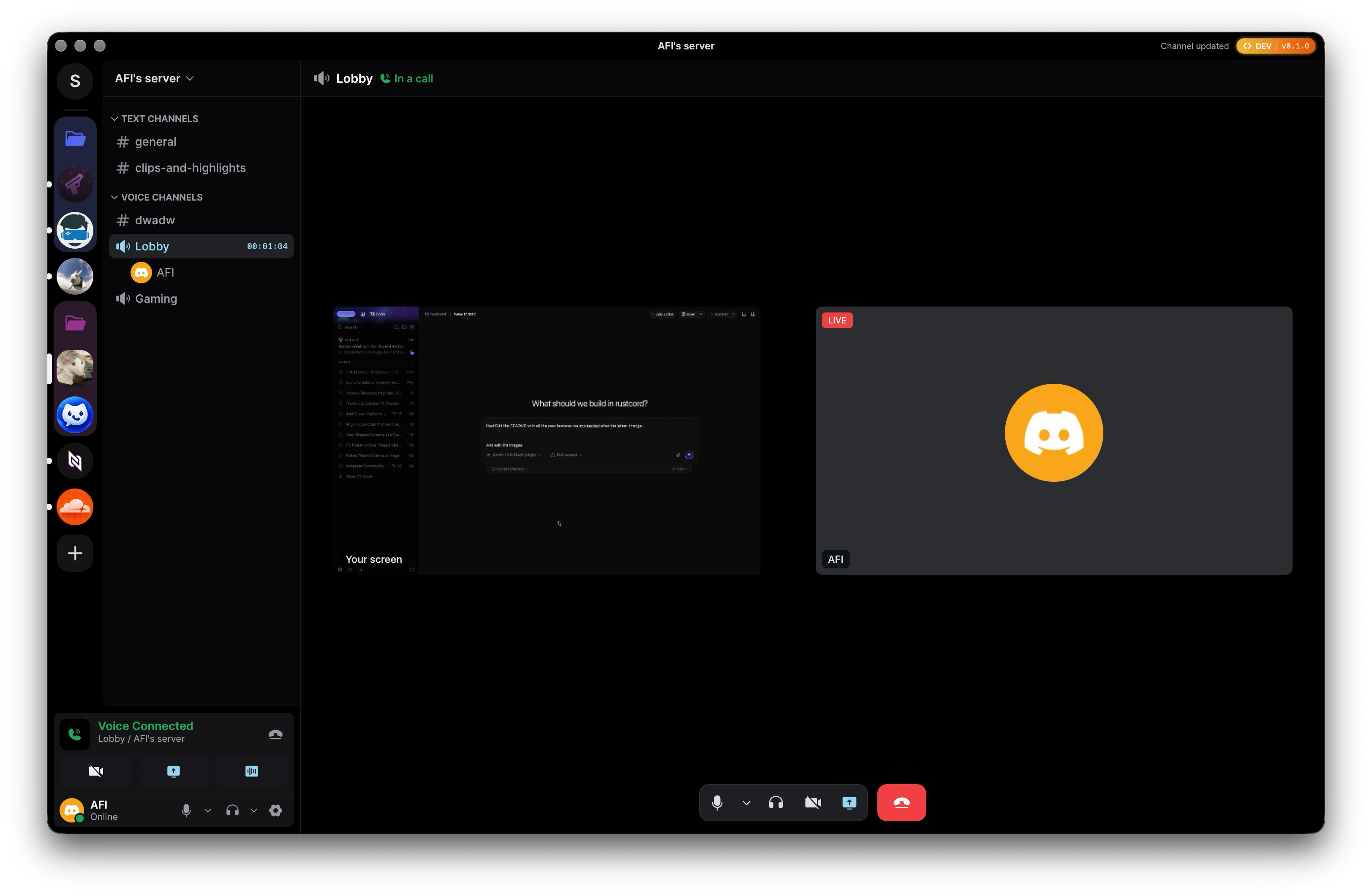
- 🎙️ Voice Calls, Video & Screen Sharing: Complete native voice engine with 1-to-1 and group DM calls, server voice channels, push-to-talk, Sonora AEC3 acoustic echo cancellation, RNNoise noise suppression, Opus codec, and DAVE v1 end-to-end encryption. Includes native screen capture (macOS ScreenCaptureKit, Windows Graphics Capture, Linux portal/PipeWire with VA-API/NVENC hardware encoding and software fallback; Linux native capture remains unverified) and incoming stream & camera video playback with hardware-accelerated decoding (VideoToolbox, VA-API, DirectX).
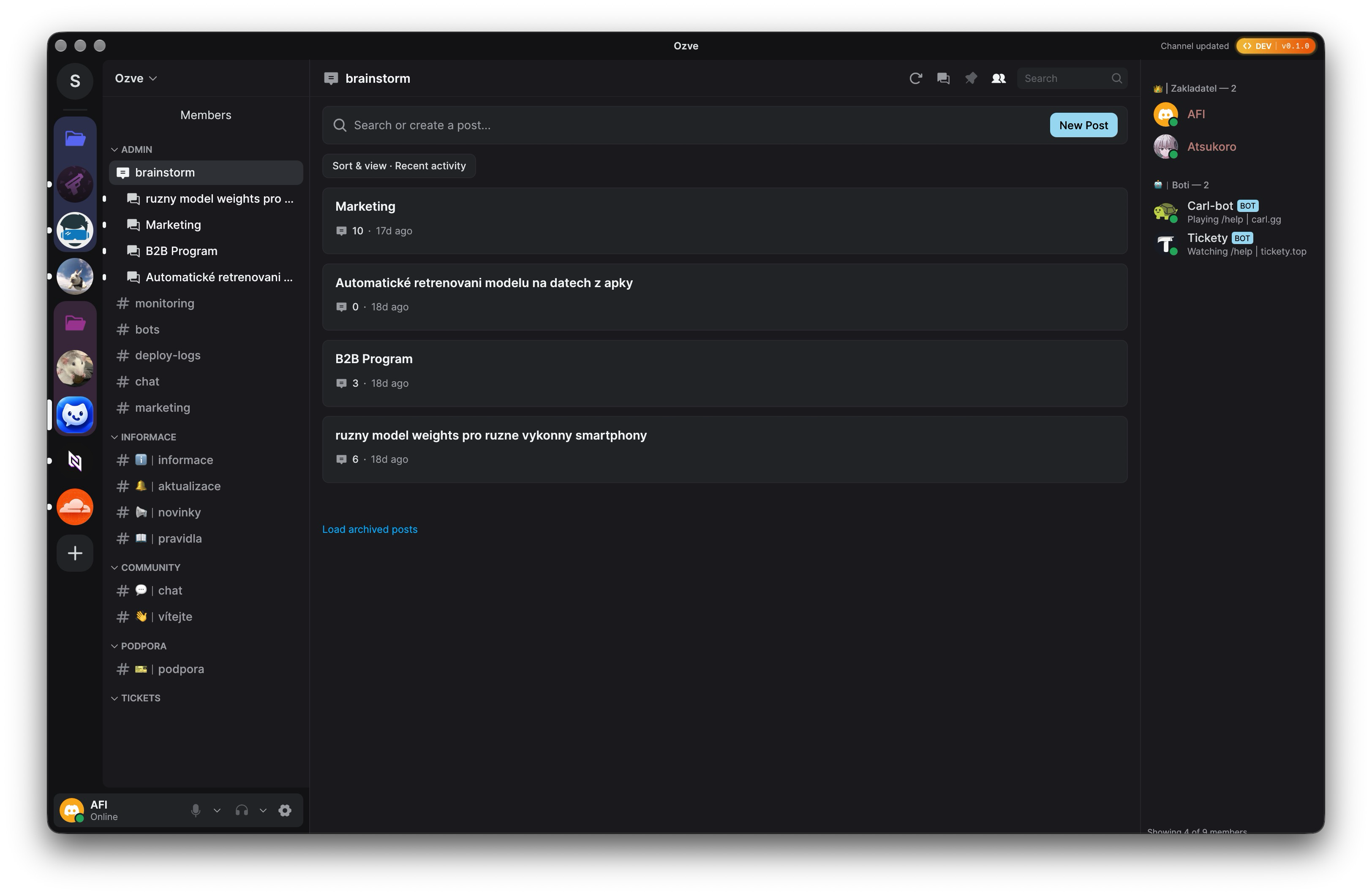
- 🧵 Forum Channels & Active Threads: Browse forum channels, view posts sorted by recent activity, read message threads with unread indicators, and create new forum posts directly in-app.
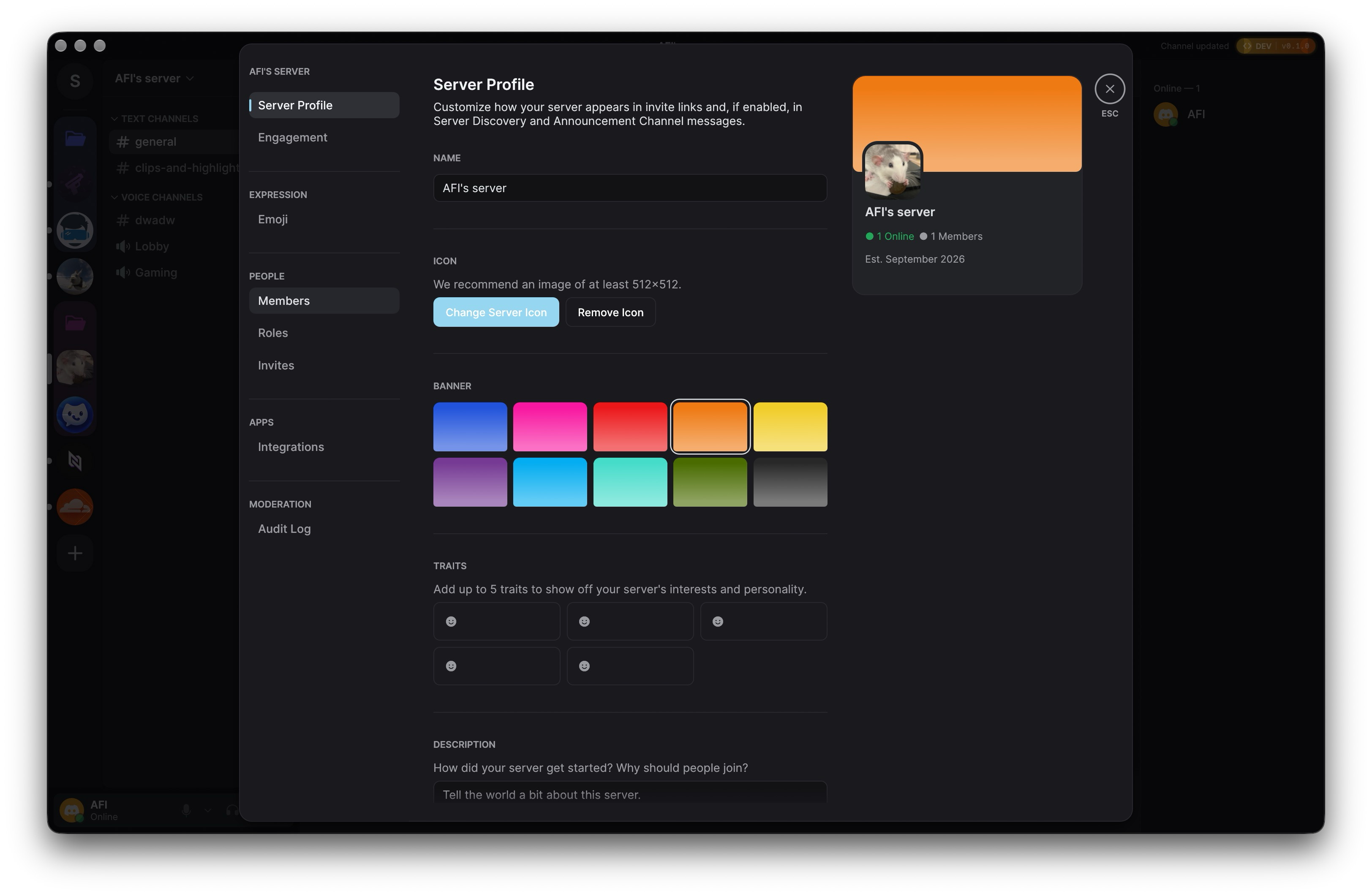
- ⚙️ Server Administration Suite: Full server management interface including Server Profiles (banners, icons, traits, descriptions), role editor with fine-grained permission matrix, paginated audit logs with action filters, invite manager with revocation, integrations and webhooks, and member moderation.
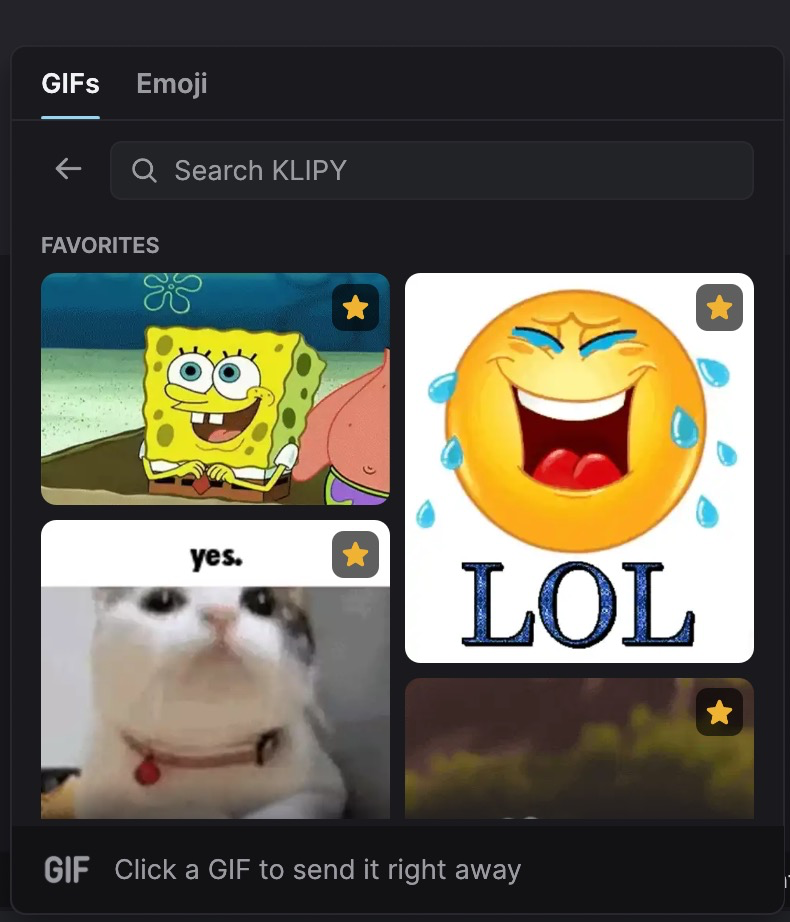
- ✨ GIF & Twemoji Picker: Instant KLIPY GIF search with favorites and one-click sending, full Twemoji picker with search and quick-reactions, plus custom guild emojis.
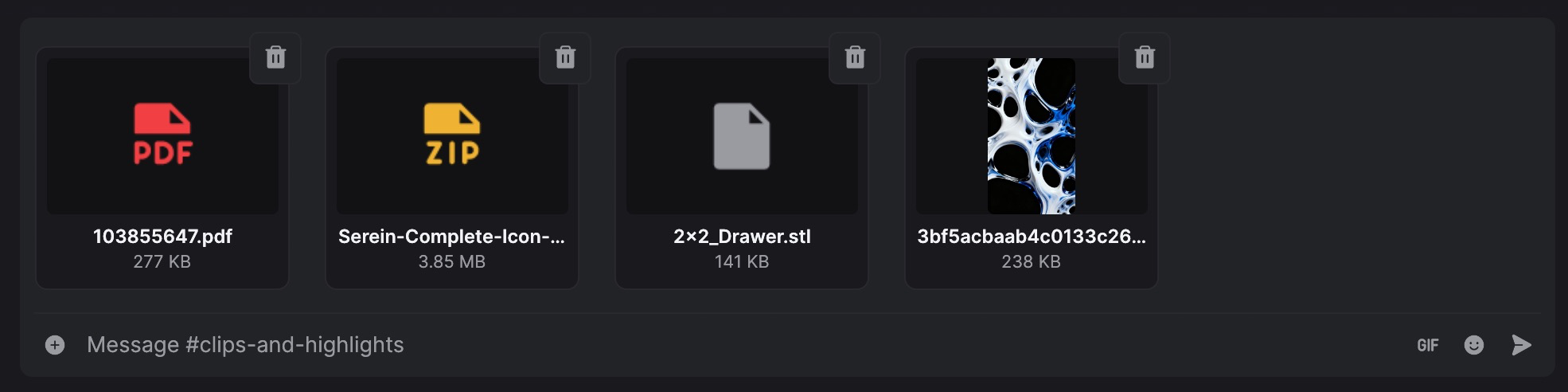
- 📎 Multi-Attachment Batch Uploads: Composer staging tray supporting multiple files of any type (PDF, ZIP, 3D STL, videos, audio, images) with file-type badges, thumbnails, size indicators, individual removal, and progress tracking.
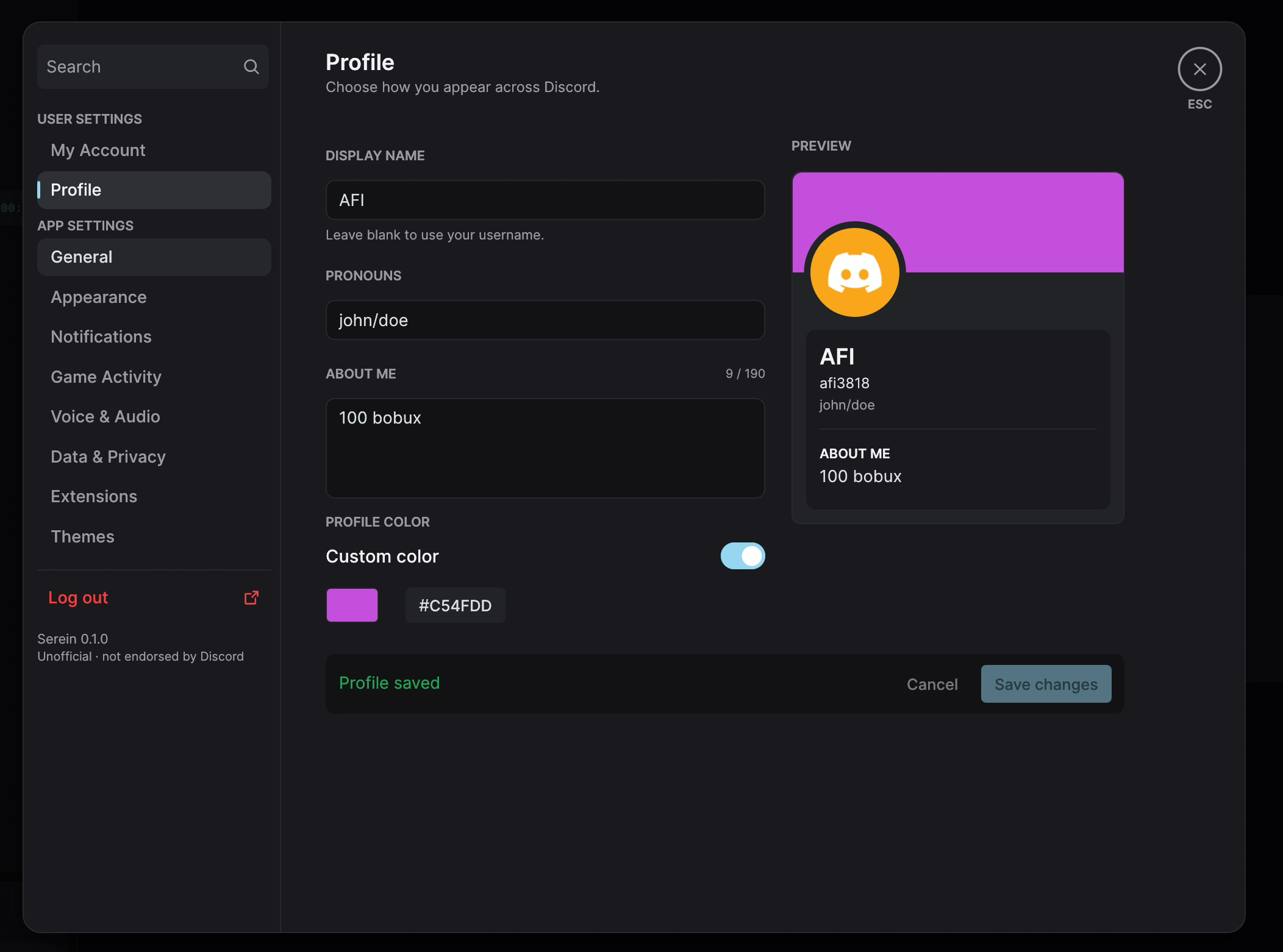
- 👤 Native Profile Customization: In-app profile editor for global display names, bios / about me, pronouns, and custom accent colors with real-time live preview cards.
- 🎨 Extensions & Theme Shop: Git-backed plugin engine and community theme shop with preview cards, color preset toggles, permission verification, and a built-in deleted-message retention protector.
- 🎬 Rich Media & Video Player: Inline video playback for MOV and MP4 attachments, interactive seekable voice message waveforms, right-click media save/copy context menus, and full-resolution image viewer modals.
- ⌨️ Keybinds & Shortcuts: Built-in keybind reference sheet styled with raised keycaps, quick edit (
Up), quick delete (Backspace), and intuitive keyboard navigation. - 🎮 Rich Presence & Game Detection: Built-in Discord IPC and WebSocket RPC servers, plus executable-based detection of running games, showing live game activities in member rosters, DM lists, and user profiles, with opt-in system tray integration.
Feature Showcase
| Voice Calls & Live Screen Sharing | User Settings & Profile Customizer |
|---|---|
 |  |
| Server Administration & Profiles | Threads & Forum Channels |
 |  |
| Multi-File Attachment Uploads | GIFs & Twemoji Picker |
 |  |
Measured Performance vs. Official Discord
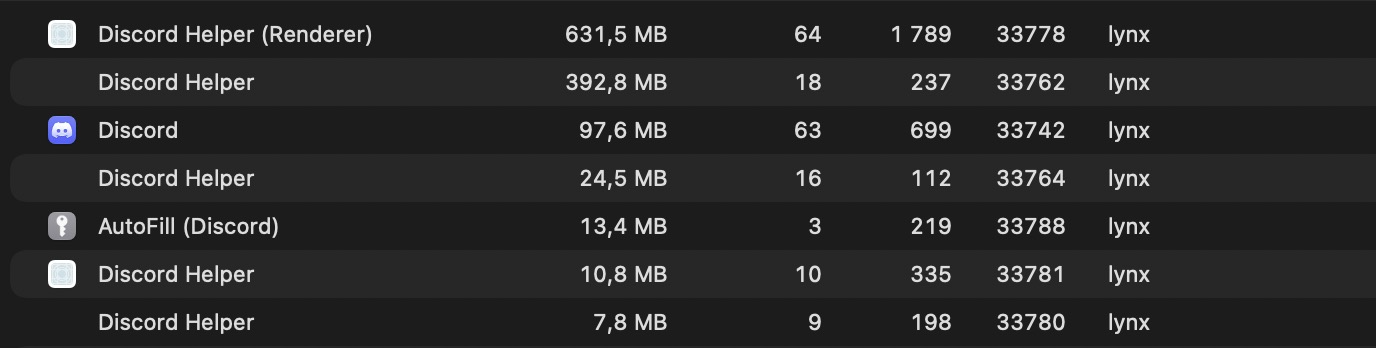
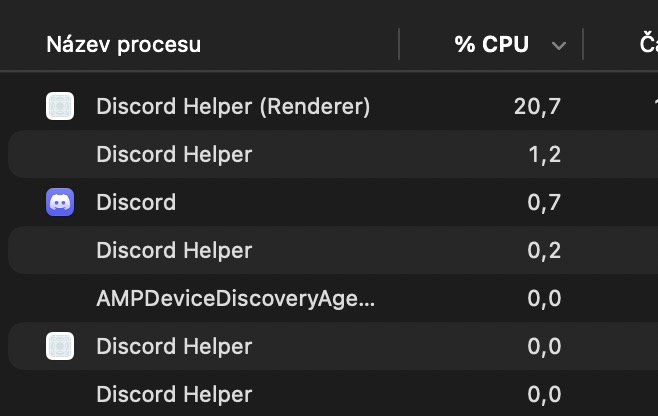
Testing Scenario: Browsing channels while joined in a Voice Channel (VC) and streaming screen at 60 FPS on macOS.
| Metric | Official Discord Client (Electron) | Serein (Native Rust + egui/wgpu) | Advantage |
|---|---|---|---|
| Memory (RAM) | 1,178.4 MB (across 7 helper processes) | 129.7 MB (single unified process) | ~9× less memory (-89%) |
| CPU Usage | 22.8% (Renderer + Helper processes) | 8.1% | ~2.8× lower CPU (-64%) |
| Official Discord (Electron) | Serein (Native Rust) |
|---|---|
| RAM: ~1,178.4 MB across 7 processes | RAM: 129.7 MB single process |
 |  |
| CPU: 22.8% total | CPU: 8.1% total |
 |  |
Quick Start
Prerequisites
Rust 1.98.1 is pinned. Ensure you have the standard C/C++ toolchain and CMake installed for your platform:
- macOS: Xcode command-line tools (
xcode-select --install) - Linux: GCC/Clang, ALSA development headers,
pkg-config, GTK 4, WebKitGTK 6.0, fontconfig, and Vulkan drivers (see Platform Support) - Windows: Visual Studio C++ build tools and WebView2 Runtime
Running Locally
# 1. Opt in to the offline synthetic demo (no network, no storage)
cargo run --locked --features demo -- --demo

# 2. Launch standard client with voice (uses saved login or official webview)
cargo run --locked
Workspace Commands
# Run full workspace validation (formatting, Clippy, tests, policy checks)
cargo xtask check

# Run release reducer benchmark
cargo replay

# Run authentication bridge JS test harness
node tests/login-handoff.cjs

# Package release including voice (macOS .app bundle, Linux .deb by default)
cargo xtask package
Feature Matrix
| Capability | Status | Notes |
|---|---|---|
| Navigation & Guilds | Implemented | Collapsible categories, cached icons, guild channels, forum channels, active threads, DM lists, People pane, and server channel context menus |
| Message Timeline | Implemented | Virtualized variable-height rows, inline link confirmations, spoiler text/media reveal, unread message banners, deleted message protector, and local timezone timestamps |
| Markdown & System Messages | Implemented | Bold, italics, code blocks, blockquotes, clickable links, and styled system events with tinted Phosphor icons and clickable member names |
| Reactions & Emojis | Implemented | Twemoji rendering, native reaction counts, eight-emoji quick picker, full emoji picker integration, custom guild emojis, and add/remove reaction controls |
| GIFs & Media Search | Implemented | KLIPY GIF picker with search, favorites category, and one-click direct sending |
| User Mentions & Autocomplete | Implemented | Clickable user mentions with interactive composer autocompletion and visual highlight styling |
| Media Previews & Video Player | Implemented | Inline MOV and MP4 video playback, media copy/save context menus, inline image cards, embed cards, related embed image galleries, and full-resolution image viewer modals |
| File & Attachment Uploads | Implemented | Multi-attachment batch staging with file-type badges (PDF, ZIP, STL, images), thumbnail previews, individual file removal, upload progress bar, and drag-and-drop |
| Voice Engine & Calls | Implemented | 1-to-1/group DM calls & server channels, Opus codec, DAVE v1 E2EE, Sonora AEC3 acoustic echo cancellation, RNNoise suppression, push-to-talk (V), audio device selector |
| Voice Messages | Implemented | Inline voice message playback with interactive waveforms and bounded streaming audio buffering |
| Screen Sharing & Video | Implemented | Native screen capture (macOS ScreenCaptureKit, Windows Graphics Capture, Linux portal/PipeWire with VA-API/NVENC hardware encoding and software fallback; Linux native capture remains unverified), quality presets (720p/1080p, up to 60fps), and local camera/screen previews |
| Camera Video & Stream Viewing | Implemented | Hardware-accelerated decoding (macOS VideoToolbox, Linux VA-API, Windows DXVA/D3D11) for incoming screen streams and camera video feeds |
| Threads & Forum Channels | Implemented | Forum post listing, recent activity sorting, active thread browsing, and new forum post / thread creation |
| Server Administration | Implemented | Server profile editor (banners, icons, traits), role management with permissions matrix, audit log viewer, invite tracking and revocation, integrations/webhooks, and member moderation |
| Extensions & Theme Shop | Implemented | Git-backed plugins, community theme catalog with preview cards and color presets, permission prompt modals, and deleted-message protector |
| Keybinds & Shortcuts | Implemented | In-app keybind cheat sheet with raised keycaps, quick edit (Up), quick delete (Backspace), and keyboard navigation hotkeys |
| Rich Presence & Game IPC | Implemented | Discord IPC and WebSocket RPC servers plus running-game detection; displays activities in member rosters, DMs, and user profiles; opt-in system tray |
| Profile Cards & Editing | Implemented | On-demand profile popouts with banners, bios, badges, connections; native in-app editor for display name, bio, pronouns, and custom accent color with live preview |
| Server & Group Actions | Implemented | Server dropdown with friend invites and leave server; group DM actions (edit name/icon preview, mute, leave) |
| Context Menus & Shortcuts | Implemented | Right-click context menus for messages, media (save/copy), server channels, and members |
| Typing Indicators | Implemented | Displays incoming typing with short expiry; Serein strictly avoids emitting outgoing typing signals |
| Persistence & Drafts | Implemented | Bounded SQLite cache for history, drafts, settings, and diagnostics; OS credential store for auth tokens; sanitary logout |
| Internationalization | Partial | Bundled Inter font, CJK and Arabic font fallbacks included; full IME and bidirectional editing unverified |
Architecture Overview
Serein is engineered as a clean multi-crate Cargo workspace, isolating UI rendering from networking, persistence, and service protocols:
rustcord/
├── apps/
│   └── desktop/          # Application entrypoint, CLI flags, window lifecycle
├── crates/
│   ├── client-core/      # Client state coordinator, generation tracking, events
│   ├── session-cache/    # In-memory bounded cache and state reconciliation
│   ├── ui/               # egui widgets, message virtualizer, themes, design tokens
│   ├── model/            # Strongly-typed Discord domain entities
│   ├── discord-protocol/ # Wire protocol serialization and partial payload patches
│   ├── discord-api/      # HTTP/2 REST client with rate limiting and backoff
│   ├── discord-gateway/  # WebSocket gateway client with heartbeat and resume
│   ├── discord-voice/    # Opus codecs, RTP/UDP transport, DAVE v1, Sonora AEC, RNNoise, video decoding
│   ├── local-store/      # Bounded SQLite database for history, drafts, settings
│   ├── platform/         # OS credential store (Keychain/CredManager/SecretService)
│   └── test-support/     # Deterministic synthetic fixtures and mocks
└── tools/
    ├── replay-bench/     # Benchmarking harness for state reducers
    └── xtask/            # Workspace automation tasks (packaging, checks, linting)
Security & Storage Policy
- Token Protection: Tokens are saved solely in the native OS credential store (macOS Keychain, Windows Credential Manager, Linux Secret Service). Plaintext token fallback is strictly prohibited. Active tokens remain redacted in memory.
- Local Cache Bounds: SQLite databases store recent channel history, drafts, settings, diagnostics, and image preview metadata within bounded byte and count limits. The local SQLite store is not encrypted by the application.
- Sanitary Logout: Executing an explicit logout destroys active network sessions, purges active secrets from memory, deletes the token from the OS credential store, and erases that account's local cache and drafts.
- Zero Telemetry: Serein contains no analytics, telemetry, background crash collectors, or tracking beacons.
- Platform Integrity: No fingerprint spoofing, CAPTCHA/MFA bypasses, bot substitutions, token scrapers, or third-party relays.
For full details, review the Storage Policy and Threat Model.
Documentation
- Architecture & Monorepo Design
- Discord Compatibility & Protocol Details
- Authentication & Login Handoff
- Storage Policy & Cache Retention
- Platform Support & Build Requirements
- Voice Architecture & Procedure
- Design Tokens & UI Styling
- Extensions & Plugin Architecture
- Theme API Specification
- Threat Model & Security
- Third-Party Licenses & Notices
License
Original Serein code is dual-licensed under either:
- MIT License (LICENSE-MIT)
- Apache License, Version 2.0 (LICENSE-APACHE)
at your option. Third-party library notices, bundled font licenses (Inter, Noto Sans CJK/Arabic), and Twemoji graphics licenses are cataloged in THIRD_PARTY_NOTICES.md.
Demo fixtures and simulated actions are excluded from normal app and CI packages.
Build with --features demo and launch with --demo to enable them; --demo-*
scenario flags additionally require --demo. cargo xtask package always builds
without demo support, while offline tests can still use synthetic fixtures.
Contributors


Similar repos


Languages
Rust
97.5%
Python
1.4%
Tiny, Performant & 100% Native client for Discord made in Rust
See the codeSee what people are saying (1)
README
Serein
A lightweight, native Discord desktop client written in Rust, powered by egui and wgpu.
💬 Join our Discord server for updates
📦 Downloads • ⚡ Highlights • ✨ Showcase • 📊 Benchmarks • 🛠️ Quick Start • 📋 Features • 🏗️ Architecture
[!WARNING] Unofficial and not endorsed by Discord. Serein communicates directly with Discord's public gateway and REST endpoints for your existing account. Automating normal accounts outside the official OAuth2/bot API violates Discord's Terms of Service and carries risk of account termination. Technical interoperability does not imply platform approval. Review the compatibility matrix and authentication guide before use.
Downloads & Installation
Pre-compiled releases for macOS, Linux, and Windows are published on GitHub Releases.
| Platform | Format | Architectures | Details |
|---|---|---|---|
| Windows | -Setup.exe, .zip | x86_64, aarch64 | Per-user NSIS installer (recommended) or standalone portable archive |
| macOS | Homebrew Cask, .zip | Apple Silicon (aarch64) | Signed and notarized .app bundle |
| Linux | Flatpak (recommended), Repositories (apt, dnf, zypper, pacman), Gentoo ebuild, .AppImage | x86_64 | Flatpak with automatic updates; signed package repositories; portable AppImage |
🐧 Linux (Flatpak, Repositories, Gentoo, AppImage)
1. Flatpak (Recommended)
Flatpak is the recommended distribution format for Linux, featuring sandbox isolation, bundled GNOME/WebKit runtimes, and automatic background updates.
-
One-Click Repository Install (Automatic Updates):
flatpak install --user https://viceverse-cz.github.io/Serein/flatpak/serein.flatpakrefOnce installed, your desktop software store (GNOME Software, KDE Discover) or
flatpak updatewill automatically discover and install updates. -
Standalone Offline Bundle: Download
Serein-linux.flatpakfrom Releases:flatpak install --user ./Serein-linux.flatpak flatpak run cz.viceverse.serein
See Flatpak guide for sandbox permissions and source build details.
2. Native Package Repositories (apt, dnf, zypper, pacman)
Configure the signed package repository for your distribution with one command:
curl -fsSL https://viceverse-cz.github.io/Serein/setup.sh | sh
The script detects your distribution (Ubuntu/Debian, Fedora, openSUSE, Arch Linux), cryptographically verifies the GPG signing key, and configures the repository with an option to install immediately.
After setup, manage Serein with your native package manager:
# Ubuntu / Debian: sudo apt install serein
# Fedora:          sudo dnf install serein
# openSUSE:        sudo zypper install serein
# Arch Linux:      sudo pacman -S serein
Your normal system updates (apt upgrade, dnf upgrade, zypper update, pacman -Syu) will keep Serein updated. See Signed package repositories for manual GPG verification steps.
3. Gentoo (source or binary)
Gentoo users can install Serein from the vitaly-zdanevich-overlay overlay. It provides a source ebuild (net-im/serein) and a prebuilt amd64 ebuild (net-im/serein-bin).
sudo eselect repository add vitaly-zdanevich-overlay git https://github.com/vitaly-zdanevich/gentoo-overlay.git
sudo emaint sync -r vitaly-zdanevich-overlay
echo 'net-im/serein ~amd64' | sudo tee /etc/portage/package.accept_keywords/serein
sudo emerge --ask net-im/serein
Use net-im/serein-bin in the keyword file and emerge command to install the prebuilt binary instead. The source ebuild requires Rust 1.98.1 or newer. The binary ebuild targets amd64 systems with glibc 2.43 or newer. The two ebuilds install the same files, so choose one.
4. Standalone AppImage (Portable)
Download serein-<version>-Linux-X64.AppImage from Releases, make it executable, and run:
chmod +x ./serein-*-Linux-X64.AppImage
./serein-*-Linux-X64.AppImage
Keep the AppImage in a writable directory to receive in-app updates via Settings → Updates. Note that the AppImage uses host GTK4 and WebKitGTK 6.0 libraries; see AppImage setup and runtime dependencies for host requirements.
🪟 Windows (Installer, PowerShell, Portable)
1. Setup Installer (Recommended)
Download the Windows-X64-Setup.exe or Windows-ARM64-Setup.exe asset for your system from Releases and run it:
- Installs per-user to
%LOCALAPPDATA%\Programs\Sereinwithout requiring administrator/UAC elevation. - Automatically registers Start Menu shortcuts and configures AppUserModelID (
cz.viceverse.serein) for native Windows toast notifications. - Registers in Windows Settings (Installed Apps / Add or Remove Programs) with full uninstall support.
- Fully compatible with in-app self-updates: updates automatically synchronize the registered version.
2. Standalone PowerShell Setup
Extract the Windows-X64.zip or Windows-ARM64.zip asset for your system and run:
powershell -ExecutionPolicy Bypass -File .\setup.ps1
To uninstall later:
powershell -ExecutionPolicy Bypass -File .\setup.ps1 -Uninstall
3. Portable Archive
Extract the Windows-X64.zip or Windows-ARM64.zip asset for your system anywhere and launch serein.exe. To enable native desktop notifications:
powershell -File .\install-notifications.ps1
Run the script from the extracted folder beside serein.exe. If PowerShell's RemoteSigned policy blocks the downloaded script, review it and run Unblock-File -LiteralPath .\install-notifications.ps1 in that folder before retrying. The Windows installer registers the shortcut automatically, so installed builds do not need this script.
🍎 macOS (Homebrew Cask, Standalone .app)
Homebrew Cask
brew tap ViceVerse-cz/serein https://github.com/ViceVerse-cz/Serein.git
brew install --cask serein
The explicit repository URL keeps the cask in this repository; a separate homebrew-serein tap is not required.
Standalone Bundle
Download serein-<version>-macOS-ARM64.zip from Releases, unzip, and drag Serein.app to your /Applications folder.
Highlights
- ⚡ Pure Native Performance: Built with pure Rust,
egui, andwgpu. Immediate-mode rendering with minimal idle CPU, low memory footprint, and instantaneous launch times—zero Electron, Node.js, or web runtime overhead. - 🌐 Direct Gateway & REST Transports: Direct connection to Discord's official endpoints with active rate-limiting cooldowns, heartbeat handling, reconnect/resume loops, and partial payload patching.
- 🔒 Secure OS Credential Storage: Session tokens are stored exclusively in your operating system's secure vault (macOS Keychain, Windows Credential Manager, or Linux Secret Service). Never saved in plaintext.
- 🛡️ Ephemeral Authentication Webview: Sign-in uses Discord's official hosted login page inside a temporary native webview (WKWebView, WebView2, or WebKitGTK) supporting email/password, QR login, and MFA. An origin-checked handoff secures the session credential and immediately terminates the webview.
- 💾 Bounded Local Persistence: Recent chat history, drafts, image previews, settings, and diagnostics are stored in an account-isolated, bounded local SQLite database. All local data is strictly cleared upon explicit logout.
- 🎙️ Voice Calls, Video & Screen Sharing: Complete native voice engine with 1-to-1 and group DM calls, server voice channels, push-to-talk, Sonora AEC3 acoustic echo cancellation, RNNoise noise suppression, Opus codec, and DAVE v1 end-to-end encryption. Includes native screen capture (macOS ScreenCaptureKit, Windows Graphics Capture, Linux portal/PipeWire with VA-API/NVENC hardware encoding and software fallback; Linux native capture remains unverified) and incoming stream & camera video playback with hardware-accelerated decoding (VideoToolbox, VA-API, DirectX).
- 🧵 Forum Channels & Active Threads: Browse forum channels, view posts sorted by recent activity, read message threads with unread indicators, and create new forum posts directly in-app.
- ⚙️ Server Administration Suite: Full server management interface including Server Profiles (banners, icons, traits, descriptions), role editor with fine-grained permission matrix, paginated audit logs with action filters, invite manager with revocation, integrations and webhooks, and member moderation.
- ✨ GIF & Twemoji Picker: Instant KLIPY GIF search with favorites and one-click sending, full Twemoji picker with search and quick-reactions, plus custom guild emojis.
- 📎 Multi-Attachment Batch Uploads: Composer staging tray supporting multiple files of any type (PDF, ZIP, 3D STL, videos, audio, images) with file-type badges, thumbnails, size indicators, individual removal, and progress tracking.
- 👤 Native Profile Customization: In-app profile editor for global display names, bios / about me, pronouns, and custom accent colors with real-time live preview cards.
- 🎨 Extensions & Theme Shop: Git-backed plugin engine and community theme shop with preview cards, color preset toggles, permission verification, and a built-in deleted-message retention protector.
- 🎬 Rich Media & Video Player: Inline video playback for MOV and MP4 attachments, interactive seekable voice message waveforms, right-click media save/copy context menus, and full-resolution image viewer modals.
- ⌨️ Keybinds & Shortcuts: Built-in keybind reference sheet styled with raised keycaps, quick edit (
Up), quick delete (Backspace), and intuitive keyboard navigation. - 🎮 Rich Presence & Game Detection: Built-in Discord IPC and WebSocket RPC servers, plus executable-based detection of running games, showing live game activities in member rosters, DM lists, and user profiles, with opt-in system tray integration.
Feature Showcase
| Voice Calls & Live Screen Sharing | User Settings & Profile Customizer |
|---|---|
| |
| Server Administration & Profiles | Threads & Forum Channels |
| |
| Multi-File Attachment Uploads | GIFs & Twemoji Picker |
| |
Measured Performance vs. Official Discord
Testing Scenario: Browsing channels while joined in a Voice Channel (VC) and streaming screen at 60 FPS on macOS.
| Metric | Official Discord Client (Electron) | Serein (Native Rust + egui/wgpu) | Advantage |
|---|---|---|---|
| Memory (RAM) | 1,178.4 MB (across 7 helper processes) | 129.7 MB (single unified process) | ~9× less memory (-89%) |
| CPU Usage | 22.8% (Renderer + Helper processes) | 8.1% | ~2.8× lower CPU (-64%) |
| Official Discord (Electron) | Serein (Native Rust) |
|---|---|
| RAM: ~1,178.4 MB across 7 processes | RAM: 129.7 MB single process |
| |
| CPU: 22.8% total | CPU: 8.1% total |
| |
Quick Start
Prerequisites
Rust 1.98.1 is pinned. Ensure you have the standard C/C++ toolchain and CMake installed for your platform:
- macOS: Xcode command-line tools (
xcode-select --install) - Linux: GCC/Clang, ALSA development headers,
pkg-config, GTK 4, WebKitGTK 6.0, fontconfig, and Vulkan drivers (see Platform Support) - Windows: Visual Studio C++ build tools and WebView2 Runtime
Running Locally
# 1. Opt in to the offline synthetic demo (no network, no storage)
cargo run --locked --features demo -- --demo

# 2. Launch standard client with voice (uses saved login or official webview)
cargo run --locked
Workspace Commands
# Run full workspace validation (formatting, Clippy, tests, policy checks)
cargo xtask check

# Run release reducer benchmark
cargo replay

# Run authentication bridge JS test harness
node tests/login-handoff.cjs

# Package release including voice (macOS .app bundle, Linux .deb by default)
cargo xtask package
Feature Matrix
| Capability | Status | Notes |
|---|---|---|
| Navigation & Guilds | Implemented | Collapsible categories, cached icons, guild channels, forum channels, active threads, DM lists, People pane, and server channel context menus |
| Message Timeline | Implemented | Virtualized variable-height rows, inline link confirmations, spoiler text/media reveal, unread message banners, deleted message protector, and local timezone timestamps |
| Markdown & System Messages | Implemented | Bold, italics, code blocks, blockquotes, clickable links, and styled system events with tinted Phosphor icons and clickable member names |
| Reactions & Emojis | Implemented | Twemoji rendering, native reaction counts, eight-emoji quick picker, full emoji picker integration, custom guild emojis, and add/remove reaction controls |
| GIFs & Media Search | Implemented | KLIPY GIF picker with search, favorites category, and one-click direct sending |
| User Mentions & Autocomplete | Implemented | Clickable user mentions with interactive composer autocompletion and visual highlight styling |
| Media Previews & Video Player | Implemented | Inline MOV and MP4 video playback, media copy/save context menus, inline image cards, embed cards, related embed image galleries, and full-resolution image viewer modals |
| File & Attachment Uploads | Implemented | Multi-attachment batch staging with file-type badges (PDF, ZIP, STL, images), thumbnail previews, individual file removal, upload progress bar, and drag-and-drop |
| Voice Engine & Calls | Implemented | 1-to-1/group DM calls & server channels, Opus codec, DAVE v1 E2EE, Sonora AEC3 acoustic echo cancellation, RNNoise suppression, push-to-talk (V), audio device selector |
| Voice Messages | Implemented | Inline voice message playback with interactive waveforms and bounded streaming audio buffering |
| Screen Sharing & Video | Implemented | Native screen capture (macOS ScreenCaptureKit, Windows Graphics Capture, Linux portal/PipeWire with VA-API/NVENC hardware encoding and software fallback; Linux native capture remains unverified), quality presets (720p/1080p, up to 60fps), and local camera/screen previews |
| Camera Video & Stream Viewing | Implemented | Hardware-accelerated decoding (macOS VideoToolbox, Linux VA-API, Windows DXVA/D3D11) for incoming screen streams and camera video feeds |
| Threads & Forum Channels | Implemented | Forum post listing, recent activity sorting, active thread browsing, and new forum post / thread creation |
| Server Administration | Implemented | Server profile editor (banners, icons, traits), role management with permissions matrix, audit log viewer, invite tracking and revocation, integrations/webhooks, and member moderation |
| Extensions & Theme Shop | Implemented | Git-backed plugins, community theme catalog with preview cards and color presets, permission prompt modals, and deleted-message protector |
| Keybinds & Shortcuts | Implemented | In-app keybind cheat sheet with raised keycaps, quick edit (Up), quick delete (Backspace), and keyboard navigation hotkeys |
| Rich Presence & Game IPC | Implemented | Discord IPC and WebSocket RPC servers plus running-game detection; displays activities in member rosters, DMs, and user profiles; opt-in system tray |
| Profile Cards & Editing | Implemented | On-demand profile popouts with banners, bios, badges, connections; native in-app editor for display name, bio, pronouns, and custom accent color with live preview |
| Server & Group Actions | Implemented | Server dropdown with friend invites and leave server; group DM actions (edit name/icon preview, mute, leave) |
| Context Menus & Shortcuts | Implemented | Right-click context menus for messages, media (save/copy), server channels, and members |
| Typing Indicators | Implemented | Displays incoming typing with short expiry; Serein strictly avoids emitting outgoing typing signals |
| Persistence & Drafts | Implemented | Bounded SQLite cache for history, drafts, settings, and diagnostics; OS credential store for auth tokens; sanitary logout |
| Internationalization | Partial | Bundled Inter font, CJK and Arabic font fallbacks included; full IME and bidirectional editing unverified |
Architecture Overview
Serein is engineered as a clean multi-crate Cargo workspace, isolating UI rendering from networking, persistence, and service protocols:
rustcord/
├── apps/
│   └── desktop/          # Application entrypoint, CLI flags, window lifecycle
├── crates/
│   ├── client-core/      # Client state coordinator, generation tracking, events
│   ├── session-cache/    # In-memory bounded cache and state reconciliation
│   ├── ui/               # egui widgets, message virtualizer, themes, design tokens
│   ├── model/            # Strongly-typed Discord domain entities
│   ├── discord-protocol/ # Wire protocol serialization and partial payload patches
│   ├── discord-api/      # HTTP/2 REST client with rate limiting and backoff
│   ├── discord-gateway/  # WebSocket gateway client with heartbeat and resume
│   ├── discord-voice/    # Opus codecs, RTP/UDP transport, DAVE v1, Sonora AEC, RNNoise, video decoding
│   ├── local-store/      # Bounded SQLite database for history, drafts, settings
│   ├── platform/         # OS credential store (Keychain/CredManager/SecretService)
│   └── test-support/     # Deterministic synthetic fixtures and mocks
└── tools/
    ├── replay-bench/     # Benchmarking harness for state reducers
    └── xtask/            # Workspace automation tasks (packaging, checks, linting)
Security & Storage Policy
- Token Protection: Tokens are saved solely in the native OS credential store (macOS Keychain, Windows Credential Manager, Linux Secret Service). Plaintext token fallback is strictly prohibited. Active tokens remain redacted in memory.
- Local Cache Bounds: SQLite databases store recent channel history, drafts, settings, diagnostics, and image preview metadata within bounded byte and count limits. The local SQLite store is not encrypted by the application.
- Sanitary Logout: Executing an explicit logout destroys active network sessions, purges active secrets from memory, deletes the token from the OS credential store, and erases that account's local cache and drafts.
- Zero Telemetry: Serein contains no analytics, telemetry, background crash collectors, or tracking beacons.
- Platform Integrity: No fingerprint spoofing, CAPTCHA/MFA bypasses, bot substitutions, token scrapers, or third-party relays.
For full details, review the Storage Policy and Threat Model.
Documentation
- Architecture & Monorepo Design
- Discord Compatibility & Protocol Details
- Authentication & Login Handoff
- Storage Policy & Cache Retention
- Platform Support & Build Requirements
- Voice Architecture & Procedure
- Design Tokens & UI Styling
- Extensions & Plugin Architecture
- Theme API Specification
- Threat Model & Security
- Third-Party Licenses & Notices
License
Original Serein code is dual-licensed under either:
- MIT License (LICENSE-MIT)
- Apache License, Version 2.0 (LICENSE-APACHE)
at your option. Third-party library notices, bundled font licenses (Inter, Noto Sans CJK/Arabic), and Twemoji graphics licenses are cataloged in THIRD_PARTY_NOTICES.md.
Demo fixtures and simulated actions are excluded from normal app and CI packages.
Build with --features demo and launch with --demo to enable them; --demo-*
scenario flags additionally require --demo. cargo xtask package always builds
without demo support, while offline tests can still use synthetic fixtures.
Similar repos
Contributors
Languages
Rust
97.5%
Python
1.4%