
Open source comprehensive e-learning platform with a focus on educational content delivery, learner tracking, and assessment management
See the codeREADME

AI-powered, open-source Learning Management System



Website · Admin Portal · Learner Portal · Contributing
Screenshots
Admin Portal
| Course Explorer | AI Features |
|---|---|
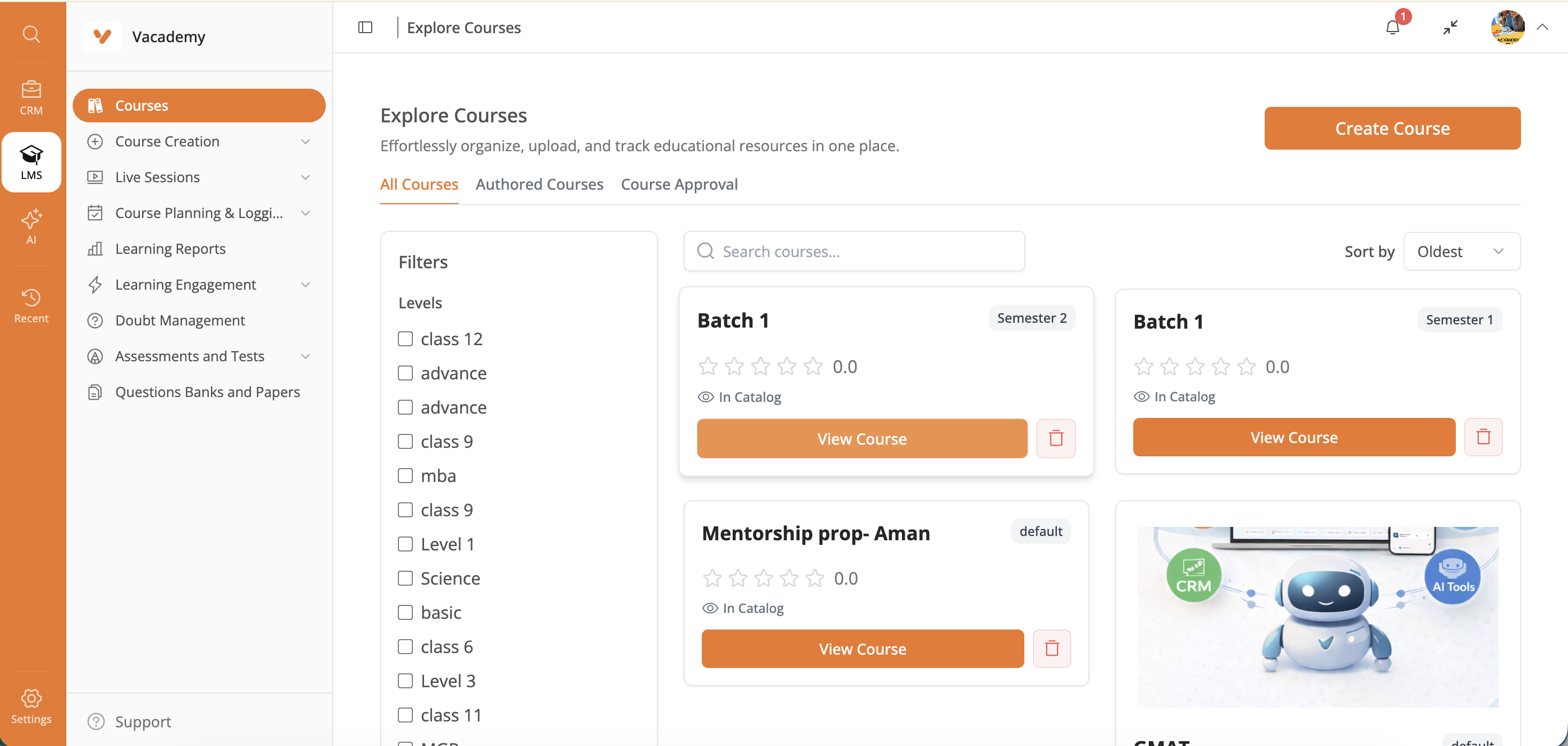 | 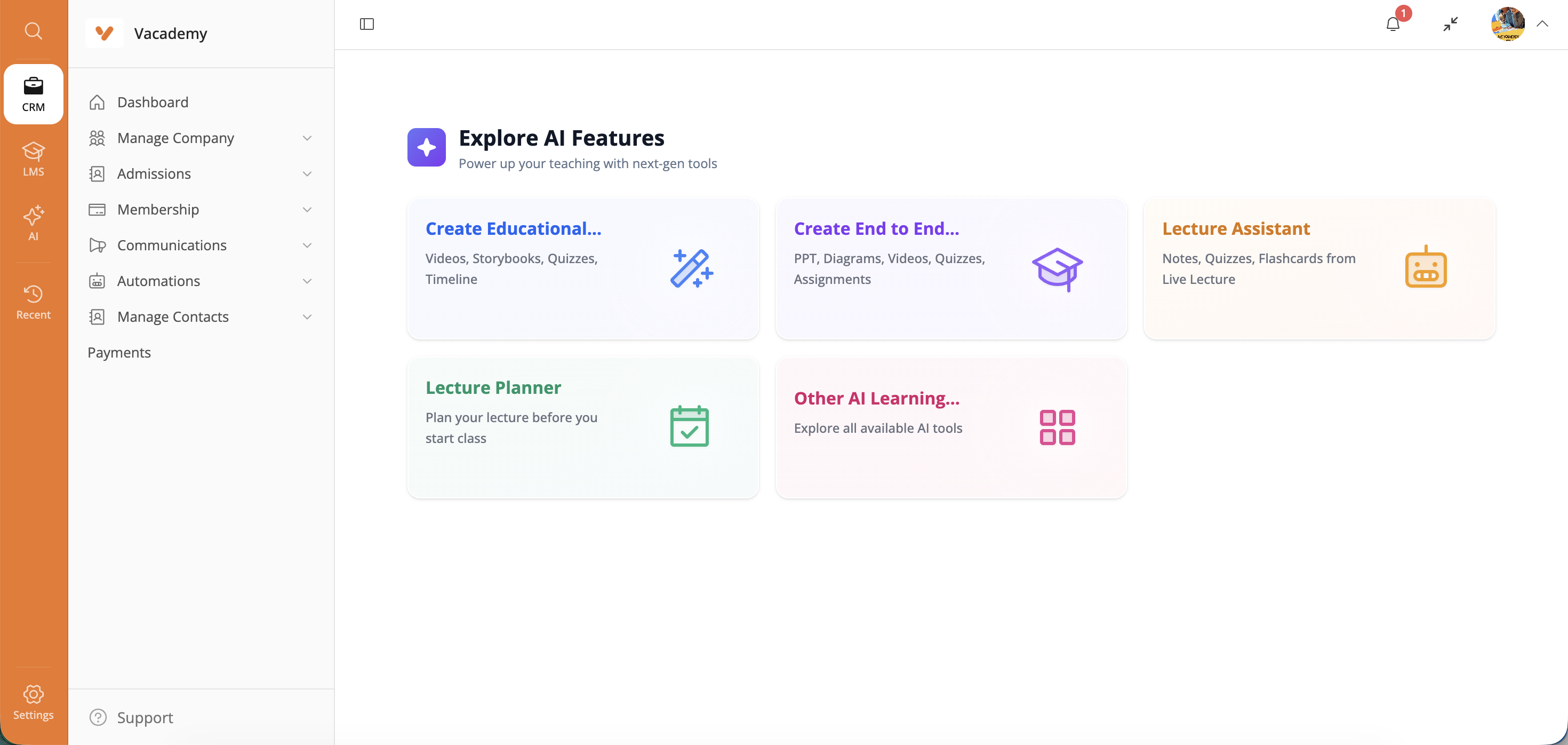 |
| Learner Management | Package Management |
|---|---|
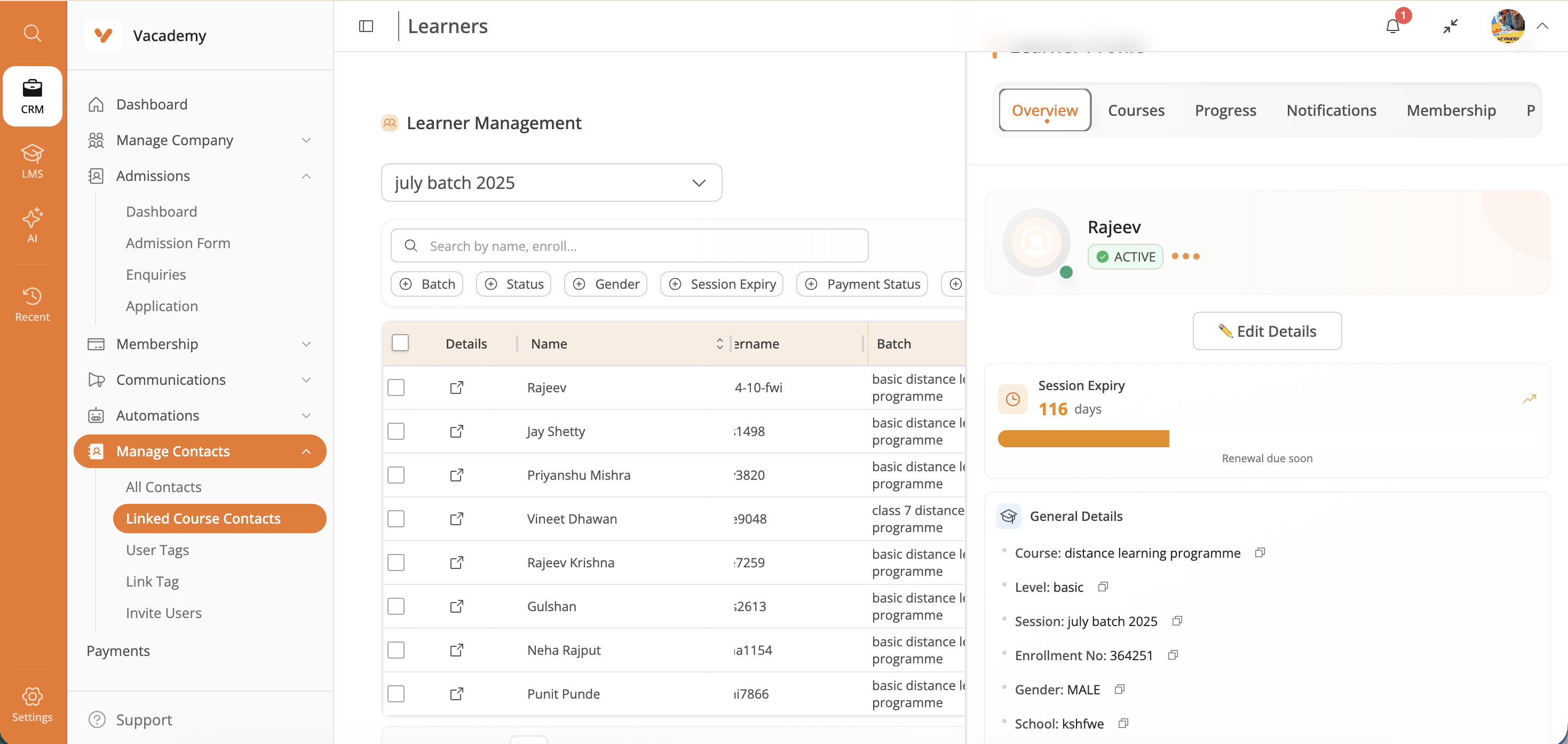 | 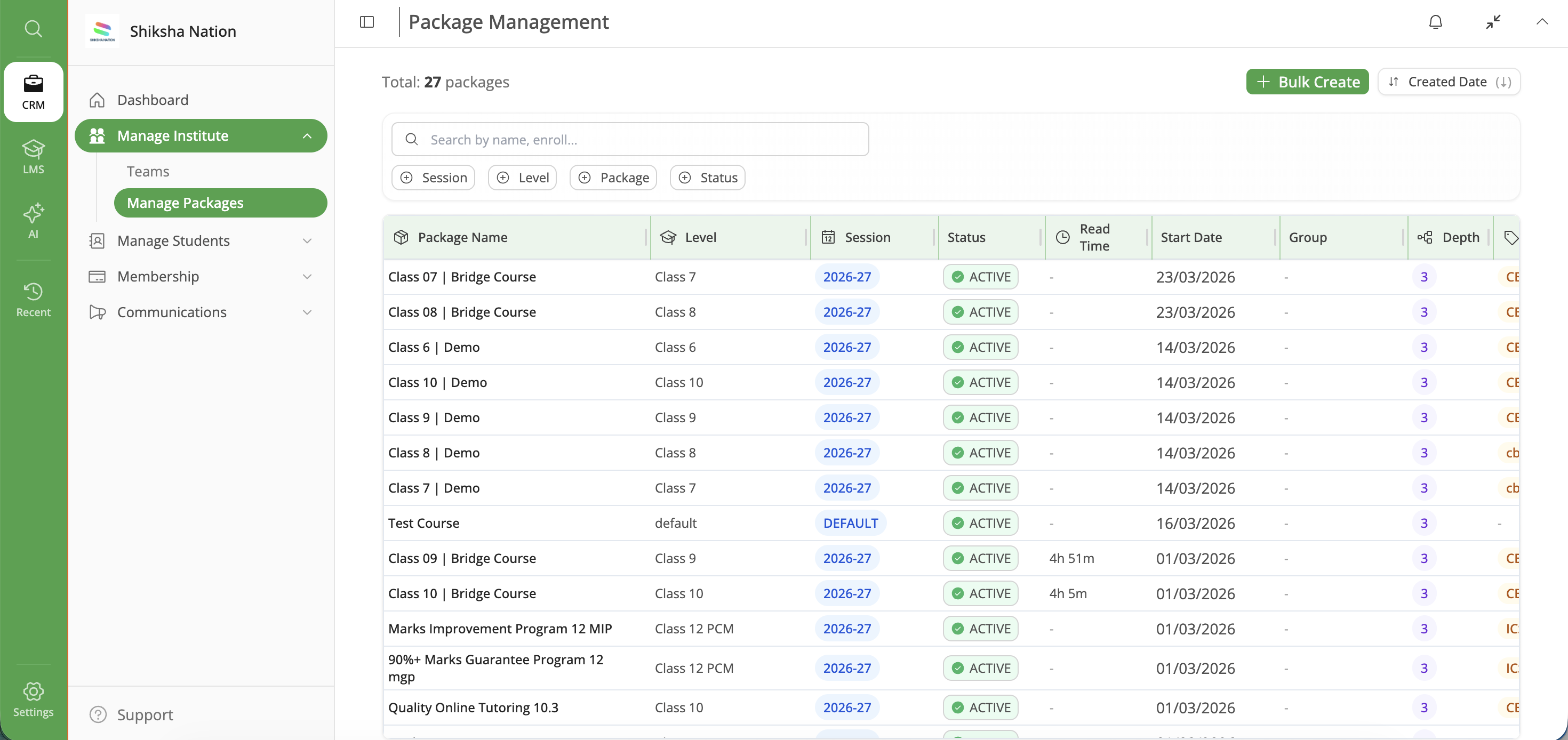 |
Learner Portal
| Dashboard | AI Chat Assistant |
|---|---|
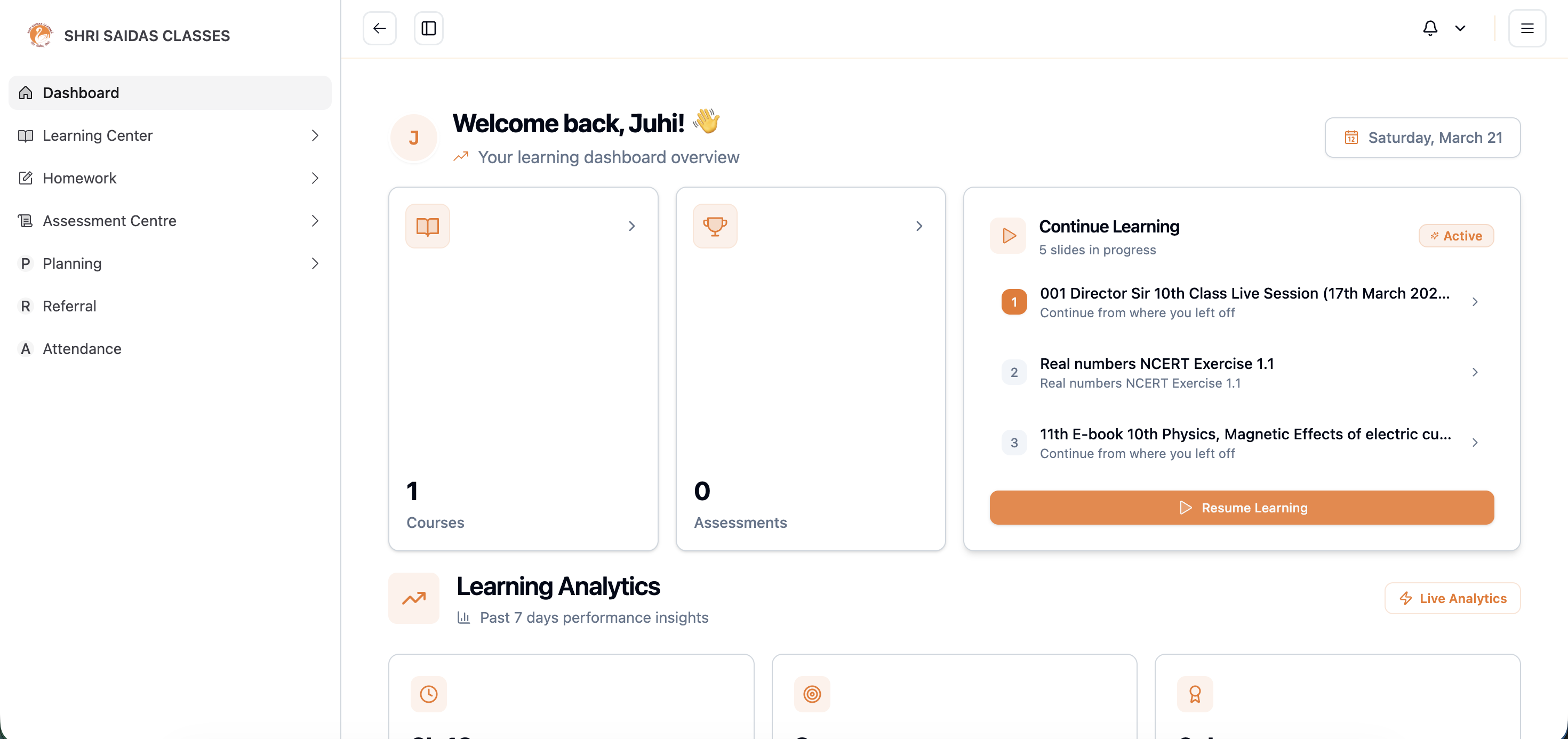 | 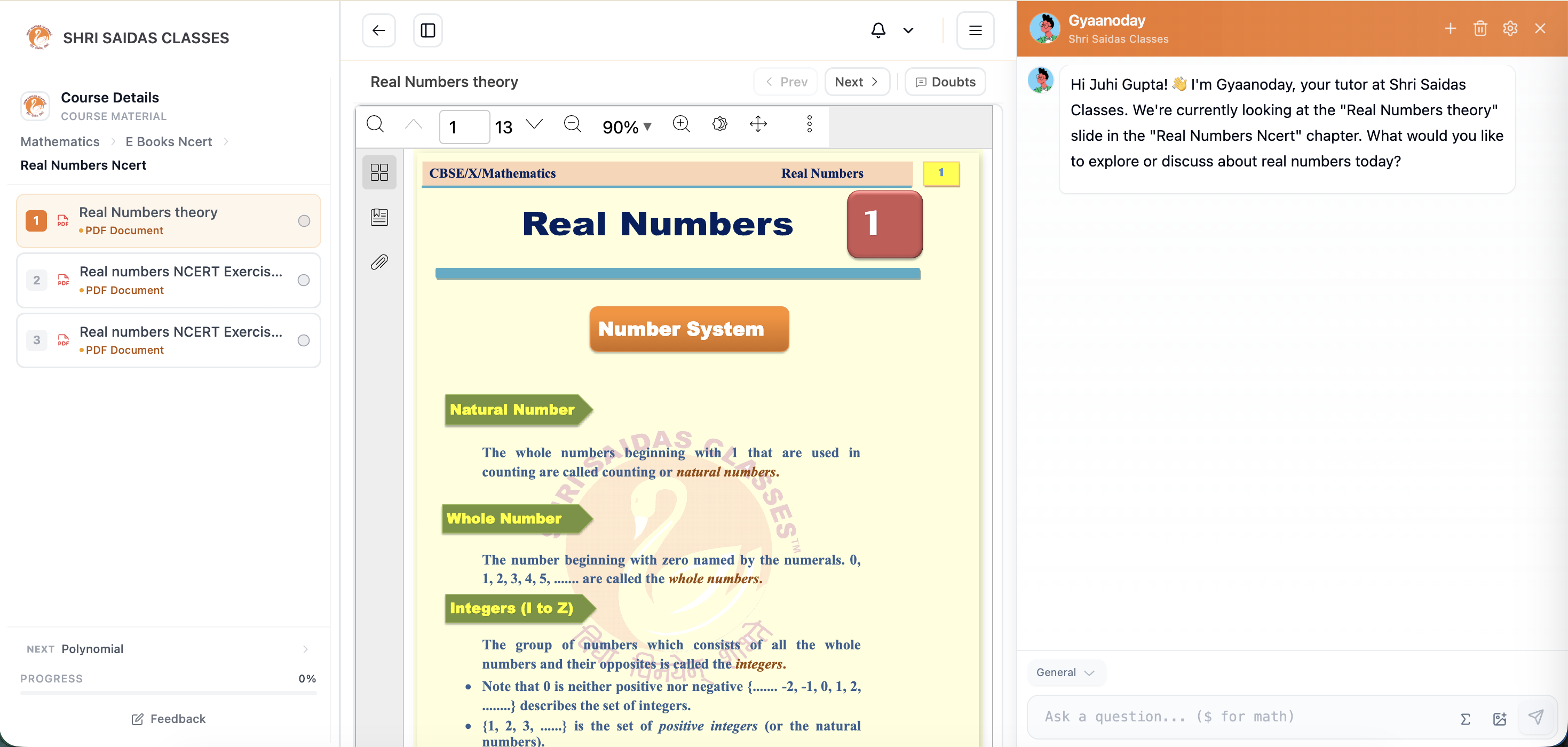 |
| Course Viewer |
|---|
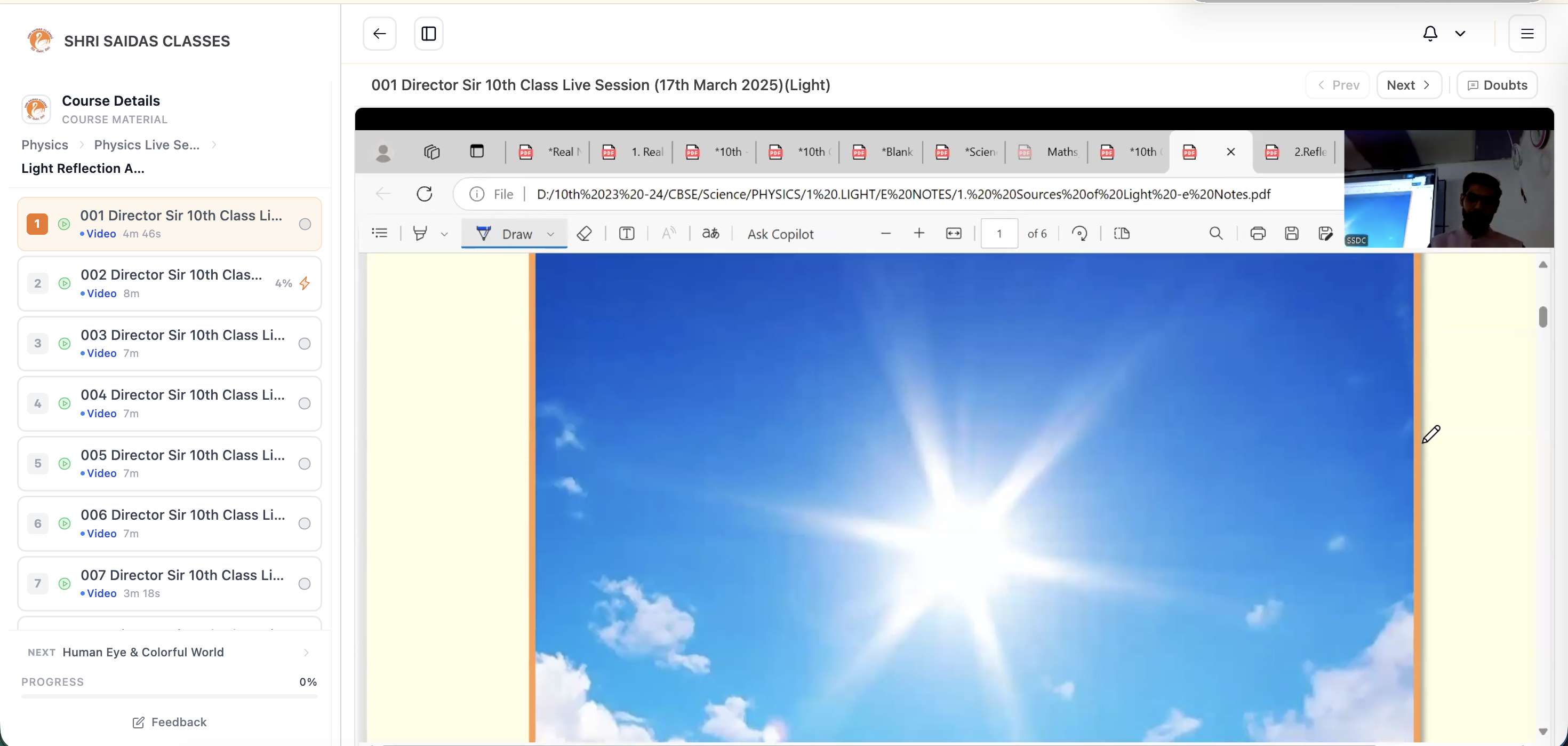 |
🖥️ Interactive Feature Docs
Two self-contained HTML pages (no build step, no server — just open them in a browser) that walk through the product end to end:
| Page | What's inside |
|---|---|
| Admin Portal Demo | Guided, click-through tour of the admin portal — screens, flows, and annotated walkthroughs of day-to-day admin tasks |
| Feature Catalog | Searchable catalog of every platform feature, grouped by module, with descriptions and where to find each one |
# Open locally after cloning
open docs/features/admin-portal-demo.html      # macOS
xdg-open docs/features/vacademy-features.html  # Linux
GitHub renders
.htmlfiles as source, not as pages. Clone the repo and open them locally, or view the same catalog in Markdown: vacademy-features.md. Both HTML pages are generated from JSON by the scripts in docs/features/build/.
📚 Documentation Index
| Document | Purpose | Audience |
|---|---|---|
| Admin Portal Demo | Interactive click-through tour of the admin portal | Everyone / Evaluators |
| Feature Catalog | Full feature catalog (Markdown version) | Everyone / Evaluators |
| Local Development Guide | Complete setup for local development | Developers |
| GitHub Secrets Configuration | Production secrets management | DevOps/Administrators |
| Security Migration Summary | Security improvements overview | Technical Teams |
| Stage Properties Migration | Environment variable migration details | DevOps/Developers |
🚀 Quick Links
- 🖥️ Admin Portal Demo - Interactive tour of the admin portal
- 📖 Feature Catalog - Every feature, module by module
- 🐳 Local Development Setup - Get started in 2 minutes
- 🏗️ Architecture Overview - Understand the system
- 📋 Service Access - Access points and APIs
- 🎯 Frontend Applications - Admin and learner dashboards
About
Vacademy is an AI-enabled, open-source Learning Management System (LMS) built with a microservices architecture. It provides comprehensive tools for educational institutions, instructors, and learners, including course management, assessment creation, study libraries, and learner tracking.
The platform features a robust backend powered by Spring Boot microservices and modern frontend applications built with React, ensuring scalability, flexibility, and maintainability while delivering a powerful educational experience.
🎯 Key Highlights
- 6 Microservices with dedicated databases and specialized functions
- Docker Compose for seamless local development
- Kubernetes/Helm for production deployment
- GitHub Actions CI/CD with automated testing
- Environment Variable based configuration management
- OAuth2 Integration (Google, GitHub)
- AI-Powered Features (VSmart tools)
- Multi-Channel Notifications (Email, WhatsApp, Push)
Features in Depth
Course Management
- Course Creation and Organization: Create and organize courses with levels, subjects, modules, chapters, and slides.
- Study Library: Centralized repository for all educational content.
- Document Management: Upload, organize, and share educational documents in folder structures.
User Management
- Institute Management: Create and manage educational institutions.
- Batch Management: Organize learners into batches for effective administration.
- Faculty Management: Manage faculty members and teaching staff.
- Student Management: Comprehensive tools for student enrollment, tracking, and management.
- CSV Bulk Import: Import students in bulk using CSV files.
Assessment System
- Assessment Creation: Create various types of assessments and examinations.
- Question Paper Management: Design and manage question papers.
- Live Testing: Support for real-time examinations.
- Homework Management: Create and assign homework to learners.
- AI-Powered Evaluation: Automated assessment grading using AI.
Learner Experience
- Learner Dashboard: Personalized dashboard for learners to access courses and track progress.
- Study Materials: Access to course materials, presentations, and documents.
- Assessment Participation: Take tests, exams, and complete homework assignments.
- Progress Tracking: Detailed progress reports and performance analytics.
AI Features
- VSmart Audio: AI-powered audio processing tools.
- VSmart Chat: Intelligent chatbot assistance.
- VSmart Extract: Automatic extraction of information from documents.
- VSmart Feedback: AI-generated feedback on assessments.
Presentation Mode
- Interactive Presentations: Create and deliver interactive course presentations.
- Presenter Controls: Advanced controls for presenters during live sessions.
- Learner Participation: Interactive features for learners during presentations.
Reporting and Analytics
- Learner Reports: Comprehensive reports on learner performance.
- Batch Reports: Aggregate reports for batches of students.
- Export Functionality: Export reports in various formats.
- Notification Settings: Configure report notification preferences.
Learner Tracking
- Activity Logging: Detailed tracking of learner activities.
- Progress Monitoring: Monitor individual and group progress through courses.
- Engagement Metrics: Measure student engagement with various course materials.
Tech Stack
Backend
- Java 17: Primary programming language.
- Spring Boot: Framework for building microservices.
- Maven: Dependency management and build tool.
- PostgreSQL: Primary database system.
- AWS S3: Cloud storage for media files.
- Kubernetes: Container orchestration for deployment.
Frontend
- React 18+: JavaScript library for building user interfaces.
- TypeScript: Type-safe JavaScript.
- Vite: Next-generation frontend tooling.
- TanStack Router: Modern routing library.
- TanStack Query: Data fetching and state management.
- TanStack Table: Table UI components.
- Radix UI: Unstyled, accessible UI components.
- Tailwind CSS: Utility-first CSS framework.
- Capacitor: For mobile app development (learner dashboard).
Tools & Utilities
- Docker: Containerization platform.
- Swagger UI: API documentation.
- GitHub Actions: CI/CD automation.
- Storybook: UI component development environment (admin dashboard).
🏗️ Backend Architecture & Services
The Vacademy platform uses a microservices architecture with 6 specialized services, each running on dedicated ports and databases for optimal scalability and maintainability.
Service Overview
| Service | Port | Database | Primary Functions |
|---|---|---|---|
| Auth Service | 8071 | auth_service | Authentication, authorization, OAuth integration |
| Admin Core Service | 8072 | admin_core_service | Course management, admin operations |
| Community Service | 8073 | community_service | Community features, user interactions |
| Assessment Service | 8074 | assessment_service | Testing, evaluation, reports |
| Media Service | 8075 | media_service | File storage, media processing |
| Notification Service | 8076 | notification_service | Notifications, email, WhatsApp |
Service Details
Common Service
- Shared utilities, models, and configurations
- Base classes and common functionality
- Cross-service dependencies and interfaces
Auth Service (Port 8071)
- User authentication and authorization
- OAuth2 integration (Google, GitHub)
- JWT token management
- Session handling and security
Admin Core Service (Port 8072)
- Course, module, subject, and chapter management
- Slide creation and presentation tools
- Learner invitation and enrollment
- Institute and faculty management
- Study library organization
- Administrative dashboard operations
Media Service (Port 8075)
- File upload and storage (AWS S3 integration)
- Media processing and optimization
- AI-powered content analysis
- Document management and organization
Community Service (Port 8073)
- User interaction and community features
- Discussion forums and collaboration tools
- Social learning components
Assessment Service (Port 8074)
- Assessment creation and scheduling
- Question paper management
- Live testing and evaluation
- Automated grading and feedback
- Performance analytics and reporting
Notification Service (Port 8076)
- Multi-channel notifications (email, push, WhatsApp)
- AWS SES integration for email delivery
- Event-driven notification system
- Communication preferences management
Deployment Architecture
Local Development
- Docker Compose orchestrates all services
- PostgreSQL with separate databases per service
- Redis for caching and session storage
- Nginx gateway for request routing
Production Deployment
- Kubernetes cluster with Helm charts
- AWS ECR for container registry
- RDS PostgreSQL for managed databases
- Application Load Balancer for traffic distribution
- GitHub Actions for CI/CD automation
🚀 Quick Start & Installation
Prerequisites
Before installing Vacademy, ensure you have:
- Docker and Docker Compose 4.0+ (recommended for local development)
- GitHub Personal Access Token with package read permissions
- Java 17 and Maven 3.8+ (optional, for building from source)
- Kubernetes cluster (for production deployment)
Note: The GitHub token is required for accessing shared dependencies in GitHub packages. Create a token here with
read:packagespermission.
🐳 Local Development (Recommended)
🚀 One-Command Setup:
# Clone and setup (2 minutes total)
git clone https://github.com/Vacademy-io/vacademy_platform.git
cd vacademy_platform
chmod +x scripts/local-dev-setup.sh
./scripts/local-dev-setup.sh
What the script does automatically:
- ✅ Validates system requirements (Docker, ports)
- ✅ Sets up all 6 microservices with Docker Compose
- ✅ Configures PostgreSQL with separate databases per service
- ✅ Sets up Redis for caching and sessions
- ✅ Configures Nginx gateway for service routing
- ✅ Performs comprehensive health checks
- ✅ Provides service status and access URLs
Manual Docker Compose Setup:
# 1. Clone the repository
git clone https://github.com/Vacademy-io/vacademy_platform.git
cd vacademy_platform

# 2. Start all services
docker-compose up -d

# 3. Check service status
docker-compose ps

# 4. View logs
docker-compose logs -f
Access Points:
- Gateway: http://localhost (Nginx routing to all services)
- Individual Services: http://localhost:807X (where X = 1-6)
- Swagger UI: Interactive API documentation at each service endpoint
- Service Health:
/actuator/healthendpoint on each service
🏗️ Production Deployment
Kubernetes with Helm:
# Deploy to Kubernetes cluster
helm install vacademy ./vacademy_devops/vacademy-services

# Update deployment
helm upgrade vacademy ./vacademy_devops/vacademy-services
GitHub Actions CI/CD:
- Automated deployment triggered on push to main branch
- Environment variables managed through GitHub Secrets
- ECR container registry integration
- Multi-environment support (staging/production)
🔧 Configuration Management
Environment Variables: All sensitive configuration is managed through environment variables:
- Local Development: Automatic setup with safe defaults
- Production: GitHub Secrets integration for secure deployment
Key Configuration Areas:
- Database connections (PostgreSQL per service)
- Service-to-service communication URLs
- OAuth credentials (Google, GitHub)
- AWS S3 storage configuration
- Email and notification settings
- External API keys (OpenAI, Gemini, YouTube, etc.)
📚 Documentation References
For detailed setup and configuration, see:
- Local Development Guide - Complete local setup instructions
- GitHub Secrets Configuration - Production secrets management
- Security Migration Summary - Security improvements overview
- Stage Properties Migration - Environment variable migration details
📁 Monorepo Structure
vacademy_platform/
├── frontend-admin-dashboard/       # Admin dashboard (React + Vite + TanStack)
├── frontend-learner-dashboard-app/ # Learner dashboard (React + Vite + Capacitor)
├── admin_core_service/             # Course management, admin operations
├── ai_service/                     # AI-powered features (Python)
├── assessment_service/             # Testing, evaluation, reports
├── auth_service/                   # Authentication, OAuth2
├── common_service/                 # Shared utilities and models
├── community_service/              # Community features
├── media_service/                  # File storage, media processing
├── notification_service/           # Email, WhatsApp, push notifications
├── engage-client/                  # Engagement client
├── docs/                           # Documentation
│   ├── deployment/                 # Setup & deployment guides
│   ├── guides/                     # Feature & integration guides
│   ├── sentry/                     # Observability & logging docs
│   └── jumpstart/                  # Jumpstart program docs
├── scripts/                        # Dev & deployment scripts
│   ├── db/                         # Database setup SQL
│   └── k8s/                        # Kubernetes scripts
├── vacademy_devops/                # Helm charts & DevOps config
├── docker-compose.yml              # Local development orchestration
├── pom.xml                         # Maven parent POM
└── Dockerfile
📋 Service Access Points
Local Development URLs
| Service | Direct URL | Gateway URL | API Documentation |
|---|---|---|---|
| Gateway | - | http://localhost | - |
| Auth Service | http://localhost:8071 | http://localhost/auth-service/ | Swagger |
| Admin Core | http://localhost:8072 | http://localhost/admin-core-service/ | Swagger |
| Community | http://localhost:8073 | http://localhost/community-service/ | Swagger |
| Assessment | http://localhost:8074 | http://localhost/assessment-service/ | Swagger |
| Media | http://localhost:8075 | http://localhost/media-service/ | Swagger |
| Notification | http://localhost:8076 | http://localhost/notification-service/ | Swagger |
Health Check Endpoints
# Check individual service health
curl http://localhost:8071/auth-service/actuator/health
curl http://localhost:8072/admin-core-service/actuator/health
# ... (repeat for each service)

# Check all services via gateway
curl http://localhost/health
Development Tools
- Database Access: PostgreSQL at
localhost:5432with separate databases per service - Cache: Redis at
localhost:6379 - Log Monitoring:
docker-compose logs -f [service-name] - Service Scaling:
docker-compose up -d --scale [service-name]=3
🎯 Frontend Applications
The platform includes two React applications with TypeScript:
Learner Dashboard (Mobile-First)
cd frontend-learner-dashboard-app
npm install && npm run dev
- Purpose: Student interface for courses, assessments, progress tracking
- Features: Responsive design, mobile app capabilities (Capacitor)
- Access: Typically runs on http://localhost:3000
Admin Dashboard (Desktop-Focused)
cd frontend-admin-dashboard
npm install && npm run dev
- Purpose: Administrative interface for course management, analytics
- Features: Advanced tools, reporting, presentation mode
- Access: Typically runs on http://localhost:3001
Note: Frontend development is optional for backend-focused development. The Docker Compose setup focuses on backend services.
Frontend
The Vacademy platform features two distinct frontend applications:
Learner Dashboard
A responsive, mobile-first application designed for learners to access educational content and participate in assessments.
Key Features:
- Responsive design with Capacitor for mobile app capabilities.
- Course library access and navigation.
- Assessment participation.
- Progress tracking.
- Notification system.
- Multi-language support.
Tech Stack:
- React with TypeScript
- Vite for building and bundling
- TanStack Router for navigation
- TanStack Query for data fetching
- Capacitor for cross-platform mobile capabilities
- Tailwind CSS for styling
Admin Dashboard
A comprehensive administration interface for educational institutions and instructors.
Key Features:
- Course creation and management.
- Assessment design and evaluation.
- Student management.
- Reports and analytics.
- AI-powered tools for content creation and evaluation.
- Presentation mode for interactive teaching.
Tech Stack:
- React with TypeScript
- Vite for building and bundling
- TanStack Router for navigation
- TanStack Query for data fetching
- Storybook for component development
- Tailwind CSS for styling
Routes
Learner Dashboard Routes
- Authentication
/login: User login/register: New user registration/login/forgot-password: Password recovery/logout: User logout
- Dashboard
/dashboard: Main user dashboard/dashboard/notifications: User notifications
- Study Library
/study-library: Main study library/study-library/courses: Course listing/study-library/courses/levels: Level selection/study-library/courses/levels/subjects: Subject selection/study-library/courses/levels/subjects/modules: Module selection/study-library/courses/levels/subjects/modules/chapters: Chapter selection/study-library/courses/levels/subjects/modules/chapters/slides: Slide viewer
- Assessment
/assessment/examination: Available examinations/assessment/examination/$assessmentId: Assessment details/assessment/examination/$assessmentId/LearnerLiveTest: Take live assessment/assessment/examination/$assessmentId/assessmentPreview: Preview assessment/assessment/reports/student-report: Student assessment reports
- User Management
/user-profile: User profile view/user-profile/edit: Edit user profile/delete-user: Delete user account/institute-selection: Select learning institute/learner-invitation-response: Respond to institute invitations
Admin Dashboard Routes
- Authentication
/login: Admin login/signup: New admin registration/login/forgot-password: Password recovery
- Dashboard
/dashboard: Main admin dashboard
- Study Library Management
/study-library: Main study library management/study-library/courses: Course management/study-library/present: Presentation mode/study-library/reports: Study library reports
- Assessment Management
/assessment/assessment-list: List of assessments/assessment/question-papers: Question paper management
- Evaluation Tools
/evaluation/evaluation-tool: Evaluation tools/evaluation/evaluations: Evaluation management
- AI Center
/ai-center/ai-tools: AI tool selection/ai-center/ai-tools/vsmart-audio: AI audio processing/ai-center/ai-tools/vsmart-chat: AI chatbot interface/ai-center/ai-tools/vsmart-extract: AI content extraction/ai-center/ai-tools/vsmart-feedback: AI assessment feedback
- Institute Management
/manage-institute/batches: Batch management/manage-institute/sessions: Session management/manage-institute/teams: Team management
- Student Management
/manage-students/students-list: Student listing/manage-students/invite: Invite students/manage-students/enroll-requests: Manage enrollment requests
🚀 Deployment & Operations
Local Development
- One-command setup with
./scripts/local-dev-setup.sh - Docker Compose orchestration for all services
- Automatic database setup with separate schemas per service
- Hot reload and easy debugging capabilities
Production Deployment
- Kubernetes/Helm charts for scalable deployment
- GitHub Actions CI/CD with automated testing and deployment
- Environment-based configuration through GitHub Secrets
- Multi-environment support (staging, production)
Security & Configuration
- 38 GitHub Secrets for secure configuration management
- Environment variable based configuration (no hardcoded values)
- OAuth2 integration for secure authentication
- Automated secret injection in deployment workflows
📝 Contributing
We welcome contributions! Here's how to get started:
- Fork the repository and clone locally
- Set up local development using our Docker Compose setup
- Create a feature branch for your changes
- Test thoroughly using provided health checks and test suites
- Submit a pull request with detailed description
Development Guidelines
- Follow existing code patterns and naming conventions
- Add tests for new functionality
- Update documentation as needed
- Ensure all services pass health checks
- Test both local and containerized environments
📞 Support & Resources
Getting Help
- Issues: Use GitHub Issues for bug reports and feature requests
- Discussions: Join our community discussions for questions
- Documentation: Comprehensive guides in the
/docsfolder
Key Resources
- Local Development Guide - Complete setup instructions
- API Documentation - Interactive API docs (when running locally)
- Architecture Docs - System design and security
- Deployment Guide - Production deployment instructions
📋 System Requirements
For Local Development
- Docker Desktop 4.0+ (8GB RAM recommended)
- Git for version control
- Modern browser for accessing web interfaces
For Production Deployment
- Kubernetes cluster (EKS, GKE, or similar)
- PostgreSQL database (RDS recommended)
- AWS S3 for file storage
- GitHub repository with Actions enabled
Optional Tools
- kubectl for Kubernetes management
- helm for chart deployment
- Java 17 + Maven for building from source
- Node.js 18+ for frontend development
🤖 AI Features
Vacademy integrates AI deeply into the teaching and learning experience — not as an add-on, but as a core part of the platform.
For Educators (Admin Portal)
| Feature | Description |
|---|---|
| Create Educational Content | Auto-generate videos, storybooks, quizzes, and timelines from your syllabus |
| Create End-to-End Assessments | Generate complete PPTs, diagrams, videos, quizzes, and assignments from topics |
| Lecture Assistant | Automatically create notes, quizzes, and flashcards from live lecture recordings |
| Lecture Planner | AI-powered lesson planning — plan your lecture before class starts |
| AI Learning Tools | Access a growing suite of AI tools for content creation and evaluation |
For Learners (Learner Portal)
| Feature | Description |
|---|---|
| AI Chat Assistant | Context-aware tutor that understands the current slide/chapter and answers questions in real-time |
| AI Copilot | In-document AI assistant for drawing, annotations, and interactive learning |
| Smart Progress Tracking | AI-driven learning analytics with personalized insights |
Try it live: explore.vacademy.ai
📊 How Vacademy Compares
| Feature | Vacademy | Moodle | Canvas LMS | Open edX | Google Classroom |
|---|---|---|---|---|---|
| AI Content Generation | Yes | No | No | No | No |
| AI Chat Tutor | Yes | No | No | No | No |
| AI Lecture Assistant | Yes | No | No | No | No |
| AI Assessment Creation | Yes | No | No | No | No |
| AI Lecture Planner | Yes | No | No | No | No |
| Modern Frontend (React) | Yes | No (PHP) | Partial (React) | No (Django) | No (Proprietary) |
| Microservices Architecture | Yes | No (Monolith) | No (Monolith) | Partial | No (Proprietary) |
| Self-Hosted | Yes | Yes | Yes | Yes | No |
| Mobile App | Yes (Capacitor) | Plugin | Yes | Partial | Yes |
| REST API | Yes | Yes | Yes | Yes | Limited |
| Real-time Assessments | Yes | Yes | Yes | Yes | Limited |
| Multi-tenant | Yes | No | Yes | Yes | Yes |
| Docker One-Command Setup | Yes | No | No | Partial | N/A |
| Open Source | Yes (AGPL-3.0) | Yes (GPL) | Yes (AGPL) | Yes (AGPL) | No |
| Tech Stack | Spring Boot + React | PHP | Ruby + React | Python (Django) | Proprietary |
| Active AI Development | Yes | No | No | No | Limited |
Vacademy is the only open-source LMS with native AI capabilities built into both the teaching and learning experience.
Star History
🎯 What Makes Vacademy Special?
- AI-Native LMS: The only open-source LMS with built-in AI for content creation, tutoring, and assessment
- Modern Architecture: 6 microservices with dedicated databases
- Developer Friendly: One-command Docker Compose setup
- Production Ready: Kubernetes/Helm deployment with CI/CD
- Multi-Platform: Web + mobile apps for learners and administrators
Ready to transform education with AI-powered learning? Start here: Local Development Guide → Get running in 2 minutes!
Built with ❤️ by the Vacademy community • Contribute • Report Issues • Join Discussions
Contributors


Similar repos


Languages
TypeScript
58.7%
Java
26.3%
Python
11.8%
Open source comprehensive e-learning platform with a focus on educational content delivery, learner tracking, and assessment management
See the codeREADME
AI-powered, open-source Learning Management System
Website · Admin Portal · Learner Portal · Contributing
Screenshots
Admin Portal
| Course Explorer | AI Features |
|---|---|
| |
| Learner Management | Package Management |
|---|---|
| |
Learner Portal
| Dashboard | AI Chat Assistant |
|---|---|
| |
| Course Viewer |
|---|
|
🖥️ Interactive Feature Docs
Two self-contained HTML pages (no build step, no server — just open them in a browser) that walk through the product end to end:
| Page | What's inside |
|---|---|
| Admin Portal Demo | Guided, click-through tour of the admin portal — screens, flows, and annotated walkthroughs of day-to-day admin tasks |
| Feature Catalog | Searchable catalog of every platform feature, grouped by module, with descriptions and where to find each one |
# Open locally after cloning
open docs/features/admin-portal-demo.html      # macOS
xdg-open docs/features/vacademy-features.html  # Linux
GitHub renders
.htmlfiles as source, not as pages. Clone the repo and open them locally, or view the same catalog in Markdown: vacademy-features.md. Both HTML pages are generated from JSON by the scripts in docs/features/build/.
📚 Documentation Index
| Document | Purpose | Audience |
|---|---|---|
| Admin Portal Demo | Interactive click-through tour of the admin portal | Everyone / Evaluators |
| Feature Catalog | Full feature catalog (Markdown version) | Everyone / Evaluators |
| Local Development Guide | Complete setup for local development | Developers |
| GitHub Secrets Configuration | Production secrets management | DevOps/Administrators |
| Security Migration Summary | Security improvements overview | Technical Teams |
| Stage Properties Migration | Environment variable migration details | DevOps/Developers |
🚀 Quick Links
- 🖥️ Admin Portal Demo - Interactive tour of the admin portal
- 📖 Feature Catalog - Every feature, module by module
- 🐳 Local Development Setup - Get started in 2 minutes
- 🏗️ Architecture Overview - Understand the system
- 📋 Service Access - Access points and APIs
- 🎯 Frontend Applications - Admin and learner dashboards
About
Vacademy is an AI-enabled, open-source Learning Management System (LMS) built with a microservices architecture. It provides comprehensive tools for educational institutions, instructors, and learners, including course management, assessment creation, study libraries, and learner tracking.
The platform features a robust backend powered by Spring Boot microservices and modern frontend applications built with React, ensuring scalability, flexibility, and maintainability while delivering a powerful educational experience.
🎯 Key Highlights
- 6 Microservices with dedicated databases and specialized functions
- Docker Compose for seamless local development
- Kubernetes/Helm for production deployment
- GitHub Actions CI/CD with automated testing
- Environment Variable based configuration management
- OAuth2 Integration (Google, GitHub)
- AI-Powered Features (VSmart tools)
- Multi-Channel Notifications (Email, WhatsApp, Push)
Features in Depth
Course Management
- Course Creation and Organization: Create and organize courses with levels, subjects, modules, chapters, and slides.
- Study Library: Centralized repository for all educational content.
- Document Management: Upload, organize, and share educational documents in folder structures.
User Management
- Institute Management: Create and manage educational institutions.
- Batch Management: Organize learners into batches for effective administration.
- Faculty Management: Manage faculty members and teaching staff.
- Student Management: Comprehensive tools for student enrollment, tracking, and management.
- CSV Bulk Import: Import students in bulk using CSV files.
Assessment System
- Assessment Creation: Create various types of assessments and examinations.
- Question Paper Management: Design and manage question papers.
- Live Testing: Support for real-time examinations.
- Homework Management: Create and assign homework to learners.
- AI-Powered Evaluation: Automated assessment grading using AI.
Learner Experience
- Learner Dashboard: Personalized dashboard for learners to access courses and track progress.
- Study Materials: Access to course materials, presentations, and documents.
- Assessment Participation: Take tests, exams, and complete homework assignments.
- Progress Tracking: Detailed progress reports and performance analytics.
AI Features
- VSmart Audio: AI-powered audio processing tools.
- VSmart Chat: Intelligent chatbot assistance.
- VSmart Extract: Automatic extraction of information from documents.
- VSmart Feedback: AI-generated feedback on assessments.
Presentation Mode
- Interactive Presentations: Create and deliver interactive course presentations.
- Presenter Controls: Advanced controls for presenters during live sessions.
- Learner Participation: Interactive features for learners during presentations.
Reporting and Analytics
- Learner Reports: Comprehensive reports on learner performance.
- Batch Reports: Aggregate reports for batches of students.
- Export Functionality: Export reports in various formats.
- Notification Settings: Configure report notification preferences.
Learner Tracking
- Activity Logging: Detailed tracking of learner activities.
- Progress Monitoring: Monitor individual and group progress through courses.
- Engagement Metrics: Measure student engagement with various course materials.
Tech Stack
Backend
- Java 17: Primary programming language.
- Spring Boot: Framework for building microservices.
- Maven: Dependency management and build tool.
- PostgreSQL: Primary database system.
- AWS S3: Cloud storage for media files.
- Kubernetes: Container orchestration for deployment.
Frontend
- React 18+: JavaScript library for building user interfaces.
- TypeScript: Type-safe JavaScript.
- Vite: Next-generation frontend tooling.
- TanStack Router: Modern routing library.
- TanStack Query: Data fetching and state management.
- TanStack Table: Table UI components.
- Radix UI: Unstyled, accessible UI components.
- Tailwind CSS: Utility-first CSS framework.
- Capacitor: For mobile app development (learner dashboard).
Tools & Utilities
- Docker: Containerization platform.
- Swagger UI: API documentation.
- GitHub Actions: CI/CD automation.
- Storybook: UI component development environment (admin dashboard).
🏗️ Backend Architecture & Services
The Vacademy platform uses a microservices architecture with 6 specialized services, each running on dedicated ports and databases for optimal scalability and maintainability.
Service Overview
| Service | Port | Database | Primary Functions |
|---|---|---|---|
| Auth Service | 8071 | auth_service | Authentication, authorization, OAuth integration |
| Admin Core Service | 8072 | admin_core_service | Course management, admin operations |
| Community Service | 8073 | community_service | Community features, user interactions |
| Assessment Service | 8074 | assessment_service | Testing, evaluation, reports |
| Media Service | 8075 | media_service | File storage, media processing |
| Notification Service | 8076 | notification_service | Notifications, email, WhatsApp |
Service Details
Common Service
- Shared utilities, models, and configurations
- Base classes and common functionality
- Cross-service dependencies and interfaces
Auth Service (Port 8071)
- User authentication and authorization
- OAuth2 integration (Google, GitHub)
- JWT token management
- Session handling and security
Admin Core Service (Port 8072)
- Course, module, subject, and chapter management
- Slide creation and presentation tools
- Learner invitation and enrollment
- Institute and faculty management
- Study library organization
- Administrative dashboard operations
Media Service (Port 8075)
- File upload and storage (AWS S3 integration)
- Media processing and optimization
- AI-powered content analysis
- Document management and organization
Community Service (Port 8073)
- User interaction and community features
- Discussion forums and collaboration tools
- Social learning components
Assessment Service (Port 8074)
- Assessment creation and scheduling
- Question paper management
- Live testing and evaluation
- Automated grading and feedback
- Performance analytics and reporting
Notification Service (Port 8076)
- Multi-channel notifications (email, push, WhatsApp)
- AWS SES integration for email delivery
- Event-driven notification system
- Communication preferences management
Deployment Architecture
Local Development
- Docker Compose orchestrates all services
- PostgreSQL with separate databases per service
- Redis for caching and session storage
- Nginx gateway for request routing
Production Deployment
- Kubernetes cluster with Helm charts
- AWS ECR for container registry
- RDS PostgreSQL for managed databases
- Application Load Balancer for traffic distribution
- GitHub Actions for CI/CD automation
🚀 Quick Start & Installation
Prerequisites
Before installing Vacademy, ensure you have:
- Docker and Docker Compose 4.0+ (recommended for local development)
- GitHub Personal Access Token with package read permissions
- Java 17 and Maven 3.8+ (optional, for building from source)
- Kubernetes cluster (for production deployment)
Note: The GitHub token is required for accessing shared dependencies in GitHub packages. Create a token here with
read:packagespermission.
🐳 Local Development (Recommended)
🚀 One-Command Setup:
# Clone and setup (2 minutes total)
git clone https://github.com/Vacademy-io/vacademy_platform.git
cd vacademy_platform
chmod +x scripts/local-dev-setup.sh
./scripts/local-dev-setup.sh
What the script does automatically:
- ✅ Validates system requirements (Docker, ports)
- ✅ Sets up all 6 microservices with Docker Compose
- ✅ Configures PostgreSQL with separate databases per service
- ✅ Sets up Redis for caching and sessions
- ✅ Configures Nginx gateway for service routing
- ✅ Performs comprehensive health checks
- ✅ Provides service status and access URLs
Manual Docker Compose Setup:
# 1. Clone the repository
git clone https://github.com/Vacademy-io/vacademy_platform.git
cd vacademy_platform

# 2. Start all services
docker-compose up -d

# 3. Check service status
docker-compose ps

# 4. View logs
docker-compose logs -f
Access Points:
- Gateway: http://localhost (Nginx routing to all services)
- Individual Services: http://localhost:807X (where X = 1-6)
- Swagger UI: Interactive API documentation at each service endpoint
- Service Health:
/actuator/healthendpoint on each service
🏗️ Production Deployment
Kubernetes with Helm:
# Deploy to Kubernetes cluster
helm install vacademy ./vacademy_devops/vacademy-services

# Update deployment
helm upgrade vacademy ./vacademy_devops/vacademy-services
GitHub Actions CI/CD:
- Automated deployment triggered on push to main branch
- Environment variables managed through GitHub Secrets
- ECR container registry integration
- Multi-environment support (staging/production)
🔧 Configuration Management
Environment Variables: All sensitive configuration is managed through environment variables:
- Local Development: Automatic setup with safe defaults
- Production: GitHub Secrets integration for secure deployment
Key Configuration Areas:
- Database connections (PostgreSQL per service)
- Service-to-service communication URLs
- OAuth credentials (Google, GitHub)
- AWS S3 storage configuration
- Email and notification settings
- External API keys (OpenAI, Gemini, YouTube, etc.)
📚 Documentation References
For detailed setup and configuration, see:
- Local Development Guide - Complete local setup instructions
- GitHub Secrets Configuration - Production secrets management
- Security Migration Summary - Security improvements overview
- Stage Properties Migration - Environment variable migration details
📁 Monorepo Structure
vacademy_platform/
├── frontend-admin-dashboard/       # Admin dashboard (React + Vite + TanStack)
├── frontend-learner-dashboard-app/ # Learner dashboard (React + Vite + Capacitor)
├── admin_core_service/             # Course management, admin operations
├── ai_service/                     # AI-powered features (Python)
├── assessment_service/             # Testing, evaluation, reports
├── auth_service/                   # Authentication, OAuth2
├── common_service/                 # Shared utilities and models
├── community_service/              # Community features
├── media_service/                  # File storage, media processing
├── notification_service/           # Email, WhatsApp, push notifications
├── engage-client/                  # Engagement client
├── docs/                           # Documentation
│   ├── deployment/                 # Setup & deployment guides
│   ├── guides/                     # Feature & integration guides
│   ├── sentry/                     # Observability & logging docs
│   └── jumpstart/                  # Jumpstart program docs
├── scripts/                        # Dev & deployment scripts
│   ├── db/                         # Database setup SQL
│   └── k8s/                        # Kubernetes scripts
├── vacademy_devops/                # Helm charts & DevOps config
├── docker-compose.yml              # Local development orchestration
├── pom.xml                         # Maven parent POM
└── Dockerfile
📋 Service Access Points
Local Development URLs
| Service | Direct URL | Gateway URL | API Documentation |
|---|---|---|---|
| Gateway | - | http://localhost | - |
| Auth Service | http://localhost:8071 | http://localhost/auth-service/ | Swagger |
| Admin Core | http://localhost:8072 | http://localhost/admin-core-service/ | Swagger |
| Community | http://localhost:8073 | http://localhost/community-service/ | Swagger |
| Assessment | http://localhost:8074 | http://localhost/assessment-service/ | Swagger |
| Media | http://localhost:8075 | http://localhost/media-service/ | Swagger |
| Notification | http://localhost:8076 | http://localhost/notification-service/ | Swagger |
Health Check Endpoints
# Check individual service health
curl http://localhost:8071/auth-service/actuator/health
curl http://localhost:8072/admin-core-service/actuator/health
# ... (repeat for each service)

# Check all services via gateway
curl http://localhost/health
Development Tools
- Database Access: PostgreSQL at
localhost:5432with separate databases per service - Cache: Redis at
localhost:6379 - Log Monitoring:
docker-compose logs -f [service-name] - Service Scaling:
docker-compose up -d --scale [service-name]=3
🎯 Frontend Applications
The platform includes two React applications with TypeScript:
Learner Dashboard (Mobile-First)
cd frontend-learner-dashboard-app
npm install && npm run dev
- Purpose: Student interface for courses, assessments, progress tracking
- Features: Responsive design, mobile app capabilities (Capacitor)
- Access: Typically runs on http://localhost:3000
Admin Dashboard (Desktop-Focused)
cd frontend-admin-dashboard
npm install && npm run dev
- Purpose: Administrative interface for course management, analytics
- Features: Advanced tools, reporting, presentation mode
- Access: Typically runs on http://localhost:3001
Note: Frontend development is optional for backend-focused development. The Docker Compose setup focuses on backend services.
Frontend
The Vacademy platform features two distinct frontend applications:
Learner Dashboard
A responsive, mobile-first application designed for learners to access educational content and participate in assessments.
Key Features:
- Responsive design with Capacitor for mobile app capabilities.
- Course library access and navigation.
- Assessment participation.
- Progress tracking.
- Notification system.
- Multi-language support.
Tech Stack:
- React with TypeScript
- Vite for building and bundling
- TanStack Router for navigation
- TanStack Query for data fetching
- Capacitor for cross-platform mobile capabilities
- Tailwind CSS for styling
Admin Dashboard
A comprehensive administration interface for educational institutions and instructors.
Key Features:
- Course creation and management.
- Assessment design and evaluation.
- Student management.
- Reports and analytics.
- AI-powered tools for content creation and evaluation.
- Presentation mode for interactive teaching.
Tech Stack:
- React with TypeScript
- Vite for building and bundling
- TanStack Router for navigation
- TanStack Query for data fetching
- Storybook for component development
- Tailwind CSS for styling
Routes
Learner Dashboard Routes
- Authentication
/login: User login/register: New user registration/login/forgot-password: Password recovery/logout: User logout
- Dashboard
/dashboard: Main user dashboard/dashboard/notifications: User notifications
- Study Library
/study-library: Main study library/study-library/courses: Course listing/study-library/courses/levels: Level selection/study-library/courses/levels/subjects: Subject selection/study-library/courses/levels/subjects/modules: Module selection/study-library/courses/levels/subjects/modules/chapters: Chapter selection/study-library/courses/levels/subjects/modules/chapters/slides: Slide viewer
- Assessment
/assessment/examination: Available examinations/assessment/examination/$assessmentId: Assessment details/assessment/examination/$assessmentId/LearnerLiveTest: Take live assessment/assessment/examination/$assessmentId/assessmentPreview: Preview assessment/assessment/reports/student-report: Student assessment reports
- User Management
/user-profile: User profile view/user-profile/edit: Edit user profile/delete-user: Delete user account/institute-selection: Select learning institute/learner-invitation-response: Respond to institute invitations
Admin Dashboard Routes
- Authentication
/login: Admin login/signup: New admin registration/login/forgot-password: Password recovery
- Dashboard
/dashboard: Main admin dashboard
- Study Library Management
/study-library: Main study library management/study-library/courses: Course management/study-library/present: Presentation mode/study-library/reports: Study library reports
- Assessment Management
/assessment/assessment-list: List of assessments/assessment/question-papers: Question paper management
- Evaluation Tools
/evaluation/evaluation-tool: Evaluation tools/evaluation/evaluations: Evaluation management
- AI Center
/ai-center/ai-tools: AI tool selection/ai-center/ai-tools/vsmart-audio: AI audio processing/ai-center/ai-tools/vsmart-chat: AI chatbot interface/ai-center/ai-tools/vsmart-extract: AI content extraction/ai-center/ai-tools/vsmart-feedback: AI assessment feedback
- Institute Management
/manage-institute/batches: Batch management/manage-institute/sessions: Session management/manage-institute/teams: Team management
- Student Management
/manage-students/students-list: Student listing/manage-students/invite: Invite students/manage-students/enroll-requests: Manage enrollment requests
🚀 Deployment & Operations
Local Development
- One-command setup with
./scripts/local-dev-setup.sh - Docker Compose orchestration for all services
- Automatic database setup with separate schemas per service
- Hot reload and easy debugging capabilities
Production Deployment
- Kubernetes/Helm charts for scalable deployment
- GitHub Actions CI/CD with automated testing and deployment
- Environment-based configuration through GitHub Secrets
- Multi-environment support (staging, production)
Security & Configuration
- 38 GitHub Secrets for secure configuration management
- Environment variable based configuration (no hardcoded values)
- OAuth2 integration for secure authentication
- Automated secret injection in deployment workflows
📝 Contributing
We welcome contributions! Here's how to get started:
- Fork the repository and clone locally
- Set up local development using our Docker Compose setup
- Create a feature branch for your changes
- Test thoroughly using provided health checks and test suites
- Submit a pull request with detailed description
Development Guidelines
- Follow existing code patterns and naming conventions
- Add tests for new functionality
- Update documentation as needed
- Ensure all services pass health checks
- Test both local and containerized environments
📞 Support & Resources
Getting Help
- Issues: Use GitHub Issues for bug reports and feature requests
- Discussions: Join our community discussions for questions
- Documentation: Comprehensive guides in the
/docsfolder
Key Resources
- Local Development Guide - Complete setup instructions
- API Documentation - Interactive API docs (when running locally)
- Architecture Docs - System design and security
- Deployment Guide - Production deployment instructions
📋 System Requirements
For Local Development
- Docker Desktop 4.0+ (8GB RAM recommended)
- Git for version control
- Modern browser for accessing web interfaces
For Production Deployment
- Kubernetes cluster (EKS, GKE, or similar)
- PostgreSQL database (RDS recommended)
- AWS S3 for file storage
- GitHub repository with Actions enabled
Optional Tools
- kubectl for Kubernetes management
- helm for chart deployment
- Java 17 + Maven for building from source
- Node.js 18+ for frontend development
🤖 AI Features
Vacademy integrates AI deeply into the teaching and learning experience — not as an add-on, but as a core part of the platform.
For Educators (Admin Portal)
| Feature | Description |
|---|---|
| Create Educational Content | Auto-generate videos, storybooks, quizzes, and timelines from your syllabus |
| Create End-to-End Assessments | Generate complete PPTs, diagrams, videos, quizzes, and assignments from topics |
| Lecture Assistant | Automatically create notes, quizzes, and flashcards from live lecture recordings |
| Lecture Planner | AI-powered lesson planning — plan your lecture before class starts |
| AI Learning Tools | Access a growing suite of AI tools for content creation and evaluation |
For Learners (Learner Portal)
| Feature | Description |
|---|---|
| AI Chat Assistant | Context-aware tutor that understands the current slide/chapter and answers questions in real-time |
| AI Copilot | In-document AI assistant for drawing, annotations, and interactive learning |
| Smart Progress Tracking | AI-driven learning analytics with personalized insights |
Try it live: explore.vacademy.ai
📊 How Vacademy Compares
| Feature | Vacademy | Moodle | Canvas LMS | Open edX | Google Classroom |
|---|---|---|---|---|---|
| AI Content Generation | Yes | No | No | No | No |
| AI Chat Tutor | Yes | No | No | No | No |
| AI Lecture Assistant | Yes | No | No | No | No |
| AI Assessment Creation | Yes | No | No | No | No |
| AI Lecture Planner | Yes | No | No | No | No |
| Modern Frontend (React) | Yes | No (PHP) | Partial (React) | No (Django) | No (Proprietary) |
| Microservices Architecture | Yes | No (Monolith) | No (Monolith) | Partial | No (Proprietary) |
| Self-Hosted | Yes | Yes | Yes | Yes | No |
| Mobile App | Yes (Capacitor) | Plugin | Yes | Partial | Yes |
| REST API | Yes | Yes | Yes | Yes | Limited |
| Real-time Assessments | Yes | Yes | Yes | Yes | Limited |
| Multi-tenant | Yes | No | Yes | Yes | Yes |
| Docker One-Command Setup | Yes | No | No | Partial | N/A |
| Open Source | Yes (AGPL-3.0) | Yes (GPL) | Yes (AGPL) | Yes (AGPL) | No |
| Tech Stack | Spring Boot + React | PHP | Ruby + React | Python (Django) | Proprietary |
| Active AI Development | Yes | No | No | No | Limited |
Vacademy is the only open-source LMS with native AI capabilities built into both the teaching and learning experience.
Star History
🎯 What Makes Vacademy Special?
- AI-Native LMS: The only open-source LMS with built-in AI for content creation, tutoring, and assessment
- Modern Architecture: 6 microservices with dedicated databases
- Developer Friendly: One-command Docker Compose setup
- Production Ready: Kubernetes/Helm deployment with CI/CD
- Multi-Platform: Web + mobile apps for learners and administrators
Ready to transform education with AI-powered learning? Start here: Local Development Guide → Get running in 2 minutes!
Built with ❤️ by the Vacademy community • Contribute • Report Issues • Join Discussions
Similar repos
Contributors
Languages
TypeScript
58.7%
Java
26.3%
Python
11.8%