
A local conversational AI tool for Norwegian language learners
Python
2
7 commits
updated Oct 3, 2026
See what people are saying
README

Pratevenn





A private, local conversational AI tool for Norwegian language learners
Pratevenn lets you practice speaking Norwegian with an AI on your own computer while everything stays on your machine.
Key Features
- Full real-time conversation in natural Norwegian Bokmål with a simple UI
- Fully private and offline (no internet or cloud accounts needed)
- Shows grammar tips as you chat and lets you review your mistakes
- Supports both CPU and NVIDIA GPUs (for faster replies)
[!IMPORTANT] Pratevenn is in early development, so bugs and breaking changes are expected. Please use the issues page to report bugs or request features.
Getting Started
Before you begin, make sure you have Docker (with Compose V2) installed on your system.
Running with Docker Compose
1. Compose Configuration
Use the included compose.yaml, or save the text below as compose.yaml:
services:
    pratevenn:
        image: ghcr.io/urukiapp/pratevenn-cpu:${PRATEVENN_VERSION:-latest}
        environment:
            - PRATEVENN_MODEL_DIR=/models
            - PRATEVENN_HOST=0.0.0.0
            - PRATEVENN_DATA_DIR=/data
        ports:
            - "127.0.0.1:${PORT:-8000}:8000"
        volumes:
            - models:/models
            - data:/data
        restart: unless-stopped

    pratevenn-cuda:
        image: ghcr.io/urukiapp/pratevenn-cuda:${PRATEVENN_VERSION:-latest}
        environment:
            - PRATEVENN_MODEL_DIR=/models
            - PRATEVENN_HOST=0.0.0.0
            - PRATEVENN_DATA_DIR=/data
            - NVIDIA_VISIBLE_DEVICES=all
            - NVIDIA_DRIVER_CAPABILITIES=compute,utility
        ports:
            - "127.0.0.1:${PORT:-8000}:8000"
        volumes:
            - models:/models
            - data:/data
        deploy:
            resources:
                reservations:
                    devices:
                        -   driver: nvidia
                            count: all
                            capabilities: [ gpu ]
        profiles:
            - cuda
        restart: unless-stopped

volumes:
    data:
        driver: local
    models:
        driver: local
2. Download the Models
Download all the models before starting the container:
docker compose run --rm pratevenn setup --full
You only need to do this one time, at the start. It also may take a while, depending on your internet speed.
3. Start Pratevenn
Start the CPU version:
docker compose up -d
If you have an NVIDIA GPU on your machine, start the CUDA version instead:
docker compose --profile cuda up -d pratevenn-cuda
[!IMPORTANT] Using the CUDA image (using an NVIDIA GPU with 8GB of VRAM or more) is the recommended way of running Pratevenn. Note that normally on Linux you need to have the NVIDIA Container Toolkit installed.
Open http://localhost:8000 in your browser and click Start conversation.

Managing Pratevenn Container
Use standard Docker Compose commands to manage Pratevenn:
docker compose up -d                    # Start Pratevenn
docker compose stop                     # Stop Pratevenn (keeps your models and data)
docker compose down                     # Remove containers
docker compose down -v                  # Remove containers (with downloaded models and saved chats)
docker compose logs -f                  # Check the logs
How It Works
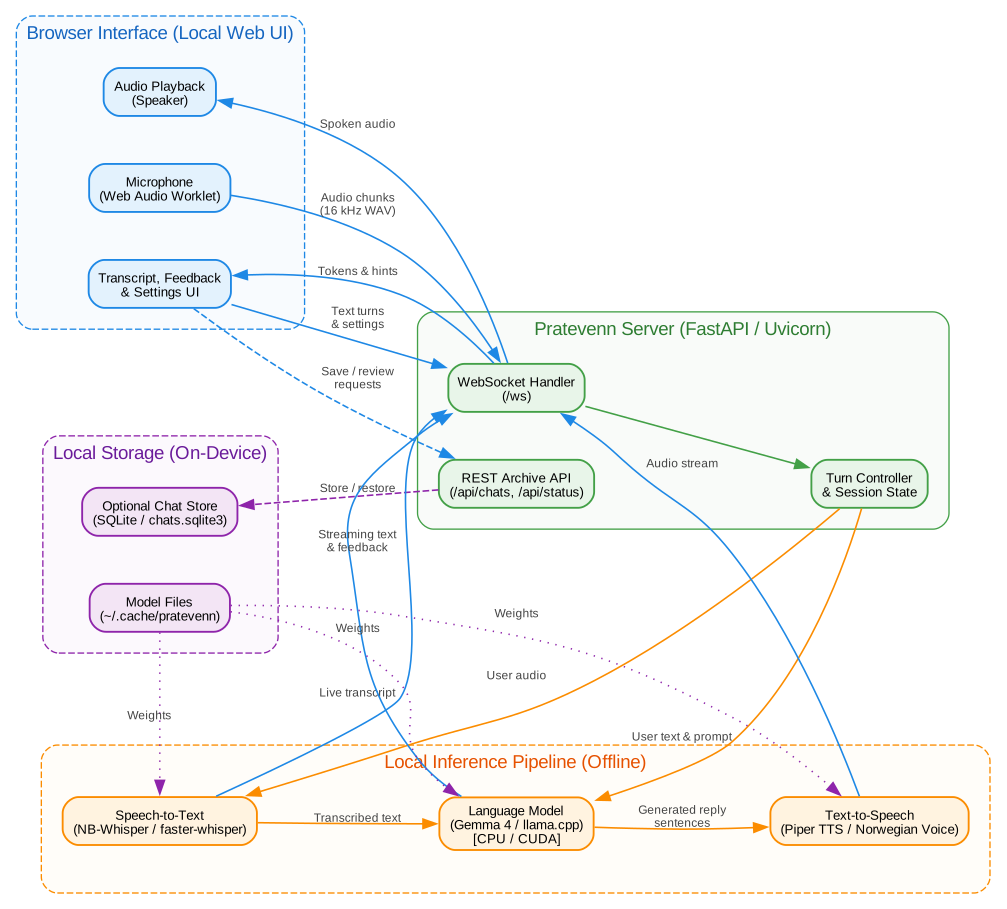
The diagram below shows the architecture of Pratevenn and its components in detail.
Contributing
See CONTRIBUTING.md to learn how to contribute.
Acknowledgments
The logo is generated with the help of ChatGPT.
Additionally, Pratevenn uses the following open-source projects and models for its core functionality:
- NB-Whisper for Norwegian speech recognition.
- Piper for text-to-speech synthesis.
- Gemma 4 models for the conversation and reviewing the chat.
- llama.cpp and llama-cpp-python for inference on CPU and GPU.
- faster-whisper for speech-to-text transcription.
License
Pratevenn is licensed under the MIT License (see LICENSE).
Similar repos


A local conversational AI tool for Norwegian language learners
Python
2
7 commits
updated Oct 3, 2026
See what people are saying
README
Pratevenn
A private, local conversational AI tool for Norwegian language learners
Pratevenn lets you practice speaking Norwegian with an AI on your own computer while everything stays on your machine.
Key Features
- Full real-time conversation in natural Norwegian Bokmål with a simple UI
- Fully private and offline (no internet or cloud accounts needed)
- Shows grammar tips as you chat and lets you review your mistakes
- Supports both CPU and NVIDIA GPUs (for faster replies)
[!IMPORTANT] Pratevenn is in early development, so bugs and breaking changes are expected. Please use the issues page to report bugs or request features.
Getting Started
Before you begin, make sure you have Docker (with Compose V2) installed on your system.
Running with Docker Compose
1. Compose Configuration
Use the included compose.yaml, or save the text below as compose.yaml:
services:
    pratevenn:
        image: ghcr.io/urukiapp/pratevenn-cpu:${PRATEVENN_VERSION:-latest}
        environment:
            - PRATEVENN_MODEL_DIR=/models
            - PRATEVENN_HOST=0.0.0.0
            - PRATEVENN_DATA_DIR=/data
        ports:
            - "127.0.0.1:${PORT:-8000}:8000"
        volumes:
            - models:/models
            - data:/data
        restart: unless-stopped

    pratevenn-cuda:
        image: ghcr.io/urukiapp/pratevenn-cuda:${PRATEVENN_VERSION:-latest}
        environment:
            - PRATEVENN_MODEL_DIR=/models
            - PRATEVENN_HOST=0.0.0.0
            - PRATEVENN_DATA_DIR=/data
            - NVIDIA_VISIBLE_DEVICES=all
            - NVIDIA_DRIVER_CAPABILITIES=compute,utility
        ports:
            - "127.0.0.1:${PORT:-8000}:8000"
        volumes:
            - models:/models
            - data:/data
        deploy:
            resources:
                reservations:
                    devices:
                        -   driver: nvidia
                            count: all
                            capabilities: [ gpu ]
        profiles:
            - cuda
        restart: unless-stopped

volumes:
    data:
        driver: local
    models:
        driver: local
2. Download the Models
Download all the models before starting the container:
docker compose run --rm pratevenn setup --full
You only need to do this one time, at the start. It also may take a while, depending on your internet speed.
3. Start Pratevenn
Start the CPU version:
docker compose up -d
If you have an NVIDIA GPU on your machine, start the CUDA version instead:
docker compose --profile cuda up -d pratevenn-cuda
[!IMPORTANT] Using the CUDA image (using an NVIDIA GPU with 8GB of VRAM or more) is the recommended way of running Pratevenn. Note that normally on Linux you need to have the NVIDIA Container Toolkit installed.
Open http://localhost:8000 in your browser and click Start conversation.
Managing Pratevenn Container
Use standard Docker Compose commands to manage Pratevenn:
docker compose up -d                    # Start Pratevenn
docker compose stop                     # Stop Pratevenn (keeps your models and data)
docker compose down                     # Remove containers
docker compose down -v                  # Remove containers (with downloaded models and saved chats)
docker compose logs -f                  # Check the logs
How It Works
The diagram below shows the architecture of Pratevenn and its components in detail.
Contributing
See CONTRIBUTING.md to learn how to contribute.
Acknowledgments
The logo is generated with the help of ChatGPT.
Additionally, Pratevenn uses the following open-source projects and models for its core functionality:
- NB-Whisper for Norwegian speech recognition.
- Piper for text-to-speech synthesis.
- Gemma 4 models for the conversation and reviewing the chat.
- llama.cpp and llama-cpp-python for inference on CPU and GPU.
- faster-whisper for speech-to-text transcription.
License
Pratevenn is licensed under the MIT License (see LICENSE).